Yes! You can use AI to fill out Department of Home Affairs — Appointment or cessation of a registered migration agent, legal practitioner or exempt person providing immigration assistance (Appointment notification form)

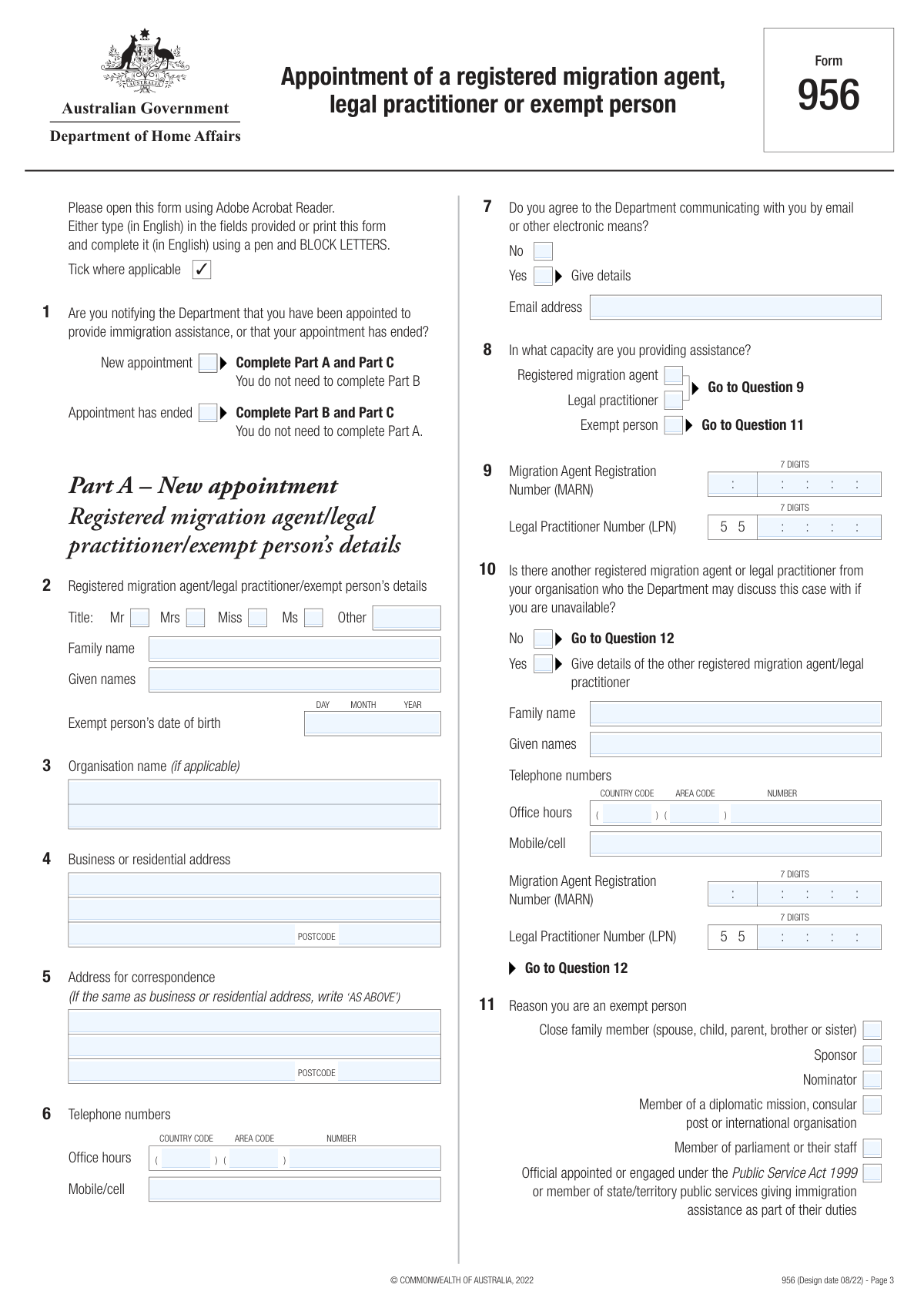
This is an appointment notification form used to advise Australia’s Department of Home Affairs about the start or end of an authorised person’s role in providing immigration assistance for a client/matter. It captures the representative’s identity and contact details, their capacity (migration agent, legal practitioner, or exempt person), client details, the type of assistance/matter, and whether the representative is an authorised recipient for written communication. Submitting accurate details helps ensure the Department communicates with the correct representative and links the representation to the correct application/cancellation/specific matter (often via TRN/RID). Today, this form can be filled out quickly and accurately using AI-powered services like Instafill.ai, which can also convert non-fillable PDF versions into interactive fillable forms.
Our AI automatically handles information lookup, data retrieval, formatting, and form filling.
It takes less than a minute to fill out Appointment/Cessation of Immigration Assistance Provider (DHA) using our AI form filling.
Securely upload your data. Information is encrypted in transit and deleted immediately after the form is filled out.

Form specifications

Form name: Department of Home Affairs — Appointment or cessation of a registered migration agent, legal practitioner or exempt person providing immigration assistance (Appointment notification form)
Number of pages: 6
Filled form examples: Form Appointment/Cessation of Immigration Assistance Provider (DHA) Examples
Language: English
Categories: IRS forms, Home Affairs forms, legal forms, practitioner forms, migration forms, SSA forms
main-image

Instafill Demo: filling out a legal form in seconds

How to Fill Out Appointment/Cessation of Immigration Assistance Provider (DHA) Online for Free in 2026

Are you looking to fill out a APPOINTMENT/CESSATION OF IMMIGRATION ASSISTANCE PROVIDER (DHA) form online quickly and accurately? Instafill.ai offers the #1 AI-powered PDF filling software of 2026, allowing you to complete your APPOINTMENT/CESSATION OF IMMIGRATION ASSISTANCE PROVIDER (DHA) form in just 37 seconds or less.
Follow these steps to fill out your APPOINTMENT/CESSATION OF IMMIGRATION ASSISTANCE PROVIDER (DHA) form online using Instafill.ai:
  1. 1 Go to Instafill.ai and upload the form PDF (or select the Department of Home Affairs appointment/cessation notification form from the form library).
  2. 2 Choose the notification type: New appointment (complete Part A and Part C) or Appointment has ended (complete Part B and Part C).
  3. 3 Enter the representative’s details: title, full name, date of birth (for exempt person), organisation (if any), business/residential address, correspondence address, and phone numbers.
  4. 4 Set communication preferences: indicate consent (Yes/No) to electronic communication and provide the email address if consenting.
  5. 5 Specify the representative capacity and identifiers: select registered migration agent/legal practitioner/exempt person and enter MARN and/or LPN as applicable; add alternate agent details if another contact is available.
  6. 6 Enter client and matter details: client role (applicant/sponsor/nominator/etc.), client name/DOB and contact details, other clients (if any), type of assistance (application/cancellation/specific matter), and include TRN and/or RID if known.
  7. 7 Review the AI-extracted fields for accuracy, validate required sections based on your selections, then generate the final completed form for signing/submission to the Department.

Our AI-powered system ensures each field is filled out correctly, reducing errors and saving you time.

Why Choose Instafill.ai for Your Fillable Appointment/Cessation of Immigration Assistance Provider (DHA) Form?

Speed

Complete your Appointment/Cessation of Immigration Assistance Provider (DHA) in as little as 37 seconds.

Up-to-Date

Always use the latest 2026 Appointment/Cessation of Immigration Assistance Provider (DHA) form version.

Cost-effective

No need to hire expensive lawyers.

Accuracy

Our AI performs 10 compliance checks to ensure your form is error-free.

Security

Your personal information is protected with bank-level encryption.

Frequently Asked Questions About Form Appointment/Cessation of Immigration Assistance Provider (DHA)

This form is used to notify the Department of Home Affairs that a person has been newly appointed to provide immigration assistance, or that an existing appointment has ended. It also records who the assistance is for, what matter it relates to, and whether the agent/practitioner is an authorised recipient for written communication.

A registered migration agent, legal practitioner, or an exempt person completes this form when they start providing immigration assistance for a client (new appointment) or when they stop providing that assistance (appointment ended). The details entered should match official records for both the representative and the client.

Tick 'New appointment' when you are starting to act for the client and notifying the Department of the appointment. Tick 'Appointment has ended' when you are ceasing to act and notifying the Department that the appointment is no longer in effect.

If you tick 'New appointment,' complete Part A and Part C (you do not need Part B). If you tick 'Appointment has ended,' complete Part B and Part C (you do not need Part A).

If your title is not one of the listed options, use the 'Registered agent/practitioner title (Other)' field and enter your title (for example, Dr or Prof). Only select one title option.

Provide your business or residential address in the address section, and use the correspondence address section if mail should be sent somewhere different (such as a PO Box). If your correspondence address is the same as your main address, you can repeat it to avoid delays.

Enter the international country code (e.g., 61 for Australia) in the country code field, the city/area code in the area code field, and the remaining local number in the number field. For mobile numbers, enter the full mobile number as requested, including any required codes if applicable.

No—electronic communication is optional. If you select 'Yes — Give details,' you must provide the email address the Department can use; if you select 'No,' the Department will not use email or other electronic means to communicate with you.

Select the capacity in which you are providing immigration assistance for this matter. If you select 'Registered migration agent,' you must provide the MARN; if you select 'Legal practitioner,' provide the LPN if applicable; if you select 'Exempt person,' you should indicate the reason for exemption in the exemption section.

A MARN is the Migration Agent Registration Number and an LPN is the Legal Practitioner Number. Enter the full 7-digit number exactly as issued (digits only, no spaces) in the relevant field based on the role you selected.

If another registered migration agent or legal practitioner is available, select 'Yes — another registered migration agent/legal practitioner available' and provide their name, phone numbers, and MARN/LPN as applicable. If no one else is available, select the 'No' option and proceed as instructed (go to Question 12).

Select the option that best describes who is receiving the immigration assistance (e.g., visa applicant, sponsor, nominator, proposer, visa holder in cancellation, or person requesting ministerial intervention). This helps the Department link the appointment to the correct party and process.

Yes—enter the main client as 'Client 1' and use the 'Other client' rows to list additional clients (up to five additional names shown). Make sure each client’s name matches their official documents.

Choose the option that matches the work you are doing: 'Application process' (and provide application type and lodgement date or tick 'Not yet lodged'), 'Cancellation process' (and provide visa subclass and date granted), or 'Specific matter' (and provide clear details). Only fill the sub-fields for the option(s) you select.

Provide the Request ID (RID) and/or Transaction Reference Number (TRN) if you know them, as they help the Department locate the matter faster. If you don’t have them, enter at least one identifier only if available—otherwise complete the rest of the form accurately.

An authorised recipient is someone authorised to receive written communication from the Department on the client’s behalf for the matter in Question 15. Select 'Yes' if you have that authorisation; select 'No' if you do not.

Yes—AI tools can help reduce errors and save time by auto-filling fields from your provided details and documents. With Instafill.ai, you upload the PDF, answer a few prompts or provide source information (e.g., names, DOBs, MARN/LPN, TRN/RID), and the system fills the correct fields while keeping formatting consistent.

If the PDF isn’t fillable, Instafill.ai can convert a flat/non-fillable PDF into an interactive fillable form so you can type directly into the fields. After conversion, you can auto-fill and then review before saving and submitting.

Compliance Appointment/Cessation of Immigration Assistance Provider (DHA)
Validation Checks by Instafill.ai

1
Appointment notification selection is mutually exclusive and required
Validate that exactly one of 'New appointment' or 'Appointment has ended' is selected. This is critical because it determines which parts of the form must be completed and prevents contradictory notifications. If both or neither are selected, block submission and prompt the user to choose one option.
2
Conditional section completeness based on appointment type (Part A vs Part B vs Part C)
If 'New appointment' is selected, require all fields designated for Part A and Part C and ensure Part B-only fields are empty/ignored; if 'Appointment has ended' is selected, require Part B and Part C and ensure Part A-only fields are empty/ignored. This prevents incomplete or misrouted processing by the Department. If the wrong section is filled or required fields are missing, return field-level errors indicating which part must be completed.
3
Registered agent/practitioner title validation (single choice + 'Other' rules)
Ensure only one title option is selected among Mr/Mrs/Miss/Ms, and if none of those are selected then 'Registered agent/practitioner title (Other)' must be provided. Also validate that 'Other' is not filled when a standard title is selected (unless explicitly allowed by business rules). If invalid, require the user to correct the title selection to avoid ambiguous identity records.
4
Registered agent/practitioner name fields required and character validation
Require 'Family name' and 'Given names' for the registered agent/practitioner and validate they contain plausible name characters (letters plus limited punctuation like hyphen/apostrophe) and are not placeholders (e.g., 'N/A', 'test'). Accurate names are essential for matching to registration records and audit trails. If validation fails, reject submission and highlight the specific name field(s).
5
Date of birth format and plausibility checks (agent and client)
Validate all DOB fields (e.g., 'Exempt person's date of birth', 'Client 1 - Date of birth', 'mg.client dob') are in the accepted date format and represent a real calendar date. Enforce plausibility rules such as not being in the future and not implying an unrealistic age (e.g., >120 years). If invalid, prevent submission because DOB is commonly used for identity matching and eligibility checks.
6
Address completeness and postcode format consistency
For each address block (business/residential, correspondence, and Client 1 address), require minimum components (street/line 1, suburb/locality, state/region, and postcode where applicable). Validate postcode format based on country context when possible (e.g., Australian postcodes are 4 digits) and ensure it is not alphabetic-only. If incomplete or malformed, return errors because incorrect addresses can prevent official correspondence delivery.
7
Correspondence address conditional validation and normalization
If any correspondence address field is provided (Line 1/Line 2/Suburb-State-Country/Postcode), require the rest of the mandatory correspondence components to avoid partial addresses. Also validate that 'Address for correspondence — Suburb/State/Country' contains at least a locality and a country (or follows a defined structured pattern if enforced). If validation fails, prompt the user to complete or clear the correspondence address to prevent misdirected communications.
8
Telephone number structure validation (country/area/subscriber) for office hours
Validate office telephone fields that are split into country code, area code, and number (for both the main agent and 'other registered agent' and Client 1) are digits-only and within reasonable length ranges (e.g., country code 1–3 digits, area code 1–5 digits, subscriber number 4–10 digits). Ensure no spaces, brackets, or '+' are included where prohibited by field instructions. If invalid, reject the phone entry because incorrect formatting breaks downstream dialing and contact workflows.
9
Mobile/cell number format validation and duplication with split fields
Validate mobile numbers are in an accepted numeric format (allow leading zeros where relevant) and enforce the instruction that country/area codes should not be duplicated if already captured in separate fields (especially for Client 1 mobile guidance). This reduces inconsistent contact data and prevents failed SMS/phone contact attempts. If duplication or invalid characters are detected, require correction and provide a clear message about the expected format.
10
Electronic communication consent is mutually exclusive and email required when consenting
Ensure exactly one of 'No (Do not agree to electronic communication)' or 'Yes — Give details' is selected. If 'Yes' is selected, require 'Email address' and validate it with a standard email pattern and length limits; if 'No' is selected, ensure the email field is empty or ignored. If validation fails, block submission because consent and a valid email are required for lawful and reliable electronic communication.
11
Capacity provided (role) selection and dependent registration numbers
Require at least one role to be selected among 'Registered migration agent', 'Legal practitioner', and 'Exempt person'. If 'Registered migration agent' is selected, require Q9 MARN; if 'Legal practitioner' is selected, require Q9 LPN; if 'Exempt person' is selected, require at least one exemption reason checkbox. If dependencies are not met, reject submission because the Department must know the legal basis and registration for providing assistance.
12
MARN and LPN numeric format and length validation (primary and other agent)
Validate that MARN and LPN fields (including 'mg.end mig marn num', 'mg.end mig lpn num', and the 'Other registered agent details' MARN/LPN) are exactly 7 digits, digits-only, with no spaces or punctuation. This is necessary for reliable matching against official registers and to prevent data entry errors. If invalid, return a specific error indicating the expected 7-digit numeric format.
13
Other registered agent availability choice is exclusive and drives required details
Ensure only one option is selected between 'No — no other registered migration agent available' and 'Yes — another registered migration agent/legal practitioner available'. If 'Yes' is selected, require the other agent’s family name, given names, and at least one contact number, plus at least one identifier (MARN or LPN) consistent with their role; if 'No' is selected, ensure those detail fields are empty. If validation fails, block submission because the Department needs a valid alternate contact when indicated.
14
Client role (Q12) selection required and consistent with assistance type
Require at least one Q12 client role checkbox (visa applicant/sponsor/nominator/proposer/visa holder/ministerial intervention requester) to be selected. This classification is important for routing and interpreting the matter in Question 15 and for correspondence authority. If none are selected, reject submission and prompt the user to identify who is receiving assistance.
15
Type of assistance (Q15) selection and conditional detail/date rules
Require at least one assistance type to be selected among Application process, Cancellation process, and Specific matter. If Application process is selected, require 'Type of application' and enforce that either 'Date lodged' is provided or 'Not yet lodged' is checked (but not both); if Cancellation process is selected, require visa subclass (numeric, typically 3 digits) and a valid 'Date visa granted'; if Specific matter is selected, require the details text with a minimum length to be meaningful. If these conditions fail, block submission because the Department cannot identify the matter being handled.
16
RID/TRN presence and numeric formatting (Q16 at least one number)
Enforce the rule 'Provide at least one number (Q16)' by requiring at least one of RID or TRN to be present (including mapped fields like 'mg.client diac request id' and 'mg.client diac trans id'). Validate that provided IDs are numeric-only and within reasonable length constraints to prevent truncation or invalid identifiers. If both are missing or malformed, reject submission because the matter cannot be reliably linked to Department records.

Common Mistakes in Completing Appointment/Cessation of Immigration Assistance Provider (DHA)

Selecting the wrong appointment notification (New vs Appointment ended)

People often tick both boxes or choose the wrong one because the form uses conditional instructions (complete Part A vs Part B) that are easy to miss. This can lead to the Department treating the notice incorrectly (e.g., thinking representation has ended when it has started), causing delays or missed communications. To avoid this, confirm whether you are notifying a start or an end event and follow the “complete Part A/Part B + Part C” rule exactly. AI-powered tools like Instafill.ai can enforce these conditional paths so you only complete the sections that match your selection.

Not following conditional “Fill only if
” rules

A very common error is completing fields that should be left blank (or leaving required conditional fields empty), such as entering an email without selecting “Yes—Give details,” or entering MARN/LPN without selecting the matching capacity. This creates inconsistencies that can trigger manual review or requests for clarification. To avoid it, treat each checkbox as a gate: only fill the dependent fields when the controlling option is selected, and ensure required dependent fields are not skipped. Instafill.ai can automatically validate these dependencies and flag missing or conflicting entries.

Entering MARN/LPN in the wrong format (not 7 digits, includes spaces/letters)

Applicants frequently enter MARN/LPN with spaces, punctuation, or fewer/more than 7 digits, or they paste a label (e.g., “MARN: 123 4567”). The form explicitly requires a full 7-digit number with digits only, and incorrect formatting can prevent matching to official records. To avoid this, enter exactly 7 digits with no spaces and double-check you used the correct number type (MARN for migration agents, LPN for legal practitioners). Instafill.ai can format-check and length-validate these identifiers before submission.

Confusing the role/capacity selections (Registered migration agent vs Legal practitioner vs Exempt person)

People sometimes tick multiple capacities without intending to, or they select “Exempt person” but then provide MARN/LPN details (or vice versa). This mismatch can cause the Department to question eligibility to provide immigration assistance and may delay processing. To avoid it, select the single capacity that truly applies to the person providing assistance and only complete the corresponding registration number fields. Instafill.ai can detect incompatible combinations and prompt corrections.

Incorrect name entry (family name vs given names, abbreviations, not matching official records)

A frequent mistake is swapping surname and given names, using initials, or entering a preferred name that doesn’t match passports/official records for the agent or clients. This can lead to identity mismatches, difficulty linking to existing Department records, and follow-up requests. To avoid it, copy names exactly as shown on official documents and enter all given names in full in the “Given names” field. Instafill.ai can standardize name parsing and reduce field-swapping errors.

Date of birth and date fields entered in the wrong format or inconsistent with “Not yet lodged”

Users often enter dates in ambiguous formats (e.g., 03/04/2026) or provide a lodgement date while also ticking “Not yet lodged.” These inconsistencies can cause confusion about timelines and may require clarification. To avoid it, use the form’s expected date format consistently (typically DD/MM/YYYY for Australian forms unless otherwise specified) and choose either a lodgement date or “Not yet lodged,” not both. Instafill.ai can normalize date formats and prevent mutually exclusive selections.

Telephone numbers split incorrectly across country/area/number fields

Because the form separates office phone into country code, area code, and subscriber number, people often put the full number in one field, include a leading “+”, add spaces/brackets, or drop leading zeros incorrectly. This can make the contact number unusable and may prevent the Department from reaching the agent/client. To avoid it, enter country code without “+”, area code without brackets/spaces, and the local number without punctuation; keep leading zeros only where the form instructs (subscriber number may require them). Instafill.ai can auto-split and validate phone numbers to match the required structure.

Address fields incomplete or mixed (business/residential vs correspondence, suburb/state/country combined incorrectly)

People frequently omit unit/street details, put a PO Box in the street address field, or mix correspondence address details into the business/residential section. Another common issue is cramming suburb/state/country into the wrong line or leaving out country for overseas addresses, which can cause mail/email routing issues and delays. To avoid it, complete each address block separately, use Line 1 for street/PO Box as instructed, and ensure suburb/town, state/territory/region, postcode, and country (if applicable) are all present. Instafill.ai can validate address completeness and formatting, and if the form is a flat non-fillable PDF, it can convert it into a fillable version to reduce layout-related entry errors.

Misunderstanding “Other registered agent available” and leaving required details blank

When “Yes—another registered migration agent/legal practitioner available” is selected, users often forget to provide the other agent’s name, phone, and MARN/LPN, or they provide partial details. This can prevent the Department from contacting an alternate representative and may slow case handling. To avoid it, only select “Yes” if you can provide complete alternate contact details, and ensure the alternate’s registration number matches their capacity (MARN vs LPN). Instafill.ai can require completion of all dependent fields when “Yes” is chosen.

Choosing the wrong client role in Q12 (visa applicant vs sponsor/nominator/proposer/visa holder/ministerial intervention)

Users sometimes tick multiple client roles or select the role that applies to the matter rather than the person receiving assistance. This can misclassify the case and lead to incorrect routing or requests for clarification. To avoid it, identify who is actually receiving immigration assistance for the matter in Q15 and select the single best matching role in Q12. Instafill.ai can guide role selection with consistency checks against the matter type.

Not providing at least one identifier in Q16 (RID or TRN) when available, or entering the wrong number type

The form indicates you should provide at least one number (RID and/or TRN) if known, but people often leave both blank even when they have a reference, or they paste an unrelated ID (e.g., client ID) into RID/TRN fields. Missing or incorrect identifiers can make it harder for the Department to locate the correct matter, causing delays. To avoid it, search your correspondence/ImmiAccount for RID/TRN and enter the correct value in the correct field; if unknown, leave blank but ensure other details are accurate. Instafill.ai can help map known reference numbers to the right fields and validate numeric-only entry.
Saved over 80 hours a year

“I was never sure if my IRS forms like W-9 were filled correctly. Now, I can complete the forms accurately without any external help.”

Kevin Martin Green

Your data stays secure with advanced protection from Instafill and our subprocessors

Robust compliance program

Transparent business model

You’re not the product. You always know where your data is and what it is processed for.

ISO 27001, HIPAA, and GDPR

Our subprocesses adhere to multiple compliance standards, including but not limited to ISO 27001, HIPAA, and GDPR.

Security & privacy by design

We consider security and privacy from the initial design phase of any new service or functionality. It’s not an afterthought, it’s built-in, including support for two-factor authentication (2FA) to further protect your account.

Fill out Appointment/Cessation of Immigration Assistance Provider (DHA) with Instafill.ai

Worried about filling PDFs wrong? Instafill securely fills department-of-home-affairs-appointment-or-cessation-of-a-registered-migration-agent-legal-practitioner-or-exempt-person forms, ensuring each field is accurate.