Yes! You can use AI to fill out Form W-4P (2026), Withholding Certificate for Periodic Pension or Annuity Payments

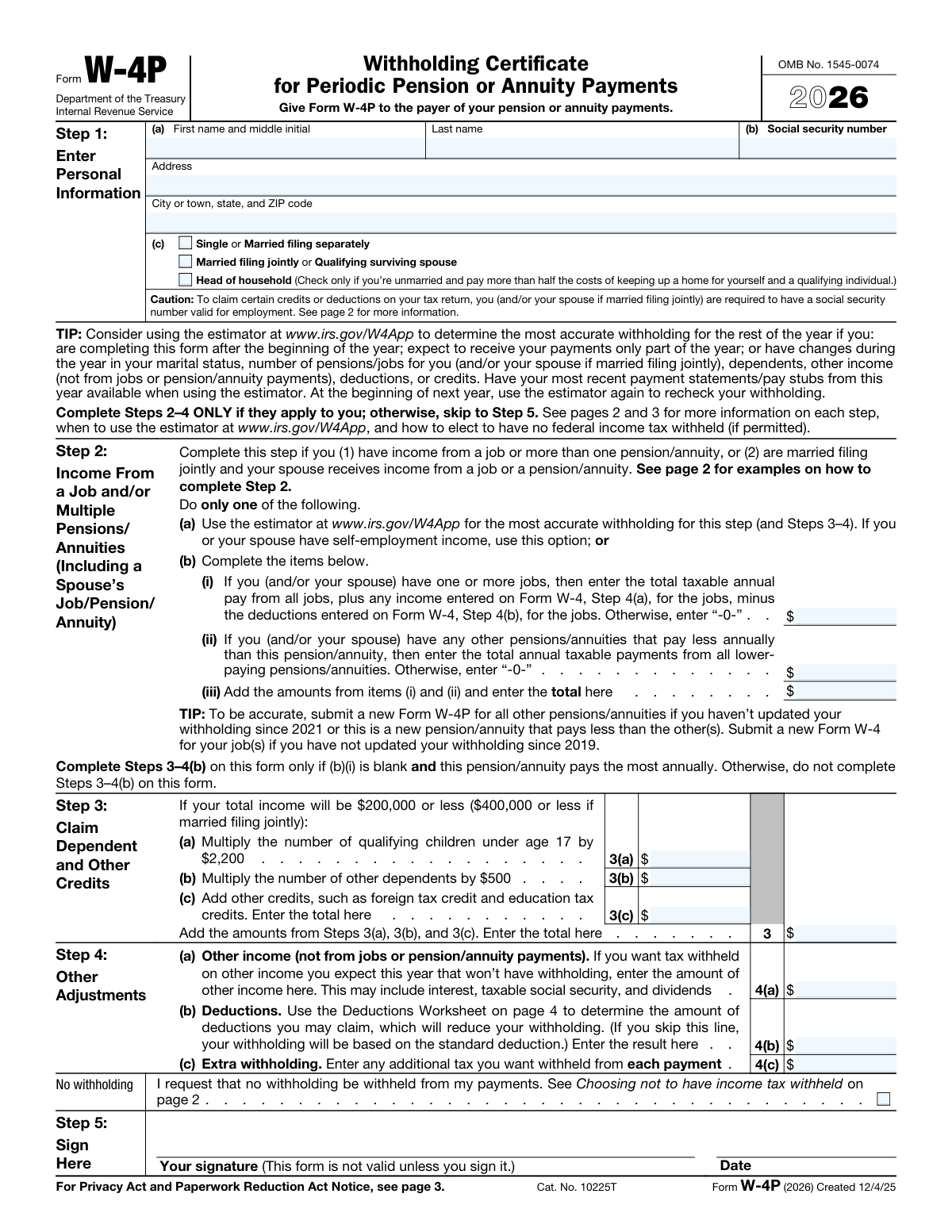
Form W-4P, Withholding Certificate for Periodic Pension or Annuity Payments, is an IRS document that pension or annuity recipients give to their payers. It specifies the recipient's filing status, adjustments, and credits to ensure the correct amount of federal income tax is withheld from their payments, helping to avoid a large tax bill or penalty at the end of the year. Today, this form can be filled out quickly and accurately using AI-powered services like Instafill.ai, which can also convert non-fillable PDF versions into interactive fillable forms.
Our AI automatically handles information lookup, data retrieval, formatting, and form filling.
It takes less than a minute to fill out W-4P using our AI form filling.
Securely upload your data. Information is encrypted in transit and deleted immediately after the form is filled out.

Form specifications

Form name: Form W-4P (2026), Withholding Certificate for Periodic Pension or Annuity Payments
Number of pages: 1
Language: English
Categories: annuity forms, pension forms, payment forms, withholding forms
main-image

Instafill Demo: How to fill out PDF forms in seconds with AI

How to Fill Out W-4P Online for Free in 2026

Are you looking to fill out a W-4P form online quickly and accurately? Instafill.ai offers the #1 AI-powered PDF filling software of 2026, allowing you to complete your W-4P form in just 37 seconds or less.
Follow these steps to fill out your W-4P form online using Instafill.ai:
  1. 1 Navigate to Instafill.ai and upload your Form W-4P, or select it from the platform's template library.
  2. 2 Use the AI assistant to enter your personal details in Step 1, including your name, address, Social Security number, and filing status.
  3. 3 If you have multiple income sources (like a job or another pension), complete Step 2. The AI tool can help calculate the necessary figures based on your financial situation.
  4. 4 In Step 3, claim dependents and other tax credits. Follow the guided prompts to accurately calculate the total credit amount.
  5. 5 Complete Step 4 for any other adjustments, such as other income not subject to withholding, deductions, or a request for extra withholding from each payment.
  6. 6 Carefully review all entered information for accuracy, then proceed to Step 5 to electronically sign and date the form.
  7. 7 Download the completed Form W-4P to provide it to the payer of your pension or annuity.

Our AI-powered system ensures each field is filled out correctly, reducing errors and saving you time.

Why Choose Instafill.ai for Your Fillable W-4P Form?

Speed

Complete your W-4P in as little as 37 seconds.

Up-to-Date

Always use the latest 2026 W-4P form version.

Cost-effective

No need to hire expensive lawyers.

Accuracy

Our AI performs 10 compliance checks to ensure your form is error-free.

Security

Your personal information is protected with bank-level encryption.

Frequently Asked Questions About Form W-4P

Form W-4P is the Withholding Certificate for Periodic Pension or Annuity Payments. You should complete this form to tell the payer of your pension or annuity how much federal income tax to withhold from your periodic payments.

You should give the completed Form W-4P directly to the payer of your pension or annuity. Do not send this form to the IRS.

Use Form W-4P for periodic payments, which are made at regular intervals like monthly or annually. Use Form W-4R for nonperiodic payments or eligible rollover distributions, such as a lump-sum payment.

Yes, you can choose not to have tax withheld by checking the 'No withholding' box in Step 4. However, be aware that you may owe tax and a penalty when you file your tax return if you have too little tax withheld.

If you don't provide a Form W-4P, your payer will withhold tax as if you are a single filer with no adjustments. This may result in an incorrect amount of tax being withheld from your payments.

You must account for your job income in Step 2. The instructions state that you should complete Steps 3 through 4(b) on the Form W-4 for your job, not on this Form W-4P, to ensure accurate withholding.

If you are married filing jointly, you must include your spouse's income from a job or another pension in Step 2. This helps calculate the correct total withholding for your household.

Consider using the online estimator at IRS.gov/W4App if you have multiple income sources, self-employment income, or if your financial situation changes during the year. It provides the most accurate withholding calculation.

You can claim dependents and other tax credits in Step 3 to reduce your withholding. However, if you also have a job, you should make these claims on your Form W-4 for that job instead.

Use Step 4 to have tax withheld for other income not from jobs or pensions (like dividends or interest), claim deductions beyond the standard deduction, or request extra tax to be withheld from each payment.

No, you are not required to submit a new form each year. However, you should submit a new Form W-4P whenever your personal or financial situation changes to ensure the correct amount of tax is withheld.

Yes, services like Instafill.ai use AI to accurately auto-fill form fields based on your information. This can save you time and help prevent common errors.

You can use a service like Instafill.ai to fill out your form online. Simply upload the PDF, and the AI will help you fill in the required fields quickly and accurately.

If your PDF is not fillable, you can use a tool like Instafill.ai. It can convert flat, non-fillable PDFs into interactive forms that you can easily complete on your computer.

Compliance W-4P
Validation Checks by Instafill.ai

1
Social Security Number Format
This check verifies that the Social Security Number (SSN) entered in Step 1(b) is a 9-digit number, optionally formatted as XXX-XX-XXXX. The SSN is critical for matching the form to the correct individual in IRS and payer systems. If the SSN is missing, incomplete, or improperly formatted, the form will be considered invalid, and withholding will default to the 'single' status with no adjustments.
2
Filing Status Single Selection
This validation ensures that only one filing status checkbox is selected in Step 1(c). A filer can only have one status (for example, 'Single' or 'Married filing jointly'). Selecting multiple statuses creates ambiguity and makes it impossible to determine the correct tax tables and standard deduction. If more than one box is checked, the form should be rejected for correction.
3
Step 1 Completeness Check
This check ensures that all required fields in Step 1(a) are filled, including first name, last name, and a complete address (address line, city, state, ZIP code). This information is fundamental for identifying the recipient and for any necessary correspondence. An incomplete form may be rejected or lead to processing delays.
4
Step 2(b)(iii) Calculation Accuracy
This validation confirms that the value entered in Step 2(b)(iii) is the mathematical sum of the amounts in Step 2(b)(i) and Step 2(b)(ii). This is a critical check to prevent simple arithmetic errors that would lead to an incorrect total income calculation for withholding purposes. If the sum is incorrect, the form should be flagged for review, as it will result in inaccurate tax withholding.
5
Step 3 Total Credits Calculation
This check verifies that the total amount for credits in Step 3 is the correct sum of the amounts entered in lines 3(a), 3(b), and 3(c). This ensures that the total claimed tax credits, which directly reduce withholding, are calculated correctly. An incorrect total will lead to either too much or too little tax being withheld from payments.
6
Mutually Exclusive 'No Withholding' Option
This validation ensures that if the 'No withholding' box in Step 4 is checked, then Steps 2, 3, and 4(a)-4(c) are all left blank. A request for 'no withholding' is a definitive choice that is incompatible with providing specific adjustments for income, deductions, or credits. If the box is checked and other adjustments are also entered, the form is contradictory and must be rejected.
7
Conditional Lockout of Steps 3 and 4(b)
Based on the caution note after Step 2, this check verifies that if an amount is entered in Step 2(b)(i) (indicating income from a job), then Steps 3 through 4(b) on this form are left blank. The IRS directs filers with a job to make these adjustments on their job's Form W-4, not the W-4P. Failure to follow this rule can lead to adjustments being counted twice, resulting in significantly incorrect withholding.
8
Signature and Date Presence
This check confirms that both a signature and a date are present in Step 5. The form explicitly states, 'This form is not valid unless you sign it.' An unsigned or undated form is legally non-binding and will be rejected by the payer, causing the filer's previous withholding status or a default status to remain in effect.
9
Valid Date Format and Range
This validation ensures the date in Step 5 is a real, valid date (e.g., not '02/30/2026') and is not a future date. The date establishes the legal timing of the withholding request. An invalid date format can cause system errors, while a future date can create ambiguity about when the new withholding instructions should take effect.
10
Numeric Format for Dollar Amounts
This check verifies that all fields intended for dollar amounts (in Steps 2, 3, and 4) contain only valid numeric characters (0-9) and an optional decimal point. Entering non-numeric text (e.g., 'N/A', 'None', '$') would cause calculation failures in the processing system. The validation ensures data integrity for all financial calculations.
11
'Head of Household' Status Logic
This validation checks the logic for selecting 'Head of household' in Step 1(c). The form specifies this status is for someone who is 'unmarried'. If the system has information indicating the filer is married, it should flag this selection as a potential error. This prevents filers from using a more favorable tax status for which they do not qualify, which would lead to under-withholding.
12
Step 4(b) Deduction Worksheet Consistency
This check validates that the amount entered in Step 4(b) on the main form matches the final calculated amount on line 17 of the Deductions Worksheet. This ensures that the complex calculation from the worksheet is transferred accurately to the main form. A mismatch would mean the wrong deduction amount is used, defeating the purpose of completing the worksheet and leading to incorrect withholding.

Common Mistakes in Completing W-4P

Completing Steps 3-4 on Multiple Forms

A frequent error is filling out dependent credits (Step 3) and deductions (Step 4) on more than one W-4P, or on a W-4P when also having a job with a Form W-4. The instructions specify these steps should only be completed on the form for the single highest-paying income source. Duplicating these adjustments causes significant under-withholding, likely leading to a large tax bill and penalties. To avoid this, consolidate all adjustments onto the one W-4 or W-4P for your highest-paying job or pension.

Using the Wrong Form for the Payment Type

Retirees often mistakenly use Form W-4P, which is for periodic payments (like monthly annuities), when they are receiving a nonperiodic payment, such as a lump-sum distribution or an eligible rollover. The correct form for those distributions is Form W-4R. Using the wrong form applies incorrect default withholding rules, which can result in a surprisingly large and unexpected tax withholding from a significant distribution. Always confirm with your payer whether a payment is periodic or nonperiodic to ensure you use the correct form.

Miscalculating Income from Multiple Sources in Step 2

Step 2 is complex and often filled out incorrectly. Common errors include adding income from a higher-paying pension instead of only lower-paying ones, or forgetting to include a spouse's job or pension income when filing jointly. These miscalculations directly skew the withholding rate, causing it to be too high or too low. For accuracy, especially with multiple income streams, use the IRS Tax Withholding Estimator tool recommended on the form.

Incorrectly Selecting Filing Status

Individuals may select a less advantageous filing status, such as 'Single' when they qualify for 'Head of Household', due to misunderstanding the specific criteria. This mistake causes the wrong standard deduction and tax brackets to be used for withholding calculations, resulting in either too much tax being withheld (a smaller payment) or too little (a future tax bill). Carefully read the definitions for each status on the form or consult IRS resources to select the correct one.

Forgetting to Sign and Date the Form

A simple but critical oversight is failing to sign and date the form in Step 5. An unsigned Form W-4P is invalid, and the payer is required to ignore it. Consequently, they will withhold tax at the default rate (single with no adjustments), which is almost always higher than necessary and will reduce the amount of your payment until a valid form is submitted. Always perform a final check for a signature and date before submitting.

Inappropriately Electing 'No Withholding'

Some individuals check the 'No withholding' box without realizing it is only for those who expect to owe no federal income tax for the year. If you have a tax liability, making this election means you will be responsible for paying the entire amount when you file your return, and you may also face underpayment penalties. Unless you are certain you will have no tax liability, it is safer to have at least some tax withheld from your payments.

Misunderstanding the 'Other Income' Field (Step 4a)

People often mistakenly include income from other jobs or pensions in Step 4(a). This field is exclusively for income that doesn't typically have withholding, such as interest, dividends, or taxable Social Security benefits. Including job or pension income here, which should be accounted for in Step 2, can lead to double-counting and excessive tax withholding from your payment. Only enter non-job, non-pension income in Step 4(a).

Skipping the Deductions Worksheet (Step 4b)

Many people ignore the Deductions Worksheet on page 4, especially if they find it complicated. By not completing it, their withholding is based on the standard deduction, even if they are eligible for significant itemized deductions (like mortgage interest or medical expenses). This results in over-withholding and smaller pension payments throughout the year. AI-powered tools like Instafill.ai can simplify this by guiding you through the calculations to ensure the correct deduction amount is entered.

Entering an Incorrect Social Security Number

A simple typo when entering the Social Security Number (SSN) in Step 1(b) is a common data entry error with major consequences. If the SSN is incorrect, the IRS will notify the payer, who must then withhold at the highest rate (single with no adjustments). This leads to a much smaller payment until a corrected form is provided. AI-powered form-filling tools like Instafill.ai can convert flat PDFs into fillable versions and help prevent this by validating the format of the SSN as it's entered.

Incorrectly Claiming Dependent Credits in Step 3

In Step 3, individuals may miscalculate the total credit amount by using outdated values or misinterpreting who qualifies as a dependent. A common error is claiming the child tax credit for a child who is 17 or older, who would only qualify for the smaller 'other dependent' credit. This mistake leads to under-withholding and a potential tax liability at the end of the year. Carefully review the age and dependency requirements in the form instructions or IRS Publication 501.
Saved over 80 hours a year

“I was never sure if my IRS forms like W-9 were filled correctly. Now, I can complete the forms accurately without any external help.”

Kevin Martin Green

Your data stays secure with advanced protection from Instafill and our subprocessors

Robust compliance program

Transparent business model

You’re not the product. You always know where your data is and what it is processed for.

ISO 27001, HIPAA, and GDPR

Our subprocesses adhere to multiple compliance standards, including but not limited to ISO 27001, HIPAA, and GDPR.

Security & privacy by design

We consider security and privacy from the initial design phase of any new service or functionality. It’s not an afterthought, it’s built-in, including support for two-factor authentication (2FA) to further protect your account.

Fill out W-4P with Instafill.ai

Worried about filling PDFs wrong? Instafill securely fills form-w-4p-2026-withholding-certificate-for-periodic-pension-or-annuity-payments forms, ensuring each field is accurate.