Yes! You can use AI to fill out Distribution Due to Death for Spouse Beneficiary - Elevator Constructors Union Local No. 1 Annuity and 401(k) Fund
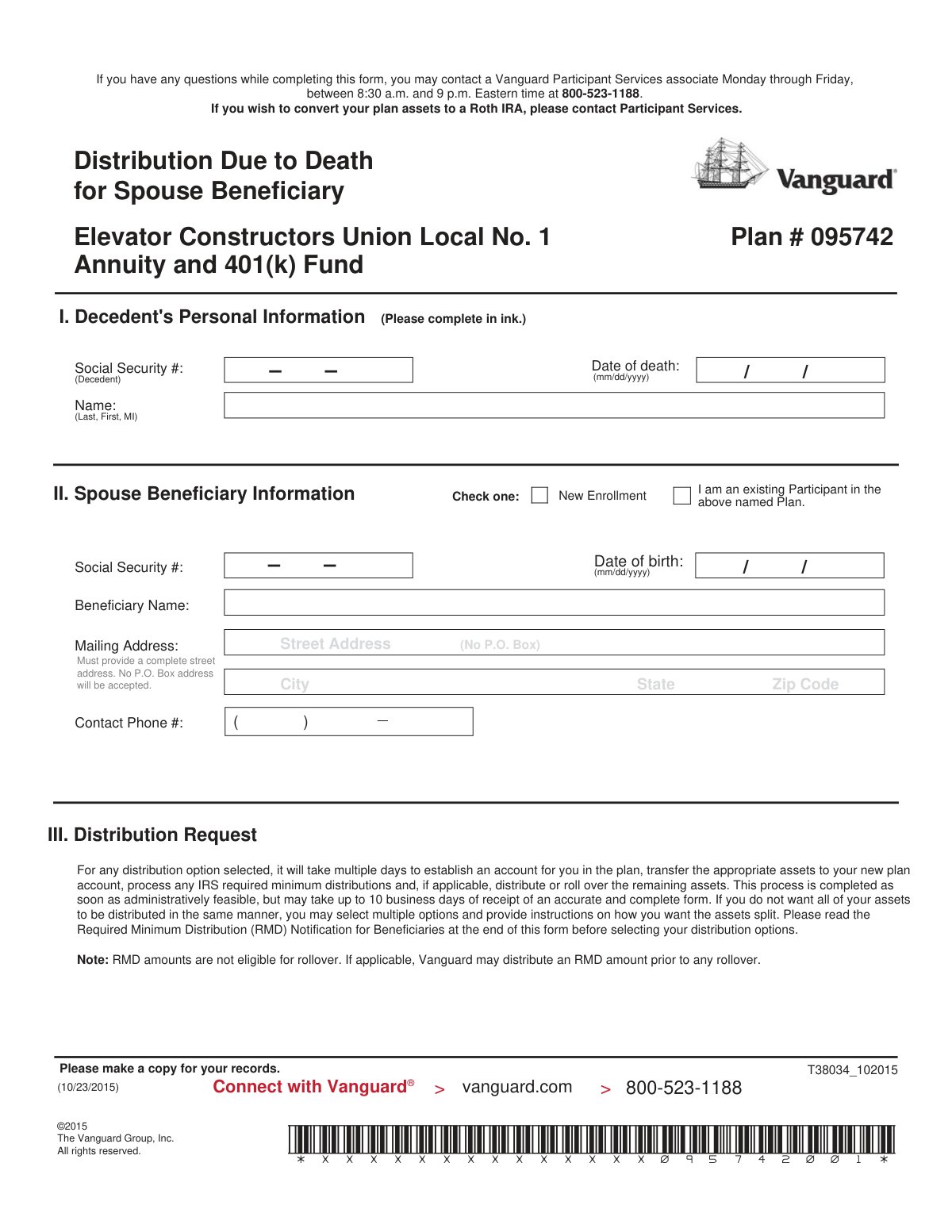
This form is a formal request submitted by a surviving spouse to Vanguard, the plan administrator, to process the distribution of assets from a deceased person's retirement account. It allows the beneficiary to choose how they want to receive the funds, such as a lump-sum payment, a direct rollover to an IRA or another employer plan, or deferring the distribution. Today, this form can be filled out quickly and accurately using AI-powered services like Instafill.ai, which can also convert non-fillable PDF versions into interactive fillable forms.
T38034_102015 is part of the
beneficiary forms, ATO forms, annuity forms, union forms, annuity fund forms, Elevator Constructors forms, distribution forms and beneficiary distribution forms categories on Instafill.
Rather not fill this in by hand? Instafill is an online form filler that completes PDF forms automatically — upload the blank form, answer a few questions, and the AI fills every field.
Form specifications
| Form name: | Distribution Due to Death for Spouse Beneficiary - Elevator Constructors Union Local No. 1 Annuity and 401(k) Fund |
| Number of pages: | 1 |
| Language: | English |
Our AI automatically handles information lookup, data retrieval, formatting, and form filling.
It takes less than a minute to fill out T38034_102015 using our AI form filling.
Securely upload your data. Information is encrypted in transit and deleted immediately after the form is filled out.
Instafill Demo: How to fill out PDF forms in seconds with AI
How to Fill Out T38034_102015 Online for Free in 2026
Are you looking to fill out a T38034_102015 form online quickly and accurately? Instafill.ai offers the #1 AI-powered PDF filling software of 2026, allowing you to complete your T38034_102015 form in just 37 seconds or less.
Follow these steps to fill out your T38034_102015 form online using Instafill.ai:
- 1 Navigate to Instafill.ai and upload or select the 'Distribution Due to Death for Spouse Beneficiary' form.
- 2 Use the AI assistant to accurately fill in the decedent's personal information in Section I, including their name, Social Security number, and date of death.
- 3 Complete Section II with your information as the spouse beneficiary, providing your name, address, Social Security number, and date of birth.
- 4 In Section III, select your desired distribution option, such as a lump-sum payment, rollover to a Vanguard or non-Vanguard IRA, or deferral.
- 5 If you chose a split distribution or rollover to another institution, provide detailed instructions in Sections IV and V respectively.
- 6 Review the Required Minimum Distribution (RMD) information in Section VI and make any necessary elections.
- 7 Carefully review all entered information for accuracy, then digitally sign and date the form in Section VII before downloading it for submission to the plan administrator.
Our AI-powered system ensures each field is filled out correctly, reducing errors and saving you time.
Why Choose Instafill.ai for Your Fillable T38034_102015 Form?
Speed
Complete your T38034_102015 in as little as 37 seconds.
Up-to-Date
Always use the latest 2026 T38034_102015 form version.
Cost-effective
No need to hire expensive lawyers.
Accuracy
Our AI performs 10 compliance checks to ensure your form is error-free.
Security
Your personal information is protected with bank-level encryption.
Frequently Asked Questions About T38034_102015
This form is for a surviving spouse to claim their inherited assets from a deceased participant's Elevator Constructors Union Local No. 1 Annuity and 401(k) Fund account, managed by Vanguard.
The surviving spouse who is the designated beneficiary of a deceased plan participant must complete this form to request a distribution of the account balance.
You will need the decedent's full name, Social Security number, and their date of death to complete Section I of the form.
Processing your request may take up to 10 business days from the receipt of a complete and accurate form. This includes setting up your account, transferring assets, and processing the distribution.
A lump-sum distribution is a cash payment made directly to you, where 20% is withheld for federal taxes. A rollover moves the money directly to another retirement account (like an IRA) without immediate tax withholding, preserving its tax-deferred growth potential.
Deferring means you choose to postpone receiving your account balance and leave the assets in the plan for now. You are still responsible for taking Required Minimum Distributions (RMDs) according to plan rules.
An RMD is the minimum amount you are required to withdraw from an inherited retirement account each year, as mandated by the IRS. RMD amounts are taxable and cannot be rolled over.
You can call a Vanguard Participant Services associate at 800-523-1188 for assistance. They are available Monday through Friday, from 8:30 a.m. to 9 p.m. Eastern time.
As the beneficiary, you should return the completed form to your benefits office. The Plan Administrator will then complete their section and forward it to Vanguard at the address listed on the form.
You must provide the name of the receiving institution, your new account number, and the institution's mailing address. It is your responsibility to open the new account before submitting this form.
The Plan Administrator must complete and sign Section VIII to authorize the distribution. This section verifies beneficiary information and is required before Vanguard can process the request.
Yes, services like Instafill.ai use AI to accurately auto-fill form fields, which can save you time and help prevent common errors.
You can use a service like Instafill.ai to fill out the form online. Simply upload the PDF, and the platform will make the fields interactive so you can type your information before printing.
If you have a non-fillable or 'flat' PDF, you can upload it to a service like Instafill.ai. The tool can convert it into an interactive, fillable form that you can complete on your computer.
Compliance T38034_102015
Validation Checks by Instafill.ai
1
Decedent's SSN Format Validation
This check ensures the Social Security Number provided for the decedent in Section I is a 9-digit number. It validates the format (XXX-XX-XXXX or XXXXXXXXX) to ensure data integrity for tax reporting and identity verification. If the format is incorrect, the form cannot be processed, leading to delays in distributing the assets.
2
Decedent's Date of Death Chronological Check
Validates that the 'Date of death' in Section I is a valid calendar date and that it occurs in the past, prior to the form submission date. This is critical for establishing the timeline for Required Minimum Distributions (RMDs) and confirming eligibility for the death benefit. An invalid or future date would make the entire claim invalid and cause immediate rejection.
3
Beneficiary SSN Uniqueness
This check verifies that the Social Security Number entered for the Spouse Beneficiary in Section II is different from the Decedent's SSN in Section I. This is a logical sanity check to prevent accidental data entry errors, as the decedent and beneficiary cannot be the same person in this context. A mismatch will require the user to correct the information before submission.
4
Beneficiary Date of Birth Validity
Ensures the 'Date of birth' for the beneficiary in Section II is a valid, complete date in the past. This is important for identity verification and for calculating life expectancy for certain distribution options. An invalid date would prevent proper account setup and RMD calculations, halting the process.
5
Physical Address Requirement (No P.O. Box)
This validation confirms that the beneficiary's mailing address in Section II is a complete physical street address and explicitly checks that it does not contain 'P.O. Box'. The form specifies this rule, likely for legal or delivery verification purposes (e.g., for overnight mail or checks). Failure to provide a valid street address will result in the form being considered 'not in good order' and will delay processing.
6
Exclusive Distribution Option Selection
Verifies that exactly one primary distribution option is selected in Section III (e.g., 'Lump Sum Distribution', 'Defer', 'Roll over to a Vanguard IRA', etc.). Selecting multiple or no options creates ambiguity on how to handle the entire account balance. The form will be rejected if this rule is not met, as the core instruction for the funds is unclear.
7
Conditional Requirement for Distribution Instructions (Section IV)
This check ensures that Section IV ('Distribution Instructions') is completed if and only if the user selects 'Lump Sum Distribution' or 'Split Distribution' in Section III. This section provides necessary details for payments made directly to the beneficiary. If it's filled out unnecessarily or not filled out when required, it will cause processing delays or rejection due to conflicting or incomplete instructions.
8
Completeness of Asset Allocation in Section IV
If Section IV is used, this validation ensures that the allocations for 'Pre-tax Plan Assets' sum to 100% of the balance (either by using the 'Balance' checkbox or by ensuring dollar/percentage amounts add up correctly). The form explicitly states that 100% of each asset type must be directed. Incomplete allocation will deem the request 'not in good order' and halt the distribution.
9
Conditional Requirement for Rollover Instructions (Section V)
Validates that Section V ('Instructions for Rollovers to Another Institution') is filled out if the 'Roll over to a non-Vanguard IRA or Employer Plan' option is selected in Section III. This section is critical for correctly issuing and sending the rollover check to the correct third-party institution. Failure to complete this section when required will make it impossible to process the rollover request.
10
Rollover Institution Details Completeness
When Section V is completed, this check verifies that all required fields, including 'Trustee/Institution Name', 'Plan/Account #', and the full mailing address, are provided. This information is essential for ensuring the funds are transferred to the correct external account. Missing information could result in the check being mailed to the beneficiary by default or the transaction being delayed until the information is provided.
11
Exclusive Rollover Mailing Instruction
In Section V, this check confirms that the user has selected exactly one of the two 'Mailing Instructions' options ('Mail check to me' or 'Mail check to institution'). This choice dictates the payee and delivery address for the rollover check. An ambiguous or missing selection prevents the system from knowing how to issue the payment, causing a processing failure.
12
Beneficiary Authorization Signature and Date
This check verifies that the beneficiary has signed and dated the form in Section VII. The signature and date legally certify that the information is correct and that the beneficiary has read all required notices. A missing signature or date invalidates the entire request, and the form will be returned without being processed.
13
Signature Date Chronology
Validates that the date provided next to the beneficiary's signature in Section VII is on or after the decedent's date of death from Section I. A signature dated before the decedent's death is logically impossible and would invalidate the legal standing of the request. This error would cause the form to be rejected for correction.
14
Contact Phone Number Format
Ensures the 'Contact Phone #' in Section II is a valid 10-digit telephone number. This is important so that a service associate can contact the beneficiary if there are any questions or issues with the form. An invalid number could significantly delay processing if clarification is needed.
Common Mistakes in Completing T38034_102015
Beneficiaries may accidentally misspell the deceased's name, transpose digits in their Social Security Number, or enter an incorrect date of death in Section I. This often happens during a stressful time and can lead to significant delays as Vanguard cannot locate the correct account. To avoid this, carefully double-check all information against official documents like a death certificate before submitting. AI-powered form filling tools like Instafill.ai can help prevent such errors by cross-referencing data and flagging potential inconsistencies.
The form explicitly states 'No P.O. Box address will be accepted' in Section II, yet many people use one out of habit for their mailing address. Submitting a P.O. Box will result in the form being deemed 'not in good order' and returned, delaying the distribution process. Always provide a complete physical street address to ensure compliance. Smart form fillers like Instafill.ai can automatically validate addresses and flag P.O. Boxes when a physical address is required, preventing rejection.
The instructions in Section VII direct the beneficiary to 'Return the completed form to your benefits office,' not directly to Vanguard. The Plan Administrator must first complete and sign Section VIII before forwarding it. Sending the form directly to Vanguard bypasses a required authorization step, leading to its rejection and return, which significantly delays the distribution. Since this form is a non-fillable PDF, a tool like Instafill.ai can convert it into a fillable version and embed instructions or reminders about the correct submission workflow.
Section III presents complex choices like a lump-sum payment versus a rollover, each with vastly different tax implications. A beneficiary might choose a lump-sum distribution without realizing that 20% will be immediately withheld for federal taxes and the entire amount becomes taxable income. It is crucial to understand these consequences or consult a financial advisor before making a selection. While AI cannot give financial advice, tools like Instafill.ai can provide contextual help for complex terms, helping users make more informed decisions.
In Section IV, if you choose to split the distribution, you must specify amounts or percentages that direct 100% of the assets. A common mistake is providing figures that do not add up to 100% of the balance, which will deem the request 'not in good order' and cause processing delays. Advanced form-filling tools like Instafill.ai can perform real-time calculations to ensure that percentage or dollar splits correctly add up to the total, preventing this error.
When filling out Section V for a rollover, it's common to miss information like the full trustee name, the new account number, or the correct mailing address. An incomplete or incorrect entry can cause the rollover check to be rejected, lost, or mailed to the wrong party, jeopardizing the tax-free status of the funds. Using a tool like Instafill.ai can help ensure all required fields are completed by highlighting mandatory information, reducing the risk of an incomplete submission.
The form states in Section V that it is the beneficiary's responsibility to open a new IRA or plan account *before* providing the rollover instructions. People often assume the rollover process itself creates the new account, but this is incorrect. Submitting this form without an active, open account at the receiving institution will cause the rollover request to fail, requiring the form to be resubmitted.
Section VI contains a critical but easily missed election regarding the Required Minimum Distribution (RMD) calculation method (life expectancy vs. five-year). Beneficiaries, overwhelmed by the form, may not understand the long-term financial impact and fail to check the box, defaulting to a potentially less favorable option. An intelligent form filler like Instafill.ai can draw attention to critical checkboxes and provide simplified explanations of complex choices like RMD methods.
One of the most frequent errors is failing to sign and date the Beneficiary Authorization in Section VII. An unsigned form is legally invalid and will be immediately rejected by the plan administrator or Vanguard. This simple oversight halts the entire process until a properly signed form is received, causing unnecessary delays. Tools like Instafill.ai can highlight signature fields to ensure they aren't missed before printing.
When taking a cash distribution, Section IV asks for a state tax withholding election, which can be confusing. Beneficiaries may not know their state's mandatory withholding rules or the personal tax consequences of their choice. An incorrect election can lead to a large, unexpected tax bill or penalty when filing annual taxes. AI-powered tools like Instafill.ai can help by automatically looking up a state's mandatory withholding rules and flagging the choice for user review.
Saved over 80 hours a year
“I was never sure if my IRS forms like W-9 were filled correctly. Now, I can complete the forms accurately without any external help.”
Kevin Martin Green
Your data stays secure with advanced protection from Instafill and our subprocessors




Robust compliance program
Transparent business model
You’re not the product. You always know where your data is and what it is processed for.
ISO 27001, HIPAA, and GDPR
Our subprocesses adhere to multiple compliance standards, including but not limited to ISO 27001, HIPAA, and GDPR.
Security & privacy by design
We consider security and privacy from the initial design phase of any new service or functionality. It’s not an afterthought, it’s built-in, including support for two-factor authentication (2FA) to further protect your account.
Fill out T38034_102015 with Instafill.ai
Worried about filling PDFs wrong? Instafill securely fills distribution-due-to-death-for-spouse-beneficiary-elevator-constructors-union-local-no-1-annuity-and-401k-fund forms, ensuring each field is accurate.
