Yes! You can use AI to fill out Fidelity Beneficiaries – Annuities
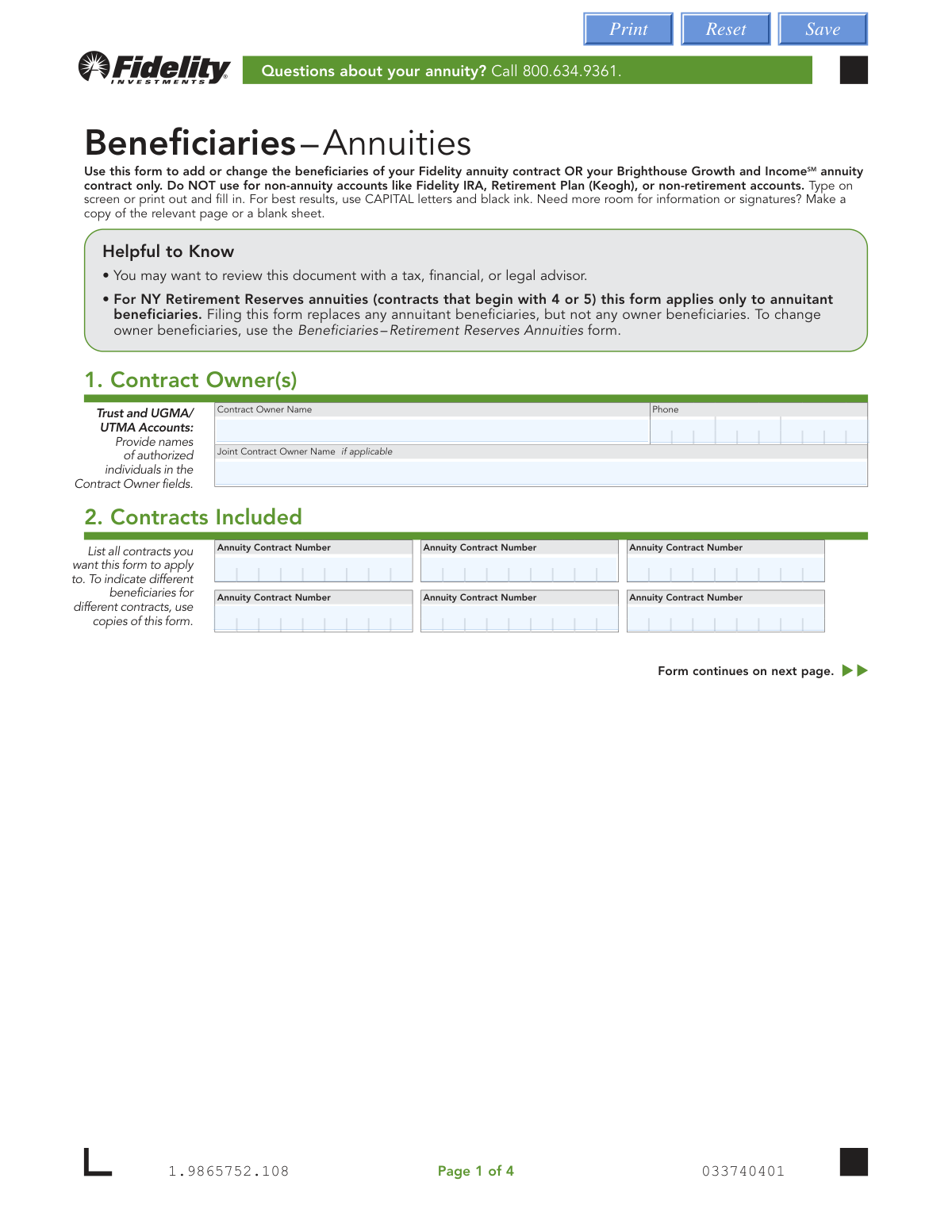
This form allows annuity contract owners to designate or update the individuals, trusts, or entities (beneficiaries) who will receive the contract's assets upon the owner's death. It is specifically for Fidelity annuity contracts and Brighthouse Growth and Income annuity contracts. Using this form ensures that your assets are distributed according to your wishes. Today, this form can be filled out quickly and accurately using AI-powered services like Instafill.ai, which can also convert non-fillable PDF versions into interactive fillable forms.
Our AI automatically handles information lookup, data retrieval, formatting, and form filling.
It takes less than a minute to fill out 1.9865752.108 using our AI form filling.
Securely upload your data. Information is encrypted in transit and deleted immediately after the form is filled out.
Form specifications
| Form name: | Fidelity Beneficiaries – Annuities |
| Number of pages: | 1 |
| Language: | English |
| Categories: | Fidelity forms |
Instafill Demo: How to fill out PDF forms in seconds with AI
How to Fill Out 1.9865752.108 Online for Free in 2026
Are you looking to fill out a 1.9865752.108 form online quickly and accurately? Instafill.ai offers the #1 AI-powered PDF filling software of 2026, allowing you to complete your 1.9865752.108 form in just 37 seconds or less.
Follow these steps to fill out your 1.9865752.108 form online using Instafill.ai:
- 1 Navigate to Instafill.ai and upload or select the Fidelity Beneficiaries – Annuities form.
- 2 Provide the contract owner's name, phone number, and joint owner information if applicable.
- 3 List all annuity contract numbers that these beneficiary designations will apply to.
- 4 Enter the full details for each primary beneficiary, including their name, relationship, share percentage, and contact information. Check the 'per stirpes' box if you want their share to pass to their descendants.
- 5 Input the information for any contingent beneficiaries who would inherit if all primary beneficiaries are deceased.
- 6 Carefully review all the information you've entered to ensure accuracy and that the share percentages total 100% for both primary and contingent groups.
- 7 All contract owners must sign and date the form to finalize and authorize the beneficiary changes.
Our AI-powered system ensures each field is filled out correctly, reducing errors and saving you time.
Why Choose Instafill.ai for Your Fillable 1.9865752.108 Form?
Speed
Complete your 1.9865752.108 in as little as 37 seconds.
Up-to-Date
Always use the latest 2026 1.9865752.108 form version.
Cost-effective
No need to hire expensive lawyers.
Accuracy
Our AI performs 10 compliance checks to ensure your form is error-free.
Security
Your personal information is protected with bank-level encryption.
Frequently Asked Questions About Form 1.9865752.108
This form is used to add or change the beneficiaries for your Fidelity annuity contract or your Brighthouse Growth and Income annuity contract. It is not for use with other accounts like IRAs or retirement plans.
No, this form is exclusively for Fidelity and Brighthouse annuity contracts. You must use a different beneficiary designation form for non-annuity accounts like IRAs, Keogh plans, or non-retirement accounts.
For each beneficiary, you must provide their full name, address, relationship to you, share percentage, and their Social Security or Taxpayer ID Number. You also need their date of birth or the date the trust was established.
Primary beneficiaries are the first people or entities to receive the annuity assets upon your death. Contingent beneficiaries will only receive the assets if all of the primary beneficiaries are no longer living when you pass away.
Checking 'per stirpes' means that if a beneficiary predeceases you, their designated share will be passed down and divided equally among their legal descendants, such as their children. This option is not applicable for trust or estate beneficiaries.
Yes, you can list all applicable contract numbers in Section 2 if you want the same beneficiaries for all of them. However, if you want different beneficiaries for different contracts, you must fill out a separate copy of this form for each.
All contract owners must sign and date the form. If the contract is jointly owned, both owners must sign, and if it is owned by a trust, all trustees are required to sign.
You must mail the entire form to the Annuity Service Center address provided on the last page. Be sure to use the correct address, as there are different ones for regular mail (NY vs. other states) and overnight mail.
After your form is received and the changes are processed, Fidelity will mail you a 'Revised Annuity Profile' to confirm the update to your beneficiary designations.
If you do not specify any percentages, the assets will be divided equally among the primary beneficiaries who are living at the time of your death. The same rule applies to contingent beneficiaries if no primary beneficiaries survive you.
For Fidelity-issued trust-owned annuities, the owning trust must be listed as the sole beneficiary on the form. You cannot list individual people as beneficiaries in this case.
Yes, services like Instafill.ai use AI to accurately auto-fill form fields with your personal and beneficiary information. This can save you time and help prevent common errors.
Simply upload the PDF form to the Instafill.ai platform. Its AI will make the form fillable online, allowing you to quickly populate your information before printing the completed document for signature.
You can use a service like Instafill.ai, which can convert flat, non-fillable PDFs into interactive forms you can type into directly. Alternatively, you can print the form and fill it out by hand using capital letters and black ink.
Compliance 1.9865752.108
Validation Checks by Instafill.ai
1
Ensures at least one Annuity Contract Number is provided
This check verifies that at least one of the six available 'Annuity Contract Number' fields in Section 2 has been filled out. It is critical to identify which contract(s) the beneficiary changes apply to. If no contract number is provided, the form cannot be processed as the subject of the changes is unknown.
2
Validates Primary Beneficiary Share Percentages Sum to 100%
This validation confirms that the sum of all values entered in the 'Share Percentage' fields for primary beneficiaries equals exactly 100%. This is crucial for ensuring the complete and unambiguous allocation of contract assets. If the total is not 100%, the form is considered in-good-order and will be rejected, as it would lead to ambiguity in asset distribution upon the owner's death.
3
Validates Contingent Beneficiary Share Percentages Sum to 100%
This check ensures that the 'Share Percentage' fields for all listed contingent beneficiaries add up to exactly 100%. Contingent beneficiaries only inherit if all primary beneficiaries are deceased, and their shares must also be clearly defined. A failure in this validation would result in an invalid designation and rejection of the form.
4
Verifies Contract Owner Signature and Date are Present
This check confirms that the 'CONTRACT OWNER SIGNATURE' and 'DATE' fields in Section 4 are both completed. The owner's signature is a legal requirement to authorize the beneficiary changes, and the date establishes when the authorization was made. An unsigned or undated form is legally invalid and will be rejected immediately.
5
Requires Joint Owner Signature if Applicable
This validation checks if a 'Joint Contract Owner' is named in Section 1, and if so, confirms that their corresponding signature and date are provided in Section 4. The form explicitly states that ALL owners must sign to authorize changes. Failure to obtain the joint owner's signature will render the beneficiary designation invalid and cause the form to be rejected.
6
Validates SSN/TIN Format for Beneficiaries
This check ensures that the 'Social Security or Taxpayer ID Number' for each beneficiary is entered in a valid format (e.g., XXX-XX-XXXX for SSN or XX-XXXXXXX for TIN). This number is essential for tax reporting and proper identification of the beneficiary. An incorrectly formatted number can cause significant processing delays and potential tax compliance issues for the beneficiary.
7
Validates Beneficiary Date of Birth or Trust Date
This validation verifies that the 'Date of Birth or Trust' field for each beneficiary is a valid date in MM DD YYYY format and is not a future date. This information is used for identity verification and to determine eligibility for certain payout options. An invalid or future date would fail this check and require correction before the form can be processed.
8
Prevents Entry of New Beneficiaries if 'Keep' Box is Checked
This is a conditional check that verifies if the 'Keep the primary/contingent beneficiary designations' box is checked, no new beneficiary information is entered in that corresponding section. This feature is designed to prevent accidental overwrites of existing designations. If the box is checked and new information is also provided, it creates a contradiction that must be resolved, causing the form to be rejected.
9
Ensures Completeness of Information for Each Listed Beneficiary
This check validates that if a beneficiary's name is entered, all other required fields for that beneficiary (Address, Relationship, Share Percentage, SSN/TIN, and Date of Birth/Trust) are also completed. Incomplete information for any single beneficiary can render that specific designation invalid and halt the processing of the entire form. This ensures all necessary data is captured for proper administration.
10
Restricts 'Per Stirpes' Designation to Non-Entity Beneficiaries
This validation ensures the 'Per stirpes' checkbox is only selected for individual beneficiaries ('Person') and not for entities like a 'Trust' or 'Estate'. The concept of 'per stirpes' applies to distributing assets to a person's descendants, which is not applicable to legal entities. Incorrectly applying this designation would create a legally ambiguous instruction, causing the form to be rejected.
11
Verifies Sole Beneficiary Consistency
This check ensures that if one beneficiary (either primary or contingent) is assigned a 100% share, no other beneficiaries of the same type are listed. Listing additional beneficiaries when one already has 100% of the share creates a logical conflict. This validation prevents contradictory instructions and ensures the owner's intent is clear.
12
Prevents Duplicate Primary and Contingent Beneficiaries
This validation checks that an individual or entity is not listed as both a primary and a contingent beneficiary. While legally possible in some scenarios, it often indicates user error and creates ambiguity in the order of inheritance. Flagging this for review ensures the contract owner's intent is correctly captured and avoids potential disputes.
Common Mistakes in Completing 1.9865752.108
A frequent error is when the share percentages for primary or contingent beneficiaries do not add up to exactly 100%. This simple math mistake will cause the form to be rejected, delaying the entire beneficiary update process. To avoid this, carefully double-check that the percentages in each section sum to 100% before submission. AI-powered form-filling tools like Instafill.ai can prevent this by automatically validating the totals as you enter them.
The form requires signatures from ALL contract owners, which includes any joint owners or all trustees of a trust. Forgetting to obtain a required signature is a critical error that invalidates the form, leaving your old beneficiary designations in place. Always verify the contract ownership on a recent statement and ensure every required party signs and dates the form in Section 4.
People often omit critical information for a beneficiary, such as their Social Security Number (SSN), Taxpayer ID Number (TIN), or full Date of Birth. This information is essential for proper identification and processing of the death benefit. Leaving these fields blank will lead to processing delays and may cause significant complications for your heirs when they try to claim the assets.
This form is specifically for Fidelity or Brighthouse annuity contracts and explicitly states it is NOT for other accounts like IRAs, Keogh plans, or standard brokerage accounts. Submitting this form for the wrong account type means your request will be disregarded, and your beneficiaries will not be updated. Always confirm the form's purpose in the header to ensure it matches your account.
If you own multiple annuity contracts, you must list every contract number you wish to update in Section 2. A common oversight is forgetting to include all relevant numbers, which results in the new beneficiary designations being applied only to the listed contracts. The unlisted contracts will retain their old, potentially outdated beneficiaries, which may not reflect your current wishes.
The 'Per stirpes' option is a legal term that is often misunderstood, leading to unintended consequences for asset distribution. Checking this box means a deceased beneficiary's share will pass down to their direct descendants; not checking it means their share is redistributed among the other surviving beneficiaries. Incorrectly using this option can fundamentally alter who inherits your assets, so it is vital to understand its meaning or consult an advisor.
A significant error is listing beneficiaries in the wrong section, such as placing a backup heir in the 'Primary Beneficiaries' section. Primary beneficiaries are first in line to inherit, while contingent beneficiaries only inherit if all primary beneficiaries are deceased. This mistake can improperly alter the intended order of inheritance and may lead to disputes or legal challenges.
The form includes special instructions in Section 3 for certain contract types, such as requiring a spouse to be the 'sole primary beneficiary' for the contract to continue. Overlooking these specific rules can invalidate your designation or prevent your heirs from accessing important contract features. Carefully read all notes and bullet points to ensure your choices comply with the requirements for your specific annuity.
The form includes a checkbox to 'Keep the...beneficiary designations already in place.' A common mistake is checking this box while also filling out the fields with new beneficiary information. This creates a direct contradiction that makes your intent unclear, forcing the form to be rejected pending clarification. You must either check the box and leave the section blank, or leave the box unchecked and list your new beneficiaries.
Since this form is a non-fillable PDF, it must be printed and filled out by hand, often leading to illegible entries for names, addresses, or ID numbers. Poor handwriting can cause data entry errors by the processing agent or lead to the form being rejected entirely. To ensure clarity, use a tool like Instafill.ai that can convert the PDF into a fillable version, allowing you to type your information before printing for a clean, error-free submission.
Saved over 80 hours a year
“I was never sure if my IRS forms like W-9 were filled correctly. Now, I can complete the forms accurately without any external help.”
Kevin Martin Green
Your data stays secure with advanced protection from Instafill and our subprocessors

Robust compliance program
Transparent business model
You’re not the product. You always know where your data is and what it is processed for.
ISO 27001, HIPAA, and GDPR
Our subprocesses adhere to multiple compliance standards, including but not limited to ISO 27001, HIPAA, and GDPR.
Security & privacy by design
We consider security and privacy from the initial design phase of any new service or functionality. It’s not an afterthought, it’s built-in, including support for two-factor authentication (2FA) to further protect your account.
Fill out 1.9865752.108 with Instafill.ai
Worried about filling PDFs wrong? Instafill securely fills fidelity-beneficiaries-annuities forms, ensuring each field is accurate.