Yes! You can use AI to fill out Elevator Constructors Union Local No.1 Annuity and 401(k) Fund Distribution Request Due to Qualified Domestic Relations Order
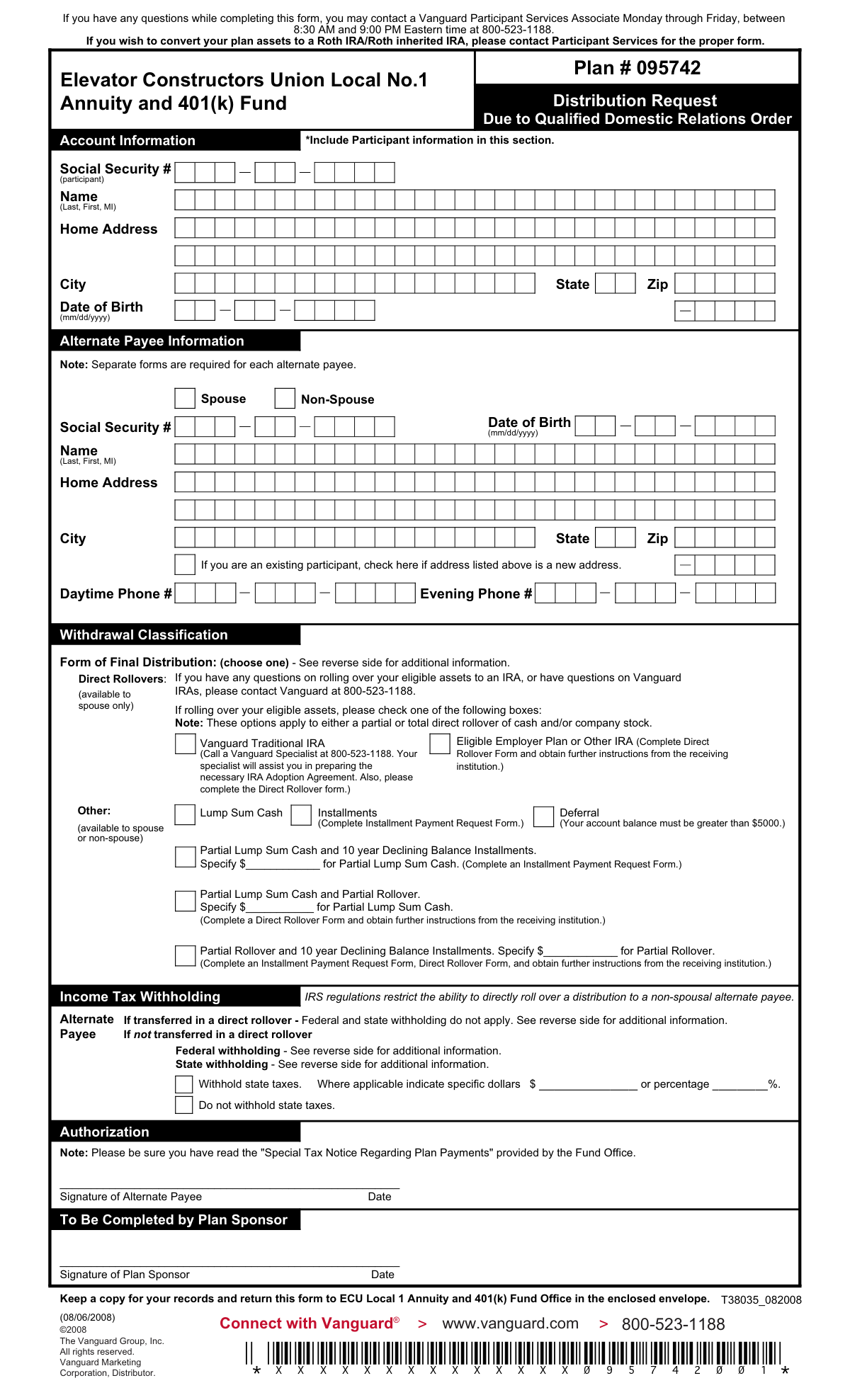
This form is a Distribution Request for an alternate payee, as determined by a Qualified Domestic Relations Order (QDRO), to receive assets from an Elevator Constructors Union Local No.1 Annuity and 401(k) Fund account. It allows the payee to choose their distribution method, such as a lump sum, direct rollover, or installments, and to specify tax withholding preferences. Today, this form can be filled out quickly and accurately using AI-powered services like Instafill.ai, which can also convert non-fillable PDF versions into interactive fillable forms.
ECU Local 1 QDRO Distribution Request is part of the
ATO forms, annuity forms, union forms, annuity fund forms, Elevator Constructors forms, distribution forms, domestic relations forms and distribution request forms categories on Instafill.
Rather not fill this in by hand? Instafill is an online form filler that completes PDF forms automatically — upload the blank form, answer a few questions, and the AI fills every field.
Form specifications
| Form name: | Elevator Constructors Union Local No.1 Annuity and 401(k) Fund Distribution Request Due to Qualified Domestic Relations Order |
| Number of pages: | 1 |
| Language: | English |
Our AI automatically handles information lookup, data retrieval, formatting, and form filling.
It takes less than a minute to fill out ECU Local 1 QDRO Distribution Request using our AI form filling.
Securely upload your data. Information is encrypted in transit and deleted immediately after the form is filled out.
Instafill Demo: How to fill out PDF forms in seconds with AI
How to Fill Out ECU Local 1 QDRO Distribution Request Online for Free in 2026
Are you looking to fill out a ECU LOCAL 1 QDRO DISTRIBUTION REQUEST form online quickly and accurately? Instafill.ai offers the #1 AI-powered PDF filling software of 2026, allowing you to complete your ECU LOCAL 1 QDRO DISTRIBUTION REQUEST form in just 37 seconds or less.
Follow these steps to fill out your ECU LOCAL 1 QDRO DISTRIBUTION REQUEST form online using Instafill.ai:
- 1 Navigate to Instafill.ai and upload the ECU Local 1 QDRO Distribution Request form or select it from their template library.
- 2 Use the AI assistant to automatically fill in the Alternate Payee Information, including your full name, Social Security Number, date of birth, and current address.
- 3 Provide the original plan participant's information as required in the Account Information section.
- 4 Select your desired 'Form of Final Distribution' from the available options, such as Lump Sum Cash, Direct Rollover, or Installments.
- 5 Complete the 'Income Tax Withholding' section to specify your preferences for federal and state taxes, if applicable.
- 6 Carefully review all the information entered by the AI for accuracy, then electronically sign and date the form in the Authorization section.
- 7 Download the completed document and submit it to the ECU Local 1 Annuity and 401(k) Fund Office as instructed on the form.
Our AI-powered system ensures each field is filled out correctly, reducing errors and saving you time.
Why Choose Instafill.ai for Your Fillable ECU Local 1 QDRO Distribution Request Form?
Speed
Complete your ECU Local 1 QDRO Distribution Request in as little as 37 seconds.
Up-to-Date
Always use the latest 2026 ECU Local 1 QDRO Distribution Request form version.
Cost-effective
No need to hire expensive lawyers.
Accuracy
Our AI performs 10 compliance checks to ensure your form is error-free.
Security
Your personal information is protected with bank-level encryption.
Frequently Asked Questions About ECU Local 1 QDRO Distribution Request
This form is used by an alternate payee, such as an ex-spouse, to request their court-ordered share of funds from an Elevator Constructors Union Local No.1 Annuity and 401(k) Fund account due to a Qualified Domestic Relations Order (QDRO).
An alternate payee who has been awarded a portion of a plan participant's retirement account through a QDRO must complete this form. A separate form is required for each alternate payee.
You will need the plan participant's full name, Social Security number, and date of birth to complete the 'Account Information' section of the form.
A spousal alternate payee has the option to directly roll over the funds to an IRA or another eligible plan. According to the form, IRS regulations restrict this direct rollover ability for non-spousal alternate payees.
You can choose a full or partial lump sum cash payment, installments over ten years, or deferral. If you are a spousal alternate payee, you can also choose a direct rollover to an IRA or another eligible employer plan.
Yes, if you choose a lump sum or installment payment that is not a direct rollover, a mandatory 20% federal tax will be withheld. State taxes may also be withheld based on your state's rules.
If you are a spousal alternate payee, electing a direct rollover to an IRA or another qualified plan will prevent federal and state taxes from being withheld at the time of the transfer.
No, this form is not for Roth IRA conversions. You must contact a Vanguard Participant Services Associate at 800-523-1188 to request the correct form for a Roth IRA conversion.
You should return the completed and signed form to the ECU Local 1 Annuity and 401(k) Fund Office in the envelope that was provided with the form.
For assistance, you can contact a Vanguard Participant Services Associate Monday through Friday between 8:30 AM and 9:00 PM Eastern time at 800-523-1188.
Before initiating the rollover, you are responsible for opening an account at the receiving institution, such as another IRA or employer plan. You will also need to complete a separate Direct Rollover Form provided by the Fund Office.
Yes, services like Instafill.ai use AI to accurately auto-fill form fields with your information, which can save you time and help prevent errors.
You can use a service like Instafill.ai to fill out this form online. Simply upload the PDF, and the tool will make the fields interactive for you to complete, sign, and download.
If your PDF is not fillable, you can use a tool like Instafill.ai to convert it into an interactive form. This allows you to easily type your information into the fields directly on your computer.
Compliance ECU Local 1 QDRO Distribution Request
Validation Checks by Instafill.ai
1
Alternate Payee SSN Format and Requirement
This check verifies that the Social Security Number for the alternate payee is provided and follows the standard 9-digit format (XXX-XX-XXXX or XXXXXXXXX). This is a critical piece of personally identifiable information required for tax reporting and identity verification. A missing or malformed SSN will prevent the processing of the distribution request.
2
Alternate Payee Date of Birth Format
Validates that the alternate payee's Date of Birth is entered in the required 'mm/dd/yyyy' format and represents a plausible, past date. This ensures data consistency and is used for identity verification and age-related eligibility calculations. An invalid or future date would be rejected, requiring correction by the user.
3
Withdrawal Classification Selection
Ensures that one of the two 'Withdrawal Classification' options, 'Spouse' or 'Non-Spouse', has been selected. This selection is mandatory as it dictates which distribution and tax withholding rules apply to the request. Failure to select a classification makes it impossible to determine eligibility for certain options, like direct rollovers.
4
Exclusive Selection of Final Distribution Form
This validation confirms that exactly one option from the 'Form of Final Distribution' section has been chosen. The form instructs the user to 'choose one', and selecting multiple options would create an ambiguous and unprocessable request. The system should return an error if zero or more than one option is selected.
5
Spouse-Only Rollover Restriction
This is a logical check that cross-references the 'Withdrawal Classification' with the 'Form of Final Distribution'. If the alternate payee is classified as 'Non-Spouse', this validation ensures they have not selected a 'Direct Rollover' option, which is explicitly marked as 'available to spouse only'. This prevents non-spouses from selecting an ineligible distribution method.
6
Partial Distribution Amount Specification
Verifies that if any of the three 'Partial' distribution options are selected, the corresponding dollar amount field is filled with a positive numeric value. A partial distribution cannot be processed without knowing the specific amount to be distributed. The validation fails if the box is checked but the amount is missing, zero, or non-numeric.
7
Deferral Eligibility Check
Checks if the 'Deferral' option is selected and, if so, verifies that the participant's account balance is greater than $5000 as stated on the form. This requires an external data lookup against the participant's account. This rule prevents participants with small balances from deferring, ensuring compliance with plan rules.
8
Tax Withholding Logic for Rollovers
Ensures that the 'Income Tax Withholding' section is not filled out if a 'Direct Rollover' distribution is chosen. The form states that federal and state withholding do not apply to direct rollovers. This check prevents contradictory instructions and ensures correct tax handling based on the distribution type.
9
State Tax Withholding Selection for Non-Rollovers
If a non-rollover distribution (like Lump Sum Cash) is selected, this check validates that one of the state withholding options ('Withhold state taxes' or 'Do not withhold state taxes') is chosen. This is a required decision for taxable distributions. The request would be considered incomplete without this instruction.
10
Mutually Exclusive State Tax Specification
If the 'Withhold state taxes' option is selected, this validation ensures that either a dollar amount OR a percentage is provided, but not both. Providing both would create ambiguity for the processor. The system should flag an error if both fields contain values.
11
Alternate Payee Contact Information
Verifies that at least one phone number, either 'Daytime Phone #' or 'Evening Phone #', has been provided for the alternate payee. This information is crucial for the plan administrator to contact the payee if there are questions or issues with the distribution request. A submission without any contact number may be flagged for follow-up.
12
Completeness of Alternate Payee Address
This check ensures that the alternate payee's home address is complete, including a street address, city, state, and ZIP code. A complete and valid address is essential for mailing checks, tax forms (like 1099-R), and other official correspondence. An incomplete address will halt the process until it is corrected.
13
Participant Information Requirement
Validates that the participant's information, specifically their Name and Social Security Number, has been provided in the designated section. This information is necessary to identify the source account from which the funds are being distributed. Without the original participant's details, the Qualified Domestic Relations Order cannot be correctly applied.
14
Alternate Payee Signature and Date
Confirms that the form has been signed by the alternate payee and that the signature is dated. The signature provides legal authorization for the transaction, and the date establishes when the request was made. The date must be a valid, non-future date to be considered legitimate.
Common Mistakes in Completing ECU Local 1 QDRO Distribution Request
The form requires information for both the Alternate Payee (the person receiving the funds) and the original Plan Participant. A common error is entering the Alternate Payee's information in the 'Account Information' section, which is designated for the Participant. This mistake leads to processing delays and potential rejection of the form as the account cannot be correctly identified. Always double-check that the Participant's details are in the 'Account Information' section and the recipient's details are in the 'Alternate Payee Information' section.
The form explicitly states that 'Direct Rollovers' are available to a spouse only and that IRS rules restrict direct rollovers for non-spousal alternate payees. Non-spouse payees often mistakenly select a direct rollover option, which is not permissible and will be rejected. This causes significant delays, requiring a new form to be submitted. Non-spouses must select a different distribution method, such as a lump sum cash payment.
Several distribution options involve partial payments, such as 'Partial Lump Sum Cash and Partial Rollover'. These options have a blank field to specify the exact dollar amount for the partial distribution (e.g., 'Specify $___________ for Partial Lump Sum Cash'). Applicants frequently select one of these options but forget to write in the dollar amount. This incomplete instruction makes the form impossible to process, forcing the plan administrator to contact the applicant for clarification and delaying the distribution.
Choosing options like 'Installments', 'Direct Rollovers', or any of the partial combinations requires the submission of additional forms (e.g., 'Installment Payment Request Form', 'Direct Rollover Form'). People often check the box on this main form but fail to obtain, complete, and submit the necessary supplemental paperwork. This results in an incomplete application package, and no funds can be distributed until all required documents are received by the Fund Office.
Applicants are often confused by the tax withholding section, especially the mandatory 20% federal withholding for non-rollover distributions. They might incorrectly assume they can opt out of it. For state taxes, if the option to specify a dollar amount or percentage is available, filers may check 'Withhold state taxes' but leave the amount blank, creating ambiguity. Understanding that rollovers avoid immediate withholding while lump sums trigger it is crucial for making an informed decision and avoiding unexpected tax consequences.
When selecting a direct rollover to an 'Eligible Employer Plan or Other IRA', the form notes that it is the applicant's responsibility to open an account at the receiving institution beforehand. Many people submit the distribution request form before or at the same time as they apply for the new account. If the receiving account is not active and ready to accept funds, the rollover will fail, causing the entire process to be delayed or cancelled until the account is properly established.
A simple but very common mistake is forgetting to sign or date the form in the 'Authorization' section. An unsigned form is not legally valid and cannot be processed under any circumstances. This oversight immediately halts the request, and a new, properly signed form must be submitted, restarting the processing timeline. Using a tool like Instafill.ai can help by highlighting required signature fields before submission, and since this form is a non-fillable PDF, Instafill.ai can convert it into a fillable version to make completion easier.
The form includes a checkbox for the Alternate Payee to indicate if the address provided is new. Individuals who have recently moved often fill in their new address but forget to check this box. Failing to check it may result in important documents, tax forms (like the 1099-R), or the distribution check itself being sent to the old address on file, leading to lost mail and significant delays in receiving funds or critical information.
The form specifies the date of birth format as (mm/dd/yyyy), but applicants often use other formats like dd/mm/yyyy or write out the month's name. This seemingly minor error can cause data entry failures in the processing system, which requires the specific format for identity verification and age-related calculations. This can lead to processing delays while the administrator seeks clarification. AI-powered form fillers like Instafill.ai can automatically format dates correctly to prevent this issue.
The Social Security Number (SSN) is the primary identifier for both the Alternate Payee and the Participant. Mistakes such as transposing digits, leaving a number out, or writing illegibly are common when filling out forms by hand. An incorrect or unreadable SSN will result in an immediate failure to locate the account or verify identity, causing the form to be rejected and requiring a corrected resubmission.
Saved over 80 hours a year
“I was never sure if my IRS forms like W-9 were filled correctly. Now, I can complete the forms accurately without any external help.”
Kevin Martin Green
Your data stays secure with advanced protection from Instafill and our subprocessors




Robust compliance program
Transparent business model
You’re not the product. You always know where your data is and what it is processed for.
ISO 27001, HIPAA, and GDPR
Our subprocesses adhere to multiple compliance standards, including but not limited to ISO 27001, HIPAA, and GDPR.
Security & privacy by design
We consider security and privacy from the initial design phase of any new service or functionality. It’s not an afterthought, it’s built-in, including support for two-factor authentication (2FA) to further protect your account.
Fill out ECU Local 1 QDRO Distribution Request with Instafill.ai
Worried about filling PDFs wrong? Instafill securely fills elevator-constructors-union-local-no1-annuity-and-401k-fund-distribution-request-due-to-qualified-domestic-relations forms, ensuring each field is accurate.
