Yes! You can use AI to fill out Incoming Rollover Election for Elevator Constructors Annuity and 401(k) Retirement Plan
This form facilitates the consolidation of retirement assets by allowing participants to roll over funds from other qualified plans into their Elevator Constructors Annuity and 401(k) Retirement Plan. It is important for centralizing retirement savings, which can simplify management and tracking of investments. Today, this form can be filled out quickly and accurately using AI-powered services like Instafill.ai, which can also convert non-fillable PDF versions into interactive fillable forms.
Incoming Rollover Election is part of the
retirement forms, ATO forms, annuity forms, retirement plan forms, rollover forms and Elevator Constructors forms categories on Instafill.
Rather not fill this in by hand? Instafill is an online form filler that completes PDF forms automatically — upload the blank form, answer a few questions, and the AI fills every field.
Form specifications
| Form name: | Incoming Rollover Election for Elevator Constructors Annuity and 401(k) Retirement Plan |
| Number of pages: | 1 |
| Language: | English |
Our AI automatically handles information lookup, data retrieval, formatting, and form filling.
It takes less than a minute to fill out Incoming Rollover Election using our AI form filling.
Securely upload your data. Information is encrypted in transit and deleted immediately after the form is filled out.
Instafill Demo: How to fill out PDF forms in seconds with AI
How to Fill Out Incoming Rollover Election Online for Free in 2026
Are you looking to fill out a INCOMING ROLLOVER ELECTION form online quickly and accurately? Instafill.ai offers the #1 AI-powered PDF filling software of 2026, allowing you to complete your INCOMING ROLLOVER ELECTION form in just 37 seconds or less.
Follow these steps to fill out your INCOMING ROLLOVER ELECTION form online using Instafill.ai:
- 1 Navigate to Instafill.ai and upload or select the Incoming Rollover Election form.
- 2 Use the AI assistant to automatically populate the 'Participant Information' section with your personal details, such as name, address, and Social Security Number.
- 3 Specify the rollover type (Direct or In-direct), provide details about the previous financial institution, and enter the amount to be rolled over.
- 4 Complete the 'Investment Option Information' section by either choosing to use your existing allocations or specifying new percentages for your desired investment options.
- 5 Review all the information entered by the AI for accuracy, then provide a handwritten signature and date as required by the form.
- 6 Gather and attach necessary supporting documents, like a copy of your most recent account statement from the previous provider.
- 7 Submit the completed form and any required attachments or checks via mail or electronic upload according to the 'Payment Instructions' section.
Our AI-powered system ensures each field is filled out correctly, reducing errors and saving you time.
Why Choose Instafill.ai for Your Fillable Incoming Rollover Election Form?
Speed
Complete your Incoming Rollover Election in as little as 37 seconds.
Up-to-Date
Always use the latest 2026 Incoming Rollover Election form version.
Cost-effective
No need to hire expensive lawyers.
Accuracy
Our AI performs 10 compliance checks to ensure your form is error-free.
Security
Your personal information is protected with bank-level encryption.
Frequently Asked Questions About Incoming Rollover Election
This form allows you to roll over funds from an Individual Retirement Account (IRA) or a previous employer's retirement plan into your current Elevator Constructors Annuity and 401(k) Retirement Plan.
You should fill out this form if you are a member of the Elevator Constructors Annuity and 401(k) Retirement Plan and wish to consolidate your retirement funds from other accounts into this plan.
You must include a copy of your most recent account statement from the plan you are rolling over from. If you are sending the rollover check with the form, you must also attach a copy of the original distribution check stub.
A Direct Rollover is when your previous provider sends the money directly to Empower. An In-direct Rollover is when the check is made payable to you, and you have 60 days to deposit it into your new plan.
You can mail the form and check to the Empower Trust Company, LLC address listed in the 'Payment Instructions' section. Alternatively, you can upload the form electronically at empower.com/iuec.
The form includes a section to certify a reason for a late contribution, such as a financial institution error or serious illness. If your reason qualifies under IRS rules, you may still be able to complete the rollover.
No, an outstanding loan balance cannot be rolled over. You must pay off the loan in full before you can submit the rollover request for that account.
On the form, you can either choose to allocate the rollover funds the same as your existing ongoing allocations or select your own investment options and percentages from the list provided.
If the investment section is left incomplete, the funds will be allocated according to your most recent investment election on file. If you don't have one, the funds will go into the plan's default investment option.
Yes, the form explicitly states that a handwritten signature is required. An electronic signature will not be accepted and will cause a significant delay in processing.
For assistance, you can call the Rollover Services Team at 1-888-737-4480 between 8 a.m. and 10 p.m. Eastern time, Monday through Friday.
A complete list of Division Names and their corresponding numbers is provided on pages 8 and 9 of the form packet to help you fill out the 'Payroll Information' section.
Yes, services like Instafill.ai use AI to accurately auto-fill form fields, which can save you time and help prevent errors when completing complex forms like this one.
You can easily fill out this form online by uploading the PDF to Instafill.ai. The platform makes the document interactive, allowing you to type your information directly into the fields before printing for your handwritten signature.
If you have a non-fillable PDF, you can use a service like Instafill.ai. It can convert flat, non-fillable PDFs into interactive forms that you can complete easily on your computer.
Compliance Incoming Rollover Election
Validation Checks by Instafill.ai
1
Social Security Number Format and Presence
This check ensures the Social Security Number field is not empty and is entered in a valid 9-digit format (XXXXXXXXX or XXX-XX-XXXX). The SSN is a critical unique identifier for matching the participant to their account and for tax reporting purposes. If the SSN is missing or invalid, the form submission will be rejected as the participant cannot be correctly identified.
2
Participant Signature and Date Completeness
Validates that the 'Participant Signature' and 'Date' fields in the 'Required Signature' section are both completed. A signature is a legal requirement indicating the participant's authorization and agreement to the terms, and the date establishes when this authorization was given. A missing signature or date renders the entire form invalid and will prevent processing.
3
Investment Allocation Percentage Sum
If the participant chooses to 'Select Your Own Investment Options', this check verifies that the percentages entered for each investment option are whole numbers and that their sum is exactly 100%. This is crucial for ensuring the entire rollover amount is allocated correctly without any portion being left uninvested or over-allocated. Submissions with a total other than 100% will be rejected and require correction.
4
Mutually Exclusive Investment Allocation Choice
Ensures the participant selects either '(A) Existing Ongoing Allocations' or '(B) Select Your Own Investment Options', but not both. This choice dictates how the incoming funds will be invested. An ambiguous or missing selection prevents the system from knowing the participant's intent, and the form will be flagged as incomplete.
5
Rollover Type Selection Requirement
This validation confirms that the participant has selected one, and only one, rollover type: either 'Direct Rollover' or 'In-direct 60-Day Rollover'. This selection is fundamental as it determines the processing workflow and tax implications. The form cannot be processed if neither or both options are selected.
6
Traditional IRA Rollover Amount Constraint
If 'Traditional IRA' is selected as the source of funds, this check ensures that amounts are only entered in the 'Pre-tax' field. The form explicitly states that only pre-tax amounts from a Traditional IRA are eligible for rollover into this plan. Entering after-tax or Roth amounts would be a compliance violation, causing the form to be rejected.
7
Rollover Amount Consistency Check
This check compares the total 'Amount of Rollover' on page 5 with the sum of the detailed breakdown amounts (Pre-tax, After-tax, Roth) provided in the 'Rollover Information' section. These values must match to ensure financial accuracy and proper accounting of the funds. A mismatch will halt processing until the discrepancy is resolved.
8
Participant Name Verification
Validates that the 'Last Name' and 'First Name' provided in the 'Participant Information' section are not empty. The form explicitly states this name must match the name on file with the service provider. This is essential for correctly identifying the participant's account, and a mismatch or missing name will result in processing delays or rejection.
9
Date of Birth Validity
This check ensures the 'Date of Birth' is a complete and valid date in MM/DD/YYYY format. It also verifies the date corresponds to a reasonable age for a retirement plan holder (e.g., over 18). This information is necessary for identity verification and for determining eligibility for certain plan features, and an invalid entry will cause rejection.
10
Required Documentation Attachment Check
Verifies that a file has been attached or uploaded if the instructions require it (e.g., 'copy of the most recent account statement'). This documentation is essential for the service provider to confirm the source of funds, plan type, and rollover eligibility. Failure to provide the required documents will result in the form being considered 'not in good order' and will delay or stop the rollover process.
11
Conditional Previous Administrator Certification
If the participant's account statement is missing key information, the fields to be completed by the 'Previous Plan Administrator' become mandatory. This validation ensures that if this section is used, all its fields (signature, name, title, date, etc.) are filled out. This certification is a required substitute for complete documentation, and if it's incomplete, the rollover cannot be accepted.
12
Liquidation Authorization Exclusivity
This check ensures that under the 'Instructions and Authorization' section, the participant has chosen either '100%' or specified a 'Part ($...)' amount, but not both. If 'Part' is selected, it also validates that a valid dollar amount has been entered. This instruction is critical for the previous custodian to know how much of the account to liquidate and transfer.
13
Late Rollover Justification
If an 'In-direct 60-Day Rollover' is being performed and is late, this check confirms that at least one box is checked in the 'Reasons for Late Contribution' section. This self-certification is required per IRS procedure to potentially waive the 60-day deadline. Without a selected reason, the late rollover cannot be accepted.
14
Division Number and Name Validation
Validates that the 'Division Number' entered in the 'Payroll Information' section is a valid number from the list provided on pages 8-9 of the form. This ensures the participant is correctly associated with their specific employee group for payroll and plan administration purposes. An invalid or missing division number will lead to rejection or misclassification of the account.
Common Mistakes in Completing Incoming Rollover Election
The form explicitly states on page 5 that a handwritten signature is required and electronic signatures will not be accepted. In an era of digital documents, many people default to using an electronic or typed signature, which will cause the form to be rejected. This results in significant processing delays, as the user will be notified and required to resubmit the entire packet with a physical 'wet ink' signature.
The form requires a 'Division Name' and 'Division Number' on page 2, with a lengthy and confusing reference list on pages 8-9. Users often select the wrong number for their division, enter the name in the number field, or guess if they are unsure. An incorrect division can lead to delays in processing the rollover and may cause issues with how contributions are credited. It is crucial to carefully find the exact corresponding number from the provided list.
The form requires several attachments, including a recent account statement and a distribution check stub. A critical and often-missed step is getting the previous plan administrator to sign page 4 if the statement lacks required details like the plan type. People often submit the form without this signature, assuming their statement is sufficient, which halts the entire process until the signed page is provided, a task that can be difficult and time-consuming.
The 'Rollover Information' section requires a precise breakdown of funds into Pre-tax, After-tax, and Roth amounts. Many individuals do not have this information readily available and may guess or enter the total amount in one field. This is a critical error, as miscategorizing funds has significant tax implications and will cause the receiving institution to reject the form until the correct breakdown, verified by the previous provider's documentation, is supplied.
In the 'Investment Option Information' section on page 5, users who select their own investments must list percentages that total exactly 100%. A common mistake is making a mathematical error, causing the total to be over or under 100%, which invalidates the selection. Others leave the section blank, not realizing the funds will then be invested in a default option they may not have chosen, as stated in the acknowledgements on page 6.
The form requires filers to choose between a 'Direct Rollover' and an 'In-direct 60-Day Rollover'. Many people do not understand the distinction; a direct rollover moves money between institutions, while an indirect rollover involves the individual receiving a check. Choosing the wrong option or misunderstanding the strict 60-day rule for indirect rollovers can lead to mandatory tax withholding and potentially severe tax penalties if deadlines are missed.
On page 4, the form asks for detailed information about the previous financial institution, including the full company name, address, and account number. People often provide incomplete or inaccurate information, such as using a colloquial company name or mis-typing the account number. This prevents the new plan administrator from being able to verify or request funds, leading to rejection of the form and requiring the participant to track down the correct details.
The 'Participant Information' section on page 2 explicitly states that the name provided 'MUST match the name on file with Service Provider.' A frequent error is using a nickname, a maiden name, or a slightly different version of a legal name. Any mismatch will cause a data validation failure, delaying the rollover until the participant contacts the provider to clarify their identity and resubmits the form with the exact name on record.
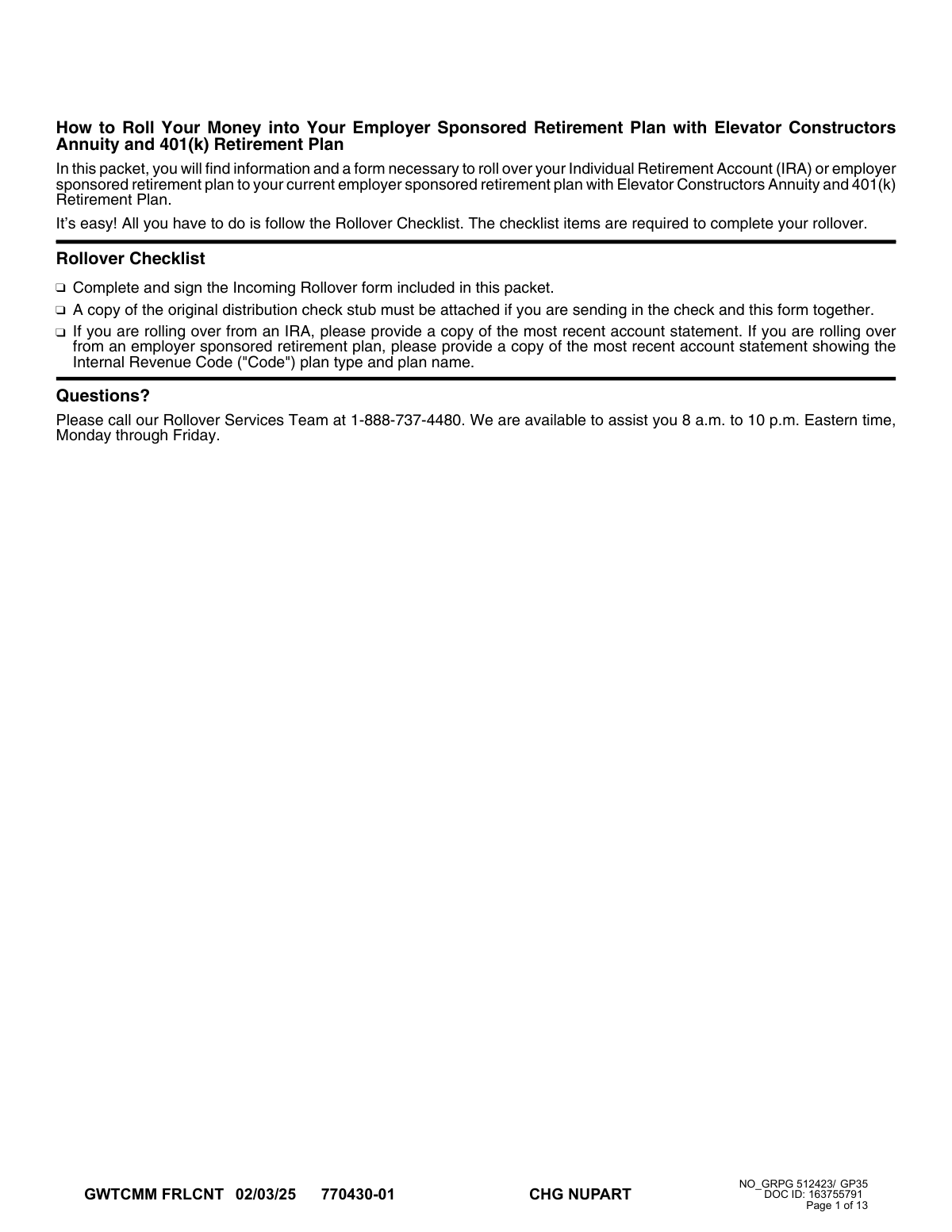
The very first page of the packet provides a simple 'Rollover Checklist' that outlines the three key requirements for a successful submission. Users often skip this introductory page and jump directly to filling out the form fields. By ignoring the checklist, they are more likely to forget a required document, like an account statement, or miss a critical step like signing the form, leading to an incomplete submission that will be immediately returned.
The payment instructions on page 7 are very specific: checks must be made payable to 'Empower Trust Company, LLC'. A common mistake is for the previous institution to issue the check in the participant's name (for a direct rollover) or for the participant to fail to endorse their check correctly for an indirect rollover. An incorrectly written or endorsed check cannot be processed, invalidating the rollover attempt and requiring a new check to be issued, which can be a lengthy process.
Saved over 80 hours a year
“I was never sure if my IRS forms like W-9 were filled correctly. Now, I can complete the forms accurately without any external help.”
Kevin Martin Green
Your data stays secure with advanced protection from Instafill and our subprocessors




Robust compliance program
Transparent business model
You’re not the product. You always know where your data is and what it is processed for.
ISO 27001, HIPAA, and GDPR
Our subprocesses adhere to multiple compliance standards, including but not limited to ISO 27001, HIPAA, and GDPR.
Security & privacy by design
We consider security and privacy from the initial design phase of any new service or functionality. It’s not an afterthought, it’s built-in, including support for two-factor authentication (2FA) to further protect your account.
Fill out Incoming Rollover Election with Instafill.ai
Worried about filling PDFs wrong? Instafill securely fills incoming-rollover-election-for-elevator-constructors-annuity-and-401k-retirement-plan forms, ensuring each field is accurate.
