Yes! You can use AI to fill out Lincoln Financial Group Requesting a distribution

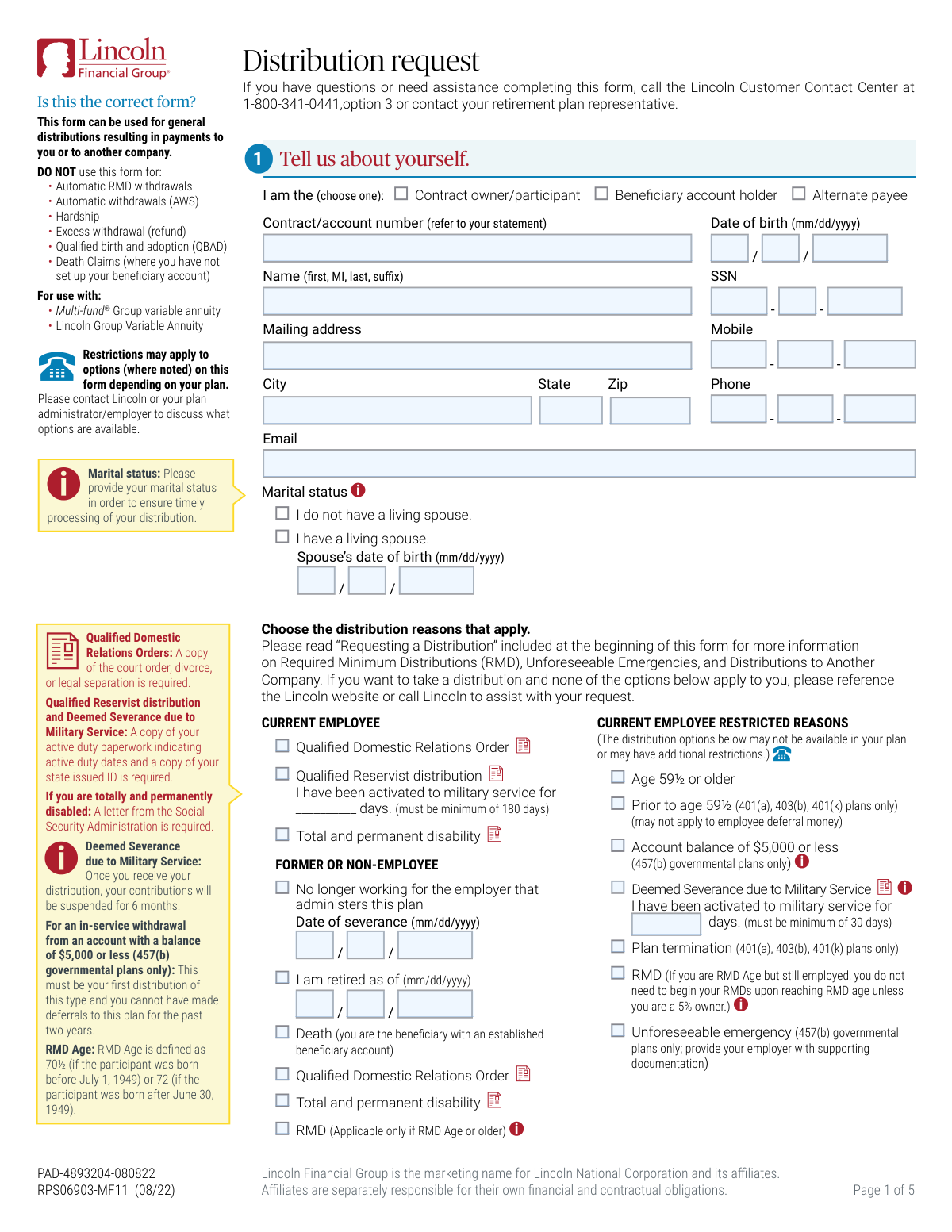
This form, officially titled 'Requesting a distribution' from Lincoln Financial Group, allows a contract owner, participant, or beneficiary to request funds from their retirement plan. It is used for general distributions, such as cash payments, rollovers to another company, or transfers between plans, covering various scenarios like retirement, severance from employment, or reaching a certain age. Today, this form can be filled out quickly and accurately using AI-powered services like Instafill.ai, which can also convert non-fillable PDF versions into interactive fillable forms.
Our AI automatically handles information lookup, data retrieval, formatting, and form filling.
It takes less than a minute to fill out RPS06903-MF11 using our AI form filling.
Securely upload your data. Information is encrypted in transit and deleted immediately after the form is filled out.

Form specifications

Form name: Lincoln Financial Group Requesting a distribution
Number of pages: 1
Language: English
Categories: financial forms, distribution forms
main-image

Instafill Demo: How to fill out PDF forms in seconds with AI

How to Fill Out RPS06903-MF11 Online for Free in 2026

Are you looking to fill out a RPS06903-MF11 form online quickly and accurately? Instafill.ai offers the #1 AI-powered PDF filling software of 2026, allowing you to complete your RPS06903-MF11 form in just 37 seconds or less.
Follow these steps to fill out your RPS06903-MF11 form online using Instafill.ai:
  1. 1 Navigate to Instafill.ai and upload or select the Lincoln Financial Group 'Requesting a distribution' form.
  2. 2 Use the AI assistant to automatically fill in your personal details in Section 1, such as your name, SSN, date of birth, and contact information.
  3. 3 Select your reason for the distribution in Section 2, indicating your employment status and the specific qualifying event (e.g., retirement, severance, age 59½).
  4. 4 Specify the distribution amount in Section 2, choosing between a full account balance, a partial payment, or a combination of cash and rollover.
  5. 5 Complete Section 4 to detail how the funds should be distributed, providing direct deposit information for cash payments or receiving company details for rollovers and transfers.
  6. 6 Indicate your federal and state tax withholding preferences in Section 5.
  7. 7 Review all entered information for accuracy, then digitally sign and date the form in Section 6 before submitting it to Lincoln Financial Group via email, fax, or mail as instructed.

Our AI-powered system ensures each field is filled out correctly, reducing errors and saving you time.

Why Choose Instafill.ai for Your Fillable RPS06903-MF11 Form?

Speed

Complete your RPS06903-MF11 in as little as 37 seconds.

Up-to-Date

Always use the latest 2026 RPS06903-MF11 form version.

Cost-effective

No need to hire expensive lawyers.

Accuracy

Our AI performs 10 compliance checks to ensure your form is error-free.

Security

Your personal information is protected with bank-level encryption.

Frequently Asked Questions About Form RPS06903-MF11

This form is used to request a general distribution from your Lincoln Financial Group retirement account. You can use it to receive a cash payment directly or to roll over or transfer funds to another retirement account.

No, this form should not be used for hardship withdrawals, automatic RMDs, automatic withdrawals (AWS), or qualified birth and adoption (QBAD) distributions. Please contact Lincoln Financial Group for the correct forms for those specific requests.

The required documents depend on your distribution reason. For example, a disability claim requires a letter from the Social Security Administration, while a military service distribution requires a copy of your active duty paperwork.

In Section 4A, select the direct deposit option and provide your bank's transit/ABA number and your account number. To ensure accuracy, it is recommended to attach a voided check for a checking account or a deposit verification letter for a savings account.

In Section 3, you can choose to close your active loan by having the remaining balance withdrawn from your account. Be aware that this loan payoff is considered a taxable event by the IRS.

For most distributions, Lincoln is required to withhold a mandatory 20% for federal taxes. For certain distributions like RMDs, withholding is voluntary, but you are still responsible for paying any taxes owed when you file your tax return.

Spousal consent may be required depending on your specific retirement plan, especially if it is subject to Qualified Joint and Survivor Annuity (QJSA) rules. Contact Lincoln or your plan administrator to confirm if your spouse's signature is needed.

You can return the signed form and all necessary documents by email, fax, or mail. The specific submission details are provided on the last page of the distribution request form.

After the funds are processed and leave your account, direct deposits typically appear in your bank account within two business days. If you requested a check, it generally arrives via mail in 2-5 business days.

A cash distribution is paid directly to you and is a taxable event. A direct rollover moves your funds to another eligible retirement plan (like an IRA or a new 401k) without immediate tax consequences or withholding.

Yes, you can use this form to request a one-time RMD payment. However, you cannot use this form to establish automatic, recurring RMD withdrawals.

Yes, services like Instafill.ai use AI to help you accurately auto-fill form fields with your personal information, which saves time and helps prevent common errors.

You can upload the Lincoln Financial distribution PDF to the Instafill.ai platform. The AI will make the form fillable, allowing you to securely enter your information once and have it populate throughout the document.

If you have a non-fillable or 'flat' PDF, you can use a service like Instafill.ai. It can convert the document into an interactive, fillable form that you can easily complete and sign on your computer.

Compliance RPS06903-MF11
Validation Checks by Instafill.ai

1
SSN Format and Structure Validation
This check verifies that the Social Security Number (SSN) is entered in the correct XXX-XX-XXXX format. It ensures that the field contains exactly nine digits and two hyphens in the proper places. This is critical for correctly identifying the participant in the system and for tax reporting purposes to the IRS. A failure would prevent submission until the format is corrected.
2
Date of Birth Logical Plausibility
Validates that the Date of Birth is a real date, is in the past, and corresponds to a reasonable age for a retirement plan participant (e.g., older than 18 and younger than 120). This prevents data entry errors like future dates or typos that could lead to incorrect age-based calculations for distributions and penalties. If the date is invalid, the user must correct it before proceeding.
3
Required Minimum Distribution (RMD) Age Eligibility
If 'RMD' is selected as a distribution reason, this check cross-references the participant's Date of Birth to confirm they meet the RMD Age criteria (age 70½ if born before July 1, 1949, or age 72 if born after June 30, 1949). This is a crucial compliance check to prevent improper RMD requests and ensure adherence to IRS regulations. An eligibility failure would require the user to deselect the RMD option or verify their date of birth.
4
Military Service Activation Day Requirement
This check enforces the minimum active duty day requirements for military-related distributions. If 'Qualified Reservist distribution' is selected, it verifies the days entered are 180 or more. If 'Deemed Severance due to Military Service' is selected, it verifies the days are 30 or more. This ensures the request meets the specific legal qualifications for these distribution types, preventing ineligible claims.
5
Severance or Retirement Date Presence and Logic
If the user selects 'No longer working for the employer' or 'I am retired', this validation ensures the corresponding 'Date of severance' or 'Date of retirement' field is completed. It also checks that the provided date is not in the future. This is essential for verifying the participant's employment status, which determines eligibility for many distribution types.
6
Spousal Information for Married Participants
If the participant's marital status is 'I have a living spouse', this check makes the 'Spouse’s date of birth' field mandatory. This information is often required for plans subject to Qualified Joint and Survivor Annuity (QJSA) rules, which protect spousal rights. Failure to provide this information could delay processing or require additional follow-up to ensure spousal consent requirements are met.
7
Exclusive Distribution Amount Selection
This validation ensures that the user selects only one option from all the choices in Section 2 ('How much should we send?'). A user cannot request both a 100% distribution and a partial payment simultaneously. This prevents ambiguous or contradictory instructions, ensuring the distribution is processed exactly as intended. An error would be flagged if multiple amount options are checked.
8
Partial Payment Amount Entry
When a user selects an option for a partial payment (either a specific dollar amount or a percentage), this check verifies that a valid, positive numeric value has been entered in the corresponding field. This prevents requests where the intent for a partial payment is indicated but the amount is missing. The form cannot be submitted until the amount is specified.
9
ABA Routing Number Structure Validation
For distributions via direct deposit, this check validates that the 'Bank transit/ABA number' is exactly 9 digits long and conforms to the ABA routing number checksum algorithm. This is a critical step to prevent payment rejections, delays, or funds being sent to the wrong financial institution. If the number is invalid, the system will prompt for correction, saving significant back-office processing time.
10
Completeness of Direct Deposit Information
If 'Direct deposit' is selected in Section 4A, this validation ensures that all related fields ('Name as it appears on your account', 'Bank transit/ABA number', 'Financial institution', and 'Account number') are filled out. The form notes that incomplete information will result in a paper check being mailed. This check enforces the data requirement upfront to fulfill the user's direct deposit preference.
11
Completeness of Receiving Company Information for Rollovers
If any distribution amount is designated to go to another company (Section 2B), this check ensures all fields in Section 4B ('Distribution to Another Company') are completed. This includes the distribution method, receiving plan type, and the full name and address of the receiving company. This is vital for a successful direct rollover or transfer and prevents the check from being mailed to the participant's home address by default.
12
Federal Tax Withholding Percentage Rules
This check validates the entered federal tax withholding percentage against IRS rules noted on the form. For rollover-eligible distributions ('Mandatory withholding'), the percentage must be 20% or greater. For RMDs or unforeseeable emergencies ('Voluntary withholding'), the percentage must be 10% or greater if a value is entered. This ensures compliance and prevents requests with invalid withholding rates.
13
Plan-Specific Distribution Reason Eligibility
This validation cross-references the selected distribution reason against the participant's plan type. For example, if 'Unforeseeable emergency' or 'Account balance of $5,000 or less' is chosen, the system verifies the participant is in a 457(b) governmental plan as specified on the form. This prevents users from requesting distributions for which their plan type is not eligible, streamlining processing and reducing rejections.
14
Signature and Date Presence
This is a final check to ensure the participant's signature and the current date have been provided in Section 6. The signature is the legal authorization for the transaction, and the date establishes when the authorization was given. In a digital system, this would verify that the signature block has been completed, preventing the submission of an unauthorized or incomplete request.

Common Mistakes in Completing RPS06903-MF11

Using the Wrong Form for the Distribution Type

The form explicitly states it should NOT be used for requests like automatic RMD withdrawals, hardship, or new death claims. Applicants often see 'Requesting a distribution' and use the form without reading the exclusions, leading to immediate rejection and significant delays. To avoid this, carefully read the 'DO NOT use this form for' section on page 2 to confirm your distribution type is permitted before you begin filling it out.

Failing to Attach Required Supporting Documentation

Many distribution reasons, such as Qualified Domestic Relations Orders (QDRO), military service, or disability, require specific supporting documents like court orders or a letter from the Social Security Administration. Forgetting to include these documents is a primary cause for processing holds and rejections. Always review the requirements for your selected distribution reason and gather all necessary paperwork before submitting the form.

Providing Incomplete or Incorrect Rollover Information

When rolling funds to another company (Section 4B), applicants often provide incomplete or inaccurate information for the receiving institution, such as a wrong account number or address. The form warns that this will result in the check being mailed to your home address, making you responsible for forwarding it and risking a missed 60-day rollover window, which can trigger major tax penalties. Double-check all receiving company details for accuracy before submission.

Missing Required Signatures, Dates, or Notarization

The form requires a pen-and-ink signature from the applicant and may require a spousal signature, which must be witnessed by a plan administrator or a notary. Applicants frequently miss the spousal signature, fail to get it properly notarized, or use an invalid electronic signature. A missing or improperly executed signature will invalidate the entire request, forcing you to start over.

Entering Incorrect or Illegible Direct Deposit Details

In Section 4A, simple typos in the bank transit/ABA number or account number are extremely common and can cause significant problems. The form states that if the information is illegible or incorrect, a physical check will be mailed, delaying your access to funds. To prevent this, carefully transcribe the numbers and consider attaching a voided check or bank verification letter as recommended to ensure accuracy.

Selecting an Ineligible Distribution Reason

The form presents numerous distribution reasons, but many are restricted based on plan type (e.g., 457(b) only), employment status, or age. An applicant might select a reason for which they are not actually eligible, such as an in-service withdrawal that their specific plan does not permit. This leads to rejection after the plan administrator reviews the request, so it is critical to contact Lincoln or your plan administrator to confirm your eligibility for a specific distribution reason before submitting.

Misunderstanding Tax Withholding Elections

Section 5 on taxes is complex and often misunderstood, leading to unexpected financial consequences. Applicants may enter a federal withholding rate below the mandatory 20% for rollovers, or they may opt out of withholding without realizing they will be responsible for a large tax payment later. It is crucial to understand that even if you opt out of state withholding, the company must withhold if your state mandates it.

Ignoring the Outstanding Loan Section

If you have an outstanding loan, you must make a choice in Section 3 on how to handle it. Overlooking this section is common but will bring the processing of your distribution to a halt, as the financial institution cannot proceed without your direction. This mistake causes unnecessary delays while the company attempts to contact you for clarification.

Submitting Without the Plan Administrator's Signature

The final page of the form is reserved for the plan administrator/employer and is required in many cases, especially for verifying severance dates, vesting percentages, or unforeseeable emergencies. Participants sometimes submit the form without routing it to their employer first, assuming it's not their responsibility. This results in the form being returned and delayed until the required employer authorization is obtained.

Non-Spouse Beneficiary Rollover Error

The form contains a critical but easily missed rule for non-spouse beneficiaries: rollovers must go to an 'Inherited IRA'. A beneficiary who is not familiar with this rule may incorrectly select a standard IRA or another account type in Section 4B. This will cause the rollover to be rejected by the receiving institution, creating processing delays and potential tax complications.
Saved over 80 hours a year

“I was never sure if my IRS forms like W-9 were filled correctly. Now, I can complete the forms accurately without any external help.”

Kevin Martin Green

Your data stays secure with advanced protection from Instafill and our subprocessors

Robust compliance program

Transparent business model

You’re not the product. You always know where your data is and what it is processed for.

ISO 27001, HIPAA, and GDPR

Our subprocesses adhere to multiple compliance standards, including but not limited to ISO 27001, HIPAA, and GDPR.

Security & privacy by design

We consider security and privacy from the initial design phase of any new service or functionality. It’s not an afterthought, it’s built-in, including support for two-factor authentication (2FA) to further protect your account.

Fill out RPS06903-MF11 with Instafill.ai

Worried about filling PDFs wrong? Instafill securely fills lincoln-financial-group-requesting-a-distribution forms, ensuring each field is accurate.