Yes! You can use AI to fill out Fidelity & Guaranty Life Required Minimum Distribution (RMD) Form for IRA Owner/Plan Participant

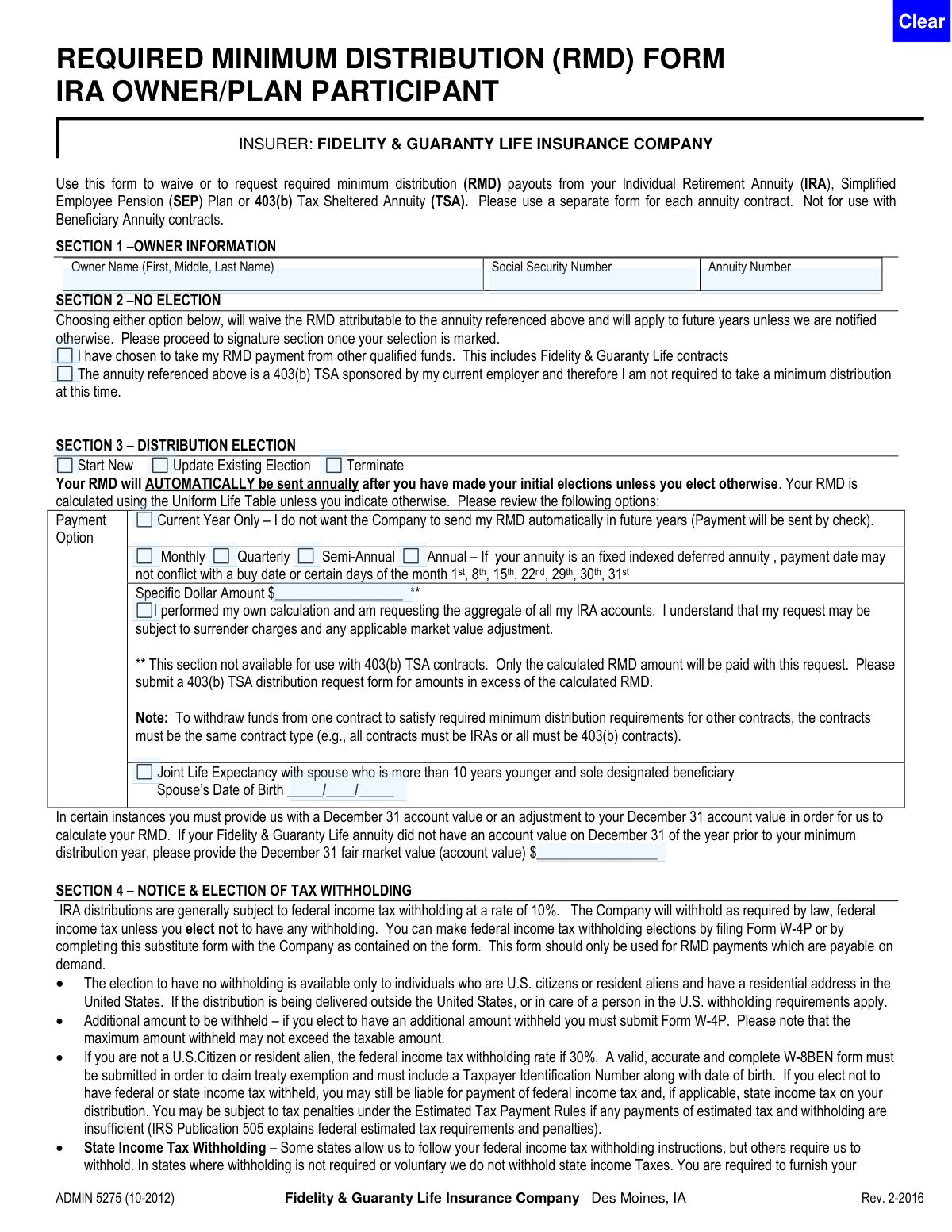
The Required Minimum Distribution (RMD) Form (ADMIN 5275) from Fidelity & Guaranty Life allows an IRA, SEP, or 403(b) owner to manage their annual RMD. It's used to either request a specific distribution schedule and payment method or to formally waive the RMD from that specific annuity, certifying it will be taken from other qualified funds. Today, this form can be filled out quickly and accurately using AI-powered services like Instafill.ai, which can also convert non-fillable PDF versions into interactive fillable forms.
Our AI automatically handles information lookup, data retrieval, formatting, and form filling.
It takes less than a minute to fill out ADMIN 5275 using our AI form filling.
Securely upload your data. Information is encrypted in transit and deleted immediately after the form is filled out.

Form specifications

Form name: Fidelity & Guaranty Life Required Minimum Distribution (RMD) Form for IRA Owner/Plan Participant
Number of pages: 1
Language: English
Categories: IRA forms, Fidelity forms, distribution forms
main-image

Instafill Demo: How to fill out PDF forms in seconds with AI

How to Fill Out ADMIN 5275 Online for Free in 2026

Are you looking to fill out a ADMIN 5275 form online quickly and accurately? Instafill.ai offers the #1 AI-powered PDF filling software of 2026, allowing you to complete your ADMIN 5275 form in just 37 seconds or less.
Follow these steps to fill out your ADMIN 5275 form online using Instafill.ai:
  1. 1 Navigate to Instafill.ai and upload or select the Fidelity & Guaranty Life RMD Form (ADMIN 5275).
  2. 2 Use the AI assistant to automatically fill in your personal details in Section 1, including your name, Social Security Number, and Annuity Number.
  3. 3 Choose your primary action: either waive the RMD by selecting an option in Section 2 or elect a distribution in Section 3.
  4. 4 If requesting a distribution, specify the payment frequency (e.g., monthly, annual), amount, and calculation method as prompted.
  5. 5 Complete Section 4 by making your federal and state income tax withholding elections.
  6. 6 Provide your payment instructions in Section 5, either by entering bank details for direct deposit or opting to receive a check.
  7. 7 Carefully review all the information populated by the AI, then digitally sign and date the form in Section 6 to certify and authorize the request.

Our AI-powered system ensures each field is filled out correctly, reducing errors and saving you time.

Why Choose Instafill.ai for Your Fillable ADMIN 5275 Form?

Speed

Complete your ADMIN 5275 in as little as 37 seconds.

Up-to-Date

Always use the latest 2026 ADMIN 5275 form version.

Cost-effective

No need to hire expensive lawyers.

Accuracy

Our AI performs 10 compliance checks to ensure your form is error-free.

Security

Your personal information is protected with bank-level encryption.

Frequently Asked Questions About Form ADMIN 5275

This form allows you to manage your Required Minimum Distribution (RMD) from an IRA, SEP, or 403(b) annuity. You can use it to request your RMD payment or to waive the payment from this specific contract if you are taking it from another source.

This form is for owners of an Individual Retirement Annuity (IRA), Simplified Employee Pension (SEP), or 403(b) Tax Sheltered Annuity (TSA) with Fidelity & Guaranty Life. It is not intended for beneficiaries who have inherited an annuity.

You will need your full name, Social Security Number, and the Annuity Number for the contract. If you plan to set up direct deposit, you will also need your bank account information and a voided check or deposit slip.

No, you must use a separate form for each individual annuity contract. The form clearly states to use a separate form for each.

Selecting an option in Section 2 informs the company that you do not want to take your RMD from this specific annuity for the year. This is typically because you are satisfying your RMD obligation from other qualified funds or you qualify for a 403(b) exception.

In Section 3, you can elect to receive payments monthly, quarterly, semi-annually, or annually. If you make an election for ongoing payments, your RMD will automatically be sent annually unless you notify the company otherwise.

By default, 10% federal income tax will be withheld from your distribution. You can use Section 4 to elect not to have federal or state taxes withheld, but you will still be responsible for any taxes owed.

To set up direct deposit, complete Section 5 with your bank's information and attach a voided check for a checking account or a deposit slip for a savings account. If you don't complete this section, you will receive a check by mail.

You can submit the completed form by mail to the address in Lincoln, NE, or by fax to 1-402-328-2266. Both standard and overnight mailing addresses are provided on the form.

Yes, for IRA and SEP contracts, you can request a specific dollar amount in Section 3. However, this option is not available for 403(b) TSA contracts; for those, you must submit a separate distribution request for amounts over the calculated RMD.

Yes, in Section 3 you can select the 'Joint Life Expectancy' option. This applies when your spouse is your sole beneficiary and more than 10 years younger, which may result in a smaller required distribution.

Yes, services like Instafill.ai use AI to help you accurately auto-fill form fields with your personal information, saving time and reducing the chance of errors.

You can use a service like Instafill.ai to upload the PDF and fill it out on your computer. The platform allows you to type your information, add a digital signature, and download the completed form for easy submission.

If you have a non-fillable or 'flat' PDF, you can upload it to a tool like Instafill.ai. It can convert the document into an interactive, fillable form that you can complete and sign electronically.

Compliance ADMIN 5275
Validation Checks by Instafill.ai

1
SSN Format and Completeness
This check verifies that the Social Security Number field in Section 1 is not empty and is entered in a valid format (XXX-XX-XXXX or XXXXXXXXX). The SSN is a critical unique identifier for tax reporting and account verification. If the SSN is missing or incorrectly formatted, the form submission will be rejected, and the user will be prompted to provide a valid number.
2
Annuity Number Presence
This validation ensures that the Annuity Number field in Section 1 is filled out. The form specifies that a separate form must be used for each annuity contract, making this number essential for identifying which policy the RMD request applies to. A missing annuity number would make the form ambiguous and impossible to process, leading to rejection.
3
Mutually Exclusive Election Sections
This check ensures that the user has not made selections in both Section 2 (No Election) and Section 3 (Distribution Election). A user can either waive their RMD (Section 2) or elect a distribution method (Section 3), but not both simultaneously. If selections are present in both sections, it creates a logical conflict, and the form will be flagged for review or rejected, requiring the user to clarify their intent.
4
Conditional Spouse DOB Requirement
This validation is triggered if the 'Joint Life Expectancy' checkbox is selected in Section 3. It verifies that the 'Spouse’s Date of Birth' field is completed. This information is required by the IRS to correctly calculate the RMD using the Joint Life and Last Survivor Table. Failure to provide the spouse's date of birth in this scenario will result in an incomplete application and prevent the correct RMD calculation.
5
Spouse's Date of Birth Format
This check validates that the 'Spouse’s Date of Birth' in Section 3, if provided, is in a valid date format (e.g., MM/DD/YYYY) and represents a logical date in the past. An invalid date format would cause processing errors, and an illogical date (e.g., a future date) would invalidate the RMD calculation. The system should reject invalid formats and flag illogical dates for correction.
6
Specific Dollar Amount for Non-403(b) Contracts Only
This rule enforces a specific constraint mentioned on the form for Section 3. It checks if a 'Specific Dollar Amount' has been requested and, if so, verifies that the annuity contract is not a 403(b) TSA. The form explicitly states this option is not available for 403(b) contracts. An attempt to use this option with a 403(b) contract will result in a validation failure, and the user will be instructed to use the appropriate distribution form.
7
Payment Instruction Completeness for Direct Deposit
This validation ensures that if the user chooses direct deposit (by not checking the 'elect NOT to receive electronic payments' box in Section 5), then all required banking fields are filled. These fields include Bank Name, Bank Account Number, ABA Routing Number, and Type of Account. Missing information would prevent the electronic transfer of funds, so the form will be considered incomplete until all required banking details are provided.
8
ABA Routing Number Validity
This check verifies that the 'ABA or Bank Routing Number' in Section 5 is exactly 9 digits long and conforms to the standard checksum algorithm. This is crucial for ensuring payments are sent to the correct financial institution. An invalid routing number will cause the electronic payment to fail, so the system must reject any number that does not meet these criteria.
9
Conflicting Tax Withholding Elections
This validation checks for contradictory choices within the tax withholding section (Section 4). It ensures the user has not selected both 'Do Not withhold' and 'Withhold' for either federal or state taxes. Such a selection is ambiguous and prevents clear processing of tax instructions, so the form would be rejected until a single, clear choice is made for each tax type.
10
Signature and Date Requirement
This check confirms that the 'Owner’s Signature' and 'Date' fields in Section 6 are both completed. The owner's signature is legally required to authorize the transaction, and the date establishes when the authorization was given. A missing signature or date renders the form invalid and legally non-binding, causing an automatic rejection of the submission.
11
Distribution Type Selection Requirement
This validation ensures that if a user makes any election in Section 3, they must also select one of the primary actions: 'Start New', 'Update Existing', or 'Terminate'. This selection defines the overall purpose of the distribution request. Without it, the company would not know how to apply the other elections, leading to processing failure and rejection of the form.
12
Payment Frequency Selection Logic
This check verifies that if Section 3 is used for an ongoing distribution (i.e., 'Current Year Only' is not selected), then one of the payment frequencies ('Monthly', 'Quarterly', 'Semi-Annual', 'Annual') must be chosen. This information is essential for scheduling future payments correctly. If no frequency is selected for an ongoing election, the form is incomplete and will be returned for correction.
13
State Withholding Specification Logic
This validation ensures that if a user enters a value for state tax withholding in Section 4, they provide either a percentage or a dollar amount, but not both. It also confirms the entry is a valid number. Providing both creates ambiguity, so the form would be flagged for correction to clarify the user's intent for state tax withholding.
14
Owner Name Completeness
This check ensures the 'Owner Name' field in Section 1 is not left blank. The owner's full name is fundamental for identifying the correct account holder and verifying their identity against the annuity contract details. A submission with a missing owner name is unidentifiable and will be immediately rejected.

Common Mistakes in Completing ADMIN 5275

Using a Single Form for Multiple Annuity Contracts

The form explicitly states, 'Please use a separate form for each annuity contract.' Owners often overlook this and attempt to manage RMDs for multiple annuities on one form, assuming it's more efficient. This will lead to the form being rejected or only processed for the first contract number listed, causing delays and potentially missed RMD deadlines for the other contracts. To avoid this, a distinct form must be completed for each individual annuity number.

Entering an Incorrect or Incomplete Annuity Number

The Annuity Number is the primary identifier for the account. People frequently mis-type this number, leave it blank, or provide a different account number (like a bank account number). An incorrect annuity number will cause the request to be rejected as the company cannot locate the specified contract, leading to significant processing delays and the risk of failing to take the RMD by the deadline. Always double-check the annuity number against an official account statement before submitting.

Misunderstanding the 'No Election' Section

Users sometimes check a box in Section 2 believing they are waiving their legal RMD requirement for the year, which is not permissible by the IRS. This section is only for waiving the RMD payout *from this specific annuity contract*, with the understanding that the RMD will be satisfied from other qualified funds. This misunderstanding can lead to an IRS penalty for failing to take a required distribution. It's crucial to understand you are only changing the source of the RMD, not eliminating the obligation.

Making Contradictory or Incomplete Distribution Elections

In Section 3, individuals often fail to select 'Start New' or 'Update Existing', or they might select both 'Current Year Only' and a recurring frequency like 'Monthly'. These conflicting or missing details create ambiguity for the processor. This results in processing delays while the company seeks clarification, potentially causing the RMD payment to be late. To prevent this, carefully select only one option for the election status and one for the payment frequency.

Requesting a Specific Dollar Amount for a 403(b) TSA

A footnote in Section 3 clearly states that requesting a 'Specific Dollar Amount' is not available for 403(b) TSA contracts. Many participants miss this fine print and fill in a dollar amount, expecting a custom withdrawal. The form will be processed for only the calculated RMD amount, or it may be rejected entirely, requiring the owner to submit a different form and delaying their distribution. For 403(b) TSAs, only the calculated RMD can be requested on this form.

Leaving Tax Withholding Elections Blank

Section 4 on tax withholding is often skipped because it seems complex. However, failing to make an election has direct consequences. If left blank, the company will apply the default withholding rate (e.g., 10% for federal), which may not align with the owner's tax strategy, potentially leading to a smaller-than-expected net payment or a large tax bill later. Always make an explicit choice to either withhold or not withhold for both federal and state taxes.

Forgetting to Attach a Voided Check for Direct Deposit

When selecting direct deposit in Section 5, many people fill out the bank information but forget to attach the required voided check or deposit slip. The company requires this physical document to verify the account and routing numbers and prevent fraud. Without it, the payment will default to a paper check sent via mail, delaying access to funds and negating the benefit of a direct deposit setup.

Missing the Owner's Signature or Date

Forgetting to sign and date the form in Section 6 is one of the most common and critical errors. An unsigned or undated form is legally invalid and cannot be processed under any circumstances. This oversight will cause the entire request to be rejected, and the owner will have to resubmit, risking a missed RMD deadline and associated tax penalties. This form is a flat PDF, but tools like Instafill.ai can make it fillable and highlight required signature fields to prevent such mistakes.

Incorrectly Transcribing Bank Account or Routing Numbers

Manual data entry of long numerical sequences like bank account and ABA routing numbers in Section 5 is highly prone to error. Transposing just one or two digits will cause the electronic funds transfer to fail. This results in the payment being rejected by the bank and delayed while the company issues a paper check and requests corrected information. Using an AI form-filler like Instafill.ai can help prevent this by auto-populating and validating banking information from a secure profile.

Using the Form for a Beneficiary Annuity

The form's instructions clearly state it is 'Not for use with Beneficiary Annuity contracts.' Beneficiaries who inherit an IRA have different distribution rules and typically must use a specific 'Beneficiary Claim' or 'Inherited IRA Distribution' form. Using this RMD form will lead to immediate rejection, causing confusion and delaying the beneficiary's access to their required withdrawal.

Failing to Provide Spouse's Date of Birth When Required

In Section 3, the option for a 'Joint Life Expectancy' calculation is only valid if the spouse is the sole beneficiary and more than 10 years younger. People often check this box for the favorable calculation but forget to provide the spouse's date of birth. Without the DOB, the company cannot verify eligibility for this calculation method and will default to the standard Uniform Life Table, potentially resulting in a larger, less desirable RMD amount being paid out.

Neglecting a Required Witness or Irrevocable Beneficiary Signature

The signature block in Section 6 includes spaces for a Witness and an Irrevocable Beneficiary. While not always required, certain contract types or state regulations mandate these additional signatures for a distribution request to be valid. Owners often overlook these fields, assuming only their own signature is needed. Submitting a form without a required second or third signature will render it incomplete and lead to its rejection.
Saved over 80 hours a year

“I was never sure if my IRS forms like W-9 were filled correctly. Now, I can complete the forms accurately without any external help.”

Kevin Martin Green

Your data stays secure with advanced protection from Instafill and our subprocessors

Robust compliance program

Transparent business model

You’re not the product. You always know where your data is and what it is processed for.

ISO 27001, HIPAA, and GDPR

Our subprocesses adhere to multiple compliance standards, including but not limited to ISO 27001, HIPAA, and GDPR.

Security & privacy by design

We consider security and privacy from the initial design phase of any new service or functionality. It’s not an afterthought, it’s built-in, including support for two-factor authentication (2FA) to further protect your account.

Fill out ADMIN 5275 with Instafill.ai

Worried about filling PDFs wrong? Instafill securely fills fidelity-guaranty-life-required-minimum-distribution-rmd-form-for-ira-ownerplan-participant forms, ensuring each field is accurate.