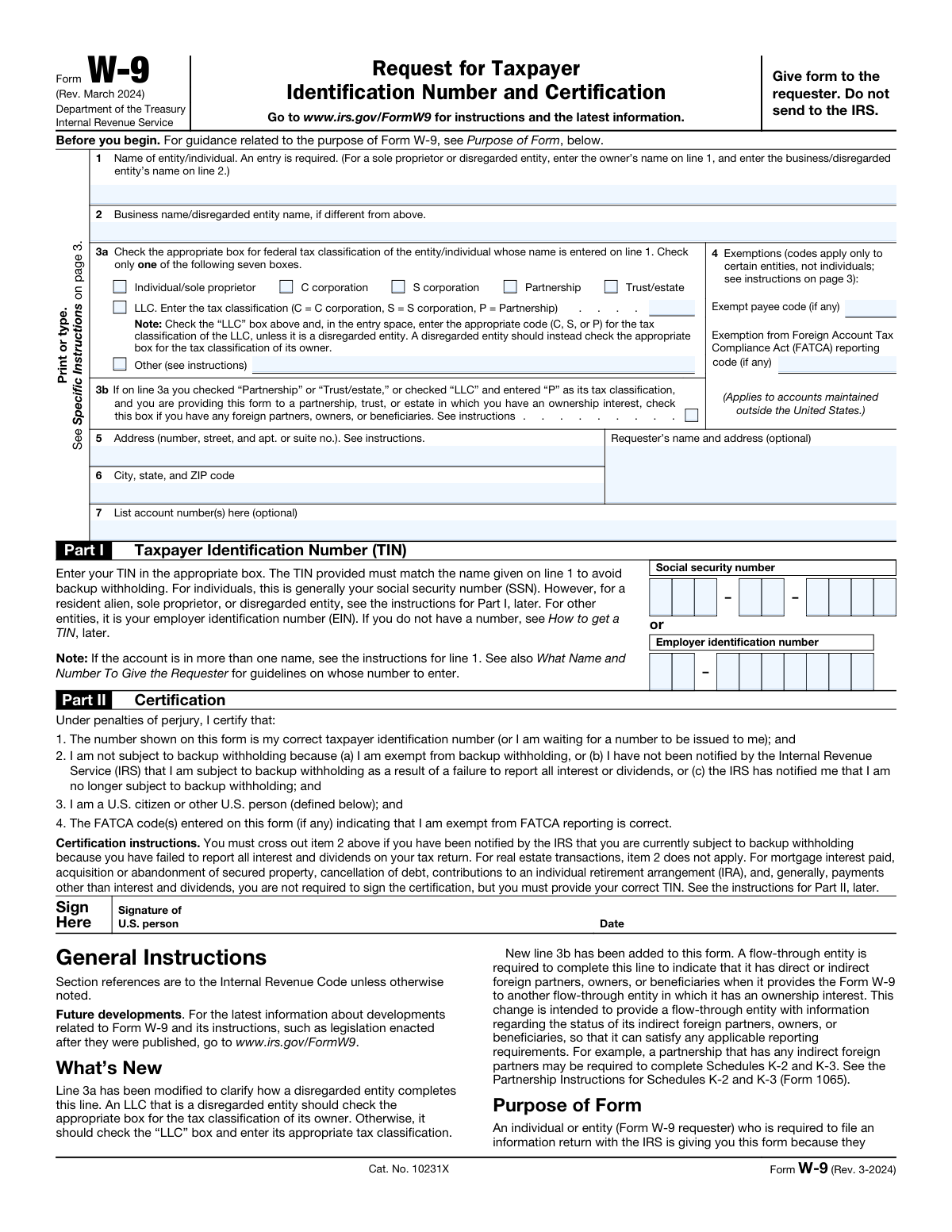
Yes! You can use AI to fill out Form W-9, Request for Taxpayer Identification Number and Certification

Form W-9, Request for Taxpayer Identification Number and Certification, is an Internal Revenue Service (IRS) form used in the United States to confirm a person's or entity's name, address, and taxpayer identification number (TIN) for employment or other income-generating purposes. It is provided by an individual or entity (the payee) to another entity (the payer) who is required to file an information return with the IRS. Today, this form can be filled out quickly and accurately using AI-powered services like Instafill.ai, which can also convert non-fillable PDF versions into interactive fillable forms.
Our AI automatically handles information lookup, data retrieval, formatting, and form filling.
It takes less than a minute to fill out W-9 using our AI form filling.
Securely upload your data. Information is encrypted in transit and deleted immediately after the form is filled out.

Form specifications

Form name: Form W-9, Request for Taxpayer Identification Number and Certification
Number of pages: 1
Language: English
Categories: identification forms, tax forms, taxpayer identification forms, certification forms
main-image

Instafill Demo: How to fill out PDF forms in seconds with AI

How to Fill Out W-9 Online for Free in 2026

Are you looking to fill out a W-9 form online quickly and accurately? Instafill.ai offers the #1 AI-powered PDF filling software of 2026, allowing you to complete your W-9 form in just 37 seconds or less.
Follow these steps to fill out your W-9 form online using Instafill.ai:
  1. 1 Navigate to Instafill.ai and upload or select the Form W-9.
  2. 2 Provide your name and business name (if applicable) as they appear on your tax return.
  3. 3 Select your federal tax classification, such as individual, C corporation, S corporation, or LLC.
  4. 4 Enter your address and your Taxpayer Identification Number (TIN), which is either your Social Security Number (SSN) or Employer Identification Number (EIN).
  5. 5 Review all the information auto-filled by the AI for accuracy, including any exemption codes if applicable.
  6. 6 Complete the certification in Part II by digitally signing and dating the form to attest that the information is correct.
  7. 7 Download the completed W-9 and provide it to the person or business that requested it.

Our AI-powered system ensures each field is filled out correctly, reducing errors and saving you time.

Why Choose Instafill.ai for Your Fillable W-9 Form?

Speed

Complete your W-9 in as little as 37 seconds.

Up-to-Date

Always use the latest 2026 W-9 form version.

Cost-effective

No need to hire expensive lawyers.

Accuracy

Our AI performs 10 compliance checks to ensure your form is error-free.

Security

Your personal information is protected with bank-level encryption.

Frequently Asked Questions About Form W-9

Form W-9 is used to provide your correct Taxpayer Identification Number (TIN) to a person or entity who must file an information return with the IRS to report payments made to you. This helps ensure accurate tax reporting for income like freelance payments, interest, or dividends.

U.S. persons, including individuals, sole proprietors, corporations, partnerships, and trusts, must fill out Form W-9 when requested by a business that will pay them. This form is used to certify your tax information for the payer.

You should give the completed Form W-9 directly to the person or business that requested it. Do not send this form to the IRS.

A Taxpayer Identification Number (TIN) is a number used by the IRS for tax administration. For individuals, it's usually your Social Security Number (SSN), while for businesses, it's typically an Employer Identification Number (EIN).

As a sole proprietor, you should enter your individual name on line 1 and your business or DBA name on line 2. You can use either your Social Security Number (SSN) or your Employer Identification Number (EIN) if you have one.

For a single-member LLC treated as a disregarded entity, enter the owner's name on line 1 and the LLC's name on line 2. Check the tax classification box for the owner (e.g., 'Individual/sole proprietor') and provide the owner's SSN or EIN.

If you don't return a completed Form W-9 to the requester, you may be subject to backup withholding. This means the payer is required to withhold 24% of your payments and send it to the IRS.

No, foreign persons and foreign entities should not use Form W-9. You should use the appropriate Form W-8 or Form 8233 to provide your information to the requester.

If you don't have a TIN, you should apply for one immediately and write 'Applied For' in the TIN section of the form. You will be subject to backup withholding on most payments until you provide your actual TIN to the requester.

Line 3b is for flow-through entities (like partnerships or trusts) to indicate if they have any foreign partners, owners, or beneficiaries. This helps the entity receiving the W-9 meet its own tax reporting requirements.

For most new accounts and payments for services, you must sign the certification to avoid backup withholding. However, for certain payments like mortgage interest or IRA contributions, a signature is not required as long as you provide a correct TIN.

Yes, services like Instafill.ai use AI to accurately auto-fill form fields, which can save you time and help prevent common errors. This is especially useful for ensuring your name and TIN match your IRS records.

You can use a service like Instafill.ai to fill out your Form W-9 online. Simply upload the form, and the AI will help you complete the fields interactively before you download, sign, and send it to the requester.

If you have a non-fillable or 'flat' PDF, you can use a tool like Instafill.ai to convert it into an interactive, fillable form. This allows you to easily type your information into the correct fields online.

Compliance W-9
Validation Checks by Instafill.ai

1
Ensures Name is Provided on Line 1
This check verifies that Line 1, 'Name of entity/individual,' is not left blank. This field is mandatory as it identifies the taxpayer for the IRS and must match the name associated with the TIN. Failure to provide a name makes the entire form invalid and will result in rejection, preventing the requester from fulfilling their tax reporting obligations.
2
Single Tax Classification Selection
This validation ensures that exactly one of the seven checkboxes in Line 3a, 'Federal tax classification,' is selected. Selecting multiple classifications creates ambiguity, while selecting none leaves out critical information for tax reporting. A submission with zero or more than one selection would be considered incomplete and must be returned for correction.
3
Valid LLC Tax Classification Code
This check validates that if the 'LLC' box is checked in Line 3a, the corresponding text field contains one of the valid single-letter codes: 'C' for a C corporation, 'S' for an S corporation, or 'P' for a Partnership. This code is essential for determining how the LLC is taxed. An empty, invalid, or multi-character entry will lead to incorrect tax treatment and requires the form to be corrected.
4
TIN or 'Applied For' Status Required
This validation confirms that Part I contains either a Social Security Number (SSN), an Employer Identification Number (EIN), or the text 'Applied For'. The Taxpayer Identification Number (TIN) is the primary purpose of the form. A missing TIN will subject the payee to backup withholding and requires the requester to follow up for the correct information.
5
Mutually Exclusive TIN Entry
This check ensures that the form submitter has provided either an SSN or an EIN in Part I, but not both. The form is designed for one primary TIN per entity/individual, and providing both creates ambiguity. A submission with both fields filled will be flagged for manual review and correction to identify the correct TIN to use.
6
Valid SSN Format
This check validates that if a Social Security Number is provided, it adheres to the 9-digit XXX-XX-XXXX format. This validation prevents data entry errors and is crucial for matching the number against IRS databases. An incorrectly formatted SSN will fail automated lookups and could lead to backup withholding or processing delays.
7
Valid EIN Format
This check validates that if an Employer Identification Number is provided, it adheres to the 9-digit XX-XXXXXXX format. Correct formatting is essential for automated processing and successful validation against IRS records. An EIN with an invalid format will cause the submission to be rejected and may trigger backup withholding on payments.
8
TIN Type Matches Entity Classification
This is a logical check to ensure the type of TIN provided is appropriate for the tax classification selected in Line 3a. For example, an entity classified as a 'C corporation' or 'Partnership' must provide an EIN, not an SSN. A mismatch indicates a fundamental error in the form's completion and will result in rejection until the name, classification, and TIN are consistent.
9
Disregarded Entity Naming Convention
This check validates that if an entity is a disregarded entity (based on Line 3a selection and Line 2 entry), the owner's name is on Line 1 and the entity's name is on Line 2. The instructions explicitly state the owner's name, not the disregarded entity's name, should be on Line 1. Incorrectly placing the entity name on Line 1 will cause a mismatch with the owner's TIN, leading to validation failures and potential backup withholding.
10
Certification Signature Presence
This check verifies that the form has been signed in Part II. The signature certifies under penalty of perjury that the information, including the TIN, is correct. An unsigned form is generally considered invalid for certification purposes and will be returned to the submitter, potentially delaying payments and invalidating the form for legal and tax purposes.
11
Valid Certification Date
This validation ensures the date field next to the signature is populated with a valid date, typically in MM/DD/YYYY format. The date should not be in the future. An absent or invalid date makes it impossible to establish when the certification was made, potentially invalidating the document for compliance purposes.
12
Address and City/State/ZIP Completeness
This check ensures that the address fields (Line 5 for street address and Line 6 for city, state, and ZIP code) are fully populated. This address is used by the requester to mail year-end tax information returns, such as Form 1099. Incomplete address information can result in non-delivery of critical tax documents to the payee and compliance issues for the requester.
13
Valid Exempt Payee Code
This check validates that if a code is entered in the 'Exempt payee code' field on Line 4, it is one of the numeric codes (1-13) specified in the form instructions. Using an invalid code can lead to incorrect assumptions about backup withholding status. The system should flag any non-standard codes for review to ensure proper tax handling.
14
Conditional Foreign Partner Checkbox
This validation ensures the checkbox on Line 3b is only checked if the tax classification in 3a is 'Partnership', 'Trust/estate', or 'LLC' with a 'P' classification. Checking this box for other entity types, like an individual or C Corp, is illogical and indicates a user error. Such an inconsistency would require clarification before the form can be accepted.

Common Mistakes in Completing W-9

Name and TIN Mismatch

This error occurs when the name entered on Line 1 does not match the Taxpayer Identification Number (TIN) provided in Part I. For example, entering a business name on Line 1 but providing an individual's Social Security Number (SSN). The IRS system will flag this mismatch, which will subject your payments to backup withholding and require you to submit a corrected form. To avoid this, ensure the name on Line 1 is the exact legal name associated with the SSN or Employer Identification Number (EIN) you provide.

Incorrectly Filling for a Disregarded Entity/LLC

Owners of single-member LLCs (treated as disregarded entities) often mistakenly put the LLC's name on Line 1. The instructions clearly state that the owner's name should be on Line 1, and the LLC's name on Line 2. This mistake leads to a Name/TIN mismatch because the owner's TIN (usually an SSN) is used. Always enter the individual owner's name on Line 1 to match their TIN, and the business name on Line 2.

Incomplete LLC Tax Classification

When filling out the form for a Limited Liability Company (LLC), many people check the 'LLC' box on Line 3a but forget to enter the required tax classification code (C, S, or P) in the adjacent space. This leaves the form incomplete and forces the requester to follow up for clarification, delaying payments. Before filling, confirm your LLC's federal tax classification and enter the corresponding letter. AI-powered tools like Instafill.ai can help prevent this by prompting for the required information when 'LLC' is selected.

Forgetting to Sign and Date the Form

Submitting an unsigned or undated W-9 is a frequent and critical error. The signature in Part II certifies, under penalties of perjury, that the information provided is correct. An unsigned form is invalid and will be rejected by the requester, leading to payment holds and processing delays until a valid, signed copy is received. Always double-check that you have physically or digitally signed and dated the form before submission.

Incorrectly Claiming Exemption

Individuals and sole proprietors sometimes mistakenly enter a code in the 'Exempt payee code' field on Line 4, believing they are exempt from reporting. However, exemptions are generally reserved for specific entities like corporations, governments, and tax-exempt organizations. Incorrectly claiming an exemption can lead to compliance issues and potential penalties for providing false information. Unless you are certain you represent a qualifying exempt entity, this field should be left blank.

Incorrect Name Entry for Sole Proprietors

A sole proprietor may incorrectly enter their 'Doing Business As' (DBA) name on Line 1 instead of their individual name. According to the instructions, the individual owner's name as shown on their tax return must be on Line 1, while the business or DBA name goes on Line 2. This error causes a Name/TIN mismatch when using an SSN, resulting in backup withholding. Always use your personal legal name on Line 1 if you are operating as a sole proprietorship.

Improper Use of Form W-9 by a Foreign Person

Form W-9 is strictly for 'U.S. persons' (including resident aliens). Foreign individuals or entities sometimes fill out a W-9 by mistake when they should be providing the appropriate Form W-8. This leads to incorrect tax withholding and reporting, creating significant compliance problems for both the payer and payee. If you are not a U.S. person, you must use a Form W-8 to certify your foreign status.

Overlooking the New Foreign Owner Declaration on Line 3b

The revised W-9 includes a new checkbox on Line 3b for flow-through entities (like partnerships or trusts) to declare if they have foreign partners, owners, or beneficiaries. Many filers are not yet familiar with this requirement and overlook it. Failing to check this box when required can prevent the requester from meeting their own tax reporting obligations, potentially leading to penalties. If you are a partnership or trust, you must determine if this applies and check the box accordingly.

Submitting an Illegible Handwritten Form

While the form can be printed and filled out by hand, illegible handwriting often leads to data entry errors by the requester. A misspelled name or a transposed digit in a TIN can cause a mismatch notice from the IRS and trigger backup withholding. To prevent this, it is best to type directly onto the PDF. If the form is a non-fillable PDF, tools like Instafill.ai can convert it into a fillable version, ensuring all entries are clean, typed, and legible.

Using an Outdated Address

The address provided on Lines 5 and 6 is where the requester will mail your year-end tax forms, such as the 1099-NEC or 1099-MISC. People often forget to update their address or use a temporary one, causing these important documents to be lost in the mail. This can lead to delays in filing your own taxes or not realizing how much income was reported to the IRS. Always use a current, reliable mailing address and write 'NEW' at the top of the form if it has recently changed.
Saved over 80 hours a year

“I was never sure if my IRS forms like W-9 were filled correctly. Now, I can complete the forms accurately without any external help.”

Kevin Martin Green

Your data stays secure with advanced protection from Instafill and our subprocessors

Robust compliance program

Transparent business model

You’re not the product. You always know where your data is and what it is processed for.

ISO 27001, HIPAA, and GDPR

Our subprocesses adhere to multiple compliance standards, including but not limited to ISO 27001, HIPAA, and GDPR.

Security & privacy by design

We consider security and privacy from the initial design phase of any new service or functionality. It’s not an afterthought, it’s built-in, including support for two-factor authentication (2FA) to further protect your account.

Fill out W-9 with Instafill.ai

Worried about filling PDFs wrong? Instafill securely fills form-w-9-request-for-taxpayer-identification-number-and-certification-1 forms, ensuring each field is accurate.