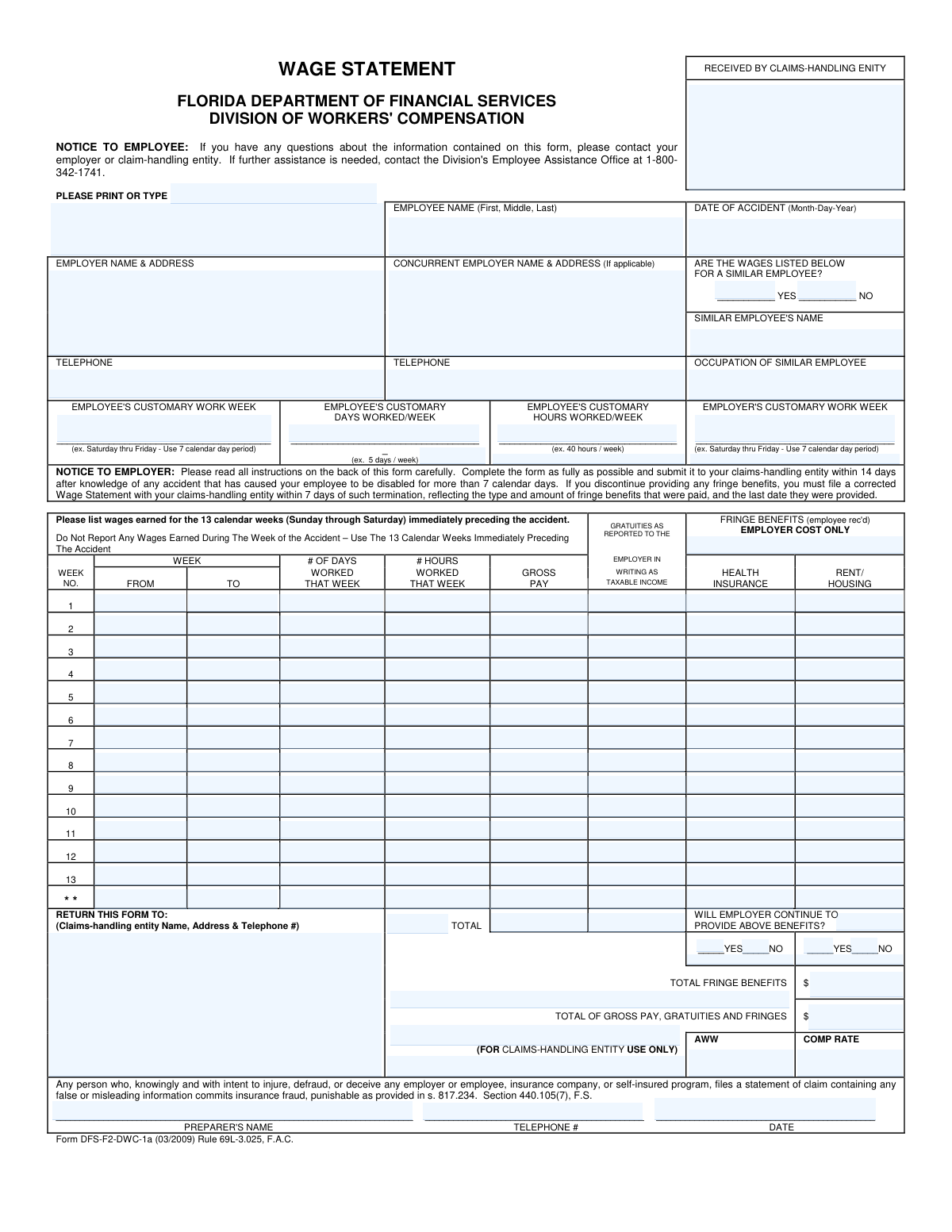
Yes! You can use AI to fill out Form DFS-F2-DWC-1a, Wage Statement
Form DFS-F2-DWC-1a is a Wage Statement required by the Florida Division of Workers' Compensation. Employers must complete this form to report an employee's gross wages, gratuities, and fringe benefits for the 13 weeks immediately preceding a workplace accident. This information is crucial for the claims-handling entity to accurately calculate the employee's average weekly wage (AWW) and determine the correct compensation rate. Today, this form can be filled out quickly and accurately using AI-powered services like Instafill.ai, which can also convert non-fillable PDF versions into interactive fillable forms.
Our AI automatically handles information lookup, data retrieval, formatting, and form filling.
It takes less than a minute to fill out DFS-F2-DWC-1a using our AI form filling.
Securely upload your data. Information is encrypted in transit and deleted immediately after the form is filled out.
Form specifications
| Form name: | Form DFS-F2-DWC-1a, Wage Statement |
| Number of pages: | 1 |
| Language: | English |
| Categories: | PA state forms, NJ state forms |
Instafill Demo: How to fill out PDF forms in seconds with AI
How to Fill Out DFS-F2-DWC-1a Online for Free in 2026
Are you looking to fill out a DFS-F2-DWC-1A form online quickly and accurately? Instafill.ai offers the #1 AI-powered PDF filling software of 2026, allowing you to complete your DFS-F2-DWC-1A form in just 37 seconds or less.
Follow these steps to fill out your DFS-F2-DWC-1A form online using Instafill.ai:
- 1 Navigate to Instafill.ai and upload or select the Form DFS-F2-DWC-1a, Wage Statement.
- 2 Provide the employee's name, date of accident, and the employer's name and address.
- 3 If applicable, provide details for a concurrent employer or a similar employee whose wages are being used.
- 4 Detail the employee's customary work week, including days and hours worked.
- 5 Enter the weekly breakdown of wages for the 13 weeks preceding the accident, including dates, days/hours worked, gross pay, gratuities, and the employer's cost for fringe benefits like health insurance and housing.
- 6 Indicate whether the employer will continue to provide the listed fringe benefits after the injury.
- 7 Review all AI-populated fields for accuracy, then provide the preparer's name, date, and contact information before submitting the completed form to the claims-handling entity.
Our AI-powered system ensures each field is filled out correctly, reducing errors and saving you time.
Why Choose Instafill.ai for Your Fillable DFS-F2-DWC-1a Form?
Speed
Complete your DFS-F2-DWC-1a in as little as 37 seconds.
Up-to-Date
Always use the latest 2026 DFS-F2-DWC-1a form version.
Cost-effective
No need to hire expensive lawyers.
Accuracy
Our AI performs 10 compliance checks to ensure your form is error-free.
Security
Your personal information is protected with bank-level encryption.
Frequently Asked Questions About Form DFS-F2-DWC-1a
This form is used by employers to report an injured employee's wages for the 13 weeks prior to their accident. This information helps the claims-handling entity calculate the employee's average weekly wage to determine their workers' compensation benefit amount.
The employer is responsible for completing the Wage Statement as fully as possible. It must then be submitted to the employer's claims-handling entity, such as their workers' compensation insurance carrier.
An employer must submit this form to their claims-handling entity within 14 days of learning that a work accident has caused an employee to be disabled for more than 7 calendar days.
You must report wages for the 13 full calendar weeks (Sunday through Saturday) immediately preceding the week of the accident. Do not report any wages earned during the actual week the accident occurred.
If the employee has not worked at least 75% of the customary hours during that period, you must report the wages of a 'similar employee' in the same employment. Be sure to check 'YES' for this question and provide the similar employee's name and occupation.
Gross pay is the employee's total earnings before any deductions. You must include all overtime pay and any bonuses that were paid during the 13-week reporting period.
The only fringe benefits that can be included are the employer's cost for health insurance for the employee or their dependents, and the value of year-round housing provided by the employer.
If you discontinue providing fringe benefits, you must file a corrected Wage Statement with your claims-handling entity within 7 days of the termination. The corrected form must show when the benefits stopped.
The completed form should be returned to your designated claims-handling entity. Their name, address, and telephone number should be entered in the 'RETURN THIS FORM TO' box on the document.
First, contact your employer or their claims-handling entity. If you need more help, you can call the Division of Workers' Compensation's Employee Assistance Office at 1-800-342-1741.
Yes, services like Instafill.ai use AI to accurately auto-fill form fields from your records. This can save significant time and reduce errors, especially when completing the detailed 13-week wage history.
Simply upload the Wage Statement PDF to the Instafill.ai platform. The service will make the form interactive and help you populate the fields, including the wage table, quickly and accurately.
If you have a non-fillable or 'flat' PDF, you can use a service like Instafill.ai to instantly convert it into an interactive, fillable form. This allows you to easily type your information directly into the fields before printing or submitting.
Compliance DFS-F2-DWC-1a
Validation Checks by Instafill.ai
1
Validates Date of Accident Format and Chronology
This check ensures the 'Date of Accident' is a valid date, is formatted correctly (e.g., MM-DD-YYYY), and occurs in the past. It is a critical data point as the entire 13-week wage reporting period is calculated relative to this date. An invalid or future date would make the form impossible to process correctly and would be rejected.
2
Ensures Wage Table Weeks Precede Accident Date
This validation verifies that the 'To' date for Week 1 in the wage table is before the 'Date of Accident'. The form instructions explicitly state not to report wages for the week of the accident. This check prevents the inclusion of incorrect periods, which would lead to an inaccurate Average Weekly Wage (AWW) calculation.
3
Verifies Sequential and Contiguous 13-Week Period
This check ensures the 13 weeks in the wage table are sequential and without gaps, starting from Week 1 (most recent) to Week 13 (least recent). It validates that the 'From' date of a given week is one day after the 'To' date of the subsequent week in the list. This is critical for accurately representing the employee's earnings over the legally defined period.
4
Validates 7-Day Span for Each Wage Week
This check confirms that for each of the 13 weeks, the 'To' date is exactly 6 days after the 'From' date, representing a full 7-day calendar week as specified in the instructions. It can also validate that the 'From' date is a Sunday and the 'To' date is a Saturday. This enforces the form's definition of a calendar week, ensuring consistency in wage reporting.
5
Confirms Completeness of Core Identifying Information
Verifies that essential fields such as 'Employee Name', 'Employer Name & Address', and 'Date of Accident' are not empty. This information is the minimum required to identify the claim and the parties involved. A submission without this data is unusable and would be immediately rejected for being incomplete.
6
Enforces Conditional Fields for Similar Employee Data
This validation checks if the 'Wages Listed for a Similar Employee?' flag is marked 'YES'. If it is, the 'Similar Employee's Name' and 'Occupation of Similar Employee' fields must be populated. If the flag is 'NO', these fields should be empty or ignored. This ensures data integrity and clarity about the source of the wage information.
7
Validates Format and Range of Numeric Wage Data
Checks that all monetary fields (Gross Pay, Gratuities, Fringe Benefits) and numeric fields (Days Worked, Hours Worked) contain valid, non-negative numbers. It also validates that 'Days Worked' is between 0 and 7, and 'Hours Worked' is within a reasonable range (e.g., 0-168). This prevents data entry errors and ensures calculations are based on plausible figures.
8
Verifies Sum of Weekly Fringe Benefits Matches Total
This check calculates the sum of all 'Health Insurance' and 'Rent/Housing' values across the 13 weeks and compares it to the value entered in the 'TOTAL FRINGE BENEFITS' field. This automated cross-footing ensures mathematical accuracy on the form. A mismatch indicates a calculation error by the preparer and requires correction before the AWW can be determined.
9
Verifies Grand Total Calculation
Validates that the 'TOTAL OF GROSS PAY, GRATUITIES AND FRINGES' field is the correct sum of the total gross pay, total gratuities, and the 'TOTAL FRINGE BENEFITS' field from the table. This is the final and most critical calculation check on the form. An incorrect grand total will lead to an incorrect AWW and compensation rate, invalidating the entire submission.
10
Ensures Preparer Contact Information is Complete
Verifies that the 'Preparer's Name', 'Telephone #', and 'Date' fields are all filled out. This information is vital for the claims-handling entity if they have questions or need clarification about the submitted wage data. Missing preparer information can cause significant delays in processing the claim.
11
Validates Format of All Telephone Number Fields
Checks that the 'Employer Telephone', 'Concurrent Employer Telephone', and 'Preparer's Telephone' fields follow a standard phone number format (e.g., 10 digits, possibly with formatting characters). This ensures the numbers are valid and usable for contact purposes. It prevents data entry errors like transposed digits or incomplete numbers from hindering communication.
12
Ensures Exclusive Selection for Yes/No Options
This validation confirms that for each pair of Yes/No checkboxes (e.g., 'Wages for Similar Employee', 'Continue to Provide Benefits'), only one option is selected. It prevents ambiguity that would arise if both or neither were checked. This is crucial for clear, machine-readable data processing and avoids manual intervention to clarify intent.
13
Cross-Validates Hours Worked Against Gross Pay
This is a logical check to flag entries where 'Hours Worked' is greater than zero but 'Gross Pay' is zero, or vice-versa. While valid in some cases (like paid time off or unpaid work), it often indicates a data entry error. A failure of this check should trigger a warning for manual review to confirm the data is correct.
14
Checks for Required Employer Information
This validation ensures that the 'Employer Name & Address' and 'Employer Telephone' fields are fully populated. This information is fundamental for verifying the source of the wage statement and for any necessary follow-up communication. A submission without complete employer details is considered incomplete and cannot be processed.
Common Mistakes in Completing DFS-F2-DWC-1a
The form requires wage data for the 13 full calendar weeks immediately preceding the week of the accident. A frequent error is including the week of the accident or starting the 13-week count from a different point in time. This mistake directly skews the wage data, leading to an incorrect calculation of the Average Weekly Wage (AWW) and potential delays or errors in benefit payments. To avoid this, identify the week of the accident, then begin with the first full calendar week (Sunday-Saturday) immediately before that week as 'Week 1'.
The wage grid specifically asks for 'GROSS PAY,' which is the employee's total earnings before any taxes or deductions are taken out. Preparers sometimes mistakenly enter the employee's net or 'take-home' pay from their pay stubs. This significantly underreports the employee's earnings, resulting in a lower AWW and reduced workers' compensation benefits. Always use the pre-tax gross earnings figure for each week.
The form strictly limits reportable fringe benefits to the employer's cost for health insurance and the value of employer-provided housing. People often mistakenly include other benefits (like 401k contributions) or report the employee's payroll deduction instead of the employer's actual cost. This can either inflate or under-report the total compensation, affecting the final benefit calculation. Only enter the actual cost to the employer for the specified benefits.
This section should only be used if the injured employee did not work 'substantially the whole of 13 calendar weeks' (less than 75% of customary hours). A common error is to use a similar employee's data unnecessarily, or to fail to use it when required for a new employee, providing an incomplete wage history. This leads to processing delays while the claims-handler requests clarification. Ensure you only use this section if the employee has a short work history and, if so, remember to include the similar employee's name and occupation.
The form specifies that only 'Gratuities reported to the employer in writing as taxable income' should be included. Preparers may incorrectly estimate tips or include all cash tips received by the employee, regardless of whether they were officially reported for tax purposes. This can lead to an inaccurate AWW and may cause issues during an audit. To prevent this, only use gratuity amounts that have been formally documented and reported by the employee as taxable income.
The 'WILL EMPLOYER CONTINUE TO PROVIDE ABOVE BENEFITS?' section with its Yes/No checkboxes is frequently overlooked. This information is critical for the claims-handling entity to determine if the value of fringe benefits should be included in the ongoing compensation rate. Leaving this blank forces the claims handler to contact the employer for clarification, delaying the finalization of the benefit amount. Always check the appropriate 'Yes' or 'No' box for both health insurance and rent/housing.
The form defines a calendar week as Sunday through Saturday, but many companies operate on a Monday-through-Sunday or other pay period schedule. Preparers often mistakenly use their company's pay period dates instead of the required Sunday-Saturday format. This misalignment of dates and wages can complicate verification and lead to incorrect AWW calculations. Always align the weekly wage data to a Sunday start and Saturday end for each of the 13 weeks.
The preparer's name, telephone number, and date are essential for the claims-handling entity to resolve any questions or discrepancies on the form. These fields are often left blank, which means any issue, no matter how small, can cause significant delays as the claims handler must first figure out who to contact. Always ensure the person completing the form provides their full name, a direct phone number, and the date of completion.
Manually adding up 13 weeks of gross pay, gratuities, and fringe benefits can easily lead to simple arithmetic errors. An incorrect total for any of these columns will result in a flawed AWW and an incorrect compensation rate for the employee, requiring recalculation and slowing down the process. Double-check all calculations before submitting. AI-powered form filling tools like Instafill.ai can prevent these errors by performing the calculations automatically.
This form is often provided as a non-fillable PDF, forcing preparers to complete it by hand. Rushed or poor handwriting can make names, numbers, and addresses impossible to read, leading to data entry errors or outright rejection of the form. This can cause major delays in processing the claim. If the form is a flat PDF, tools like Instafill.ai can convert it into a fillable version, allowing you to type directly onto the form for maximum clarity.
Saved over 80 hours a year
“I was never sure if my IRS forms like W-9 were filled correctly. Now, I can complete the forms accurately without any external help.”
Kevin Martin Green
Your data stays secure with advanced protection from Instafill and our subprocessors

Robust compliance program
Transparent business model
You’re not the product. You always know where your data is and what it is processed for.
ISO 27001, HIPAA, and GDPR
Our subprocesses adhere to multiple compliance standards, including but not limited to ISO 27001, HIPAA, and GDPR.
Security & privacy by design
We consider security and privacy from the initial design phase of any new service or functionality. It’s not an afterthought, it’s built-in, including support for two-factor authentication (2FA) to further protect your account.
Fill out DFS-F2-DWC-1a with Instafill.ai
Worried about filling PDFs wrong? Instafill securely fills form-dfs-f2-dwc-1a-wage-statement forms, ensuring each field is accurate.