Yes! You can use AI to fill out DWC002, Employer’s report for reimbursement of voluntary payment
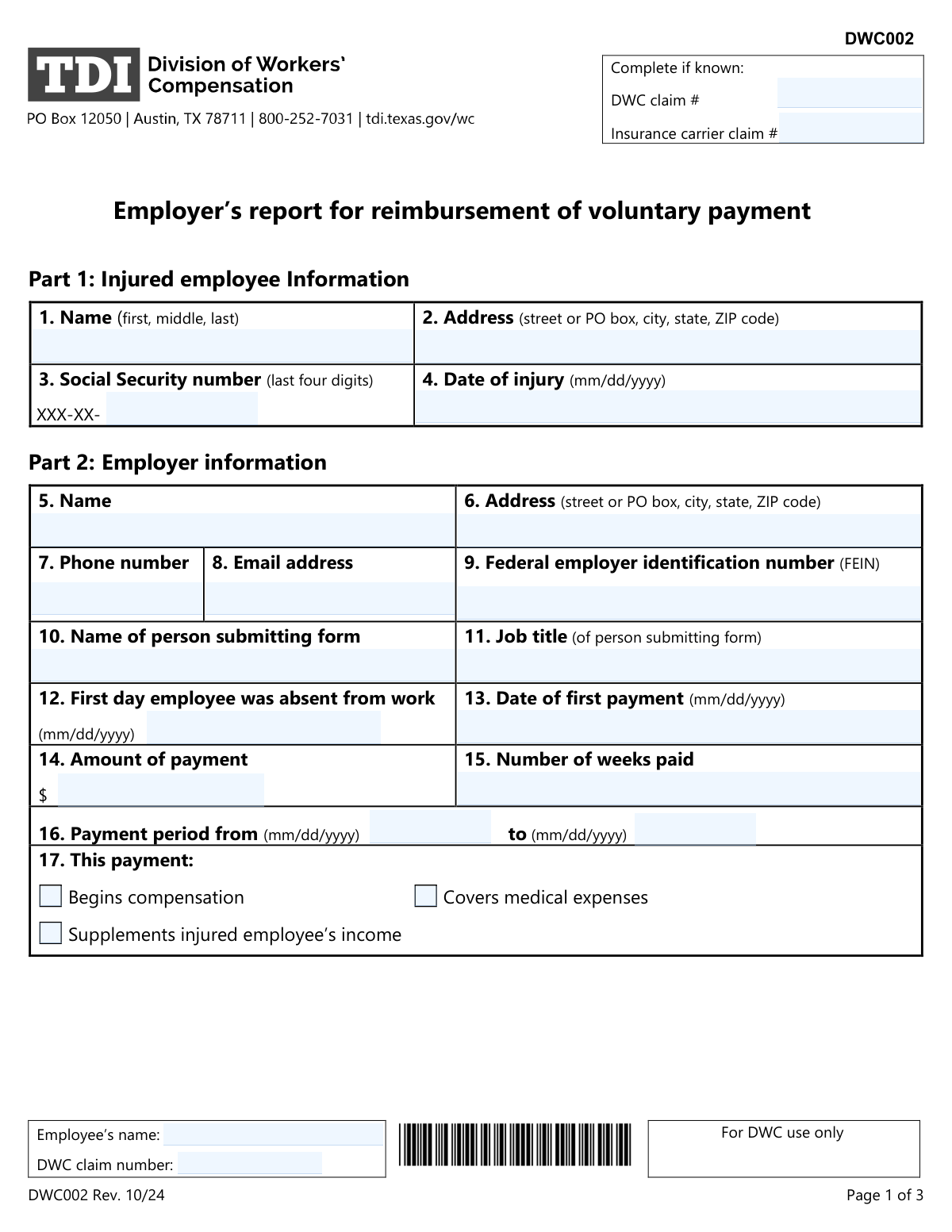
Form DWC002, Employer’s Report for Reimbursement of Voluntary Payment, is a document used in Texas by an employer to seek reimbursement from their insurance carrier for payments made directly to an injured employee. These voluntary payments can cover initial medical expenses or supplement income before the official workers' compensation claim is processed. Filing this form correctly and promptly is crucial for an employer to recover their costs. Today, this form can be filled out quickly and accurately using AI-powered services like Instafill.ai, which can also convert non-fillable PDF versions into interactive fillable forms.
Our AI automatically handles information lookup, data retrieval, formatting, and form filling.
It takes less than a minute to fill out DWC002 using our AI form filling.
Securely upload your data. Information is encrypted in transit and deleted immediately after the form is filled out.
Form specifications
| Form name: | DWC002, Employer’s report for reimbursement of voluntary payment |
| Number of pages: | 2 |
| Language: | English |
| Categories: | employer forms, payment forms |
Instafill Demo: How to fill out PDF forms in seconds with AI
How to Fill Out DWC002 Online for Free in 2026
Are you looking to fill out a DWC002 form online quickly and accurately? Instafill.ai offers the #1 AI-powered PDF filling software of 2026, allowing you to complete your DWC002 form in just 37 seconds or less.
Follow these steps to fill out your DWC002 form online using Instafill.ai:
- 1 Navigate to Instafill.ai and upload or select the DWC002 form.
- 2 Use the AI assistant to fill in Part 1 with the injured employee's information, including their name, address, SSN (last four digits), and date of injury.
- 3 Complete Part 2 by providing your employer details, such as name, FEIN, and information about the voluntary payment made.
- 4 Enter the insurance carrier's information in Part 3, including their name, address, and FEIN.
- 5 Review all the information entered by the AI for accuracy and completeness across all sections.
- 6 Proceed to Part 4 to certify the form with your digital signature and the current date.
- 7 Download the completed DWC002 and send copies to the Texas Department of Insurance, Division of Workers’ Compensation (DWC) and the insurance carrier as instructed.
Our AI-powered system ensures each field is filled out correctly, reducing errors and saving you time.
Why Choose Instafill.ai for Your Fillable DWC002 Form?
Speed
Complete your DWC002 in as little as 37 seconds.
Up-to-Date
Always use the latest 2026 DWC002 form version.
Cost-effective
No need to hire expensive lawyers.
Accuracy
Our AI performs 10 compliance checks to ensure your form is error-free.
Security
Your personal information is protected with bank-level encryption.
Frequently Asked Questions About Form DWC002
This form is used by an employer to request reimbursement from their insurance carrier for voluntary payments, such as income supplements or medical expenses, made to an injured employee.
An employer who has made voluntary payments directly to an injured employee and wishes to be reimbursed by their workers' compensation insurance carrier should complete and submit this form.
You must send a copy of the completed form to both the Texas Department of Insurance, Division of Workers’ Compensation (DWC) and your insurance carrier. The form provides specific fax and mail details for the DWC.
Yes, you must send this form to the DWC and your insurance carrier within seven days after the date you made the first voluntary payment to the employee. Missing this deadline can waive your right to reimbursement.
Your insurance carrier should reimburse you within seven days after receiving your completed DWC002 form. The carrier must also notify the DWC of the reimbursement.
If a dispute arises and your insurance carrier refuses to provide reimbursement, you have the right to file a subclaim with the DWC to resolve the issue.
The form states you should complete these fields 'if known.' If you do not have these numbers, fill out the rest of the form completely to avoid delays and submit it on time.
You must also ensure you have timely filed the DWC Form-001, Employer’s First Report of Injury or Illness. Failure to file the DWC Form-001 on time will also waive your right to reimbursement for voluntary payments.
Yes, services like Instafill.ai use AI to accurately auto-fill form fields from your saved information, which can save you significant time and help reduce errors.
You can use a service like Instafill.ai to upload the form, and its AI will help you fill in the required fields quickly and accurately online. You can then download, print, or share the completed document.
If you have a non-fillable PDF, you can upload it to a platform like Instafill.ai. The service can convert flat PDFs into interactive, fillable forms that you can easily complete on your computer.
The FEIN is a unique nine-digit number assigned by the IRS to business entities. It is required in Parts 2 and 3 to correctly identify the employer and the insurance carrier involved in the claim.
'Date of first payment' is the specific date you issued the first payment. 'Payment period from' is the start date of the time period that the payment is intended to cover, which may be different.
Compliance DWC002
Validation Checks by Instafill.ai
1
Validates SSN Last Four Digits Format
This check ensures that the 'Social Security number (last four digits)' field contains exactly four numeric characters. This is crucial for correctly identifying the employee while maintaining privacy standards required by law. A failure in this validation would prevent the form from being processed, as the employee cannot be uniquely and securely identified in the system.
2
Ensures Date of Injury is Not in the Future
This validation confirms that the 'Date of injury' is a valid date in MM/DD/YYYY format and occurs on or before the current submission date. An injury cannot have happened in the future, so this check prevents logical impossibilities and common data entry errors. If the date is invalid or in the future, the submission will be rejected to ensure the claim's temporal accuracy.
3
Validates Federal Employer Identification Number (FEIN) Format
This check verifies that the 'Federal employer identification number (FEIN)' for both the employer and insurance carrier is entered in the correct XX-XXXXXXX format. The FEIN is a unique identifier for business entities, and correct formatting is essential for database lookups and regulatory reporting. An incorrectly formatted FEIN could lead to misidentification of the employer or carrier, delaying the reimbursement process.
4
Verifies Standard Email Address Format
This validation ensures that the email address fields for the employer and insurance carrier follow the standard '[email protected]' syntax. A valid email is critical for all electronic communication regarding the status of the reimbursement request. If the format is incorrect, automated notifications and manual communications may fail, leaving the submitter uninformed about their request.
5
Validates First Day of Absence is After Injury
This logical check confirms that the 'First day employee was absent from work' is on or after the 'Date of injury'. An employee cannot be absent from work due to an injury before the injury occurred. This validation prevents chronological errors that would question the validity of the entire claim and cause processing delays.
6
Validates First Payment Date is After Absence
This check ensures the 'Date of first payment' is on or after the 'First day employee was absent from work'. Voluntary payments are made to cover lost wages or expenses incurred after the employee stops working. A payment date preceding the absence date is illogical and would trigger a validation failure, requiring the user to correct the dates.
7
Ensures Payment Period 'To' Date is After 'From' Date
This validation verifies that the 'Payment period to' date is on or after the 'Payment period from' date. A payment period cannot end before it begins, and this check enforces basic chronological sense. An invalid period would make it impossible to calculate the duration of payment and would result in the form being rejected for correction.
8
Confirms Payment Amount is a Positive Value
This check ensures that the 'Amount of payment' field contains a numeric value greater than zero. A reimbursement request cannot be for a zero or negative amount. This validation prevents erroneous submissions that would otherwise require manual intervention and correction, thereby streamlining the payment process.
9
Requires At Least One Payment Type Selection
This validation ensures that at least one of the checkboxes under 'This payment' (Begins compensation, Covers medical expenses, Supplements income) is selected. It is essential to know the purpose of the payment for proper classification and processing by the insurance carrier. Failure to select a payment type would result in an incomplete submission, as the nature of the reimbursement would be unknown.
10
Validates Signature Date is Logical and Present
This check confirms the 'Signature Date' is a valid date that is on or after the 'Date of first payment' and not in the future. The form should be signed after the payment event it is reporting has occurred. An illogical or missing signature date could invalidate the certification and cause the form to be rejected.
11
Correlates Payment Period with Number of Weeks Paid
This validation compares the 'Number of weeks paid' with the duration calculated from the 'Payment period from' and 'to' dates. While some minor variance might be acceptable, a significant discrepancy would indicate a data entry error. This check helps ensure the financial details of the reimbursement request are consistent and accurate, preventing potential disputes over the amount.
12
Ensures All Required Employer Information is Provided
This completeness check verifies that all essential employer information fields (Name, Address, Phone number, FEIN, Submitter Name, Job title) are filled out. This information is critical for identifying the entity requesting reimbursement and for communication purposes. An incomplete employer section would halt the process, as the DWC and insurance carrier would not have the necessary information to process the request.
Common Mistakes in Completing DWC002
These numbers are often overlooked because they are located at the top of the form, separate from the main numbered sections. Submitting the form without these critical identifiers makes it impossible for the DWC and insurance carrier to link the reimbursement request to the correct case, leading to immediate rejection or significant processing delays. Before filling out the form, confirm both claim numbers with the insurance carrier to ensure the document can be processed correctly.
The form specifies an 'mm/dd/yyyy' format for all date fields, but people often use other formats like 'm/d/yy' or 'dd/mm/yyyy' out of habit. This inconsistency can cause data entry errors in automated systems, leading to incorrect calculations for deadlines and payment periods, which delays reimbursement. Always double-check that all dates are entered in the required two-digit month, two-digit day, and four-digit year format to prevent processing issues.
The form requests a Federal Employer Identification Number (FEIN) for both the employer (Part 2) and the insurance carrier (Part 3), and it's easy to enter the same number in both fields by mistake. This error incorrectly identifies the parties involved, causing the insurance carrier's system to reject the submission and delaying reimbursement. To avoid this, carefully read the section headers and verify you are entering the unique nine-digit FEIN for the correct entity in each respective field.
The signature and date in Part 4 are a legal certification of the form's accuracy, but this final step is frequently forgotten in the rush to submit. An unsigned form is considered invalid and will be rejected, which delays the entire reimbursement process and can cause the employer to miss the strict 7-day filing deadline. To prevent this, make a final check for a valid signature and date your absolute last step before faxing or mailing the form.
The footer on each of the three pages requires the employee's name and DWC claim number, but filers often complete it on the first page and neglect the others. If the pages become separated during mail or fax processing, the un-labeled pages cannot be associated with the claim, rendering the submission incomplete. Ensure these details are filled out on every single page to guarantee the integrity of your submission, even if pages are separated.
Mistakes are common when correlating the 'Amount of payment' (Field 14), 'Number of weeks paid' (Field 15), and the 'Payment period from/to' dates (Field 16). Manual calculation errors or misunderstanding how to define a 'week' can lead to discrepancies that cause the insurance carrier to dispute the reimbursement amount. Carefully cross-reference these fields to ensure the payment amount accurately reflects the compensation rate for the exact period specified, preventing disputes and resubmissions.
The FAQ clearly states the form must be filed within seven days of the first payment, a deadline many employers are unaware of or fail to meet. The consequence is severe and explicit: failure to file on time waives the employer's right to reimbursement for any voluntary payments, resulting in a direct financial loss. To avoid this, be aware of the deadline triggered by the 'Date of first payment' and submit the form immediately.
Filers may use a nickname (e.g., 'Bill' for 'William') or omit a middle name, which seems minor but can cause significant issues. If the name on the form does not exactly match the legal name in the DWC or insurance carrier's system, it can cause a record-matching failure. This delays claim linkage and reimbursement, so always use the employee's full legal name as it appears on official employment records.
Part 3 asks for both the insurance carrier's main address (Field 19) and its claims office address (Field 24), which are often different, but filers may only know the corporate address. Using the general corporate address instead of the specific claims department address can cause correspondence to be misrouted, leading to significant delays. Always verify the direct address for the claims processing office to ensure your form and any follow-up communication are handled efficiently.
In Field 17, filers may be confused about whether a payment 'Begins compensation,' 'Supplements income,' or 'Covers medical expenses,' and check the wrong box. This misclassifies the payment, which can complicate how the insurance carrier processes the reimbursement and coordinates benefits, potentially leading to disputes. Clearly identify if the payment is for lost wages or a medical bill and check the corresponding box to ensure accurate processing.
This form is often submitted as a flat PDF that must be printed, filled by hand, and then scanned or faxed, which can result in poor legibility. If numbers, names, or dates are unreadable, the processing office cannot enter the data correctly, leading to rejection and requiring the employer to start over. To prevent this, write clearly in block letters or use a tool like Instafill.ai, which can convert non-fillable PDFs into fillable versions for clean, typed entries.
Saved over 80 hours a year
“I was never sure if my IRS forms like W-9 were filled correctly. Now, I can complete the forms accurately without any external help.”
Kevin Martin Green
Your data stays secure with advanced protection from Instafill and our subprocessors

Robust compliance program
Transparent business model
You’re not the product. You always know where your data is and what it is processed for.
ISO 27001, HIPAA, and GDPR
Our subprocesses adhere to multiple compliance standards, including but not limited to ISO 27001, HIPAA, and GDPR.
Security & privacy by design
We consider security and privacy from the initial design phase of any new service or functionality. It’s not an afterthought, it’s built-in, including support for two-factor authentication (2FA) to further protect your account.
Fill out DWC002 with Instafill.ai
Worried about filling PDFs wrong? Instafill securely fills dwc002-employers-report-for-reimbursement-of-voluntary-payment forms, ensuring each field is accurate.