Yes! You can use AI to fill out Form 1399 – Declaration of Service (Department of Home Affairs, Australia)
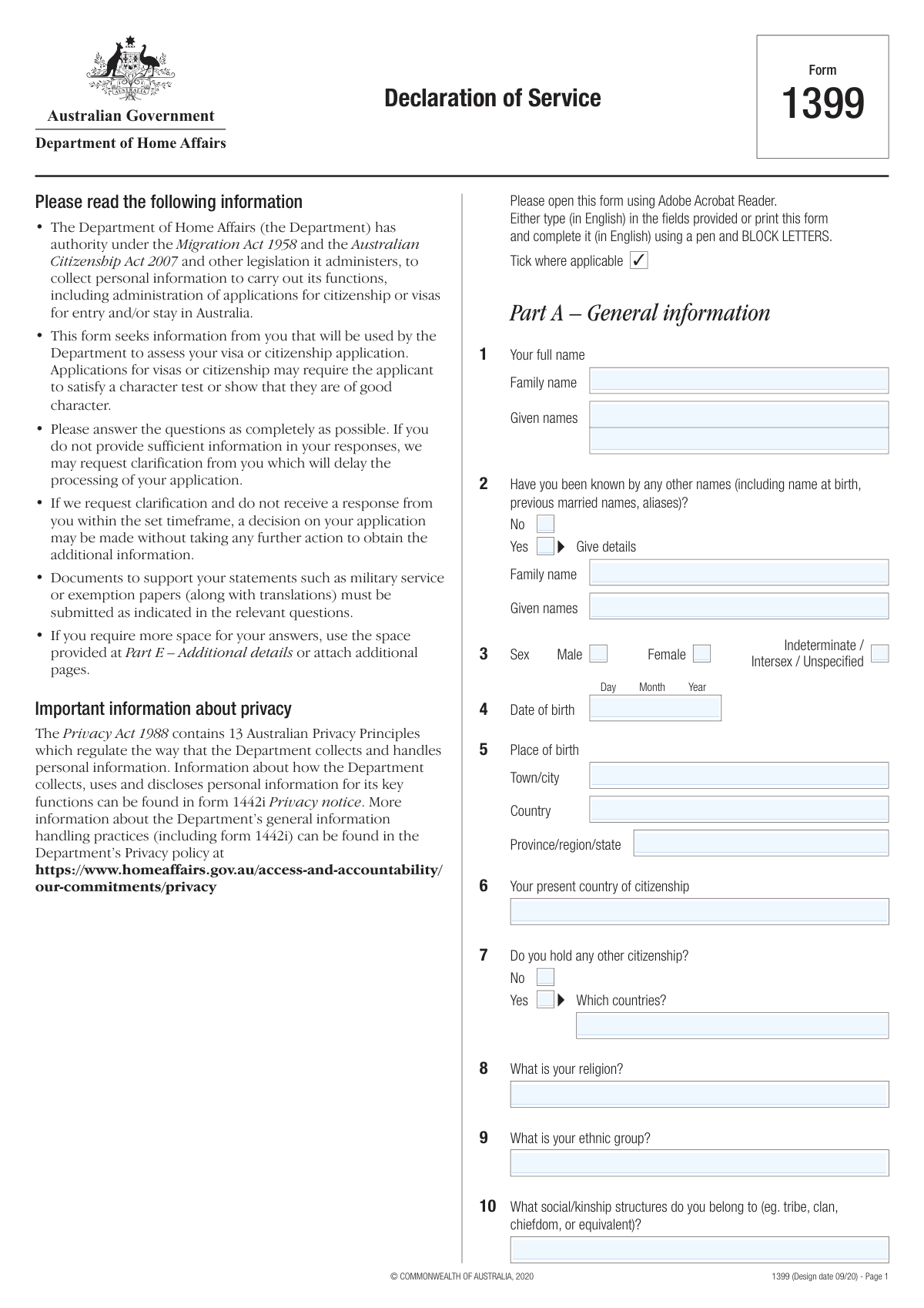
Form 1399, Declaration of Service, is an official Department of Home Affairs form used to gather an applicant’s background information—especially any military, paramilitary, security, intelligence, police, detention/prison service, and related activities—along with family details and history of residence, education, and employment. The information is used to assess visa or citizenship applications, including character and good-character requirements under Australian migration and citizenship legislation. Accurate, complete answers and supporting documents (for example, service papers and translations) help avoid delays or adverse decisions. Today, this form can be filled out quickly and accurately using AI-powered services like Instafill.ai, which can also convert non-fillable PDF versions into interactive fillable forms.
Our AI automatically handles information lookup, data retrieval, formatting, and form filling.
It takes less than a minute to fill out Form 1399 using our AI form filling.
Securely upload your data. Information is encrypted in transit and deleted immediately after the form is filled out.
Form specifications
| Form name: | Form 1399 – Declaration of Service (Department of Home Affairs, Australia) |
| Number of pages: | 13 |
| Language: | English |
| Categories: | IRS forms, Australian immigration forms, Home Affairs forms, visa forms, Australian government forms |
Instafill Demo: filling out a legal form in seconds
How to Fill Out Form 1399 Online for Free in 2026
Are you looking to fill out a FORM 1399 form online quickly and accurately? Instafill.ai offers the #1 AI-powered PDF filling software of 2026, allowing you to complete your FORM 1399 form in just 37 seconds or less.
Follow these steps to fill out your FORM 1399 form online using Instafill.ai:
- 1 Go to Instafill.ai and upload the Form 1399 PDF (or select Form 1399 from the form library).
- 2 Let the AI detect and convert the form into a fillable, guided version; confirm the form version (Design date 09/20) and your preferred language for entry (English).
- 3 Enter Part A (General information): your identity details, other names, birth/citizenship details, religion/ethnic/kinship information, and family member details.
- 4 Complete background history sections: overseas residences (6+ months), full education history, full employment history (including unemployment and military service), and any medals/awards.
- 5 Answer the character and involvement questions (membership/roles in groups, government/religious/cultural/political roles, and any war crimes/conflict-related questions) and provide detailed explanations where you answer “Yes.”
- 6 Fill Part B (Service history) if applicable: military/paramilitary/security/police/detention service, training, discharge details, and operations; upload supporting documents and translations.
- 7 Complete Part C (assistance details, if any) and Part D (declaration, signature/date), then review for completeness and export/download the finalized form for submission with attachments.
Our AI-powered system ensures each field is filled out correctly, reducing errors and saving you time.
Why Choose Instafill.ai for Your Fillable Form 1399 Form?
Speed
Complete your Form 1399 in as little as 37 seconds.
Up-to-Date
Always use the latest 2026 Form 1399 form version.
Cost-effective
No need to hire expensive lawyers.
Accuracy
Our AI performs 10 compliance checks to ensure your form is error-free.
Security
Your personal information is protected with bank-level encryption.
Frequently Asked Questions About Form Form 1399
Form 1399 collects detailed personal, family, residence, education, employment, and service history information so the Department of Home Affairs can assess visa or citizenship applications, including character and security-related considerations.
You complete Form 1399 if the Department requests it as part of your Australian visa or citizenship application, especially where additional background, military/service, or character-related information is required.
Yes—answer as completely as possible and select “No” where applicable. If you leave gaps or provide unclear answers, the Department may request clarification, which can delay processing.
If you answer “Yes” to service history questions (especially Question 28), you must attach supporting documents such as a military book, service papers, discharge papers, and translations if they are not in English.
The Department recommends opening the PDF in Adobe Acrobat Reader and typing in English. If you print it, complete it in English using a pen and BLOCK LETTERS.
In Part A, Question 2, select “Yes” and provide the other family name and given names exactly as used. Include all names you have been known by, not just legal changes.
In Question 13, list every place you lived outside Australia for 6 months or more, including your country of origin, with dates (from/to), city/region, country, and the reason for each move.
Yes. Question 15 asks for your entire employment history, including overseas work, military service, and periods of unemployment, so provide continuous coverage with explanations for gaps.
You must provide full details in the table, including dates, position/title, organisation name, location, duties, supervisor/commanding officer (if relevant), and how your involvement ended.
Use Part E (Additional details) and reference the relevant question number, or attach additional pages. Make sure any attachments are clearly labeled and consistent with the form’s question numbers.
If the Department asks for clarification and you don’t respond within the set timeframe, they may make a decision on your application without obtaining the additional information.
Yes. In Part C (Questions 32–35), you must state whether you received help, provide the helper’s details, indicate if they are a registered migration agent (MARA), whether they are in Australia, and whether you paid or gave a gift.
Yes. AI form-filling tools can help you organize your information and auto-fill fields to reduce errors and save time—services like Instafill.ai use AI to auto-fill form fields accurately based on the information you provide.
Upload the Form 1399 PDF to Instafill.ai, provide your details (and optionally upload supporting documents), and let the AI map your information into the correct fields. Review each entry for accuracy, then download the completed PDF to sign and submit according to your Department instructions.
If the PDF is flat/non-fillable, you can use Instafill.ai to convert it into an interactive fillable form and then auto-fill it. Alternatively, open it in Adobe Acrobat Reader or print and complete it in BLOCK LETTERS.
Compliance Form 1399
Validation Checks by Instafill.ai
1
Applicant full name completeness and character set validation
Validates that both 'Family name' and 'Given names' are provided and contain plausible name characters (letters, spaces, hyphens, apostrophes) rather than numbers-only or placeholder text (e.g., 'N/A', 'Unknown'). This is important because the applicant’s legal identity must match identity documents and downstream systems often reject invalid characters. If validation fails, block submission and prompt the applicant to enter their name exactly as per identity documents.
2
Other names (Q2) mutually exclusive selection and conditional details requirement
Ensures exactly one of 'Other Names – No' or 'Other Names – Yes' is selected (not both, not neither). If 'Yes' is selected, the 'Other name — Family name' and 'Other name — Given names' fields must be completed; if 'No' is selected, those fields must be empty. If validation fails, show an error indicating the inconsistency and require correction before submission.
3
Sex selection single-choice validation
Checks that exactly one option is selected among Male, Female, and Indeterminate/Intersex/Unspecified. This prevents ambiguous or conflicting demographic data and supports consistent reporting and identity matching. If validation fails, require the user to select one option only.
4
Date of birth format, validity, and plausibility validation
Validates that the applicant date of birth is a real calendar date in the expected Day/Month/Year format and is not in the future. It should also be within a plausible human range (e.g., not older than 120 years) to catch data entry errors. If validation fails, reject the date and request a corrected DOB.
5
Place of birth completeness and country normalization
Ensures 'Town/City' and 'Country' are provided for place of birth, and that 'Country' matches an allowed country list (normalized naming, no free-text typos like 'Austarlia'). 'Province/Region/State' may be optional but if provided should not be numeric-only or placeholder text. If validation fails, prompt for missing fields or require selecting a valid country value.
6
Citizenship fields consistency (present vs other citizenships)
Validates that 'Present country of citizenship' is provided and is a valid country value. If 'Do you hold any other citizenship? — Yes' is selected, the 'Other citizenship — countries' field must be populated with at least one country and must not duplicate the present citizenship; if 'No' is selected, the other-countries field must be blank. If validation fails, require correction to avoid contradictory citizenship declarations.
7
Spouse/partner deceased status vs date of death validation
Checks logical consistency between spouse/partner 'Date death (if deceased)' and other spouse fields: if a date of death is provided, it must be a valid date and not earlier than spouse DOB; if no date of death is provided, the system should not infer deceased status. This prevents incorrect family status records and timeline contradictions. If validation fails, require the user to correct the spouse DOB/death date or clear the death date.
8
Family member date fields validity and relationship plausibility checks
Validates that all entered parent/sibling DOB and DOD values are valid dates (or valid years where only year is captured) and that DOD is not before DOB. Additionally, apply basic plausibility rules (e.g., a parent’s DOB should generally be at least ~12 years before the applicant’s DOB) to flag likely data entry mistakes without hard-failing edge cases. If validation fails, either block for impossible dates or raise a warning for implausible relationships requiring confirmation.
9
Family members’ military/police/judicial/government employment table row integrity
For each populated row in Question 12, ensures required columns are present together (Given name, DOB, Position name, Employer name, Years served, Highest rank/role) and that 'Years served' is numeric and within a reasonable range (e.g., 0–80). This prevents partially filled rows that cannot be assessed and reduces manual follow-up. If validation fails, highlight the incomplete row and require completion or removal of the row.
10
Overseas residence history (Q13) date range and minimum duration rule
Validates that each overseas residence entry has Month/Year 'Date from' and 'Date to' in correct format, and that 'to' is not earlier than 'from'. Because the question is for places lived outside Australia for 6 months or longer, the system should flag entries shorter than 6 months (warning or require justification in Part E) and require Country/Region and Reason for move when dates are present. If validation fails, require corrected dates and missing location/reason details.
11
Education history (Q14) completion status exclusivity and date logic
Ensures that for each education row, exactly one of 'Graduated' or 'Not completed' is selected when a course/institution is provided. Also validates Month/Year date ranges (to >= from) and requires Country and Institution name when dates are entered. If validation fails, prompt the applicant to correct the completion status and/or missing fields.
12
Employment history (Q15) date format and continuity/overlap warning
Validates that each employment entry has valid Day/Month/Year dates and that 'Date to' is not earlier than 'Date from'. Additionally, detect overlapping employment periods and large unexplained gaps; since the form requests periods of unemployment too, gaps should trigger a warning to add an unemployment entry or explain in Part E. If validation fails, block impossible date ranges and warn on overlaps/gaps for correction.
13
Yes/No character and conflict questions require details when 'Yes'
For Questions 18–23 (war crimes witness/participation/abuse/capture/detention), ensures exactly one of Yes/No is selected per question. If 'Yes' is selected, the corresponding free-text details field must be non-empty and meet a minimum content threshold (e.g., at least 20 characters) to avoid meaningless responses like 'N/A'. If validation fails, require selection and/or sufficient detail before submission.
14
Service history gateway logic (Q24–Q27) and conditional service table requirement (Q28)
Validates that Q27 ('Did you answer Yes to any of Q24, Q25, Q26?') is consistent with the actual selections in Q24–Q26. If any of Q24–Q26 is 'Yes', then Q27 must be 'Yes' and at least one Q28 service-history row must be completed; if all are 'No', Q28 must be empty. If validation fails, block submission and direct the applicant to complete or clear the service history section accordingly.
15
Discharge status (Q30) conditional fields and date consistency
Ensures Q30 has a coherent selection: if 'Yes' (discharged) is selected, 'Date discharged' and 'Rank/Position when discharged' must be provided and the discharge date must not precede any service 'Date from' in Q28. If 'No' is selected with 'still serving' or 'left without official discharge', require the relevant explanation text and ensure no discharge date is entered. If validation fails, require missing discharge details or correct conflicting dates.
16
Assistance with form (Q32–Q35) conditional assistant identity and phone format validation
If Q32 indicates assistance was received, validates that assistant title, family name, given names, address, and at least one contact number are provided. Phone numbers should be validated for numeric content and structure: country code and area code (if provided) must be digits, and the main number must meet a minimum length; mobile/cell should also be digits with reasonable length. If validation fails, require completion of assistant details and correct phone formatting.
17
Declaration signature and declaration date required and not in the future
Validates that the applicant signature field is present (non-empty for e-forms or a captured signature indicator) and that the declaration date is a valid Day/Month/Year date not in the future. This is critical because the form is not legally complete without the declaration, and processing should not proceed without it. If validation fails, block submission until the declaration is properly completed.
Common Mistakes in Completing Form 1399
Applicants often shorten given names, change the order, omit middle names, or use an anglicised spelling that doesn’t match their passport/birth certificate. This can trigger identity-matching issues, requests for clarification, and processing delays. Copy the name exactly as shown on your primary identity document and keep spelling, hyphens, and spacing consistent across all forms. AI-powered form filling tools like Instafill.ai can help by pulling names from your documents and validating formatting consistency.
A very common error is ticking ‘No’ even though the person has a maiden name, name at birth, previous married name, or alternate spelling used in records, or ticking ‘Yes’ but not providing full details. This can cause character/identity checks to return incomplete results and lead to follow-up requests or concerns about non-disclosure. List every other name you have ever been known by (including different spellings) and provide both family and given names for each. Instafill.ai can prompt for missing alias details when ‘Yes’ is selected and ensure the dependent fields are completed.
This form mixes full dates (Day/Month/Year) with Month/Year-only fields (e.g., overseas residence and education history), so people frequently enter the wrong format or leave parts blank. Incorrect date formats can make timelines inconsistent and may lead to delays or requests for correction. Use the exact granularity requested: provide Day/Month/Year where shown, and only Month/Year where that’s what the table asks for. Instafill.ai can automatically format dates correctly per field and flag missing components.
Applicants often enter only a city and country, omit the province/region/state, or use informal abbreviations that don’t match official records. This can complicate identity verification and background checks, especially for countries with multiple cities of the same name. Provide the town/city, province/region/state (if applicable), and the full country name as used in official documents. Instafill.ai can standardize location entries and reduce mismatches caused by abbreviations.
People sometimes list their country of residence instead of citizenship, forget dual citizenships, or fail to list all additional citizenship countries after ticking ‘Yes’. Missing citizenship information can lead to incomplete security/identity checks and follow-up requests. Enter your current citizenship in the ‘present country of citizenship’ field, then list every other citizenship you hold (separated clearly, e.g., commas) if applicable. Instafill.ai can help ensure the ‘Which countries?’ field is completed whenever ‘Yes’ is selected.
Question 11 explicitly asks to include adoptive parents and half/step/adoptive siblings, but applicants often list only immediate biological family or leave unknown details blank without explanation. Incomplete family information can trigger clarification requests and slow processing. Include all required family categories and, if details are unknown, state ‘unknown’ and explain briefly in Part E rather than leaving empty fields. Instafill.ai can remind you of required inclusions (adoptive/step/half) and route overflow details into Part E.
Applicants frequently overlook that this question is about family members (not just the applicant) and fail to include roles that seem minor (e.g., local government, administrative roles, judiciary support). Missing this information can lead to additional screening questions and delays. Provide each relevant family member’s name, DOB, position title, employer name/address, years served, and highest rank/level achieved, and use Part E if you run out of space. Instafill.ai can help structure these entries consistently and prevent missing columns like ‘years served’ or ‘highest rank’.
A common mistake is listing only the most recent country, excluding the country of origin, or forgetting stays of 6 months or longer (including study, work, or displacement). Applicants also often omit the ‘reason for move,’ which the form explicitly requests. Gaps or missing reasons can raise questions and lead to requests for clarification. Build a continuous timeline of all countries lived in for 6+ months, with Month/Year ranges and a clear reason for each move; use Part E for complex circumstances. Instafill.ai can detect timeline gaps and prompt for missing reasons or dates.
People often list only completed degrees or formal jobs and forget primary schooling, vocational training, periods of unemployment, or military service (which the form requires). Unexplained gaps can cause follow-up questions and delay assessment. Provide a complete chronological history with start/end dates, and explicitly record unemployment periods (e.g., ‘unemployed—seeking work’) and any military service in the employment/service sections as appropriate. Instafill.ai can help create a consistent timeline and flag missing periods between entries.
Applicants sometimes tick ‘Yes’ but provide minimal information, or they tick ‘No’ because they misunderstand terms like ‘supporter,’ ‘associated with,’ or ‘political organisation.’ Incomplete or inconsistent answers can lead to significant delays, further investigation, or adverse credibility concerns. If you answer ‘Yes,’ provide full details (dates, locations, organisation names, duties, supervisors, and how involvement ended) in the table and Part E as needed; if unsure, explain rather than omit. Instafill.ai can ensure the required detail fields appear and are completed when ‘Yes’ is selected.
Applicants often miss the branching logic (e.g., answering ‘Yes’ to 24/25/26 but not completing Question 28), provide partial service details, or forget the required supporting documents and translations (military book/service/discharge papers). This commonly results in requests for evidence and processing delays. Follow the flow: if any of 24–26 is ‘Yes,’ complete Question 28 fully (unit/battalion/brigade/division/corps, supervisor and rank, locations, dates) and attach supporting documents with certified translations if needed. Instafill.ai can help by validating that Question 28 is completed when required and by generating a checklist of attachments.
People sometimes forget to disclose help from a friend/translator/agent, omit MARA registration details, leave phone fields incomplete (country/area code), or forget to sign and date the declaration. Missing assistance details or an unsigned declaration can make the submission invalid or trigger follow-up, delaying processing. If anyone helped you, complete Part C fully; then ensure Part D is signed and dated in the correct format. Instafill.ai can validate required contact subfields and prevent submission with missing signature/date fields (and if you’re working from a flat non-fillable PDF, Instafill.ai can convert it into a fillable version to reduce omissions).
Saved over 80 hours a year
“I was never sure if my IRS forms like W-9 were filled correctly. Now, I can complete the forms accurately without any external help.”
Kevin Martin Green
Your data stays secure with advanced protection from Instafill and our subprocessors

Robust compliance program
Transparent business model
You’re not the product. You always know where your data is and what it is processed for.
ISO 27001, HIPAA, and GDPR
Our subprocesses adhere to multiple compliance standards, including but not limited to ISO 27001, HIPAA, and GDPR.
Security & privacy by design
We consider security and privacy from the initial design phase of any new service or functionality. It’s not an afterthought, it’s built-in, including support for two-factor authentication (2FA) to further protect your account.
Fill out Form 1399 with Instafill.ai
Worried about filling PDFs wrong? Instafill securely fills form-1399-declaration-of-service-department-of-home-affairs-australia forms, ensuring each field is accurate.