Yes! You can use AI to fill out C139 – Employer’s Information Questionnaire (WCB Alberta)

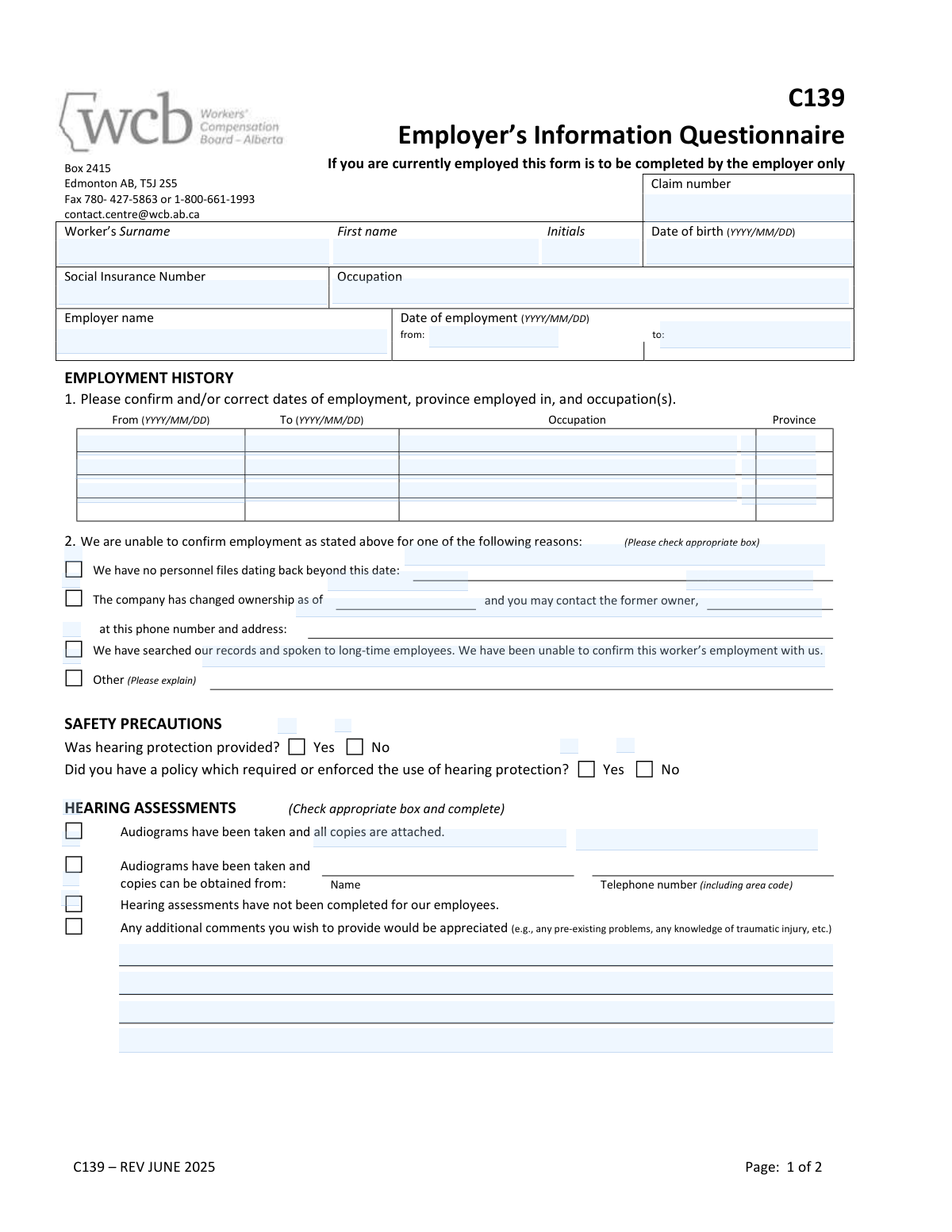
Form C139 is an employer-completed questionnaire used by WCB Alberta to verify a worker’s employment details and gather workplace exposure information relevant to a claim. It captures employment dates, occupations, and province(s) worked, along with safety precautions such as hearing protection policies. The form also requests supporting documentation like audiograms and noise level readings, or details on where those records can be obtained. This information helps WCB assess workplace noise exposure and determine claim eligibility and benefits.
Our AI automatically handles information lookup, data retrieval, formatting, and form filling.
It takes less than a minute to fill out C139 using our AI form filling.
Securely upload your data. Information is encrypted in transit and deleted immediately after the form is filled out.

Form specifications

Form name: C139 – Employer’s Information Questionnaire (WCB Alberta)
Number of pages: 2
Filled form examples: Form C139 Examples
Language: English
main-image

Instafill Demo: filling out a legal form in seconds

How to Fill Out C139 Online for Free in 2026

Are you looking to fill out a C139 form online quickly and accurately? Instafill.ai offers the #1 AI-powered PDF filling software of 2026, allowing you to complete your C139 form in just 37 seconds or less.
Follow these steps to fill out your C139 form online using Instafill.ai:
  1. 1 Enter the claim number and confirm the worker’s identifying details (name, date of birth, SIN, occupation) as shown on the form.
  2. 2 Provide employer details and the worker’s dates of employment (from/to), then complete the Employment History table with dates, occupation(s), and province(s) employed.
  3. 3 If employment cannot be confirmed, select the applicable reason (no files, ownership change with prior owner contact, unable to confirm after search, or other) and add the requested explanation/contact details.
  4. 4 Answer the Safety Precautions questions about whether hearing protection was provided and whether a policy required/enforced its use.
  5. 5 Complete the Hearing Assessments section by indicating whether audiograms exist; attach copies or provide the name and phone number of the source that can supply them, or indicate none were completed.
  6. 6 Complete the Noise Level Readings section by indicating whether readings exist; attach copies or provide the name and phone number of the source, or indicate none were taken, and list equipment/tools/machinery the worker used or worked near.
  7. 7 Add any additional comments, then enter company/contact information, print contact name and title, sign, and date the form before submitting to WCB Alberta via the provided contact method.

Our AI-powered system ensures each field is filled out correctly, reducing errors and saving you time.

Why Choose Instafill.ai for Your Fillable C139 Form?

Speed

Complete your C139 in as little as 37 seconds.

Up-to-Date

Always use the latest 2026 C139 form version.

Cost-effective

No need to hire expensive lawyers.

Accuracy

Our AI performs 10 compliance checks to ensure your form is error-free.

Security

Your personal information is protected with bank-level encryption.

Frequently Asked Questions About Form C139

Form C139 is used by WCB-Alberta to collect employer information about a worker’s employment history and workplace noise exposure, often in support of a hearing-related claim. It helps WCB confirm job dates, duties, and whether hearing protection, audiograms, and noise readings exist.

If the worker is currently employed, the form must be completed by the employer only. The employer should have someone with access to HR/safety records complete and sign it.

You must provide the WCB claim number and the worker’s surname, first name, initials, date of birth, Social Insurance Number, occupation, employer name, and dates of employment. Use the date format shown on the form (YYYY/MM/DD).

List each period separately with the “From” and “To” dates, the occupation for that period, and the province where the work was performed. Add additional lines or attach a separate page if needed, and reference the claim number on any attachment.

Check the box that best explains why you cannot confirm the employment (e.g., records don’t go back that far, ownership changed, or records/long-time employees can’t confirm). Provide the requested details such as the date records begin, former owner contact information, or an explanation under “Other.”

Indicate whether hearing protection was provided and whether there was a policy requiring or enforcing its use. Answer based on the period(s) the worker was employed and your documented safety practices.

Audiograms are hearing test results (hearing assessments). If audiograms were taken, check the appropriate box and either attach copies or provide the name and phone number of the provider who can supply them.

Check the box stating that hearing assessments have not been completed for your employees. You can still add helpful context in the comments section about noise exposure controls or any relevant history you are aware of.

Noise level readings are measurements of workplace noise exposure. If readings exist, check the box and attach copies, or provide the contact name and phone number for where WCB can obtain them.

Check the box indicating noise level readings have not been taken. Then complete the equipment/tools/machinery list to help WCB understand potential noise sources in the worker’s work area.

List the main noise-producing equipment the worker used or worked near (e.g., compressors, grinders, saws, heavy equipment, stamping presses). Include enough detail to identify the type of equipment and the work area, and add extra pages if necessary.

Use this section to share relevant information such as known pre-existing hearing issues, any traumatic injury events, changes in job duties, or hearing protection practices. Keep comments factual and based on records or direct knowledge.

Submit the form to WCB-Alberta using the contact details shown on the form: fax to 780-427-5863 or 1-800-661-1993, or email to [email protected]. Include the claim number on the form and on any attachments.

An authorized employer representative should print their name, provide their position/title, sign, and date the form (YYYY/MM/DD). The company name, telephone number, and a contact name are also required so WCB can follow up if needed.

The form itself does not list a specific processing time, and timelines can vary depending on the claim and whether records (audiograms/noise readings) are complete. Submitting the form promptly and attaching available documents can help avoid delays.

Compliance C139
Validation Checks by Instafill.ai

1
Claim Number Presence and Format Validation
Validates that the claim number field is completed and matches the expected WCB claim number format (e.g., allowed length, alphanumeric pattern, no illegal characters). This is critical for correctly associating the questionnaire with the correct claim file and avoiding misfiling. If validation fails, the submission should be rejected or routed to manual review with a request for correction.
2
Worker Name Completeness (Surname, First Name, Initials)
Ensures the worker’s surname and first name are provided, and that initials (if provided) contain only alphabetic characters and are not used as a substitute for the full first name. Accurate identity information is necessary to match the worker to the claim and employment records. If missing or malformed, the form should be flagged and the employer prompted to correct the worker identification fields.
3
Worker Date of Birth Format and Plausibility (YYYY/MM/DD)
Checks that the date of birth is present, follows the YYYY/MM/DD format, and represents a valid calendar date. It should also be plausibility-checked (e.g., not in the future and within a reasonable age range for employment). If invalid, the system should block submission or require correction because DOB is commonly used for identity matching and eligibility checks.
4
Social Insurance Number (SIN) Format and Check-Digit Validation
Validates that the SIN is exactly 9 digits (allowing optional spaces/hyphens for entry) and passes the Luhn check-digit algorithm. This reduces data entry errors and prevents mismatches with government/benefit records. If validation fails, the SIN should be rejected and the user required to re-enter it or leave it blank only if the process explicitly allows missing SIN with an explanation.
5
Occupation Field Required and Non-Placeholder Validation
Ensures the occupation field is completed and is not a placeholder value (e.g., 'N/A', 'unknown') unless the form rules explicitly allow it with an explanation. Occupation is essential for assessing exposure risk and interpreting hearing/noise information. If missing or non-informative, the submission should be flagged for follow-up because it can materially affect adjudication.
6
Employer Name Required and Legal-Entity Quality Check
Checks that the employer name is provided and appears to be a business/legal entity name rather than a person’s name or a department only (e.g., 'HR', 'Shop'). Correct employer identification is required for record linkage and potential contact. If validation fails, the form should be returned for correction or routed to manual review to confirm the employer entity.
7
Employment Date Range (From/To) Format, Validity, and Order
Validates that the 'Date of employment from/to' fields use YYYY/MM/DD, are valid dates, and that the 'from' date is not after the 'to' date (unless 'to' is intentionally blank to indicate currently employed, if allowed). This prevents impossible employment periods and supports accurate exposure timelines. If invalid, the system should require correction before acceptance.
8
Employment History Table Row Integrity (From/To/Occupation/Province)
For each completed row in the employment history table, verifies that required columns are present together: if a 'From' date is entered, then 'To', 'Occupation', and 'Province' must also be entered (and vice versa). It also checks date order within each row and that province values match an allowed list (e.g., Canadian provinces/territories abbreviations or full names). If a row is partially filled or contains invalid province/date data, the row should be rejected and the user prompted to complete or remove it.
9
Employment History vs. Summary Employment Dates Consistency
Compares the overall 'Date of employment from/to' summary with the earliest 'From' and latest 'To' dates in the employment history table (when provided). The summary should align with the table or be explainable (e.g., table includes multiple periods and the summary reflects the relevant period). If inconsistent beyond a defined tolerance, the submission should be flagged for review because timeline discrepancies can affect entitlement and exposure assessment.
10
Reason for Unable to Confirm Employment: Single-Selection and Conditional Fields
Ensures that if the employer indicates they are unable to confirm employment, exactly one reason checkbox is selected (unless the business rule allows multiple) and that all dependent fields are completed. For example, if 'no personnel files dating back beyond this date' is selected, the cutoff date must be provided; if 'company changed ownership' is selected, the ownership change date plus former owner contact details must be provided; if 'Other' is selected, an explanation is required. If dependencies are missing, the form should be rejected or returned for completion because the reason is incomplete and not actionable.
11
Safety Precautions Yes/No Responses Required and Mutually Exclusive
Validates that both safety questions ('Was hearing protection provided?' and 'Did you have a policy...') have exactly one response selected (Yes or No) and not both or neither. These answers are key to evaluating workplace controls and potential exposure mitigation. If invalid, the system should require correction because ambiguous safety responses undermine adjudication and follow-up.
12
Hearing Assessments Section: Exclusive Option Selection and Attachment/Source Requirements
Checks that exactly one hearing assessment option is selected: (1) audiograms attached, (2) audiograms taken and obtainable from a source, or (3) not completed. If option (1) is selected, the submission must include attachments; if option (2) is selected, the source name and telephone number must be provided and valid; if option (3) is selected, attachments and source fields should be empty. If these conditions are not met, the form should be flagged because missing audiogram evidence or source details prevents verification.
13
Noise Level Readings Section: Exclusive Option Selection and Attachment/Source Requirements
Validates that exactly one noise reading option is selected: (1) readings attached, (2) readings obtainable from a source, or (3) not taken. If attached is selected, at least one noise reading document must be included; if obtainable is selected, the provider name and telephone number must be completed and valid; if not taken is selected, attachment/source fields should be blank. Failures should trigger a correction request because noise data is central to assessing exposure levels.
14
Telephone Number Format Validation (Including Area Code)
Validates all telephone number fields (former owner contact, audiogram source, noise reading source, company telephone) to ensure they include an area code and contain only permitted characters (digits, spaces, parentheses, hyphens, plus). Where applicable, enforce minimum digit counts consistent with NANP (e.g., 10 digits) and reject obvious placeholders (e.g., 000-000-0000). If invalid, the form should be flagged because incorrect phone numbers prevent follow-up and evidence retrieval.
15
Employer Contact and Attestation Completeness (Company Name, Contact Name, Title, Signature, Date)
Ensures the bottom attestation section is complete: company name, company telephone number, contact name, position/title, signature, and signature date in YYYY/MM/DD format. The signature date must be a valid date and not unreasonably in the future. If any element is missing or invalid, the submission should be rejected or routed for correction because the form lacks accountable authorization and a reliable point of contact.

Common Mistakes in Completing C139

Using the wrong date format (not YYYY/MM/DD)

People often enter dates in their usual local format (e.g., DD/MM/YYYY or MM/DD/YYYY) or write them in words, which can cause the claim to be interpreted incorrectly. This can lead to delays while WCB confirms timelines or requests clarification. Always enter dates exactly as YYYY/MM/DD for date of birth, employment dates, and signature date, and double-check that month/day are not swapped.

Leaving employment dates incomplete or inconsistent

A common error is providing only a start date, using vague ranges (e.g., “2019–2021”), or listing dates that don’t match the “Employer name / Date of employment from/to” section and the Employment History table. Inconsistent timelines can prevent WCB from confirming exposure duration and may trigger follow-up requests. Ensure the “from” and “to” dates are complete, consistent across the form, and reflect any breaks in employment in separate lines.

Not listing all occupations and provinces in the Employment History table

Employers sometimes enter only one job title or omit the province, especially if the worker had multiple roles or worked at different sites. Missing occupation/province details can weaken the exposure assessment and slow adjudication. List each distinct role and location/province on separate lines with the correct date ranges, even if the worker stayed with the same company.

Checking a reason for “unable to confirm employment” without completing the required details

When selecting options like “no personnel files beyond this date” or “company changed ownership,” people often forget to fill in the date, former owner contact information, or the “beyond this date” cutoff. This leaves WCB without a path to verify employment and can stall the claim. If you check any of these boxes, complete every related blank (dates, names, phone numbers, addresses) and add a brief explanation under “Other” when needed.

Contradictory answers about hearing protection and enforcement policy

It’s common to answer “Yes” to hearing protection being provided but “No” to having/enforcing a policy (or vice versa) without explanation. Contradictions raise questions about actual usage and workplace controls, often prompting follow-up. Answer both questions carefully and, if the situation changed over time, clarify in the comments (e.g., policy introduced in a certain year or enforced only in specific areas).

Selecting “audiograms attached” but not actually attaching them (or attaching incomplete records)

Employers frequently check that audiograms are attached but forget to include them, include only a summary, or omit key pages/dates. Missing audiograms can delay medical review and exposure correlation. Attach complete copies (all pages, dates, and identifiers) or, if obtaining from a provider, choose the “copies can be obtained from” option and provide the provider’s full name and phone number.

Providing incomplete third-party contact details for audiograms/noise readings

When indicating records can be obtained elsewhere, people often provide only a company name without a contact person, or omit the area code/phone number. Incomplete contact details prevent WCB from retrieving records efficiently and can lead to repeated requests. Provide a specific contact name (if available), full telephone number including area code, and ensure the organization name is spelled correctly.

Not completing the noise level readings section correctly (box checked but no supporting info)

A frequent mistake is checking that noise readings exist but not attaching copies or not identifying where they can be obtained. This can delay assessment of workplace noise exposure and may require WCB to request additional documentation. If readings exist, either attach them or provide a clear source contact; if they do not exist, check “not been taken” and use the equipment list and comments to describe noise sources.

Listing equipment/tools too vaguely or omitting key noise sources

People often write generic terms like “machinery” or “tools” without specifying types, models, or the worker’s proximity, or they forget intermittent but loud equipment (e.g., grinders, impact tools, compressors). Vague equipment lists make it harder to evaluate exposure and may lead to follow-up questions. List specific equipment (type/model if known), typical tasks, and whether the worker operated it or worked nearby.

Missing or illegible employer identification and sign-off details

Common omissions include leaving out company name, contact name (printed), position/title, telephone number, signature, or the signature date. Without a clear authorized sign-off, WCB may treat the submission as incomplete and request resubmission. Print the contact name clearly, include a direct phone number, provide the signer’s title, sign the form, and date it in YYYY/MM/DD.

Employer form completed by the worker or someone without authority

Despite the instruction that the form is to be completed by the employer only (if the worker is currently employed), workers or unauthorized staff sometimes fill it out, leading to credibility and verification issues. This can result in WCB rejecting the information or requesting an authorized employer representative to redo it. Ensure an appropriate employer representative (HR, safety officer, or manager with access to records) completes and signs the form, and use company records rather than memory where possible.
Saved over 80 hours a year

“I was never sure if my IRS forms like W-9 were filled correctly. Now, I can complete the forms accurately without any external help.”

Kevin Martin Green

Your data stays secure with advanced protection from Instafill and our subprocessors

Robust compliance program

Transparent business model

You’re not the product. You always know where your data is and what it is processed for.

ISO 27001, HIPAA, and GDPR

Our subprocesses adhere to multiple compliance standards, including but not limited to ISO 27001, HIPAA, and GDPR.

Security & privacy by design

We consider security and privacy from the initial design phase of any new service or functionality. It’s not an afterthought, it’s built-in, including support for two-factor authentication (2FA) to further protect your account.

Fill out C139 with Instafill.ai

Worried about filling PDFs wrong? Instafill securely fills c139-employers-information-questionnaire-wcb-alber forms, ensuring each field is accurate.