Yes! You can use AI to fill out Ohio Department of Commerce – Table of Heirship (Unclaimed Funds Claim, Claims Less Than $3,000)
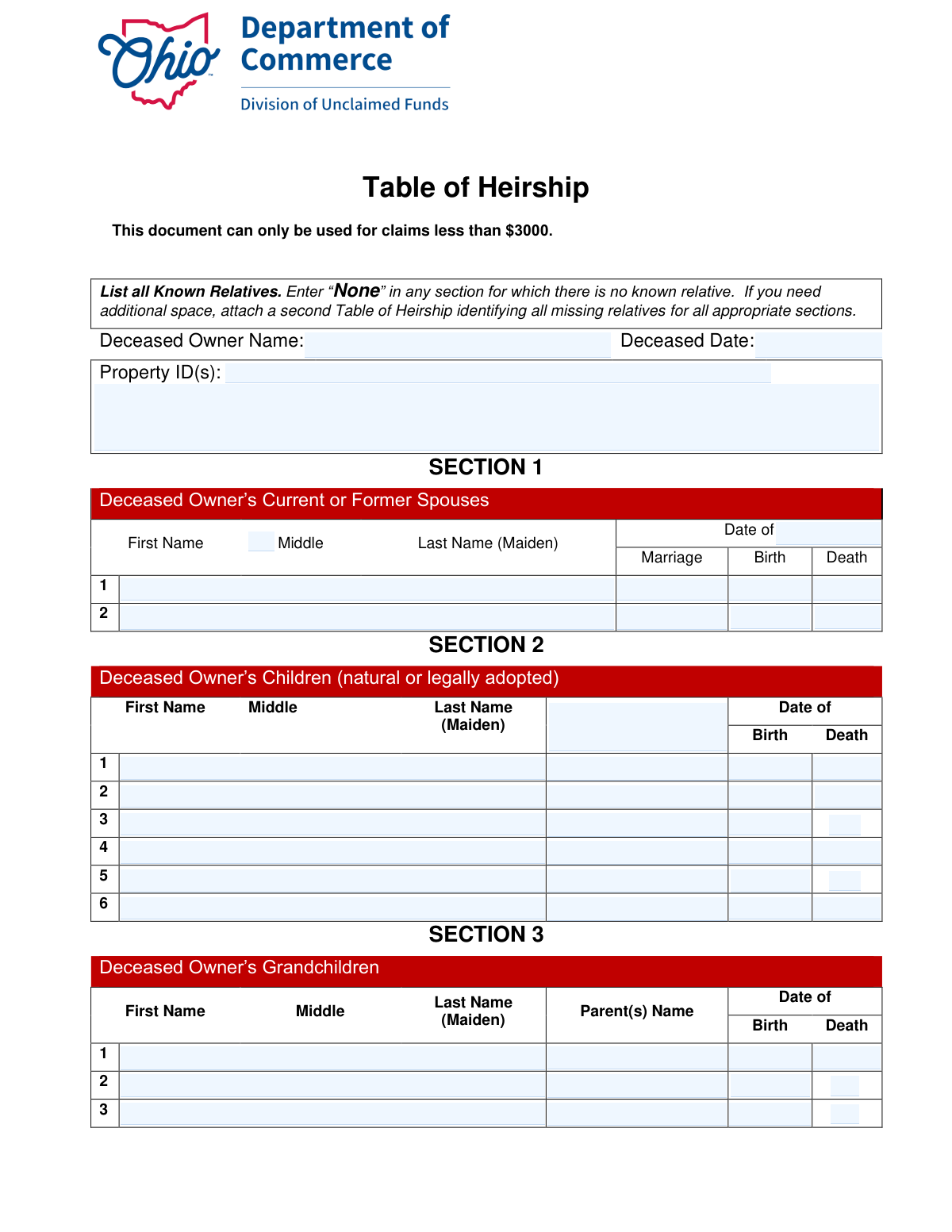
The Ohio Department of Commerce Table of Heirship is a sworn statement used by the Division of Unclaimed Funds to identify the deceased owner’s family members (spouses, children, grandchildren, parents, and siblings) and help determine the proper heirs for an unclaimed property claim. It must be completed with complete information for all known relatives—living or deceased—and is signed under penalty of perjury under Ohio law. The form is specifically noted as usable only for claims less than $3,000 and typically requires submission of the deceased owner’s certified unredacted death certificate, with additional documents possibly requested after review. Today, this form can be filled out quickly and accurately using AI-powered services like Instafill.ai, which can also convert non-fillable PDF versions into interactive fillable forms.
Our AI automatically handles information lookup, data retrieval, formatting, and form filling.
It takes less than a minute to fill out Ohio Table of Heirship using our AI form filling.
Securely upload your data. Information is encrypted in transit and deleted immediately after the form is filled out.
Form specifications
| Form name: | Ohio Department of Commerce – Table of Heirship (Unclaimed Funds Claim, Claims Less Than $3,000) |
| Number of pages: | 3 |
| Language: | English |
| Categories: | Ohio state forms, unclaimed funds forms, Ohio commerce forms, heirship forms |
Instafill Demo: filling out a legal form in seconds
How to Fill Out Ohio Table of Heirship Online for Free in 2026
Are you looking to fill out a OHIO TABLE OF HEIRSHIP form online quickly and accurately? Instafill.ai offers the #1 AI-powered PDF filling software of 2026, allowing you to complete your OHIO TABLE OF HEIRSHIP form in just 37 seconds or less.
Follow these steps to fill out your OHIO TABLE OF HEIRSHIP form online using Instafill.ai:
- 1 Go to Instafill.ai and upload the Ohio Department of Commerce Table of Heirship form (or select it from the form library).
- 2 Enter the deceased owner’s information: full name, date of death, and the Property ID(s) from the claim details page (add any additional property identifiers if needed).
- 3 Complete Section 1 by listing all current or former spouses (or enter “None”), including names, marriage date, and birth/death dates as applicable.
- 4 Complete Section 2 by listing all children (natural or legally adopted) (or “None”), including names and birth/death dates; include parent name references if the form requests them.
- 5 Complete Section 3 by listing all grandchildren (or “None”), including names, parent(s) name, and birth/death dates.
- 6 Complete Sections 4 and 5 by listing the deceased owner’s parents and all brothers/sisters (or “None”), including names and birth/death dates.
- 7 Use Instafill.ai to review for missing relatives/blank sections, attach an additional Table of Heirship if more space is needed, then add printed name(s), signature(s), and date(s) and download/submit with the required death certificate and any supporting documents.
Our AI-powered system ensures each field is filled out correctly, reducing errors and saving you time.
Why Choose Instafill.ai for Your Fillable Ohio Table of Heirship Form?
Speed
Complete your Ohio Table of Heirship in as little as 37 seconds.
Up-to-Date
Always use the latest 2026 Ohio Table of Heirship form version.
Cost-effective
No need to hire expensive lawyers.
Accuracy
Our AI performs 10 compliance checks to ensure your form is error-free.
Security
Your personal information is protected with bank-level encryption.
Frequently Asked Questions About Form Ohio Table of Heirship
This form is used to list the deceased property owner’s known relatives (living and deceased) to help the Ohio Division of Unclaimed Funds determine who is entitled to claim the property.
Anyone filing an unclaimed funds claim on behalf of a deceased owner may need to complete it, especially when the state must verify heirs. You should provide information for yourself and all known relatives of the deceased owner.
Yes. The form states it can only be used for claims less than $3,000. If your claim is $3,000 or more, you may need a different process or additional documentation.
You’ll need the deceased owner’s full legal name, date of death, and the Property ID(s) from the claim details page. You’ll also need names and key dates (birth, death, marriage) for the deceased owner’s relatives.
A certified, unredacted death certificate for the deceased owner must be submitted for examination. The Division of Unclaimed Funds may request additional documents after reviewing your claim.
The Property ID is found on the claim details page printed with your claim form. If there are multiple Property IDs, list all of them in the Property ID field and use any “Additional Property Information” space if needed.
List all current or former spouses, one per line, whether living or deceased. If the deceased owner never married, write “None” in Section 1.
List all children of the deceased owner, including natural and legally adopted children, one per line (living or deceased). If there were no children, enter “None.”
For each child in Section 2, enter the first name of the child’s parent as listed in Section 1 (the spouse/other parent). For each grandchild in Section 3, enter the first name of the grandchild’s parent as listed in Section 2.
Provide the most accurate information you have and avoid guessing if you’re unsure. If you don’t have a date, leave it blank or add an explanatory note in an attachment if needed, since the information is subject to investigation.
Attach a second Table of Heirship and include all missing relatives in the appropriate sections. Make sure the additional page clearly identifies the deceased owner and continues the same section format.
By signing, you are declaring the information is true and correct under Ohio law, and false statements can lead to denial of the claim. The form provides signature lines for two declarants, so follow the claim instructions for whether one or two signatures are required in your situation.
Yes. AI tools can help organize family information and auto-fill form fields to reduce errors and save time. Services like Instafill.ai use AI to auto-fill form fields accurately based on the information you provide.
Upload the Table of Heirship PDF to Instafill.ai, then provide the deceased owner details, Property ID(s), and relatives’ information when prompted. Instafill.ai can map your answers into the correct fields (spouses, children, grandchildren, parents, siblings) and generate a completed form for you to review before signing.
If the PDF is flat/non-fillable, Instafill.ai can convert it into an interactive fillable form so you can type directly into the correct fields. After conversion, review the output carefully to ensure names and dates appear in the right sections before submitting.
Compliance Ohio Table of Heirship
Validation Checks by Instafill.ai
1
Claim Amount Eligibility (Must Be < $3000)
Validates that the claim associated with the submitted Table of Heirship is for less than $3000, as the form explicitly limits use to claims under this threshold. This prevents processing a claim using an inapplicable affidavit/table that may not meet statutory or agency requirements. If the claim amount is $3000 or more (or cannot be determined), the submission should be rejected or routed to the correct form/workflow.
2
Deceased Owner Name Completeness and Legal-Name Format
Ensures the Deceased Owner Name is present and appears to be a full legal name (at minimum first and last name), not initials-only or placeholders (e.g., "N/A", "Unknown"). This is critical for matching the claim to the unclaimed property record and death certificate. If the name is missing or clearly incomplete, the form should fail validation and request correction.
3
Deceased Date Valid Date and Not in the Future
Checks that the Deceased Date is provided and is a valid calendar date in an accepted format (e.g., MM/DD/YYYY), and that it is not a future date. The date of death is required for eligibility and for verifying the death certificate and heirship timeline. If invalid or future-dated, the submission should be blocked and the user prompted to correct the date.
4
Property ID(s) Required and Properly Delimited
Validates that at least one Property ID is provided and that multiple IDs (if entered) follow a consistent delimiter rule (e.g., comma-separated) without illegal characters. Property IDs are necessary to link the heirship table to specific unclaimed funds records. If missing or malformed, the submission should fail because the claim cannot be reliably associated with the correct property record(s).
5
At Least One Relative Section Completed or Explicit 'None' Entered
Ensures each heirship section (Spouses, Children, Grandchildren, Parents, Siblings) is either populated with at least one person or explicitly contains the word "None" as instructed. This prevents ambiguous omissions where a section is left blank and reviewers cannot tell whether relatives are unknown or simply not provided. If any section is blank without "None" or entries, the submission should be flagged as incomplete.
6
Person Row Completeness (Name + Required Dates When a Row Is Used)
When a spouse/child/grandchild/parent/sibling row is partially filled, validates that the minimum required fields for that row are completed (e.g., first and last name, and date of birth where requested). Partial rows create uncertainty and can lead to incorrect heir determination or follow-up delays. If a row has any data but is missing required companion fields, validation should fail and require completion or removal of the row.
7
Date Fields Must Be Valid and Chronologically Plausible (Birth/Marriage/Death)
Validates that all entered dates (birth, marriage, death) are real dates and follow logical chronology: birth date must be before death date; marriage date must not be after the deceased owner’s death date; and birth dates should not be in the future. Chronological plausibility reduces fraud risk and prevents data-entry errors that break downstream adjudication. If any date relationship is impossible, the submission should be rejected or flagged for correction.
8
Deceased/Death Checkbox Consistency With Date of Death Fields
For fields that include a "deceased" checkbox (e.g., Third Child Death, Fifth Child Death, Third Grandchild Death, Fifth Sibling Death), verifies consistency: if checked, a Date of Death must be provided; if not checked, Date of Death should be blank (or explicitly allowed only with a warning). This prevents contradictory records that complicate heirship review. If inconsistent, validation should fail and require the user to reconcile the checkbox and date.
9
Child Parent Name Must Reference a Listed Spouse (Section 1 Cross-Reference)
Validates that each child’s Parent’s Name (where collected) matches the first name (or full name, depending on system rules) of a spouse listed in Section 1, or is otherwise handled by a defined exception rule (e.g., "None/Unknown" only if no spouses exist and policy allows). The form instructions explicitly require the parent name to come from Section 1, enabling lineage verification. If the parent name does not match any spouse entry, the submission should be flagged for correction or additional documentation.
10
Grandchild Parent Name Must Reference a Listed Child (Section 2 Cross-Reference)
Ensures each grandchild’s Parent(s) Name corresponds to a child listed in Section 2 (again using a consistent matching rule such as first name + last name, or a unique selection if implemented). This linkage is essential to establish the generational relationship and determine representation if a child is deceased. If the referenced parent is not found among listed children, validation should fail or require clarification.
11
Parents Section Completeness (Both Parents or Explicit Unknown/None Handling)
Checks that Section 4 includes entries for both Father and Mother (living or dead) as instructed, or that the system captures an explicit "Unknown"/"None" value per parent if allowed by policy. Parent information is often required to resolve heirship when spouse/children are absent or disputed. If one parent is omitted without an explicit indicator, the submission should be marked incomplete.
12
Duplicate Person Detection Across Sections and Rows
Detects likely duplicates (same name and date of birth, or strong fuzzy match) entered multiple times within a section or across sections (e.g., the same child listed twice, or a spouse repeated in both the structured spouse fields and the generic spouse section). Duplicates can distort heir counts and shares and create review delays. If duplicates are detected, the submission should be flagged for user confirmation, merge, or correction.
13
Heirship Share Field Validation (Numeric/Percent and Totals)
For rows that capture an heir share (e.g., Heir 4 Share), validates that the value is in an accepted format (percentage like 25% or decimal like 0.25) and within allowed bounds (>0 and ≤100% if percent). If multiple shares are provided, validates that the total equals 100% (or 1.0) within a small tolerance, unless the workflow explicitly allows partial/unknown shares. If invalid or totals do not reconcile, the submission should be rejected or flagged for correction because distribution cannot be computed reliably.
14
Signature, Printed Name, and Date Required for Each Declarant
Validates that each declarant block is complete: Printed Name, Signature, and Date must all be present for the first declarant, and if the second declarant fields are used, they must also be fully completed. The perjury statement requires an executed attestation to be legally effective and reviewable. If any required attestation element is missing, the submission should fail validation and be returned for completion.
15
Declaration Dates Valid and Not Before Deceased Date
Checks that declarant signature dates are valid dates, not in the future, and not earlier than the Deceased Date (since the declaration concerns a deceased owner). This helps prevent obvious data-entry errors and strengthens evidentiary reliability. If a declaration date is invalid or precedes the death date, the submission should be flagged for correction before acceptance.
16
Unlabeled/Free-Text Fields Must Not Contain Placeholders or Sensitive Data Leakage
Validates that the "Unlabeled Field" and other free-text fields (e.g., text_* fields, Additional Property Information) are not left as placeholders ("N/A" where a value is required, random characters) and do not include inappropriate sensitive data not requested (e.g., SSNs, bank account numbers). This reduces processing risk, privacy exposure, and downstream parsing failures. If placeholders or prohibited sensitive data are detected, the submission should be blocked or routed for secure handling and user correction.
Common Mistakes in Completing Ohio Table of Heirship
People often miss the note that this document can only be used for claims less than $3,000 and submit it for larger claims anyway. This can lead to delays, rejection, or a request to resubmit using the correct process/forms. Confirm the claim amount before completing the form and use the correct documentation for higher-value claims; AI-powered tools like Instafill.ai can flag eligibility issues early so you don’t complete the wrong form.
A common error is using nicknames, omitting middle names/initials, or not matching the deceased owner’s name to the death certificate and claim record. Mismatches can trigger manual review, requests for additional proof, or denial if identity cannot be verified. Always enter the full legal name exactly as it appears on the certified unredacted death certificate and the claim details; Instafill.ai can help standardize names and reduce mismatches across documents.
This form mixes full-date fields and split fields (e.g., child date of birth entered as MM/DD and YYYY separately), which causes people to enter a full date in one box or omit the year. Incorrect or inconsistent dates can create conflicts with vital records and slow verification. Follow the field structure exactly (MM/DD in the month/day box and YYYY in the year box) and use consistent formatting throughout; Instafill.ai can automatically format dates correctly and validate that required parts are present.
The instructions require entering “None” in any section where there is no known relative, but many applicants leave the rows empty. Blank sections can be interpreted as missing information rather than “no relatives,” prompting follow-up requests and delays. Explicitly write “None” for each inapplicable section (spouses, children, grandchildren, siblings) to show you addressed it; Instafill.ai can auto-populate “None” where appropriate to prevent accidental omissions.
Applicants frequently list only the most recent spouse and forget prior marriages, especially if divorced or the spouse is deceased. Missing spouses can change the heirship analysis and may result in denial or a request to amend the table. Include all current and former spouses, one per line, and provide marriage dates and birth/death dates when known; Instafill.ai can prompt for prior spouses and ensure each spouse entry is complete.
Fields labeled “Last Name (Maiden)” are often filled with a current married name or left blank, especially for women whose names changed. This can prevent the agency from matching relatives to records and can trigger additional documentation requests. Enter the maiden name when applicable (and the legal last name if different, where the form allows) and keep it consistent with vital records; Instafill.ai can help normalize name variants and remind you when a maiden name is likely needed.
The form specifically says the parent’s first name must come from the earlier section (child’s parent from Section 1; grandchild’s parent from Section 2), but people often enter the other parent, a full name not listed, or leave it blank. This breaks the linkage the reviewer uses to confirm family relationships and can cause follow-up questions. Copy the parent’s name exactly as listed in the referenced section and keep spelling consistent; Instafill.ai can cross-reference entries and prevent mismatched parent links.
Many filers assume only living heirs matter and omit deceased spouses, children, parents, or siblings. The instructions require listing known relatives “both living and dead,” and missing deceased relatives can change the distribution path and create gaps in the family tree. Include every known relative regardless of whether they are living, and complete the date of death when applicable; Instafill.ai can prompt for death information and ensure deceased-status fields/checkboxes align with entered dates.
Some sections include “Death” checkboxes (e.g., certain children/grandchildren/siblings) while other areas require a date of death; people often check the box but forget the date, or enter a death date without indicating deceased status. Inconsistencies can cause the form to look unreliable and may lead to clarification requests. If someone is deceased, mark the appropriate checkbox (if present) and provide the date of death; if living, leave death fields blank (or follow instructions) and do not check deceased; Instafill.ai can validate that checkbox selections and dates agree.
The form provides limited lines (e.g., up to 2 spouses, 6 children, 3 grandchildren, 6 siblings), so people squeeze multiple relatives into one line, write in margins, or omit relatives entirely. This can make the submission illegible, incomplete, and more likely to be rejected or delayed. Use a second Table of Heirship for overflow and clearly identify all missing relatives in the appropriate sections; if the form is a flat non-fillable PDF, Instafill.ai can convert it into a fillable version and help you add structured continuation pages.
Applicants often sign but forget to print their name, forget the date, or leave the second declarant section incomplete when it is required by the submission context. Because the declaration is under penalty of perjury, incomplete execution can invalidate the form and force resubmission. Ensure each declarant line has a printed name, signature, and date exactly where indicated, and confirm whether one or two declarants are needed; Instafill.ai can highlight missing execution fields before you submit.
Saved over 80 hours a year
“I was never sure if my IRS forms like W-9 were filled correctly. Now, I can complete the forms accurately without any external help.”
Kevin Martin Green
Your data stays secure with advanced protection from Instafill and our subprocessors

Robust compliance program
Transparent business model
You’re not the product. You always know where your data is and what it is processed for.
ISO 27001, HIPAA, and GDPR
Our subprocesses adhere to multiple compliance standards, including but not limited to ISO 27001, HIPAA, and GDPR.
Security & privacy by design
We consider security and privacy from the initial design phase of any new service or functionality. It’s not an afterthought, it’s built-in, including support for two-factor authentication (2FA) to further protect your account.
Fill out Ohio Table of Heirship with Instafill.ai
Worried about filling PDFs wrong? Instafill securely fills ohio-department-of-commerce-table-of-heirship-unclaimed-funds-claim-claims-less-than-3000 forms, ensuring each field is accurate.