Yes! You can use AI to fill out SIMPLE Retirement Account (SRA) Program Employer Notice and Salary-Reduction Agreement

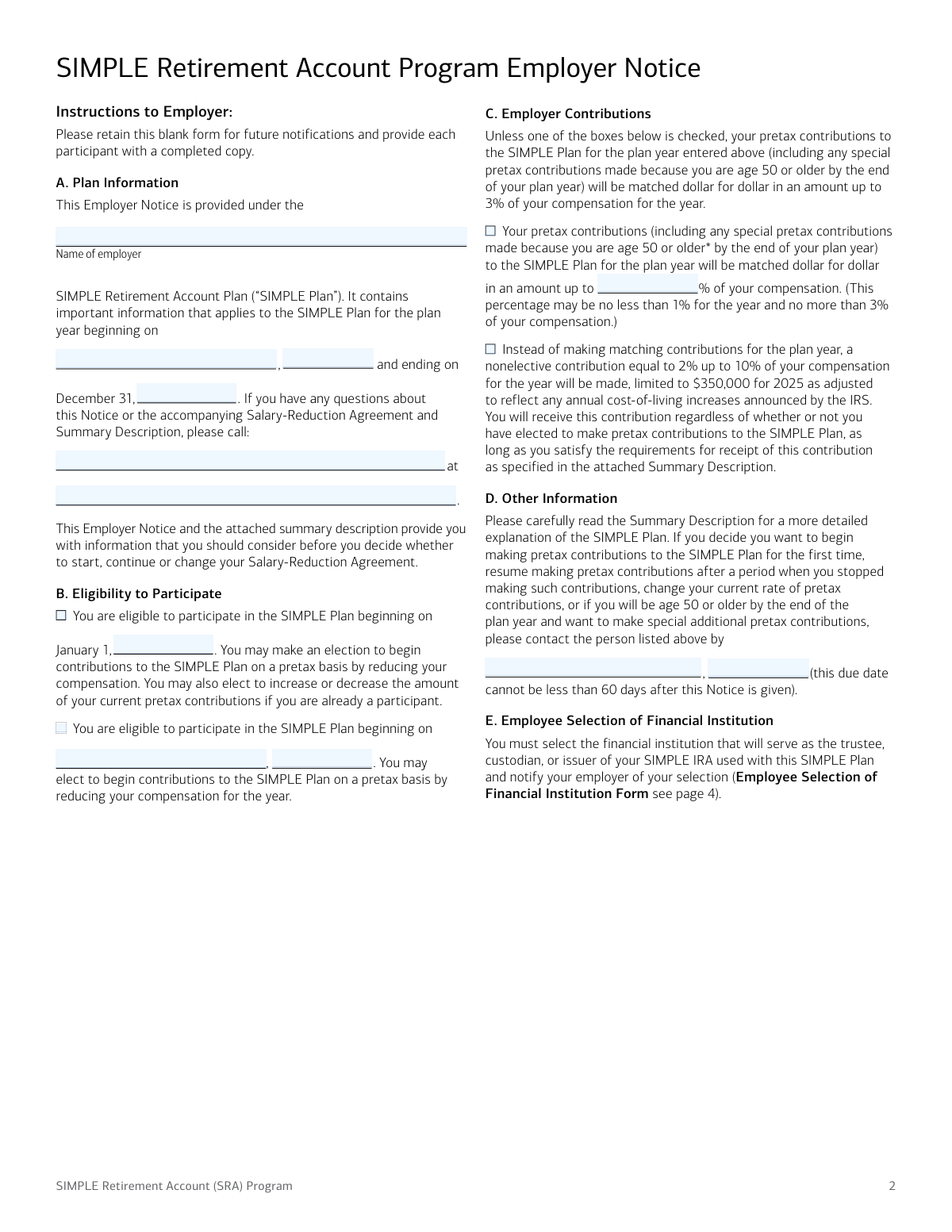
The SIMPLE Retirement Account (SRA) Program form serves as both a notice from an employer to an employee about their eligibility for a SIMPLE retirement plan and as an agreement for the employee to reduce their salary for plan contributions. It outlines contribution options, eligibility details, and requires the employee to select a financial institution for their SIMPLE IRA. Today, this form can be filled out quickly and accurately using AI-powered services like Instafill.ai, which can also convert non-fillable PDF versions into interactive fillable forms.
Our AI automatically handles information lookup, data retrieval, formatting, and form filling.
It takes less than a minute to fill out SIMPLE SRA Program using our AI form filling.
Securely upload your data. Information is encrypted in transit and deleted immediately after the form is filled out.

Form specifications

Form name: SIMPLE Retirement Account (SRA) Program Employer Notice and Salary-Reduction Agreement
Number of pages: 1
Language: English
Categories: employer forms, retirement forms, retirement account forms
main-image

Instafill Demo: How to fill out PDF forms in seconds with AI

How to Fill Out SIMPLE SRA Program Online for Free in 2026

Are you looking to fill out a SIMPLE SRA PROGRAM form online quickly and accurately? Instafill.ai offers the #1 AI-powered PDF filling software of 2026, allowing you to complete your SIMPLE SRA PROGRAM form in just 37 seconds or less.
Follow these steps to fill out your SIMPLE SRA PROGRAM form online using Instafill.ai:
  1. 1 Navigate to Instafill.ai and upload the SIMPLE SRA Program form or select it from their template library.
  2. 2 Let the AI assist the employer in completing the 'Plan Information' section with details about the plan year and contribution options.
  3. 3 As the employee, provide your personal details in the 'Participant Information' section.
  4. 4 Complete the 'Salary-Reduction Election' to specify the percentage or dollar amount of your compensation to contribute to your retirement account.
  5. 5 If applicable, fill out the section for additional special age 50 or older contributions.
  6. 6 Complete the 'Employee Selection of Financial Institution Form' with your chosen institution's details and your account number.
  7. 7 Review all AI-populated fields for accuracy, electronically sign the agreement, and submit the completed form to your employer.

Our AI-powered system ensures each field is filled out correctly, reducing errors and saving you time.

Why Choose Instafill.ai for Your Fillable SIMPLE SRA Program Form?

Speed

Complete your SIMPLE SRA Program in as little as 37 seconds.

Up-to-Date

Always use the latest 2026 SIMPLE SRA Program form version.

Cost-effective

No need to hire expensive lawyers.

Accuracy

Our AI performs 10 compliance checks to ensure your form is error-free.

Security

Your personal information is protected with bank-level encryption.

Frequently Asked Questions About Form SIMPLE SRA Program

This form allows eligible employees to enroll in their employer's SIMPLE IRA plan, specify how much of their salary to contribute, and designate a financial institution for their retirement account.

Any employee who is eligible for the company's SIMPLE Plan and wishes to start, change, or stop making pretax salary contributions needs to complete this form. Your employer will notify you of your eligibility.

You will need your personal details, your desired contribution amount (as a percentage or dollar figure), and the account information for your chosen financial institution, including its name, address, and your SIMPLE IRA account number.

Your employer will either match your contributions up to a certain percentage (usually 1-3%) or make a nonelective contribution on your behalf. Refer to Section C of the Employer Notice to see which method your employer has chosen.

Yes, you must select a financial institution to hold your SIMPLE IRA and provide its details on the 'Employee Selection of Financial Institution Form'. If you don't, your employer may select one for you.

For 2025, you can contribute up to $16,500. If you are age 50 or older, you may be eligible to make an additional 'catch-up' contribution of up to $3,500, or more if you are age 60-63.

This is your choice. A percentage automatically adjusts with pay changes, while a fixed dollar amount is predictable each pay period. Choose the option that best suits your financial planning.

Yes, you can change your contribution rate by submitting a new form and checking the 'Amended Agreement' box. This new agreement will replace your previous election.

You must return the completed and signed form to your employer. The specific deadline is provided by your employer in Section D of the Employer Notice.

To stop contributing, you must submit a new Salary-Reduction Agreement to your employer with '0' entered in the contribution amount field in Section C.

To make additional contributions, you must complete Section D, 'Additional Special Age 50 or Older Salary-Reduction Election', specifying the extra amount you wish to contribute.

Yes, services like Instafill.ai use AI to help you accurately auto-fill form fields with your information, which saves time and reduces the chance of errors.

You can use a service like Instafill.ai to complete the form digitally. Simply upload the PDF, and the AI-powered tool will guide you through filling out the necessary fields before you download it for submission.

If you receive a non-fillable or 'flat' PDF, you can use a tool like Instafill.ai to instantly convert it into an interactive, fillable form. This allows you to type your information directly into the fields.

Compliance SIMPLE SRA Program
Validation Checks by Instafill.ai

1
Plan Year Consistency
Validates that the start year and end year for the plan in Section A of the Employer Notice are identical. This ensures the notice applies to a single, coherent plan year as intended. A mismatch could lead to confusion and incorrect application of plan rules for contributions and eligibility.
2
Employer Name Consistency Across Forms
Ensures the 'Name of employer' in the Employer Notice (Page 2, Section A) exactly matches the 'Name of Employer' on the Salary-Reduction Agreement (Page 3, Section A). This is critical for linking the employee's agreement to the correct company's SIMPLE plan. Mismatched names could result in the agreement being rejected or processed for the wrong entity.
3
Valid Employer Contribution Percentage
Checks the employer contribution options in Section C of the Employer Notice. If the employer chooses to match a percentage of compensation, this validation ensures the entered percentage is not less than 1% and not more than 3%. This rule is mandated by the form's instructions and prevents the setup of a non-compliant plan contribution structure.
4
Agreement Type Selection
Confirms that in Section B of the Salary-Reduction Agreement, the employee has selected exactly one of the two checkboxes: 'Original Agreement' or 'Amended Agreement'. This information is crucial for payroll and plan administrators to know whether to initiate a new deduction or modify an existing one. Failure to select one option makes the employee's intent unclear.
5
Mutually Exclusive Salary Reduction Election
Verifies that in Section C of the Salary-Reduction Agreement, an employee has filled in either the percentage field or the dollar amount field, but not both. This prevents ambiguity in how much the employee wishes to contribute from their salary. If both are filled, the form should be rejected and returned to the employee for clarification.
6
Termination Agreement Logic
Validates that if an employee enters '0' in the salary-reduction election (Section C) to terminate contributions, then the 'Additional Special Age 50 or Older' section (Section D) is left blank. This enforces the form's instructions and ensures a clean termination request without conflicting data. An entry in Section D would contradict the intent to stop all contributions.
7
Age 50+ Contribution Limit Adherence
Checks that any amount entered in the 'Additional Special Age 50 or Older Salary-Reduction Election' (Section D) does not exceed the annual limit specified by the IRS ($3,500 for 2025). This validation is essential for tax compliance and prevents excess contributions that could lead to penalties for the employee. The system should flag any amount over this limit for correction.
8
Signature Date Format and Presence
Ensures that the date fields next to the employee signatures on both the Salary-Reduction Agreement and the Financial Institution Selection form are present and in a valid MM/DD/YYYY format. A missing or improperly formatted date can call into question when the agreement was executed, which is critical for determining the effective start date of contributions.
9
Employee Name Consistency
Verifies that the printed name in the signature block (Section E) of the Salary-Reduction Agreement matches the employee's name provided in the Participant Information section (Section B). This cross-reference confirms the identity of the person signing the agreement. A discrepancy could indicate a form was signed by the wrong person or contains a typo that needs correction.
10
Financial Institution Information Completeness
Checks that all fields on the 'Employee Selection of Financial Institution Form' are filled out, including the institution's name, full address, and the employee's account name and number. Missing information would make it impossible for the employer to direct contributions to the correct account. The form submission would be considered incomplete until all details are provided.
11
Valid Financial Institution ZIP Code
Validates that the ZIP code provided for the financial institution is in a proper 5-digit or 9-digit (ZIP+4) format. This simple format check helps ensure mail deliverability and data accuracy for the employer's records. An invalid format could cause processing delays or errors in setting up the contribution destination.
12
Salary Reduction Choice Required
Ensures that for a non-terminating agreement (i.e., the contribution in Section C is not '0'), the employee has made a selection by filling in either the percentage or dollar amount. An agreement cannot be processed without a specified contribution amount. This check prevents the submission of incomplete agreements where the core election is missing.
13
Contact Information Completeness
Validates that in Section A of the Employer Notice, both the contact person's name and their contact information (phone number) are provided. This ensures employees have a designated point of contact for any questions about the plan. An incomplete contact section hinders communication and can lead to employee confusion.

Common Mistakes in Completing SIMPLE SRA Program

Ambiguous Salary-Reduction Election

Employees often fill out both the percentage and the dollar amount fields in Section C or D, or the stated percentage does not match the dollar amount. This creates ambiguity for payroll, leading to incorrect deductions or processing delays. To avoid this, carefully choose only one option—either a percentage of your pay or a specific dollar amount—and leave the other blank.

Incomplete or Incorrect Financial Institution Details

The 'Employee Selection of Financial Institution Form' is frequently submitted with missing or inaccurate information, such as an incorrect account number or a partial address. This is a critical error as it prevents the employer from depositing contributions, causing the employee to miss out on investment growth. Double-check that the institution's full name, address, and your exact SIMPLE IRA account name and number are entered correctly before submitting.

Using a Personal Bank Account Instead of a SIMPLE IRA

A common misunderstanding is providing details for a personal checking or savings account instead of a designated SIMPLE IRA. Retirement plan contributions are legally required to be deposited into a qualified retirement account. This error will cause all contribution attempts to fail until you open a proper SIMPLE IRA and resubmit the form with the correct account information.

Forgetting to Submit the Financial Institution Selection Form

Employees sometimes complete the Salary-Reduction Agreement but forget to include the separate 'Employee Selection of Financial Institution Form'. If this form is not provided by the deadline, the employer may be forced to select a financial institution on the employee's behalf, which may not be their preferred choice. Ensure you complete and submit all required pages of the packet to maintain control over your retirement account.

Improper Age 50+ Catch-Up Contribution

Employees who are not yet age 50 by the end of the plan year sometimes mistakenly fill out Section D for special catch-up contributions. This leads to rejection of the election and requires the form to be resubmitted. Only complete Section D if you meet the age requirement, and ensure the amount is within the specified additional limit, not your total contribution.

Requesting Contributions Above IRS Limits

An employee might elect a percentage or dollar amount that, when annualized, exceeds the IRS maximum contribution limit stated in Section C. This requires payroll to manually cap the contributions or return the form for correction, delaying proper deductions. AI-powered form filling tools like Instafill.ai can help prevent this by automatically validating entries against plan limits to ensure compliance.

Omitting or Mismarking Agreement Type

In Section B of the Salary-Reduction Agreement, employees frequently forget to check whether it is an 'Original Agreement' or an 'Amended Agreement.' This can cause processing delays as the employer must verify if this is a new enrollment or a change to an existing one. Always check 'Original' if you are enrolling for the first time and 'Amended' if you are changing a previous election.

Missing Signature, Date, or Printed Name

A surprising number of forms are submitted without a signature, date, or clearly printed name in the signature section. An unsigned agreement is legally invalid and cannot be processed, delaying your participation in the retirement plan. If the form is a non-fillable PDF, tools like Instafill.ai can convert it into an interactive version, making it easier to spot and fill all required fields before signing.

Incorrectly Filling Form to Stop Contributions

The instructions specify that to terminate contributions, an employee should enter '0' in Section C. However, people often write 'Stop' or 'N/A,' or leave the section blank, which can be misinterpreted as an incomplete form rather than an intentional termination. To clearly and effectively stop your contributions, follow the instructions precisely by entering '0' in the salary-reduction election field.

Making an Election Based on Misunderstood Employer Contributions

Employees may not fully read or understand the employer's contribution choice described in the Employer Notice (e.g., a 3% match vs. a 2% nonelective contribution). This can lead them to contribute less than needed to get the full match, or contribute unnecessarily when a nonelective contribution is guaranteed. Carefully read the employer's notice to understand their contribution policy so you can make an informed decision about your own salary reduction.
Saved over 80 hours a year

“I was never sure if my IRS forms like W-9 were filled correctly. Now, I can complete the forms accurately without any external help.”

Kevin Martin Green

Your data stays secure with advanced protection from Instafill and our subprocessors

Robust compliance program

Transparent business model

You’re not the product. You always know where your data is and what it is processed for.

ISO 27001, HIPAA, and GDPR

Our subprocesses adhere to multiple compliance standards, including but not limited to ISO 27001, HIPAA, and GDPR.

Security & privacy by design

We consider security and privacy from the initial design phase of any new service or functionality. It’s not an afterthought, it’s built-in, including support for two-factor authentication (2FA) to further protect your account.

Fill out SIMPLE SRA Program with Instafill.ai

Worried about filling PDFs wrong? Instafill securely fills simple-retirement-account-sra-program-employer-notice-and-salary-reduction-agreement forms, ensuring each field is accurate.