Yes! You can use AI to fill out Form BWC-1141, Request for Medical Information
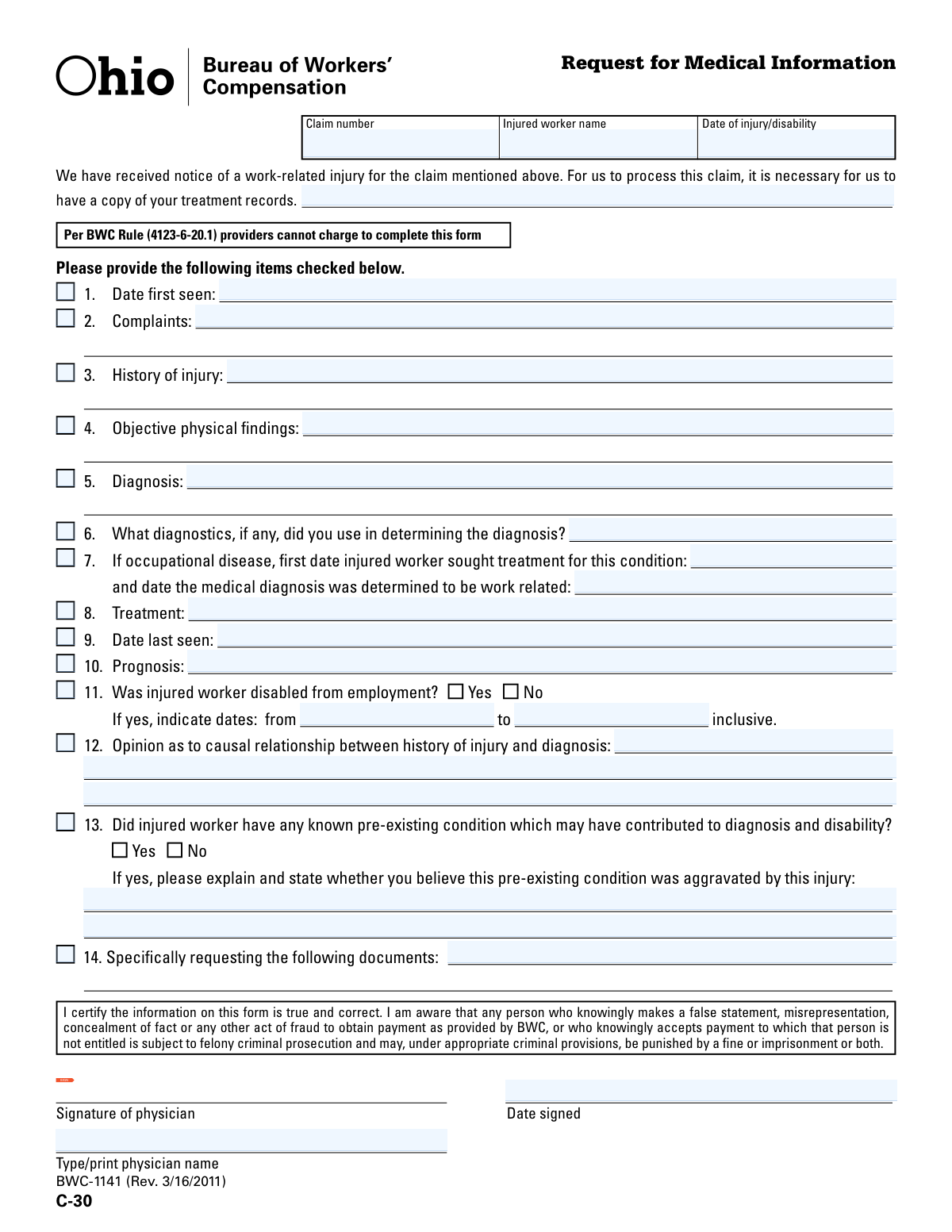
Form BWC-1141, also known as C-30, is a Request for Medical Information used by the Ohio Bureau of Workers' Compensation. Healthcare providers complete this form to supply detailed medical records and professional opinions regarding an employee's work-related injury or occupational disease. This information, including diagnosis, treatment, and causality, is critical for the BWC to process and adjudicate the workers' compensation claim. Today, this form can be filled out quickly and accurately using AI-powered services like Instafill.ai, which can also convert non-fillable PDF versions into interactive fillable forms.
Our AI automatically handles information lookup, data retrieval, formatting, and form filling.
It takes less than a minute to fill out BWC-1141 / C-30 using our AI form filling.
Securely upload your data. Information is encrypted in transit and deleted immediately after the form is filled out.
Form specifications
| Form name: | Form BWC-1141, Request for Medical Information |
| Number of pages: | 1 |
| Language: | English |
| Categories: | medical forms, VA medical forms, Medi-Cal forms, medical request forms |
Instafill Demo: How to fill out PDF forms in seconds with AI
How to Fill Out BWC-1141 / C-30 Online for Free in 2026
Are you looking to fill out a BWC-1141 / C-30 form online quickly and accurately? Instafill.ai offers the #1 AI-powered PDF filling software of 2026, allowing you to complete your BWC-1141 / C-30 form in just 37 seconds or less.
Follow these steps to fill out your BWC-1141 / C-30 form online using Instafill.ai:
- 1 Navigate to Instafill.ai and upload or select the BWC-1141 form.
- 2 Enter the basic claim information, including the claim number, injured worker's name, and the date of injury or disability.
- 3 Provide detailed medical information by checking the relevant items and filling in the corresponding fields for the initial evaluation, such as complaints, history of injury, diagnosis, and diagnostics used.
- 4 Document the treatment provided, the date the patient was last seen, and the medical prognosis.
- 5 Answer the questions regarding the worker's disability status, your opinion on the causal relationship between the injury and diagnosis, and any pre-existing conditions.
- 6 If specific documents are being requested, list them in item 14.
- 7 Review all the information for accuracy, then have the physician sign, date, and print their name to certify the form's contents.
Our AI-powered system ensures each field is filled out correctly, reducing errors and saving you time.
Why Choose Instafill.ai for Your Fillable BWC-1141 / C-30 Form?
Speed
Complete your BWC-1141 / C-30 in as little as 37 seconds.
Up-to-Date
Always use the latest 2026 BWC-1141 / C-30 form version.
Cost-effective
No need to hire expensive lawyers.
Accuracy
Our AI performs 10 compliance checks to ensure your form is error-free.
Security
Your personal information is protected with bank-level encryption.
Frequently Asked Questions About Form BWC-1141 / C-30
This form is used by the Bureau of Workers' Compensation (BWC) to collect essential medical information from a physician regarding an injured worker's claim, including their diagnosis, treatment, and disability status.
The treating physician or another medical provider who has evaluated or treated the worker for their work-related injury is responsible for completing and signing this form.
No, the form explicitly states that per BWC Rule (4123-6-20.1), medical providers cannot charge a fee to complete the BWC-1141 form.
You must provide your professional medical opinion on whether the patient's diagnosis is directly caused by the reported work injury and include a detailed explanation supporting your conclusion.
You should only fill in the 'from' and 'to' disability dates if you check 'Yes' to confirm that the injured worker was disabled from employment as a result of the injury.
Check 'Yes' for Item 13, describe the pre-existing condition, and then state your medical opinion on whether you believe the work injury aggravated or worsened that condition.
For an occupational disease, you must provide two distinct dates: the date the worker first sought any treatment for the condition, and the later date when the diagnosis was officially determined to be work-related.
By signing, you are certifying that all the information provided is true and correct, and you acknowledge the legal penalties for knowingly making false statements to obtain BWC payments.
Objective findings are your specific observations from the physical exam, like swelling or limited range of motion. The diagnosis is the medical condition you conclude the patient has based on those findings and their history.
Yes, services like Instafill.ai use AI to accurately auto-fill form fields from your existing records, which can save significant time and help reduce manual data entry errors.
You can use a service like Instafill.ai to upload the form. Its AI can help you populate the fields quickly and accurately from your patient's electronic health records before you sign.
You can upload the non-fillable PDF to a platform like Instafill.ai. The service can convert it into an interactive, fillable form that you can complete and sign electronically.
This section is typically filled out by the BWC or the party requesting the information. As the provider, you should review this section and attach copies of any documents listed, such as operative reports or office notes.
Compliance BWC-1141 / C-30
Validation Checks by Instafill.ai
1
Ensures Header Information is Complete
This check verifies that the 'Claim number', 'Injured worker name', and 'Date of injury/disability' fields are all populated. This information is critical for uniquely identifying the claim and the individual, ensuring the medical information is associated with the correct file. A failure would prevent the form from being processed as it cannot be linked to a specific case.
2
Validates Date of Injury is in the Past
This validation confirms that the 'Date of injury/disability' is a valid date and occurs on or before the current date. An injury date cannot be in the future, and this check prevents simple data entry errors that would invalidate the entire claim timeline. If this validation fails, the form should be rejected for correction as the primary event date is illogical.
3
Verifies Chronological Order of Treatment Dates
This check ensures the 'Date last seen' (Item 9) is on or after the 'Date first seen' (Item 1). It is logically impossible for a patient's last visit to precede their first visit for the same condition. This validation maintains the integrity of the treatment timeline and prevents nonsensical data. A failure indicates a data entry error that must be corrected by the provider.
4
Confirms Treatment Start Date is After Injury Date
This validation ensures the 'Date first seen' (Item 1) is on or after the 'Date of injury/disability'. A patient cannot be treated for an injury before the injury has occurred. This check is fundamental for establishing a causal link between the event and the medical care provided. If this check fails, it suggests a significant error in one of the dates, requiring immediate clarification.
5
Enforces Conditional Disability Date Entry
This check validates that if the 'Yes' box is checked for 'Was injured worker disabled from employment?' (Item 11), then both the 'Disability start date' and 'Disability end date' fields must be filled. These dates are essential for calculating benefits and determining the period of incapacity. If 'Yes' is checked but the dates are missing, the form is incomplete and cannot be used to process disability payments.
6
Validates Disability Period Chronology
This check ensures the 'Disability end date' is on or after the 'Disability start date' in Item 11. The period of work disability must have a logical start and end. An end date that precedes the start date is an impossible scenario and indicates a clear data entry mistake. The form would be considered invalid until this temporal inconsistency is resolved.
7
Enforces Conditional Pre-existing Condition Explanation
This validation confirms that if the 'Yes' box is checked for 'Did injured worker have any known pre-existing condition?' (Item 13), the corresponding explanation text field is not empty. The explanation is crucial for determining the extent to which the work injury is responsible for the disability versus a prior condition. A missing explanation makes it impossible to properly assess causality and liability.
8
Validates Signature Date is the Final Date
This check ensures the 'Date signed' by the physician is on or after all other dates on the form, particularly the 'Date last seen'. The physician can only sign and certify the information after all the events and treatments have occurred. A signature date that precedes the last treatment date would invalidate the attestation. This ensures the information is current as of the signature.
9
Verifies Physician Attestation Completeness
This check ensures that the 'Signature of physician', 'Date signed', and 'Type/print physician name' fields are all completed. A complete attestation is a legal requirement, certifying the accuracy of the provided medical information. Missing any of these components renders the form legally incomplete and untrustworthy, preventing its use in claim adjudication.
10
Validates Occupational Disease Date Logic
For claims involving an occupational disease (Item 7), this check ensures the 'date the medical diagnosis was determined to be work related' is on or after the 'first date injured worker sought treatment for this condition'. A diagnosis cannot be determined to be work-related before the patient has even sought treatment. This maintains the logical progression of an occupational disease claim.
11
Ensures Disability Period Follows Injury
This validation confirms that the 'Disability start date' (Item 11) is on or after the 'Date of injury/disability'. A period of work disability cannot begin before the injury that caused it. This check is a critical cross-reference between two key sections of the form to ensure the overall claim narrative is logical and consistent. A failure would indicate a major error in the reported dates.
12
Mutually Exclusive Selection for Disability Status
This check ensures that for Item 11, 'Was injured worker disabled from employment?', either 'Yes' or 'No' is selected, but not both. This enforces data integrity for a binary question. If both or neither are selected, the worker's disability status is ambiguous, and the form cannot be processed correctly.
Common Mistakes in Completing BWC-1141 / C-30
Users often forget to fill in or mistype the 'Claim number', 'Injured worker name', or 'Date of injury' at the top of the form. Since these fields are the primary identifiers for the entire claim, any error or omission can lead to the form being rejected or misfiled. To avoid this, double-check that each piece of information is entered correctly and matches the official claim documentation before proceeding with the rest of the form.
The form has checkboxes next to items 1-14, which are intended for the party requesting the information to indicate which sections need to be completed. A common mistake is for the medical provider filling out the form to simply check the box instead of providing the detailed written information in the corresponding space. This results in an incomplete form and significant delays. Providers should ignore the checkboxes and focus on filling in the detailed information for all relevant sections.
People frequently make mistakes on conditional questions like item 11. A common error is checking 'Yes' to indicate the worker was disabled but then failing to provide the 'from' and 'to' dates for the disability period. This leaves the BWC without the necessary information to process benefits. Always ensure that if 'Yes' is checked, the corresponding start and end dates are filled in completely and accurately.
Similar to the disability question, users often check 'Yes' for a pre-existing condition but neglect to provide the mandatory explanation. The question specifically requires an explanation of the condition AND an opinion on whether the injury aggravated it. Failing to provide this detailed narrative can halt the claim's progress. Ensure that a 'Yes' answer is always accompanied by a thorough explanation in the space provided.
Providers sometimes repeat the 'History of injury' (Item 3) in the section for 'Opinion as to causal relationship' (Item 12). Item 12 requires a distinct professional medical opinion that explicitly links the diagnosis to the reported injury, not just a restatement of how the injury occurred. This mistake can lead to requests for clarification; the opinion should clearly state if the diagnosis is, or is not, causally related to the injury and explain the medical reasoning.
In sections like 'Complaints', 'Objective physical findings', and 'Diagnosis', using non-specific terms like 'soreness', 'pain', or 'back issue' is a frequent error. These descriptions lack the clinical detail needed for claim evaluation, causing delays while clarification is sought. Providers should use precise, objective language, such as 'decreased lumbar flexion to 45 degrees' or 'Diagnosis: L4-L5 herniated nucleus pulposus', to ensure clarity and expedite processing.
Item 7 is conditional and only applies to occupational diseases, making it easy to overlook or fill out incorrectly. A common mistake is providing only one of the two required dates. The form requires both the 'first date injured worker sought treatment' and the 'date the medical diagnosis was determined to be work related'. Missing either of these dates will result in an incomplete submission for occupational disease claims.
The form is not valid without a proper signature, date, and printed name of the physician at the bottom. Mistakes include using a stamped signature when a wet signature is required, forgetting to date the signature, or leaving the 'Type/print physician name' field blank, making the signature illegible. This can lead to immediate rejection of the form. Verifying all three components are present and legible is crucial before submission.
Throughout the form, multiple date fields are required (e.g., 'Date first seen', 'Date last seen', 'Date of injury'). A common error is using inconsistent formats (e.g., MM/DD/YY vs. MM/DD/YYYY) or entering dates that are logically impossible, such as a 'Date last seen' that is before the 'Date first seen'. These inconsistencies create data entry problems and can trigger audits or rejections. Using a consistent MM/DD/YYYY format and reviewing all dates for logical consistency is essential.
In the 'Objective physical findings' section, providers sometimes list the patient's subjective complaints (e.g., 'patient states their back hurts'). This section is exclusively for objective, measurable, and observable findings from the physical exam, such as range of motion measurements, swelling, results of specific tests (e.g., positive straight leg raise), or palpable tenderness. Failing to provide objective data weakens the medical evidence and can delay the claim.
Saved over 80 hours a year
“I was never sure if my IRS forms like W-9 were filled correctly. Now, I can complete the forms accurately without any external help.”
Kevin Martin Green
Your data stays secure with advanced protection from Instafill and our subprocessors

Robust compliance program
Transparent business model
You’re not the product. You always know where your data is and what it is processed for.
ISO 27001, HIPAA, and GDPR
Our subprocesses adhere to multiple compliance standards, including but not limited to ISO 27001, HIPAA, and GDPR.
Security & privacy by design
We consider security and privacy from the initial design phase of any new service or functionality. It’s not an afterthought, it’s built-in, including support for two-factor authentication (2FA) to further protect your account.
Fill out BWC-1141 / C-30 with Instafill.ai
Worried about filling PDFs wrong? Instafill securely fills form-bwc-1141-request-for-medical-information forms, ensuring each field is accurate.