Yes! You can use AI to fill out City of Carlinville Application for Employment (An Equal Opportunity Employer)
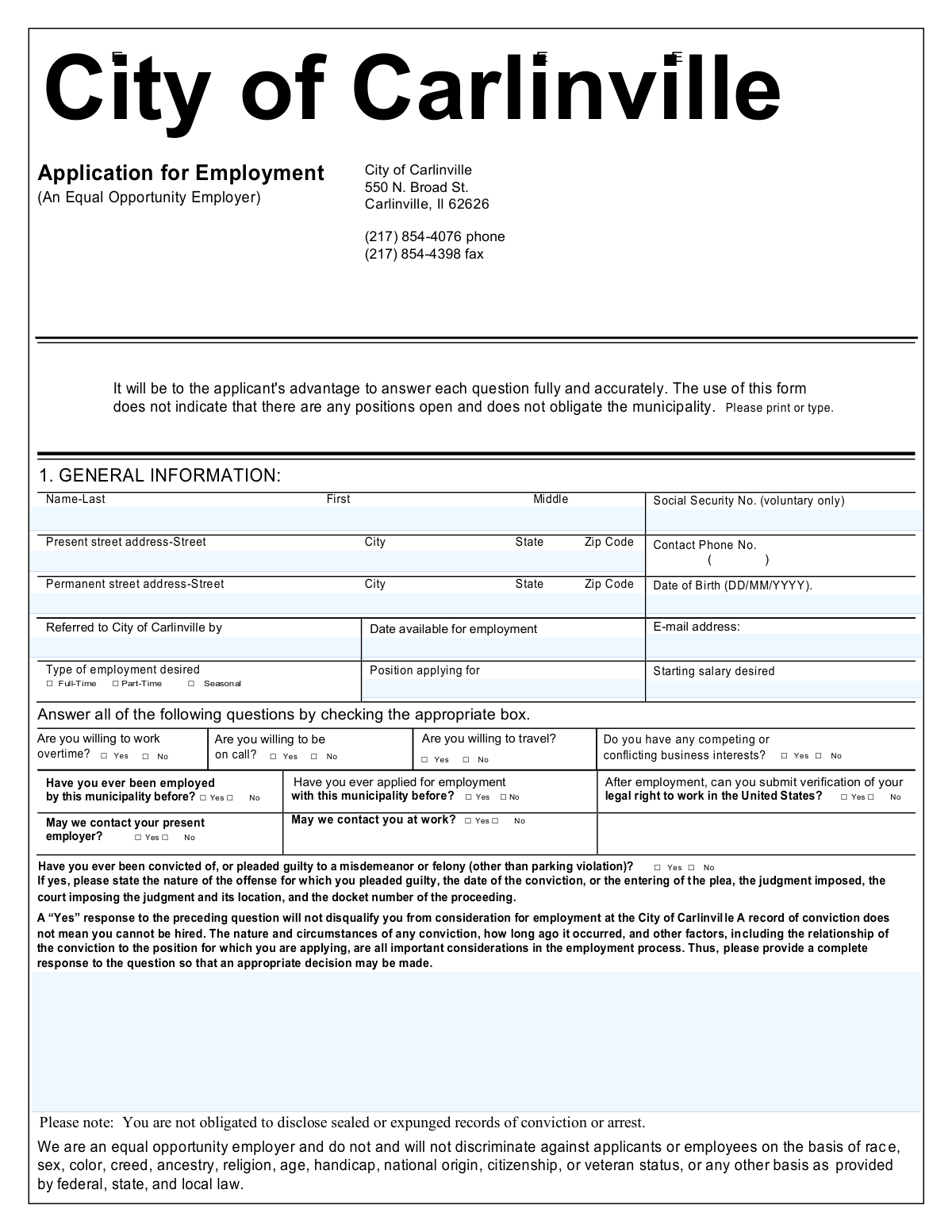
The City of Carlinville Application for Employment is an official municipal job application that collects an applicant’s identifying information, job preferences, work authorization confirmation, background disclosures, and detailed employment/education history. It is important because it serves as the City’s standardized record for evaluating qualifications, verifying information, and obtaining applicant consent for background and reference checks, along with at-will employment acknowledgments. Today, this form can be filled out quickly and accurately using AI-powered services like Instafill.ai, which can also convert non-fillable PDF versions into interactive fillable forms.
City of Carlinville Employment Application is part of the
CAR forms, employer forms, employment forms and employment application forms categories on Instafill.
Rather not fill this in by hand? Instafill is an online form filler that completes PDF forms automatically — upload the blank form, answer a few questions, and the AI fills every field.
Form specifications
| Form name: | City of Carlinville Application for Employment (An Equal Opportunity Employer) |
| Number of pages: | 1 |
| Filled form examples: | City of Carlinville Employment Application Examples |
| Language: | English |
Our AI automatically handles information lookup, data retrieval, formatting, and form filling.
It takes less than a minute to fill out City of Carlinville Employment Application using our AI form filling.
Securely upload your data. Information is encrypted in transit and deleted immediately after the form is filled out.
Instafill Demo: How to fill out PDF forms in seconds with AI
How to Fill Out City of Carlinville Employment Application Online for Free in 2026
Are you looking to fill out a CITY OF CARLINVILLE EMPLOYMENT APPLICATION form online quickly and accurately? Instafill.ai offers the #1 AI-powered PDF filling software of 2026, allowing you to complete your CITY OF CARLINVILLE EMPLOYMENT APPLICATION form in just 37 seconds or less.
Follow these steps to fill out your CITY OF CARLINVILLE EMPLOYMENT APPLICATION form online using Instafill.ai:
- 1 Go to Instafill.ai and upload the City of Carlinville Application for Employment (or select it from the form library).
- 2 Let the AI detect and map all fields, then confirm the form version and the position you are applying for.
- 3 Enter personal and contact information (name, addresses, phone, email, date of birth, and optional Social Security number if you choose to provide it).
- 4 Complete job preferences and eligibility sections (employment type, position, salary desired, availability date, prior municipal employment/application, work authorization, and employer contact permissions).
- 5 Answer the general information/background questions (overtime/on-call/travel willingness, conflicts of interest, and conviction history if applicable, with required details).
- 6 Provide employment history for the last 10 years (employers, dates, pay, job titles, duties, supervisors, reasons for leaving) and explain any employment gaps over three months; add military service if applicable.
- 7 Fill in education/skills, activities, and references, then review the certifications/authorizations, e-sign and date the application, and download/submit the completed form.
Our AI-powered system ensures each field is filled out correctly, reducing errors and saving you time.
Why Choose Instafill.ai for Your Fillable City of Carlinville Employment Application Form?
Speed
Complete your City of Carlinville Employment Application in as little as 37 seconds.
Up-to-Date
Always use the latest 2026 City of Carlinville Employment Application form version.
Cost-effective
No need to hire expensive lawyers.
Accuracy
Our AI performs 10 compliance checks to ensure your form is error-free.
Security
Your personal information is protected with bank-level encryption.
Frequently Asked Questions About City of Carlinville Employment Application
This form is used to apply for employment with the City of Carlinville. It collects your contact information, work history, education, skills, references, and required acknowledgments so the City can evaluate your candidacy.
Anyone seeking a job with the City of Carlinville should complete it, whether you are applying for full-time, part-time, or seasonal work. You should fill it out even if you are also submitting a resume.
No. The form states that using the application does not indicate positions are open and does not obligate the municipality to hire.
No—this form indicates the Social Security Number is voluntary only. If you choose not to provide it, complete the rest of the application as fully as possible.
Use your current living address for “Present street address.” Use your long-term or legal mailing address for “Permanent street address” if it is different from where you currently live.
Check the box for Full-Time, Part-Time, or Seasonal, then write the specific job title you are applying for in “Position applying for.” If you are open to multiple roles, list your primary target position and clarify alternatives in an attached note.
Enter the earliest date you can start work if hired. If you need to give notice to a current employer, use a realistic start date based on that notice period.
You can select “No” for “May we contact your present employer?” and/or “May we contact you at work?” Then provide a reliable phone number and email so the City can reach you outside of work.
Answer truthfully and provide the requested details (offense, date, court, judgment, and docket number) if you answer “Yes.” The form states a “Yes” will not automatically disqualify you; the City considers the nature of the offense, how long ago it occurred, and its relation to the job.
No. The form notes that you are not obligated to disclose sealed or expunged records of conviction or arrest.
List your employment history for the last 10 years, starting with your most recent employer. If you need more room, the form allows you to use a separate sheet.
You must identify and explain any gap in employment longer than three (3) months. Briefly note the reason (e.g., school, caregiving, job search, medical leave) and the dates.
Provide three references (previous supervisors preferred) including name/association, occupation, address, phone, and years known. Do not use relatives as references.
By signing, you certify the information is true, authorize the City to verify your personal/education/work history, and acknowledge employment is at-will (you or the City may end employment at any time). You also acknowledge that false information can lead to rejection or termination.
Yes—AI tools like Instafill.ai can help auto-fill form fields accurately and save time by pulling details from your resume or typed responses. Upload the PDF to Instafill.ai, map your information (personal details, work history, education, references), review for accuracy, and then download the completed form for submission.
If the PDF is flat/non-fillable, Instafill.ai can convert it into an interactive fillable form so you can type directly into the fields. After conversion, you can auto-fill and export a clean, completed PDF.
Compliance City of Carlinville Employment Application
Validation Checks by Instafill.ai
1
Applicant Name Completeness and Character Validation
Validates that Last Name and First Name are provided and contain only reasonable name characters (letters, spaces, hyphens, apostrophes) and are not placeholder text (e.g., 'N/A', 'Unknown'). This is important for identity matching, background checks, and record creation. If validation fails, the submission should be rejected or routed back to the applicant to correct the name fields before processing.
2
Social Security Number Format and Voluntary Disclosure Handling
If an SSN is provided, validates it matches a strict 9-digit format (either '#########' or '###-##-####') and rejects known invalid patterns (e.g., all zeros in any group). Because the form states SSN is voluntary, the system must allow the field to be blank without error while still validating format when present. If validation fails, the SSN should be cleared/flagged and the applicant prompted to correct it or leave it blank.
3
Present Address Required Fields and Postal Format Validation
Ensures the present street address, city, state, and ZIP code are all completed and that state is a valid two-letter US state code and ZIP is 5 digits (optionally ZIP+4). Accurate address data is required for correspondence, residency checks, and HR records. If validation fails, the application should be marked incomplete and not advanced until corrected.
4
Permanent Address Completeness or Explicit Same-as-Present Confirmation
Validates that the permanent address section is either fully completed (street, city, state, ZIP) or the system captures an explicit indicator that permanent address is the same as present address (if supported). This prevents partial permanent addresses that cannot be used for official mail or verification. If validation fails, require the applicant to complete the missing permanent address fields or confirm same-as-present.
5
Contact Phone Number Format and Plausibility Check
Validates that the contact phone number is present and matches an acceptable US phone format (10 digits with optional country code, parentheses, spaces, or dashes) and is not an obviously invalid number (e.g., too short). Reliable phone contact is essential for scheduling interviews and follow-ups. If validation fails, the applicant must correct the phone number before submission is accepted.
6
Email Address Format Validation
If an email address is provided, validates it conforms to standard email syntax (local@domain) and rejects common invalid patterns (missing '@', missing TLD, spaces). Email is often used for automated notifications and status updates, so malformed addresses cause delivery failures. If validation fails, prompt for correction or allow blank if email is not required by the workflow.
7
Date of Birth Format, Valid Calendar Date, and Age Plausibility
Validates Date of Birth is provided and matches the specified format (DD/MM/YYYY), is a real calendar date, and is within a plausible range (e.g., not in the future, not implying an unrealistic age). This supports identity verification and ensures compliance with employment eligibility rules. If validation fails, the system should block submission and request a corrected date.
8
Employment Availability Date Format and Logical Consistency
Validates the 'Date available for employment' is a valid date and is not earlier than the submission date by an unreasonable amount (unless explicitly allowed) and not before the applicant’s date of birth. This prevents scheduling and onboarding errors caused by invalid or contradictory dates. If validation fails, require correction and flag the record for review if the date is unusual but technically valid.
9
Employment Type Selection Must Include Exactly One Option
Ensures the applicant selects at least one employment type (Full-Time, Part-Time, Seasonal) and enforces the business rule of whether multiple selections are allowed (commonly exactly one). This is important for routing the application to the correct hiring process and determining eligibility for benefits/roles. If validation fails, the applicant must adjust selections before the application can be submitted.
10
Position Applying For Required and Non-Generic Entry Validation
Validates that 'Position applying for' is completed and is not a generic placeholder (e.g., 'any', 'open', 'whatever') and meets minimum length requirements. This is necessary to route the application to the correct department and evaluate qualifications. If validation fails, the system should require a specific position title or requisition reference.
11
Starting Salary Desired Numeric and Range Validation
Validates that the starting salary desired is either blank (if optional) or a numeric value in an acceptable format (e.g., dollars without letters) and within a reasonable range (non-negative, not excessively large). This prevents downstream parsing errors and supports compensation review. If validation fails, prompt the applicant to enter a valid numeric amount or leave it blank if permitted.
12
Yes/No Question Completeness and Single-Choice Enforcement
For each Yes/No item (previously employed by municipality, previously applied, legal right to work verification, contact present employer, contact at work, willing to work overtime/on call/travel, competing interests, conviction question), validates exactly one option is selected. These fields drive eligibility, background check steps, and contact permissions, so ambiguous answers create compliance and workflow issues. If validation fails, the application should be returned for completion and not advanced.
13
Work Authorization Consistency Check (Legal Right to Work)
If the applicant answers 'No' to being able to submit verification of legal right to work in the United States, the system should flag the application as potentially ineligible and require an acknowledgment or HR review step. This is important for I-9 compliance and to prevent progressing candidates who cannot meet legal employment requirements. If validation fails (e.g., missing answer or contradictory data), block submission or route to mandatory compliance review depending on policy.
14
Conviction Disclosure Details Required When 'Yes' Selected
If the applicant answers 'Yes' to having been convicted or pleaded guilty (excluding parking violations), validates that the required explanatory details are provided: nature of offense, date, judgment imposed, court and location, and docket number. This ensures the municipality can perform a fair, individualized assessment as described on the form and supports auditability. If validation fails, the application should be marked incomplete and the applicant prompted to provide the missing details (while respecting sealed/expunged record guidance).
15
Employment History Entries: Required Fields and Date Range Validation
For each employment history entry provided, validates that company name, address or location, phone, dates from/to, job title, supervisor name/title, and reason for leaving are present (as required by the form) and that date ranges are valid (From <= To, no impossible overlaps if the system enforces it). This is critical for background verification and assessing experience over the last 10 years. If validation fails, the system should highlight the specific entry and fields needing correction before acceptance.
16
Employment Gaps Explanation Required for Gaps Longer Than Three Months
Validates that if the employment history dates indicate any gap longer than three months within the last 10 years, the applicant provides an explanation in the designated section. This supports completeness of the work history and reduces follow-up delays during screening. If validation fails, the application should be flagged as incomplete and the applicant required to add gap explanations.
Common Mistakes in Completing City of Carlinville Employment Application
Many applicants instinctively use the U.S. format (MM/DD/YYYY) or write dates inconsistently (e.g., “Jan 2022” in one place and “1/22” in another). This can cause misinterpretation of your DOB, eligibility, and employment timeline, and may trigger follow-up requests or delays. Always follow the form’s stated format for DOB (DD/MM/YYYY) and use a consistent, unambiguous format for “Dates From–To” (e.g., 01/2021–03/2024). AI-powered form filling tools like Instafill.ai can help by formatting dates correctly and flagging inconsistent entries before submission.
Applicants often either skip the SSN field without realizing it may slow background checks, or they enter an incomplete/incorrect number due to transposition errors. Even though it’s marked “voluntary only,” providing it (if you choose) must be accurate and match your legal records to avoid verification issues. If you do not want to provide it, leave it clearly blank (do not write partial numbers) and ensure the rest of your identifying information is complete. Instafill.ai can reduce typos by validating number length and preventing common digit swaps.
A common mistake is duplicating the same address in both sections without considering whether the permanent address differs, or forgetting apartment/unit numbers, ZIP+4, or state abbreviations. Incorrect or incomplete addresses can lead to missed contact attempts, payroll/tax issues, or delays in onboarding paperwork. Enter the full street address (including unit), city, state, and ZIP code for both sections, and write “Same as present” only if that is truly accurate and acceptable for the form. Instafill.ai can standardize address formatting and catch missing fields like state or ZIP.
Applicants frequently mistype email addresses (missing “@”, wrong domain) or provide a phone number without area code, or list a work number while also checking “May we contact you at work? No.” This can prevent the City from scheduling interviews or requesting clarifications, which may effectively remove you from consideration. Use a personal phone number with area code, a professional email you check daily, and ensure your contact preferences align with the numbers you provide. Instafill.ai can validate email/phone formats and highlight conflicts between contact fields and checkboxes.
Because the form has many repeated Yes/No questions (overtime, on-call, travel, prior employment/application, contact permissions, legal right to work, convictions), applicants often skip a box, mark both, or mark the wrong line due to layout confusion. Missing or contradictory selections can delay processing and may raise concerns about attention to detail. Review each question and ensure exactly one box is selected per Yes/No item, and that your answers are consistent across the form. Instafill.ai can help by enforcing single-choice selection and flagging unanswered required questions.
Applicants often provide partial employment history, omit short-term roles, or list dates that don’t align with other sections (resume vs. application), especially when asked for the last 10 years. Inconsistencies can trigger verification problems, background check discrepancies, or requests for clarification that slow hiring. List all employers in order, include month/year ranges, and ensure job titles and dates match what references and records will confirm. Instafill.ai can help reconcile entries, maintain consistent formatting, and prompt you when the 10-year timeline has gaps.
The employment background section asks for “Starting base salary” and “Current or final base salary” with a “$ ___ Per ___” structure, but applicants often enter only a number without specifying per hour/week/month/year. This makes compensation history ambiguous and can complicate pay-setting or verification. Always specify the pay period (e.g., “$18.50 per hour” or “$52,000 per year”) and keep it consistent with how you were paid. Instafill.ai can prompt for the missing “per” unit and standardize salary formatting.
Many applicants leave the “gaps longer than three (3) months” section blank, assuming it’s optional or that a resume covers it. Unexplained gaps can raise questions during screening and may lead to follow-up requests that delay your application. Briefly explain each gap with dates and a neutral reason (e.g., schooling, caregiving, job search, medical leave) without oversharing sensitive details. Instafill.ai can detect timeline gaps from your entered dates and remind you to complete the gap explanation section.
Applicants sometimes disclose sealed/expunged matters even though the form states you are not obligated to, while others answer “Yes” but fail to provide the required specifics (offense nature, date, judgment, court/location, docket number). Over-disclosure can introduce unnecessary sensitive information, and under-disclosure can appear incomplete and may delay review. If you answer “Yes,” provide the complete requested details; if records are sealed/expunged, you generally should not include them per the note. Instafill.ai can guide you through the required sub-details when “Yes” is selected and help avoid including unnecessary sealed/expunged information.
The form requests three references, preferably previous supervisors, and explicitly says not to use relatives—yet applicants often list family members or friends and omit phone numbers, addresses, or years known. Weak or incomplete references can slow verification and reduce credibility compared to candidates with supervisor references. Choose supervisors or professional contacts who can speak to your work, confirm their current contact info, and include relationship/association and years known. Instafill.ai can ensure all reference fields are completed and formatted consistently.
Applicants often check “graduate” without listing the diploma/degree, skip the “last year completed,” or leave skills like typing speed/equipment blank even when relevant to the position. Missing or vague education/skills information can make it harder to assess qualifications and may reduce your chances for roles requiring specific competencies. Fill in each school’s name/address, course of study, last year completed, graduation status, and the exact diploma/degree; list equipment/software and realistic typing/shorthand speeds if applicable. Instafill.ai can prompt for missing companion fields (e.g., degree when “graduate” is checked) and keep entries standardized.
Saved over 80 hours a year
“I was never sure if my IRS forms like W-9 were filled correctly. Now, I can complete the forms accurately without any external help.”
Kevin Martin Green
Your data stays secure with advanced protection from Instafill and our subprocessors




Robust compliance program
Transparent business model
You’re not the product. You always know where your data is and what it is processed for.
ISO 27001, HIPAA, and GDPR
Our subprocesses adhere to multiple compliance standards, including but not limited to ISO 27001, HIPAA, and GDPR.
Security & privacy by design
We consider security and privacy from the initial design phase of any new service or functionality. It’s not an afterthought, it’s built-in, including support for two-factor authentication (2FA) to further protect your account.
Fill out City of Carlinville Employment Application with Instafill.ai
Worried about filling PDFs wrong? Instafill securely fills city-of-carlinville-application-for-employment-an-equal-opportunity-employer forms, ensuring each field is accurate.
