
Yes! You can use AI to fill out Form 941-X (Rev. April 2023), Adjusted Employer’s QUARTERLY Federal Tax Return or Claim for Refund
Don't type 375 fields by hand. Tell our AI about yourself, or upload a document you already have, and it fills every field in seconds. You check it, then download, print or sign.
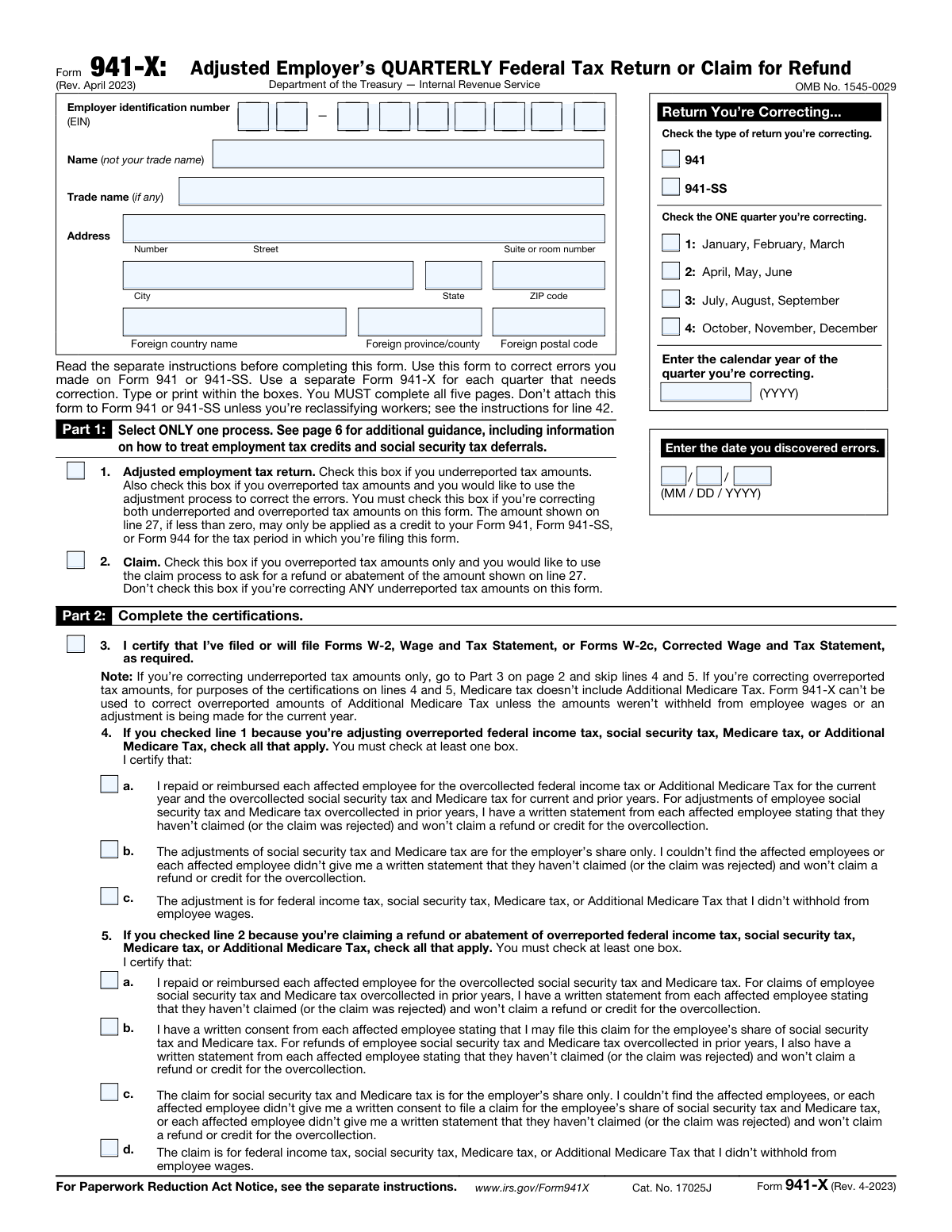
The AI does the filling. You just check it.
No typing into boxes, nothing to install.
What this form asks for
The AI fills all of it, from your answers or your documents.
The AI checks your answers before you download
15 checks built for this form, so a wrong date or a missing answer is caught before anyone else sees it.
Checks that the EIN is provided and matches the IRS-required 9-digit format (commonly displayed as NN-NNNNNNN). This is critical because the EIN uniquely identifies the employer’s account and determines where the adjustment/claim is posted. If the EIN is missing or malformed, the submission should be rejected and routed back for correction because downstream matching and posting will fail.
Verifies that the 'Name (not your trade name)' field is completed and is not blank or identical to the trade name when a separate legal name is required. The legal name is used for IRS account matching and correspondence, while the trade name is optional and informational. If the legal name is missing or appears to be a trade/DBA only, the form should be flagged for correction to prevent misidentification and processing delays.
Checks that the address includes required components (street/number, city, state, ZIP) for U.S. addresses, or foreign country plus foreign postal code/province when a foreign address is used. It also validates that U.S. state/ZIP are not provided alongside a foreign country in a conflicting way. If address fields are incomplete or inconsistent, the submission should fail validation because IRS notices/refunds may be undeliverable.
Ensures the filer selects exactly one return type: Form 941 or Form 941-SS. This matters because the underlying tax rules, lines, and IRS processing streams differ between the two return types. If neither or both are selected, the form should be rejected because the correction cannot be applied to the correct original return.
Checks that exactly one quarter (1–4) is selected and that the correcting calendar year is a 4-digit year (YYYY). It should also validate that the quarter/year combination is plausible (e.g., not a future quarter/year relative to filing context, if known). If quarter or year is missing/invalid, the submission should fail because the IRS cannot associate the correction with the correct tax period.
Ensures the discovered date is present and in MM/DD/YYYY format, and represents a real calendar date. Additionally, it should be logically on or after the end of the quarter being corrected (or at least not unreasonably before the quarter begins). If the date is invalid or illogical, the form should be flagged because it can affect timeliness/limitations analysis and audit trail integrity.
And 9 more checks
- Enforces Part 1 process selection: exactly one of line 1 (Adjusted return) or line 2 (Claim)
- Validates Part 2 certification requirements based on selected process
- Validates numeric field formatting for all monetary and wage/tip entries
- Validates Column arithmetic: Column 3 equals Column 1 minus Column 2 for each completed line
- Validates tax correction calculations in Column 4 for rate-based lines
- Validates line 23 and line 27 totals equal the sum of referenced lines in Column 4
- Enforces time-window eligibility for COVID-era and other period-limited lines
- Requires explanation in Part 4 when indicated and when corrections exist
- Validates signature block completeness and date format (taxpayer and preparer as applicable)
Let AI fill out your Form 941-X
No typing. Every field filled in seconds, checked, ready to sign.
How to Fill Out Form 941-X Online for Free in 2026
What the AI walks you through.
- Enter employer information (EIN, legal name, trade name if any, and address) and select the return type being corrected (941 or 941-SS).
- Identify the exact quarter and calendar year being corrected and enter the date the errors were discovered.
- Choose the correction process in Part 1: check either “Adjusted employment tax return” (line 1) or “Claim” (line 2) based on whether you underreported, overreported, or both.
- Complete Part 2 certifications: confirm W-2/W-2c filing and check the required certification boxes for adjustments or refund claims (including repayment/consent statements where applicable).
- In Part 3, enter corrections line-by-line using Columns 1–4 (corrected amount, originally reported amount, difference, and tax correction), including any applicable credits/deferrals, and compute the total on line 27 (balance due, credit, or refund).
- In Part 4, provide a detailed written explanation of each correction (and indicate if corrections include both under- and overreported amounts or involve reclassified workers).
- Sign and date Part 5 (and complete paid preparer information if applicable), then submit the form and pay any amount due by the filing time or request the credit/refund as indicated by your selected process.
Common Mistakes in Completing Form 941-X
The ones the AI is built to catch.
Choosing the wrong process in Part 1 (Adjusted return vs. Claim)
Failing to file a separate Form 941-X for each quarter being corrected
Incorrect or inconsistent quarter/year and “date you discovered errors”
Using trade name instead of legal name or entering an EIN that doesn’t match IRS records
Not completing all five pages and required signature fields
Leaving Part 2 certifications incomplete or checking the wrong certification boxes
Misunderstanding Column 1 vs. Column 2 vs. Column 3 (and sign errors)
Applying the wrong tax rate or using the employer-only rate without qualifying
Using time-limited credit lines for the wrong periods (ERC, sick/family leave, COBRA)
Forgetting required attachments (e.g., Form 8974 for the research payroll tax credit)
Providing an insufficient explanation in Part 4 (lines 41–43) or not checking 41/42 when applicable
Frequently Asked Questions About Form 941-X
Is it really free for 7 days?
Can I fill other forms too?
How do I cancel?
How does the AI fill out Form 941-X?
What happens to my information?
How complex is Form 941-X to fill out?
What is Form 941-X used for?
Who needs to file Form 941-X?
Do I need a separate Form 941-X for each quarter I’m correcting?
Should I attach Form 941-X to my Form 941 or 941-SS when I file?
What’s the difference between the “Adjusted employment tax return” process and the “Claim” process in Part 1?
Can I check both box 1 and box 2 in Part 1?
What if I’m correcting both underreported and overreported amounts in the same quarter?
What does the “90 days before the period of limitations expires” rule mean for choosing a process?
What information do I need to complete the top of Form 941-X?
How do the columns work in Part 3 (Columns 1–4)?
What should I do if a line in Part 3 doesn’t apply to me?
Do I have to file Forms W-2 or W-2c when I file Form 941-X?
What certifications are required if I’m correcting overreported taxes?
How do I know whether to use the full Social Security/Medicare tax rate or the employer-only rate on certain lines?
What happens if line 27 shows I owe money or I’m due a credit/refund?
What do I need to write in Part 4 (lines 41–43)?
Get your Form 941-X filled out by AI
$0 today. Cancel before Oct 31 and you pay nothing.
Other forms like this one
employer forms: Form 940, Employer’s Annual FUTA Tax Return, Form 8027, Employer’s Annual Information Return, Form DE 1, Commercial Employer Account Registration, Form 8994, Employer Credit for Paid Family and Medical Leave, Form 1095-C, Employer-Provided Health Insurance Offer and Coverage, Form 941, Employer’s Quarterly Federal Tax Return, Form I-129CWR, Semiannual Report for CW-1 Employers, C139 – Employer’s Information Questionnaire (WCB Alberta), Form SS-4 (Rev. December 2025), Application for Employer Identification Number, City of Carlinville Application for Employment (An Equal Opportunity Employer), Form 941, Employer's QUARTERLY Federal Tax Return (Rev. March 2025), Easy Transfer Form: Moving Funds to an Employer-Sponsored Retirement Plan at TIAA, Form F10462, Moving Funds to an Employer-Sponsored Retirement Plan at TIAA, Moving Funds to an Employer-Sponsored Retirement Plan at TIAA, Form F10794, Cash Withdrawal or Rollover Transfer Payout Annuity for Private Employer Plans, DWC002, Employer’s report for reimbursement of voluntary payment, DWC001S, Employer’s first report of injury or illness, DWC Form-001, Employer’s first report of injury or illness, The E-Verify Memorandum of Understanding for Employers, SIMPLE Retirement Account (SRA) Program Employer Notice and Salary-Reduction Agreement
tax forms: W-9, Request for Taxpayer Identification Number and Certification, Form W-2, Wage and Tax Statement, Form 1040-X, Amended U.S. Individual Income Tax Return, Form 130, Taxpayer's Notice to Initiate an Appeal, Form 1040-C, U.S. Departing Alien Income Tax Return, Form 940, Employer’s Annual FUTA Tax Return, Form 720, Quarterly Federal Excise Tax Return, Form 982, Reduction of Tax Attributes, Form 4137, Social Security and Medicare Tax on Unreported Tip Income, Form 911, Request for Taxpayer Advocate Service Assistance, Form 8960, Net Investment Income Tax, Form 8959, Additional Medicare Tax, Form 8919, Uncollected Social Security and Medicare Tax, Form 8801, Credit for Prior Year Minimum Tax, Form 990-T, Exempt Org Business Income Tax Return, Form 945, Annual Return of Withheld Federal Income Tax, Form 5330, Return of Excise Taxes, Form FTB 3514, California Earned Income Tax Credit, Form 100, CA Corp Tax Return, Form 8288, U.S. Withholding Tax Return
federal forms: Form CA-1, Federal Employee's Notice of Traumatic Injury, Form 720, Quarterly Federal Excise Tax Return, Form OF-306, Declaration for Federal Employment, Form 945, Annual Return of Withheld Federal Income Tax, Form 941, Employer’s Quarterly Federal Tax Return, Personal Financial Statement (REV 06/2018) – Northwest Federal Credit Union, Income-Driven Repayment (IDR) Plan Request (PAYE, IBR, and ICR) — William D. Ford Federal Direct Loan (Direct Loan) Program and Federal Family Education Loan (FFEL) Programs (OMB No. 1845-0102), Direct Consolidation Loan Request to Add Loans (William D. Ford Federal Direct Loan Program) (OMB No. 1845-0007), Form 941, Employer's QUARTERLY Federal Tax Return (Rev. March 2025), Loan Rehabilitation: Income and Expense Information, William D. Ford Federal Direct Loan (Direct Loan) Program/Federal Family Education Loan (FFEL) Program, 2026–27 FAFSA® Form, Free Application for Federal Student Aid, Form OF-612, Optional Application for Federal Employment, Navy Federal Voluntary Removal of Joint Owner Request, FS Form 5179, Legacy Treasury Direct Security Transfer Request, Formato de Inscripción al Registro Federal De Contribuyentes a Través de Oficina Virtual, Free Application for Federal Student Aid (FAFSA), Navy Federal Change of Information/Add Joint Owner (for primary account holders 18 and over), Form 941-X, Adjusted Employer’s QUARTERLY Federal Tax Return or Claim for Refund, Optional Form 306, Declaration for Federal Employment, Form AO 243, Motion to Vacate, Set Aside, or Correct a Sentence
VA claim forms: Form OWCP-915, Claim for Medical Reimbursement, Form 8862, Information To Claim Certain Credits, Form CA-7, Claim for Compensation, Form CA-5, Claim for Compensation, Form SC-100, Plaintiff's Claim and ORDER to Go to Small Claims Court, Form 20-0995, Decision Review Request: Supplemental Claim, Form 104, List of Creditors 20 Largest Unsecured Claims, Judicial Council of California Form SC-104, Proof of Service (Small Claims), Immigration and Refugee Board of Canada (IRB) – Refugee Protection Division (RPD) Basis of Claim Form (for persons claiming refugee protection in Canada) (RPD.02.01), SC-108, Request to Correct or Cancel Judgment and Answer (Small Claims), Judicial Council of California Form SC-105, Request for Court Order and Answer (Small Claims), SC-120, Defendant’s Claim and ORDER to Go to Small Claims Court (Small Claims), Judicial Council of California Form SC-104, Proof of Service (Small Claims), Continental American Insurance Company (CAIC) / Aflac Group Critical Illness Claim Form (with Attending Physician’s Statement, HIPAA Authorization to Obtain Information, and Electronic Funds Transaction Authorization), Judicial Council of California Form SC-108, Request to Correct or Cancel Judgment and Answer (Small Claims), SC-105, Request for Court Order and Answer (Small Claims), Judicial Council of California Form SC-120, Defendant’s Claim and ORDER to Go to Small Claims Court (Small Claims), Small Claim and Notice of Small Claim (ORS 46.425) (OJD Official) (Jan 2026), VA Form 21-4138, Statement in Support of Claim, Form SSA-795, Statement of Claimant or Other Person
federal tax forms: Form 720, Quarterly Federal Excise Tax Return, Form 945, Annual Return of Withheld Federal Income Tax, Form 941, Employer’s Quarterly Federal Tax Return, Form 941, Employer's QUARTERLY Federal Tax Return (Rev. March 2025), Form 911, Request for Taxpayer Advocate Service Assistance (And Application for Taxpayer Assistance Order), Form 941-X, Adjusted Employer’s QUARTERLY Federal Tax Return or Claim for Refund, Form 2290, Heavy Highway Vehicle Use Tax Return, Form SS-8, Determination of Worker Status
employer tax forms: Form 941, Employer's QUARTERLY Federal Tax Return (Rev. March 2025), Form 940, Employer’s Annual FUTA Tax Return, Form 941, Employer’s Quarterly Federal Tax Return, Form 8850, Pre-Screening Notice and Certification Request for the Work Opportunity Credit, Form 941-X, Adjusted Employer’s QUARTERLY Federal Tax Return or Claim for Refund
quarterly tax forms: Form 941, Employer's QUARTERLY Federal Tax Return (Rev. March 2025), Form 720, Quarterly Federal Excise Tax Return, Form 941, Employer’s Quarterly Federal Tax Return, Form 941-X, Adjusted Employer’s QUARTERLY Federal Tax Return or Claim for Refund, Arizona Form A1-QRT, Arizona Quarterly Withholding Tax Return
Let AI fill out your Form 941-X
Your trial starts once a card is added. You pay nothing before Oct 31.
Our AI already knows this form, all 375 fields of it. Skip the typing: tell it about yourself, or upload what you have, and it fills the whole form in seconds.
- AI fills every field on all 5 pages, checkboxes included
- No typing into boxes: answer a few questions, or upload a document you already have, an old copy of this form, a photo of a document
- The AI checks the answers; you review and change anything before you download
- Download the finished PDF, print it, or sign it online
- Encrypted, and never used to train AI
Cancel before Oct 31 and you pay nothing.
A card is needed to start the trial. Cancel in two clicks from your account.
Terms · Privacy