Yes! You can use AI to fill out Ohio Department of Commerce Table of Heirship (Division of Unclaimed Funds)
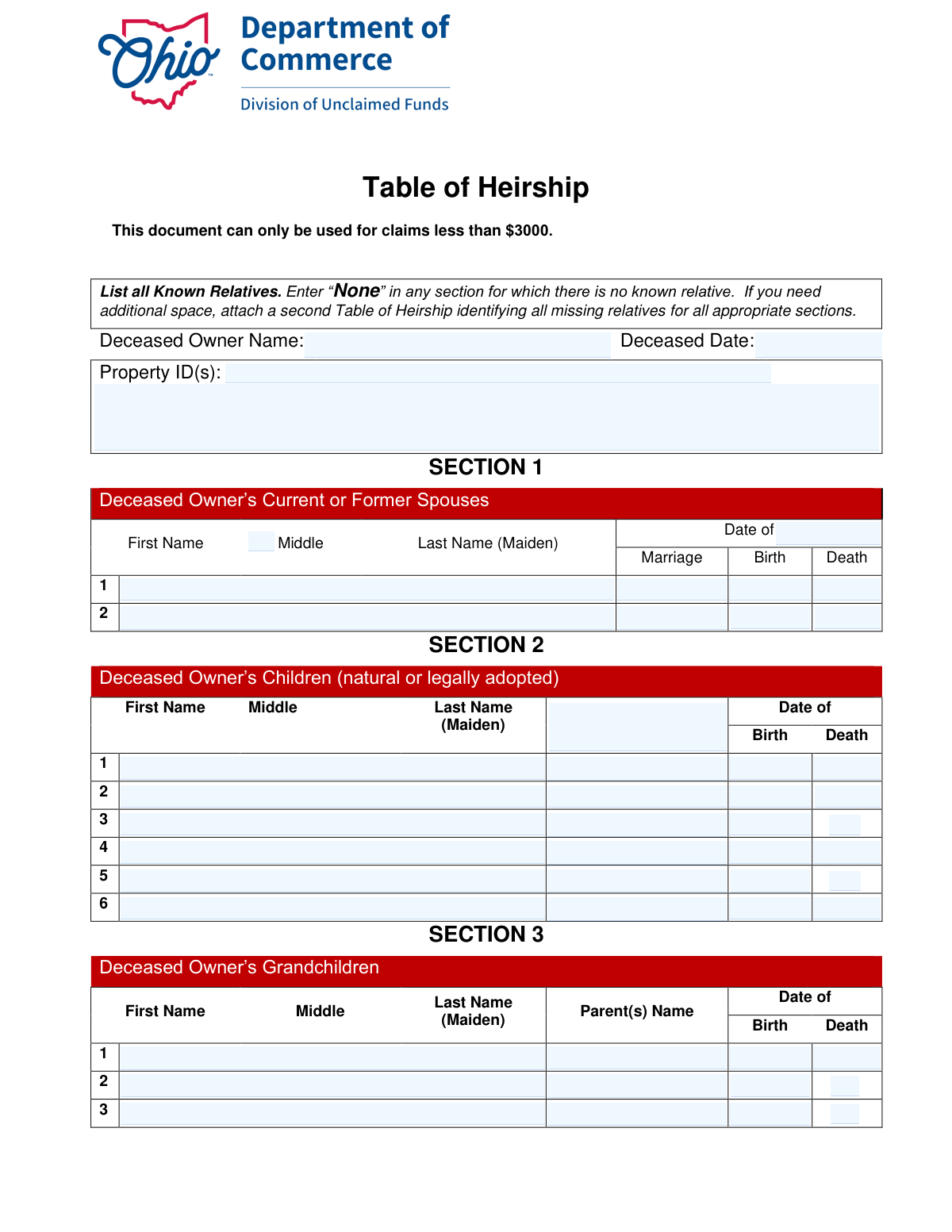
The Ohio Department of Commerce Table of Heirship is a sworn statement used in the unclaimed funds process to document the deceased owner’s family relationships (spouses, children, grandchildren, parents, and siblings) so the state can determine rightful heirs. It is specifically noted for use with claims less than $3,000 and must be completed accurately, as it is signed under penalty of perjury and may be investigated. Claimants typically must also submit the deceased owner’s certified unredacted death certificate and may be asked for additional documentation after review. Today, this form can be filled out quickly and accurately using AI-powered services like Instafill.ai, which can also convert non-fillable PDF versions into interactive fillable forms.
Table of Heirship (Ohio) is part of the
IRS forms, unclaimed funds forms, Ohio commerce forms, VA claim forms and heirship forms categories on Instafill.
Rather not fill this in by hand? Instafill is an online form filler that completes PDF forms automatically — upload the blank form, answer a few questions, and the AI fills every field.
Form specifications
| Form name: | Ohio Department of Commerce Table of Heirship (Division of Unclaimed Funds) |
| Number of pages: | 1 |
| Field instructions: | Table of Heirship (Ohio) Instructions |
| Language: | English |
Our AI automatically handles information lookup, data retrieval, formatting, and form filling.
It takes less than a minute to fill out Table of Heirship (Ohio) using our AI form filling.
Securely upload your data. Information is encrypted in transit and deleted immediately after the form is filled out.
Instafill Demo: How to fill out PDF forms in seconds with AI
How to Fill Out Table of Heirship (Ohio) Online for Free in 2026
Are you looking to fill out a TABLE OF HEIRSHIP (OHIO) form online quickly and accurately? Instafill.ai offers the #1 AI-powered PDF filling software of 2026, allowing you to complete your TABLE OF HEIRSHIP (OHIO) form in just 37 seconds or less.
Follow these steps to fill out your TABLE OF HEIRSHIP (OHIO) form online using Instafill.ai:
- 1 Go to Instafill.ai and upload the Table of Heirship form (or select it from the form library) and let the AI convert it into a fillable version if needed.
- 2 Enter the claim details at the top of the form, including Deceased Owner Name, Deceased Date, and the Property ID(s) from your claim details page.
- 3 Complete Section 1 by listing all current or former spouses (or enter “None” if not applicable), including names and marriage/birth/death dates as applicable.
- 4 Complete Section 2 by listing all children (natural or legally adopted), including names and birth/death dates (or enter “None” if none).
- 5 Complete Section 3 by listing all grandchildren and their parent(s) name from Section 2, including birth/death dates (or enter “None” if none).
- 6 Complete Sections 4 and 5 by listing both parents and all brothers/sisters with birth/death dates (or enter “None” where applicable), and attach an additional Table of Heirship if you need more space.
- 7 Review for completeness and consistency, then e-sign/print-sign where required (printed name, signature, date), and upload supporting documents (including the certified unredacted death certificate) before submitting with your Ohio unclaimed funds claim.
Our AI-powered system ensures each field is filled out correctly, reducing errors and saving you time.
Why Choose Instafill.ai for Your Fillable Table of Heirship (Ohio) Form?
Speed
Complete your Table of Heirship (Ohio) in as little as 37 seconds.
Up-to-Date
Always use the latest 2026 Table of Heirship (Ohio) form version.
Cost-effective
No need to hire expensive lawyers.
Accuracy
Our AI performs 10 compliance checks to ensure your form is error-free.
Security
Your personal information is protected with bank-level encryption.
Frequently Asked Questions About Table of Heirship (Ohio)
This form helps the Ohio Department of Commerce, Division of Unclaimed Funds determine the deceased owner’s heirs for an unclaimed funds claim. It lists the deceased owner’s known relatives so the state can verify who is entitled to the property.
Anyone filing an unclaimed funds claim on behalf of a deceased property owner may be asked to complete it. You must provide information for yourself and all known relatives of the deceased owner, both living and deceased.
Yes. The document states it can only be used for claims less than $3,000. If your claim is $3,000 or more, the Division of Unclaimed Funds may require different documentation or a different process.
You’ll need the deceased owner’s name, date of death, and the Property ID(s) from the claim details page printed with your claim form. You’ll also need names and key dates (birth, death, marriage) for the deceased owner’s relatives.
A certified, unredacted death certificate for the deceased owner must be submitted for examination. The Division of Unclaimed Funds may request additional documents after reviewing your claim.
Enter the Property ID exactly as shown on the claim details page that you print with your claim form. If there are multiple properties, list all applicable Property IDs.
Write “None” in any section where there is no known relative (for example, no spouses or no children). This is required so the form clearly shows the category was not overlooked.
If the deceased owner never married, enter “None.” If the deceased owner had current or former spouses (including divorced spouses), list each spouse on a separate line and include dates of marriage and birth/death if known.
List all children of the deceased owner, including biological (natural) and legally adopted children, whether living or deceased. Enter one child per line and include their name and birth/death dates if applicable.
For each child listed in Section 2, enter the first name of the child’s parent as it appears in Section 1 (the spouse list). This links the child to the correct parent listed on the form.
List each grandchild of the deceased owner on a separate line, living or deceased. For “Parent(s) Name,” enter the first name of the grandchild’s parent exactly as listed in Section 2.
Attach a second Table of Heirship and use it to identify all missing relatives for all appropriate sections. Make sure the additional page(s) clearly continue the same deceased owner and include any required identifying details.
Yes. The instructions say to list all known relatives, both living and dead, and include dates of death when applicable. This helps the state verify the family tree and inheritance path.
By signing, you are declaring under Ohio law that the information is true and correct and acknowledging it may be investigated. False or dishonest statements can lead to denial of the claim.
Yes—AI form-filling services like Instafill.ai can help auto-fill fields accurately from the information you provide, saving time and reducing errors. If your PDF is flat/non-fillable, Instafill.ai can convert it into an interactive fillable form so you can complete it online more easily.
Compliance Table of Heirship (Ohio)
Validation Checks by Instafill.ai
1
Claim Amount Eligibility (Under $3000)
Validates that the associated claim amount for the referenced Property ID(s) is less than $3000, since the form explicitly states it can only be used for claims under this threshold. This prevents use of an incorrect affidavit process for larger claims that may require probate or additional documentation. If the amount is $3000 or more (or cannot be verified), the submission should be rejected or routed to the correct claim workflow with a clear error message.
2
Deceased Owner Name Completeness and Format
Ensures the Deceased Owner Name is provided and contains at minimum a first and last name (not initials only), matching typical identity requirements for unclaimed funds processing. This is important for correctly linking the Table of Heirship to the claim record and death certificate. If missing or clearly incomplete (e.g., only one character, only a last name, or placeholder text), the form should be flagged as incomplete and returned for correction.
3
Deceased Date (Date of Death) Valid Date and Reasonable Range
Checks that the Deceased Date is present and is a valid date in an accepted format (e.g., MM/DD/YYYY) and not in the future. It also validates the date is within a reasonable historical range (e.g., not before 1900 unless explicitly allowed) to catch typos like transposed digits. If invalid, the submission should fail validation because the date of death is essential for determining heirs and required documentation.
4
Property ID(s) Required and Properly Formatted
Validates that at least one Property ID is provided and that each ID matches the expected format used by the claim system (e.g., alphanumeric pattern/length, no illegal characters). This is critical to link the heirship table to the correct unclaimed property record(s). If missing or malformed, the submission should be rejected or held because the agency cannot associate the heirship information with a claim.
5
Property ID(s) Uniqueness and Delimiter Validation
Ensures multiple Property ID(s) are separated using an allowed delimiter (comma, semicolon, or newline) and that the same ID is not repeated. This prevents duplicate processing and reduces downstream reconciliation errors. If duplicates or unparseable separators are detected, the system should prompt the user to correct the list before submission.
6
Section Completion Rule: Must List Relatives or Enter 'None'
Checks each section (Spouses, Children, Grandchildren, Parents, Siblings) to ensure it is not left blank: it must contain at least one person entry or the explicit word 'None' as instructed. This is important because blank sections are ambiguous and can be interpreted as missing data rather than no known relatives. If a section is blank, validation should fail and require either entries or 'None'.
7
Person Entry Minimum Fields (Name Required per Listed Relative)
For any row where a relative is being listed (i.e., not 'None'), validates that at least First Name and Last Name are provided; Middle and Maiden are optional unless required by business rules. This prevents unusable partial entries like a date without a name or a single initial. If a row is partially filled (e.g., only DOB), the system should flag the row and require completion or removal.
8
Date Fields Format Validation Across All Sections
Validates that all entered dates (marriage, birth, death) conform to a consistent accepted date format and represent real calendar dates (e.g., no 02/30/2020). Consistent date formatting is necessary for automated review and to reduce manual interpretation errors. If any date fails parsing, the submission should be blocked or the specific field should be highlighted for correction.
9
Life Event Logical Consistency (Birth < Marriage < Death)
Checks logical ordering of dates where applicable: birth date must be before death date; marriage date must be after spouse birth date and not after either party’s death date; and no death date may be in the future. This catches common data entry mistakes (e.g., swapped month/day or wrong year). If inconsistencies are found, the system should flag the specific person record and require correction or an explanatory attachment if the workflow allows exceptions.
10
Child Parent Reference Must Match a Spouse Listed in Section 1
Validates that any 'Parent(s) Name' or parent reference for a child corresponds to a spouse name listed in Section 1 (or otherwise matches the form’s instruction to reference Section 1). This ensures the family relationships are traceable and internally consistent for heir determination. If a child references a parent not present in Section 1 (and Section 1 is not 'None'), the submission should be flagged for correction or require adding the missing spouse entry.
11
Grandchild Parent Reference Must Match a Child Listed in Section 2
Ensures each grandchild’s listed Parent(s) Name matches a child recorded in Section 2, as instructed. This is important to establish lineage and determine representation if a child is deceased. If the referenced parent cannot be matched to Section 2, validation should fail or require the user to add the missing child record.
12
Parents Section Completeness (Father and Mother Present or Explicitly Unknown)
Validates that Section 4 includes entries for both Father and Mother, or clearly indicates 'None'/'Unknown' per system policy (the form expects both parents living or dead). Parent information is a key component of heirship determination when there is no spouse/children. If one parent is left blank without an explicit indicator, the submission should be flagged as incomplete.
13
Duplicate Person Detection Within and Across Sections
Checks for likely duplicate entries (same first/last name with same DOB, or highly similar names) within a section and across sections (e.g., a spouse accidentally entered as a sibling). Duplicates can distort heir counts and cause conflicting relationship mapping. If duplicates are detected, the system should warn the submitter and require confirmation, merge, or correction before acceptance.
14
Signature, Printed Name, and Date Required for Each Signer Block
Validates that each signature block included on the form has a Printed Name, a Signature (non-empty), and a Date, and that the date is valid and not in the future. The perjury declaration requires proper execution to be legally meaningful and acceptable for review. If any signer block is partially completed (e.g., printed name without signature), the submission should be rejected as not properly attested.
15
Attachment Requirement Trigger: Additional Space Indication
If the submitter indicates additional relatives beyond the provided lines (e.g., by referencing an attachment, writing 'see attached', or exceeding row limits in an electronic version), validates that an additional Table of Heirship attachment is actually included. This ensures the record is complete and that no relatives are omitted due to space constraints. If an attachment is referenced but missing, the submission should be flagged and held until the attachment is provided.
Common Mistakes in Completing Table of Heirship (Ohio)
People often miss the note that this document can only be used for claims less than $3,000 and submit it for larger claims anyway. This can lead to delays, rejection, or a request to resubmit using the correct process/forms. Verify the claim amount on the claim details page before completing the form; if it exceeds $3,000, contact the Division of Unclaimed Funds for the correct requirements. AI-powered tools like Instafill.ai can flag eligibility issues early so you don’t complete the wrong form.
A very common error is leaving a section empty when there are no known relatives in that category, even though the instructions require entering “None.” Blank sections can be interpreted as incomplete information and may trigger follow-up requests or processing delays. To avoid this, explicitly write “None” in every section that does not apply. Instafill.ai can automatically insert “None” where appropriate to prevent accidental omissions.
Claimants sometimes list only the relatives who are alive or only those they believe are “relevant,” but the form requires all known relatives, both living and dead. Missing relatives can raise questions about heirship, cause investigations, and delay or deny the claim until the family tree is complete. Carefully review each section (spouses, children, grandchildren, parents, siblings) and include everyone you know, even if deceased. Instafill.ai can help by prompting for missing categories and validating that the family structure is complete.
People frequently omit maiden names, skip middle names, or use nicknames, and they often spell the same person’s name differently across sections. Inconsistencies can prevent the agency from matching records (death certificate, marriage records, claim details) and can lead to requests for clarification or additional documentation. Use legal names as they appear on official records and include maiden names where requested (especially for spouses, children, parents, and siblings). Instafill.ai can standardize name formatting and reduce mismatches by reusing verified entries consistently across sections.
Some applicants mistakenly enter their own name (the claimant) instead of the deceased property owner’s name at the top of the form. This creates a mismatch with the Property ID and claim details, often resulting in rejection or a request to redo the paperwork. Always copy the deceased owner’s name exactly as shown on the claim details page and supporting documents. Instafill.ai can map fields correctly so the deceased owner and claimant identities don’t get swapped.
Dates are often left blank, estimated without noting uncertainty, or written in inconsistent formats (e.g., 1/2/23 vs. January 2, 2023), and some people accidentally swap birth and death dates. Incorrect or missing dates can slow verification and may require additional proof or corrections. Use a consistent full date format (MM/DD/YYYY unless the form specifies otherwise) and verify against official records when possible. Instafill.ai can validate date formats and catch impossible entries (e.g., death date before birth date).
In Section 3, many people enter the grandchild’s grandparents or the deceased owner’s spouse instead of the grandchild’s parent from Section 2. This breaks the lineage chain the agency uses to confirm heirship and can trigger follow-up questions or denial pending clarification. Enter the parent’s first name exactly as listed in Section 2 (and ensure that parent is listed there). Instafill.ai can auto-populate the parent field from Section 2 to keep relationships consistent.
Applicants often list only the spouse at the time of death and forget prior marriages, divorces, or deceased spouses, even though the form requires current or former spouses. Missing spouse history can change heirship determinations and may lead to additional document requests or claim denial until corrected. List every spouse one per line and include marriage dates and death dates where applicable. Instafill.ai can prompt for “former spouse” entries and ensure each spouse record is complete.
When there are more relatives than the lines provided, people sometimes squeeze multiple names into one line, write in margins, or omit relatives instead of attaching a second Table of Heirship. This can make the submission hard to read, incomplete, or unacceptable for processing. Use one person per line and attach an additional Table of Heirship to capture all missing relatives for all appropriate sections. If the form is only available as a flat non-fillable PDF, Instafill.ai can convert it into a fillable version and generate clean continuation pages.
The form includes a declaration under penalty of perjury and provides multiple signature blocks; people often sign but forget to print their name, forget the date, or leave one of the required signature lines incomplete. An incomplete attestation can invalidate the submission and cause the agency to return it for correction. Ensure every required signer prints their name, signs, and dates the form exactly where indicated. Instafill.ai can highlight missing signature/date fields before you submit.
Applicants frequently submit a photocopy, a redacted certificate, or forget the death certificate entirely, despite the instruction that a certified unredacted death certificate must be submitted. Without the correct certificate, the agency cannot verify the death and will pause processing or request resubmission. Order and include the certified unredacted version and confirm it matches the deceased owner’s name and date of death on the form. Instafill.ai can provide a submission checklist and flag missing required attachments before filing.
Saved over 80 hours a year
“I was never sure if my IRS forms like W-9 were filled correctly. Now, I can complete the forms accurately without any external help.”
Kevin Martin Green
Your data stays secure with advanced protection from Instafill and our subprocessors




Robust compliance program
Transparent business model
You’re not the product. You always know where your data is and what it is processed for.
ISO 27001, HIPAA, and GDPR
Our subprocesses adhere to multiple compliance standards, including but not limited to ISO 27001, HIPAA, and GDPR.
Security & privacy by design
We consider security and privacy from the initial design phase of any new service or functionality. It’s not an afterthought, it’s built-in, including support for two-factor authentication (2FA) to further protect your account.
Fill out Table of Heirship (Ohio) with Instafill.ai
Worried about filling PDFs wrong? Instafill securely fills ohio-department-of-commerce-table-of-heirship-division-of-unclaimed-funds forms, ensuring each field is accurate.
