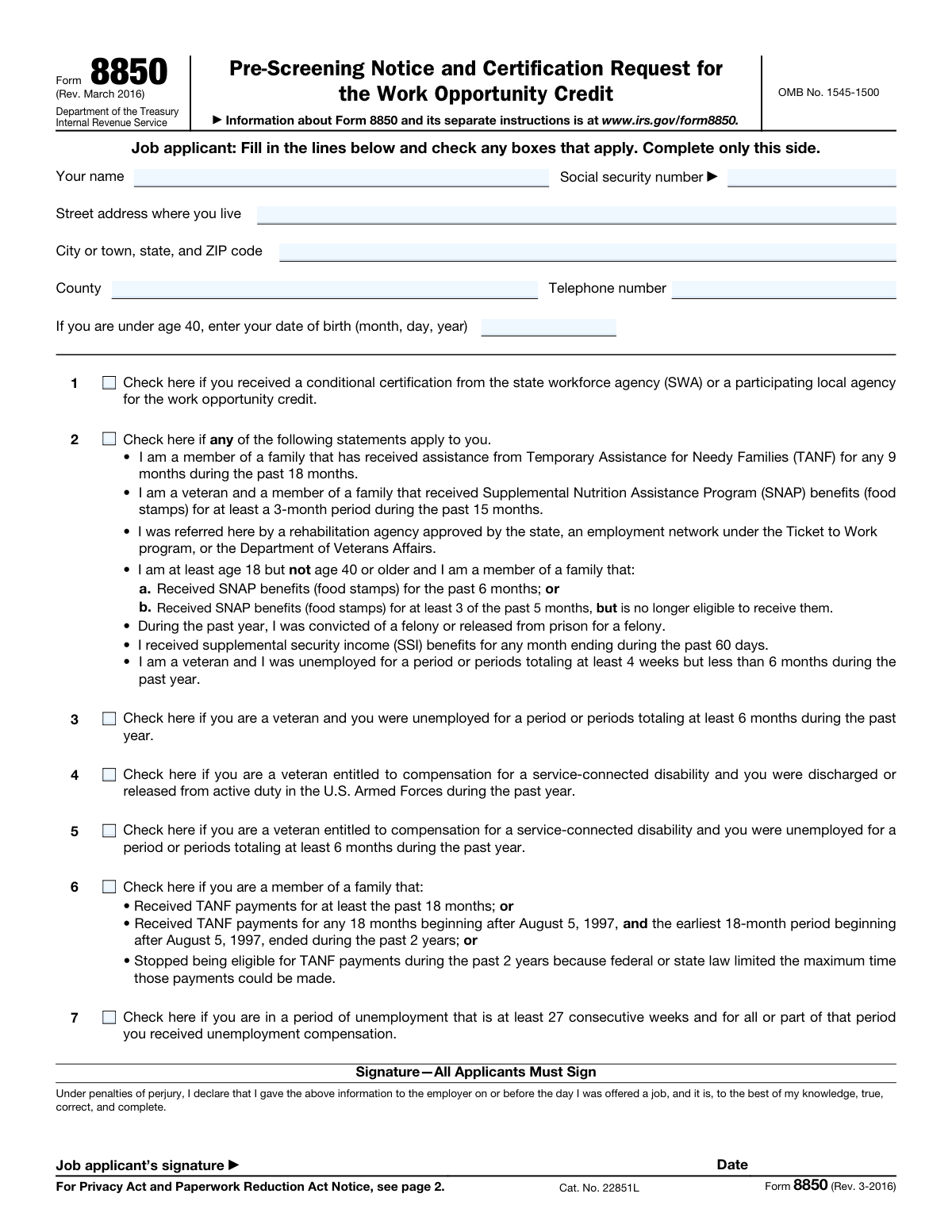
Yes! You can use AI to fill out Form 8850, Pre-Screening Notice and Certification Request for the Work Opportunity Credit

Form 8850, the Pre-Screening Notice and Certification Request for the Work Opportunity Credit, is an IRS document used by employers to determine if a potential employee qualifies them for the Work Opportunity Tax Credit (WOTC). The job applicant provides information about their status (e.g., veteran, recipient of government assistance), and the employer uses this to request certification from a state workforce agency. Today, this form can be filled out quickly and accurately using AI-powered services like Instafill.ai, which can also convert non-fillable PDF versions into interactive fillable forms.
Our AI automatically handles information lookup, data retrieval, formatting, and form filling.
It takes less than a minute to fill out Form 8850 using our AI form filling.
Securely upload your data. Information is encrypted in transit and deleted immediately after the form is filled out.

Form specifications

Form name: Form 8850, Pre-Screening Notice and Certification Request for the Work Opportunity Credit
Number of pages: 2
Language: English
Categories: credit forms, certification forms
main-image

Instafill Demo: How to fill out PDF forms in seconds with AI

How to Fill Out Form 8850 Online for Free in 2026

Are you looking to fill out a FORM 8850 form online quickly and accurately? Instafill.ai offers the #1 AI-powered PDF filling software of 2026, allowing you to complete your FORM 8850 form in just 37 seconds or less.
Follow these steps to fill out your FORM 8850 form online using Instafill.ai:
  1. 1 Navigate to Instafill.ai and upload or select IRS Form 8850.
  2. 2 The job applicant uses the AI assistant to provide their personal information on page 1, such as name, social security number, and address.
  3. 3 The applicant reviews and checks the boxes in questions 1 through 7 that apply to their situation to determine if they are a member of a targeted group.
  4. 4 The applicant electronically signs and dates the form to certify the information is true and complete.
  5. 5 The employer completes the 'For Employer’s Use Only' section on page 2, providing their business details, EIN, and relevant hiring dates.
  6. 6 The employer signs the form, reviews all information for accuracy, and then submits it to the appropriate state workforce agency (SWA) to request certification.

Our AI-powered system ensures each field is filled out correctly, reducing errors and saving you time.

Why Choose Instafill.ai for Your Fillable Form 8850 Form?

Speed

Complete your Form 8850 in as little as 37 seconds.

Up-to-Date

Always use the latest 2026 Form 8850 form version.

Cost-effective

No need to hire expensive lawyers.

Accuracy

Our AI performs 10 compliance checks to ensure your form is error-free.

Security

Your personal information is protected with bank-level encryption.

Frequently Asked Questions About Form Form 8850

Form 8850, the Pre-Screening Notice and Certification Request, is used by employers to determine if a new hire is a member of a targeted group, which may qualify the employer for the Work Opportunity Credit.

Both the job applicant and the employer complete this form. The applicant fills out and signs page 1 on or before the day of the job offer, and the employer completes and signs page 2.

No, completing this form is voluntary for the job applicant. However, providing this information can help your potential employer qualify for a tax credit, which may assist you in securing employment.

The employer must submit the completed form to their designated state workforce agency (SWA), not the IRS. This must be done within 28 days of the employee's start date to request certification.

You will need to provide your name, Social Security number, address, date of birth, and check any boxes that apply to your status, such as being a veteran or a recipient of certain government assistance.

You should only check the boxes for conditions that you are certain apply to you. Since you must sign under penalties of perjury, it is best to leave a box unchecked if you are unsure.

A conditional certification is a document issued by a state workforce agency that pre-qualifies you as a member of a targeted group. If you have received one, check this box and show it to your employer.

The employer must ensure the applicant completes page 1 by the job offer date, then fill out page 2 with company details and hiring dates. The employer then signs and submits the form to the SWA to request certification.

The information is used by the employer for tax purposes and by the state workforce agency for certification. While generally confidential, the form notes it may be disclosed to other government agencies for specific legal or administrative purposes.

Yes, services like Instafill.ai use AI to accurately auto-fill form fields for both applicants and employers. This can help save time and reduce common errors.

You can upload the form to the Instafill.ai platform, which uses AI to make the document interactive. Simply enter your information into the guided fields to complete the form quickly and accurately before printing for signature.

If you have a non-fillable or 'flat' PDF, you can use a tool like Instafill.ai. It can convert the document into an interactive, fillable form that you can easily complete on your computer.

Targeted groups are categories of individuals who have faced significant barriers to employment. These groups include certain veterans, ex-felons, and individuals receiving assistance like SNAP or TANF, as detailed on the form.

Compliance Form 8850
Validation Checks by Instafill.ai

1
Social Security Number Format
This check verifies that the Social Security Number (SSN) field contains exactly nine digits, optionally formatted as XXX-XX-XXXX. It is crucial for correctly identifying the applicant for tax credit purposes. A failure in this validation would prevent the form from being processed by the state workforce agency (SWA) and the IRS, as the applicant cannot be uniquely identified.
2
Employer Identification Number (EIN) Format
This validation ensures the Employer Identification Number (EIN) is entered in the correct XX-XXXXXXX format. The EIN is a unique nine-digit number assigned by the IRS to business entities, and its accuracy is mandatory for associating the tax credit with the correct employer. An invalid EIN will result in the rejection of the certification request.
3
Applicant Information Completeness
This check confirms that all mandatory applicant fields (Name, Social Security Number, Street Address, City/State/ZIP, and County) are filled out. Incomplete information can delay or prevent the SWA from verifying the applicant's eligibility for a targeted group. The form will be returned to the employer for completion if these fields are missing.
4
Employer Information Completeness
This check verifies that the employer's name, EIN, and full address are provided in the 'For Employer’s Use Only' section. This information is essential for the SWA to issue the certification to the correct business entity and for the IRS to process the tax credit. Missing employer data will cause the form to be considered incomplete and rejected.
5
Employment Dates Logical Sequence
This validation ensures the four dates provided by the employer are in a logical chronological order: Date Gave Information ≤ Date Was Offered Job ≤ Date Was Hired ≤ Date Started Job. This sequence is critical for establishing the timeline of events required by the Work Opportunity Credit rules. An illogical sequence suggests an error in reporting and will likely lead to a request for correction or denial of the certification.
6
Applicant Certification Timing
This check verifies that the 'Date applicant Gave information' and the applicant's signature date are on or before the 'Date Was offered job'. The program requires that the pre-screening notice be completed before or on the day of the job offer. Failure to meet this timing requirement makes the applicant ineligible for the credit for that employer, and the certification will be denied.
7
Eligibility Criteria Selection
This validation ensures that the applicant has checked at least one of the eligibility boxes (numbered 1 through 7). These checkboxes represent the specific targeted groups for the Work Opportunity Credit. If no box is checked, there is no basis for requesting certification, and the form will be considered invalid as it does not claim eligibility for any group.
8
Date of Birth and Age-Related Eligibility
This check validates that if the applicant is under 40, a Date of Birth is provided. It then cross-references this date with any age-specific eligibility criteria checked, such as the one for individuals 'at least age 18 but not age 40 or older'. This ensures consistency and helps verify eligibility for age-dependent targeted groups, preventing incorrect claims.
9
Signature and Date Completeness
This check confirms that both the applicant and the employer have signed and dated the form in their respective sections. Signatures and dates are required under penalty of perjury and are fundamental to the form's legal validity. A missing signature or date from either party will render the form incomplete and cause it to be rejected immediately.
10
Targeted Group Number Validity
This validation checks that if a value is entered in the 'Targeted Group Number' field, it is either '4' or '6'. This field is for a specific designation based on instructions not present on the form itself. Entering an invalid number indicates a misunderstanding or error by the employer and may require clarification or correction before processing can continue.
11
Veteran Unemployment Period Consistency
This check ensures an applicant does not select contradictory veteran unemployment categories. For example, an applicant cannot simultaneously check the box for being unemployed 'at least 4 weeks but less than 6 months' and the box for being unemployed 'at least 6 months'. Such a contradiction would require clarification, as it makes the applicant's specific eligibility status unclear.
12
Conditional Contact Person Information
This validation rule ensures that if a name is entered in the 'Person to contact' field, then the corresponding telephone number and address fields for that person are also filled out. This is important for ensuring the SWA can reach the correct individual with questions about the application. If the contact name is present but the contact details are missing, it can cause communication delays.
13
Date of Birth Validity
This check ensures the applicant's Date of Birth is a valid, non-future date that corresponds to a plausible working age (e.g., older than 14). An invalid or nonsensical date, such as one in the future or one indicating the applicant is a toddler, would be flagged for correction. This prevents obvious data entry errors from being submitted and causing processing issues.

Common Mistakes in Completing Form 8850

Incorrectly Sequencing Key Dates

Employers frequently record the dates for 'Date Gave information' and 'Date offered job' out of order. The form is only valid if the applicant provides the information and signs the form on or before the date the job is offered. Recording a signature or information date that is after the job offer date will automatically disqualify the application and result in a lost tax credit.

Missing Applicant Signature or Date

Applicants often focus on their personal information and overlook the signature line at the bottom of the first page. An unsigned or undated form is legally invalid because the applicant has not attested to the information's truthfulness under penalty of perjury. This critical error will cause the State Workforce Agency (SWA) to reject the form, making the employer ineligible for the tax credit.

Misinterpreting Eligibility Criteria Checkboxes

The eligibility questions use specific legal language and timeframes (e.g., 'TANF for any 9 months during the past 18 months') that applicants can easily misunderstand. Checking the wrong box, or failing to check a valid one, leads to an inaccurate application and denial of the tax credit for the employer. Applicants should read each statement carefully and ask for clarification rather than guessing.

Entering an Invalid Employer Identification Number (EIN)

An employer may mistype their nine-digit EIN or enter a different number, like a state ID, by mistake. The EIN is the primary business identifier for the IRS, and an incorrect one will prevent the SWA from processing the request or linking it to the correct employer. This leads to rejection and requires refiling, which may not be possible if the 28-day submission deadline has passed.

Illegible Handwriting on a Non-Fillable Form

This form is often distributed as a non-fillable PDF, requiring it to be completed by hand. Illegible handwriting can cause data entry errors by the SWA, leading to mismatches in names, addresses, or Social Security Numbers that result in processing delays or rejections. To prevent this, print clearly in block letters; AI-powered tools like Instafill.ai can convert non-fillable PDFs into interactive forms, ensuring all entries are perfectly legible.

Leaving the County Field Blank

Applicants often skip the 'County' field, assuming the city and state are sufficient. However, eligibility for certain targeted groups (like a Designated Community Resident) is determined by residence in specific counties or census tracts, making this a critical data point for verification. Omitting the county can cause processing delays or a missed opportunity for the employer to claim the credit.

Omitting Date of Birth for Applicants Under 40

The form's instruction to enter a date of birth only 'if you are under age 40' can be misleading. Several targeted groups have specific age requirements (e.g., 18-39 for the SNAP recipient group), and without a DOB, the employer and SWA cannot verify eligibility. This omission can lead to the denial of a certification that would have otherwise been approved.

Missing or Incorrect Social Security Number

Applicants may accidentally transpose digits or leave the SSN field blank due to privacy concerns or simple oversight. An incorrect or missing SSN makes it impossible for the SWA to verify eligibility against government records, leading to an automatic rejection of the certification request. To prevent this, carefully double-check the number before submission; AI form-filling tools like Instafill.ai can help validate the format to ensure all nine digits are present.

Applicant Completing the Employer's Section

Job applicants, particularly when given the form without clear instructions, may mistakenly fill out information on Page 2, which is for 'Employer’s Use Only.' This invalidates the form as it shows a failure in the required process where the employer must review the applicant's information and then complete their own section. Employers must clearly instruct applicants to complete only the first page as stated at the top of the form.

Forgetting the Employer's Signature and Title

An HR representative might complete all the employer fields but forget to sign, date, or enter their title at the bottom of page 2. This omission invalidates the employer's declaration and request for certification. The SWA will reject an unsigned submission, jeopardizing the employer's ability to claim the tax credit, especially if the filing deadline is near.
Saved over 80 hours a year

“I was never sure if my IRS forms like W-9 were filled correctly. Now, I can complete the forms accurately without any external help.”

Kevin Martin Green

Your data stays secure with advanced protection from Instafill and our subprocessors

Robust compliance program

Transparent business model

You’re not the product. You always know where your data is and what it is processed for.

ISO 27001, HIPAA, and GDPR

Our subprocesses adhere to multiple compliance standards, including but not limited to ISO 27001, HIPAA, and GDPR.

Security & privacy by design

We consider security and privacy from the initial design phase of any new service or functionality. It’s not an afterthought, it’s built-in, including support for two-factor authentication (2FA) to further protect your account.

Fill out Form 8850 with Instafill.ai

Worried about filling PDFs wrong? Instafill securely fills form-8850-pre-screening-notice-and-certification-request-for-the-work-opportunity-credit forms, ensuring each field is accurate.