
Yes! You can use AI to fill out Form W-10, Dependent Care Provider’s Identification
Don't type 6 fields by hand. Tell our AI about yourself, or upload a document you already have, and it fills every field in seconds. You check it, then download, print or sign.
The AI does the filling. You just check it.
No typing into boxes, nothing to install.
What this form asks for
The AI fills all of it, from your answers or your documents.
The AI checks your answers before you download
15 checks built for this form, so a wrong date or a missing answer is caught before anyone else sees it.
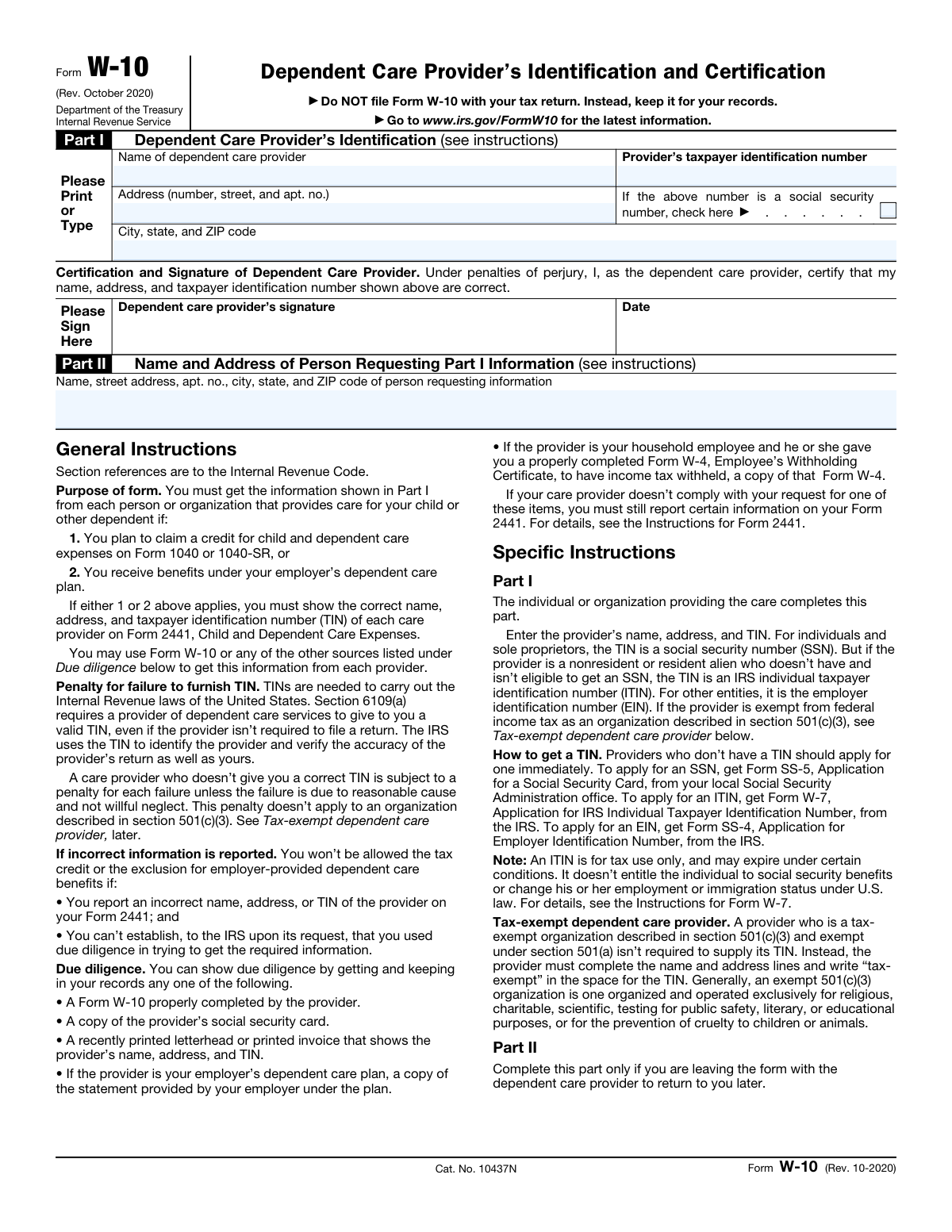
The AI ensures that the full name of the dependent care provider is accurately captured in Part I of the form. It checks for the presence of both first and last names, and if applicable, a middle initial or suffix. The AI also verifies that no fields are left blank and that the name matches any associated documentation provided for the dependent care provider.
The AI confirms that the address of the dependent care provider is complete and includes all necessary details such as the house or building number, street name, and apartment number if applicable. It validates that the address format conforms to standard postal requirements and that all parts of the address are logically consistent and correctly placed in their respective fields in Part I.
The AI verifies that the city, state, and ZIP code for the provider's address are correctly entered in Part I. It checks for the correct spelling of the city name, the appropriate state abbreviation, and a valid ZIP code format. The AI also ensures that these elements are consistent with the street address provided and that they correspond to actual locations within the United States.
The AI checks that the taxpayer identification number (TIN) of the provider is entered in Part I. It ensures that the TIN is in the correct format, whether it is a Social Security Number (SSN) or an Employer Identification Number (EIN). If the TIN provided is an SSN, the AI also confirms that the corresponding box indicating this is checked to avoid any discrepancies or errors in identification.
The AI validates that the dependent care provider has provided a signature and a date on the form, which is essential for certifying the accuracy of the information under penalties of perjury. It checks for the presence of a signature in the designated area and verifies that the date is in a valid format and is reasonable in the context of the form's submission. The AI also ensures that the signature and date fields are not left blank, as this would invalidate the form.
The system confirms that the full name of the person requesting the information is accurately entered in Part II, if applicable. It checks for any missing components such as first name, middle initial, or last name. The validation ensures that the name matches the standard format and does not contain any numbers or special characters that are not typically found in names. Additionally, it verifies that the name field is not left blank and prompts the user to fill in the information if it is incomplete.
And 9 more checks
- Complete Address
- City, State, and ZIP Code
- Documentation Verification
- TIN Format Validation
- Tax-Exempt Provider Identification
- TIN Application Advisory
- Record Keeping Compliance
- Complete Field Validation
- Information Consistency Verification
Let AI fill out your W-10
No typing. Every field filled in seconds, checked, ready to sign.
How to Fill Out W-10 Online for Free in 2026
What the AI walks you through.
- Visit instafill.ai site and select W-10.
- Enter provider's name and address.
- Fill in provider's taxpayer identification number.
- Sign and date the form electronically.
- Check for accuracy and submit form.
Common Mistakes in Completing W-10
The ones the AI is built to catch.
Incomplete or inaccurate dependent care provider name
Incomplete or inaccurate dependent care provider address
Incorrect city, state, or ZIP code for the dependent care provider's address
Incorrect or incomplete taxpayer identification number (TIN) for the dependent care provider
Failure to have the dependent care provider sign and date the form
Omitting complete information in Part II for dependent care providers
Neglecting to keep a copy of the completed Form W-10
Providing incorrect or incomplete information in Part I
Failing to demonstrate due diligence in obtaining the required TIN from the dependent care provider
Frequently Asked Questions About W-10
Is it really free for 7 days?
Can I fill other forms too?
How do I cancel?
How does the AI fill out W-10?
What happens to my information?
How complex is W-10 to fill out?
What is the purpose of Form W-10, Dependent Care Provider’s Identification and Certification?
Who completes Part I of Form W-10?
What is the penalty for a care provider who fails to provide a correct TIN?
What information must be reported on Form 2441 if the care provider does not comply with the request for a TIN or one of the due diligence items?
What is the difference between an SSN, ITIN, and EIN?
Who is required to complete and file Form W-10?
When is Form W-10 due?
What happens if a care provider refuses to provide a TIN?
What is a tax-exempt dependent care provider?
How can I get a TIN for a dependent care provider?
What is the due dilgence requirement for reporting dependent care provider information?
What happens if incorrect information is reported for the dependent care provider?
What is the penalty for failure to furnish a TIN?
Get your W-10 filled out by AI
$0 today. Cancel before Nov 1 and you pay nothing.
Other forms like this one
CAR forms: Form SSA-44, Medicare Income-Related Monthly Adjustment Amount - Life-Changing Event, Form I-90, Application to Replace Permanent Resident Card, Form 2441, Child and Dependent Care Expenses, Form WH-380-E, Certification of Health Care Provider, Form 4137, Social Security and Medicare Tax on Unreported Tip Income, Form 8959, Additional Medicare Tax, Form 8919, Uncollected Social Security and Medicare Tax, Form CMS-1763, Request for Termination of Medicare Coverage, Form CMS-855O, Medicare Enrollment Application, Form CMS-460, Medicare Participation Agreement, Form CMS-4040, Request for Enrollment in Medicare Part B, Form WH-380-F, Certification of Health Care Provider, Form 1099-K, Payment Card and Third Party Network Transactions, Form CMS-40B, Application for Enrollment in Medicare Part B, Form SS-5-FS, Application for a Social Security Card, Form REG 195, Disabled Person Placard, Form AR-11, Alien's Change of Address Card, Form I-905, Application for Authorization to Issue Certification for Health Care Workers, Form I-131A, Application for Carrier Documentation, Form DBQ, Scars/Disfigurement Disability Benefits
identification forms: W-9, Request for Taxpayer Identification Number and Certification, Form SS-4 (Rev. December 2025), Application for Employer Identification Number, ROTC Cadet Academic Plan / Degree and Credit Hour Worksheet (Student Identification, Term-by-Term Courses, GPA Summary, and Completion Certification), Form W-9, Request for Taxpayer Identification Number and Certification, Inherited Retirement Account Beneficiary Identification Form, Form 40-5122, Travel License / Identification Application, Form D1, Driver License, Permit or Identification Card Transaction Application, Form W-9, Request for Taxpayer Identification Number and Certification, AML/CTF Investor Identification Information Form, Form 478, Application for Alaska Driver License, Permit or Identification Card, Form 630, Individual Identification Information Record, Form 631, Corporation/Entity Identification Information Record, Form SS241 - Referee's Report - Identification of a claimant, Form W-9, Request for Taxpayer Identification Number and Certification, Form DL 142, Request for Cancellation or Surrender of a Driver License or ID
L.A. Care forms: Form SSA-44, Medicare Income-Related Monthly Adjustment Amount - Life-Changing Event, Form 2441, Child and Dependent Care Expenses, Form WH-380-E, Certification of Health Care Provider, Form 4137, Social Security and Medicare Tax on Unreported Tip Income, Form 8959, Additional Medicare Tax, Form 8919, Uncollected Social Security and Medicare Tax, Form CMS-1763, Request for Termination of Medicare Coverage, Form CMS-855O, Medicare Enrollment Application, Form CMS-460, Medicare Participation Agreement, Form CMS-4040, Request for Enrollment in Medicare Part B, Form WH-380-F, Certification of Health Care Provider, Form CMS-40B, Application for Enrollment in Medicare Part B, Form I-905, Application for Authorization to Issue Certification for Health Care Workers, DHS-6696-ENG, Minnesota Health Care Programs Application (MNsure/DHS), California Department of Social Services (CDSS) Community Care Licensing Child Care Forms Packet (LIC 9150, LIC 282, LIC 627, LIC 700, LIC 995A, CDPH 286, LIC 9227), State of Illinois Department of Human Services (IDHS) – Bureau of Child Care and Development Child Care Application (Form IL444-3455), Form CH-006: PA-BH-Res-PCS, Oregon Behavioral Health Support Program Plan of Care Authorization (Plan of Care Request for Behavioral Health Residential or Personal Care Services), State of Illinois Department of Children and Family Services Medical Report on an Adult in a Child Care Facility (CFS 602), Carer Payment and Carer Allowance – Medical Report (SA431) for a child under 16 years, Pennsylvania Application for Subsidized Child Care (CY 868)
certification forms: Form HS 200, Licensure & Certification Application, W-9, Request for Taxpayer Identification Number and Certification, Form WH-380-E, Certification of Health Care Provider, Form WH-385, Certification for Serious Injury or Illness, Form WH-380-F, Certification of Health Care Provider, Form WH-385-V, Certification for Serious Injury or Illness, Form 8802, Application for U.S. Residency Certification, Form I-905, Application for Authorization to Issue Certification for Health Care Workers, Form N-648, Medical Certification for Disability Exceptions, Form 01-339, Texas Sales and Use Tax Resale Certificate / Texas Sales and Use Tax Exemption Certification, Dakota County CDA New Admissions Informal Review Request Form (Housing Choice Voucher Program) and HUD Form 5382, Certification of Domestic Violence, Dating Violence, Sexual Assault, or Stalking, and Alternate Documentation, NJ Department of Labor & Workforce Development Form MW-562, Payroll Certification for Public Works Projects (Contractor and Subcontractor’s Weekly and Final Certification), ROTC Cadet Academic Plan / Degree and Credit Hour Worksheet (Student Identification, Term-by-Term Courses, GPA Summary, and Completion Certification), Certification for Special Assessment (Office of Building, Planning, & Code Compliance, City of Knox, Indiana), Outpatient Behavioral Health (BH) – ABA Treatment Request: Required Information for Precertification (GR-69017-4), Form W-9, Request for Taxpayer Identification Number and Certification, 401(k) Program Rollover Certification, WTIA 401(k) Plan Rollover Contribution Employee Certification, Trust Certification and Trustee Powers, Form GR-68831, Precertification Information Request Form
Let AI fill out your W-10
Your trial starts once a card is added. You pay nothing before Nov 1.
Our AI already knows this form, all 6 fields of it. Skip the typing: tell it about yourself, or upload what you have, and it fills the whole form in seconds.
- AI fills every field on the form, checkboxes included
- No typing into boxes: answer a few questions, or upload a document you already have, an old copy of this form, a photo of a document
- The AI checks the answers; you review and change anything before you download
- Download the finished PDF, print it, or sign it online
- Encrypted, and never used to train AI
Cancel before Nov 1 and you pay nothing.
A card is needed to start the trial. Cancel in two clicks from your account.
Terms · Privacy