Yes! You can use AI to fill out 401(k) Program Rollover Certification
This form, the 401(k) Program Rollover Certification, is a document used to authorize and process the direct rollover of retirement funds from a prior plan into a new 401(k) program. It ensures that the transfer is properly documented for tax purposes and that the funds are invested according to your instructions. Today, this form can be filled out quickly and accurately using AI-powered services like Instafill.ai, which can also convert non-fillable PDF versions into interactive fillable forms.
401(k) Rollover Certification is part of the
rollover forms and certification forms categories on Instafill.
Rather not fill this in by hand? Instafill is an online form filler that completes PDF forms automatically — upload the blank form, answer a few questions, and the AI fills every field.
Form specifications
| Form name: | 401(k) Program Rollover Certification |
| Number of pages: | 1 |
| Language: | English |
Our AI automatically handles information lookup, data retrieval, formatting, and form filling.
It takes less than a minute to fill out 401(k) Rollover Certification using our AI form filling.
Securely upload your data. Information is encrypted in transit and deleted immediately after the form is filled out.
Instafill Demo: How to fill out PDF forms in seconds with AI
How to Fill Out 401(k) Rollover Certification Online for Free in 2026
Are you looking to fill out a 401(K) ROLLOVER CERTIFICATION form online quickly and accurately? Instafill.ai offers the #1 AI-powered PDF filling software of 2026, allowing you to complete your 401(K) ROLLOVER CERTIFICATION form in just 37 seconds or less.
Follow these steps to fill out your 401(K) ROLLOVER CERTIFICATION form online using Instafill.ai:
- 1 Navigate to Instafill.ai and upload or select the 401(k) Program Rollover Certification form.
- 2 Use the AI assistant to automatically populate your personal details in the 'Participant Information' section, including your name, Social Security Number, and address.
- 3 Enter your current employer's details in the 'Employer Information' section.
- 4 Specify the exact dollar amount you are rolling over and review the acknowledgements in the 'Rollover Election' section.
- 5 Indicate your investment choices by assigning percentages to the desired funds in the 'Investment Elections' section, ensuring the total adds up to 100%.
- 6 Carefully review all entered information, then digitally sign and date the form in the 'Employee Authorization' section.
- 7 Download the completed form, attach your rollover check and supporting documents (like a 1099-R), and mail the package to the address specified on the form.
Our AI-powered system ensures each field is filled out correctly, reducing errors and saving you time.
Why Choose Instafill.ai for Your Fillable 401(k) Rollover Certification Form?
Speed
Complete your 401(k) Rollover Certification in as little as 37 seconds.
Up-to-Date
Always use the latest 2026 401(k) Rollover Certification form version.
Cost-effective
No need to hire expensive lawyers.
Accuracy
Our AI performs 10 compliance checks to ensure your form is error-free.
Security
Your personal information is protected with bank-level encryption.
Frequently Asked Questions About 401(k) Rollover Certification
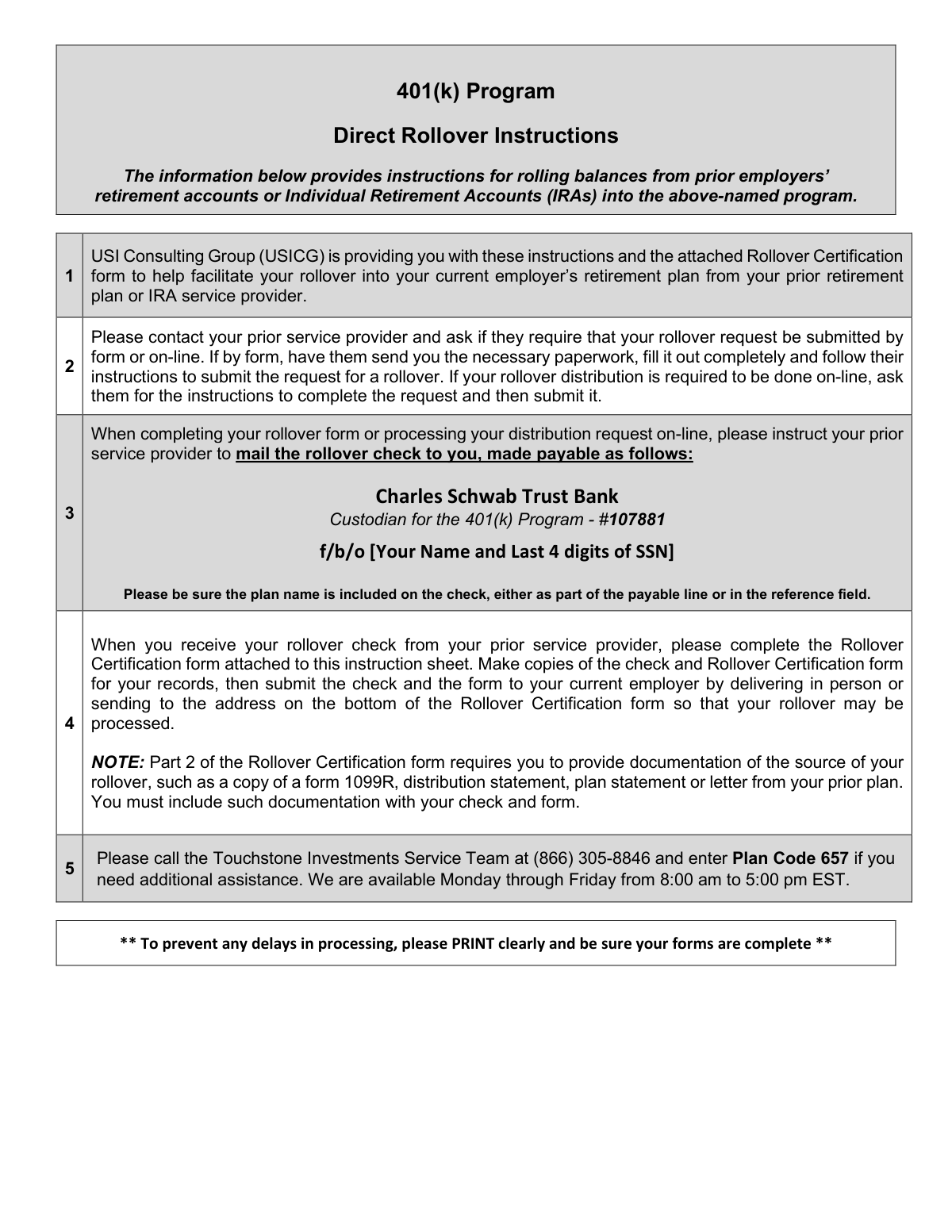
This form provides instructions and the necessary certification to transfer funds from a previous employer's retirement plan or an IRA into your current 401(k) Program.
You should complete this form if you have received a rollover check from a prior retirement plan and wish to deposit it into your current employer's 401(k) Program.
The check must be made payable to 'Charles Schwab Trust Bank Custodian for the 401(k) Program - #107881 f/b/o [Your Name and Last 4 digits of SSN]'.
Your prior service provider should mail the rollover check directly to you. You will then submit the check with your completed Rollover Certification form.
You must submit the original rollover check and documentation of the rollover source, such as a copy of Form 1099-R, a distribution statement, or a letter from your prior plan.
After receiving the check, you must complete the Rollover Certification form and submit it along with the original check and supporting documents to the address provided on the form.
Send the completed form, check, and documentation to USI Consulting Group, Attn: Touchstone Investments Service Team, 95 Glastonbury Blvd, Suite 102, Glastonbury, CT 06033.
If you do not have an established account, you must submit a completed Account Application along with your Rollover Certification form and check.
In Section 4, you can either have the funds invested according to your current elections or allocate the rollover amount by percentage across the listed investment options, ensuring the total equals 100%.
For assistance, you can call the Touchstone Investments Service Team at (866) 305-8846 and enter Plan Code 657 during their business hours.
Yes, services like Instafill.ai use AI to accurately auto-fill form fields with your information, which can save you time and help reduce errors.
Simply upload the form to the Instafill.ai platform, and its AI will identify the fields and help you fill them out with your saved information. You can then review, sign, and download the completed form.
You can use a service like Instafill.ai, which can convert flat, non-fillable PDFs into interactive forms that you can easily complete and sign on your computer.
Compliance 401(k) Rollover Certification
Validation Checks by Instafill.ai
1
Participant SSN Format Validation
Ensures the Social Security Number in Section 1 is a 9-digit number, formatted as XXXXXXXXX or XXX-XX-XXXX. This is a critical field for uniquely identifying the participant for tax reporting and account lookup. An invalid or incorrectly formatted SSN will prevent the system from finding an existing account or creating a new one, causing the entire rollover process to fail.
2
Participant Information Completeness
Verifies that all fields in the 'Participant Information' section (Name, SSN, full address, Date of Birth, Date of Hire, Phone, Email) are filled out. Incomplete information can delay or prevent the establishment of the account and the processing of the rollover. This check ensures all necessary data for legal and operational purposes is captured before proceeding.
3
Date of Birth and Hire Logical Consistency
Validates that the 'Date of Birth' and 'Date of Hire' are both valid dates and that the Date of Hire occurs after the Date of Birth by a reasonable margin (e.g., at least 16 years). This check prevents data entry errors and logical impossibilities. A failure indicates a significant data quality issue that must be corrected by the participant before the form can be processed.
4
Rollover Amount Format and Value
Checks that the dollar amount entered in the 'Rollover Election' section is a positive, non-zero numerical value. This is the principal amount of the transaction, and it cannot be negative or non-numeric. This validation prevents processing errors and ensures the financial transaction is based on a correct and valid figure.
5
Investment Allocation Total Percentage
Confirms that the sum of all percentages entered in the 'Investment Elections' section equals exactly 100%. This is a critical check to ensure the entire rollover amount is allocated according to the participant's wishes, leaving no funds uninvested. If the total is not 100%, the funds cannot be invested, causing delays and requiring participant follow-up.
6
Individual Investment Percentage Validity
Ensures that each individual percentage entered in the 'Investment Elections' section is a non-negative number (zero or greater). Participants cannot allocate a negative percentage to a fund. This validation prevents mathematical errors in the allocation logic and ensures all specified investment directions are valid and actionable.
7
Employee Authorization Signature and Date
Verifies that the form has been signed and dated by the employee in Section 5. The signature provides legal authorization for the transaction and certifies the accuracy of the provided information. A missing signature or date invalidates the request and legally prevents the rollover from being processed until it is obtained.
8
Rollover Source Documentation Attachment
Confirms that the required supporting documentation (e.g., Form 1099-R, distribution statement, or letter from the prior plan) is attached to the form as stated in Section 3. This documentation is mandatory to prove the funds are eligible for rollover treatment under IRS rules. Without this proof, the rollover cannot be accepted and must be rejected.
9
Account Application for New Participants
Checks if the participant (identified by SSN) already has an account in the 401(k) Program. If no account exists, this validation verifies that a completed 'Account Application' form is submitted alongside the Rollover Certification. This is necessary to create the new account into which the rollover funds will be deposited; failure to include it will halt processing.
10
Contact Information Formatting
Validates that the 'Daytime Phone' and 'Email Address' fields follow standard formats (e.g., (XXX) XXX-XXXX for phone, [email protected] for email). Correctly formatted contact information is essential for communicating with the participant about their rollover status or any issues. Invalid formats can lead to communication breakdowns and processing delays.
11
Address Field Formatting (State and Zip)
Ensures the State and Zip Code fields for both the participant and employer addresses are in the correct format (e.g., 2-letter state abbreviation, 5-digit or 9-digit zip code). Proper address formatting is critical for mail delivery of statements and other important documents. Incorrect formatting can lead to returned mail and significant delays in communication.
12
Rollover Check and Amount Match
This is a two-part check verifying that a physical check is attached and that the amount written on the check exactly matches the dollar amount specified in Section 3. This is the most critical financial validation to ensure the funds received match the participant's declared rollover amount. A mismatch will halt the entire process until the discrepancy is resolved with the participant.
Common Mistakes in Completing 401(k) Rollover Certification
The instructions require the check be made payable to a very specific and long entity name, including a custodian, plan name, account number, and the participant's personal details. People often shorten this name or omit key details like the 'f/b/o' information. A check with an incorrect payee cannot be deposited, leading to its rejection and requiring the participant to request a new check from their prior provider, causing significant delays. To avoid this, provide the exact payee text from the instructions to your prior plan administrator and verify the check upon receipt.
The form explicitly requires documentation proving the source of the rollover funds, such as a Form 1099-R or a final distribution statement from the prior plan. Participants often overlook this requirement and only send the check and certification form. Without this proof, the receiving institution cannot legally accept the rollover, putting the entire process on hold until the documents are provided. Always create a checklist and ensure you include this documentation in the same envelope as your form and check.
In the Investment Elections section, participants must allocate their rollover funds across various options, and the percentages must sum to exactly 100%. Simple arithmetic errors are common, leading to totals like 99% or 101%. This discrepancy will cause the form to be rejected, and the funds may be held in a non-invested cash account or a default fund until a corrected form is received. To prevent this, double-check your math before submitting the form. AI-powered form fillers like Instafill.ai can automatically validate that these fields sum correctly.
This error occurs when the dollar amount written in Section 3 of the Rollover Certification form does not exactly match the amount on the enclosed check. This often happens due to typos or writing the amount from memory instead of looking at the check. This mismatch creates a reconciliation problem for the processing team, halting the transaction until they can contact you for clarification. Always verify the amount on the physical check and carefully transcribe that exact figure onto the form.
Forgetting to sign and date the Employee Authorization section is one of the most frequent and critical errors. An unsigned form is not legally valid and cannot be processed under any circumstances. This simple oversight will result in the immediate rejection of your application, forcing you to resubmit and delaying your investment. Always perform a final review of the entire form, paying special attention to the signature and date fields before mailing.
The instructions state to 'PRINT clearly,' but handwritten information, especially for names, addresses, and Social Security Numbers, can often be illegible. This leads to data entry errors, failed identity verification, and processing delays while the administrator attempts to clarify the information. To avoid this, use clear, block capital letters. For non-fillable PDFs like this one, tools like Instafill.ai can convert them into digitally fillable forms, ensuring all information is perfectly legible and accurate.
A small note at the top of the certification form states that an 'Account Application' must be submitted alongside the rollover form if the participant does not already have an account. New employees often miss this note and only submit the rollover paperwork. This results in the rejection of the rollover, as there is no established account to deposit the funds into. Carefully read all instructions, including headers and footnotes, to identify any additional required forms.
It is surprisingly common for participants to complete all the paperwork perfectly but forget to include the actual rollover check in the envelope. They may set it aside and forget to enclose it before sealing and mailing the documents. Without the check, the rollover cannot be funded, and the form is useless, stalling the entire process until the check is received. Always use a paperclip to attach the check directly to the completed certification form before placing them in the envelope.
Section 2 asks for 'Employer Information,' and since the process involves a prior employer's plan, participants sometimes mistakenly enter the old employer's details. The form is for the plan you are rolling money *into*, so it requires your *current* employer's information. This error can lead to incorrect data in your new retirement account and communication breakdowns. To avoid this, remember that this form is for your new plan and should contain your current employment details.
Saved over 80 hours a year
“I was never sure if my IRS forms like W-9 were filled correctly. Now, I can complete the forms accurately without any external help.”
Kevin Martin Green
Your data stays secure with advanced protection from Instafill and our subprocessors




Robust compliance program
Transparent business model
You’re not the product. You always know where your data is and what it is processed for.
ISO 27001, HIPAA, and GDPR
Our subprocesses adhere to multiple compliance standards, including but not limited to ISO 27001, HIPAA, and GDPR.
Security & privacy by design
We consider security and privacy from the initial design phase of any new service or functionality. It’s not an afterthought, it’s built-in, including support for two-factor authentication (2FA) to further protect your account.
Fill out 401(k) Rollover Certification with Instafill.ai
Worried about filling PDFs wrong? Instafill securely fills 401k-program-rollover-certification forms, ensuring each field is accurate.
