Yes! You can use AI to fill out Certification for Special Assessment (Office of Building, Planning, & Code Compliance, City of Knox, Indiana)
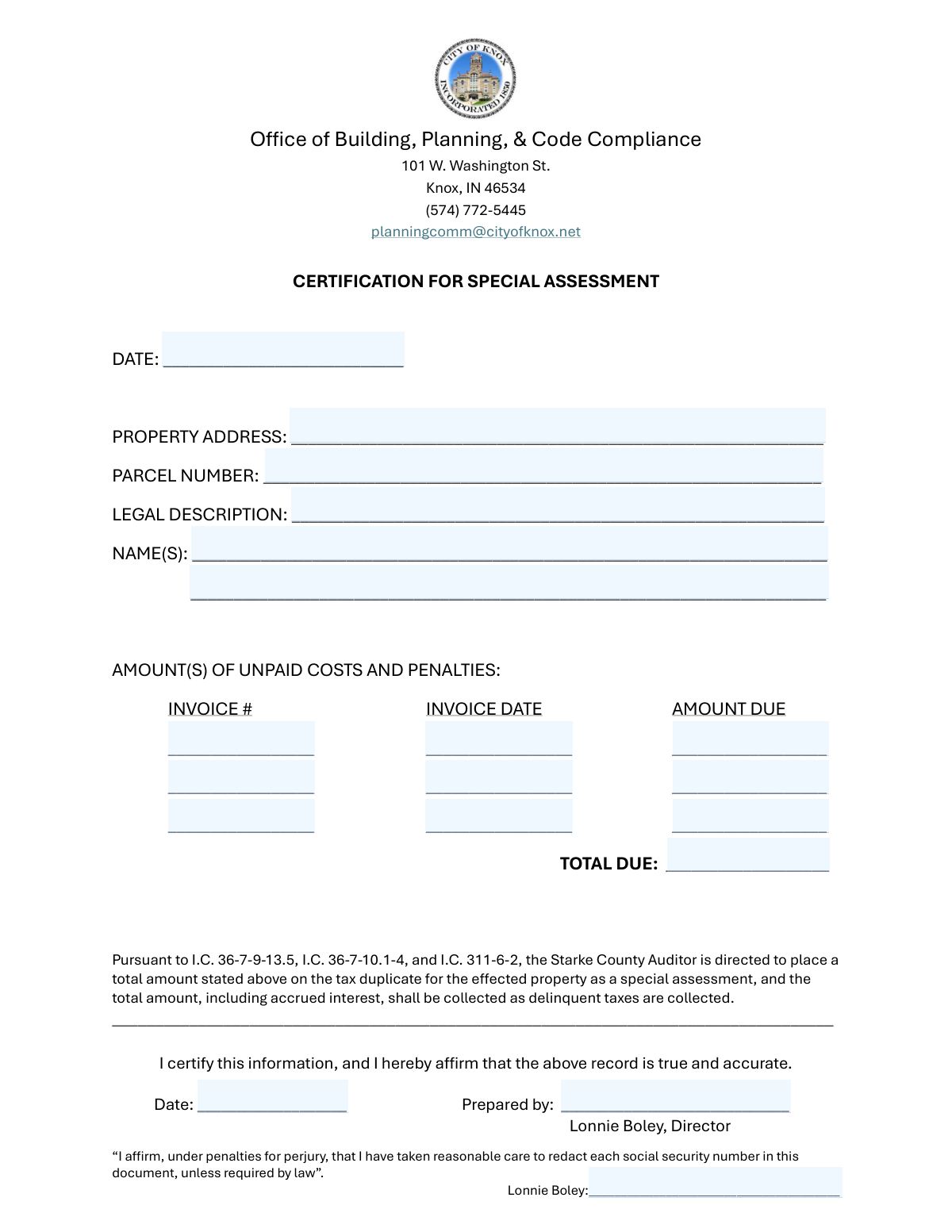
The Certification for Special Assessment is an official certification document prepared by the local building/planning/code compliance office to report unpaid costs and penalties tied to a specific property (address, parcel number, and legal description). It supports the placement of the stated total (plus any accrued interest) onto the county tax duplicate as a special assessment, to be collected in the same manner as delinquent taxes under the cited Indiana Code provisions. The form is important because it creates a formal, signed record that the amounts and property identifiers are accurate and properly documented for tax collection purposes. Today, this form can be filled out quickly and accurately using AI-powered services like Instafill.ai, which can also convert non-fillable PDF versions into interactive fillable forms.
Our AI automatically handles information lookup, data retrieval, formatting, and form filling.
It takes less than a minute to fill out Certification for Special Assessment using our AI form filling.
Securely upload your data. Information is encrypted in transit and deleted immediately after the form is filled out.
Form specifications
| Form name: | Certification for Special Assessment (Office of Building, Planning, & Code Compliance, City of Knox, Indiana) |
| Number of pages: | 1 |
| Language: | English |
| Categories: | Knox Indiana forms, building and planning forms, special assessment forms, Indiana municipal forms |
Instafill Demo: filling out a legal form in seconds
How to Fill Out Certification for Special Assessment Online for Free in 2026
Are you looking to fill out a CERTIFICATION FOR SPECIAL ASSESSMENT form online quickly and accurately? Instafill.ai offers the #1 AI-powered PDF filling software of 2026, allowing you to complete your CERTIFICATION FOR SPECIAL ASSESSMENT form in just 37 seconds or less.
Follow these steps to fill out your CERTIFICATION FOR SPECIAL ASSESSMENT form online using Instafill.ai:
- 1 Go to Instafill.ai and upload the Certification for Special Assessment form (or select it from the form library, if available).
- 2 Let the AI detect and map the fields, then confirm the form type and review the extracted field list (property details, owner names, invoice lines, totals, and signature blocks).
- 3 Enter the form completion date and the property identifiers: property address, parcel number, and the full legal description exactly as shown on deed/tax records.
- 4 Add the owner name(s) as they appear on record (individuals or legal entity names), including any co-owner if applicable.
- 5 Fill in each unpaid cost line item (invoice number, invoice date, and amount due) for up to three invoices, ensuring amounts match the supporting invoices/billing documents.
- 6 Have Instafill.ai calculate or verify the Total Due from the line items, then review for accuracy and consistency with the stated unpaid costs and penalties.
- 7 Complete the certification block (prepared by name/title, certification date, and certifier signature/printed name), then download, print/sign if required, and submit to the appropriate office/county auditor process as instructed.
Our AI-powered system ensures each field is filled out correctly, reducing errors and saving you time.
Why Choose Instafill.ai for Your Fillable Certification for Special Assessment Form?
Speed
Complete your Certification for Special Assessment in as little as 37 seconds.
Up-to-Date
Always use the latest 2026 Certification for Special Assessment form version.
Cost-effective
No need to hire expensive lawyers.
Accuracy
Our AI performs 10 compliance checks to ensure your form is error-free.
Security
Your personal information is protected with bank-level encryption.
Frequently Asked Questions About Form Certification for Special Assessment
This form certifies unpaid costs and penalties related to a specific property so the Starke County Auditor can place the total as a special assessment on the propertyâs tax duplicate. The amount (plus any accrued interest) is then collected the same way delinquent taxes are collected.
It is typically prepared by the Office of Building, Planning, & Code Compliance (or an authorized official) to certify amounts owed for a property. Property owners usually do not prepare it unless instructed by the office.
Contact or submit through the Office of Building, Planning, & Code Compliance, 101 W. Washington St., Knox, IN 46534, phone (574) 772-5445, email [email protected]. If youâre unsure about submission method (mail, email, in-person), call or email to confirm current procedures.
You must provide the Property Address, Parcel Number (APN/parcel ID), Legal Description, and the owner name(s) as they appear on official records. Enter these exactly as shown on tax records or the deed to avoid processing delays.
The parcel number is usually on county tax bills, assessor records, or property tax lookup tools. The legal description is found on the deed, title documents, or recorded property records.
List each unpaid item on a separate line with the Invoice #, Invoice Date, and Amount Due. Use the invoice or billing documents to ensure the numbers and dates match exactly.
If you have more than three items, ask the office whether you should attach an additional page or provide a separate itemized list. Make sure the âTotal Dueâ reflects the sum of all unpaid costs and penalties being certified.
Add the Amount Due from each listed invoice line and enter the sum in âTotal Due.â If the office has provided a total that includes penalties or other charges, confirm whether those are already included before finalizing the number.
Form Date is the date the certification form is being completed, while Certification Date is the date the certifier signs/affirms the information. In many cases they may be the same, but use the actual dates applicable to completion and signing.
The certifier is the person affirming the record is true and accurate (often the Director or authorized official listed on the form). âPrepared byâ should be the person who completed the form details, including their name (and optionally title).
It means the person submitting the document affirms they have removed (redacted) any Social Security numbers unless the law specifically requires them. Do not include SSNs on attachments unless you have explicit legal or office instructions to do so.
Once certified, the Starke County Auditor is directed to place the stated total on the tax duplicate as a special assessment for the affected property. The amount, including accrued interest, may be collected in the same manner as delinquent taxes.
Processing times can vary depending on office workload and coordination with the county auditor. For the most accurate estimate, contact the Office of Building, Planning, & Code Compliance at (574) 772-5445 or [email protected].
YesâAI tools can help by extracting information from invoices, deeds, and tax records and placing it into the correct fields. Services like Instafill.ai use AI to auto-fill form fields accurately and save time.
Upload the PDF to Instafill.ai, then upload or connect your supporting documents (e.g., invoices, deed/legal description, tax record showing parcel number). Instafill.ai can map the information to fields like Property Address, Parcel Number, invoice lines, and Total Due, and you can review and edit before exporting the completed form.
If the PDF is not fillable, Instafill.ai can convert flat non-fillable PDFs into interactive fillable forms. After conversion, you can auto-fill the newly created fields and export a clean, typed version for submission.
Compliance Certification for Special Assessment
Validation Checks by Instafill.ai
1
Form Date is present and uses an accepted date format
Validates that the Form Date field is not blank and matches an approved date format (e.g., MM/DD/YYYY or YYYY-MM-DD). This is important because the formâs completion date is used for recordkeeping and audit trails. If validation fails, the submission should be rejected and the user prompted to enter a valid date.
2
Certification Date is present and uses an accepted date format
Checks that the Certification Date is provided and conforms to the same standardized date format rules as the Form Date. The certification date establishes when the attestation was made and can affect enforceability and processing timelines. If missing or malformed, the form should be flagged as incomplete and not routed for recording.
3
Certification Date is not earlier than Form Date
Ensures logical consistency by verifying the Certification Date is the same as or later than the Form Date. A certification cannot occur before the form is completed, and an earlier date suggests data entry error or backdating. If this check fails, the system should require correction or an override with documented justification.
4
Property Address completeness and minimum structure validation
Validates that the Property Address includes at least a street number and street name, and (if required by the jurisdictionâs rules) city, state, and ZIP. This matters because the assessment must be tied to a uniquely identifiable property for tax duplicate placement. If the address is incomplete or too vague (e.g., only a street name), the submission should be rejected or routed to manual review.
5
Property Address does not contain prohibited PII (SSN redaction check)
Scans free-text fields (especially Property Address, Legal Description, and Names) for patterns resembling Social Security Numbers (e.g., ###-##-#### or 9 consecutive digits). The form includes an affirmation about redacting SSNs, so detecting SSN-like strings helps prevent accidental disclosure. If an SSN pattern is detected, the system should block submission and instruct the filer to redact or remove the number unless legally required.
6
Parcel Number (APN) required and format constrained
Ensures the Parcel Number is present and matches allowed character rules (commonly digits with optional dashes/periods, depending on local APN conventions). This is critical because the auditorâs tax duplicate posting typically relies on the parcel identifier more than the mailing address. If the parcel number is missing or contains invalid characters, the form should be rejected or flagged for correction.
7
Legal Description required and meets minimum content threshold
Checks that the Legal Description is not blank and contains a minimum number of characters/words to be meaningful (e.g., not just 'N/A' or a single lot number without context). The legal description is used to precisely identify the property in official records and resolve ambiguities. If it fails, the system should require a fuller description or supporting documentation.
8
At least one Owner Name is provided and is not placeholder text
Validates that Owner Name 1 is present and not a placeholder such as 'unknown', 'n/a', or a single initial. Owner identification is necessary for notice, record accuracy, and downstream tax/collection processes. If missing or clearly invalid, the submission should be blocked until corrected.
9
Owner Name 2 conditional validation (no partial co-owner entry)
If Owner Name 2 is provided, verifies it meets the same quality rules as Owner Name 1 (e.g., not blank, not placeholder, reasonable length). This prevents partial or corrupted co-owner data that can cause misindexing or notice failures. If Owner Name 2 fails validation, the system should require correction or removal of the second owner entry.
10
Invoice line completeness per row (all-or-nothing rule)
For each invoice row, validates that Invoice Number, Invoice Date, and Amount Due are either all filled in or all blank. This prevents orphaned amounts without references or dates, which undermines auditability and reconciliation. If a row is partially completed, the system should prompt the user to complete the missing fields or clear the row.
11
Invoice Date format and plausibility validation
Checks each Invoice Date for valid date formatting and plausibility (e.g., not a nonexistent date and not unreasonably far in the future). Invoice dates support aging, interest calculations, and documentation matching. If an invoice date is invalid or future-dated beyond an allowed tolerance, the row should be rejected or flagged for review.
12
Invoice Number uniqueness across rows
Ensures that the invoice numbers entered across the three rows are not duplicates (unless the system supports explicit duplicates with justification). Duplicate invoice identifiers can lead to double-counting or confusion during collections and reconciliation. If duplicates are detected, the system should require correction or a documented reason.
13
Amount Due numeric and currency validation
Validates that each Amount Due is a numeric value in a valid currency format (e.g., optional $ sign, commas allowed, max two decimal places). This is important to prevent parsing errors and ensure accurate totals and tax duplicate posting. If the amount is non-numeric, has too many decimals, or contains invalid characters, the system should block submission for correction.
14
Amount Due must be non-negative and non-zero when an invoice is present
Checks that each Amount Due is greater than 0 when an invoice row is populated, and never negative. Negative or zero amounts can indicate credits, reversals, or data entry mistakes that may not be supported by the special assessment process. If this fails, the system should require correction or route to manual review with an explanation.
15
Total Due equals sum of populated Amount Due values
Recalculates the sum of all provided Amount Due entries and compares it to Total Due within a small rounding tolerance (e.g., $0.01). This prevents arithmetic errors that could cause incorrect assessment amounts to be placed on the tax duplicate. If the total does not match, the system should either auto-correct Total Due or require the user to fix the discrepancy before submission.
16
Prepared By and Certifier Signature/Printed Name are present and consistent
Validates that Prepared By is completed and that the Certifier Signature/Printed Name is present, with basic checks for reasonable name length and non-placeholder values. Because the form includes an attestation under penalties for perjury, missing preparer/certifier identification undermines legal and administrative validity. If either is missing, the submission should be rejected as incomplete and not accepted for official processing.
Common Mistakes in Completing Certification for Special Assessment
People often enter only one date, reuse the same date everywhere, or mix formats (e.g., 1/2/24 vs 02-01-2024), especially when the form has multiple date fields. This can create ambiguity about when the certification was prepared versus when it was signed, and can delay processing or require re-issuance. Use a single, clear format (typically MM/DD/YYYY unless your office specifies otherwise) and ensure each date reflects the correct event (completion, signature, and each invoiceâs actual date). AI-powered tools like Instafill.ai can help standardize date formats and flag missing or conflicting dates.
A common error is listing only the street address without city/state/ZIP, or forgetting unit/suite numbers for multi-unit properties. Incomplete addresses can cause the assessment to be applied to the wrong location or trigger follow-up requests from the auditorâs office. Always enter the full mailing-style address (street number/name, unit if applicable, city, state, ZIP) exactly as used in tax records. Instafill.ai can auto-complete and validate addresses to reduce omissions and formatting issues.
Applicants frequently transpose digits, omit leading zeros, or use an internal reference number instead of the official parcel ID. Because the parcel number is the primary identifier for tax duplicate placement, a mismatch can result in misapplied assessments or rejection until corrected. Copy the parcel number directly from the county tax record, deed, or assessorâs database and keep punctuation/hyphens exactly as shown. Instafill.ai can help by validating the parcel number format and reducing copy/typing errors.
Many people paste a street address or a shortened subdivision note instead of the full legal description from the deed (lot/block/subdivision or metes and bounds). An incomplete legal description can create legal ambiguity and may not satisfy recording or audit requirements, leading to delays or requests for corrected documentation. Use the exact legal description from the deed/title documents, including all lot/block identifiers and any continuation text. If the form is a flat non-fillable PDF, Instafill.ai can convert it into a fillable version so long legal descriptions can be entered cleanly without truncation.
A frequent mistake is using nicknames, omitting middle initials/suffixes, listing a tenant/occupant, or using a DBA instead of the legal entity name. This can cause mismatches with county ownership records and complicate notice, billing, or enforcement. Enter the owner name(s) exactly as shown on the deed or tax roll, and include both owners when the property is jointly owned. Instafill.ai can help keep names consistent across fields and prevent accidental omissions.
People often forget to add a co-owner, or they repeat Owner Name 1 in Owner Name 2 because they assume itâs required. Missing a co-owner can create notice and due process issues, while duplicating can look like a data entry error and prompt clarification requests. Confirm ownership from the most recent deed/tax record and list each distinct owner on the correct line, leaving Owner Name 2 blank only if truly not applicable. Instafill.ai can prompt for co-owner details when records indicate multiple owners.
Itâs common to fill in amounts but forget invoice numbers or dates, or to enter a reference that doesnât match the billing document. Missing identifiers make it difficult to audit the charges and can delay certification or require resubmission with supporting documentation. For each unpaid cost row, enter the invoice number exactly as shown, the correct invoice date, and the corresponding amount due. Instafill.ai can help by mapping data from invoices into the correct fields and checking that each row is complete.
People sometimes enter amounts like â1,200â without decimals, use cents incorrectly (e.g., 1200.0 or 12.00 instead of 1200.00), or include text such as âapprox.â. These inconsistencies can cause calculation errors, misinterpretation of totals, or rejection by staff who need clean numeric values. Enter amounts as numbers with two decimals (e.g., 1200.00) and follow any local formatting rules consistently across all rows. Instafill.ai can automatically format currency fields and prevent non-numeric entries.
A very common issue is arithmetic mistakes, forgetting to include one line item, or including interest/fees in Total Due that arenât reflected in the listed invoices. A mismatch can trigger manual review, slow processing, or require a corrected certification to ensure the tax duplicate reflects the right amount. Recalculate the total from the listed âAmount Dueâ entries and ensure Total Due equals that sum (or clearly itemize any additional components if required by your office). Instafill.ai can auto-sum line items and flag discrepancies before submission.
People often complete the property and invoice sections but forget the certifier signature/printed name, the prepared-by name, or the certification date. Without proper execution, the certification may be considered incomplete and not legally reliable, resulting in delays or rejection. Ensure the âPrepared by,â certifier signature/printed name, and the certification date are all completed by the appropriate person (as indicated on the form, e.g., the director/certifier). Instafill.ai can highlight missing signature/date fields and reduce the chance of submitting an incomplete form.
The form includes a perjury affirmation about redacting Social Security numbers, but people sometimes attach supporting documents that still contain SSNs, or they over-redact key identifiers like parcel numbers or invoice numbers. Unredacted SSNs create privacy and compliance risks, while over-redaction can make the submission unusable and require resubmission. Review all pages and attachments to ensure SSNs are properly redacted unless legally required, and do not redact essential property/invoice identifiers needed for processing. Instafill.ai can help by detecting sensitive patterns and guiding consistent redaction practices before finalizing the packet.
Saved over 80 hours a year
âI was never sure if my IRS forms like W-9 were filled correctly. Now, I can complete the forms accurately without any external help.â
Kevin Martin Green
Your data stays secure with advanced protection from Instafill and our subprocessors

Robust compliance program
Transparent business model
Youâre not the product. You always know where your data is and what it is processed for.
ISO 27001, HIPAA, and GDPR
Our subprocesses adhere to multiple compliance standards, including but not limited to ISO 27001, HIPAA, and GDPR.
Security & privacy by design
We consider security and privacy from the initial design phase of any new service or functionality. Itâs not an afterthought, itâs built-in, including support for two-factor authentication (2FA) to further protect your account.
Fill out Certification for Special Assessment with Instafill.ai
Worried about filling PDFs wrong? Instafill securely fills certification-for-special-assessment-office-of-building-planning-code-compliance-city-of-knox-indiana forms, ensuring each field is accurate.