
Yes! You can use AI to fill out State of New Mexico Workers’ Compensation Administration — Workers' Compensation Complaint (Rev. 8/22) (11.4.4.9 NMAC)
Don't type 108 fields by hand. Tell our AI about yourself, or upload a document you already have, and it fills every field in seconds. You check it, then download, print or sign.
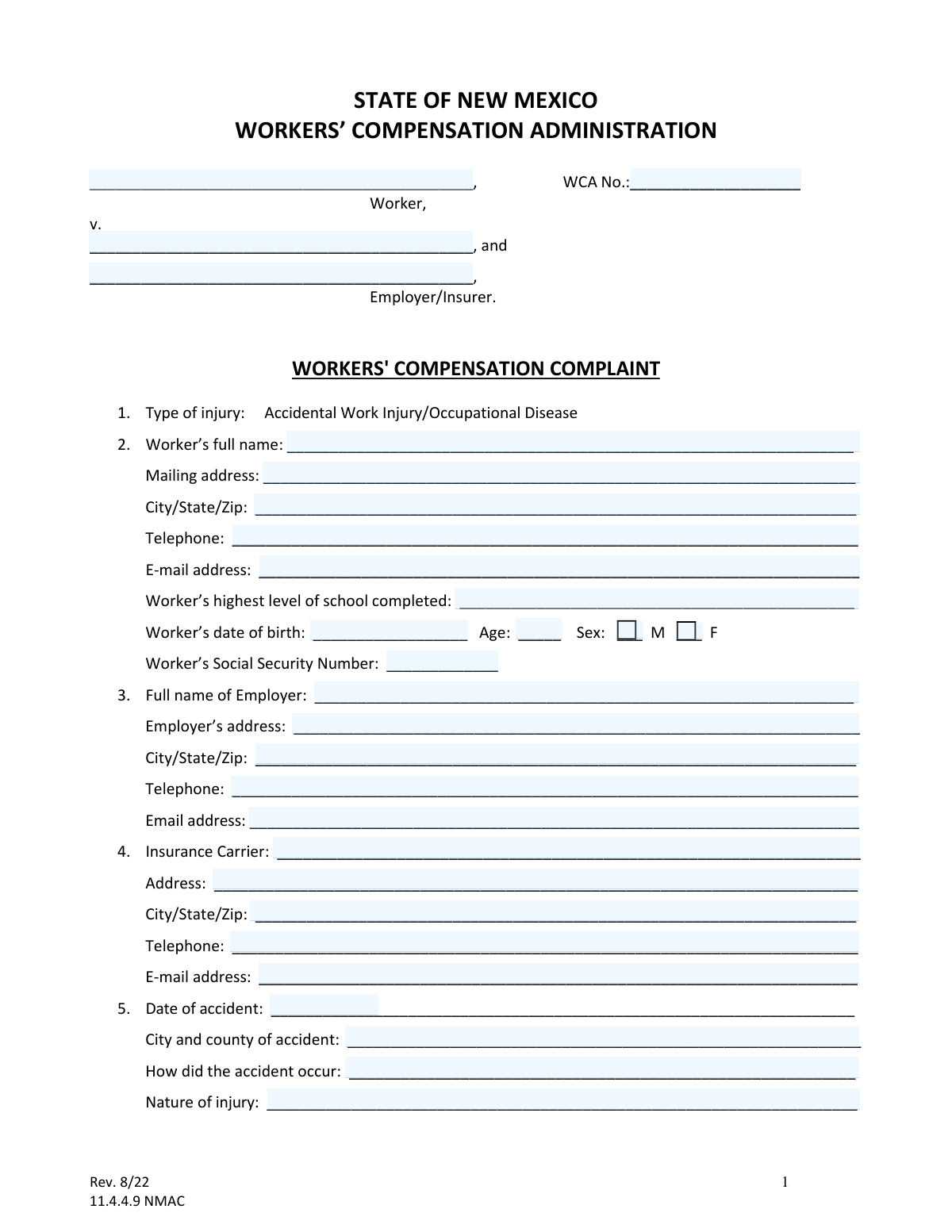
The AI does the filling. You just check it.
No typing into boxes, nothing to install.
What this form asks for
The AI fills all of it, from your answers or your documents.
The AI checks your answers before you download
16 checks built for this form, so a wrong date or a missing answer is caught before anyone else sees it.
Checks whether the WCA No. field is provided when the submission is intended to be filed into an existing case, and validates that it matches the expected WCA numbering pattern (e.g., digits/hyphens as configured by the agency). This prevents misfiling into the wrong case or creating duplicate records. If validation fails, the system should block submission for existing-case filings or route to manual review with a clear prompt to correct the case number.
Verifies the Worker’s full name is present and contains at least a first and last name, rejecting entries like initials only, 'N/A', or blank/whitespace. Accurate identification is essential for matching to prior claims, medical records authorizations, and service of process. If validation fails, the form should be rejected as incomplete and the filer prompted to enter the Worker’s full legal name.
Checks that the Worker mailing address includes a street address (or PO Box), city, state, and ZIP code, and that the state is a valid US state/territory abbreviation and ZIP is 5 digits (or ZIP+4). This is required for notices, service, and jurisdictional correspondence. If validation fails, the system should require correction before submission or flag for manual follow-up if the filer indicates homelessness/unknown address (if supported).
Ensures each provided telephone number conforms to a valid US format (10 digits, allowing punctuation and optional country code) and is not obviously invalid (e.g., 000-000-0000). Reliable phone numbers are critical for mediation scheduling, hearing logistics, and medical/provider coordination. If validation fails, the system should prompt for correction and allow omission only where the field is not required.
Checks that any entered email address is syntactically valid (e.g., [email protected]) and specifically requires the 'e-mail address for service' for the filing party/attorney if electronic service is used by the program. Incorrect emails can cause failed service and missed deadlines. If validation fails, the system should block submission or require an alternate service method to be selected (if available).
Ensures the date of birth is a valid date (MM/DD/YYYY or configured format), not in the future, and that the stated Age (if provided) matches the DOB within an acceptable tolerance (e.g., ±1 year depending on whether birthday has occurred this year). This reduces identity errors and supports Medicare/benefits coordination. If validation fails, the system should prompt to correct DOB/age and flag potential identity mismatch.
And 10 more checks
- Validates Sex selection is exactly one option when required
- Validates Social Security Number format and disallows known invalid patterns
- Ensures Employer and Insurer identification fields are complete and distinct
- Validates accident date and related timeline fields for logical order
- Validates injury type selection and requires supporting narrative fields
- Validates location of accident includes city and county
- Validates wage and compensation rate fields including 'To be determined/disputed' logic
- Validates Maximum Medical Improvement (MMI) and impairment rating dependencies
- Validates Yes/No questions enforce required follow-up dates
- Validates interpreter and remote-hearing equipment responses and conditional fields
Let AI fill out your NM WCA Workers' Compensation Complaint
No typing. Every field filled in seconds, checked, ready to sign.
How to Fill Out NM WCA Workers' Compensation Complaint Online for Free in 2026
What the AI walks you through.
- Enter case caption details: worker name, employer/insurer names, and the WCA case number (if known/assigned).
- Complete the worker information section, including contact details, education level, date of birth, sex, and Social Security Number.
- Provide employer and insurance carrier information (names, addresses, phone numbers, and email addresses).
- Describe the injury/occupational disease: date of accident, location (city/county), how it occurred, nature of injury, body parts affected, and first date unable to perform job duties.
- Fill in employment and wage details at the time of injury (job title, average weekly wage, and weekly compensation rate, or mark as to be determined/disputed).
- Add medical information: treating doctor, maximum medical improvement (MMI) doctor and date, impairment rating (if known), and work status/return-to-work dates.
- Select the benefits/relief sought and any employer complaints, state the reasons supporting the complaint, answer interpreter/remote-hearing equipment questions, then sign/date and provide service contact information; attach required documents (summons for each responding party and, if the worker is filing, the Worker’s Authorization for Use and Disclosure of Health Records).
Common Mistakes in Completing NM WCA Workers' Compensation Complaint
The ones the AI is built to catch.
Leaving the WCA No. blank or entering the wrong case number
Not clearly identifying all parties (worker, employer, and insurer) in the caption and fields
Selecting the wrong injury type (Accidental Work Injury vs. Occupational Disease)
Incomplete worker contact information (address, phone, email) or using an unreliable email for service
Errors in date fields (date of accident, first unable-to-work date, MMI date) and inconsistent timelines
Providing vague accident details and injury descriptions
Missing or incorrect wage and compensation rate information (and not marking ‘to be determined/disputed’)
Incomplete doctor information or mixing up treating doctor vs. MMI doctor
Not answering return-to-work questions or providing dates that don’t match work status
Skipping Medicare eligibility questions or answering them incorrectly
Checking benefits sought without specifying details (especially medical bills, safety device, mental impairment, and ‘other’)
Forgetting required attachments and service documents (Summons for each responding party; health records authorization)
Frequently Asked Questions About NM WCA Workers' Compensation Complaint
Is it really free for 7 days?
Can I fill other forms too?
How do I cancel?
How does the AI fill out NM WCA Workers' Compensation Complaint?
What happens to my information?
How complex is NM WCA Workers' Compensation Complaint to fill out?
What is the Workers’ Compensation Complaint form used for?
Who should fill out and file this complaint?
What is the WCA number and do I need it to file?
Do I need to choose between “Accidental Work Injury” and “Occupational Disease”?
What information about the worker is required in Section 2?
What if I don’t know the employer’s insurer or insurance carrier information?
How do I complete the accident and injury details in Section 5?
What if I don’t know my average weekly wage or weekly compensation rate?
Do I have to list my doctor and maximum medical improvement (MMI) information?
What does it mean to be “released back to work” or to have “returned to any work”?
Why does the form ask about Medicare and Social Security Disability in Section 10?
Which benefits can I request in Section 11?
What should the employer/insurer put in Section 12 (Complaints by Employer)?
How detailed should I be in Section 13 (reasons supporting the complaint)?
Do I need to file anything else with the complaint, and how do I get help?
Get your NM WCA Workers' Compensation Complaint filled out by AI
$0 today. Cancel before Oct 31 and you pay nothing.
Other forms like this one
workers compensation forms: DWC Form-001, Employer’s first report of injury or illness, DWC001S, Employer’s first report of injury or illness, DWC002, Employer’s report for reimbursement of voluntary payment, Form BWC-1141, Request for Medical Information, ACORD 130 CA, California Workers Compensation Application, Form CA-17, Duty Status Report
New Mexico forms: Northland Application for Rental – New Mexico
PA state forms: Form 1095-A, Health Insurance Marketplace Statement, Form W-2, Wage and Tax Statement, Form 593, Real Estate Withholding, Form 8938, Statement of Specified Foreign Financial Assets, Form CMS-2567, Statement of Deficiencies, Form 1098, Mortgage Interest Statement, Form 1098-T, Tuition Statement, Form 1099-S, Proceeds From Real Estate Transactions, Form 1098-E, Student Loan Interest Statement, Form DS-3053, Statement of Consent, Form DS-86, Statement of Non-Receipt of a U.S. Passport, Form DS-86, Statement of Non-Receipt of a U.S. Passport, Form 108, Statement of Intention, Form 107, Statement of Financial Affairs, Form 121, Statement About Your SSNs, Form 122A-1, Chapter 7 Statement of Current Monthly Income, Center for Infertility & Reproductive Surgery – New Patient Questionnaire and Patient/Guarantor Statement (Brigham and Women’s Hospital, Department of Obstetrics and Gynecology), Adult Travel Document Application for Stateless and Protected Persons in Canada (16 years of age or over) (PPTC 190), Form W-8IMY (Rev. October 2021), Certificate of Foreign Intermediary, Foreign Flow-Through Entity, or Certain U.S. Branches for United States Tax Withholding and Reporting, Form W-2, Wage and Tax Statement (2025)
NJ state forms: Form 1095-A, Health Insurance Marketplace Statement, Form W-2, Wage and Tax Statement, Form 593, Real Estate Withholding, Form 8938, Statement of Specified Foreign Financial Assets, Form CMS-2567, Statement of Deficiencies, Form 1098, Mortgage Interest Statement, Form 1098-T, Tuition Statement, Form 1099-S, Proceeds From Real Estate Transactions, Form 1098-E, Student Loan Interest Statement, Form DS-3053, Statement of Consent, Form DS-86, Statement of Non-Receipt of a U.S. Passport, Form DS-86, Statement of Non-Receipt of a U.S. Passport, Form 108, Statement of Intention, Form 107, Statement of Financial Affairs, Form 121, Statement About Your SSNs, Form 122A-1, Chapter 7 Statement of Current Monthly Income, Center for Infertility & Reproductive Surgery – New Patient Questionnaire and Patient/Guarantor Statement (Brigham and Women’s Hospital, Department of Obstetrics and Gynecology), Adult Travel Document Application for Stateless and Protected Persons in Canada (16 years of age or over) (PPTC 190), Form W-8IMY (Rev. October 2021), Certificate of Foreign Intermediary, Foreign Flow-Through Entity, or Certain U.S. Branches for United States Tax Withholding and Reporting, Form W-2, Wage and Tax Statement (2025)
state ID forms: Application for Renewal or Duplicate of Alabama Driver License or ID card, Form 1095-A, Health Insurance Marketplace Statement, Form W-2, Wage and Tax Statement, Form 593, Real Estate Withholding, Form 8938, Statement of Specified Foreign Financial Assets, Form CMS-2567, Statement of Deficiencies, Form 1098, Mortgage Interest Statement, Form 1098-T, Tuition Statement, Form 1099-S, Proceeds From Real Estate Transactions, Form 1098-E, Student Loan Interest Statement, Form DS-3053, Statement of Consent, Form DS-86, Statement of Non-Receipt of a U.S. Passport, Form 108, Statement of Intention, Form 107, Statement of Financial Affairs, Form 121, Statement About Your SSNs, Form 122A-1, Chapter 7 Statement of Current Monthly Income, Center for Infertility & Reproductive Surgery – New Patient Questionnaire and Patient/Guarantor Statement (Brigham and Women’s Hospital, Department of Obstetrics and Gynecology), Adult Travel Document Application for Stateless and Protected Persons in Canada (16 years of age or over) (PPTC 190), Form W-8IMY (Rev. October 2021), Certificate of Foreign Intermediary, Foreign Flow-Through Entity, or Certain U.S. Branches for United States Tax Withholding and Reporting, Form W-2, Wage and Tax Statement (2025)
complaint forms: NCR Form 29, Complaint Initiation Form, Form UD-100, Complaint—Unlawful Detainer, Form NYS DHR, Employment Complaint Form, Form ADM 140, Language Access Complaint, Form 4, Complaint against a certificated bailiff, Murrieta Police Department Citizen Complaint Form (California Penal Code § 148.6 Advisory Statement), New York State Department of Labor (NYSDOL) Division of Labor Standards Complaint Form (LS 223), New York State Department of Labor, Division of Labor Standards Complaint Form (LS 223), Illinois Circuit Court Eviction Summons and Proof of Service of Eviction Summons & Eviction Complaint (Form E-S 3507.3), AOPC 308A, Civil Complaint, Consumer Complaint Form - Office of the Arizona Attorney General, Minimum Wage Ordinance (MWO) Complaint Intake Form, Affidavit - Supporting Documents Not Attached to Eviction Complaint, Judicial Council of California Form UD-100, Complaint—Unlawful Detainer, Form CMS-10287, Medicare Beneficiary Complaint Form, CMS Survey and Certification Complaint/Revisit Report, Resource Family Complaint Report, Pro Se 7, Complaint for Employment Discrimination, Form DC-CV-001, Complaint/Application and Affidavit in Support of Judgment, Illinois Eviction Complaint (06/24)
Let AI fill out your NM WCA Workers' Compensation Complaint
Your trial starts once a card is added. You pay nothing before Oct 31.
Our AI already knows this form, all 108 fields of it. Skip the typing: tell it about yourself, or upload what you have, and it fills the whole form in seconds.
- AI fills every field on all 3 pages, checkboxes included
- No typing into boxes: answer a few questions, or upload a document you already have, an old copy of this form, a photo of a document
- The AI checks the answers; you review and change anything before you download
- Download the finished PDF, print it, or sign it online
- Encrypted, and never used to train AI
Cancel before Oct 31 and you pay nothing.
A card is needed to start the trial. Cancel in two clicks from your account.
Terms · Privacy