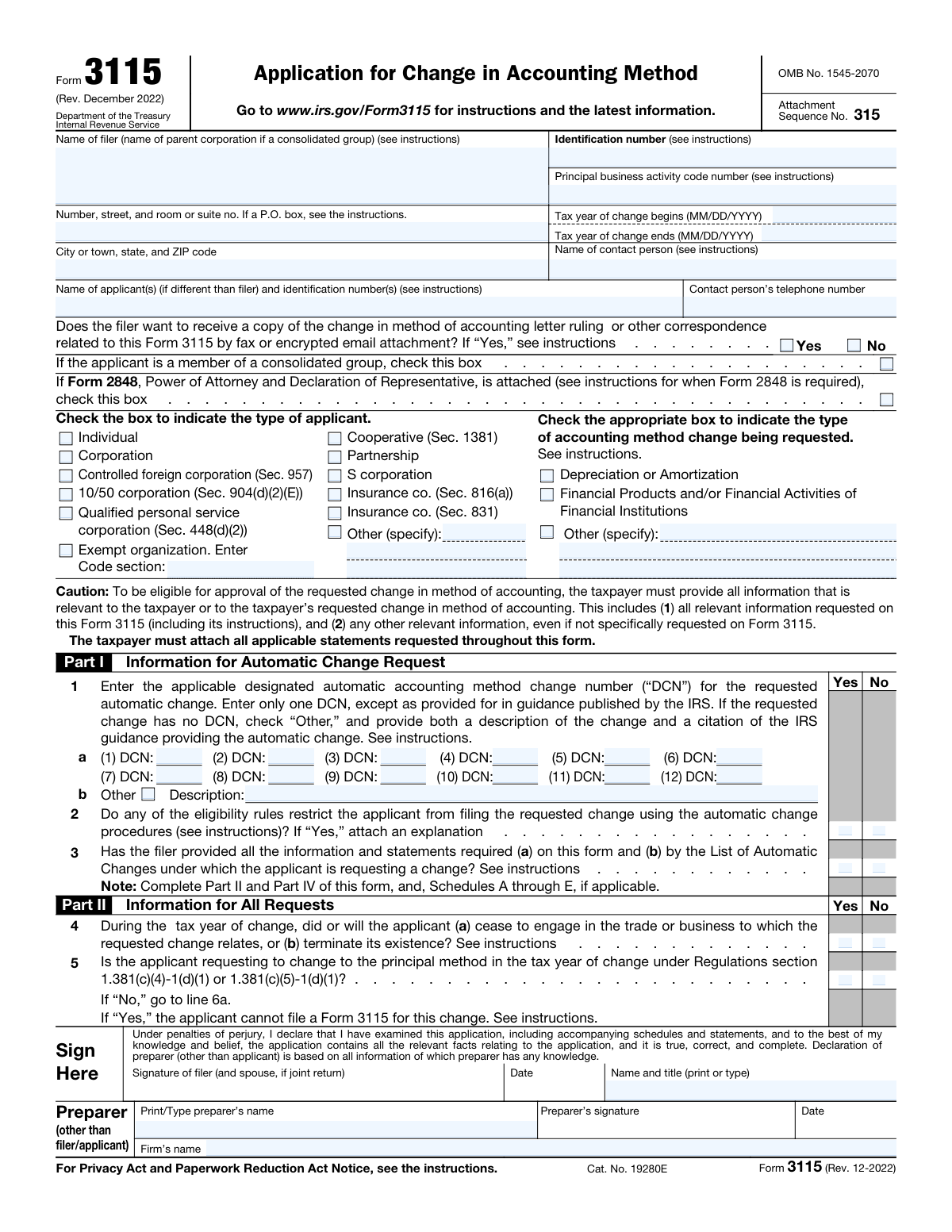
Yes! You can use AI to fill out Form 3115, Application for Change in Accounting Method

Form 3115, Application for Change in Accounting Method, is a tax form submitted to the Internal Revenue Service (IRS) by taxpayers to request consent to change their method of accounting. This is crucial for ensuring tax compliance when a taxpayer's financial practices change, affecting how income and expenses are reported. Today, this form can be filled out quickly and accurately using AI-powered services like Instafill.ai, which can also convert non-fillable PDF versions into interactive fillable forms.
Our AI automatically handles information lookup, data retrieval, formatting, and form filling.
It takes less than a minute to fill out Form 3115 using our AI form filling.
Securely upload your data. Information is encrypted in transit and deleted immediately after the form is filled out.

Form specifications

Form name: Form 3115, Application for Change in Accounting Method
Number of pages: 8
Language: English
Categories: accounting forms
main-image

Instafill Demo: How to fill out PDF forms in seconds with AI

How to Fill Out Form 3115 Online for Free in 2026

Are you looking to fill out a FORM 3115 form online quickly and accurately? Instafill.ai offers the #1 AI-powered PDF filling software of 2026, allowing you to complete your FORM 3115 form in just 37 seconds or less.
Follow these steps to fill out your FORM 3115 form online using Instafill.ai:
  1. 1 Navigate to Instafill.ai and upload your Form 3115, or select it from our library of official tax forms.
  2. 2 Allow the AI to scan and identify all the fields on the form, including filer information, applicant type, and details about the accounting method change.
  3. 3 Provide your information by answering simple questions in a conversational interface. The AI will populate the corresponding fields like Filer Name, EIN, and the tax year of change.
  4. 4 Specify the type of applicant and the accounting method change requested. The AI will guide you through selecting the correct checkboxes and entering Designated Automatic Accounting Method Change Numbers (DCNs).
  5. 5 Review the auto-filled form. The AI will highlight any required information that is missing, such as details about examinations or prior requests, ensuring completeness.
  6. 6 Securely e-sign the form and download the completed, ready-to-file Form 3115 to submit to the IRS.

Our AI-powered system ensures each field is filled out correctly, reducing errors and saving you time.

Why Choose Instafill.ai for Your Fillable Form 3115 Form?

Speed

Complete your Form 3115 in as little as 37 seconds.

Up-to-Date

Always use the latest 2026 Form 3115 form version.

Cost-effective

No need to hire expensive lawyers.

Accuracy

Our AI performs 10 compliance checks to ensure your form is error-free.

Security

Your personal information is protected with bank-level encryption.

Frequently Asked Questions About Form Form 3115

Form 3115, Application for Change in Accounting Method, is used by taxpayers to request a change in their overall method of accounting or the accounting treatment of any specific item. This allows you to get consent from the IRS for the change, which is generally required.

Any individual, corporation, partnership, S corporation, or other entity that wants to change its method of accounting for federal income tax purposes must file this form. This applies whether you are requesting an automatic or non-automatic change.

A DCN is a specific number assigned by the IRS to an approved automatic change in accounting method. You must find the correct DCN from the IRS's List of Automatic Changes and enter it in Part I, line 1a of the form.

You must enter the beginning and ending dates of the tax year for which you are requesting the change to take effect. This is a critical piece of information that defines when your new accounting method will start.

You must disclose this on the form in Part II, line 6a. You will also need to provide the examining agent's name and contact information and indicate whether the accounting method you want to change is an issue under examination.

Audit protection generally prevents the IRS from requiring you to change the same method of accounting for a tax year prior to the year of change. You must answer whether audit protection applies on line 7a and provide details if it does.

You only need to attach Form 2848 if you are authorizing a representative, such as an attorney or CPA, to represent you before the IRS in connection with this application. If you are, check the corresponding box on the form.

The form asks if you want to receive a copy of the letter ruling or other correspondence by fax or encrypted email. You should check 'Yes' or 'No' to indicate your preference for receiving communications about your application.

Yes, if the applicant is a partnership or S corporation, it must indicate on line 10 whether the requested change will affect the federal income tax returns of its partners, members, or shareholders.

You must disclose on line 11a if you, a predecessor, or a related party has requested or made a change in accounting method within the 5 tax years ending with the year of change. This may affect your eligibility for the current request.

Yes, services like Instafill.ai use AI to help you accurately auto-fill form fields, which can save significant time and reduce errors. This is especially helpful for complex forms like Form 3115.

You can use a service like Instafill.ai to complete your form online. Simply upload the form, and the platform will make it fillable, allowing you to type your information directly into the fields and save your progress.

If you have a non-fillable or 'flat' PDF, you can use a tool like Instafill.ai to convert it into an interactive, fillable form. This allows you to easily enter, edit, and save your information electronically.

Compliance Form 3115
Validation Checks by Instafill.ai

1
Validates Employer Identification Number (EIN) Format
This check ensures the 'Identification number (EIN)' field is formatted correctly as a nine-digit number with a hyphen after the second digit (XX-XXXXXXX). The EIN is a unique identifier assigned by the IRS, and an incorrect format will lead to processing errors and failure to match the filer's records. If the format is invalid, the submission should be blocked until the user corrects the entry.
2
Ensures Logical Tax Year Period
This validation confirms that the 'Tax year of change begins' date is chronologically before the 'Tax year of change ends' date. An illogical date range would make the application invalid and impossible for the IRS to process correctly. This check prevents nonsensical data entry and ensures the requested accounting change is applied to a valid and coherent time period.
3
Requires Mandatory Filer Identification
This check verifies that the core filer identification fields, including 'Filer name', 'Street address', 'City, state, and ZIP code', and 'Identification number (EIN)', are not empty. These fields are fundamental for identifying the taxpayer and processing the application. A failure in this check would mean the form is critically incomplete and cannot be submitted.
4
Validates State Abbreviation Format
This check ensures the state provided in the 'City, state, and ZIP code' field is a valid two-letter postal abbreviation. Using non-standard or full state names can cause issues with automated mail processing and database entry. If the entry does not match a standard two-letter code, the user should be prompted to correct it to ensure deliverability and data consistency.
5
Enforces Conditional 'Other' Applicant Type Description
This validation rule checks that if the 'Other (specify)' checkbox is selected in the 'Type of applicant' section, the corresponding 'Other applicant type — line 1' text field must be populated. This is important because selecting 'Other' without providing a description leaves the applicant's entity type unknown, making the form incomplete. Failure to provide the specification will result in an error, requiring the user to describe the entity type.
6
Enforces Conditional 'Exempt Organization' Code Section
This check ensures that if the 'Exempt organization' checkbox is selected, the 'Exempt organization — Code section' field is filled out with the relevant IRS code. The specific code section is critical for identifying the type of exempt organization and applying the correct tax rules. If the checkbox is selected but the code is missing, the form is considered incomplete and cannot be processed accurately.
7
Requires Selection for Applicant Type
This validation verifies that at least one checkbox in the 'Type of applicant' section has been selected. The applicant's entity type is a fundamental piece of information that dictates which tax laws and regulations apply to the accounting method change. Without this selection, the application is ambiguous and cannot be correctly evaluated by the IRS.
8
Validates Conditional Examination Details (Line 6)
This rule checks that if the filer answers 'Yes' to '6a - Federal income tax return(s) under examination', then the subsequent fields (6b, 6c, and 6d) must be completed. This information is required for the IRS to coordinate with the examining agent and understand the context of the application. Missing these details after indicating an ongoing examination will halt the application process.
9
Validates Conditional Appeals Details (Line 8)
This validation ensures that if the filer answers 'Yes' to '8a Federal returns before Appeals and/or a federal court', then the related fields (8b, 8c, and 8d) are properly filled out. This context is crucial for the IRS to understand any overlapping issues currently under formal dispute. Failure to provide the Appeals officer or counsel information will render the submission incomplete.
10
Flags Critical Ineligibility on Line 5
This check identifies when a filer selects 'Yes' for 'Part II, line 5', which indicates they are requesting a principal-method change under specific regulations. According to the form instructions, an applicant in this situation cannot use Form 3115 for the change. This validation should trigger a critical warning or block the submission, informing the user that they are ineligible to file under this condition.
11
Ensures Exclusive Selection for Yes/No Choices
This validation rule applies to all pairs of 'Yes' and 'No' checkboxes for a single question, such as 'Receive copy by fax or encrypted email'. It ensures that a user can only select one option, not both or neither. This prevents contradictory or ambiguous answers, which would require manual intervention to resolve and delay processing.
12
Requires Date for 120-Day Audit Protection Window
This check verifies that if the '7b - 120 day' checkbox is selected under the audit protection section, the corresponding '7b — 120‑day examination end date' field must contain a valid date. Claiming this specific type of audit protection is contingent on providing the examination end date. An empty or invalid date field would make the claim unsubstantiated and invalid.
13
Verifies Presence of Accounting Method Change Identifier
This validation ensures that the filer has identified the accounting method change by either entering at least one 'Designated automatic accounting method change number (DCN)' in the Line 1a fields or by checking 'Line 1b Other' and providing a description. The form is invalid without a clear identifier for the requested change. This check prevents submissions where the core purpose of the form is undefined.
14
Requires Signature Name and Title
This is a final completeness check to ensure the 'Sign Here — Name and title (print or type)' field is filled out. The signature block legally validates the form and attests to the accuracy of the information provided. A missing name and title in the signature section would render the document legally incomplete and invalid for official submission.

Common Mistakes in Completing Form 3115

Using a DBA or Abbreviated Filer Name

Filers often enter a 'doing business as' (DBA) name or an internal abbreviation instead of the full legal name registered with the IRS. This occurs due to familiarity with the trade name over the legal one. This mistake causes a mismatch with the Employer Identification Number (EIN) in IRS records, leading to processing delays or outright rejection of the form. Always use the exact legal entity name as it appears on prior tax filings and official registration documents to ensure a successful match.

Entering an Invalid Employer Identification Number (EIN)

Mistakes with the EIN are common, including transposing digits, entering a Social Security Number (SSN) by mistake, or formatting it incorrectly (e.g., without the hyphen). This is a critical error as the EIN is the primary identifier for the business entity, and an incorrect number will cause the filing to be rejected immediately. To avoid this, double-check the EIN against a prior tax return or official IRS notice, and ensure it is entered in the correct XX-XXXXXXX format. AI-powered tools like Instafill.ai can automatically validate the format of the EIN as it is entered.

Incorrect or Outdated Principal Business Activity Code

Filers may guess, use a code from a previous year without checking for updates, or choose a code that doesn't accurately represent their primary income-generating activity. The IRS uses these NAICS-based codes for statistical purposes and to assess examination potential, so an incorrect code can lead to improper classification or raise red flags. To prevent this, consult the most recent instructions for your business's income tax return (e.g., Form 1120, 1065) to find the correct and current code for your specific industry.

Incomplete 'Other (specify)' Sections

This form includes several 'Other (specify)' options, such as for the applicant type or the type of accounting method change. A frequent error is checking the 'Other' box but then failing to provide the required descriptive information in the corresponding text fields. An application with a selected 'Other' box and a blank description is considered incomplete and will be sent back for clarification, delaying the entire process. Always ensure that if you check 'Other', you provide a clear and concise explanation as required.

Mistakes with Designated Automatic Change Numbers (DCNs)

Filers requesting an automatic change often enter the wrong Designated Change Number (DCN), transpose digits, or use a DCN that is obsolete. These numbers are highly specific and correspond to exact changes outlined in IRS revenue procedures. Using the wrong DCN means you are applying for the wrong change, which will lead to a denial of your request. Always refer to the latest version of the IRS's 'List of Automatic Changes' to find the precise DCN for your situation before filling out the form.

Contradictory Answers for Conditional Questions

The form contains many questions with conditional follow-ups (e.g., Line 6a-d regarding tax returns under examination). A common logical error is to answer 'No' to the main question but then fill out the dependent fields, or to answer 'Yes' and leave the required details blank. This signals confusion and guarantees a processing delay while the IRS seeks clarification. Carefully read the form's logic, and use AI-powered form fillers like Instafill.ai, which can automatically show or hide dependent fields based on your answers to prevent such contradictions.

Forgetting to Attach Required Forms like Form 2848

When a tax professional or other representative is authorized to represent the filer, a Form 2848 (Power of Attorney) must be attached. Filers or their preparers sometimes forget to attach the form or fail to check the corresponding box on Form 3115. If the preparer signs the form but the Form 2848 is missing, their signature may be invalid, and the entire application can be rejected as improperly filed. Always create a checklist of required attachments and verify that the appropriate boxes are checked on the main form.

Incorrect 'Type of applicant' Selection

Businesses, especially those with complex structures or recent changes, may select the wrong entity type. For example, a business that has made an S-election might incorrectly check 'Corporation' instead of 'S corporation', or a single-member LLC might choose 'Partnership' instead of 'Individual' or 'Corporation' depending on its tax election. This is a fundamental error that misrepresents the applicant's tax status and can cause the application to be rejected. Confirm the entity's tax classification by reviewing its election documents (Form 2553/8832) or the type of tax return it files.

Inconsistent or Illogical Tax Year Dates

Users sometimes enter the 'Tax year of change begins' and 'ends' dates incorrectly, such as reversing the two dates, entering dates that do not constitute a valid tax year, or using a calendar year for a fiscal-year filer. This makes the request nonsensical and will result in rejection. The dates must precisely match the beginning and end of the tax year for which the accounting method change is being requested. AI tools can help by flagging illogical date ranges, such as an end date that occurs before a start date.

Failing to Provide Contact Info for Examining Agent or Appeals Officer

If an applicant answers 'Yes' to being under examination (Line 6a) or before an Appeals office (Line 8a), they are required to provide the name and contact information of the relevant IRS personnel. Filers often leave this section blank, assuming the IRS can look it up internally. However, this information is required for the Form 3115 processing unit to coordinate with the other function, and its absence will halt the application. Before filing, gather the contact details for any relevant agent, officer, or counsel.

Ignoring 'Fill only if' Instructions

Many fields on this complex form are governed by 'Fill only if' logic, making them dependent on a previous answer. Users either miss these instructions and leave a required field blank, or they ignore them and fill in a field that should have been left empty, creating confusion. This often happens when working with a flat, non-fillable PDF. To avoid this, read every instruction carefully. Better yet, use a tool like Instafill.ai, which can convert a flat PDF into an interactive, fillable form that automatically handles this conditional logic, ensuring you only see and fill out the fields relevant to your situation.
Saved over 80 hours a year

“I was never sure if my IRS forms like W-9 were filled correctly. Now, I can complete the forms accurately without any external help.”

Kevin Martin Green

Your data stays secure with advanced protection from Instafill and our subprocessors

Robust compliance program

Transparent business model

You’re not the product. You always know where your data is and what it is processed for.

ISO 27001, HIPAA, and GDPR

Our subprocesses adhere to multiple compliance standards, including but not limited to ISO 27001, HIPAA, and GDPR.

Security & privacy by design

We consider security and privacy from the initial design phase of any new service or functionality. It’s not an afterthought, it’s built-in, including support for two-factor authentication (2FA) to further protect your account.

Fill out Form 3115 with Instafill.ai

Worried about filling PDFs wrong? Instafill securely fills form-3115-application-for-change-in-accounting-method forms, ensuring each field is accurate.