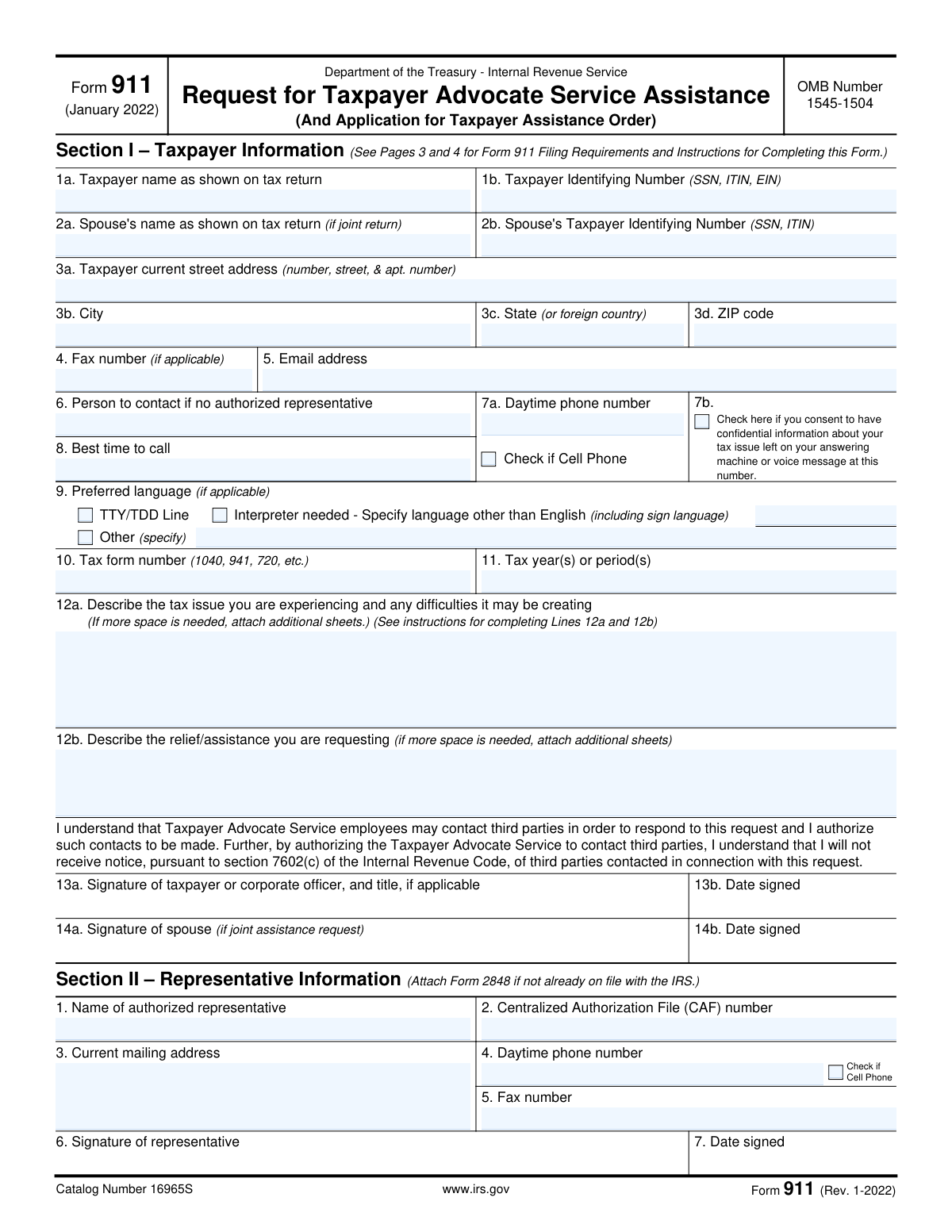
Yes! You can use AI to fill out Form 911, Request for Taxpayer Advocate Service Assistance (And Application for Taxpayer Assistance Order)

IRS Form 911, Request for Taxpayer Advocate Service Assistance, is a crucial document for taxpayers who are experiencing significant hardship due to an unresolved issue with the IRS. It allows individuals and businesses to formally request help from the Taxpayer Advocate Service (TAS), an independent organization within the IRS that protects taxpayer rights. Filing this form is important when you've been unable to resolve your problem through normal channels and are facing economic harm, a threat of adverse action, or other serious issues. Today, this form can be filled out quickly and accurately using AI-powered services like Instafill.ai, which can also convert non-fillable PDF versions into interactive fillable forms.
Our AI automatically handles information lookup, data retrieval, formatting, and form filling.
It takes less than a minute to fill out Form 911 using our AI form filling.
Securely upload your data. Information is encrypted in transit and deleted immediately after the form is filled out.

Form specifications

Form name: Form 911, Request for Taxpayer Advocate Service Assistance (And Application for Taxpayer Assistance Order)
Number of pages: 4
Language: English
Categories: tax forms
main-image

Instafill Demo: How to fill out PDF forms in seconds with AI

How to Fill Out Form 911 Online for Free in 2026

Are you looking to fill out a FORM 911 form online quickly and accurately? Instafill.ai offers the #1 AI-powered PDF filling software of 2026, allowing you to complete your FORM 911 form in just 37 seconds or less.
Follow these steps to fill out your FORM 911 form online using Instafill.ai:
  1. 1 Navigate to Instafill.ai and upload your PDF of Form 911 or select it from their template library.
  2. 2 Provide your personal details in Section I, including your name, Taxpayer Identifying Number (SSN, ITIN, or EIN), and spouse's information if applicable.
  3. 3 Enter your current contact information, such as your mailing address, phone number, and email, and specify your preferred contact method.
  4. 4 In lines 12a and 12b, clearly describe the tax issue you are facing, the difficulties it's causing, and the specific relief or assistance you are requesting from the TAS.
  5. 5 If you have an authorized representative, complete Section II with their details and attach a Form 2848 if required. Otherwise, you can skip this section.
  6. 6 Carefully review all the information populated by the AI for accuracy, then electronically or manually sign and date the form in Section I.
  7. 7 Download the completed Form 911 and submit it to the appropriate TAS office via fax or mail as instructed on the form.

Our AI-powered system ensures each field is filled out correctly, reducing errors and saving you time.

Why Choose Instafill.ai for Your Fillable Form 911 Form?

Speed

Complete your Form 911 in as little as 37 seconds.

Up-to-Date

Always use the latest 2026 Form 911 form version.

Cost-effective

No need to hire expensive lawyers.

Accuracy

Our AI performs 10 compliance checks to ensure your form is error-free.

Security

Your personal information is protected with bank-level encryption.

Frequently Asked Questions About Form Form 911

Form 911 is used to request assistance from the Taxpayer Advocate Service (TAS), an independent organization within the IRS. It is for taxpayers who are experiencing tax problems that they have been unable to resolve directly with the IRS.

You should file Form 911 if your tax problem is causing financial difficulty, you've tried and failed to resolve your issue with the IRS, or you believe an IRS system or procedure is not working as it should. Assistance from TAS is free for those who qualify.

You will need your personal details, including your name and Taxpayer Identifying Number (SSN, ITIN, or EIN), current address, and contact information. You also need to provide the tax form number and tax year(s) related to your issue.

In Line 12a, clearly describe the tax problem you are experiencing and the difficulties it is creating. Include any actions the IRS has taken or failed to take, and specify dates if your issue involves a delay of more than 30 days.

In Line 12b, describe the specific action or outcome you want from the Taxpayer Advocate Service. Being clear about the resolution you are seeking helps TAS to better assist you.

Yes, you should attach copies of any documents that support your case and can help TAS resolve the issue faster. If a representative is filing for you, a Form 2848 Power of Attorney must also be attached.

The quickest method is to fax the form to the TAS office in your geographic area. You can also mail it to your local TAS office; find the correct fax number or address on the TAS website or in IRS Publication 1546.

A TAS employee will attempt to call you to discuss your case. If you do not receive a response within 30 days of submitting your form, you should call TAS at 877-777-4778 for assistance.

No, you are not required to have a representative to request help from TAS. If you do use an authorized representative, they must complete Section II and you must have a Form 2848 on file.

Section I is for the taxpayer's information. Section II is only to be completed by an authorized representative, such as an attorney or CPA, who has your permission to act on your behalf.

If you have a flat, non-fillable PDF, you can use a service like Instafill.ai to convert it into an interactive form. This allows you to easily type your information into the fields before printing and submitting.

Yes, services like Instafill.ai use AI to help auto-fill form fields accurately and save time. This can help reduce errors and ensure your information is entered correctly.

To fill out Form 911 online, you can use a platform like Instafill.ai. Simply upload the form, and the service will make it an interactive, fillable document that you can complete on your computer.

No, there is no charge for assistance from the Taxpayer Advocate Service. If you qualify for their help, it is always free.

Compliance Form 911
Validation Checks by Instafill.ai

1
Validates Taxpayer Identifying Number (TIN) Format
This check ensures that the Taxpayer Identifying Number in field 1b is entered in a valid format for a Social Security Number (SSN), Individual Taxpayer Identification Number (ITIN), or Employer Identification Number (EIN). A valid format is typically XXX-XX-XXXX for SSN/ITIN or XX-XXXXXXX for an EIN. This validation is critical for correctly identifying the taxpayer's account in IRS systems, and failure will prevent the form from being processed.
2
Ensures Core Taxpayer Information is Complete
This check verifies that essential taxpayer identification fields, including 'Taxpayer name' (1a), 'Taxpayer Identifying Number' (1b), and the full 'Taxpayer current street address' (3a-3d), are not empty. This information is mandatory for the Taxpayer Advocate Service (TAS) to open a case and communicate with the taxpayer. If this information is missing, the request for assistance cannot be initiated.
3
Verifies Joint Request Information Consistency
This validation checks that if a spouse's signature is provided in field 14a, then the 'Spouse's name' (2a) and 'Spouse's Taxpayer Identifying Number' (2b) are also filled out. This ensures that for a joint assistance request, all necessary information for the second taxpayer is provided for proper case handling. An incomplete joint request may be delayed or treated as an individual request.
4
Validates Spouse's Taxpayer Identifying Number (TIN) Format
This check confirms that the Spouse's Taxpayer Identifying Number in field 2b follows the correct format for an SSN or ITIN (XXX-XX-XXXX). This is important for accurately identifying the spouse on a joint tax account. An invalid format will cause data mismatches and processing errors for joint requests.
5
Requires Description of Tax Issue and Requested Relief
This validation ensures that the text areas for 'Describe the tax issue' (12a) and 'Describe the relief/assistance you are requesting' (12b) are not left blank. These fields contain the fundamental reason for the Form 911 submission and are essential for TAS to understand the problem and the desired outcome. Without this information, TAS cannot evaluate the case or determine a course of action.
6
Confirms Taxpayer Signature and Valid Date
This check verifies that the taxpayer has signed the form (field 13a) and that the 'Date signed' (13b) is a valid, non-future date. The signature is a legal requirement authorizing TAS to act and access confidential information, and the date establishes the official submission time. An unsigned or improperly dated form is legally invalid and will be rejected.
7
Ensures Interpreter Language is Specified When Needed
This validation rule checks that if the 'Interpreter needed' box is checked in Section I, the corresponding text field specifying the language is filled out. This is crucial for ensuring effective communication and providing proper assistance to taxpayers with limited English proficiency or other communication needs. Failure to specify the language will delay contact as TAS will not know which interpreter to arrange.
8
Validates Representative Section for Completeness
This check ensures that if Section II is used (i.e., a representative's name is entered in field 1), then the 'Signature of representative' (field 6) and 'Date signed' (field 7) are also completed. This confirms the representative's authorization to act on the taxpayer's behalf. An incomplete representative section will prevent TAS from communicating with the named representative.
9
Validates Email Address Format
This check verifies that the value entered in the 'Email address' field (5) conforms to a standard email format (e.g., [email protected]). While optional, if an email is provided, it must be valid to be useful for communication. An invalid format could lead to failed communication attempts and delays in case resolution.
10
Validates Daytime Phone Number Format
This check ensures the 'Daytime phone number' (7a) is entered in a recognizable phone number format, including an area code. This is the primary method of contact for TAS, and an invalid or incomplete number will prevent them from reaching the taxpayer to discuss the case. This could lead to the case being closed for inability to make contact.
11
Checks for Valid Tax Year or Period
This validation ensures the 'Tax year(s) or period(s)' field (11) contains a valid year (e.g., 2022), range of years (e.g., 2020-2021), or tax period. This is critical for locating the correct tax records related to the issue. An invalid or nonsensical entry would make it impossible for TAS to investigate the specific problem.
12
Requires Congressional Name for Congressional Inquiries
This is a conditional check for Section III (IRS Use Only). It verifies that if the 'Congressional correspondence/inquiry (x)' box is checked, the 'Name of senator/representative' field is filled. This is required for internal tracking and proper handling of cases referred by a congressional office. Missing this information would break the audit trail for the referral.
13
Requires Situation Description for Economic Harm Criteria
This is a conditional check for Section III (IRS Use Only). It ensures that if any of the TAS criteria boxes for economic harm or adverse impact (boxes 1-4) are checked, the 'Question 9' description field is completed. This narrative is mandatory to justify and explain the severity of the taxpayer's situation. Without this description, the case may not be properly prioritized or accepted based on the selected criteria.
14
Requires Specification for 'Other' Source
This validation applies to both taxpayer and IRS employee sections where an 'Other (specify)' option exists, such as in Question 10. It checks that if the 'Other' checkbox is selected, the corresponding text field is not empty. This ensures that data collected for analysis (e.g., how taxpayers learn about TAS) is complete and meaningful. A checked 'Other' box with no explanation provides no useful information.

Common Mistakes in Completing Form 911

Mismatched Taxpayer Name or ID

Taxpayers often enter a nickname or a slightly different name than what is on their tax return, or they mistype their SSN, ITIN, or EIN. This mismatch prevents the IRS system from locating the correct taxpayer account, leading to immediate processing delays or rejection of the request. To avoid this, carefully copy the name and Taxpayer Identifying Number exactly as they appear on the tax return in question. AI-powered form fillers like Instafill.ai can help by storing and accurately populating this information, reducing the risk of typos.

Vague Description of the Tax Issue (Line 12a)

People frequently describe their problem in general or emotional terms, such as 'The IRS is being unfair,' without providing specific facts, dates, notice numbers, or actions already taken. This forces the Taxpayer Advocate to spend extra time investigating basic details, significantly delaying any potential resolution. To prevent this, clearly state the timeline of events, reference specific IRS notices by number and date, and describe what you have already done to try and solve the problem.

Unspecified Relief Requested (Line 12b)

In line 12b, taxpayers may write something generic like 'Fix this problem' or leave it blank, assuming the advocate will know what they want. This ambiguity can lead to a resolution that doesn't meet the taxpayer's needs or requires additional back-and-forth communication. Be explicit about the desired outcome, such as 'I am requesting the release of a levy on my bank account' or 'I need help establishing an affordable installment agreement.'

Missing Taxpayer or Spouse Signature

Forgetting to sign the form is a common oversight, as is failing to have the spouse sign when the request relates to a joint tax return. An unsigned or improperly signed Form 911 is considered invalid and cannot be processed, causing the request to be returned and delaying critical assistance. Since this form is often a non-fillable PDF, it's easy to print and forget a signature field. Using a tool like Instafill.ai can convert the PDF into a smart, fillable version with clear signature prompts to prevent this oversight.

Failure to Attach Supporting Documentation

The instructions advise attaching relevant documents, but taxpayers often submit the form without copies of IRS notices, previous correspondence, or proof of hardship. This lack of evidence means the Taxpayer Advocate cannot fully assess the situation and must request the information, halting progress on the case. To expedite your request, gather and attach all relevant documents, such as IRS notices, letters you've sent, and bank statements showing economic harm.

Representative Fails to Attach Power of Attorney (Form 2848)

When a tax professional fills out Section II on behalf of a taxpayer, they sometimes forget to attach a copy of a valid Form 2848, Power of Attorney. Without this authorization on file, the Taxpayer Advocate Service is legally prohibited from discussing the case with the representative, rendering their involvement useless until the proper paperwork is submitted. Representatives must ensure a completed Form 2848 for the relevant tax matters and periods is attached or already on file with the IRS.

Incorrect or Missing Tax Form/Year (Lines 10 & 11)

Taxpayers may enter the wrong form number (e.g., 'W-2' instead of '1040') or an incorrect tax year or period, especially if they have multiple ongoing issues. This error sends the advocate looking at the wrong records, causing confusion and wasted time. To avoid this, refer directly to the IRS notice you received, which will specify the exact tax form number and tax period (e.g., 'Form 1040' and '2021').

Withholding Consent for Voicemail (Line 7b)

Many people are hesitant to check the box in 7b, which allows TAS to leave confidential information on a voicemail. While this caution is understandable, not giving consent can lead to prolonged phone tag and communication delays, as the advocate cannot leave specific details or next steps. If your voicemail is secure, checking this box can significantly speed up communication and the resolution of your case.

Completing the 'For IRS Use Only' Section

Taxpayers sometimes mistakenly fill out information in Section III, which is clearly marked 'For IRS Use Only.' This happens when people quickly scan the form and don't read the headings carefully. While it may not invalidate the form, it creates confusion for the processing employee and looks unprofessional, potentially requiring clarification. Taxpayers should only complete Section I and, if applicable, have their representative complete Section II.

Using an Outdated Mailing Address

People who have recently moved may automatically fill in a previous address out of habit, or fail to include an apartment number. Since the Taxpayer Advocate Service may need to send correspondence by mail, using an incorrect address means you will not receive critical updates. Always verify that the address in lines 3a-3d is your current, complete mailing address. AI-powered tools like Instafill.ai can help prevent this by auto-filling saved, current address information and validating its format.
Saved over 80 hours a year

“I was never sure if my IRS forms like W-9 were filled correctly. Now, I can complete the forms accurately without any external help.”

Kevin Martin Green

Your data stays secure with advanced protection from Instafill and our subprocessors

Robust compliance program

Transparent business model

You’re not the product. You always know where your data is and what it is processed for.

ISO 27001, HIPAA, and GDPR

Our subprocesses adhere to multiple compliance standards, including but not limited to ISO 27001, HIPAA, and GDPR.

Security & privacy by design

We consider security and privacy from the initial design phase of any new service or functionality. It’s not an afterthought, it’s built-in, including support for two-factor authentication (2FA) to further protect your account.

Fill out Form 911 with Instafill.ai

Worried about filling PDFs wrong? Instafill securely fills form-911-request-for-taxpayer-advocate-service-assistance-and-application-for-taxpayer-assistance-order forms, ensuring each field is accurate.