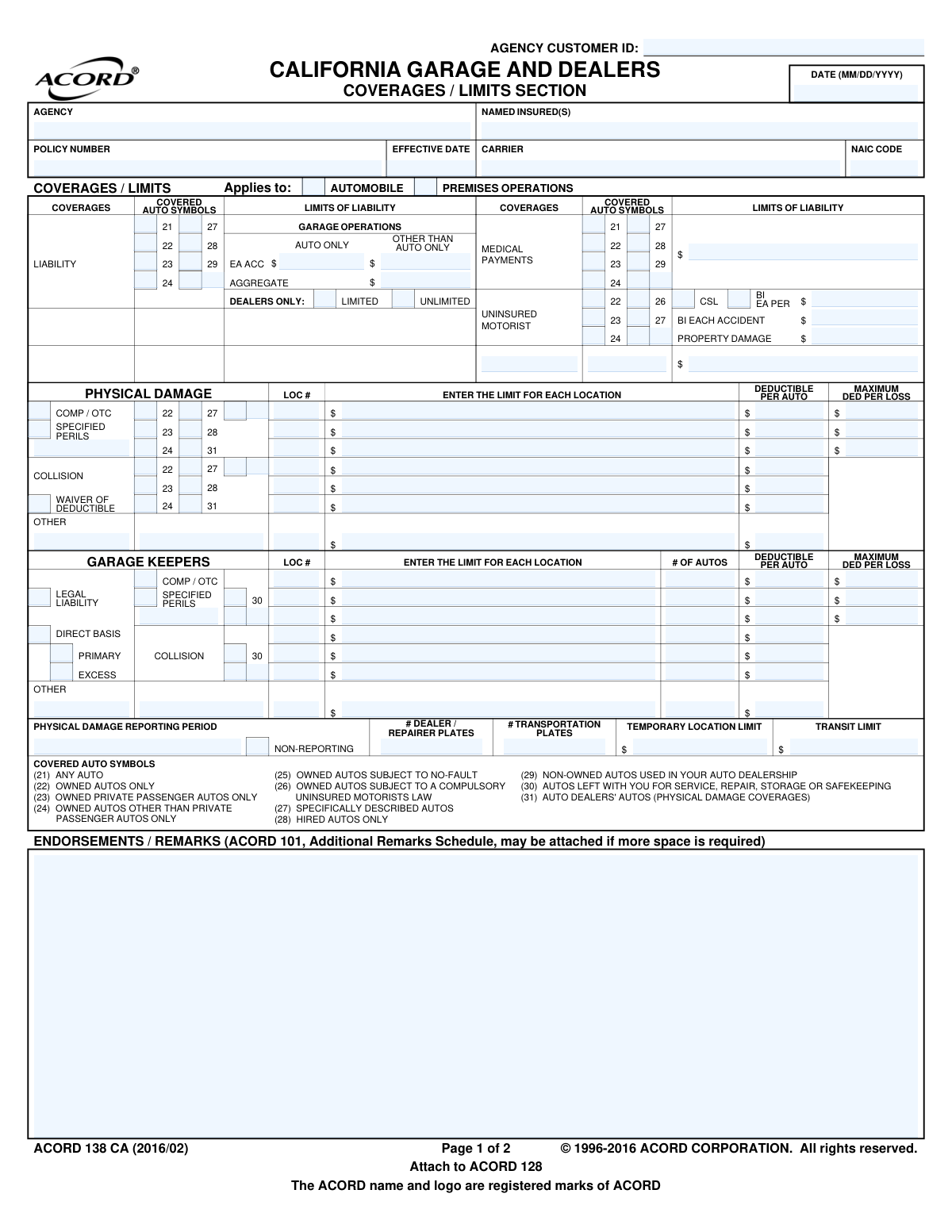
Yes! You can use AI to fill out ACORD 138 CA (2016/02), California Garage and Dealers Coverages / Limits Section
ACORD 138 CA is a supplemental form used in conjunction with a commercial auto insurance application, specifically for garage and auto dealer operations in California. It allows insurance agents and applicants to specify the types of coverage (like liability, physical damage, and garage keepers), select applicable auto symbols, and set the financial limits and deductibles for the policy. Today, this form can be filled out quickly and accurately using AI-powered services like Instafill.ai, which can also convert non-fillable PDF versions into interactive fillable forms.
ACORD 138 CA is part of the
California insurance forms category on Instafill.
Our AI automatically handles information lookup, data retrieval, formatting, and form filling.
It takes less than a minute to fill out ACORD 138 CA using our AI form filling.
Securely upload your data. Information is encrypted in transit and deleted immediately after the form is filled out.
Form specifications
| Form name: | ACORD 138 CA (2016/02), California Garage and Dealers Coverages / Limits Section |
| Number of fields: | 155 |
| Number of pages: | 1 |
| Language: | English |
Instafill Demo: How to fill out PDF forms in seconds with AI
How to Fill Out ACORD 138 CA Online for Free in 2026
Are you looking to fill out a ACORD 138 CA form online quickly and accurately? Instafill.ai offers the #1 AI-powered PDF filling software of 2026, allowing you to complete your ACORD 138 CA form in just 37 seconds or less.
Follow these steps to fill out your ACORD 138 CA form online using Instafill.ai:
- 1 Navigate to Instafill.ai and upload or select the ACORD 138 CA form.
- 2 Enter the basic policy and insured information, including the agency, named insured, policy number, and effective date.
- 3 Select the appropriate covered auto symbols (e.g., 'Any Auto', 'Owned Autos Only') for each coverage type to define the scope of the policy.
- 4 Specify the limits of liability for Garage Operations, Medical Payments, and Uninsured Motorist coverage, along with any applicable deductibles.
- 5 Detail Physical Damage and Garage Keepers coverages, including limits per location, deductibles per auto, and whether coverage is on a legal liability or direct basis.
- 6 Complete the reporting period information, dealer plate counts, and any temporary location or transit limits.
- 7 Review all entered information for accuracy, then have the applicant and producer provide their digital signatures and date the form.
Our AI-powered system ensures each field is filled out correctly, reducing errors and saving you time.
Why Choose Instafill.ai for Your Fillable ACORD 138 CA Form?
Speed
Complete your ACORD 138 CA in as little as 37 seconds.
Up-to-Date
Always use the latest 2026 ACORD 138 CA form version.
Cost-effective
No need to hire expensive lawyers.
Accuracy
Our AI performs 10 compliance checks to ensure your form is error-free.
Security
Your personal information is protected with bank-level encryption.
Frequently Asked Questions About Form ACORD 138 CA
This form is a California-specific supplement for garage and auto dealer businesses to detail their desired insurance coverages and limits. It is typically attached to a main commercial auto application, like the ACORD 128, to create a complete policy application.
Auto dealerships, repair shops, service stations, and other garage businesses in California must complete this form with their insurance agent when applying for or renewing their garage insurance policy.
These are numeric codes that define the type of vehicles covered for a specific insurance section. For example, symbol '21' means 'Any Auto,' while symbol '30' specifically covers 'Autos Left With You For Service, Repair, Storage or Safekeeping'.
Garagekeepers coverage protects your customers' vehicles while they are in your care. Physical Damage coverage protects the vehicles your business owns, such as your dealer inventory.
Legal Liability only covers damage to a customer's car if you are legally at fault. Direct Basis provides coverage regardless of fault, which can be a valuable customer service feature for your business.
California law requires insurers to offer Uninsured Motorist Bodily Injury (UMBI) and Property Damage (UMPD) coverage. Your signature confirms you have been offered these coverages and have made a clear choice to accept, reduce, or reject them.
You will need your desired liability limits, details about your business locations, the number of dealer and transportation plates you have, and information about your vehicle inventory. Be prepared to make decisions about optional coverages like Uninsured Motorist.
The form allows for an 'ACORD 101, Additional Remarks Schedule' to be attached. You can use this separate form to list additional locations, endorsements, or any other information that doesn't fit in the provided space.
This is an optional coverage you can purchase that waives your collision deductible if an uninsured driver is at fault for an accident involving your vehicle. The form documents whether this option was offered and accepted or rejected.
This is a consumer protection notice required by California law. It states that if you qualify as a 'Good Driver' and an insurer denies you coverage, they must provide you with a written explanation for the denial.
Yes, services like Instafill.ai use AI to accurately auto-fill form fields from your existing data, which can save significant time and reduce errors when completing complex insurance forms.
You can use a service like Instafill.ai to upload the form, and its AI will automatically identify and fill in the required fields. You can then review the information, make any necessary adjustments, and complete the form digitally.
Tools like Instafill.ai can convert flat, non-fillable PDFs into interactive, fillable forms. Simply upload your PDF to the platform, and it will become an easy-to-complete digital document.
Compliance ACORD 138 CA
Validation Checks by Instafill.ai
1
Valid Signature Date Format
This check ensures that the 'NamedInsured_SignatureDate_A' field is entered in a valid MM/DD/YYYY format. Proper date formatting is crucial for data integrity and for establishing a clear and unambiguous date of agreement. If the date is invalid, the submission should be rejected and the user prompted to correct the format.
2
Applicant Signature Presence
Verifies that the 'NamedInsured_Signature_A' field is not empty, confirming that the applicant has signed the document. The applicant's signature is a legal requirement to bind coverage and indicates their understanding and agreement with the terms. A missing signature invalidates the application, and the form cannot be processed.
3
Producer NPN Validation
This check validates that the 'Producer_NationalIdentifier_A' (National Producer Number) is present and follows the correct format, which is typically a numeric identifier of a specific length. This ensures that the policy is being submitted by a licensed and identifiable producer. An invalid or missing NPN can lead to compliance issues and should halt processing until corrected.
4
Mutually Exclusive Dealers Liability Option
Ensures that for the 'Dealers Only' liability option, only one of 'Limited' or 'Unlimited' is selected. These two options, represented by 'Vehicle_LiabilityOption_DealersOnlyLimitedIndicator_A' and 'Vehicle_LiabilityOption_DealersOnlyUnlimitedIndicator_A', are mutually exclusive. Selecting both creates ambiguity in the desired coverage, so the form should be flagged for correction if both are checked.
5
Conditional 'Specified Perils' Description
If the 'Specified Perils' checkbox is selected for either Physical Damage or Garage Keepers coverage, this check ensures the corresponding description field is filled out. This is important because 'Specified Perils' coverage is not standard and requires an explicit list of the perils being insured against. Failure to provide a description leaves the coverage undefined and the policy incomplete.
6
Coverage Limit Requires Auto Symbol
This validation confirms that if a monetary limit is entered for a coverage (e.g., Liability, Medical Payments, Uninsured Motorist), at least one 'Covered Auto Symbol' checkbox is selected within that same coverage block. A limit is meaningless without defining which vehicles it applies to. A failure would trigger an error asking the user to select the appropriate auto symbols for the specified coverage.
7
Mutually Exclusive Garage Keepers Basis
Verifies that for Garage Keepers coverage, either 'Legal Liability' or 'Direct Basis' is selected, but not both. These options define the trigger for coverage and are mutually exclusive. The system should return an error if both 'GarageAndDealers_GarageKeepers_LegalLiabilityIndicator_A' and 'GarageAndDealers_GarageKeepers_DirectBasisIndicator_A' are checked, as this creates a conflict in the policy terms.
8
Mutually Exclusive Garage Keepers Priority
Ensures that for Garage Keepers coverage, either 'Primary' or 'Excess' is selected, but not both. This defines whether the coverage pays before or after other applicable insurance. Selecting both 'GarageAndDealers_GarageKeepers_PrimaryIndicator_A' and 'GarageAndDealers_GarageKeepers_ExcessIndicator_A' is a logical contradiction that must be corrected before the policy can be issued.
9
Logical Deductible Amounts
For Physical Damage coverages, this check ensures that the 'Maximum Per Loss Deductible' is greater than or equal to the 'Per Auto Deductible' for a given location. It is illogical for the maximum possible deductible for a single event to be less than the deductible for one vehicle involved in that event. This validation prevents data entry errors and ensures the deductible structure is sound.
10
Signature Date Precedes Effective Date
This check validates that the 'NamedInsured_SignatureDate_A' is on or before the 'Policy_EffectiveDate_A'. A policy cannot be legally effective before the insured has agreed to its terms by signing the application. This check prevents backdating errors and ensures a logical and legally sound timeline for the policy inception.
11
Uninsured Motorist Limit Consistency
As stated in the form's disclosure, this validates that the Uninsured Motorist Bodily Injury (UMBI) limits do not exceed the policy's primary Bodily Injury (BI) liability limits. This is a common regulatory requirement to prevent policyholders from carrying more coverage for their own injuries from an uninsured driver than they do for injuries they might cause to others. A failure would require the user to lower the UMBI limits or reject the coverage.
12
NAIC Code Format Validation
This check ensures the 'Insurer_NAICCode_A' field contains a valid 5-digit numeric code. The NAIC code is a standard identifier for insurance companies, and its accuracy is critical for regulatory reporting and correct routing of policy information. An invalid format would cause downstream processing failures and should be flagged immediately.
13
Garage Keepers Location Completeness
Verifies that if a limit, deductible, or vehicle count is entered for a Garage Keepers coverage line, the corresponding 'LOC #' (ProducerLocationIdentifier) is also filled in. Coverage details must be associated with a specific insured location. Missing location information makes it impossible to apply the coverage correctly, so the submission should be rejected until the location is specified.
14
Physical Damage Location Completeness
Ensures that if a limit or deductible is entered for a Physical Damage coverage line (Comprehensive or Collision), the corresponding 'LOC #' (ProducerLocationIdentifier) is also provided. Similar to Garage Keepers, these coverages are location-specific. The validation prevents incomplete data entry that would make it unclear which location's inventory is covered.
Common Mistakes in Completing ACORD 138 CA
Applicants frequently misunderstand or select incorrect 'Covered Auto Symbols' (e.g., 21-31), which define the types of vehicles covered. For example, selecting only symbol '22' (Owned Autos) when the business also uses hired or non-owned vehicles (symbols '28' & '29') creates a significant uninsured exposure. This mistake can lead to denied claims for a large portion of the business's operations, so it is crucial to review the symbol definitions and select all that apply to the business's activities.
A common error is failing to select both 'Auto Only' and 'Other Than Auto Only' liability coverage. Applicants may assume 'Garage Operations Liability' is a single, all-encompassing coverage, but it's split. Neglecting to select 'Other Than Auto Only' leaves the business exposed to claims for incidents on their premises that don't involve a vehicle, such as a customer slip-and-fall, which can be financially devastating.
Applicants often confuse the 'Legal Liability' and 'Direct Basis' options for Garage Keepers coverage, which protects customers' vehicles. Selecting 'Legal Liability' means the policy only pays if the garage is legally responsible for the damage, which can lead to disputes and unhappy customers. 'Direct Basis' provides coverage regardless of fault, which is a higher level of service, and choosing the wrong option can damage a business's reputation and lead to lost clients.
Businesses often underestimate the total value of vehicles they are responsible for, leading to inadequate limits for Garage Keepers (customers' cars) or Physical Damage (dealer's inventory). Applicants may calculate an average value instead of the maximum possible value on their lot at any given time. A single event like a fire or hailstorm could result in a total loss far exceeding the policy limit, leaving the business severely underinsured and financially responsible for the difference.
There is frequent confusion between the 'Deductible Per Auto' and 'Maximum Ded Per Loss' fields. An applicant might enter a high number for the 'Per Auto' deductible, believing it's the most they will pay out-of-pocket for any single event. However, in a catastrophe affecting multiple vehicles, this deductible applies to each car, which could lead to an enormous, unexpected expense; the 'Maximum Ded Per Loss' is the critical field for capping this exposure.
The form explicitly states that rejecting or selecting lower UM/UIM limits requires signing the separate California Auto Supplement, ACORD 61 CA. A frequent mistake is checking a box on this form without completing and signing the required supplemental form. This oversight can result in the insurance carrier being unable to process the request, potentially defaulting the coverage to state minimums or limits matching the liability, leading to incorrect coverage and premium.
The Garage Keepers and Physical Damage sections require limits to be entered per location ('LOC #'). Business owners with multiple lots, showrooms, or storage facilities often make the mistake of only listing the limits for their primary location. This critical error leaves inventory and customer vehicles at the unlisted locations completely uninsured for physical damage or theft.
Applicants often leave the 'ENDORSEMENTS / REMARKS' section blank, even when non-standard coverages or specific operational details need to be communicated to the underwriter. This space is essential for requesting specific endorsements, clarifying unusual business activities, or noting special circumstances. Failing to use it can result in a policy that doesn't accurately reflect the business's needs, leading to coverage gaps.
Data entry errors are common when specifying liability limits, such as entering a Combined Single Limit (CSL) amount in the split limit fields for Bodily Injury (BI) and Property Damage (PD). This can cause confusion and delays in quoting and binding. It is essential to verify whether a CSL or split limit is required and enter the dollar amounts in the correct corresponding fields to ensure the policy is issued as intended.
A simple but frequent mistake is forgetting to sign or date the application in the designated signature blocks for both the applicant and the producer. An unsigned or undated application is not a valid legal document and will be immediately rejected by the carrier, delaying the effective date of coverage. This can leave the business uninsured during the time it takes to correct and resubmit the paperwork. AI-powered tools like Instafill.ai can help prevent this by flagging missing required fields before submission.
Saved over 80 hours a year
“I was never sure if my IRS forms like W-9 were filled correctly. Now, I can complete the forms accurately without any external help.”
Kevin Martin Green
Your data stays secure with advanced protection from Instafill and our subprocessors

Robust compliance program
Transparent business model
You’re not the product. You always know where your data is and what it is processed for.
ISO 27001, HIPAA, and GDPR
Our subprocesses adhere to multiple compliance standards, including but not limited to ISO 27001, HIPAA, and GDPR.
Security & privacy by design
We consider security and privacy from the initial design phase of any new service or functionality. It’s not an afterthought, it’s built-in, including support for two-factor authentication (2FA) to further protect your account.
Fill out ACORD 138 CA with Instafill.ai
Worried about filling PDFs wrong? Instafill securely fills acord-138-ca-201602-california-garage-and-dealers-coverages-limits-section forms, ensuring each field is accurate.