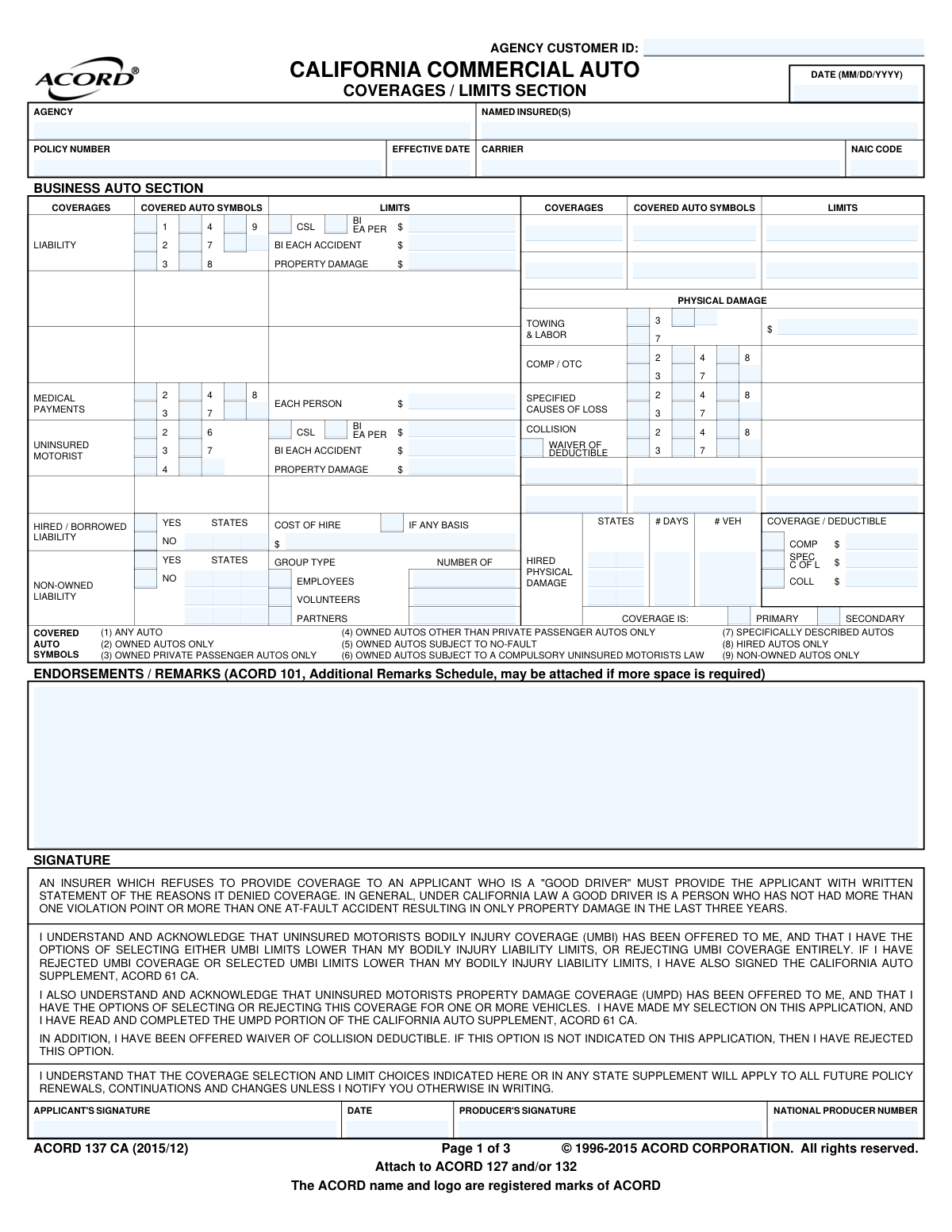
Yes! You can use AI to fill out ACORD 137 CA, Commercial Auto Application - California
The ACORD 137 CA, Commercial Auto Application for California, is a standardized insurance form used by businesses to apply for commercial vehicle coverage. It collects essential information about the applicant's business operations, vehicles, drivers, and the specific types and limits of insurance coverage requested, such as liability, physical damage, and uninsured motorist coverage. Today, this form can be filled out quickly and accurately using AI-powered services like Instafill.ai, which can also convert non-fillable PDF versions into interactive fillable forms.
ACORD 137 CA is part of the
ACORD forms, California insurance forms, commercial insurance forms and insurance application forms categories on Instafill.
Our AI automatically handles information lookup, data retrieval, formatting, and form filling.
It takes less than a minute to fill out ACORD 137 CA using our AI form filling.
Securely upload your data. Information is encrypted in transit and deleted immediately after the form is filled out.
Form specifications
| Form name: | ACORD 137 CA, Commercial Auto Application - California |
| Number of fields: | 407 |
| Number of pages: | 1 |
| Language: | English |
More forms in ACORD forms
Instafill Demo: How to fill out PDF forms in seconds with AI
How to Fill Out ACORD 137 CA Online for Free in 2026
Are you looking to fill out a ACORD 137 CA form online quickly and accurately? Instafill.ai offers the #1 AI-powered PDF filling software of 2026, allowing you to complete your ACORD 137 CA form in just 37 seconds or less.
Follow these steps to fill out your ACORD 137 CA form online using Instafill.ai:
- 1 Navigate to Instafill.ai and upload or select the ACORD 137 CA form.
- 2 Provide your business's legal name, address, and contact information in the Named Insured section.
- 3 Complete the appropriate sections (Business Auto, Truckers, or Motor Carrier) with details about your vehicles, including year, make, model, and VIN.
- 4 Select the desired coverage types, limits, and deductibles for liability, physical damage, medical payments, and uninsured motorist coverage.
- 5 List all drivers who will be operating the commercial vehicles, providing their personal and driving history information as required.
- 6 Review all the information populated by the AI for accuracy, ensuring all sections are complete and correct.
- 7 Electronically sign the application, date it, and submit it to your insurance agent or carrier.
Our AI-powered system ensures each field is filled out correctly, reducing errors and saving you time.
Why Choose Instafill.ai for Your Fillable ACORD 137 CA Form?
Speed
Complete your ACORD 137 CA in as little as 37 seconds.
Up-to-Date
Always use the latest 2026 ACORD 137 CA form version.
Cost-effective
No need to hire expensive lawyers.
Accuracy
Our AI performs 10 compliance checks to ensure your form is error-free.
Security
Your personal information is protected with bank-level encryption.
Frequently Asked Questions About Form ACORD 137 CA
This form is a Commercial Auto Application specifically for businesses operating in California. It is used to apply for insurance coverage for vehicles used for business purposes, including those owned by general businesses, truckers, and motor carriers.
Any business owner or authorized representative seeking to purchase or renew a commercial auto insurance policy in California must complete this form. It is typically filled out in conjunction with an insurance agent or producer.
These sections are designed for different types of commercial operations, each with unique coverage needs. You or your agent should complete the section that best describes your business activities to ensure you get the correct type of policy.
Covered Auto Symbols are numeric codes (e.g., 1, 7, 8) that define which types of vehicles are covered under your policy, such as 'Any Auto' or only 'Specifically Described Autos'. Selecting the correct symbols is critical to ensure all your vehicle exposures are properly insured.
No, it is not mandatory, but it must be formally offered to you. You have the option to select this coverage, choose limits lower than your liability limits, or reject it entirely by signing the appropriate section or the California Auto Supplement (ACORD 61 CA).
As defined by California law on the form, a 'Good Driver' is someone who has not had more than one violation point or one at-fault property damage accident in the last three years. Insurers must provide a written reason if they deny coverage to an applicant who qualifies as a good driver.
This is an optional coverage that allows you to avoid paying your collision deductible if you are hit by an uninsured driver who is at fault. If this option is not specifically selected on your application, it is considered rejected.
You may need to attach an ACORD 101 for additional remarks and will likely need to complete the California Auto Supplement (ACORD 61 CA). This supplement is especially important if you are rejecting or modifying Uninsured Motorist coverage.
By signing, you certify that the information provided is accurate and acknowledge that you have been offered key coverages like Uninsured Motorist. You also agree that your coverage selections will apply to future renewals unless you request changes in writing.
Typically, you will submit the completed and signed application to your insurance agent or producer. They will then forward it to the insurance carrier for underwriting, quoting, and issuing a policy.
Yes, AI-powered services like Instafill.ai can help you complete this form more efficiently. These tools can accurately auto-fill many of the required fields using your existing data, reducing manual entry and saving you time.
Simply upload the ACORD 137 CA form to the Instafill.ai platform. The AI will identify the fields, allowing you to fill them out interactively online, save your progress, and download the completed, signed document.
Services like Instafill.ai can convert flat, non-fillable PDFs into interactive, fillable forms. Just upload your document, and the platform will make it easy to complete and sign digitally without needing to print it.
Compliance ACORD 137 CA
Validation Checks by Instafill.ai
1
Applicant Signature Presence
This check verifies that the applicant's signature field has been signed. A signature is a legal requirement to bind the application and confirms the applicant's understanding of the terms and acknowledgements. If the signature is missing, the application is considered invalid and cannot be processed or bound.
2
Signature and Date Consistency
Validates that if an applicant's signature is present, the corresponding signature date is also filled out. The date confirms when the signature was provided, which is critical for establishing the timeline of the application process. An application with a signature but no date is incomplete and may be legally questionable, requiring rejection until corrected.
3
Policy Effective Date Logic
Ensures the 'Policy Effective Date' is on or after the application signature date. This check prevents the improper backdating of policies and confirms that the applicant agreed to the terms before the policy is intended to start. A validation failure would flag the application for manual review to correct the dates before a policy can be issued.
4
Producer National Identifier (NPN) Format
Verifies that the 'National Producer Number' is a valid, numeric identifier. The NPN is crucial for regulatory compliance, tracking, and correctly commissioning the producer. This check confirms the field contains only numbers and is of the correct length, preventing data entry errors that could cause processing and compliance issues.
5
Liability Limit Exclusivity (CSL vs. Split)
Confirms that for the liability section, either a Combined Single Limit (CSL) is provided or split limits (Bodily Injury per person/accident and Property Damage) are provided, but not both. This prevents contradictory and ambiguous coverage specifications on the policy. If both are entered, the form should be rejected with an error asking the user to choose one format.
6
Uninsured Motorist vs. Bodily Injury Limit Consistency
Checks that the Uninsured Motorists Bodily Injury (UMBI) limits are less than or equal to the primary Bodily Injury (BI) liability limits. Per California regulations mentioned on the form, UMBI limits can be selected that are lower than BI limits, but they cannot be higher. This validation prevents a common error that would lead to an incorrectly rated and non-compliant policy.
7
Coverage and Covered Auto Symbol Association
Validates that if a monetary limit or deductible is entered for a specific coverage (e.g., Liability, Collision), at least one corresponding 'Covered Auto Symbol' is checked. The symbols define which vehicles the coverage applies to, so without a symbol, the coverage is undefined and cannot be rated. A failure means the user must select the appropriate symbol(s) for the requested coverage.
8
Physical Damage Coverage Exclusivity
Ensures that for physical damage, either 'Comprehensive (OTC)' or 'Specified Causes of Loss' is selected, but not both for the same coverage block. These are mutually exclusive coverage types that offer different levels of peril protection. Selecting both would create ambiguity in the policy and rating, so the system must enforce a choice of one or the other.
9
Coverage and Deductible Requirement
Verifies that if a physical damage coverage like Collision or Comprehensive is selected, a corresponding deductible amount is also entered. The deductible is a fundamental part of the coverage definition and is required for rating the policy premium. An application missing a deductible for a selected coverage is incomplete and must be corrected.
10
Hired Auto Coverage Detail
Checks that if 'Yes' is selected for Hired Auto Liability, then either the 'Cost of Hire' amount or the 'If Any Basis' indicator is also provided. This information is necessary for the underwriter to properly classify and rate the hired auto exposure. If 'Yes' is selected without these subsequent details, the application is incomplete for that coverage.
11
Non-Owned Auto Group Specification
Validates that if 'Yes' is selected for Non-Owned Auto Liability, at least one group type (Employees, Volunteers, or Partners) is checked and a corresponding count is provided. This detail is essential for the insurer to understand and rate the scope of the non-owned exposure. The application cannot be accurately rated without this information.
12
Trailer Interchange Section Completeness
Ensures that if Trailer Interchange coverage is selected in the Truckers or Motor Carrier sections, all required fields such as Symbol, Number of Trailers, Radius, and Deductible are filled. This is a specialized coverage with its own rating parameters, and missing data makes it impossible to price or issue. A failure would require the user to complete the Trailer Interchange section before submission.
13
NAIC Code Format and Presence
Validates that the 'NAIC Code' field is populated with a 5-digit numeric code. The NAIC code is a standard identifier for the insurance carrier. An incorrect format or missing code indicates a data entry error that could cause the application to be routed incorrectly or fail downstream reporting.
14
Mandatory Named Insured
Checks that the 'Named Insured(s)' field is not empty. The name of the insured is the most fundamental piece of information on the application, identifying the legal entity or person to be insured. An application cannot be processed, quoted, or issued without this information.
Common Mistakes in Completing ACORD 137 CA
The form has three distinct sections: Business Auto, Truckers, and Motor Carrier. Applicants frequently get confused and fill out the wrong section for their business, or incorrectly complete parts of multiple sections. This error leads to incorrect rating, potential coverage gaps, and significant processing delays. To avoid this, carefully determine if your business operates as a standard commercial auto risk (e.g., contractor, florist), a for-hire trucker, or a motor carrier before you begin filling out the application.
The form uses numerical symbols (e.g., Symbol 7 for 'Specifically Described Autos', Symbol 8 for 'Hired Autos') to define coverage. A common mistake is selecting the wrong symbol, such as choosing Symbol 7 but failing to list all vehicles, leaving some uninsured. This can lead to a catastrophic, uncovered loss. It is crucial to review the symbol definitions and select the ones that accurately represent all vehicle exposures, including owned, hired, and non-owned vehicles.
Applicants often get confused between a Combined Single Limit (CSL) and split limits (Bodily Injury per person/per accident and Property Damage). They may enter a CSL amount in the split limit fields or vice-versa, or enter inconsistent values across the sections. This mistake results in the policy being quoted and issued with incorrect liability protection, which could be financially devastating in a large claim. Always confirm whether you need a CSL or split limit and enter the dollar amounts only in the appropriate fields.
Many businesses mistakenly assume their policy automatically covers rented vehicles or employees using personal cars for work errands. They fail to select Hired Auto (Symbol 8) and Non-Owned Auto (Symbol 9) coverages, creating a major liability gap. If an accident occurs in such a vehicle, the business could be held liable with no insurance to respond. If you ever rent vehicles or have employees use their cars for business, you must affirmatively select these coverages.
California has specific rules about offering and rejecting Uninsured Motorist coverage. Applicants often rush this section, either unintentionally rejecting this valuable protection or failing to complete the required supplemental forms (like the ACORD 61 CA mentioned) when selecting lower limits. This can lead to compliance issues or leave the business and its employees unprotected if hit by an uninsured driver. Carefully read the UM/UIM declarations and ensure all required signatures and supplemental forms are completed as instructed.
The 'Named Insured' field must contain the full, legal business name, including any suffix like 'LLC,' 'Inc.,' or 'Corp.' Applicants often use a shorthand trade name or a DBA ('Doing Business As'), which is legally insufficient. An incorrect Named Insured can create serious problems for claim payments, vehicle financing, and legal defense, as the entity on the policy may not match the legal entity being sued. Always use the exact business name as registered with the state.
This application has signature lines at the bottom of each of its three main sections, distributed across multiple pages. It is very common for applicants to sign only the last page and assume they are done, or to forget to date their signature. An unsigned, partially signed, or undated application is not legally binding and will be rejected by the carrier, causing delays in obtaining coverage. You must review every page and sign and date every required signature line.
Applicants frequently confuse Comprehensive (Comp/OTC), Specified Causes of Loss, and Collision coverages, or they apply incorrect deductibles to the wrong coverage. For example, they might enter a $1,000 Collision deductible on the Comprehensive line. These errors lead to incorrect premiums and coverage that doesn't match the applicant's needs, resulting in surprise out-of-pocket costs during a claim. Be sure to clearly define which physical damage perils you want to cover and ensure the corresponding deductible is entered in the correct field.
This form is often distributed as a non-fillable PDF, leading applicants to print it and fill it out by hand. This process frequently results in illegible handwriting, missed fields, and data entry errors when the insurance agent or carrier types the information into their system. Such errors can lead to incorrect vehicle details, wrong coverage limits, or delays in quoting. To avoid this, use a tool that makes the document digitally fillable. AI-powered form-filling tools like Instafill.ai can convert any flat PDF into a fillable version, ensuring all data is clear and accurate.
For trucking risks, the Trailer Interchange section is critical but often filled out incorrectly or overlooked entirely. Applicants may fail to select this coverage when they haul non-owned trailers under an agreement, or they may enter incomplete information for the radius of operations or number of days. This mistake can leave a trucker completely uninsured for physical damage to a trailer they are pulling, which could be a six-figure exposure. If you pull trailers you don't own, you must complete this section accurately and in its entirety.
Saved over 80 hours a year
“I was never sure if my IRS forms like W-9 were filled correctly. Now, I can complete the forms accurately without any external help.”
Kevin Martin Green
Your data stays secure with advanced protection from Instafill and our subprocessors

Robust compliance program
Transparent business model
You’re not the product. You always know where your data is and what it is processed for.
ISO 27001, HIPAA, and GDPR
Our subprocesses adhere to multiple compliance standards, including but not limited to ISO 27001, HIPAA, and GDPR.
Security & privacy by design
We consider security and privacy from the initial design phase of any new service or functionality. It’s not an afterthought, it’s built-in, including support for two-factor authentication (2FA) to further protect your account.
Fill out ACORD 137 CA with Instafill.ai
Worried about filling PDFs wrong? Instafill securely fills acord-137-ca-commercial-auto-application-california forms, ensuring each field is accurate.