Yes! You can use AI to fill out Blue Shield of California Network Participation Letter of Intent

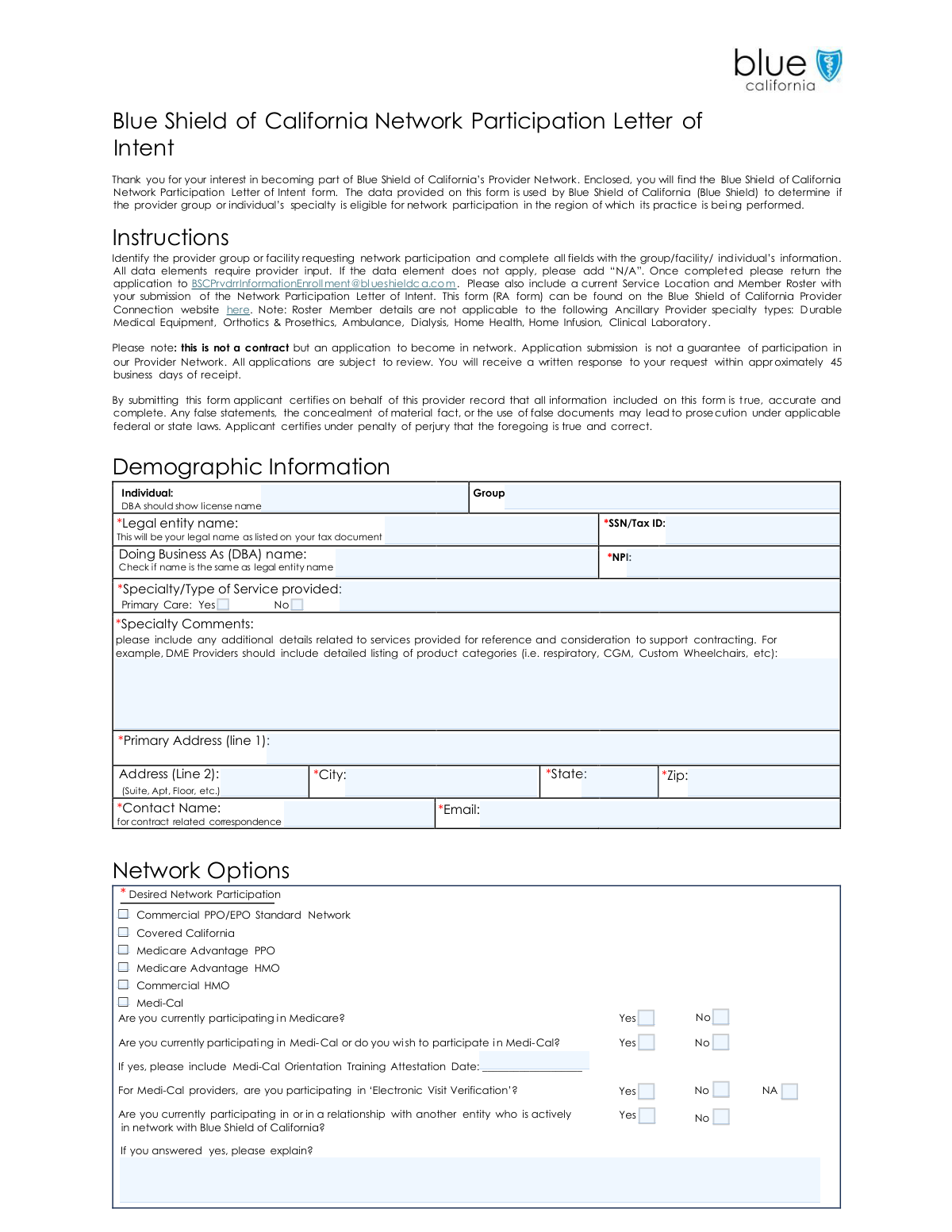
This form is an application used by healthcare providers, both individuals and groups, to express their interest in joining the Blue Shield of California's provider network. It gathers essential demographic, specialty, and service information to determine eligibility for network participation in a specific region. Submitting this letter of intent is the first step in the application process and does not guarantee a contract. Today, this form can be filled out quickly and accurately using AI-powered services like Instafill.ai, which can also convert non-fillable PDF versions into interactive fillable forms.
Our AI automatically handles information lookup, data retrieval, formatting, and form filling.
It takes less than a minute to fill out Blue Shield of California Letter of Intent using our AI form filling.
Securely upload your data. Information is encrypted in transit and deleted immediately after the form is filled out.

Form specifications

Form name: Blue Shield of California Network Participation Letter of Intent
Number of pages: 2
Language: English
Categories: Blue Shield of California forms
main-image

Instafill Demo: How to fill out PDF forms in seconds with AI

How to Fill Out Blue Shield of California Letter of Intent Online for Free in 2026

Are you looking to fill out a BLUE SHIELD OF CALIFORNIA LETTER OF INTENT form online quickly and accurately? Instafill.ai offers the #1 AI-powered PDF filling software of 2026, allowing you to complete your BLUE SHIELD OF CALIFORNIA LETTER OF INTENT form in just 37 seconds or less.
Follow these steps to fill out your BLUE SHIELD OF CALIFORNIA LETTER OF INTENT form online using Instafill.ai:
  1. 1 Navigate to Instafill.ai and upload or select the Blue Shield of California Network Participation Letter of Intent form.
  2. 2 Provide the provider's demographic information, including the legal entity name, Tax ID, NPI, and primary address.
  3. 3 Specify the provider's specialty, type of service, and any additional details about the services provided.
  4. 4 Select the desired network participation options, such as Commercial PPO, Medicare Advantage, or Medi-Cal, and answer related questions.
  5. 5 List any hospital or facility affiliations, including the name, ASC privileges, and effective date for each.
  6. 6 Answer questions about additional services, such as accepting new patients, offering urgent care, and providing gender-affirming care.
  7. 7 Review all the information populated by the AI for accuracy, certify that the details are true and complete, and submit the form as instructed.

Our AI-powered system ensures each field is filled out correctly, reducing errors and saving you time.

Why Choose Instafill.ai for Your Fillable Blue Shield of California Letter of Intent Form?

Speed

Complete your Blue Shield of California Letter of Intent in as little as 37 seconds.

Up-to-Date

Always use the latest 2026 Blue Shield of California Letter of Intent form version.

Cost-effective

No need to hire expensive lawyers.

Accuracy

Our AI performs 10 compliance checks to ensure your form is error-free.

Security

Your personal information is protected with bank-level encryption.

Frequently Asked Questions About Form Blue Shield of California Letter of Intent

This form serves as an initial application for healthcare providers, groups, or facilities who wish to join the Blue Shield of California Provider Network. Blue Shield uses the information to determine if your specialty and practice location are eligible for participation.

No, this form is an application, not a contract. Submission does not guarantee participation in the provider network, as all applications are subject to review by Blue Shield of California.

You must also submit a current Service Location and Member Roster (RA form) with your Letter of Intent. This form is available on the Blue Shield of California Provider Connection website.

You will receive a written response to your request within approximately 45 business days of Blue Shield receiving your completed application and all required documents.

Please email the completed Letter of Intent form and the Service Location and Member Roster to [email protected].

Your 'Legal entity name' is the name as it appears on your tax documents. The 'Doing Business As (DBA) name' is the name your practice is commonly known as, if different from the legal name.

Use this section to provide specific details about the services you offer that could support your application. For example, DME providers should list product categories like respiratory, CGM, or custom wheelchairs.

No, the Member Roster is not applicable for certain Ancillary Provider specialties. These include Durable Medical Equipment, Orthotics & Prosthetics, Ambulance, Dialysis, Home Health, Home Infusion, and Clinical Laboratory.

If a data element or question does not apply to your practice, you should write 'N/A' in that field to indicate it is not applicable.

No, this section is intended for provider groups. The form specifies that individual hospital affiliations should be listed with your roster details instead.

Yes, services like Instafill.ai use AI to accurately auto-fill form fields, which can save you time and help ensure the information is entered correctly.

You can use a service like Instafill.ai to complete the form digitally. Simply upload the PDF, and the platform will make it fillable so you can type your answers directly into the fields.

If you have a non-fillable or 'flat' PDF, you can use a tool like Instafill.ai. It can convert the document into an interactive, fillable form that you can easily complete and save.

This question asks whether the practitioners on your roster are direct employees (W9) or independent contractors (1099). Blue Shield states its intent is to contract with groups that employ their practitioners.

Compliance Blue Shield of California Letter of Intent
Validation Checks by Instafill.ai

1
Validates SSN/Tax ID Format and Requirement
This check ensures the 'SSN/Tax ID' field contains a valid 9-digit number. As a required field, it cannot be empty. This identifier is critical for legal entity verification, tax reporting, and payment processing, so an invalid or missing number would prevent the application from being processed.
2
Validates National Provider Identifier (NPI) Format
This validation verifies that the 'NPI' field contains a 10-digit numeric value. The NPI is a standard unique identifier for health care providers in the United States, essential for all administrative and billing functions. An incorrect or missing NPI would lead to claim rejections and prevent the provider from being correctly identified in any system.
3
Requires Explanation for 'Yes' Responses on Service Offerings
This check ensures that if a provider answers 'Yes' to questions about offering services like 'Urgent Care', 'gender affirming care', or having 'special certification', the corresponding explanation text field is not empty. These details are crucial for Blue Shield to understand the provider's specific capabilities and scope of practice. A missing explanation would result in an incomplete profile and require manual follow-up, delaying the review process.
4
Ensures Medi-Cal Attestation Date is Provided When Applicable
This validation confirms that if an applicant selects 'Yes' for participating in or wishing to participate in Medi-Cal, the 'Medi-Cal Orientation Training Attestation Date' field must be filled with a valid date. This date is a mandatory credentialing requirement for the Medi-Cal network. An application missing this date cannot proceed with Medi-Cal network enrollment.
5
Validates Completeness of Hospital Affiliation Rows
This rule verifies that if a 'Hospital Name' is entered in an affiliation row, the corresponding 'ASC Privileges' and 'Effective date' fields for that same row are also filled. This maintains data integrity for each listed affiliation, ensuring a complete record is provided. Incomplete affiliation records are unusable for credentialing and directory purposes and would require correction.
6
Validates Format of Contract Correspondence Email
This check ensures the 'Email' field for the contract contact contains a validly formatted email address (e.g., [email protected]). This is the primary channel for all official communication regarding the application status, requests for information, and contract documents. An invalid email address would sever communication and halt the application process.
7
Validates Primary Address ZIP Code Format
This validation verifies that the 'Zip' code field contains either a 5-digit or 9-digit (ZIP+4) numeric value. A valid ZIP code is necessary for accurate mail delivery, service area verification, and regional analysis of network adequacy. An incorrect format could lead to returned mail and incorrect assignment of the provider's practice region.
8
Cross-Validates Medicare Participation with Network Selection
This rule checks for logical consistency between the desired network participation and the stated Medicare status. If a provider selects 'Medicare Advantage PPO' or 'Medicare Advantage HMO', the answer to 'Are you currently participating in Medicare?' should be 'Yes'. A mismatch could indicate an error or misunderstanding by the applicant, flagging the application for review to ensure eligibility for the requested networks.
9
Requires Offshore Location Details if Offshore Access is Indicated
This validation ensures that if the applicant answers 'Yes' to providing offshore access to BSC data, the 'Offshore location(s) (city and country)' field must be filled out. This information is a critical component of the information security and compliance review. Failure to provide the location details when required would halt the security assessment portion of the application.
10
Ensures Exclusive Selection for Radio Button Groups
This check verifies that for question sets with mutually exclusive options (e.g., 'Primary Care: Yes/No', 'Group Employment Status: W9/1099'), only one option is selected. This prevents ambiguous or contradictory data that would make the response impossible to process. A submission with multiple selections for a single question indicates a form error and must be rejected.
11
Validates EVV Status for Medi-Cal Providers
This check confirms that if a provider indicates they participate in Medi-Cal, they must provide a 'Yes', 'No', or 'N/A' response to the 'Electronic Visit Verification' (EVV) question. EVV is a federal requirement for certain Medi-Cal services, so this response is mandatory for compliance checks. An omission here would leave a critical compliance question unanswered, delaying the Medi-Cal portion of the application.
12
Requires Explanation for Existing Blue Shield Relationship
This validation ensures that if a provider answers 'Yes' to 'Are you currently participating in or in a relationship with another entity who is actively in network with Blue Shield of California?', the corresponding explanation field must be filled. This information is vital to prevent duplicate records and understand complex organizational structures. Without this explanation, the system cannot determine if this is a new entity or an update to an existing one.
13
Verifies Completeness of All Required Fields
This check scans the entire form to ensure that all fields marked with an asterisk (*) contain a value and are not empty. The form instructions state these are required for submission. An incomplete application cannot be properly evaluated and will be rejected or returned to the applicant, significantly delaying the contracting process.
14
Validates Format of Affiliation Effective Dates
This rule checks that all 'Effective date' fields within the Affiliations section are entered in a valid date format (e.g., MM/DD/YYYY). Correct and consistent date formatting is essential for database entry and for accurately determining the timeline of a provider's privileges. An invalid date format would cause data entry errors and require manual correction.

Common Mistakes in Completing Blue Shield of California Letter of Intent

Forgetting to Attach the Required Roster

The form instructions explicitly state that a 'Service Location and Member Roster' must be included with the submission. Applicants often focus only on the Letter of Intent form itself and forget to attach this separate, critical document. Submitting an incomplete package results in an immediate delay, as the application cannot be reviewed until all required documents are received, pushing back the 45-day response timeline.

Leaving Fields Blank Instead of Using 'N/A'

The instructions clearly direct applicants to enter 'N/A' for any data element that does not apply. Many people simply leave these fields empty, which can be misinterpreted as an oversight or missing information, leading to processing delays or requests for clarification. This is a common issue on flat PDF forms; an AI tool like Instafill.ai can convert the PDF into a fillable version and prompt the user to correctly fill every field or mark it as not applicable.

Confusing Legal Entity Name with DBA Name

Providers frequently enter their 'Doing Business As' (DBA) name in the 'Legal entity name' field. The form requires the legal name to match tax documents exactly for verification purposes. This discrepancy can cause significant delays in credentialing and contracting, as the submitted Tax ID will not match the provided legal name. To avoid this, double-check your W-9 or other tax documents before filling out this section.

Providing an Incomplete Specialty Description

Applicants often provide a very general specialty (e.g., 'DME') in the 'Specialty/Type of Service' field without using the 'Specialty Comments' section for required details. The form specifically asks DME providers to list product categories (e.g., respiratory, CGM). Failing to provide this detail makes it impossible for Blue Shield to determine network needs and eligibility, likely leading to a request for more information or application rejection.

Missing Explanations for 'Yes' Answers

The form contains multiple questions (e.g., 'Do you offer Urgent Care?', 'Do you provide gender affirming care?') that require a detailed explanation if answered 'Yes'. A common mistake is to check 'Yes' but leave the corresponding explanation field blank. This is considered an incomplete answer and will halt the review process until the necessary details are provided, delaying the application.

Incomplete Medi-Cal Participation Information

When an applicant indicates they participate or wish to participate in Medi-Cal by checking 'Yes', they often forget to fill in the 'Medi-Cal Orientation Training Attestation Date'. This date is a required piece of information for processing Medi-Cal network requests. Omitting it leads to an incomplete application and requires follow-up from the enrollment team, causing unnecessary delays.

Incorrectly Reporting Hospital Affiliations

The form specifies that the 'Affiliations' section is for provider groups, and individual hospital affiliations should be listed on the separate roster. Individual practitioners often mistakenly fill out this section, while groups may omit important privilege details. This error leads to confusion and requires clarification, slowing down the evaluation of the provider's or group's service capabilities and network integration.

Failing to Detail Offshore Data Access

If a provider answers 'Yes' to the question about offshore access to Blue Shield data, they must also provide the offshore location and confirm that specific security measures (VPN, VDI, MFA) are in place. Applicants frequently check 'Yes' but fail to provide these mandatory security details. This is a critical compliance issue that will immediately stop the application process until the information security requirements are fully documented.

Submitting an Incorrect or Mismatched NPI

Applicants sometimes enter an individual NPI for a group application or a group NPI for an individual, or simply make a typo. The National Provider Identifier (NPI) is a fundamental data point used for verification and system setup. An incorrect NPI will cause validation failures and can lead to the application being rejected or significantly delayed while the correct information is tracked down.

Omitting the Contact Person for Correspondence

The form requires a specific 'Contact Name' and 'Email' for all contract-related correspondence. Sometimes this is left blank or filled with generic office information. This mistake can lead to important communications about the application status, requests for information, or the final contract being sent to the wrong person or a general inbox, causing critical delays or missed deadlines. Using a form-filling tool like Instafill.ai can help ensure these crucial contact fields are never left empty.
Saved over 80 hours a year

“I was never sure if my IRS forms like W-9 were filled correctly. Now, I can complete the forms accurately without any external help.”

Kevin Martin Green

Your data stays secure with advanced protection from Instafill and our subprocessors

Robust compliance program

Transparent business model

You’re not the product. You always know where your data is and what it is processed for.

ISO 27001, HIPAA, and GDPR

Our subprocesses adhere to multiple compliance standards, including but not limited to ISO 27001, HIPAA, and GDPR.

Security & privacy by design

We consider security and privacy from the initial design phase of any new service or functionality. It’s not an afterthought, it’s built-in, including support for two-factor authentication (2FA) to further protect your account.

Fill out Blue Shield of California Letter of Intent with Instafill.ai

Worried about filling PDFs wrong? Instafill securely fills blue-shield-of-california-network-participation-letter-of-intent forms, ensuring each field is accurate.