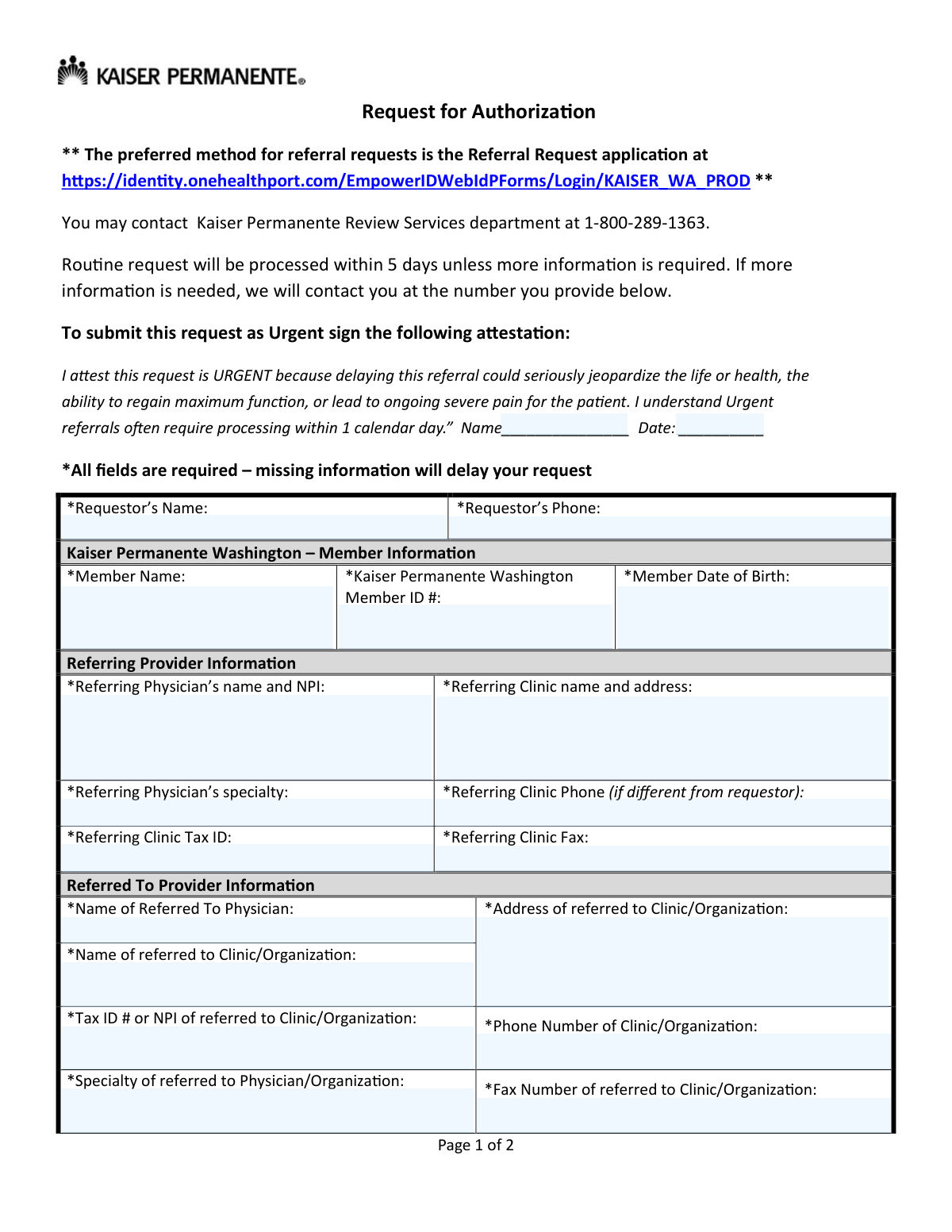
Yes! You can use AI to fill out Kaiser Permanente Washington Request for Authorization
This form is a formal request submitted by a healthcare provider to Kaiser Permanente Washington to obtain pre-approval for referring a member to another specialist, clinic, or for a specific procedure. Securing this authorization is crucial to ensure the requested service is deemed medically necessary and is covered under the patient's health plan. Today, this form can be filled out quickly and accurately using AI-powered services like Instafill.ai, which can also convert non-fillable PDF versions into interactive fillable forms.
Our AI automatically handles information lookup, data retrieval, formatting, and form filling.
It takes less than a minute to fill out Kaiser WA Referral Request using our AI form filling.
Securely upload your data. Information is encrypted in transit and deleted immediately after the form is filled out.
Form specifications
| Form name: | Kaiser Permanente Washington Request for Authorization |
| Number of pages: | 2 |
| Language: | English |
| Categories: | authorization forms |
Instafill Demo: How to fill out PDF forms in seconds with AI
How to Fill Out Kaiser WA Referral Request Online for Free in 2026
Are you looking to fill out a KAISER WA REFERRAL REQUEST form online quickly and accurately? Instafill.ai offers the #1 AI-powered PDF filling software of 2026, allowing you to complete your KAISER WA REFERRAL REQUEST form in just 37 seconds or less.
Follow these steps to fill out your KAISER WA REFERRAL REQUEST form online using Instafill.ai:
- 1 Navigate to Instafill.ai and upload or select the Kaiser Permanente Washington Request for Authorization form.
- 2 Provide the requestor's name and phone number. If the request is urgent, sign and date the attestation section.
- 3 Enter the patient's information, including their full name, Kaiser Permanente member ID number, and date of birth.
- 4 Fill in the details for the referring provider and the provider the patient is being referred to, including names, NPIs, addresses, and contact information.
- 5 Input the specific diagnosis and procedure codes/descriptions, and select the correct place of service.
- 6 Add any relevant notes and check the box if you are attaching clinical information or medical records.
- 7 Review all the information auto-filled by the AI for accuracy, make any necessary corrections, and then download, print, and fax the completed form to Kaiser Permanente Review Services.
Our AI-powered system ensures each field is filled out correctly, reducing errors and saving you time.
Why Choose Instafill.ai for Your Fillable Kaiser WA Referral Request Form?
Speed
Complete your Kaiser WA Referral Request in as little as 37 seconds.
Up-to-Date
Always use the latest 2026 Kaiser WA Referral Request form version.
Cost-effective
No need to hire expensive lawyers.
Accuracy
Our AI performs 10 compliance checks to ensure your form is error-free.
Security
Your personal information is protected with bank-level encryption.
Frequently Asked Questions About Form Kaiser WA Referral Request
This form is used by healthcare providers to request prior authorization from Kaiser Permanente for a member to see a specialist, receive a specific procedure, or obtain medical equipment.
The referring physician's office or clinic staff is responsible for completing and submitting this form on behalf of the Kaiser Permanente member needing the referral.
Yes, the preferred and faster method is to use the online Referral Request application available through the OneHealthPort website, as mentioned at the top of the form.
Routine requests are processed within 5 days. If you submit the request as Urgent, it will often be processed within one calendar day.
To mark a request as Urgent, you must fill in your name and the date on the attestation statement on page 1, confirming the patient's health could be jeopardized by a delay.
The form states that all fields are required. Any missing information will delay your request, as Kaiser Permanente will need to contact your office to get the necessary details.
Once all fields are completed, you must print the form and fax it to Kaiser Permanente Review Services at 1-888-282-2685.
If you are providing supporting clinical documents, you must check the box at the bottom of page 2 to indicate that clinical information or medical records are attached.
For questions regarding the referral request process, you can contact the Kaiser Permanente Review Services department at 1-800-289-1363.
The 'Referred To Provider' section is for the specialist's clinic information. The 'Facility' section should only be filled out if the service will occur at a different location, such as a hospital or ambulatory surgery center.
Yes, you can use services like Instafill.ai, which leverage AI to help you accurately auto-fill form fields, saving time and minimizing data entry errors.
You can upload the form to the Instafill.ai platform. The AI will make the fields fillable, allowing you to complete it digitally before printing it for faxing.
If you have a non-fillable PDF, a tool like Instafill.ai can convert it into an interactive, fillable form that you can easily complete on your computer.
Compliance Kaiser WA Referral Request
Validation Checks by Instafill.ai
1
Member ID Format Validation
This check verifies that the 'Kaiser Permanente Washington Member ID #' follows the expected format, such as a specific length, prefix, or combination of letters and numbers. This is crucial for correctly identifying the patient in the system and avoiding processing errors. If the ID format is incorrect, the system will reject the submission and prompt the user to enter a valid Member ID.
2
Member Date of Birth Logical Check
This validation ensures the 'Member Date of Birth' is a valid, properly formatted date (e.g., MM/DD/YYYY) and that it occurs in the past. It prevents the entry of future dates or nonsensical values, which would be invalid for a patient's birth date. An invalid date will halt processing and require correction to ensure patient data integrity.
3
Standard Phone and Fax Number Formatting
This check validates that all phone and fax number fields (e.g., 'Requestor’s Phone', 'Referring Clinic Fax') adhere to a standard format, such as 10 digits with an optional country code or common formatting characters. Correctly formatted numbers are essential for communication regarding the referral. A validation failure would trigger an error message, asking the user to correct the number before submission.
4
NPI Number Structure Validation
This validation confirms that the National Provider Identifier (NPI) entered in the 'Referring Physician’s name and NPI' and 'Tax ID # or NPI of referred to Clinic/Organizafion' fields is a 10-digit numeric value. The NPI is a standard, unique identifier for health care providers, and its accuracy is critical for billing and regulatory compliance. An invalid NPI format will prevent form submission until a valid 10-digit number is provided.
5
Tax ID (EIN) Format Validation
This check ensures that any Tax ID provided for the referring or referred-to clinic is a 9-digit number, consistent with the format of an Employer Identification Number (EIN). Accurate Tax IDs are necessary for financial and administrative processing between healthcare organizations. If the number does not meet the 9-digit format, the system will flag it as an error.
6
Urgent Attestation Conditional Requirement
This validation checks that if the request is submitted as 'Urgent', the 'Attestation Name' and 'Attestation Date' fields are both completed. This attestation is a legal declaration justifying the expedited timeline, and its absence on an urgent request would be a compliance issue. If the request is marked urgent but the attestation is incomplete, the submission will be blocked until the fields are filled.
7
Referring vs. Referred-To Provider Distinction
This logical check verifies that the identifying information (e.g., NPI or Name/Address) for the 'Referring Provider' is different from the 'Referred To Provider'. A referral, by definition, is a transfer of care from one provider or entity to another. A validation failure would indicate a potential data entry error or an invalid self-referral, requiring the user to review and correct the provider information.
8
Place of Service Selection Requirement
This check ensures that at least one option under 'Place of Service' (e.g., Office, ASC, Hospital Outpatient) has been selected. This information is fundamental for determining coverage, reimbursement rates, and the logistical context of the requested service. If no selection is made, the form cannot be processed, and the user will be prompted to choose an option.
9
“Other Place of Service” Field Dependency
This validation rule ensures that if the 'Other' checkbox is selected under 'Place of Service', the corresponding text field for specifying the location is not empty. This prevents incomplete data when a standard option does not apply. Failure to specify the 'Other' location would result in an error, forcing the user to provide the necessary detail.
10
Facility Information for Hospital-Based Services
This is a conditional check that requires the 'Facility or Hospital Name & Address' and 'Facility Phone and Fax Number' fields to be completed if the 'Place of Service' is 'Hospital Outpatient' or 'Inpatient Facility'. This information is essential for coordinating care and verifying service location details. If the condition is met but the facility information is missing, the form submission will be flagged as incomplete.
11
Diagnosis Code and Description Presence
This validation confirms that the 'Diagnosis Code/Description' field contains information. A diagnosis is the primary medical justification for a referral and is mandatory for the review process. Submitting a request without a diagnosis would lead to an automatic delay or rejection, so this check ensures the core reason for the request is present.
12
Procedure Code and Description Presence
This check verifies that the 'Procedure or Equipment Code/Description' field is filled out. This information specifies the exact service or item for which authorization is being requested and is critical for determining medical necessity and coverage. A missing procedure code would make the request ambiguous and unprocessable, leading to a validation failure.
13
Requestor Contact Information Completeness
This validation ensures that both the 'Requestor's Name' and 'Requestor's Phone' fields are filled. The form explicitly states that the review department will use this number to contact the requestor if more information is needed. Missing contact details would impede the review process and cause significant delays, so this check is vital for smooth processing.
Common Mistakes in Completing Kaiser WA Referral Request
Users often transpose digits in the Member ID number or enter the Date of Birth in an incorrect format. Since these fields are used to identify the patient in the system, even a small error will result in a failed search and an immediate delay or rejection of the authorization request. Double-check the member's insurance card for the exact ID number and use a standard MM/DD/YYYY format for the date of birth to ensure accuracy.
The form requires both the referring physician's NPI and the Tax ID or NPI for the referred-to clinic. These fields are often left blank or filled incorrectly because the information is not readily available to the person completing the form. Missing identifiers make it impossible to verify provider credentials and network status, which will halt the review process until the information is provided. It is critical to look up and confirm these numbers before submission.
A common error is either failing to sign and date the attestation for a genuinely urgent request, or signing it for a routine one. Forgetting to sign for an urgent case means it will be processed on a routine 5-day timeline, potentially jeopardizing patient health. Improperly marking a routine request as urgent can lead to scrutiny and misuse of the expedited pathway. Only complete this section when the patient's condition meets the specific criteria for urgency.
Submitters frequently check the box indicating that clinical records are attached but then forget to fax the documents, or they fax the documents without checking the box. This mismatch causes significant delays, as the review team cannot proceed without the necessary clinical information and must contact the requestor to obtain it. Always ensure that if the box is checked, the corresponding medical records are included in the same fax transmission.
Providing an outdated diagnosis code, a non-specific procedure description, or a code that does not logically match the written diagnosis is a frequent mistake. Reviewers rely on specific, accurate codes (like ICD-10 and CPT) to determine medical necessity. Vague information forces the reviewer to send a request for additional information, delaying the authorization decision.
Because this form is a non-fillable PDF that must be printed, filled by hand, and faxed, poor handwriting is a major source of errors. Critical data like names, ID numbers, and clinical codes can be easily misread by the processing team, leading to incorrect data entry and subsequent rejections. To prevent this, it's best to print legibly in block letters. AI-powered tools like Instafill.ai can convert such flat PDFs into digitally fillable forms, eliminating handwriting issues entirely.
Users often overlook the 'Place of Service' section, failing to check any of the boxes (Office, ASC, Hospital, etc.). This information is essential for determining coverage rules and reimbursement rates, as they vary significantly by location. Leaving this field blank will result in a delay while the processor contacts the provider's office to clarify where the service will be rendered.
The form has separate fields for the 'Name of Referred To Physician' and the 'Name of referred to Clinic/Organization'. People often enter the same information in both, or provide incomplete details for one. This ambiguity makes it difficult to confirm the specific provider's network status and direct the authorization correctly, potentially causing it to be sent to the wrong entity. Ensure the individual doctor's name and the facility's name are entered accurately in their respective fields.
The form states that if more information is needed, the review department will use the phone number provided. Leaving the 'Requestor's Phone' or 'Referring Clinic Phone' fields blank, or entering an incorrect number, severs this communication line. This means that instead of a quick phone call to resolve a minor issue, the request will be delayed or denied outright. Using a form-filling tool like Instafill.ai can help by saving and auto-populating correct contact details for frequent requestors.
Saved over 80 hours a year
“I was never sure if my IRS forms like W-9 were filled correctly. Now, I can complete the forms accurately without any external help.”
Kevin Martin Green
Your data stays secure with advanced protection from Instafill and our subprocessors

Robust compliance program
Transparent business model
You’re not the product. You always know where your data is and what it is processed for.
ISO 27001, HIPAA, and GDPR
Our subprocesses adhere to multiple compliance standards, including but not limited to ISO 27001, HIPAA, and GDPR.
Security & privacy by design
We consider security and privacy from the initial design phase of any new service or functionality. It’s not an afterthought, it’s built-in, including support for two-factor authentication (2FA) to further protect your account.
Fill out Kaiser WA Referral Request with Instafill.ai
Worried about filling PDFs wrong? Instafill securely fills kaiser-permanente-washington-request-for-authorization forms, ensuring each field is accurate.