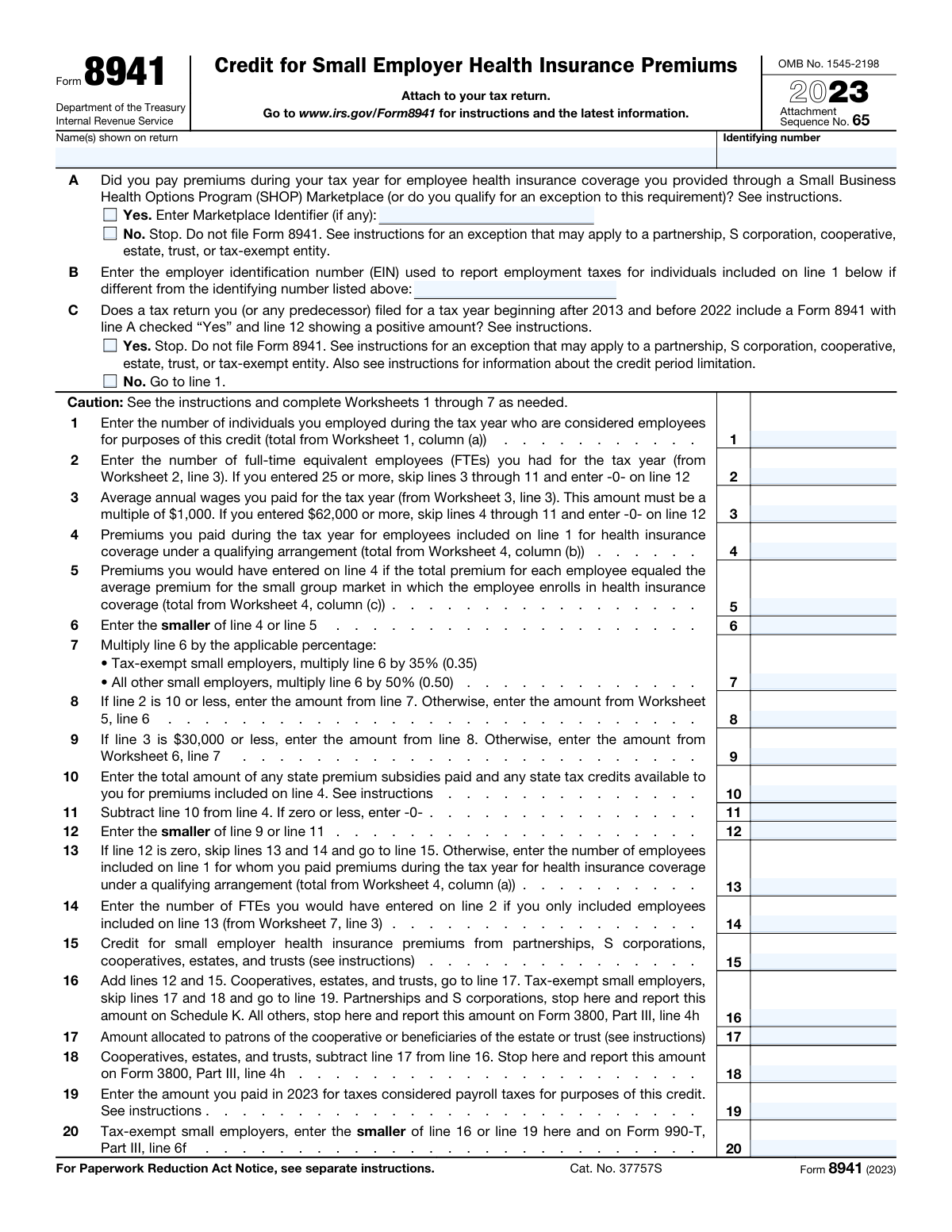
Yes! You can use AI to fill out Form 8941, Credit for Small Employer Health Insurance Premiums

Form 8941, Credit for Small Employer Health Insurance Premiums, is an Internal Revenue Service (IRS) form used by eligible small businesses and tax-exempt organizations to calculate and claim a tax credit for providing health insurance coverage to their employees. This credit helps offset the cost of premiums, making it more affordable for small employers to offer health benefits. Today, this form can be filled out quickly and accurately using AI-powered services like Instafill.ai, which can also convert non-fillable PDF versions into interactive fillable forms.
Form 8941 is part of the credit forms, employer forms, health forms, health insurance forms and insurance forms categories on Instafill.
Our AI automatically handles information lookup, data retrieval, formatting, and form filling.
It takes less than a minute to fill out Form 8941 using our AI form filling.
Securely upload your data. Information is encrypted in transit and deleted immediately after the form is filled out.

Form specifications

Form name: Form 8941, Credit for Small Employer Health Insurance Premiums
Number of fields: 28
Number of pages: 1
Language: English
main-image

Instafill Demo: How to fill out PDF forms in seconds with AI

How to Fill Out Form 8941 Online for Free in 2026

Are you looking to fill out a FORM 8941 form online quickly and accurately? Instafill.ai offers the #1 AI-powered PDF filling software of 2026, allowing you to complete your FORM 8941 form in just 37 seconds or less.
Follow these steps to fill out your FORM 8941 form online using Instafill.ai:
  1. 1 Navigate to Instafill.ai and upload or select IRS Form 8941.
  2. 2 Enter your business name and identifying number as shown on your tax return.
  3. 3 Answer the initial eligibility questions regarding SHOP Marketplace participation and prior credit claims.
  4. 4 Use the AI-powered tool to complete the necessary worksheets to determine the number of employees, full-time equivalents (FTEs), average annual wages, and premiums paid.
  5. 5 The service will automatically populate the main form with the calculated figures from the worksheets, such as lines 1 through 5.
  6. 6 Review the calculated credit amount on line 12 and follow the instructions for your specific entity type (e.g., partnership, S corp, tax-exempt).
  7. 7 Securely download, print, or e-file the completed Form 8941 to attach to your annual tax return.

Our AI-powered system ensures each field is filled out correctly, reducing errors and saving you time.

Why Choose Instafill.ai for Your Fillable Form 8941 Form?

Speed

Complete your Form 8941 in as little as 37 seconds.

Up-to-Date

Always use the latest 2026 Form 8941 form version.

Cost-effective

No need to hire expensive lawyers.

Accuracy

Our AI performs 10 compliance checks to ensure your form is error-free.

Security

Your personal information is protected with bank-level encryption.

Frequently Asked Questions About Form Form 8941

Form 8941 is used by eligible small employers to calculate and claim the tax credit for health insurance premiums they paid for their employees.

Small employers who paid for employee health insurance through a qualifying arrangement, typically a SHOP Marketplace plan, and meet specific criteria regarding the number of employees and average wages should fill out this form.

To be eligible, you must have fewer than 25 full-time equivalent (FTE) employees, pay average annual wages below the inflation-adjusted limit (around $62,000 for 2023), and contribute at least 50% of the premium cost for employee-only coverage.

Generally, you must have purchased coverage through a Small Business Health Options Program (SHOP) Marketplace to qualify. If you answer 'No' to question A, you cannot file the form unless you meet a specific exception, which is rare for most businesses.

The worksheets are detailed calculation guides found in the official IRS instructions for Form 8941. You must use them to determine key figures like your number of full-time equivalent employees (Worksheet 2) and average annual wages (Worksheet 3).

The credit is limited to a two-consecutive-tax-year period. Question C on the form is designed to check if you have already claimed the credit in prior years, which may make you ineligible to claim it again.

The maximum credit percentage is 50% for most small businesses. However, for tax-exempt small employers, the maximum credit percentage is 35%.

You do not file Form 8941 by itself. It must be attached to your business's annual income tax return, such as Form 1120 for corporations or Form 1040 for sole proprietors.

Yes, partnerships and S corporations calculate the credit on Form 8941 but then report the amount on Schedule K. The credit is then passed through to the partners or shareholders to claim on their individual returns.

If you have 25 or more FTEs (line 2) or your average annual wages are $62,000 or more for 2023 (line 3), you are not eligible for the credit. The form instructs you to enter -0- on line 12 and stop.

Yes, services like Instafill.ai use AI to auto-fill form fields accurately and save time. This can help ensure your business name, identifying number, and other details are entered correctly.

You can use a service like Instafill.ai to complete the form online. Simply upload the PDF, and the platform will make it an interactive, fillable form that you can complete and download.

If your PDF is not fillable, you can upload it to a service like Instafill.ai. The platform can convert flat, non-fillable PDFs into interactive forms that you can easily complete on your computer.

Compliance Form 8941
Validation Checks by Instafill.ai

1
Validates Identifying Number Format
This check ensures the 'Identifying number' field is a validly formatted Social Security Number (SSN) or Employer Identification Number (EIN). An incorrect or malformed number can lead to processing delays or rejection of the form. If the number does not match the expected XXX-XX-XXXX or XX-XXXXXXX format, the submission should be flagged for correction.
2
Ensures SHOP Marketplace Participation (Question A)
This validation confirms that the 'Yes' box for Question A is checked, as participation in a SHOP Marketplace is a primary eligibility requirement for this credit. If 'No' is checked, the form should be rejected, and the user should be directed to the form instructions to see if they qualify for a rare exception. This prevents ineligible filers from proceeding.
3
Verifies No Prior Credit Claimed (Question C)
This check ensures the 'No' box for Question C is checked, confirming the filer has not already claimed the credit in previous years beyond the allowed period. If 'Yes' is checked, the filer is generally ineligible, and the form should be rejected to prevent an improper credit claim. The user should be directed to the instructions regarding the credit period limitation.
4
FTE Limit Enforcement (Line 2)
This check validates the rule that if the number of full-time equivalent employees (FTEs) on Line 2 is 25 or more, the filer is ineligible for the credit. In this case, the validation ensures that Line 12 is correctly entered as zero. This prevents calculations for an ineligible employer and enforces a key program limitation.
5
Average Annual Wage Limit Enforcement (Line 3)
This check validates the rule that if the average annual wages on Line 3 are $62,000 or more, the filer is ineligible for the credit. The validation ensures that Line 12 is correctly entered as zero if this condition is met. This enforces a critical eligibility threshold for the credit.
6
Average Annual Wage Format (Line 3)
This check ensures that the amount entered on Line 3 for average annual wages is a multiple of $1,000, as explicitly stated on the form. This formatting requirement simplifies calculations and is a specific instruction from the IRS. A failure would prompt the user to round their calculated average wage to the nearest $1,000.
7
Line 6 Calculation Verification
This validation confirms that the value on Line 6 is correctly calculated as the smaller of the amounts on Line 4 and Line 5. This is a fundamental step in determining the premium amount eligible for the credit. An incorrect value here would lead to all subsequent calculations being wrong, so the system should recalculate or flag the discrepancy.
8
Line 11 Calculation and Floor Verification
This check verifies that Line 11 is the result of subtracting Line 10 from Line 4, and importantly, that the result is not less than zero. The form specifies that if the result is negative, zero should be entered. This validation enforces both the subtraction and the non-negative floor rule, which is crucial for the final credit calculation.
9
Line 12 Calculation Verification
This validation confirms that the value on Line 12 is correctly calculated as the smaller of the amounts on Line 9 and Line 11. This is the final calculated credit amount before adding credits from other entities. An error here directly impacts the total credit claimed, so a failure must be flagged for correction.
10
Conditional Field Logic for Lines 13 and 14
This check enforces the instruction that if Line 12 is zero, then Lines 13 and 14 must be skipped (i.e., left blank or contain zero). These lines are only relevant if a credit is being calculated. This validation prevents the entry of superfluous or contradictory data when no credit is available.
11
Employee Count Consistency (Line 13 vs Line 1)
This validation ensures that the number of employees for whom premiums were paid (Line 13) is not greater than the total number of employees reported on Line 1. It is logically impossible to pay premiums for more employees than you have. A failure indicates a data entry error that must be corrected.
12
FTE Count Consistency (Line 14 vs Line 2)
This check ensures that the number of FTEs calculated from premium-paid employees (Line 14) does not exceed the total number of FTEs for the company (Line 2). This maintains logical consistency between the overall employee count and the subset used for the credit calculation. A discrepancy would indicate a worksheet error or data entry mistake.
13
Line 16 Summation Verification
This check validates that the amount on Line 16 is the sum of Line 12 and Line 15. This calculation combines the credit calculated on this form with any credits flowing through from partnerships, S corporations, etc. An incorrect sum would lead to an improper final credit amount being reported on Form 3800 or Schedule K.
14
Line 18 Calculation for Specific Entities
For cooperatives, estates, and trusts, this check verifies that Line 18 correctly equals Line 16 minus Line 17. This calculation properly subtracts amounts allocated to patrons or beneficiaries. Failure to perform this check could result in the entity claiming a larger credit than it is entitled to.
15
Line 20 Calculation for Tax-Exempt Employers
For tax-exempt employers, this validation confirms that the value on Line 20 is the smaller of Line 16 (total credit) and Line 19 (payroll taxes paid). The credit for these entities is limited to the amount of payroll taxes they paid. This check enforces that specific limitation and prevents an excessive claim.

Common Mistakes in Completing Form 8941

Misinterpreting Key Eligibility Questions

Filers often incorrectly answer the gateway questions on the form, particularly Question A (regarding SHOP Marketplace participation) and Question C (regarding the two-consecutive-tax-year credit limit). Answering 'No' to Question A when an exception applies, or 'No' to Question C when the credit was claimed previously, can lead to an improper claim. This can result in an audit, penalties, and repayment of the credit. To avoid this, carefully read the form instructions to understand the specific definitions, exceptions, and credit period limitations before answering.

Neglecting or Incorrectly Completing Required Worksheets

Many lines on Form 8941 require figures calculated on one of seven external worksheets. A common mistake is to estimate these values or skip the worksheets altogether, leading to unsupported and incorrect entries for employee counts, wages, and premiums. This guarantees an inaccurate credit calculation and can trigger IRS inquiries. To prevent this, methodically complete each required worksheet first and then transfer the final figures to the corresponding lines on Form 8941.

Miscalculating Full-Time Equivalent (FTE) Employees

The FTE calculation for line 2 is not a simple headcount and is a frequent source of errors. Filers often miscalculate by improperly accounting for part-time employee hours or using the wrong formula from Worksheet 2. An incorrect FTE count can cause you to be improperly disqualified (if you enter 25 or more) or to use the wrong phase-out calculation, leading to a significantly misstated credit amount. Using an AI-powered tool like Instafill.ai can help by automating these complex calculations based on your payroll data.

Improper Calculation and Formatting of Average Annual Wages

Line 3 requires the average annual wage figure from Worksheet 3, which must be rounded to the nearest $1,000. Filers frequently forget to round this number or miscalculate the average by including wages for excluded individuals like business owners or their relatives. An incorrect or unrounded wage figure can lead to an improper credit phase-out or complete disqualification if it exceeds the statutory limit. To avoid this, double-check the rounding rule and the definition of includible wages in the instructions.

Using Incorrect Health Insurance Premium Data

A critical error is incorrectly filling out lines 4 and 5. Line 5 requires a calculation based on the average premium for the employer's specific small group market rating area, data which must be looked up from IRS-provided tables. Many filers struggle to find this data and simply copy the amount from line 4 (actual premiums paid). This error invalidates a key limitation on the credit and will almost certainly lead to an overclaimed credit and subsequent IRS adjustment.

Ignoring Credit Phase-Out Thresholds and Instructions

The form contains explicit instructions to stop and enter zero on line 12 if FTEs are 25 or more, or if average wages are $62,000 or more. Filers often miss these instructions and continue filling out the form, wasting time and making an invalid claim. Similarly, they may fail to use Worksheets 5 and 6 to calculate the phase-out when FTEs exceed 10 or wages exceed $30,000. AI-powered form fillers like Instafill.ai can prevent this by automatically applying these rules and validating entries in real-time.

Applying the Incorrect Credit Percentage

Line 7 specifies two different credit percentages: 50% for most employers and 35% for tax-exempt small employers. A common mistake is for tax-exempt organizations to accidentally use the higher 50% rate, leading to an overstated credit. This simple error can cause significant calculation discrepancies that the IRS will correct, potentially with interest due. Always verify your entity's status and apply the correct percentage.

Omitting State Premium Subsidies or Tax Credits

Filers must reduce their creditable premiums by any state-level assistance received for those same premiums on line 10. People often forget to account for state tax credits or premium subsidy programs, which is considered 'double-dipping' by the IRS. This omission inflates the basis for the federal credit on line 11, resulting in an overpayment that will need to be returned with interest.

Following Incorrect Reporting Instructions for Entity Type

The final steps of the form (lines 16-20) provide different reporting instructions based on the filer's business structure (e.g., Partnership, S Corporation, C Corporation, Tax-Exempt). A frequent error is following the wrong path, such as a Partnership reporting the credit on Form 3800 instead of Schedule K. This causes processing delays, return rejections, and requires filing an amended return. Carefully read the instructions on line 16 to ensure the credit is reported on the correct corresponding form or schedule.

Mismatched Name or Identifying Number

The employer name and identifying number (EIN) at the top of Form 8941 must exactly match the information on the primary tax return it is attached to (e.g., Form 1120-S, 1065). Filers sometimes use a DBA name, an abbreviation, or the wrong EIN, causing an electronic filing rejection or processing delay. To avoid this, copy the legal name and EIN precisely as they appear on your main business tax return. If the form is a non-fillable PDF, a tool like Instafill.ai can convert it to a fillable version, reducing the chance of transcription errors.
Saved over 80 hours a year

“I was never sure if my IRS forms like W-9 were filled correctly. Now, I can complete the forms accurately without any external help.”

Kevin Martin Green

Your data stays secure with advanced protection from Instafill and our subprocessors

Robust compliance program

Transparent business model

You’re not the product. You always know where your data is and what it is processed for.

ISO 27001, HIPAA, and GDPR

Our subprocesses adhere to multiple compliance standards, including but not limited to ISO 27001, HIPAA, and GDPR.

Security & privacy by design

We consider security and privacy from the initial design phase of any new service or functionality. It’s not an afterthought, it’s built-in, including support for two-factor authentication (2FA) to further protect your account.

Fill out Form 8941 with Instafill.ai

Worried about filling PDFs wrong? Instafill securely fills form-8941-credit-for-small-employer-health-insurance-premiums forms, ensuring each field is accurate.