Yes! You can use AI to fill out 2023 Schedule IL-E/EIC, Illinois Exemption and Earned Income Tax Credit (Illinois Department of Revenue)

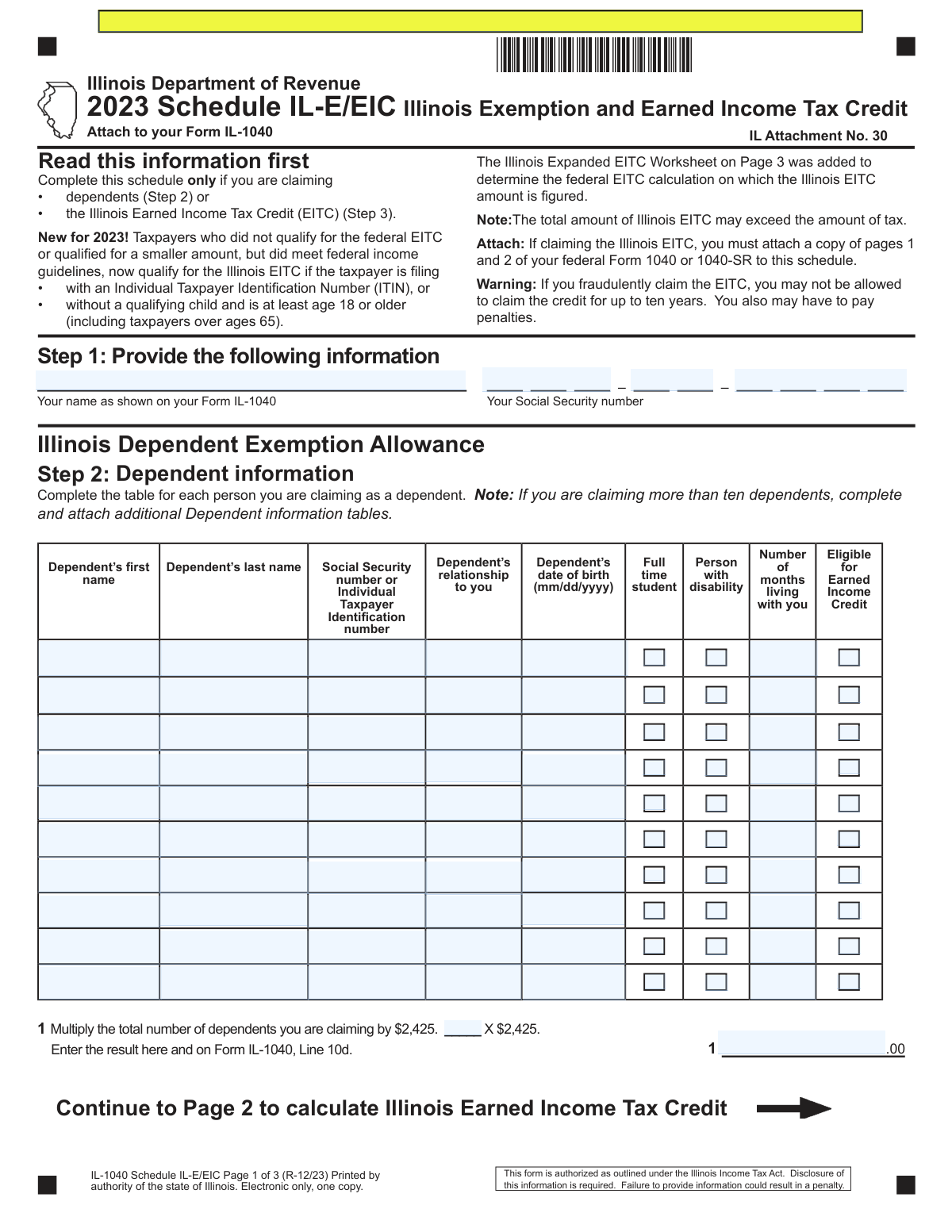
Schedule IL-E/EIC is a required Illinois income tax schedule attached to Form IL-1040 when you are claiming dependents (to compute the Illinois Dependent Exemption Allowance) and/or claiming the Illinois Earned Income Tax Credit. It collects dependent and qualifying child details and uses figures from your federal Form 1040/1040-SR (and related schedules) to determine the Illinois EITC amount. For 2023, Illinois expanded EITC eligibility for certain filers who may not qualify for the federal EITC (including some ITIN filers and filers without a qualifying child who are age 18+). Completing it accurately is important because it affects your Illinois taxable income and refundable/credit amounts reported on specific IL-1040 lines.
Our AI automatically handles information lookup, data retrieval, formatting, and form filling.
It takes less than a minute to fill out Schedule IL-E/EIC (IL-1040) using our AI form filling.
Securely upload your data. Information is encrypted in transit and deleted immediately after the form is filled out.

Form specifications

Form name: 2023 Schedule IL-E/EIC, Illinois Exemption and Earned Income Tax Credit (Illinois Department of Revenue)
Number of pages: 3
Filled form examples: Form Schedule IL-E/EIC (IL-1040) Examples
Language: English
Categories: tax exemption forms, income forms
main-image

Instafill Demo: filling out a legal form in seconds

How to Fill Out Schedule IL-E/EIC (IL-1040) Online for Free in 2026

Are you looking to fill out a SCHEDULE IL-E/EIC (IL-1040) form online quickly and accurately? Instafill.ai offers the #1 AI-powered PDF filling software of 2026, allowing you to complete your SCHEDULE IL-E/EIC (IL-1040) form in just 37 seconds or less.
Follow these steps to fill out your SCHEDULE IL-E/EIC (IL-1040) form online using Instafill.ai:
  1. 1 Confirm you need Schedule IL-E/EIC (you are claiming dependents on IL-1040 and/or claiming the Illinois EITC for 2023) and gather supporting documents (federal Form 1040/1040-SR pages 1–2, W-2s, and any relevant federal schedules such as Schedule 1, Schedule SE, Schedule C/F, and K-1s).
  2. 2 Step 1: Enter your identifying information exactly as shown on Form IL-1040 (name and Social Security number).
  3. 3 Step 2: Enter each dependent’s information (name, SSN/ITIN, relationship, date of birth, student/disability indicators, months lived with you, and EIC eligibility), then compute the Illinois Dependent Exemption Allowance by multiplying the number of dependents by $2,425 and transfer the result to Form IL-1040, Line 10d.
  4. 4 Step 3 (if applicable): List any qualifying children not already included in Step 2 in the Qualifying Child Information table.
  5. 5 Step 4: Enter required income and filing-related amounts from your federal return (wages from 1040/1040-SR Line 1z; business income/loss from Schedule 1 Line 3; special married filing status information if applicable; and statutory employee status from W-2 Box 13).
  6. 6 If you do not qualify for the federal EITC but may qualify for the Illinois EITC, check the box on Step 4, Line 5 and complete the Illinois Expanded EITC Worksheet (Page 3) to compute the federal EITC calculation used for Illinois purposes; otherwise use your federal EITC from 1040/1040-SR Line 27.
  7. 7 Compute the Illinois EITC (enter the federal EITC or worksheet result on Line 6, multiply by 20% on Line 7, apply the residency decimal on Line 8, and enter the final credit on Line 9) and transfer it to Form IL-1040, Line 29; attach required federal return pages to the schedule when filing.

Our AI-powered system ensures each field is filled out correctly, reducing errors and saving you time.

Why Choose Instafill.ai for Your Fillable Schedule IL-E/EIC (IL-1040) Form?

Speed

Complete your Schedule IL-E/EIC (IL-1040) in as little as 37 seconds.

Up-to-Date

Always use the latest 2026 Schedule IL-E/EIC (IL-1040) form version.

Cost-effective

No need to hire expensive lawyers.

Accuracy

Our AI performs 10 compliance checks to ensure your form is error-free.

Security

Your personal information is protected with bank-level encryption.

Frequently Asked Questions About Form Schedule IL-E/EIC (IL-1040)

Schedule IL-E/EIC is used to claim Illinois dependent exemptions and/or the Illinois Earned Income Tax Credit (EITC). You attach it to your Form IL-1040 (IL Attachment No. 30).

Complete this schedule only if you are claiming dependents (Step 2) or claiming the Illinois EITC (Steps 3–4). If you are not claiming either, you generally do not file this schedule.

For 2023, you may qualify for the Illinois EITC even if you did not qualify for the federal EITC (or qualified for a smaller amount), as long as you meet federal income guidelines and are filing with an ITIN or are age 18+ without a qualifying child (including taxpayers over age 65).

Not always. If you don’t qualify for the federal EITC but do qualify under Illinois’ expanded rules, you can check the box on Step 4, Line 5 and complete the Illinois Expanded EITC Worksheet (Page 3) to calculate the amount used for Illinois.

If you claim the Illinois EITC, you must attach a copy of pages 1 and 2 of your federal Form 1040 or 1040-SR to this schedule.

Count the total number of dependents you are claiming and multiply that number by $2,425. Enter the result on Schedule IL-E/EIC Step 2, Line 1 and on Form IL-1040, Line 10d.

For each dependent, provide their name, SSN or ITIN, relationship to you, date of birth, whether they are a full-time student or a person with a disability, number of months living with you, and whether they are eligible for Earned Income Credit.

If you are claiming more than ten dependents, complete and attach additional Dependent Information tables. Make sure the total number of dependents used in the $2,425 calculation includes everyone you are claiming.

Step 3 is used to list qualifying children for EITC purposes who are not already included in Step 2. You only complete the Step 3 table if you are claiming a qualifying child not listed as a dependent in Step 2.

Line 1 comes from your federal Form 1040 or 1040-SR, Line 1z (wages, salaries, and tips). Line 2 comes from federal Schedule 1 (Form 1040), Line 3 (business income or loss).

If you enter an amount on Step 3, Line 2 (business income or loss), you must answer Line 2a. It asks whether your occupation requires a city, state, or county issued professional license, registration, or certification.

Enter your federal adjusted gross income (AGI) from the married filing jointly federal Form 1040 or 1040-SR, Line 11 on Step 3, Line 3. If you enter an amount on Line 3, you must also enter your spouse’s SSN on Line 3a.

You start with the federal EITC amount (federal Form 1040/1040-SR, Line 27) or the worksheet amount if using the expanded rules, then multiply by 20% on Line 7. If you are a nonresident or part-year resident, you also multiply by the Schedule NR decimal (Line 48) to get the final Illinois EITC on Line 9.

Nonresidents and part-year residents enter the decimal from Schedule NR, Line 48 on Line 8. Illinois residents enter 1.0.

Yes. The form notes that the total amount of Illinois EITC may exceed the amount of tax, meaning it can still benefit you even if your tax is low.

Compliance Schedule IL-E/EIC (IL-1040)
Validation Checks by Instafill.ai

1
Taxpayer name present and matches IL-1040 primary taxpayer name
Validates that the taxpayer name field in Step 1 is completed and matches the primary taxpayer name as shown on the associated Form IL-1040 (including suffix if present). This prevents mis-association of the schedule to the wrong return and reduces identity and processing errors. If the name is missing or does not match IL-1040, the submission should be flagged for correction and may be rejected or manually reviewed.
2
Taxpayer SSN format and validity (Step 1)
Checks that the taxpayer Social Security number is present and follows the required 9-digit SSN format (###-##-#### or 9 digits) and is not an invalid pattern (e.g., all zeros in any group). This is critical for identity matching, credit eligibility, and preventing duplicate filings. If validation fails, the schedule should not be accepted for automated processing and should require correction.
3
Schedule completion requirement: dependents claimed or Illinois EITC claimed
Ensures the schedule is only submitted when the filer is claiming dependents (Step 2) and/or claiming the Illinois EITC (Step 4/Line 9). This prevents unnecessary attachments and inconsistent filings. If neither dependents are listed nor an Illinois EITC amount is computed/claimed, the schedule should be rejected or ignored with an error prompting removal.
4
Dependent table row completeness for each claimed dependent (Step 2)
For each dependent listed, validates required fields are populated: first name, last name, SSN/ITIN, relationship, date of birth, months living with you, and applicable checkboxes (student/disability/EIC eligibility) are explicitly marked or left blank per form rules. Complete dependent data is necessary to support the exemption allowance and any EITC-related determinations. If any required element is missing for a dependent row, the dependent should not be counted and the return should be flagged for correction.
5
Dependent SSN/ITIN format, uniqueness, and non-duplication across the schedule
Validates that each dependent’s SSN is 9 digits in valid SSN format or that the ITIN is 9 digits and follows ITIN conventions (commonly beginning with 9), and that the same SSN/ITIN is not repeated across multiple dependents or qualifying children tables. This prevents double-counting dependents and reduces fraud/duplicate-identity issues. If duplicates or invalid formats are found, the submission should error and require correction before credits/exemptions are calculated.
6
Dependent/child date of birth format and logical range
Checks that all dates of birth are in mm/dd/yyyy format and represent a real calendar date that is not in the future and is within a plausible range (e.g., not before 1900 unless explicitly allowed). DOB is used for eligibility rules (qualifying child, age-based EITC rules, student status plausibility). If invalid, the dependent/child record should be rejected and EITC/dependent calculations should be halted pending correction.
7
Months living with you is an integer between 0 and 12
Validates that the 'Number of months living with you' field for each dependent/qualifying child is a whole number from 0 through 12. This supports residency/relationship tests and prevents impossible values that could inflate eligibility. If the value is outside range or non-numeric, the row should be flagged and excluded from eligibility until corrected.
8
Step 2 dependent exemption allowance calculation (Line 1) matches dependent count
Ensures the exemption allowance equals (number of dependents claimed in Step 2) × 2,425 and that the computed amount is carried to Form IL-1040 Line 10d. This prevents arithmetic errors and incorrect exemption claims. If the amount does not match the dependent count or is not properly transferred, the system should recalculate and/or require the filer to correct the mismatch.
9
Qualifying child table usage rule: Step 3 only for children not included in Step 2
Validates that any child listed in Step 3 is not also listed as a dependent in Step 2 (no duplicate SSN/ITIN across the two tables) and that Step 3 is only used when needed. This prevents double-counting qualifying children for EITC computations. If a duplicate is detected, the submission should error and require removal from one table.
10
Income fields numeric format and sign rules (Steps 3 and Expanded Worksheet)
Checks that all money fields (e.g., wages Line 1, business income/loss Line 2, AGI Line 3, EITC Line 6, worksheet lines) are valid numeric currency amounts with at most two decimals, and that fields that should not be negative (e.g., wages) are non-negative while fields that may be negative (e.g., business loss) allow negatives. Correct numeric formatting is required for accurate credit computation and to prevent parsing errors. If invalid, the return should be rejected for correction or the system should prompt for re-entry.
11
Line 2a license question required when business income/loss is reported (Step 3)
If an amount is entered on Step 3 Line 2 (business income or loss), validates that Line 2a is answered Yes/No. This is a conditional completeness rule that supports compliance and downstream review logic. If Line 2 is non-blank and Line 2a is blank, the submission should fail validation and require an explicit response.
12
Married filing jointly federal / married filing separately Illinois consistency (Line 3 and 3a)
If Step 3 Line 3 (federal AGI from a married filing jointly federal return) is entered, validates that Line 3a (spouse SSN) is present and in valid SSN format, and that the Illinois filing status context indicates MFS while federal indicates MFJ as described. This prevents incomplete spouse identification and inconsistent filing scenarios. If Line 3 is populated without a valid Line 3a, the submission should be rejected or routed for correction.
13
Statutory employee indicator is explicitly answered (Step 3 Line 4)
Validates that the Yes/No response for whether the statutory employee box is marked on the W-2 is provided. This affects how certain income may be treated in the Expanded EITC Worksheet and supports accurate earned income determination. If unanswered, the system should block EITC computation and require a selection.
14
Illinois EITC computation integrity (Lines 6–9) and residency decimal validation (Line 8)
Checks that Line 7 equals Line 6 × 0.20, and Line 9 equals Line 7 × Line 8, with appropriate rounding rules, and that Line 8 is either exactly 1.0 for Illinois residents or a decimal between 0 and 1 sourced from Schedule NR Line 48 for non/part-year residents. This ensures the credit is computed correctly and apportioned properly for residency status. If any arithmetic or range check fails, the system should recompute, flag discrepancies, and prevent posting an incorrect credit to IL-1040 Line 29.
15
Expanded EITC Worksheet gating and qualification stop rule (Worksheet Line 16)
If Step 4 Line 5 is checked (using the Illinois Expanded EITC Worksheet), validates that the worksheet is completed through Line 23 and that Line 16 is 'Yes' (earned income within the table limit) before allowing an amount to flow to Step 4 Line 6. This enforces the form’s explicit eligibility stop condition and prevents claiming the credit when income exceeds limits. If Line 16 is 'No' or required worksheet lines are missing, the Illinois EITC should be set to zero and the submission should be flagged for ineligibility/correction.
16
Required attachment presence when claiming Illinois EITC (federal Form 1040/1040-SR pages 1–2)
When an Illinois EITC amount is claimed (Step 4 Line 9 > 0 or Line 5 checked), validates that a copy of federal Form 1040 or 1040-SR pages 1 and 2 is included with the submission. The attachment supports verification of wages, AGI, and federal EITC inputs used on this schedule. If missing, the claim should be suspended/denied pending documentation or the return should be rejected as incomplete.

Common Mistakes in Completing Schedule IL-E/EIC (IL-1040)

Filing Schedule IL-E/EIC when it isn’t required

Many filers attach this schedule automatically, even though it is only required if you are claiming dependents (Step 2) and/or the Illinois EITC (Steps 3–4). This can create mismatches with the IL-1040 (e.g., Line 10d or Line 29) and may trigger questions or delays. Before completing it, confirm you are actually claiming dependents and/or the Illinois EITC for 2023.

Name/SSN on Step 1 doesn’t match the IL-1040

A common error is entering a nickname, different last name format, or the wrong Social Security number compared to the main Form IL-1040. Even small differences can cause processing issues, rejected e-files, or correspondence from the Department of Revenue. Copy the taxpayer name and SSN exactly as shown on the IL-1040 (and SSA records), including hyphens/spacing where applicable.

Dependent SSN/ITIN missing, transposed, or using the wrong ID type

People frequently leave the dependent’s SSN/ITIN blank, swap digits, or enter an ITIN when the dependent has an SSN (or vice versa). Incorrect or missing IDs can disallow the dependent exemption and can also affect EITC eligibility determinations. Use the dependent’s official SSN/ITIN card/letter, double-check all digits, and ensure the ID type matches what the dependent actually has.

Incorrect dependent date of birth format or wrong birthdate

The form requires dates in mm/dd/yyyy, but filers often use mm/dd/yy, write text (e.g., “Jan 5”), or accidentally enter the taxpayer’s birthdate instead of the dependent’s. Wrong DOBs can cause dependent validation failures and EITC qualifying-child issues. Always enter the full 4-digit year and verify the date against official records.

Misreporting “months living with you” for dependents/qualifying children

Filers often guess, leave it blank, or enter “12” even when the child lived elsewhere part of the year. This field is critical for residency-based eligibility and can lead to EITC denial or follow-up documentation requests. Count the actual months the person lived with you in 2023 (generally 0–12) and be consistent with custody/living arrangements.

Checking student/disability boxes incorrectly or leaving them blank when applicable

The “Full time student” and “Person with disability” indicators are commonly misunderstood, leading to incorrect boxes checked or none checked at all. Incorrect selections can change whether someone qualifies as a dependent or qualifying child for EITC purposes and may prompt verification. Use the definitions in the instructions and only check these boxes when the dependent clearly meets the criteria for 2023.

Double-listing a child in both Step 2 and Step 3 (or forgetting Step 3 entirely)

Step 3 is only for qualifying children not included in Step 2, but filers often repeat the same child in both places or omit Step 3 when needed. Duplicates can create inconsistencies and may delay processing, while omissions can reduce or eliminate the credit. Ensure each child appears in the correct section: dependents in Step 2, and only additional qualifying children (not already listed) in Step 3.

Not attaching federal Form 1040/1040-SR pages 1 and 2 when claiming Illinois EITC

The schedule explicitly requires attaching a copy of pages 1 and 2 of the federal Form 1040 or 1040-SR if claiming the Illinois EITC. Missing attachments are a frequent reason credits are held, reduced, or the return is flagged for correspondence. If you claim Illinois EITC, include those federal pages with the IL-E/EIC submission (especially for paper filing).

Entering the wrong federal line amounts (wages, business income, AGI, federal EITC)

People often pull numbers from the wrong federal lines (e.g., using old line references, using taxable income instead of AGI, or using net profit instead of the specified Schedule 1/Schedule C lines). This leads to incorrect Illinois EITC calculations and can cause under/over-claims that may be adjusted later. Carefully match each IL-E/EIC line to the exact federal form and line listed (e.g., 1040 Line 1z for wages, Line 11 for AGI, Line 27 for federal EITC).

Skipping Line 2a (professional license question) when Line 2 has an amount

If you enter business income or loss on Line 2, the form requires answering Line 2a, but many filers overlook it. Leaving it unanswered can make the schedule incomplete and may trigger follow-up questions or delays. If Line 2 is not blank, mark Yes/No on 2a based on whether your occupation requires a city/state/county-issued license, registration, or certification.

Incorrect handling of the “married filing jointly federally but married filing separately in Illinois” situation (Lines 3 and 3a)

Filers in this special scenario often leave Line 3 blank, enter the wrong AGI, or forget to provide the spouse’s SSN on Line 3a. Errors here can cause the Illinois EITC computation to be wrong and may create identity/return matching issues. If this situation applies, enter the AGI from the federal MFJ return exactly as requested and provide the spouse’s SSN from that same federal return.

Using the wrong residency decimal on Line 8 (or leaving it blank for nonresidents/part-year residents)

Line 8 is 1.0 for full-year Illinois residents, but nonresidents and part-year residents must use the decimal from Schedule NR, Line 48; many people mistakenly enter 1.0 anyway or forget the Schedule NR decimal. This can overstate the Illinois EITC and lead to later adjustments, bills, or penalties. Confirm your residency status for 2023 and, if required, compute and enter the exact Schedule NR Line 48 decimal.
Saved over 80 hours a year

“I was never sure if my IRS forms like W-9 were filled correctly. Now, I can complete the forms accurately without any external help.”

Kevin Martin Green

Your data stays secure with advanced protection from Instafill and our subprocessors

Robust compliance program

Transparent business model

You’re not the product. You always know where your data is and what it is processed for.

ISO 27001, HIPAA, and GDPR

Our subprocesses adhere to multiple compliance standards, including but not limited to ISO 27001, HIPAA, and GDPR.

Security & privacy by design

We consider security and privacy from the initial design phase of any new service or functionality. It’s not an afterthought, it’s built-in, including support for two-factor authentication (2FA) to further protect your account.

Fill out Schedule IL-E/EIC (IL-1040) with Instafill.ai

Worried about filling PDFs wrong? Instafill securely fills 2023-schedule-il-eeic-illinois-exemption-and-earne forms, ensuring each field is accurate.