
Instafill.ai
7 days free
AI form filling · 10 fields · 1 page · done in seconds

Yes! You can use AI to fill out Form 5884-A, Employee Retention Credit

Don't type 10 fields by hand. Tell our AI about yourself, or upload a document you already have, and it fills every field in seconds. You check it, then download, print or sign.
7 days free, then $19.99/month · Cancel anytime
AI fills it, no typingEncrypted, never used to train AICancel in two clicks
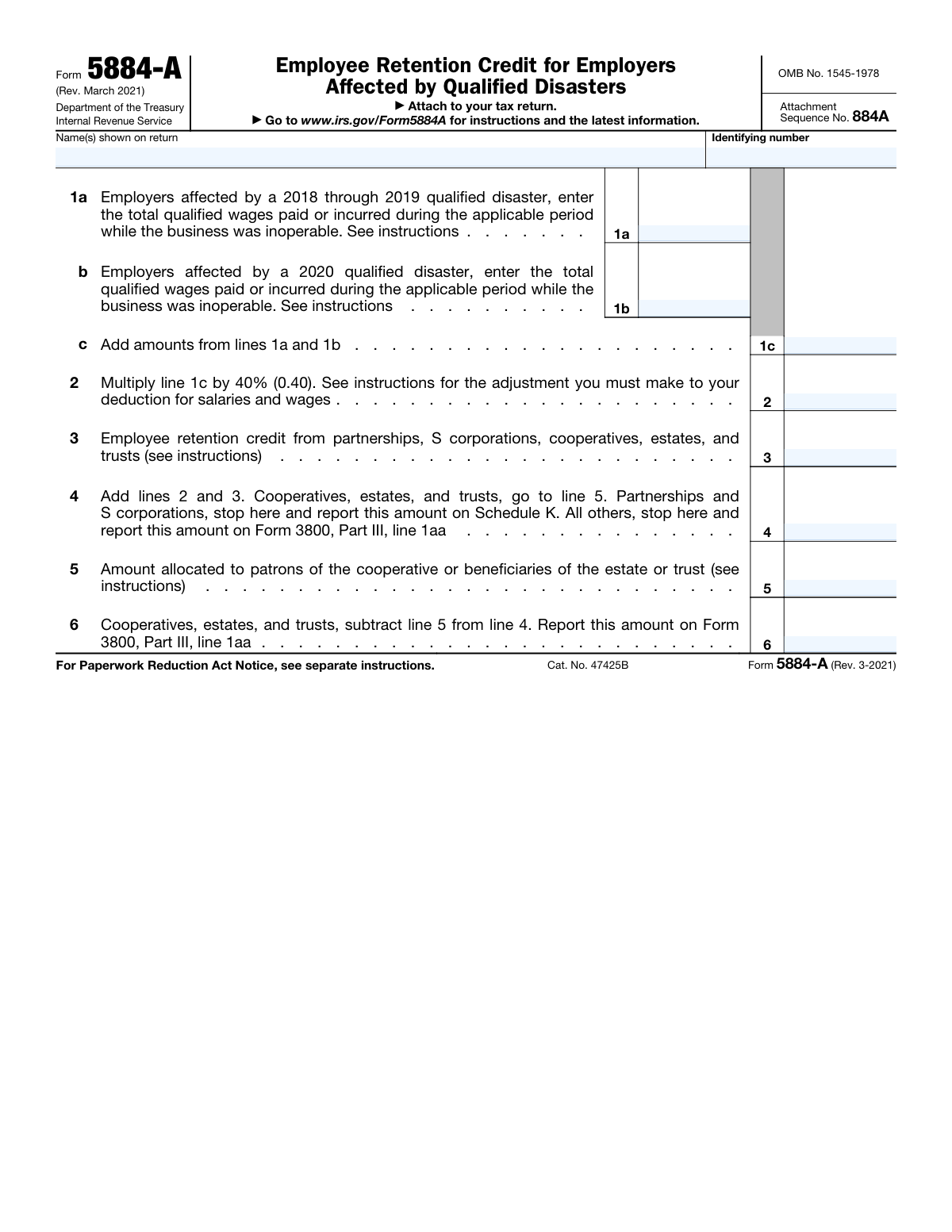
Form 5884-A, Employee Retention Credit, page 1
Simple · 27/100Form Complexity Index

The AI does the filling. You just check it.

No typing into boxes, nothing to install.

Tell the AI about youAnswer a few questions in plain words, or upload a document you already have. That is all the typing there is.
AI fills every field in secondsIt puts each answer in the right box on every page, checkboxes included.
Check it and downloadReview every field, change anything, then download, print or sign the PDF.

What this form asks for

The AI fills all of it, from your answers or your documents.

Form 5884-A, Employee Retention Credit, is used by employers affected by qualified disasters to claim a credit for wages paid during the period of inoperability. This form is essential for businesses to recover some of their lost income due to disasters.
Fillable fields10
Pages1
Sections4
Form Complexity IndexSimple, 27/100

The AI checks your answers before you download

15 checks built for this form, so a wrong date or a missing answer is caught before anyone else sees it.

Form Revision Check for 2018 or Later

Ensures that the form being used is the March 2021 revision of Form 5884-A for tax years beginning in 2018 or later. This check is crucial as it verifies the form's version is current and applicable for the specified tax years, preventing the use of outdated forms that may contain incorrect information or calculations. It also ensures compliance with the IRS's requirements for the Employee Retention Credit for Qualified Disasters.

Form Revision Check for Pre-2018

Confirms that for tax years prior to 2018, the appropriate prior revisions of the form are used. This validation is important to maintain accuracy in filing, as different tax years may have different rules and calculations. It helps to avoid processing delays or errors that could arise from using an incorrect form version for a specific tax year.

Qualified Wages Limit Check

Verifies that the total qualified wages entered on lines 1a and 1b do not exceed $6,000 for each qualified employee. This check is essential to ensure that the credit claimed does not surpass the allowable limit per employee, as stipulated by the IRS. It maintains the integrity of the tax filing by preventing overstatement of the credit.

Deduction Reduction Check

Checks that the deduction for salaries and wages is reduced by the amount on line 2. This validation ensures that the taxpayer does not double-dip by claiming both a full deduction for salaries and wages and the full Employee Retention Credit. It aligns the tax filing with IRS regulations that require the deduction to be reduced by the amount of the credit claimed.

Costs Capitalization Reduction Check

Ensures that any costs capitalized are reduced by the credit amount attributable to these costs. This check is important to prevent the taxpayer from claiming a credit on costs that have been capitalized, which would result in an incorrect calculation of taxable income. It ensures that the credit is accurately reflected in the taxpayer's financial statements and tax returns.

Confirms the total employee retention credits from Schedule K-1 or Form 1099-PATR are accurately entered on line 3.

The validation process ensures that the total employee retention credits reported on Schedule K-1 or Form 1099-PATR are correctly transcribed to line 3 of the Employee Retention Credit for Qualified Disasters form. It cross-references the amounts from the supporting documents to confirm accuracy. Any discrepancies are flagged for review to prevent errors in the credit calculation. This check is crucial for maintaining the integrity of the tax return and ensuring compliance with tax laws.

And 9 more checks
  • Verifies that cooperatives allocate any excess credit to patrons and calculate the unused amount of the credit allocated to patrons on line 5.
  • Ensures that estates and trusts allocate the credit between the estate or trust and the beneficiaries on line 5.
  • Includes any Form 5884-A credit from passive activities disallowed for prior years and carried forward to this year on line 5.
  • Confirms that all members of a controlled group of corporations or businesses under common control are treated as a single employer.
  • Proportionate Share Verification
  • Paperwork Reduction Act Compliance
  • Record Retention Requirement
  • Confidentiality of Information
  • Form Simplification Suggestions

Let AI fill out your Form 5884-A

No typing. Every field filled in seconds, checked, ready to sign.

7 days free, then $19.99/month · Cancel anytime

How to Fill Out Form 5884-A Online for Free in 2026

What the AI walks you through.

  1. Visit instafill.ai site and select Form 5884-A.
  2. Enter name(s) shown on return.
  3. Fill in identifying number and qualified wages.
  4. Calculate total qualified wages and credits.
  5. Sign and date the form electronically.
  6. Check for accuracy and submit form.

Common Mistakes in Completing Form 5884-A

The ones the AI is built to catch.

Excessive entry of qualified wages
When filling out the Employee Retention Credit for Qualified Disasters form, it is essential to enter the correct amount of qualified wages for each eligible employee on lines 1a and 1b. The total amount should not exceed $6,000 per employee per quarter. Entering more significant amounts may result in an overstatement of the credit, leading to potential penalties and incorrect tax reporting. To avoid this mistake, double-check the wages paid to each employee and ensure they do not exceed the allowable limit.
Failure to reduce deductions for salaries and wages
Another common mistake is neglecting to reduce deductions for salaries and wages by the amount entered on line 2. This reduction is necessary to avoid double-counting the wages when calculating the total income. To prevent this error, make sure to subtract the amount entered on line 2 from the total wages reported on the income statement or tax return.
Neglecting to allocate excess credits
Cooperatives and estates or trusts may be eligible for excess credits, which need to be allocated to patrons or beneficiaries, respectively. Failing to make these allocations on line 5 may result in incorrect reporting and potential penalties. To avoid this mistake, carefully review the instructions for line 5 and ensure that all required allocations are made accurately.
Failure to attach required statements
Attaching a statement showing the allocation of the credit for controlled groups or businesses under common control is mandatory. Failing to do so may result in the rejection of the form or incorrect processing of the credit. To prevent this mistake, ensure that all required statements are attached to the form before submitting it to the appropriate tax authority.
Neglecting to retain records
Lastly, it is crucial to retain all required records related to the form, including wage records, tax records, and any supporting documentation. Failing to do so may result in difficulties during audits or future tax filings. To avoid this mistake, establish a record-keeping system and ensure that all necessary documents are stored securely and easily accessible.
Using an outdated version of Form 5884-A for the wrong tax year
Taxpayers may inadvertently use an older version of Form 5884-A to claim the Employee Retention Credit for Qualified Disasters, which could result in incorrect calculations or denial of the credit. To avoid this mistake, ensure that the latest version of Form 5884-A is used and that it corresponds to the appropriate tax year. The IRS website provides the most up-to-date forms and instructions. Additionally, taxpayers should double-check the form instructions and deadlines to ensure timely filing.
Not reporting the credit directly on Form 3800 for other taxpayers
Taxpayers who receive the Employee Retention Credit from a partnership, S corporation, cooperative, estate, or trust, may overlook reporting the credit directly on their Form 3800 for other taxpayers. Failure to report the credit could result in underreported income or missed opportunities for tax savings. To prevent this mistake, taxpayers should carefully review the instructions for Form 3800 and ensure that they report all relevant credits, including those received from pass-through entities or other sources. Additionally, maintaining accurate records of all income and credits is essential for proper reporting and potential future audits.

Frequently Asked Questions About Form 5884-A


Is it really free for 7 days?
Yes. You pay $0 today. Cancel before Nov 1 and you are never charged. Keep it, and it is $19.99 a month for 5 fills of your Form 5884-A.
Can I fill other forms too?
This plan is for your Form 5884-A: your own AI agent fills it as often as 5 times a month. To fill other forms and upload your own, choose a Professional plan from your account.
How do I cancel?
From your account, in two clicks, any time. No email, no call.
How does the AI fill out Form 5884-A?
You answer a few questions in plain words, or upload a document you already have. The AI reads what you give it and puts each answer into the right field of Form 5884-A, on every page, in seconds. It checks the answers against the form's own rules, and you review and change anything before you download, print or sign.
What happens to my information?
It is encrypted in transit and at rest, and it is never used to train AI.
How complex is Form 5884-A to fill out?
Form 5884-A has a Form Complexity Index of 27 out of 100, in the simple tier: 10 fillable fields across 1 page. Instafill.ai's AI fills it in under a minute, with every field there for you to review before you download.
What is Form 5884-A and who is it for?
Form 5884-A, Employer's Application for Disaster Relief Provisions, is a form used by eligible employers to apply for various disaster relief provisions, including the Employee Retention Credit (ERC) for Qualified Disasters. Employers who have experienced a qualified disaster and have had their operations suspended or experienced a significant decline in gross receipts may be eligible for these provisions.
When is Form 5884-A due and where should it be filed?
Form 5884-A should be filed along with the employer's quarterly employment tax return, Form 941, for the quarter in which the qualified disaster occurred. If the employer is required to file on a monthly basis, the form should be filed with Form 941-X, Adjusted Employer's Quarterly Federal Tax Return or Adjusted Employer's Annual Federal Tax Return (Form 940), as applicable. The form can be filed electronically or by mail to the address listed on the form instructions.
What is the Employee Retention Credit (ERC) and how is it calculated?
The Employee Retention Credit (ERC) is a refundable tax credit designed to encourage employers to keep employees on their payroll during periods of significant disruption or closure due to a qualified disaster. The credit is equal to 70% of qualified wages paid to eligible employees, up to $10,000 per employee per quarter. This translates to a maximum credit of $7,000 per employee per quarter. Eligible wages include those paid for hours not worked due to the disaster, as well as those paid for hours worked during the disaster period. The credit is calculated on a per-employee basis, and the total credit amount is determined by multiplying the percentage of credit (70%) by the total qualified wages paid to each eligible employee.
Who are the employers eligible for the Employee Retention Credit for Qualified Disasters?
Employers who have experienced a qualified disaster and have had their operations fully or partially suspended, or have experienced a significant decline in gross receipts, may be eligible for the Employee Retention Credit for Qualified Disasters. Eligibility is determined on a case-by-case basis, and employers should refer to the instructions for Form 5884-A and the IRS website for the most current information on eligibility requirements.
What are qualified wages and when are they paid or incurred?
Qualified wages are wages paid to eligible employees during the period that the employer's operations were fully or partially suspended due to a qualified disaster, or during a period in which the employer experienced a significant decline in gross receipts. Wages paid for hours not worked due to the disaster, as well as wages paid for hours worked during the disaster period, may be considered qualified wages. The wages must be paid or incurred during the calendar quarter in which the employer files its application for disaster relief provisions, or in the preceding or following quarter. Employers should refer to the instructions for Form 5884-A and the IRS website for the most current information on determining qualified wages.
How is the total qualified wages calculated for 2018 through 2019 disasters?
The total qualified wages for 2018 through 2019 disasters are calculated by adding line 1 (total qualified wages paid to employees) of Form 941, Employer's Quarterly Federal Tax Return, for the quarters in which the disaster occurred. You may also include qualified wages paid for sick and family leave if the leave was taken due to the disaster. The maximum amount of qualified wages for each employee for any calendar quarter is $20,000, and the maximum amount of qualified health plan expenses is $10,000.
How is the total qualified wages calculated for 2020 disasters?
The total qualified wages for 2020 disasters are calculated by adding line 5 (total qualified wages, including allocable qualified health plan expenses, for all employees) of Form 941, Employer's Quarterly Federal Tax Return, for the quarters in which the disaster occurred. The maximum amount of qualified wages for each employee for any calendar quarter is $10,000, and the maximum amount of qualified health plan expenses is $10,000.
What is the adjustment for the deduction for salaries and wages?
The adjustment for the deduction for salaries and wages is made by subtracting the total qualified wages from the total wages paid to employees in the affected quarters. This adjustment is reported on Form 941, line 11, and is carried forward to Form 1040, Schedule 1, line 11. This adjustment is also used to determine the Employer's Share of Social Security Tax on wages paid to employees in the affected quarters.
How is the amount from lines 2 and 3 added?
The amount from lines 2 and 3 (total qualified wages and total qualified health plan expenses) are added together to determine the total amount of qualified wages and qualified health plan expenses for the affected quarters. This total amount is reported on line 4 of the form.
What should cooperatives, estates, and trusts do with the amount on line 4?
Cooperatives, estates, and trusts should report the total amount on line 4 (total qualified wages and qualified health plan expenses) on their respective income tax returns. Cooperatives should report this amount on Form 1120, U.S. Corporation Income Tax Return, line 11. Estates and trusts should report this amount on Form 1041, U.S. Income Tax Return for Estates and Trusts, line 11.
What should partnerships and S corporations do with the amount on line 4?
Partnerships and S corporations should report the total qualified disaster relief wages (QWRW) paid to their employees on line 4a of Form 941, Employer's Quarterly Federal Tax Return. They will then subtract this amount from their total wages, tips, and other compensation paid to their employees during the quarter, and report the difference on line 1a of Form 941. The partnership or S corporation will also report the total QWRW paid to each employee on Form W-2, Box 14, with the code 'Q'.
What should all other taxpayers do with the amount on line 4?
All other taxpayers, including self-employed individuals, should report the total qualified disaster relief wages (QWRW) paid to their employees on line 4a of Form 941. They will then subtract this amount from their total wages, tips, and other compensation paid to their employees during the quarter, and report the difference on line 1a of Form 941. The employer will also report the total QWRW paid to each employee on Form W-2, Box 14, with the code 'Q'.
What is the purpose of line 5 for cooperatives, estates, and trusts?
Line 5 is used by cooperatives, estates, and trusts to report the total qualified disaster relief wages (QWRW) paid to their patrons or beneficiaries. This amount is reported on Form 1042-S, Form 1042, or Form 1120-S, as applicable.
How is the amount allocated to patrons or beneficiaries calculated?
The amount allocated to patrons or beneficiaries is calculated by subtracting the total wages, tips, and other compensation paid to all employees (other than the patron or beneficiary) from the total wages, tips, and other compensation paid to all employees during the quarter. The result is the amount of qualified disaster relief wages paid to the patron or beneficiary.
What should cooperatives, estates, and trusts report on Form 3800, Part III, line 1aa?
Cooperatives, estates, and trusts should report the total qualified disaster relief wages (QWRW) paid to their patrons or beneficiaries on Form 3800, Part III, line 1aa. This amount is reported in Box 11 of Form 1042-S, Form 1042, or Form 1120-S, as applicable.
What is the purpose of the Paperwork Reduction Act Notice in Form 5884-A?
The Paperwork Reduction Act (PRA) notice is included in Form 5884-A to comply with the requirements of the Paperwork Reduction Act of 1995. The PRA aims to minimize the reporting burden on taxpayers by reducing the need to provide the same information to multiple government agencies. The notice includes the OMB control number and expiration date of the form, which helps ensure that the information collected is necessary and efficient.
Where can I find instructions and the latest information about Form 5884-A, Employee Retention Credit for Qualified Disasters?
The instructions for completing Form 5884-A, along with other related forms and publications, can be found on the IRS website (www.irs.gov). You can search for Form 5884-A using the Form Finder tool or by visiting the Disaster-Related Tax Topics page. The IRS website is updated regularly to reflect any changes to the form or its instructions. It is recommended that you check the website frequently for the latest information to ensure that you are using the most current version of the form.
Encrypted in transit and at restNever used to train AIDelete your forms any time

Get your Form 5884-A filled out by AI

$0 today. Cancel before Nov 1 and you pay nothing.

Other forms like this one

employee forms: Form 1099-NEC, Nonemployee Compensation, Form W-4, Employee's Withholding Certificate, Form CA-1, Federal Employee's Notice of Traumatic Injury, Form 1099-NEC, Nonemployee Compensation, Form 1099-NEC, Nonemployee Compensation, Form 1099-NEC, Nonemployee Compensation, HR-Pol-Rec&Res-04 Employment Application Form (Recruitment of Permanent Employees), Commonwealth of Massachusetts Department of Industrial Accidents Form 110, Employee’s Claim, Commonwealth of Massachusetts Department of Industrial Accidents (DIA) Form 110, Employee’s Claim, Form 1099-NEC, Nonemployee Compensation, WTIA 401(k) Plan Rollover Contribution Employee Certification, BNSF Investment and Retirement Plan [401(k) Plan for Salaried Employees], Form 5500, Annual Return/Report of Employee Benefit Plan, Form 5500, Annual Return/Report of Employee Benefit Plan, The Principal Pension Plan Summary Plan Description: Cash Balance Formula for Employees and Individual Field, The Principal Pension Plan Summary Plan Description: Traditional and Cash Balance Formulas for Employees and Individual Field, Sensus USA Inc. 401(k) Plan Summary Plan Description (For Non-Union Employees), Paychex Retirement Services Employee Rollover Form, Employee’s Frequently Asked Questions: Leave of Absence, Employee Direct Deposit Banking Authorization Form (RUN Powered by ADP®)

credit forms: Form 5405, Repayment of First-Time Homebuyer Credit, Form 8862, Information To Claim Certain Credits, Form 8880, Credit for Qualified Retirement Savings Contributions, Form 5695, Residential Energy Credits, Form 3468, Investment Credit, Form 8801, Credit for Prior Year Minimum Tax, Form FTB 3514, California Earned Income Tax Credit, Form 8910, Alternative Motor Vehicle Credit, Form 8885, Health Coverage Tax Credit, Form 5884, Work Opportunity Credit, Form 5884-C, Work Opportunity Credit, Form 8994, Employer Credit for Paid Family and Medical Leave, Form 8962, Premium Tax Credit (PTC), Form 8812, Credits for Qualifying Children, Form 104, List of Creditors 20 Largest Unsecured Claims, WestRock Credit Application and Uniform Sales & Use Tax Exemption/Resale Certificate — Multijurisdiction, Personal Financial Statement (REV 06/2018) – Northwest Federal Credit Union, Form G-1450, Authorization for Credit Card Transactions, 2023 Schedule IL-E/EIC, Illinois Exemption and Earned Income Tax Credit (Illinois Department of Revenue), Form 5695 (2025), Residential Energy Credits

7 days free, then $19.99/month · Cancel anytime