
Instafill.ai
7 days free
AI form filling · 57 fields · 4 pages · done in seconds

Yes! You can use AI to fill out Form 8801, Credit for Prior Year Minimum Tax

Don't type 57 fields by hand. Tell our AI about yourself, or upload a document you already have, and it fills every field in seconds. You check it, then download, print or sign.
7 days free, then $19.99/month · Cancel anytime
AI fills it, no typingEncrypted, never used to train AICancel in two clicks
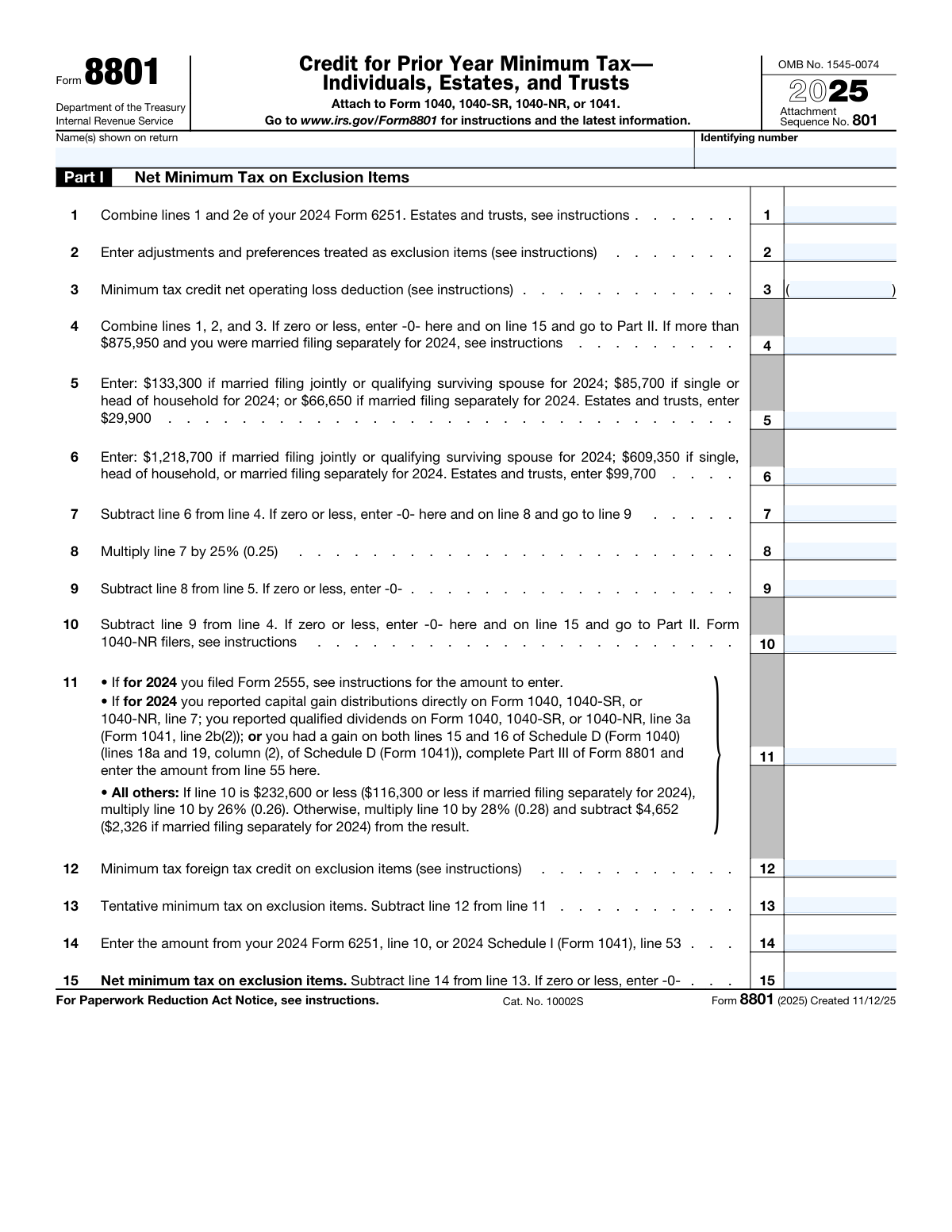
Form 8801, Credit for Prior Year Minimum Tax, page 1
Moderate · 49/100Form Complexity Index

The AI does the filling. You just check it.

No typing into boxes, nothing to install.

Tell the AI about youAnswer a few questions in plain words, or upload a document you already have. That is all the typing there is.
AI fills every field in secondsIt puts each answer in the right box on every page, checkboxes included.
Check it and downloadReview every field, change anything, then download, print or sign the PDF.

What this form asks for

The AI fills all of it, from your answers or your documents.

Form 8801, Credit for Prior Year Minimum Tax, is used by individuals, estates, and trusts to claim a credit for minimum tax paid in prior years. This form is important as it allows taxpayers to recover some of the taxes they have previously paid, potentially reducing their current tax liability.
Fillable fields57
Pages4
Sections11
Form Complexity IndexModerate, 49/100

The AI checks your answers before you download

15 checks built for this form, so a wrong date or a missing answer is caught before anyone else sees it.

Form 8801 Completion Criteria

Ensures that Form 8801 is only filled out when appropriate, verifying that the taxpayer had an Alternative Minimum Tax (AMT) liability in a prior year due to adjustments or preferences that are not exclusion items. It also checks for the presence of a credit carryforward to the current tax year, 2023, or an unallowed qualified electric vehicle credit from the tax year 2022. This validation helps prevent incorrect claims and ensures compliance with tax regulations.

Estates and Trusts Worksheet Usage

Confirms that only estates and trusts are utilizing the worksheet version of Form 1041, Schedule I, to calculate the credit for prior year minimum tax. It ensures that these entities correctly determine the amount to enter on line 4, while bypassing lines 1 through 3. This validation is crucial for maintaining the integrity of the form and ensuring that the correct procedures are followed by estates and trusts.

Individual Adjustments and Preferences

Verifies that individuals are properly considering adjustments and preferences that are treated as exclusion items when completing line 2 of the form. This check is important to ensure that taxpayers are accurately accounting for these items, which can affect the calculation of the credit and the taxpayer's eligibility for it.

MTCNOLD Calculation

Calculates the minimum tax credit net operating loss deduction (MTCNOLD) for line 3 as required. This validation ensures that the MTCNOLD is computed correctly, which is essential for determining the correct amount of credit available to the taxpayer. It helps in maintaining the accuracy of the form and the taxpayer's compliance with tax laws.

Qualified Electric Vehicle Credit Entry

Checks that any qualified electric vehicle credit not allowed for the tax year 2022 is correctly entered on line 20. This validation ensures that taxpayers are able to carry forward any unallowed credits to the current year, which can potentially reduce their tax liability. It is an important step in ensuring that all eligible credits are accounted for.

Validates that line 21 is more than zero before filing the form

The system ensures that the value entered on line 21 of the Credit for Prior Year Minimum Tax form is greater than zero. This validation is crucial because a value of zero or less indicates that the taxpayer is not eligible to file this form. If such a case is detected, the system will advise against completing or filing the form to prevent incorrect submissions. This check helps maintain the integrity of the tax filing process.

And 9 more checks
  • Confirms that line 22 references the taxpayer's 2023 income tax return accurately
  • Ensures that Part III tax computation using maximum capital gains rates is completed
  • Verifies that specific modifications are made for taxpayers who filed Form 2555
  • Checks for the correct application of married filing separately status
  • Completeness of Form 8801
  • Recordkeeping and Documentation
  • Adherence to IRS Guidelines
  • Acknowledgment of Time Estimates
  • Solicitation of Feedback for Simplification

Let AI fill out your Form 8801

No typing. Every field filled in seconds, checked, ready to sign.

7 days free, then $19.99/month · Cancel anytime

How to Fill Out Form 8801 Online for Free in 2026

What the AI walks you through.

  1. Visit instafill.ai site and select Form 8801.
  2. Enter your name and identifying number.
  3. Fill in the net minimum tax details.
  4. Complete the minimum tax credit section.
  5. Sign and date the form electronically.
  6. Check for accuracy and submit the form.

Common Mistakes in Completing Form 8801

The ones the AI is built to catch.

Failing to determine eligibility before filing
One of the most significant mistakes when filing Form 8801 for Credit for Prior Year Minimum Tax is filing the form without first determining eligibility. This error occurs when taxpayers file the form even if line 21 on their tax return is less than zero. To avoid this mistake, taxpayers should carefully review the instructions and eligibility requirements before filing Form 8801. It is essential to note that this form should only be filed when the taxpayer has a credit to carryforward from a prior year.
Incorrectly calculating minimum tax credit net operating loss deduction (MTCNOLD)
Another common mistake when filing Form 8801 is incorrectly calculating the minimum tax credit net operating loss deduction (MTCNOLD) for line 3. This error can occur when taxpayers fail to properly apply the rules for calculating this deduction. To avoid this mistake, taxpayers should carefully review the instructions and ensure they follow the correct method for calculating MTCNOLD. It is essential to note that this calculation can be complex, and taxpayers may need to consult the instructions or seek professional advice to ensure accuracy.
Neglecting to enter qualified electric vehicle credit not allowed for 2022 on line 20 for Part II.
Another mistake when filing Form 8801 is neglecting to enter the qualified electric vehicle credit not allowed for 2022 on line 20 for Part II. This error can occur when taxpayers fail to properly report this credit, which can result in understated taxes or missed opportunities for tax savings. To avoid this mistake, taxpayers should carefully review the instructions and ensure they enter all applicable credits, including those not allowed for the current year. It is essential to note that failure to report this credit can result in penalties or delays in processing the return.
Miscalculating tax computation using maximum capital gains rates in Part III.
Another common mistake when filing Form 8801 is miscalculating the tax computation using maximum capital gains rates in Part III. This error can occur when taxpayers fail to properly apply the correct capital gains rates or use outdated rates. To avoid this mistake, taxpayers should carefully review the instructions and ensure they use the correct capital gains rates for the applicable tax year. It is essential to note that failure to use the correct rates can result in understated taxes or missed opportunities for tax savings.
Ignoring instructions for married filing separately status, disposition of U.S. real property interests, foreign earned income, and minimum tax foreign tax credit on exclusion items (MTFTCE)
Another mistake when filing Form 8801 is ignoring the instructions for married filing separately status, disposition of U.S. real property interests, foreign earned income, and minimum tax foreign tax credit on exclusion items (MTFTCE). This error can occur when taxpayers fail to properly report these items, which can result in understated taxes or missed opportunities for tax savings. To avoid this mistake, taxpayers should carefully review the instructions and ensure they report all applicable items, including those related to married filing separately status, U.S. real property interests, foreign earned income, and minimum tax foreign tax credit on exclusion items. It is essential to note that failure to report these items can result in penalties or delays in processing the return.
Neglecting to Complete Part III Worksheets or Schedules
The Credit for Prior Year Minimum Tax form, also known as Form 8833, includes Part III worksheets or schedules that are essential for accurate tax computation. Overlooking these components can lead to incorrect calculations and potential discrepancies in your tax return. To avoid this mistake, carefully review the instructions and ensure all required worksheets or schedules are completed and attached to the form before submission.
Incorrect or Incomplete Information on Adjustments and Preferences Lines
Lines 2 and related adjustments and preferences on the Credit for Prior Year Minimum Tax form require precise and complete information. Entering incorrect or incomplete data can result in inaccurate tax calculations and potential issues with the IRS. To prevent this mistake, double-check all inputted data, ensure it aligns with the latest IRS guidelines, and consult the instructions or a tax professional if needed.
Neglecting to Maintain Proper Documentation
Proper documentation is crucial when filing tax returns, including the Credit for Prior Year Minimum Tax form. Failing to keep the form and all related documentation can make it difficult to address any potential issues or audits in the future. To avoid this mistake, maintain a well-organized record of all tax-related documents and keep them in a secure location for the required retention period.
Attaching Unnecessary Worksheets to the Tax Return
While some worksheets or schedules may be required for the Credit for Prior Year Minimum Tax form, attaching unnecessary ones can create confusion and potentially delay the processing of your tax return. To avoid this mistake, carefully review the instructions and only attach the worksheets or schedules specifically requested.
Ignoring the Latest IRS Guidelines and Forms
Tax laws and regulations are subject to change, and it's essential to stay informed of the latest IRS guidelines and forms when preparing your tax return. Failing to do so can result in incorrect calculations or potential issues with the IRS. To prevent this mistake, regularly check the IRS website for updates and consult a tax professional if needed.
Misunderstanding instructions for estates and trusts
Estates and trusts may encounter confusion when filling out the Credit for Prior Year Minimum Tax form. Specifically, they may not be aware that they are required to use a worksheet to calculate the amount to enter on line 4. To avoid this mistake, estates and trusts should carefully review the instructions provided in the form and the accompanying IRS publications. They should also consult with a tax professional if they have any doubts or uncertainties about the process.
Failure to use the worksheet version of Schedule I
Another common mistake when filling out the Credit for Prior Year Minimum Tax form is the failure to use the worksheet version of Schedule I to determine the amount to enter on line 4. This mistake can lead to incorrect calculations and potential penalties. To avoid this error, taxpayers should make sure they have the correct version of the form and schedule, and follow the instructions carefully. They should also double-check their calculations to ensure accuracy.

Frequently Asked Questions About Form 8801


Is it really free for 7 days?
Yes. You pay $0 today. Cancel before Nov 2 and you are never charged. Keep it, and it is $19.99 a month for 5 fills of your Form 8801.
Can I fill other forms too?
This plan is for your Form 8801: your own AI agent fills it as often as 5 times a month. To fill other forms and upload your own, choose a Professional plan from your account.
How do I cancel?
From your account, in two clicks, any time. No email, no call.
How does the AI fill out Form 8801?
You answer a few questions in plain words, or upload a document you already have. The AI reads what you give it and puts each answer into the right field of Form 8801, on every page, in seconds. It checks the answers against the form's own rules, and you review and change anything before you download, print or sign.
What happens to my information?
It is encrypted in transit and at rest, and it is never used to train AI.
How complex is Form 8801 to fill out?
Form 8801 has a Form Complexity Index of 49 out of 100, in the moderate tier: 57 fillable fields across 4 pages. Instafill.ai's AI fills it in under a minute, with every field there for you to review before you download.
What is the purpose of Form 8801, Credit for Prior Year Minimum Tax?
Form 8801 is used to claim a credit for excess minimum tax paid in prior years. The excess minimum tax occurs when an individual or corporation has a tax liability for an earlier year that exceeded the minimum tax required for that year. The credit can be claimed in the current year to reduce the tax liability.
Who is required to file Form 8801?
Individuals, trusts, estates, and corporations that have paid an excess minimum tax in a prior year and wish to claim the credit in the current year are required to file Form 8801. It is important to note that there are certain exceptions and limitations, so taxpayers should consult the instructions for Form 8801 and the Internal Revenue Code for more information.
What is the difference between Part I and Part II of Form 8801?
Part I of Form 8801 is used to claim the general business credit for excess minimum tax paid by corporations. Part II is used to claim the credit for individuals, trusts, and estates for excess minimum tax paid on certain types of income, such as passive income and income from foreign sources. The calculation of the credit and the supporting documentation required may differ between Part I and Part II.
What is the net minimum tax on exclusion items?
Exclusion items are income that is specifically excluded from the calculation of the minimum tax under the Alternative Minimum Tax (AMT) rules. Examples of exclusion items include certain deductions for state and local taxes, personal exemptions, and certain types of interest. The net minimum tax on exclusion items is the minimum tax that would have been paid if those items were not excluded. The credit for prior year minimum tax can be claimed for the excess of the net minimum tax on exclusion items over the minimum tax paid in the prior year.
How is the minimum tax credit calculated?
The minimum tax credit is calculated as the excess of the net minimum tax on exclusion items over the minimum tax paid in the prior year. The net minimum tax on exclusion items is determined by adding back certain deductions and subtracting certain exclusions that were taken into account in calculating the regular tax liability. The minimum tax paid in the prior year is determined by calculating the minimum tax for that year using the alternative minimum tax rules. The credit is then claimed in the current year to reduce the tax liability.
What is the minimum tax foreign tax credit on exclusion items?
The minimum tax foreign tax credit on exclusion items refers to the credit for taxes paid to a foreign country on income that is excluded from gross income under the Internal Revenue Code. This credit can help reduce the taxpayer's U.S. tax liability on that income. The amount of the credit is generally limited to the lesser of the foreign taxes paid or the U.S. tax that would have been imposed on the excluded income.
How is the tentative minimum tax on exclusion items calculated?
The tentative minimum tax on exclusion items is calculated by determining the taxpayer's taxable income, subtracting certain adjustments, and then applying the applicable minimum tax rate. The minimum tax rate is generally 15% for corporations and 5% for individuals. The taxpayer may then claim a foreign tax credit for taxes paid on the excluded income, which can reduce the tentative minimum tax. The final minimum tax is determined on Form 8801 and is compared to the regular tax liability to determine which tax is owed.
What is the minimum tax credit carryforward to 2024?
The minimum tax credit carryforward refers to the amount of unused minimum tax credits that can be carried forward to future years. The credit can be carried forward for up to 10 years. The credit can be used to offset U.S. tax liability in those years, reducing the taxpayer's overall tax burden. It is important to note that the minimum tax credit carryforward is subject to certain limitations and restrictions, and the taxpayer should consult the instructions for Form 8801 for more information.
What is the tax computation using maximum capital gains rates?
The tax computation using maximum capital gains rates refers to the calculation of the taxpayer's tax liability on capital gains using the highest tax rates that apply. The maximum capital gains rates are 20% for individuals in the highest tax bracket and 23.8% for net investment income. The taxpayer must determine their taxable income, calculate their capital gains, and apply the maximum capital gains tax rate to determine their tax liability. This calculation is important for understanding the potential tax impact of realizing capital gains and can help the taxpayer plan their tax strategy accordingly.
What is the purpose of Part III of Form 8801?
Part III of Form 8801 is used to report the taxpayer's foreign tax credit for the current year and any carryforwards from previous years. The taxpayer must list each foreign country and the amount of foreign taxes paid for the current year and each previous year. The taxpayer must also calculate the foreign tax credit for each year and report it on the form. Part III of Form 8801 is an important part of the tax filing process for taxpayers with foreign income and foreign taxes paid, as it helps ensure that the taxpayer receives proper credit for the taxes paid to foreign countries.
What is the amount entered in line 10 of Form 8801?
Line 10 of Form 8801 represents the total amount of minimum tax paid in the prior year. This amount is used to calculate the minimum tax credit that can be claimed on Form 8801.
How is the minimum tax credit calculated on line 25?
The minimum tax credit is calculated by subtracting the total tax paid in the current year (line 11) from the total minimum tax paid in the prior year (line 10). The result is then entered on line 25.
What is the credit carryforward to 2024 on line 26?
Line 26 represents the amount of the minimum tax credit that can be carried forward to the next tax year (2024). If the minimum tax credit calculated on line 25 exceeds the minimum tax paid in the current year, the excess amount is carried forward to the next year.
What is the purpose of completing Part III of Form 8801?
Part III of Form 8801 is used to calculate and report the minimum tax credit for alternative minimum tax (AMT) purposes. If you are required to file an AMT return, you must complete Part III of Form 8801 to calculate and report the minimum tax credit for AMT purposes.
What is the amount entered in line 27 of Form 8801?
Line 27 represents the total minimum tax paid in the prior year for AMT purposes. This amount is used to calculate the minimum tax credit for AMT purposes in Part III of Form 8801.
How is the minimum tax credit calculated on line 25 when filing Form 2555?
The minimum tax credit on line 25 of Form 2555 is calculated as the lesser of: 1) the tax paid or accrued on foreign earned income, or 2) the amount of foreign tax credit that can be claimed on Form 1040. The calculation of the minimum tax credit is based on the taxpayer's tax liability on their foreign earned income. For more detailed instructions, refer to Form 2555 and its instructions.
What is the purpose of the Foreign Earned Income Tax Worksheet in relation to Form 8801?
The Foreign Earned Income Tax Worksheet (Form 2555 or Form 2555-EZ) is used to determine the amount of foreign earned income and foreign housing expenses that are eligible for the foreign tax credit. The results from the Foreign Earned Income Tax Worksheet are then used to complete Form 8801, which is used to claim the foreign tax credit on Form 1040.
What is the amount entered in line 32 of Form 8801?
Line 32 of Form 8801 is for entering the total amount of foreign taxes paid or accrued during the tax year. This amount is used to calculate the foreign tax credit that can be claimed on Form 1040.
How is the minimum tax credit calculated on line 25 when there is a gain on both lines 15 and 16 of Schedule D?
When there is a gain on both lines 15 and 16 of Schedule D, the minimum tax credit on line 25 of Form 2555 is calculated separately for each type of income (line 15 and line 16). The credit is based on the tax paid or accrued on each type of income, and the total of the two credits is entered on line 25. For more detailed instructions, refer to Form 2555 and its instructions.
What is the purpose of line 39 in Form 8801?
Line 39 of Form 8801 is for entering the total amount of foreign taxes paid or accrued on passive income. Passive income is income that is derived from sources outside the United States, such as rents, royalties, and dividends. The foreign taxes paid or accrued on passive income are added to the total foreign taxes paid or accrued on lines 31 and 32, and the total is used to calculate the foreign tax credit that can be claimed on Form 1040.
Encrypted in transit and at restNever used to train AIDelete your forms any time

Get your Form 8801 filled out by AI

$0 today. Cancel before Nov 2 and you pay nothing.

7 days free, then $19.99/month · Cancel anytime