
Instafill.ai
7 days free
AI form filling · 281 fields · 10 pages · done in seconds

Yes! You can use AI to fill out Form 3468, Investment Credit

Don't type 281 fields by hand. Tell our AI about yourself, or upload a document you already have, and it fills every field in seconds. You check it, then download, print or sign.
7 days free, then $19.99/month · Cancel anytime
AI fills it, no typingEncrypted, never used to train AICancel in two clicks
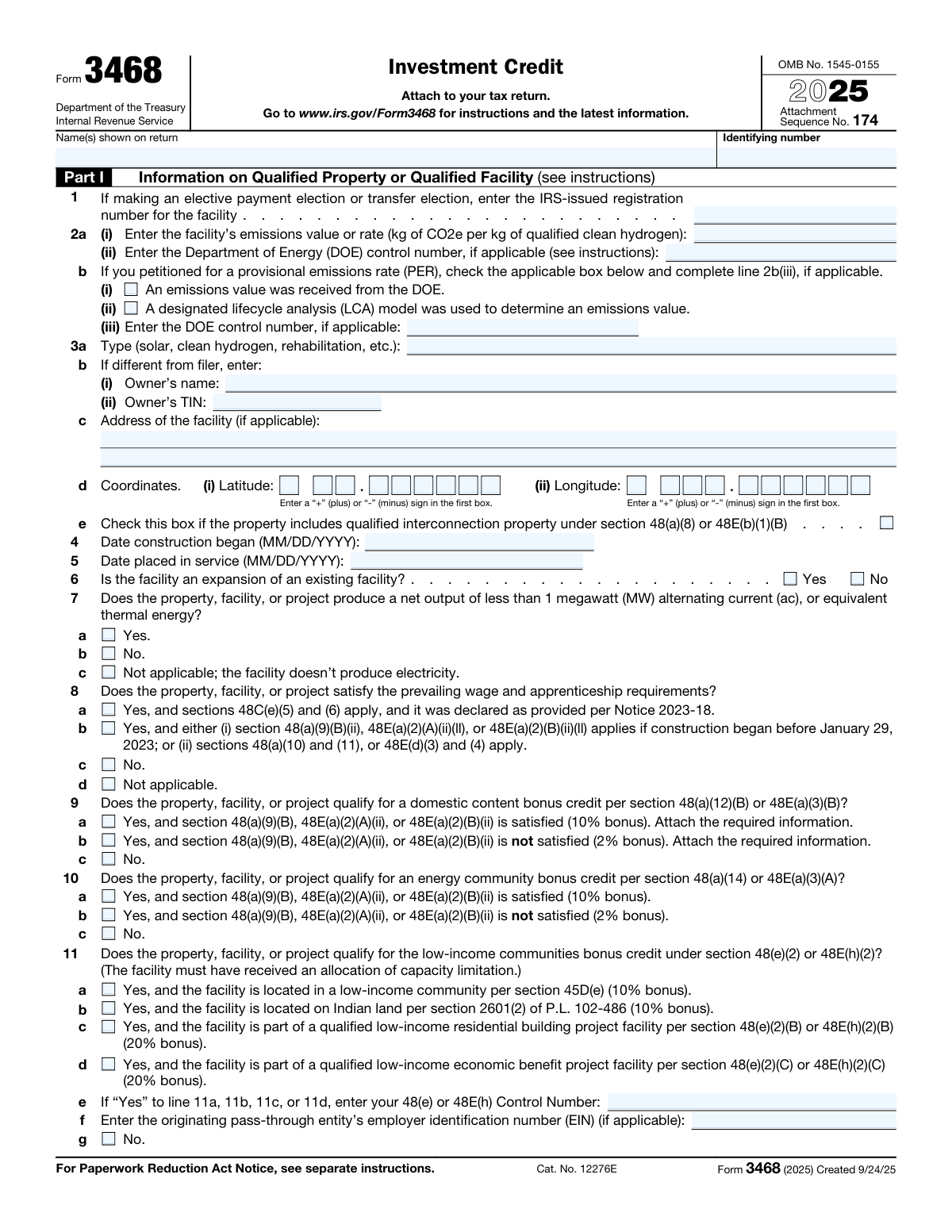
Form 3468, Investment Credit, page 1
Complex · 71/100Form Complexity Index

The AI does the filling. You just check it.

No typing into boxes, nothing to install.

Tell the AI about youAnswer a few questions in plain words, or upload a document you already have. That is all the typing there is.
AI fills every field in secondsIt puts each answer in the right box on every page, checkboxes included.
Check it and downloadReview every field, change anything, then download, print or sign the PDF.

What this form asks for

The AI fills all of it, from your answers or your documents.

Form 3468, Investment Credit, is used to claim tax credits for investments in energy properties such as solar, geothermal, and wind facilities. Filling out this form is crucial for taxpayers to benefit from available investment credits, which can significantly reduce their tax liability.
Fillable fields281
Pages10
Sections48
Questions that depend on earlier answers12
Form Complexity IndexComplex, 71/100

The AI checks your answers before you download

15 checks built for this form, so a wrong date or a missing answer is caught before anyone else sees it.

Ensures that all sections of Form 3468 relevant to the taxpayer's specific investment property type are completed accurately.

The AI ensures that Form 3468 is filled out with precision, taking into account the unique characteristics of the taxpayer's investment property. It meticulously checks that all relevant sections are completed, leaving no required fields blank. The AI cross-references the taxpayer's information with the property type to guarantee that the form reflects the correct details. It also ensures that the information provided aligns with IRS requirements for the specific type of investment property claimed.

Confirms that the basis of the property is correctly calculated and reported for credit computation.

The AI confirms the accuracy of the property's basis calculation, which is essential for determining the investment credit. It verifies that the taxpayer has reported the correct cost or other basis of the property, ensuring that it is in line with IRS rules and regulations. The AI also checks for common errors in basis reporting and performs calculations to validate that the reported basis is consistent with the provided documentation.

Verifies that the date the property was placed in service is provided and falls within the applicable tax year for the credit claim.

The AI verifies the date on which the investment property was placed in service, ensuring that it is clearly stated on the form. It checks that this date is within the tax year for which the credit is being claimed, as this is a critical eligibility criterion for the investment credit. The AI also ensures that the date is consistent with any supporting documentation and that it adheres to the tax year requirements set forth by the IRS.

Checks that the applicable percentages for calculating the credit are correctly applied based on the type of investment property.

The AI checks that the correct percentages are applied when calculating the investment credit. It understands the varying percentages that apply to different types of investment properties and ensures that these are accurately reflected in the credit computation. The AI also reviews the form to confirm that the taxpayer has not deviated from the prescribed percentages and that the final credit amount is calculated based on the correct application of these rates.

Validates that any required certifications or documentation to substantiate the credit claim are attached, especially for certified historic structures.

The AI validates the presence of all necessary certifications and documentation that support the investment credit claim. It pays special attention to certified historic structures, which require specific documentation to qualify for the credit. The AI ensures that these documents are properly attached and meet the IRS criteria for substantiating the credit claim. It also alerts the taxpayer if any required documentation is missing or incomplete, to prevent processing delays or denials of the credit.

Confirms the provision of the National Park Service (NPS) project number and the date of final certification for claims involving certified historic structures.

This validation check ensures that for any claims involving certified historic structures, the National Park Service (NPS) project number is provided and clearly indicated on the form. It also confirms that the date of final certification is present and accurate, as this is a critical requirement for such claims. The check involves cross-referencing the provided information with NPS records to ensure validity and completeness. Any discrepancies or omissions trigger a prompt for correction or additional documentation.

And 9 more checks
  • Ensures that investment credits for patrons in a cooperative are properly allocated according to the instructions.
  • Calculates the credit reduction for properties financed with tax-exempt bonds to ensure compliance with the form's requirements.
  • Verifies that an election statement is attached for facilities elected to be treated as energy property or a clean hydrogen production facility, containing all required information.
  • Checks that the rehabilitation credit under Section 47 is claimed correctly, with adherence to its specific requirements.
  • Confirms that the credit for pre-1936 buildings is not claimed
  • Ensures that the modified credit for certified historic structures is correctly claimed
  • Verifies that all required statements or documentation are attached to the form
  • Confirms that unused investment credits from cooperatives are reported
  • Reviews the Paperwork Reduction Act Notice

Let AI fill out your Form 3468

No typing. Every field filled in seconds, checked, ready to sign.

7 days free, then $19.99/month · Cancel anytime

How to Fill Out Form 3468 Online for Free in 2026

What the AI walks you through.

  1. Visit instafill.ai site and select Form 3468.
  2. Enter your name and identifying number.
  3. Provide facility information and construction dates.
  4. Indicate if the facility meets specific credit requirements.
  5. Sign and date the form electronically.
  6. Check for accuracy and submit the form.

Common Mistakes in Completing Form 3468

The ones the AI is built to catch.

Incomplete information for investment property parts
One of the most common mistakes when filling out the Investment Credit form is failing to provide all necessary information for each part of the form related to the specific type of investment property. This may include omitting details about the property's location, acquisition date, cost basis, or other relevant information. To avoid this mistake, ensure that all required fields are filled out completely and accurately. Double-check that all necessary documentation, such as purchase contracts and appraisals, are attached to the form.
Incorrect calculation of property basis or placement in service date
Another common mistake is incorrect calculation of the basis of the property or the date it was placed in service. The basis of a property is its cost, including any improvements made to the property. Incorrectly calculating the basis can lead to inaccurate credit calculations. Similarly, failing to provide the correct date that the property was placed in service can also result in incorrect credit amounts. To avoid these mistakes, carefully review the instructions for calculating the basis and placement in service date, and consult with a tax professional if needed.
Omission of NPS project number and final certification date for certified historic structures
Failure to provide the National Park Service (NPS) project number and the date of final certification for certified historic structures is another common mistake. The NPS project number and certification date are required for properties that have been certified as historic structures. Failing to provide this information can result in the rejection of the form. To avoid this mistake, ensure that all required documentation, including the NPS project number and certification date, is gathered and included with the form before submission.
Failure to allocate investment credit to patrons in a cooperative
Cooperatives must allocate investment credit to their patrons. Failure to do so can result in penalties and incorrect tax reporting. To avoid this mistake, ensure that the cooperative properly calculates and allocates the investment credit to each patron, and that the allocation is reported on the appropriate tax forms. Consult with a tax professional if needed.
Incorrect calculation of credit reduction for properties financed with tax-exempt bonds
Properties financed with tax-exempt bonds may be subject to credit reduction. Failure to correctly calculate this reduction can result in overstated investment credit amounts. To avoid this mistake, carefully review the instructions for calculating the credit reduction, and consult with a tax professional if needed. Ensure that all required documentation, including bond information, is attached to the form.
Failure to attach election statement for facilities treated as energy property or clean hydrogen production facilities
One of the most critical mistakes in filling out the Investment Credit form is neglecting to attach the election statement for facilities treated as energy property or clean hydrogen production facilities. This statement is essential to claim the investment tax credit for these specific types of assets. To avoid this error, carefully review the instructions provided with the form and ensure all required attachments are included with the submission. Failure to attach the election statement may result in processing delays or even denial of the credit.
Failure to report unused investment credits from cooperatives
Another common mistake on the Investment Credit form is failing to report unused investment credits from cooperatives. These credits can be carried forward to future tax years and provide significant savings. To prevent this error, review previous tax returns and ensure all unused investment credits from cooperatives are reported on the current form. Neglecting to report these credits may result in missed opportunities for tax savings and potential audits or penalties.
Failure to review and ensure accuracy of all information provided on the form
A common mistake when filling out the Investment Credit form is neglecting to review and ensure the accuracy of all information provided. Errors or inconsistencies in the data entered can lead to processing delays, potential audits, or even denial of the credit. To prevent this error, carefully review all information entered on the form before submitting it. Check for consistency in data, such as taxpayer identification numbers, and ensure all required fields are completed.
Failure to retain required records as per the law
Another mistake on the Investment Credit form is failing to retain required records as per the law. Proper record-keeping is essential to support tax credit claims and potential audits. To avoid this error, familiarize yourself with the record-keeping requirements and ensure all necessary documents are kept in a secure and organized manner. Failure to retain records may result in denied credits or penalties.
Incomplete or illegible forms
A common mistake when filling out the Investment Credit form is submitting incomplete or illegible forms. Incomplete forms may lack essential information, leading to processing delays or denial of the credit. Illegible forms can make it difficult for the processing agency to read and understand the data entered. To prevent this error, ensure all required fields are completed and legibly filled out. Use clear and dark ink to write or print all information.
Failure to sign the form
One of the most critical errors made when filling out the Investment Credit form is neglecting to sign it. The form must be signed by the taxpayer or an authorized representative to validate the accuracy and authenticity of the information provided. To avoid this mistake, carefully review the form instructions and ensure that all required signatures are obtained and placed in the designated areas before submitting the form to the relevant tax authority.
Failure to follow instructions for specific sections or parts of the form
Another common mistake made when completing the Investment Credit form is not adhering to the instructions for specific sections or parts of the form. This can result in incorrect or incomplete information being submitted, which may lead to delays or even denial of the tax credit. To avoid this mistake, it is essential to read and understand the instructions carefully before filling out the form. Pay particular attention to any special instructions for specific sections or parts of the form, and make sure you provide all the necessary information in the correct format.

Frequently Asked Questions About Form 3468


Is it really free for 7 days?
Yes. You pay $0 today. Cancel before Nov 1 and you are never charged. Keep it, and it is $19.99 a month for 5 fills of your Form 3468.
Can I fill other forms too?
This plan is for your Form 3468: your own AI agent fills it as often as 5 times a month. To fill other forms and upload your own, choose a Professional plan from your account.
How do I cancel?
From your account, in two clicks, any time. No email, no call.
How does the AI fill out Form 3468?
You answer a few questions in plain words, or upload a document you already have. The AI reads what you give it and puts each answer into the right field of Form 3468, on every page, in seconds. It checks the answers against the form's own rules, and you review and change anything before you download, print or sign.
What happens to my information?
It is encrypted in transit and at rest, and it is never used to train AI.
How complex is Form 3468 to fill out?
Form 3468 has a Form Complexity Index of 71 out of 100, in the complex tier: 281 fillable fields across 10 pages. Instafill.ai's AI fills it in under a minute, with every field there for you to review before you download.
What is the Investment Credit Form 3468 used for?
The Investment Credit Form 3468 is used to claim tax credits for various energy-related investments, such as solar, wind, geothermal, and biomass projects.
What information is required in Part I of Form 3468?
Part I of Form 3468 requires information about the facility, including its name, IRS-issued registration number, type, location, and construction and placement in service dates.
What is the prevailing wage and apprenticeship requirement for the Investment Credit?
The prevailing wage and apprenticeship requirements apply to certain types of energy projects and must be satisfied to claim the Investment Credit. These requirements ensure that laborers involved in the project are paid a fair wage and that apprenticeship programs are utilized to train the workforce.
What is the difference between Part I, line 7a and Part I, line 7b for the Investment Credit?
Part I, line 7a applies if the project produces a net output of less than 1 megawatt (MW) alternating current (ac), or equivalent thermal energy, while Part I, line 7b applies if the project produces 1 MW or more of electricity. The distinction is important because different rules and calculations apply to each section.
What is the domestic content bonus credit and how is it claimed on Form 3468?
The domestic content bonus credit is a tax credit for certain energy projects that use a certain percentage of domestic content. It is claimed on Form 3468 by completing Part I, line 9a or 9b, depending on the section of the tax code that applies. The domestic content bonus credit encourages the use of domestically produced materials and components in energy projects.
What is the energy community bonus credit and how is it claimed on Form 3468?
The energy community bonus credit is a tax credit for energy projects located in certain designated communities. It is claimed on Form 3468 by completing Part I, line 10a or 10b, depending on the section of the tax code that applies. The energy community bonus credit is intended to encourage investment in energy projects in communities that may not otherwise have the resources to support such projects. By providing this credit, the government aims to promote economic development and job creation in these areas.
What is the low-income community bonus credit and how is it claimed on Form 3468?
The low-income community bonus credit is a tax credit for energy projects located in low-income communities. It is claimed on Form 3468 by completing Part I, line 11a, 11b, 11c, or 11d, depending on the type of project and the section of the tax code that applies. The low-income community bonus credit is designed to encourage investment in energy projects in communities where the need for energy improvements is greatest. By providing this credit, the government aims to improve the living conditions and economic opportunities in these areas.
What is the difference between Part II, Section A and Part II, Section B of Form 3468?
Part II, Section A of Form 3468 is for the Qualifying Advanced Coal Project Credit, while Part II, Section B is for the Qualifying Gasification Project Credit. These two sections of Form 3468 are related to tax credits for energy projects that use advanced coal technologies or gasification technologies, respectively. The specific requirements and calculations for each section may vary, so it is important to carefully review the instructions for Form 3468 and the applicable tax code sections to determine which section applies to your project.
What is the advanced manufacturing investment credit and how is it claimed on Form 3468?
The advanced manufacturing investment credit is a tax credit for investments in advanced manufacturing facilities. It is claimed on Form 3468 by completing Part IV, depending on the type of facility and the section of the tax code that applies. The advanced manufacturing investment credit is intended to encourage investment in advanced manufacturing facilities that use innovative technologies or processes to produce goods more efficiently and effectively. By providing this credit, the government aims to promote economic growth and job creation in the manufacturing sector.
What is the geothermal energy credit and how is it claimed on Form 3468?
The geothermal energy credit is a tax credit for investments in geothermal energy projects. It is claimed on Form 3468 by completing Part VI, Section A, depending on the section of the tax code that applies. The geothermal energy credit is designed to encourage investment in geothermal energy projects, which are an important source of renewable energy. By providing this credit, the government aims to reduce greenhouse gas emissions and promote energy independence.
What is the Investment Credit for solar energy and how is it claimed on Form 3468?
The Investment Credit for solar energy is a tax credit for investments made in solar energy projects. This credit is designed to encourage the adoption of renewable energy sources by providing a financial incentive to taxpayers. The credit is claimed on Form 3468, the Investment Credit computation worksheet. Specifically, it is claimed in Part VI, Section B of the form. The exact section of the tax code that applies will depend on the nature of the investment and the taxpayer's situation. It is recommended that taxpayers consult the instructions for Form 3468 and the Internal Revenue Code for more detailed information.
What information is required to be reported on Form 3468 for the solar energy credit?
To claim the solar energy credit on Form 3468, taxpayers must report certain information related to their solar energy investment. This may include the name and address of the project, the date of placement in service, the cost basis of the solar energy property, and the amount of the credit claimed. Taxpayers should refer to the instructions for Form 3468 and the Internal Revenue Code for specific requirements and guidelines.
Is there a limit to the amount of the solar energy credit that can be claimed on Form 3468?
Yes, there are limits to the amount of the solar energy credit that can be claimed on Form 3468. The credit is generally equal to a percentage of the cost basis of the solar energy property, with the percentage varying depending on the tax code section that applies. The total amount of the credit that can be claimed may also be subject to certain caps or phaseouts based on the taxpayer's income level or the total amount of other tax credits claimed. Taxpayers should consult the instructions for Form 3468 and the Internal Revenue Code for more detailed information on the credit limits.
Encrypted in transit and at restNever used to train AIDelete your forms any time

Get your Form 3468 filled out by AI

$0 today. Cancel before Nov 1 and you pay nothing.

Other forms like this one

investment forms: Form 8960, Net Investment Income Tax, How to Transfer Assets from Morgan Stanley to Fidelity Investments (Fidelity Stock Plan Services Guide), Fidelity Investments Transfer/Rollover/Exchange Form, Fidelity Investments Standing Transfer Instructions Form, One-Time Withdrawal – IRA, Fidelity Investments, Fidelity Investments Transfer/Rollover Form, Special Tax Notice: Your Rollover Options - Fidelity Investments, Fidelity Investment-Only (Non-Prototype) Retirement Account Application, Fidelity Investments® Beneficiary Distribution Form, Fidelity Investments Distribution Form, One-Time Withdrawal – Investment-Only (Non-Prototype) Retirement Account, Fidelity Investments Withdrawal — One-Time, Fidelity Investments Withdrawals—529 College Savings Plan, Fidelity Investments Change of Account Ownership — Mutual Fund Only Accounts, Fidelity Investments 403(b) Beneficiary Designation, Fidelity Investments Qualified Plan Beneficiary Designation, Fidelity Investments 403(b)/401(a) Beneficiary Designation, Fidelity Investments Qualified Plan Beneficiary Designation, Fidelity Investments Earnings Automatic Withdrawal Plan — IRA, HSA Bank Investment Account Transfer Form

credit forms: Form 5405, Repayment of First-Time Homebuyer Credit, Form 8862, Information To Claim Certain Credits, Form 8880, Credit for Qualified Retirement Savings Contributions, Form 5695, Residential Energy Credits, Form 8801, Credit for Prior Year Minimum Tax, Form FTB 3514, California Earned Income Tax Credit, Form 8910, Alternative Motor Vehicle Credit, Form 8885, Health Coverage Tax Credit, Form 5884-A, Employee Retention Credit, Form 5884, Work Opportunity Credit, Form 5884-C, Work Opportunity Credit, Form 8994, Employer Credit for Paid Family and Medical Leave, Form 8962, Premium Tax Credit (PTC), Form 8812, Credits for Qualifying Children, Form 104, List of Creditors 20 Largest Unsecured Claims, WestRock Credit Application and Uniform Sales & Use Tax Exemption/Resale Certificate — Multijurisdiction, Personal Financial Statement (REV 06/2018) – Northwest Federal Credit Union, Form G-1450, Authorization for Credit Card Transactions, 2023 Schedule IL-E/EIC, Illinois Exemption and Earned Income Tax Credit (Illinois Department of Revenue), Form 5695 (2025), Residential Energy Credits

UK investment forms: Triple Point Venture VCT plc | Investor Application Form, Form 8960, Net Investment Income Tax, How to Transfer Assets from Morgan Stanley to Fidelity Investments (Fidelity Stock Plan Services Guide), Fidelity Investments Transfer/Rollover/Exchange Form, Fidelity Investments Standing Transfer Instructions Form, One-Time Withdrawal – IRA, Fidelity Investments, Fidelity Investments Transfer/Rollover Form, Special Tax Notice: Your Rollover Options - Fidelity Investments, Fidelity Investment-Only (Non-Prototype) Retirement Account Application, Fidelity Investments® Beneficiary Distribution Form, Fidelity Investments Distribution Form, One-Time Withdrawal – Investment-Only (Non-Prototype) Retirement Account, Fidelity Investments Withdrawal — One-Time, Fidelity Investments Withdrawals—529 College Savings Plan, Fidelity Investments Change of Account Ownership — Mutual Fund Only Accounts, Fidelity Investments 403(b) Beneficiary Designation, Fidelity Investments Qualified Plan Beneficiary Designation, Fidelity Investments 403(b)/401(a) Beneficiary Designation, Fidelity Investments Qualified Plan Beneficiary Designation, Fidelity Investments Earnings Automatic Withdrawal Plan — IRA

7 days free, then $19.99/month · Cancel anytime