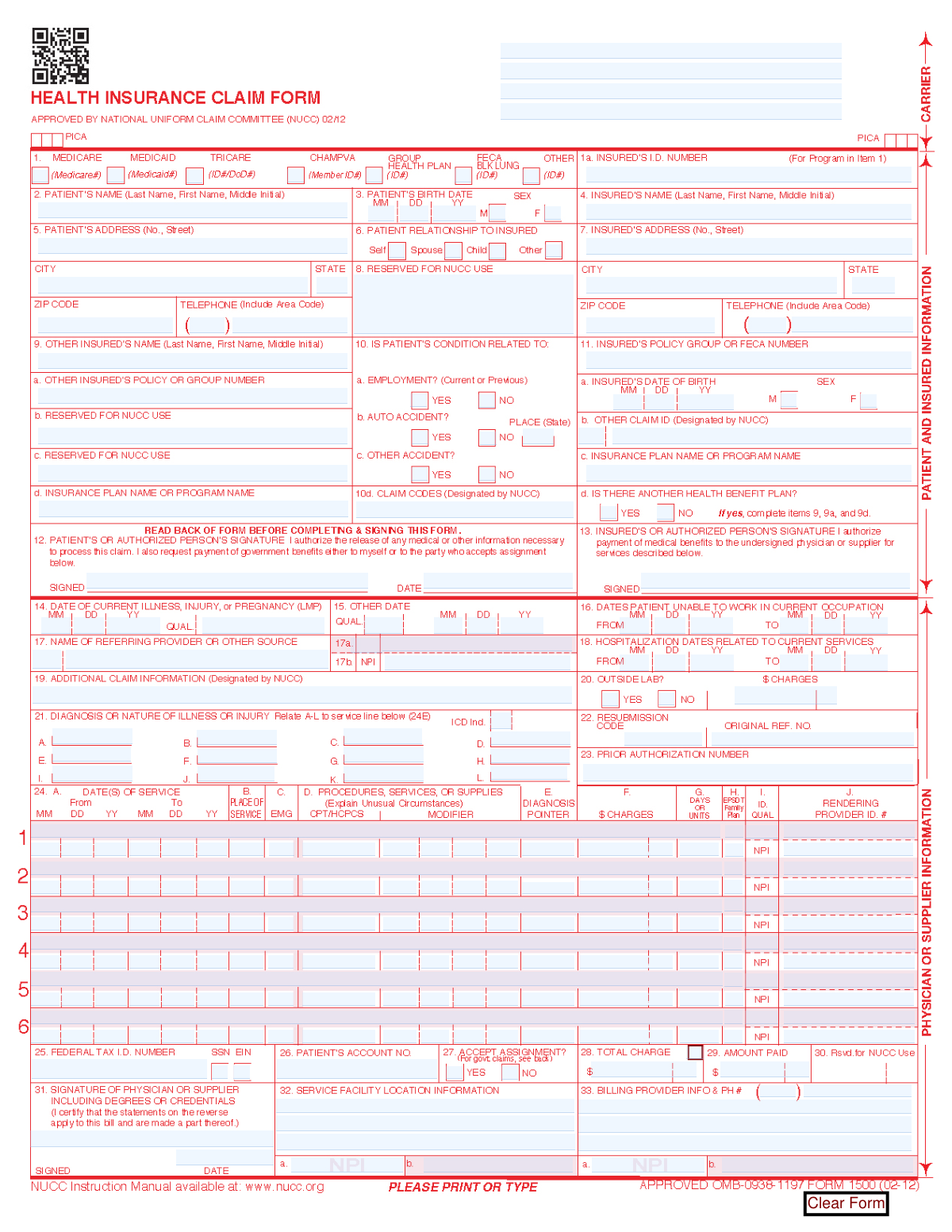
Yes! You can use AI to fill out CMS-1500 Health Insurance Claim Form (OMB-0938-0999)
The CMS-1500 is the universal claim form used by physicians and other non-institutional healthcare providers to bill for services rendered to patients. It is essential for submitting claims to Medicare, Medicaid, TRICARE, and most private insurance carriers to receive reimbursement. Proper and accurate completion is critical for timely payment and avoiding claim denials. Today, this form can be filled out quickly and accurately using AI-powered services like Instafill.ai, which can also convert non-fillable PDF versions into interactive fillable forms.
Our AI automatically handles information lookup, data retrieval, formatting, and form filling.
It takes less than a minute to fill out CMS-1500 using our AI form filling.
Securely upload your data. Information is encrypted in transit and deleted immediately after the form is filled out.
Form specifications
| Form name: | CMS-1500 Health Insurance Claim Form (OMB-0938-0999) |
| Number of fields: | 271 |
| Number of pages: | 1 |
| Language: | English |
| Categories: | CMS forms, health forms, health insurance forms, insurance claim forms, insurance forms, VA claim forms |
Instafill Demo: How to fill out PDF forms in seconds with AI
How to Fill Out CMS-1500 Online for Free in 2026
Are you looking to fill out a CMS-1500 form online quickly and accurately? Instafill.ai offers the #1 AI-powered PDF filling software of 2026, allowing you to complete your CMS-1500 form in just 37 seconds or less.
Follow these steps to fill out your CMS-1500 form online using Instafill.ai:
- 1 Navigate to Instafill.ai and upload your CMS-1500 form, or select it from the template library.
- 2 Use the AI assistant to accurately enter patient demographic information and details about the primary insured person in boxes 1-13.
- 3 Provide information about the patient's condition, including dates of illness or injury and all relevant diagnosis codes (ICD) in boxes 14-21.
- 4 Detail each service or procedure provided in the service lines (box 24), including dates of service, CPT/HCPCS codes, modifiers, charges, and rendering provider information.
- 5 Complete the billing provider, service facility, and federal tax ID information in boxes 25-33 to ensure proper payment routing.
- 6 Review the entire form for accuracy, then digitally sign and date the form in the required signature fields (e.g., box 12, 13, and 31).
- 7 Finalize the form and download the completed document, ready for electronic submission to the payer or for printing.
Our AI-powered system ensures each field is filled out correctly, reducing errors and saving you time.
Why Choose Instafill.ai for Your Fillable CMS-1500 Form?
Speed
Complete your CMS-1500 in as little as 37 seconds.
Up-to-Date
Always use the latest 2026 CMS-1500 form version.
Cost-effective
No need to hire expensive lawyers.
Accuracy
Our AI performs 10 compliance checks to ensure your form is error-free.
Security
Your personal information is protected with bank-level encryption.
Frequently Asked Questions About Form CMS-1500
This is a standard health insurance claim form used by healthcare providers to request payment from insurance companies for services rendered. It is used by various government and private health programs like Medicare, Medicaid, and CHAMPUS.
The healthcare provider or supplier (e.g., physician's office, hospital, lab) who provided the medical services is responsible for completing and submitting this form to the patient's insurance payer.
The 'Patient' is the individual who received the medical care. The 'Insured' is the person who holds the insurance policy, which might be the patient themselves, a spouse, or a parent.
For each service, you must provide the date(s) of service, place of service code, procedure code (CPT/HCPCS), diagnosis pointer, charges, and the rendering provider's NPI number.
Checking 'Yes' for 'Accept Assignment' means the provider agrees to accept the insurance plan's approved amount as full payment. The patient is then only responsible for any deductible, coinsurance, or co-payment.
The patient or an authorized person must sign to authorize the release of information and payment of benefits. The physician or supplier must also sign to certify that the services were medically necessary and furnished as described.
You must indicate that there is another health benefit plan by checking 'Yes' in the appropriate box. Then, you need to complete the fields with the other insured's name, policy number, and insurance plan name for proper coordination of benefits.
The completed form should be sent to the insurance carrier listed at the top of the form. Do not mail it to the CMS address mentioned in the fine print, as that address is only for feedback on the form itself.
A diagnosis pointer is a letter (A-L) that links a specific service or procedure listed on the claim to the corresponding diagnosis code. This demonstrates the medical necessity for the service provided.
Yes, services like Instafill.ai use AI to accurately auto-fill form fields from your saved data, which can save significant time and reduce errors on complex forms like this one.
You can use a service like Instafill.ai to solve this problem. It can convert flat, non-fillable PDFs into interactive, fillable forms that you can easily complete and save online.
To fill this form online, upload it to Instafill.ai, which will automatically identify all the fields. You can then click to fill each field or use saved profiles to populate patient, provider, and insurance information instantly.
Knowingly filing a claim with false, incomplete, or misleading information is a criminal act. It can lead to prosecution, fines, imprisonment, and civil penalties under federal and state laws.
NPI stands for National Provider Identifier. It is a unique 10-digit identification number issued to health care providers in the United States by the Centers for Medicare and Medicaid Services (CMS).
Compliance CMS-1500
Validation Checks by Instafill.ai
1
Total Charges Consistency Check
This validation ensures that the value in the 'Total Charge' field is equal to the sum of all individual 'Charge Amount' fields from each service line. This is critical for financial accuracy and prevents billing discrepancies that would lead to claim rejection or payment delays. If the sum does not match the total, the claim is flagged for manual review to correct the financial data before submission.
2
Diagnosis Pointer to Diagnosis Code Linkage
This check verifies that each 'Diagnosis Pointer' listed on a service line (e.g., 'Service Line 1 - Diagnosis Pointer') corresponds to a diagnosis code that is actually present and populated in the diagnosis section (e.g., 'Diagnosis Pointer 1 (Line A)'). A service must be medically justified by a diagnosis, and this validation ensures that every billed service is linked to a valid, listed diagnosis on the claim. Claims with unlinked pointers will be rejected for lacking medical necessity.
3
Conditional Requirement for Accident Details
This validation checks that if the 'Auto Accident — Yes' box is checked, the 'Auto Accident — Place (State)' field must be populated. This is important because accident claims often involve third-party liability, and the location is a required data point for coordination of benefits and subrogation. Failure to provide the state where the accident occurred will result in the claim being returned as incomplete.
4
Logical Date Chronology
This validation ensures all dates on the form are in a logical sequence. For example, a service date cannot be before the patient's birth date, the 'To Date' of a service or hospitalization cannot be before the 'From Date', and the signature dates cannot be before the latest date of service. This prevents impossible or illogical date entries that would invalidate the claim and require correction.
5
National Provider Identifier (NPI) Format
This check validates that all National Provider Identifier fields (e.g., 'Billing Provider / Supplier NPI', 'Referring Provider NPI') contain a 10-digit number. It may also include a check against the Luhn algorithm to verify the NPI's structural validity. An incorrect NPI is a common reason for claim rejection, as it prevents the payer from identifying the provider, so this validation is essential for successful processing.
6
Insurance ID Presence for Selected Plan
This validation ensures that if an insurance type checkbox (e.g., 'Medicare', 'Group Health Plan') is selected, the corresponding 'Insured's I.D. Number' or 'Insured's Policy / Group Number' field is not empty. This check confirms that a policy number is provided for the specified coverage type, which is necessary for the payer to locate the patient's policy. A missing ID number for a selected plan will cause an immediate claim denial.
7
Patient Signature and Date Requirement
This check verifies that the 'Patient or Authorized Person Signature' field is completed (or marked 'Signature on File') and that the 'Date of Patient/Authorized Signature' is present. This signature legally authorizes the release of medical information and the payment of benefits to the provider. The signature date must be on or after the latest date of service, otherwise the authorization is invalid for those services.
8
Provider Signature and Date Requirement
This validation confirms that the 'Provider Signature' and 'Provider Signature Date' fields are completed. The provider's signature certifies that the services were medically necessary and personally furnished or supervised as required. The signature date must be on or after the latest date of service on the claim, as the provider cannot certify services that have not yet been rendered.
9
Patient and Insured Name Consistency
This check verifies that if the 'Patient Relationship — Self' box is checked, the 'Patient's Name' and 'Insured's Name' fields are identical. This logical check helps ensure data entry accuracy and proper identification of the primary policyholder. A mismatch can cause confusion and processing delays while the payer attempts to verify the patient's relationship to the insured.
10
Service Line Completeness
This validation ensures that any service line containing data has all mandatory fields filled, including 'Date of Service', 'Place of Service', 'Procedure Code', 'Charge Amount', and 'Diagnosis Pointer'. An incomplete service line cannot be adjudicated because essential information is missing. This check prevents the submission of claims with unbillable line items, reducing the likelihood of partial denials.
11
Conditional Requirement for Outside Lab Charges
This validation rule ensures that if the 'Outside Lab — Yes' box is checked, the 'Outside Lab Charges' field must contain a valid, non-zero monetary value. This is required to properly account for and bill services that were not performed by the billing provider but are included on the claim. Submitting a claim indicating outside lab work without the associated charges will lead to rejection for incomplete information.
12
Resubmission Claim Logic
This check verifies that if a 'Resubmission Code' is present, the 'Original Reference Number' field must also be populated. This is crucial for corrected or replacement claims, as the original reference number links the new submission to the previously adjudicated or denied claim. Without this link, the payer may treat the resubmission as a duplicate claim and deny it.
Common Mistakes in Completing CMS-1500
This error occurs when the patient's name, date of birth, or ID number on the claim form does not exactly match the information on file with the insurance company. It often happens due to typos or using an outdated insurance card. A mismatch leads to an immediate claim rejection for eligibility failure, delaying payment until the provider's office corrects and resubmits the claim. To prevent this, always verify patient details against their most current insurance card at check-in.
Each service or procedure listed in Box 24 must be justified by a medical diagnosis from Box 21, linked via the 'Diagnosis Pointer' in Box 24E. Billers may accidentally point to the wrong diagnosis, fail to link a procedure, or use a diagnosis that doesn't medically support the service. This results in a denial for lacking 'medical necessity,' a common and time-consuming issue to appeal. Ensure every procedure is linked to a specific, appropriate diagnosis code to prove the service was necessary.
Medical coding sets are updated annually, but practices may fail to update their billing software or reference materials, leading to the use of deleted or non-specific codes. Claims with invalid codes are automatically rejected by the payer's system before they are even reviewed for payment. This forces the billing staff to find the correct code and resubmit the entire claim, causing significant reimbursement delays. Using up-to-date software or AI-powered tools that validate codes in real-time is the best way to avoid this.
When a patient has more than one insurance plan, the claim must be submitted to the primary payer first, with all secondary insurance information correctly documented in boxes 9 and 11. Staff may be unaware of the secondary plan or fail to complete these fields. This leads to claim denials or incorrect payments, requiring a complicated follow-up process to bill the secondary payer and delaying full reimbursement. Always ask patients about other health coverage and accurately complete all coordination of benefits fields.
This form requires multiple National Provider Identifiers (NPIs): the rendering provider (Box 24J), the service facility (Box 32a), and the billing provider (Box 33a). It is a common mistake to enter the group NPI in the individual rendering provider field or vice-versa. Payers' systems cross-reference these numbers, and any mismatch will cause the claim to be rejected for invalid provider information. Carefully differentiate between these entities and enter the correct NPI in each designated box.
Certain fields are only required under specific conditions, but forgetting them leads to denials. For example, if a condition is due to an accident (Box 10), the date and state must be provided; if not, the 'No' box must be checked. Leaving these boxes blank creates ambiguity and causes the claim to be rejected as incomplete. To avoid this, complete all relevant checkboxes and conditional fields, even if the answer is 'No'.
Many payers require pre-approval for specific procedures or visits, and this approval is tracked with a prior authorization number. Offices may forget to obtain this number or fail to enter it in the correct field (Box 23). Submitting a claim without a required authorization number almost always results in a denial that is difficult and often impossible to successfully appeal. Always verify authorization requirements before providing service and ensure the number is entered on the claim.
The Place of Service (POS) code in Box 24B tells the payer where the service was rendered (e.g., '11' for Office, '22' for Outpatient Hospital). Using the wrong code is a frequent error, especially with the rise of telehealth services. Since reimbursement rates vary significantly by POS, an incorrect code can lead to underpayment, overpayment (which must be returned), or an outright denial. Staff must be trained to select the precise code that matches the service location for each encounter.
When claims are filled by hand or scanned from paper, illegible handwriting or low-quality scans can make the data unreadable to the payer's processing systems. Optical Character Recognition (OCR) software may misinterpret the characters, leading to data entry errors that cause a denial. The claim may also be rejected as 'unprocessable.' To prevent this, always use electronic billing software or fillable PDFs. If a form is only available as a non-fillable PDF, a tool like Instafill.ai can convert it into a clean, fillable version to ensure all entries are typed and legible.
Errors can occur when totaling the charges for all services listed on the claim. The total charge in Box 28 must equal the sum of all individual line item charges in Box 24F. A simple miscalculation or typo can cause a mismatch, leading the payer's system to flag and reject the claim. It's also crucial to accurately report any prior payments from the patient or other payers in Box 29. Using software that automatically calculates totals can prevent these mathematical errors.
Saved over 80 hours a year
“I was never sure if my IRS forms like W-9 were filled correctly. Now, I can complete the forms accurately without any external help.”
Kevin Martin Green
Your data stays secure with advanced protection from Instafill and our subprocessors

Robust compliance program
Transparent business model
You’re not the product. You always know where your data is and what it is processed for.
ISO 27001, HIPAA, and GDPR
Our subprocesses adhere to multiple compliance standards, including but not limited to ISO 27001, HIPAA, and GDPR.
Security & privacy by design
We consider security and privacy from the initial design phase of any new service or functionality. It’s not an afterthought, it’s built-in, including support for two-factor authentication (2FA) to further protect your account.
Fill out CMS-1500 with Instafill.ai
Worried about filling PDFs wrong? Instafill securely fills cms-1500-health-insurance-claim-form-omb-0938-0999 forms, ensuring each field is accurate.