Yes! You can use AI to fill out Blue Shield Promise Continuity of Care Request Form
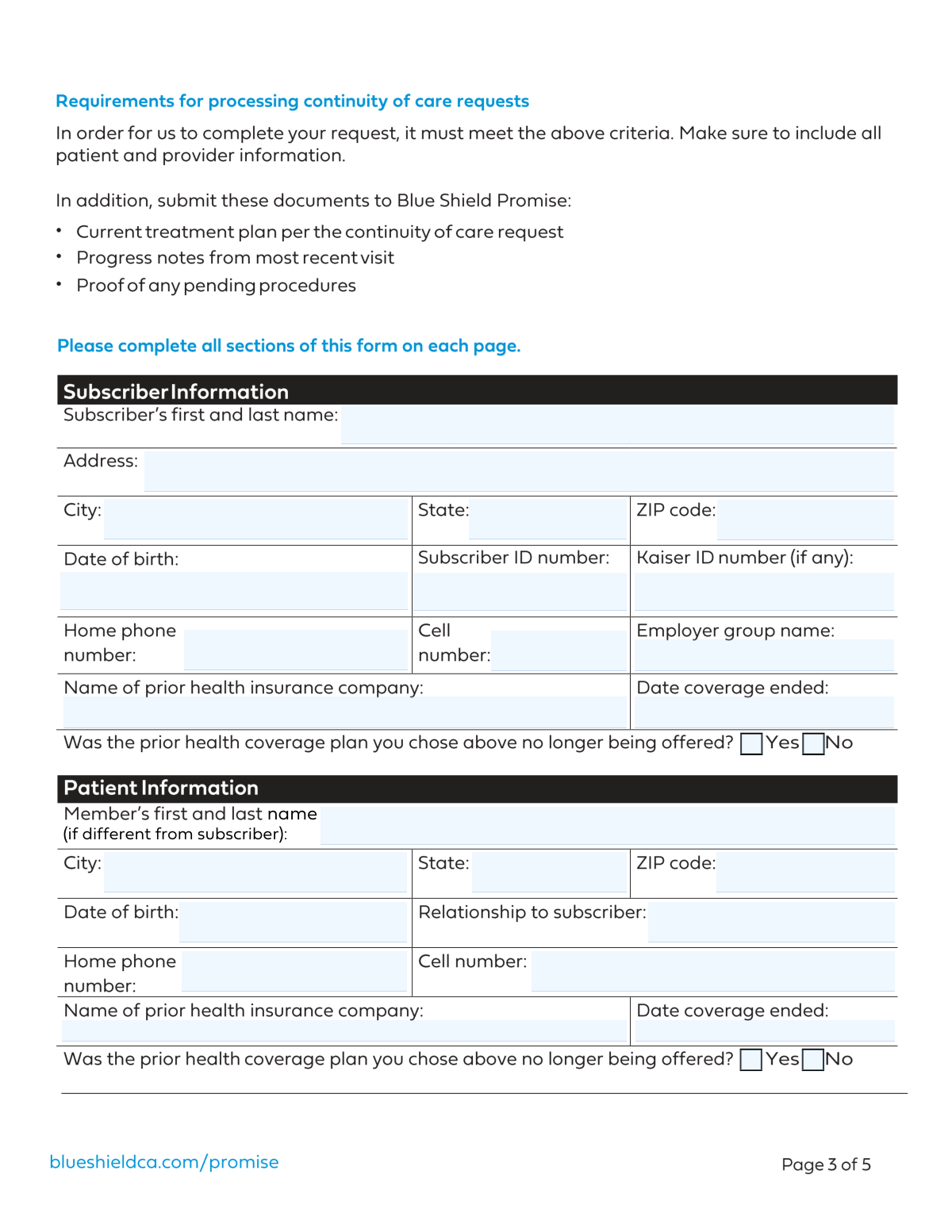
This form is a formal request submitted by a healthcare provider to Blue Shield Promise to allow a new member to continue treatment with them, even if the provider is not in the Blue Shield network. It gathers essential patient, provider, and medical information to determine if the member's condition qualifies for continuity of care, such as pregnancy, a terminal illness, or an acute condition. Today, this form can be filled out quickly and accurately using AI-powered services like Instafill.ai, which can also convert non-fillable PDF versions into interactive fillable forms.
Our AI automatically handles information lookup, data retrieval, formatting, and form filling.
It takes less than a minute to fill out Continuity of Care Request using our AI form filling.
Securely upload your data. Information is encrypted in transit and deleted immediately after the form is filled out.
Form specifications
| Form name: | Blue Shield Promise Continuity of Care Request Form |
| Number of fields: | 65 |
| Number of pages: | 5 |
| Language: | English |
| Categories: | CAR forms, L.A. Care forms |
Instafill Demo: How to fill out PDF forms in seconds with AI
How to Fill Out Continuity of Care Request Online for Free in 2026
Are you looking to fill out a CONTINUITY OF CARE REQUEST form online quickly and accurately? Instafill.ai offers the #1 AI-powered PDF filling software of 2026, allowing you to complete your CONTINUITY OF CARE REQUEST form in just 37 seconds or less.
Follow these steps to fill out your CONTINUITY OF CARE REQUEST form online using Instafill.ai:
- 1 Navigate to Instafill.ai and upload the Blue Shield Promise Continuity of Care Request Form or select it from the template library.
- 2 Use the AI assistant to fill in the Subscriber's and Patient's personal, contact, and insurance information.
- 3 Enter the Requesting Provider's details, including name, specialty, address, NPI, and Tax ID. Instafill.ai can save this information for future use.
- 4 Provide the necessary medical details, such as diagnosis (ICD-10) and treatment (CPT) codes, treatment dates, and check the boxes corresponding to the member's specific condition (e.g., pregnancy, hospitalization, terminal illness).
- 5 Complete the remaining sections regarding prior insurance, Medi-Cal status, and willingness to negotiate a Letter of Agreement.
- 6 Carefully review all the auto-filled information for accuracy, make any necessary corrections, and then e-sign the document directly on the platform.
- 7 Download the completed form for your records and submit it to Blue Shield Promise as instructed.
Our AI-powered system ensures each field is filled out correctly, reducing errors and saving you time.
Why Choose Instafill.ai for Your Fillable Continuity of Care Request Form?
Speed
Complete your Continuity of Care Request in as little as 37 seconds.
Up-to-Date
Always use the latest 2026 Continuity of Care Request form version.
Cost-effective
No need to hire expensive lawyers.
Accuracy
Our AI performs 10 compliance checks to ensure your form is error-free.
Security
Your personal information is protected with bank-level encryption.
Frequently Asked Questions About Form Continuity of Care Request
This form is used to request continuity of care for a patient who has recently switched to a new insurance plan. It provides the new insurer with necessary patient, provider, and treatment details to ensure care is not interrupted.
Typically, the healthcare provider's office completes this form on behalf of the patient. It requires specific provider details like NPI and Tax ID numbers, as well as medical diagnosis and treatment codes.
The 'Subscriber' is the primary holder of the insurance policy. The 'Patient' is the individual receiving medical care, who can be the subscriber or a dependent, such as a child or spouse.
If the patient and the subscriber are the same person, you only need to complete the 'Subscriber's Personal Information' section. The 'Patient's Personal Information' section can be left blank.
ICD-10 codes are used to classify medical diagnoses, while CPT codes identify the specific medical services or procedures provided. These are essential for the insurance company to process the request for care.
You should only complete these sections if they are relevant to the patient's current condition. For example, fill out the 'Expected Delivery Date' only if the member is pregnant, and the 'Hospital Information' only if the member is currently hospitalized.
This indicates if a provider who is not in the insurance network is open to creating a temporary, single-case contract with Blue Shield Promise to cover treatment for this specific patient.
The Kaiser ID Number is only required if applicable. If the subscriber's insurance is not with Kaiser or they do not have this specific ID, you can leave the field blank.
Providing prior insurance details helps the new insurer verify the patient's recent coverage history. This is often a key requirement for establishing eligibility for continuity of care benefits.
The 'Requesting Provider' is the doctor or specialist treating the patient. The 'Contact Person' is usually an administrative staff member in the provider's office who can answer questions about the form's completion.
Yes, you can use services like Instafill.ai, which leverage AI to auto-fill form fields accurately from your saved information, saving you time and helping to prevent errors.
To fill this form online, you can upload it to a service like Instafill.ai. The platform makes the document interactive, allowing you to type your information directly into the fields and then save or print the completed form.
If you have a non-fillable or 'flat' PDF, you can use a tool like Instafill.ai to convert it into an interactive, fillable form. Simply upload the document, and the service will make the fields editable online.
Compliance Continuity of Care Request
Validation Checks by Instafill.ai
1
National Provider Identifier (NPI) Validity
This check verifies that the National Provider Identifier (NPI) is a valid 10-digit number. It ensures the number conforms to the standard format and may cross-reference it against the national NPI registry to confirm the provider's existence and credentials. This is critical for claim processing and provider verification, and failure to provide a valid NPI will result in the form's rejection.
2
Billing Tax ID Number Format
This validation ensures that the 'Billing Tax ID Number' is a 9-digit number, consistent with the format for a federal Taxpayer Identification Number (TIN) or Employer Identification Number (EIN). Correctly formatted tax IDs are essential for billing, payment processing, and regulatory compliance. An invalid format will prevent the system from correctly identifying the billing entity and will halt the submission.
3
Logical Date Sequence for Treatment
This check ensures that the 'Original Start Date with Provider' is on or before the 'Date of Last Office Visit or Treatment'. This maintains a logical timeline of care, preventing nonsensical data entry where a last visit occurs before a first visit. Failure to adhere to this logic indicates a data entry error that must be corrected before the form can be processed.
4
Date of Birth is in the Past
This validation confirms that the 'Date of Birth' for both the subscriber and the patient is a valid date that occurs before the current submission date. This simple check prevents common data entry errors, such as entering the current date or a future date. An invalid date of birth would make the individual's record inaccurate and could cause issues with eligibility and age-related benefits.
5
Conditional Requirement for Hospitalization Fields
This check enforces a rule that if the 'Member in Hospital Yes' box is checked, the 'Hospital Name', 'Hospital Phone Number', and 'Hospital Tax ID Number' fields become mandatory. This ensures that all necessary information is captured when a member is an inpatient, which is critical for coordinating care and benefits. Submissions indicating hospitalization without these details will be considered incomplete.
6
Conditional Requirement for Pregnancy-Related Fields
This validation ensures that if a diagnosis code indicates pregnancy or if the 'Expected Delivery Date' is filled, then the 'Delivering Hospital Name' and 'OB/GYN Name' fields must also be completed. This is vital for managing maternity care and ensuring all providers and facilities are documented for pre-authorization. Missing this information can delay approvals for delivery services.
7
At Least One Subscriber Phone Number Required
This check verifies that at least one phone number, either 'Home Phone Number' or 'Cell Phone Number', has been provided for the subscriber. Having a valid contact number is essential for the insurance plan to communicate with the member regarding their coverage, claims, or requests for more information. If no phone number is provided, the form submission will be flagged as incomplete.
8
State and ZIP Code Consistency
This validation checks that the provided 'State' and 'ZIP Code' are a valid combination for any address block (Subscriber, Patient, Provider). The system would cross-reference the first digits of the ZIP code with the state to ensure they align geographically. This helps prevent data entry errors and ensures mailability, which is crucial for sending important documents.
9
Diagnosis and Procedure Code Format
This check validates that the 'Diagnosis Codes' and 'Treatment CPT Codes' adhere to their respective standard formats (e.g., ICD-10 and CPT). While not a full validation of the code's existence, it ensures the structure is correct, preventing malformed data from entering the system. Incorrectly formatted codes cannot be processed for authorization or billing and will cause the submission to fail.
10
Exclusive Selection for Yes/No Options
This validation ensures that for every pair of 'Yes' and 'No' checkboxes, such as 'Member in Hospital', only one option is selected. This prevents contradictory and ambiguous data from being submitted. If both or neither option is selected for a required question, the user will be prompted to make a single, definitive choice.
11
Patient Information Completeness if Different from Subscriber
This check is triggered if the 'Patient's Name' field is filled out, indicating the patient is not the subscriber. It then validates that the 'Patient's Date of Birth' and 'Relationship to Subscriber' fields are also completed. This ensures a complete demographic record for the dependent receiving care, which is necessary for determining eligibility and processing claims correctly.
12
Prior Coverage End Date is in the Past
This validation ensures that the 'Coverage End Date' for prior insurance is a date that has already passed. This logically confirms that the specified coverage is indeed 'prior' and not current or future, which is important for coordination of benefits. An end date in the future would be a logical contradiction and would require correction.
13
Provider Information Completeness
This check mandates that essential provider details, including 'Requesting Provider's Full Name', 'Billing Tax ID Number', 'NPI', and the full 'Provider Address', are all provided. This information is non-negotiable for processing any medical request, as it is used to verify the provider's identity, credentials, and location. An incomplete provider profile will result in an immediate rejection of the form.
14
Conditional Requirement for Home Health/Hospice Fields
This validation rule ensures that if 'Receiving Home Health or Hospice Care - Yes' is checked, then the associated 'Provider Name', 'Provider Phone Number', and 'Provider Tax ID Number' fields are mandatory. Capturing these details is crucial for managing and authorizing ongoing specialized care in a home setting. Failure to provide this information will render the request incomplete and delay care approval.
Common Mistakes in Completing Continuity of Care Request
Users often mistakenly enter the patient's information in the subscriber section or vice-versa, especially when the patient and subscriber are the same person. This leads to confusion and can cause significant delays in processing the request or verifying insurance eligibility. To avoid this, carefully read each section header; if the patient is also the subscriber, ensure the subscriber information is filled out completely and leave the 'Patient's Name' field blank as instructed ('if different from the subscriber').
Fields like 'Subscriber ID Number', 'National Provider Identifier (NPI)', and 'Billing Tax ID Number' are prone to typos, transposition errors, or being left incomplete. These numbers are critical for billing and identification, and even a single wrong digit can lead to claim rejection or misidentification. Always double-check these numbers against the source document (insurance card, provider records). AI-powered tools like Instafill.ai can help by validating the format and length of these critical numbers to catch errors before submission.
Dates for 'Date of Birth', 'Coverage End Date', and 'Treatment Dates' are often entered in non-standard formats (e.g., DD-MM-YY) or contain simple typos. This ambiguity can cause data entry errors on the recipient's end, leading to processing delays or incorrect records. To prevent this, always use the standard MM/DD/YYYY format and carefully review each date for accuracy before submitting the form.
The form contains sections that are only required if a specific condition is met, such as pregnancy or hospitalization. People frequently miss the initial checkbox (e.g., 'Member in Hospital Yes') and then fail to fill out the dependent fields like 'Hospital Name' and 'Hospital Tax ID Number'. This omission of critical data will halt the review process. If the form is a non-fillable PDF, it can be hard to navigate these dependencies; tools like Instafill.ai can convert flat PDFs into smart, fillable forms that automatically show or hide these sections based on your answers, preventing this error.
When filling out 'Prior Insurance Company Name', people often use common abbreviations (e.g., 'BCBS') or forget the exact name of their plan. This ambiguity makes it difficult for the new insurer to verify prior coverage history, which can delay the continuity of care review. Always write out the full, official name of the prior insurance company as it appears on the insurance card and provide the exact 'Coverage End Date'.
The 'Diagnosis Codes (ICD-10)' and 'Treatment CPT Codes' fields require a high degree of precision and are often filled out incorrectly by individuals without clinical coding knowledge. Using outdated, non-specific, or simply wrong codes will almost certainly lead to the request being denied or delayed pending clarification from the provider. This section should be completed by the requesting provider's office to ensure accuracy and prevent unnecessary back-and-forth communication.
The form includes several mandatory 'Yes/No' questions, such as 'Medi-Cal Provider' or 'Has Terminal Condition'. A common error is to skip these questions, leaving both boxes unchecked. This creates ambiguity and forces the processor to assume an answer or, more likely, return the form for completion, causing delays. To avoid this, make sure to select one option for every 'Yes/No' pair, even if the answer is 'No'.
When the patient is not the subscriber, the 'Relationship to Subscriber' field is crucial for establishing eligibility under the subscriber's plan (e.g., spouse, child). Forgetting to fill this out is a frequent oversight that stops the verification process immediately. This simple mistake requires follow-up and delays the entire request. Always specify the relationship clearly when the patient and subscriber are different people.
When entering the 'Street Address' for the subscriber or provider, users often forget to include the apartment, suite, or unit number. This omission can lead to returned mail and significant delays in communication, especially for official notices or requests for more information. Always provide the full, complete address to ensure deliverability. AI-powered form fillers like Instafill.ai can help by validating addresses to ensure they are complete and correctly formatted.
The form distinguishes between the 'Requesting Provider's Full Name' and a 'Contact Name' for follow-up questions. People often leave the 'Contact Name' and 'Contact Phone Number' blank or repeat the provider's information. This makes it inefficient for the insurance company to get quick clarifications, as they may not be able to reach the right person in the provider's office. Providing a specific contact, like an office manager or referral coordinator, streamlines communication and speeds up the review process.
Saved over 80 hours a year
“I was never sure if my IRS forms like W-9 were filled correctly. Now, I can complete the forms accurately without any external help.”
Kevin Martin Green
Your data stays secure with advanced protection from Instafill and our subprocessors

Robust compliance program
Transparent business model
You’re not the product. You always know where your data is and what it is processed for.
ISO 27001, HIPAA, and GDPR
Our subprocesses adhere to multiple compliance standards, including but not limited to ISO 27001, HIPAA, and GDPR.
Security & privacy by design
We consider security and privacy from the initial design phase of any new service or functionality. It’s not an afterthought, it’s built-in, including support for two-factor authentication (2FA) to further protect your account.
Fill out Continuity of Care Request with Instafill.ai
Worried about filling PDFs wrong? Instafill securely fills blue-shield-promise-continuity-of-care-request-form forms, ensuring each field is accurate.