
Yes! You can use AI to fill out Blue Cross and Blue Shield of Texas Group Enrollment Application/Change Form
Don't type 356 fields by hand. Tell our AI about yourself, or upload a document you already have, and it fills every field in seconds. You check it, then download, print or sign.
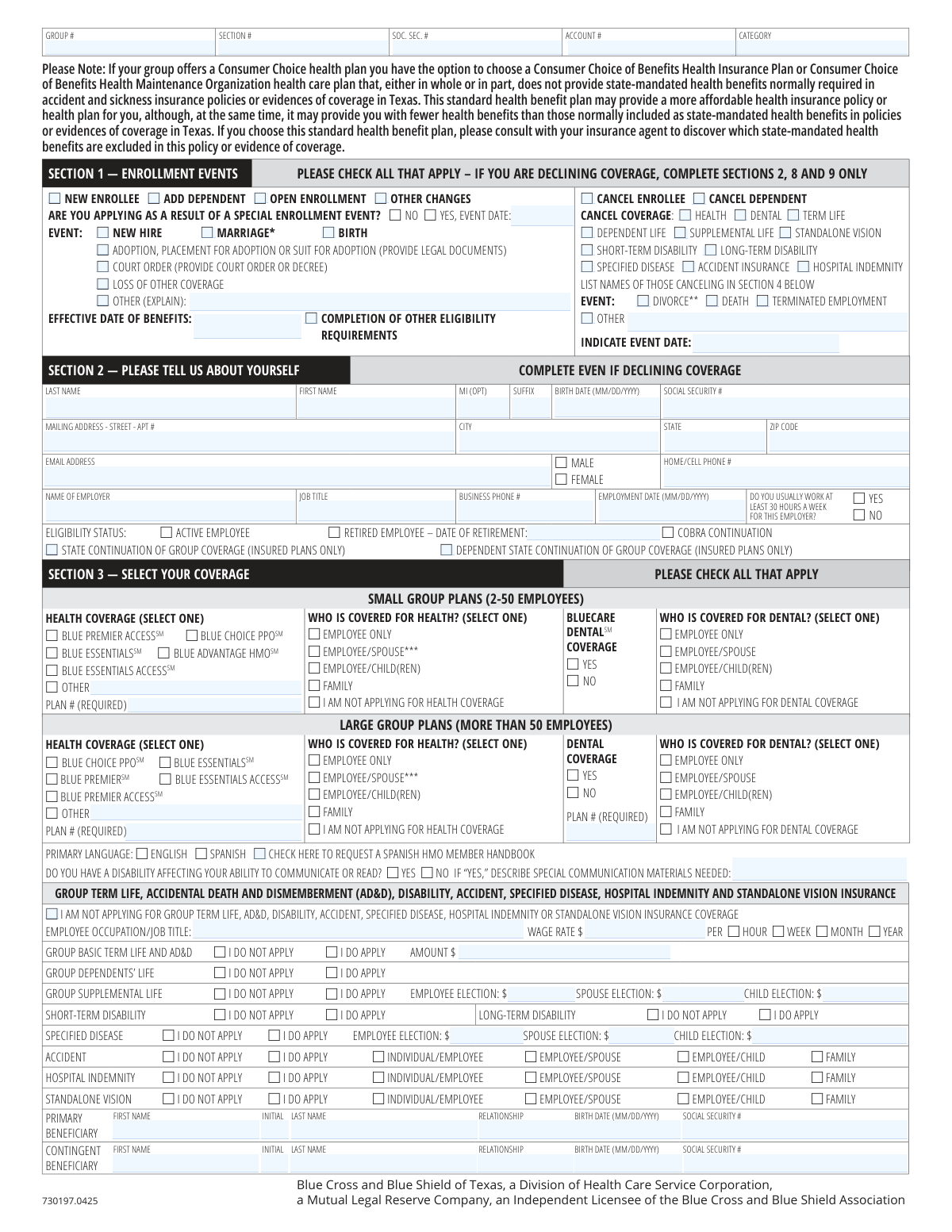
The AI does the filling. You just check it.
No typing into boxes, nothing to install.
What this form asks for
The AI fills all of it, from your answers or your documents.
The AI checks your answers before you download
14 checks built for this form, so a wrong date or a missing answer is caught before anyone else sees it.
This check ensures that the Social Security Number (SSN) for the employee and each dependent is a valid 9-digit number. It also verifies that a dependent's SSN is not identical to the primary enrollee's SSN. This is critical for uniquely identifying individuals for claims processing, tax reporting, and preventing data entry errors. If an SSN is invalid or duplicated, the application cannot be processed.
For applications marked as 'New Enrollee', this validation confirms that all required sections (notably Sections 2, 3, and 9) are completed. This includes the applicant's personal information, a selected health plan, and a signature with a date. Incomplete applications are a primary cause of processing delays, as they lack the basic information needed to establish a new policy.
If an applicant selects an HMO plan that requires a Primary Care Physician (e.g., Blue Advantage HMO, Blue Essentials), this check verifies that a PCP Name and PCP Number have been provided in Section 4 for each covered individual. This is important because HMO plans manage care through a designated PCP. Failure to provide this information may result in a random PCP assignment or a delay in finalizing enrollment until a selection is made.
This check validates that if an applicant indicates they are applying due to a 'Special Enrollment Event', they must also provide the specific event type (e.g., Marriage, Birth) and the date of that event. This information is legally required to determine eligibility for enrollment outside of the standard open enrollment period. An application missing this justification cannot be approved as a special enrollment.
If an applicant selects any health or dental coverage in Section 3, this check ensures the corresponding 'Plan #' field is filled out and matches a valid plan ID format (e.g., the 7-character example 'B634ADT'). The plan number is the primary identifier for the specific benefits package being selected. An incorrect or missing plan number will result in processing failure, as the system cannot determine which benefits to assign.
This validation ensures an applicant does not make contradictory choices, such as selecting a specific health plan in Section 3 while also checking the 'I am not applying for health coverage' box. Such logical conflicts create ambiguity that must be resolved manually. This check enforces clarity of intent, preventing processing errors and ensuring the applicant's choice is correctly recorded.
And 8 more checks
- Verifies Dependent Data Matches Coverage Level
- Enforces Logical Flow for Declination of Coverage
- Ensures Completeness of Cancellation Requests
- Requires Beneficiary Information for Life Insurance
- Validates All Date Fields for Format and Logic
- Validates Medicare HIC Number Presence and Format
- Confirms Presence of Signature and Date
- Flags Disabled Dependent for Documentation Review
Let AI fill out your 730197.0425
No typing. Every field filled in seconds, checked, ready to sign.
How to Fill Out 730197.0425 Online for Free in 2026
What the AI walks you through.
- Navigate to Instafill.ai and upload or select the Blue Cross and Blue Shield of Texas Group Enrollment Application/Change Form.
- Use the AI assistant to complete Section 1, indicating the enrollment event, such as 'New Enrollee,' 'Add Dependent,' or 'Open Enrollment,' and provide the event date if applicable.
- Fill in your personal and employment information in Section 2, including your name, address, Social Security number, and job details.
- In Section 3, select your desired health, dental, life, and other ancillary coverages, specifying the plan and who will be covered.
- Provide detailed information for each dependent you are enrolling in Section 4, including their name, date of birth, and Primary Care Physician (PCP) if required.
- Complete any other necessary sections, such as Section 6 for other insurance coverage, Section 7 for Medicare information, or Section 8 if you are declining coverage.
- Carefully review all the information pre-filled by the AI for accuracy, then digitally sign and date the form in Section 9 to finalize your application before submitting it to your employer.
Common Mistakes in Completing 730197.0425
The ones the AI is built to catch.
Forgetting the Required Plan ID Number
Missing Primary Care Physician (PCP) Information for HMO Plans
Forgetting to Sign and Date the Application
Improperly Declining Coverage
Failing to Disclose Other Health Coverage
Providing Incomplete Beneficiary Information
Missing Required Documentation for Special Cases
Using Abbreviations or Illegible Handwriting
Omitting the Special Enrollment Event Date
Confusing 'Access' Plans with Standard HMO Plans
Frequently Asked Questions About 730197.0425
Is it really free for 7 days?
Can I fill other forms too?
How do I cancel?
How does the AI fill out 730197.0425?
What happens to my information?
How complex is 730197.0425 to fill out?
What is the purpose of this form?
Who needs to complete this form?
What information do I need to provide if I am declining coverage?
What is a 'Special Enrollment Event'?
Where can I find the 'Plan #' required in Section 3?
Do I have to select a Primary Care Physician (PCP)?
How do I add a disabled dependent who is over the plan's age limit?
What documents might I need to submit with this application?
Where do I submit the completed form?
What is the difference between a Primary and Contingent Beneficiary for life insurance?
Can I use an AI tool to help me fill out this form?
How can I fill out this BCBSTX form online?
The PDF form I have is not fillable. What can I do?
Get your 730197.0425 filled out by AI
$0 today. Cancel before Nov 4 and you pay nothing.
Other forms like this one
Blue Cross Blue Shield forms: Applied Behavior Analysis (ABA) Initial Assessment Request and Clinical Service Request Form – Blue Cross and Blue Shield of Illinois (BCBSIL), Horizon Blue Cross Blue Shield of New Jersey Applied Behavior Analysis Supplemental Information Form, Blue Cross and Blue Shield of Texas Average Employee Count Form
enrollment forms: Form CMS-855O, Medicare Enrollment Application, Form CMS-4040, Request for Enrollment in Medicare Part B, Form CMS-40B, Application for Enrollment in Medicare Part B, Providence Health Plan Out-of-Area Dependent Enrollment Form, Empower Enrollment Form, Empower Enrollment Form, Principal Life Insurance Company UCTIE INTERNATIONAL UNION 401(K) SAVINGS PLAN Enrollment Form, Enrollment Application, Northwell Residents Open Enrollment Benefits Guide 2026, University of Colorado 403(b) Plan – DSW Scudder Enrollment and Beneficiary Designation Form, Merrill Funds Transfer Service Enrollment Form, Funds Transfer Service Enrollment Form, Standing Letter of Authorization / Instruction Enrollment Form, Merrill RMD Service Enrollment and Authorization Form, Fidelity Investments Account Application/Enrollment Form and Beneficiary Designation, MyMerrill® Client Order Entry Enrollment Form, CMS-855I, Medicare Enrollment Application for Physicians and Non-Physician Practitioners, Form CMS-855R, Medicare Enrollment Application - Reassignment of Medicare Benefits, CMS-855R, Medicare Enrollment Application: Reassignment of Medicare Benefits, CMS-855R, Medicare Enrollment Application: Reassignment of Medicare Benefits
enrollment application forms: Form CMS-855O, Medicare Enrollment Application, Form CMS-40B, Application for Enrollment in Medicare Part B, Enrollment Application, Fidelity Investments Account Application/Enrollment Form and Beneficiary Designation, CMS-855I, Medicare Enrollment Application for Physicians and Non-Physician Practitioners, Form CMS-855R, Medicare Enrollment Application - Reassignment of Medicare Benefits, CMS-855R, Medicare Enrollment Application: Reassignment of Medicare Benefits, CMS-855R, Medicare Enrollment Application: Reassignment of Medicare Benefits, Medicare Enrollment Application for Durable Medical Equipment, Prosthetics, Orthotics, and Supplies (DMEPOS) Suppliers, CMS-855S, CMS-855B, Medicare Enrollment Application for Clinics/Group Practices and Other Suppliers, CMS-855A, Medicare Enrollment Application for Institutional Providers, Form CMS-855A, Medicare Enrollment Application for Institutional Providers, Medicare Enrollment Application - Medicare Diabetes Prevention Program (MDPP) Suppliers, Form CMS-20134, Form HFS 2243, Provider Enrollment Application Illinois Medical Assistance Program, Provider Enrollment Agreement (OHA 3975), Oregon Medicaid ID Application Form, Medical Baseline Allowance Application (Used for Medical Baseline Enrollment and Re-Certification), Form CMS-40B, Application for Enrollment in Medicare Part B (Medical Insurance) (01/24), Form CMS-18-F-5, Application for Medicare Part A (Hospital Insurance)
Blue Shield forms: Blue Shield of California Network Participation Letter of Intent, Blue Shield of California Prior Authorization Request Form for Applied Behavioral Analysis (ABA) – Commercial Products, Applied Behavior Analysis (ABA) Initial Assessment Request and Clinical Service Request Form – Blue Cross and Blue Shield of Illinois (BCBSIL), Horizon Blue Cross Blue Shield of New Jersey Applied Behavior Analysis Supplemental Information Form, Blue Shield of California Prior Authorization Request Form, Blue Shield of California Urgent Request for Prior Authorization, Blue Cross and Blue Shield of Texas Average Employee Count Form, Blue Shield Promise Durable Medical Equipment (DME) Treatment Authorization Request Form, Blue Shield Promise Universal Prior Authorization Form, Blue Shield of California Promise Health Plan Long Term Care Treatment Authorization Request Form, Blue Shield Promise Community Health Worker (CHW) Services Recommendation Form, Blue Shield Promise Treatment Authorization Request Form, Blue Shield of California Servicing Provider Change Request Form, Blue Shield of California Promise Health Plan Referral Form, Blue Shield of California Community Supports (CS) Request Form, Blue Shield of California Promise Health Plan Health Education Referral Form, Blue Shield of California Palliative Care Program Eligibility Screening Tool, Blue Shield Promise Continuity of Care Request Form, Blue Shield of California Promise Health Plan Medi-Cal Group Doula Provider Quality Check Form
Let AI fill out your 730197.0425
Your trial starts once a card is added. You pay nothing before Nov 4.
Our AI already knows this form, all 356 fields of it. Skip the typing: tell it about yourself, or upload what you have, and it fills the whole form in seconds.
- AI fills every field on all 5 pages, tables and checkboxes included
- No typing into boxes: answer a few questions, or upload a document you already have, an old copy of this form, a photo of a document
- The AI checks the answers; you review and change anything before you download
- Download the finished PDF, print it, or sign it online
- Encrypted, and never used to train AI
Cancel before Nov 4 and you pay nothing.
A card is needed to start the trial. Cancel in two clicks from your account.
Terms · Privacy