
Yes! You can use AI to fill out Horizon Blue Cross Blue Shield of New Jersey Applied Behavior Analysis Supplemental Information Form
Don't type 115 fields by hand. Tell our AI about yourself, or upload a document you already have, and it fills every field in seconds. You check it, then download, print or sign.
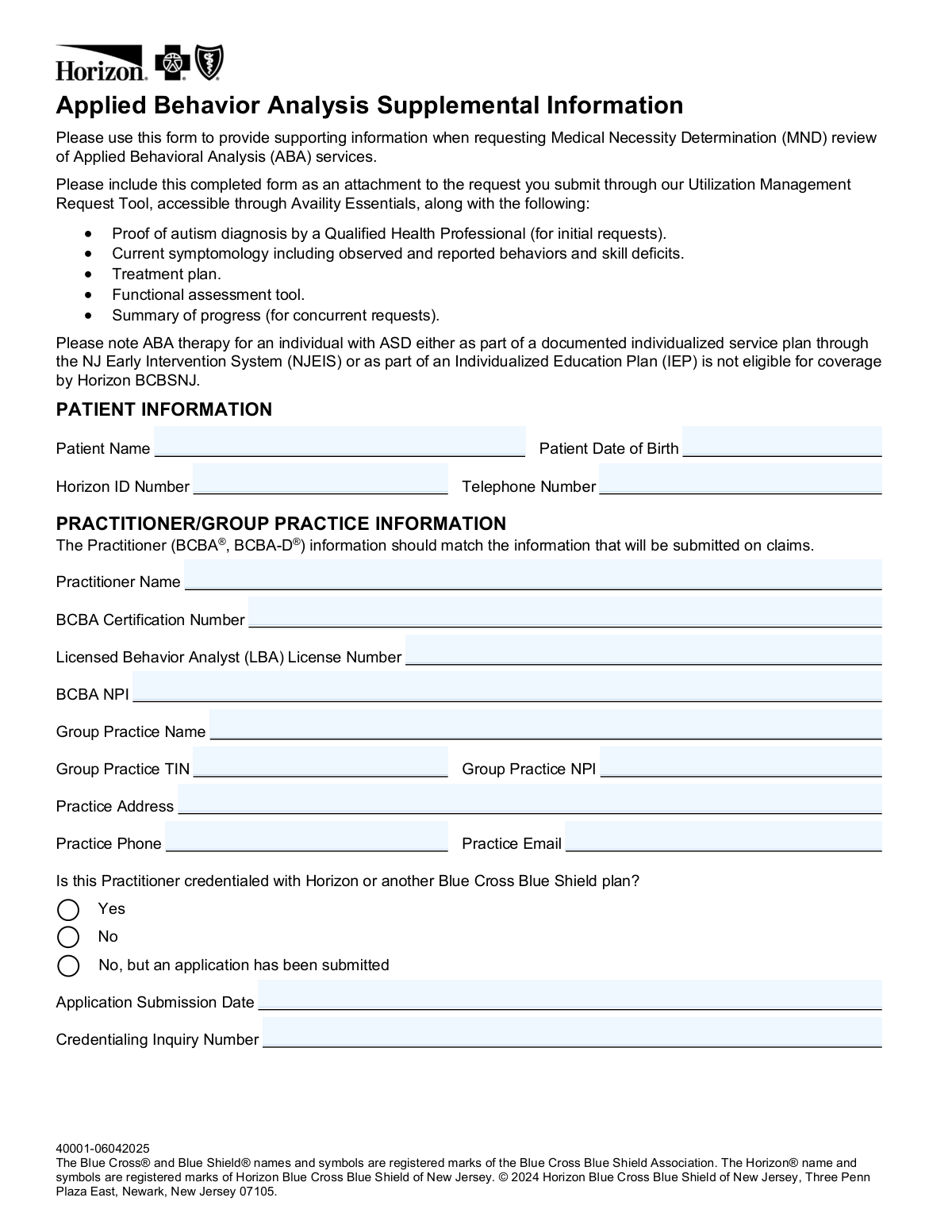
The AI does the filling. You just check it.
No typing into boxes, nothing to install.
What this form asks for
The AI fills all of it, from your answers or your documents.
The AI checks your answers before you download
16 checks built for this form, so a wrong date or a missing answer is caught before anyone else sees it.
Validates that the Patient Date of Birth is entered in a standard date format (MM/DD/YYYY) and represents a logically valid date (e.g., not a future date, not more than 120 years in the past). This field is critical for correctly identifying the member in Horizon's system and ensuring the authorization is tied to the correct individual. If the date is missing, improperly formatted, or logically invalid, the request cannot be processed and may be rejected or delayed.
Ensures the Horizon ID Number is present and conforms to Horizon BCBSNJ's expected member ID format, typically a combination of letters and numbers of a specific length. An incorrect or missing Horizon ID will prevent the system from locating the member's eligibility and benefits, causing the MND request to fail. This field must exactly match the ID on the member's insurance card to avoid misidentification.
Validates that the BCBA Certification Number is provided and follows the expected alphanumeric format issued by the Behavior Analyst Certification Board (BACB). ABA services must be directed by a credentialed BCBA or BCBA-D, and this number is used to verify the practitioner's qualifications. If this field is missing or incorrectly formatted, the request may be denied as the practitioner's credentials cannot be confirmed.
Checks that both the BCBA NPI and Group Practice NPI fields contain valid 10-digit National Provider Identifier numbers, as required by HIPAA standards. NPIs are used to identify healthcare providers on claims, and the form explicitly states that practitioner information must match what will be submitted on claims. An invalid or mismatched NPI will cause a discrepancy between the authorization request and subsequent claims submissions, leading to claim denials.
Ensures the Group Practice TIN is entered in the correct format (XX-XXXXXXX, a 9-digit Employer Identification Number). The TIN is required for billing and reimbursement purposes and must match the information on file with Horizon BCBSNJ. A missing or incorrectly formatted TIN will prevent proper claims processing and could result in payment delays or denials.
Validates that when the practitioner selects 'No, but an application has been submitted' for the credentialing question, both the Application Submission Date and Credentialing Inquiry Number fields are populated. These fields are conditionally required to allow Horizon to track the pending credentialing application and assess the request appropriately. If the credentialing option is selected but the supporting fields are left blank, the submission is incomplete and cannot be properly evaluated.
And 10 more checks
- Service Type Selection Requirement
- Concurrent Review Fields Populated Only for Concurrent Requests
- Units Requested Greater Than Units Used Explanation Requirement
- Program Setting Hours Per Week Consistency with Units Requested
- H0032 Treatment Planning Units Cap Validation
- DSM-V Autism Severity Classification Selection Requirement
- Percent of Goals Mastered Field Required for Concurrent Reviews
- Treatment Barriers Field Completeness Validation
- Standardized and Curriculum Assessment Fields Completeness
- Practice Email Format Validation
Let AI fill out your Horizon BCBSNJ ABA Supplemental Information Form
No typing. Every field filled in seconds, checked, ready to sign.
How to Fill Out Horizon BCBSNJ ABA Supplemental Information Form Online for Free in 2026
What the AI walks you through.
- Navigate to Instafill.ai and upload the Horizon BCBSNJ ABA Supplemental Information Form PDF, or select it from the available form library to begin filling it out online.
- Enter the patient information section, including the patient's full name, date of birth, Horizon ID number, and telephone number.
- Complete the Practitioner/Group Practice Information section with the BCBA's name, certification number, LBA license number, NPI, group practice name, TIN, group practice NPI, practice address, phone, email, and credentialing status with Horizon or another BCBS plan.
- Select the type of service being requested (Initial Assessment, Initial Treatment, or Concurrent Review), enter the requested start date, and specify the program setting(s) and hours per week for each applicable setting.
- Fill in the Services Requested section by entering the units requested (and units used from the previous authorization period for concurrent reviews) for each applicable ABA service code, including assessment, treatment planning, direct therapy, group treatment, and family guidance services.
- Complete the Patient Condition and Progress section by selecting DSM-V autism severity levels for social communication and restrictive/repetitive behaviors, indicating any IDD diagnosis, percentage of goals mastered, treatment domains addressed, and any treatment barriers or standardized/curriculum assessment results.
- Review all sections for accuracy, add any additional clinical notes, indicate whether health plan care management services would be helpful, and then submit the completed form as an attachment through Horizon's Utilization Management Request Tool via Availity Essentials along with all required supporting documentation.
Common Mistakes in Completing Horizon BCBSNJ ABA Supplemental Information Form
The ones the AI is built to catch.
Mismatched practitioner information between form and claims
Confusing units with hours when entering service quantities
Failing to provide 'Units Used from Previous Authorization Period' for concurrent reviews
Not explaining when units requested exceed units used
Submitting an initial request without attaching proof of autism diagnosis
Requesting coverage for ABA services already covered under NJEIS or IEP
Incorrect or incomplete credentialing status disclosure
Selecting only one DSM-5 severity level instead of completing both domains
Leaving assessment fields blank instead of writing 'N/A'
Omitting treatment barrier information or leaving the field blank
Entering the wrong NPI — confusing individual BCBA NPI with Group Practice NPI
Failing to repeat patient name and Horizon ID on pages 2, 3, 4, and 5
Frequently Asked Questions About Horizon BCBSNJ ABA Supplemental Information Form
Is it really free for 7 days?
Can I fill other forms too?
How do I cancel?
How does the AI fill out Horizon BCBSNJ ABA Supplemental Information Form?
What happens to my information?
How complex is Horizon BCBSNJ ABA Supplemental Information Form to fill out?
What is the purpose of the Applied Behavior Analysis Supplemental Information form?
Who needs to complete this form?
What documents do I need to submit along with this form?
Where do I submit this completed form?
Is ABA therapy covered if it is part of an IEP or the NJ Early Intervention System?
What types of service requests can be made using this form?
What should I do if the units requested in the previous authorization period were greater than the units actually used?
What practitioner credentials are required to complete this form?
What if the practitioner is not yet credentialed with Horizon BCBSNJ?
How is autism symptom severity reported on this form?
What progress information is required for a concurrent review request?
Can I use AI tools like Instafill.ai to help fill out this form?
How do I fill out this form online using Instafill.ai?
What service codes are covered under this form, and how are units measured?
What care management support options can be requested through this form?
Get your Horizon BCBSNJ ABA Supplemental Information Form filled out by AI
$0 today. Cancel before Oct 30 and you pay nothing.
Other forms like this one
Blue Cross Blue Shield forms: Applied Behavior Analysis (ABA) Initial Assessment Request and Clinical Service Request Form – Blue Cross and Blue Shield of Illinois (BCBSIL), Blue Cross and Blue Shield of Texas Average Employee Count Form, Blue Cross and Blue Shield of Texas Group Enrollment Application/Change Form
New Jersey forms: State of New Jersey Alternate Benefit Program Withdrawal Request Acknowledgement Receipt, State of New Jersey Application for Employment (Form DPF-663), New Jersey Judiciary Plea Form (Plea 01), Supplemental Plea Form for Certain Sexual Offenses: Megan’s Law/Parole Supervision for Life/Community Supervision for Life (Plea 05), Financial Questionnaire to Establish Indigency, New Jersey Judiciary Resource Family Information Form, Foreclosure Case Information Statement (FCIS) - Appendix XII-B2, New Jersey Judiciary Records Request Form, Superior Court of New Jersey, Application for Appeal and Order, FL Certification of Requested Background Checks for Kinship Legal Guardianship, Certification of Caregiver as to Knowledge of Identity and/or Location of Parents, FL Order Judgment for Kinship Legal Guardianship, New Jersey Judiciary Certification of Repair and Plea of Guilty, Uniform Summary Support Order (USSO), New Jersey Judiciary Volunteer Application (CN 10293), Application to Take the New Jersey Court Interpreter Oral Examination, New Jersey Judiciary Attorney Fee Arbitration Request, Order to Show Cause with Temporary Restraints Pursuant to Rule 4:52, Tax Court of New Jersey, State Tax Complaint, State Tax Case Information Statement (CIS-State)
Blue Shield forms: Blue Shield of California Network Participation Letter of Intent, Blue Shield of California Prior Authorization Request Form for Applied Behavioral Analysis (ABA) – Commercial Products, Applied Behavior Analysis (ABA) Initial Assessment Request and Clinical Service Request Form – Blue Cross and Blue Shield of Illinois (BCBSIL), Blue Shield of California Prior Authorization Request Form, Blue Shield of California Urgent Request for Prior Authorization, Blue Cross and Blue Shield of Texas Average Employee Count Form, Blue Cross and Blue Shield of Texas Group Enrollment Application/Change Form, Blue Shield Promise Durable Medical Equipment (DME) Treatment Authorization Request Form, Blue Shield Promise Universal Prior Authorization Form, Blue Shield of California Promise Health Plan Long Term Care Treatment Authorization Request Form, Blue Shield Promise Community Health Worker (CHW) Services Recommendation Form, Blue Shield Promise Treatment Authorization Request Form, Blue Shield of California Servicing Provider Change Request Form, Blue Shield of California Promise Health Plan Referral Form, Blue Shield of California Community Supports (CS) Request Form, Blue Shield of California Promise Health Plan Health Education Referral Form, Blue Shield of California Palliative Care Program Eligibility Screening Tool, Blue Shield Promise Continuity of Care Request Form, Blue Shield of California Promise Health Plan Medi-Cal Group Doula Provider Quality Check Form
supplemental forms: Form F1C, Account Application Supplemental, Form I-130A, Supplemental Info for Spouse Beneficiary, Form 20-0995, Decision Review Request: Supplemental Claim, Form SSA-8000-BK, Application for Supplemental Security Income (SSI), Missouri Department of Social Services, Family Support Division — Application for Supplemental Nutrition Assistance Program (SNAP) (MO 886-0460 / FS-1), Supplemental Alternative Documentation of Income (for use when other income documentation is not available), National Apartment Association (NAA) Rental Application for Residents and Occupants (Virginia) and Supplemental Rental Application for Units Under Government Regulated Affordable Housing Programs, Form I-130A, Supplemental Information for Spouse Beneficiary, Form H1504, Commodity Supplemental Food Program Participant Application, Truckers/Warehouse Supplemental Application, Form UD-101, Plaintiff's Mandatory Cover Sheet and Supplemental Allegations—Unlawful Detainer, Missouri Application for Temporary Assistance (TA) and Supplemental Nutrition Assistance Program (SNAP) Benefits, Form S-320, Supplemental Application: LLC Ownership, Equestrian Day Camp Supplemental Application
Let AI fill out your Horizon BCBSNJ ABA Supplemental Information Form
Your trial starts once a card is added. You pay nothing before Oct 30.
Our AI already knows this form, all 115 fields of it. Skip the typing: tell it about yourself, or upload what you have, and it fills the whole form in seconds.
- AI fills every field on all 5 pages, checkboxes included
- No typing into boxes: answer a few questions, or upload a document you already have, an old copy of this form, a photo of a document
- The AI checks the answers; you review and change anything before you download
- Download the finished PDF, print it, or sign it online
- Encrypted, and never used to train AI
Cancel before Oct 30 and you pay nothing.
A card is needed to start the trial. Cancel in two clicks from your account.
Terms · Privacy