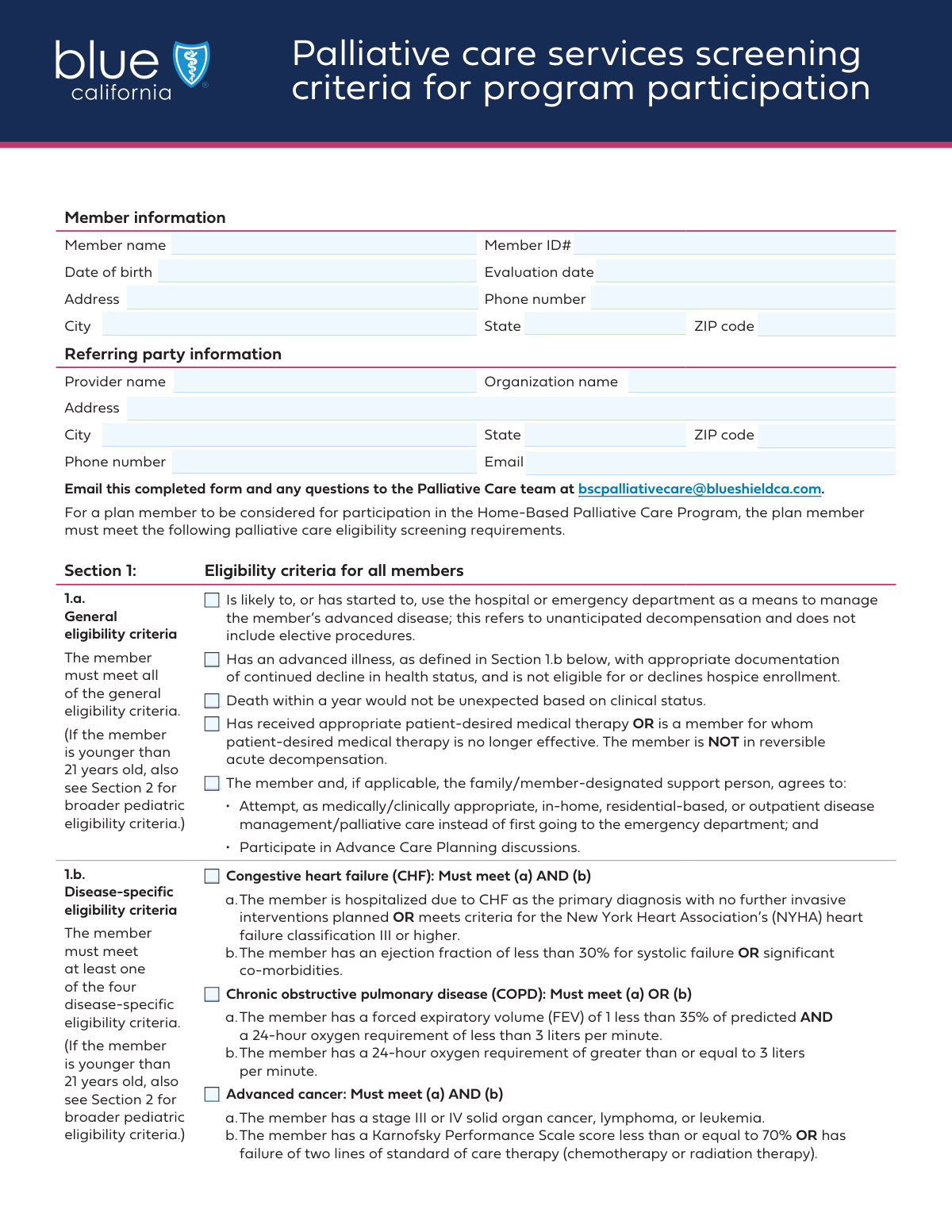
Yes! You can use AI to fill out Blue Shield of California Palliative Care Program Eligibility Screening Tool

This form is a comprehensive checklist for healthcare providers to determine if a patient meets the criteria for Blue Shield of California's palliative care program. It covers general health decline, specific advanced diseases, and patient consent, ensuring that individuals with serious illnesses receive appropriate supportive care. Today, this form can be filled out quickly and accurately using AI-powered services like Instafill.ai, which can also convert non-fillable PDF versions into interactive fillable forms.
Our AI automatically handles information lookup, data retrieval, formatting, and form filling.
It takes less than a minute to fill out BSC Palliative Care Screening Tool using our AI form filling.
Securely upload your data. Information is encrypted in transit and deleted immediately after the form is filled out.

Form specifications

Form name: Blue Shield of California Palliative Care Program Eligibility Screening Tool
Number of fields: 44
Number of pages: 2
Language: English
Categories: Blue Shield of California forms, CAR forms, L.A. Care forms
main-image

Instafill Demo: How to fill out PDF forms in seconds with AI

How to Fill Out BSC Palliative Care Screening Tool Online for Free in 2026

Are you looking to fill out a BSC PALLIATIVE CARE SCREENING TOOL form online quickly and accurately? Instafill.ai offers the #1 AI-powered PDF filling software of 2026, allowing you to complete your BSC PALLIATIVE CARE SCREENING TOOL form in just 37 seconds or less.
Follow these steps to fill out your BSC PALLIATIVE CARE SCREENING TOOL form online using Instafill.ai:
  1. 1 Navigate to Instafill.ai and upload the Palliative Care Program Eligibility Screening Tool or select it from the available templates.
  2. 2 Use the AI assistant to accurately fill in the Member Information, including name, member ID, and contact details.
  3. 3 Enter the complete information for the Referring Party, such as the provider's name, organization, and address.
  4. 4 Carefully review and check all applicable boxes under the General and Disease-Specific Eligibility Criteria sections based on the patient's condition.
  5. 5 Complete the section on the patient's Home-Based Palliative Care Program Status and indicate if a referral for evaluation is being made.
  6. 6 Review all entered information for accuracy, then finalize and prepare the form for submission to Blue Shield of California.

Our AI-powered system ensures each field is filled out correctly, reducing errors and saving you time.

Why Choose Instafill.ai for Your Fillable BSC Palliative Care Screening Tool Form?

Speed

Complete your BSC Palliative Care Screening Tool in as little as 37 seconds.

Up-to-Date

Always use the latest 2026 BSC Palliative Care Screening Tool form version.

Cost-effective

No need to hire expensive lawyers.

Accuracy

Our AI performs 10 compliance checks to ensure your form is error-free.

Security

Your personal information is protected with bank-level encryption.

Frequently Asked Questions About Form BSC Palliative Care Screening Tool

This form is used by healthcare providers to evaluate a member's eligibility for a Home-Based Palliative Care Program based on their health status and specific medical conditions.

A referring provider, such as a Primary Care Physician (PCP) or a specialist who is familiar with the member's medical history and current condition, should complete this form.

You will need the member's personal information (name, ID, DOB, address), your practice's contact details, and specific clinical information about the member's diagnosis to check the appropriate eligibility criteria.

No, this form is for evaluating eligibility for palliative care, which can be provided alongside curative treatments. The form notes that the member should not be eligible for or has declined hospice to qualify for this program.

The form suggests that a member should meet these general criteria to be considered for the program. These criteria establish the foundational need for palliative services, such as having an advanced illness and agreeing to advance care planning.

If the member's condition is not listed under the 'Disease-specific eligibility criteria', you can check the 'Other' box and provide a detailed description in the 'Other Eligibility Criteria' field.

Yes, there is a separate section for members under 21. You must confirm the family/guardian agrees to pediatric palliative care and then select from a different list of disease-specific criteria applicable to younger patients.

Submitting this form initiates a referral for a full Palliative Care Service Evaluation. The program will then assess the member's eligibility, and the outcome will determine their enrollment status.

If an eligible member declines to participate in the program, you should check the box for 'Member did not agree to enroll' in the 'Home-Based Palliative Care Program Status' section.

Yes, services like Instafill.ai use AI to accurately auto-fill form fields from your existing records, which can save you time and help prevent errors.

To fill this form online, you can upload it to Instafill.ai. The platform's AI will help you complete the required fields quickly and accurately before you download or print the completed document.

You can use a service like Instafill.ai to make the form interactive. Simply upload the non-fillable PDF, and the tool will convert it into a fillable format that you can complete on your computer.

Compliance BSC Palliative Care Screening Tool
Validation Checks by Instafill.ai

1
Ensures Evaluation Date is Chronologically Correct
This validation checks that the 'Evaluation Date' is on or after the member's 'Date of Birth'. It is impossible for an evaluation to occur before a person is born, so this check prevents logical and data entry errors. If the validation fails, the user will be prompted to correct one or both of the dates before submission.
2
Validates Consistency of Age-Related Fields
This check verifies that if the 'Member under 21' box is checked, the member's age calculated from the 'Date of Birth' and 'Evaluation Date' is indeed less than 21. This maintains data integrity and ensures that pediatric-specific logic and fields are triggered correctly. A mismatch would require the user to correct either the date of birth or the checkbox selection.
3
Requires Pediatric Consent When Applicable
This validation ensures that if the member is identified as being under 21, the 'Family/guardian agrees to pediatric palliative care' checkbox must be selected. This is a critical consent requirement for treating minors and ensures legal and procedural compliance. The form cannot be submitted for a minor without this explicit agreement being checked.
4
Enforces Mutually Exclusive Program Status
This check ensures that only one option is selected within the 'Home-Based Palliative Care Program Status' section (e.g., 'Member enrolled in program', 'Member did not agree to enroll'). A member cannot have multiple statuses simultaneously, and this rule prevents contradictory data. If more than one option is selected, an error will be displayed, forcing the user to choose the single correct status.
5
Validates Conditional Enrollment Date
This validation rule ensures that the 'Enrollment Date' field is populated with a valid date if the 'Member enrolled in program' checkbox is selected. The date is essential for tracking program metrics and patient history. If the box is checked but the date is missing or invalid, the submission will be blocked until a proper date is provided.
6
Requires Details for 'Other' Disease Criteria
This check confirms that if the 'Other' checkbox is selected under 'Disease-specific eligibility criteria', the corresponding 'Other Eligibility Criteria' text field is not empty. This ensures that selections of 'Other' are always accompanied by a necessary explanation for proper evaluation and record-keeping. Failure to provide details will result in a validation error prompting the user to describe the condition.
7
Verifies Eligibility Criteria Completeness
This validation ensures that at least one 'General Eligibility Criteria' checkbox AND at least one 'Disease-Specific Eligibility Criteria' checkbox are selected. This is crucial to confirm the member meets the minimum requirements for the program from both a general and clinical perspective. The form will be considered incomplete and cannot be submitted if either category lacks a selection.
8
Validates ZIP Code Format
This check verifies that the 'ZIP Code' fields for both the member and the referring party follow a valid format (e.g., 5 digits like '12345' or 9 digits like '12345-6789'). Correctly formatted ZIP codes are essential for accurate mailings, location-based services, and data standardization. An invalid format will trigger an error message requiring the user to correct the entry.
9
Validates Phone Number Format
This rule ensures that the 'Phone Number' fields for both the member and the referring party are entered in a recognized format (e.g., 10 digits with or without separators). Proper formatting is critical for ensuring the contact information is usable for communication and integrates correctly with other systems. The user will be prompted to re-enter the number if the format is not recognized.
10
Validates Referring Party Email Format
This check ensures the 'Email' address provided for the referring party contains a valid format, including an '@' symbol and a domain. A valid email is necessary for electronic communication, sending confirmations, and follow-ups regarding the referral. If the entry does not resemble a valid email address, the system will reject it and ask for a correction.
11
Requires Details for PCP/Specialist Referral
This validation ensures that if the 'Refer member for Palliative Care Service Evaluation' box is checked, the 'PCP/Specialist Referral Information' text area is filled out. This context is vital for the receiving party to understand the reason for the referral and any pertinent clinical details. The submission will be blocked until this required information is provided.
12
Checks for Logical Conflict with Hospice Enrollment
This validation cross-references the 'General Eligibility Criteria' with the 'Home-Based Palliative Care Program Status'. It flags a potential conflict if 'Member enrolled in hospice' is checked, as one of the general criteria states the member 'declines hospice enrollment'. This check helps identify potentially inconsistent submissions that may require manual review or clarification to ensure the member is being directed to the appropriate program.

Common Mistakes in Completing BSC Palliative Care Screening Tool

Inconsistent or Illogical Dates

Users often enter dates that are logically inconsistent, such as an 'Evaluation Date' that occurs before the member's 'Date of Birth'. This error can also manifest as entering a birth date for a minor but failing to complete the pediatric-specific sections of the form. These mistakes delay processing as they require manual verification and correction. To avoid this, double-check all dates for logical sense before submission; AI-powered tools like Instafill.ai can automatically flag such inconsistencies during data entry.

Misinterpreting Complex Eligibility Criteria

The form contains criteria with complex logic, such as requiring 'both condition (a) and condition (b)' or 'either (a) or (b)'. Referrers may hastily check a box after reading only one part of the condition, leading to an incorrect eligibility assessment. This can result in the wrongful denial or approval of services. Carefully read the full description for each criterion to ensure all conditions are met before checking the box.

Confusing Member and Referring Party Information

The form has separate, nearly identical sections for the member's and the referring party's contact information. It is very common for users to accidentally enter the member's address in the provider's section, or vice-versa. This error can lead to correspondence being sent to the wrong address, causing significant delays. To prevent this, carefully review the section headers ('Member Information' vs. 'Referring Party Information') for each field you complete.

Ignoring Conditional Fields

Many fields on this form are conditional, meaning they should only be filled out if a specific checkbox is selected (e.g., providing details for 'Other' diseases). A frequent mistake is either checking the box and leaving the required details blank, or providing details without checking the corresponding box. This creates an incomplete or confusing submission. AI form-filling tools like Instafill.ai can help by automatically showing or requiring fields based on your previous selections.

Selecting Contradictory Program Statuses

In the 'Home-Based Palliative Care Program Status' section, users sometimes select multiple, mutually exclusive options, such as checking both 'Member enrolled in program' and 'Member did not agree to enroll'. This indicates a misunderstanding of the form and makes it impossible to determine the member's actual status. Only one status should be selected to accurately reflect the outcome of the evaluation.

Incomplete or Informal Names and IDs

People often enter nicknames, initials, or incomplete names in the 'Member Name' or 'Provider Name' fields, when a full legal name is required for identification. Similarly, typos or missing digits in the 'Member ID' are frequent and will cause the submission to fail matching in the system. These errors are critical as they prevent proper record linkage. Always use the full, official name and double-check the Member ID against official documentation.

Mishandling Pediatric-Specific Sections

The form has specific criteria that apply only if the member is under 21. A common error is either filling out these sections for an adult patient or, more frequently, failing to complete them for an eligible pediatric patient. This oversight can lead to an automatic rejection or a delay while the correct information is requested. Pay close attention to the 'Fill only if...' instructions to ensure the correct sections are completed based on the member's age.

Incorrect Data Formatting

Basic data entry errors, such as formatting a phone number as '(123) 456-7890' instead of '123-456-7890' or a date as 'DD-MM-YYYY' instead of 'MM/DD/YYYY', are extremely common. While seemingly minor, these formatting mistakes can be rejected by automated processing systems. If the form is a non-fillable PDF, tools like Instafill.ai can convert it to a fillable version and help prevent these errors by automatically formatting data into the required standard.

Incomplete Address Blocks

Users frequently leave address fields incomplete, most often omitting the ZIP code or state. This happens when people are rushing or assume the information is known. An incomplete address prevents verification and can stop important mail from being delivered, delaying the entire palliative care evaluation process. Always fill out the complete street address, city, state, and ZIP code for both the member and the referring party.
Saved over 80 hours a year

“I was never sure if my IRS forms like W-9 were filled correctly. Now, I can complete the forms accurately without any external help.”

Kevin Martin Green

Your data stays secure with advanced protection from Instafill and our subprocessors

Robust compliance program

Transparent business model

You’re not the product. You always know where your data is and what it is processed for.

ISO 27001, HIPAA, and GDPR

Our subprocesses adhere to multiple compliance standards, including but not limited to ISO 27001, HIPAA, and GDPR.

Security & privacy by design

We consider security and privacy from the initial design phase of any new service or functionality. It’s not an afterthought, it’s built-in, including support for two-factor authentication (2FA) to further protect your account.

Fill out BSC Palliative Care Screening Tool with Instafill.ai

Worried about filling PDFs wrong? Instafill securely fills blue-shield-of-california-palliative-care-program-eligibility-screening-tool forms, ensuring each field is accurate.