
Yes! You can use AI to fill out Blue Shield of California Promise Health Plan Medi-Cal Group Doula Provider Quality Check Form
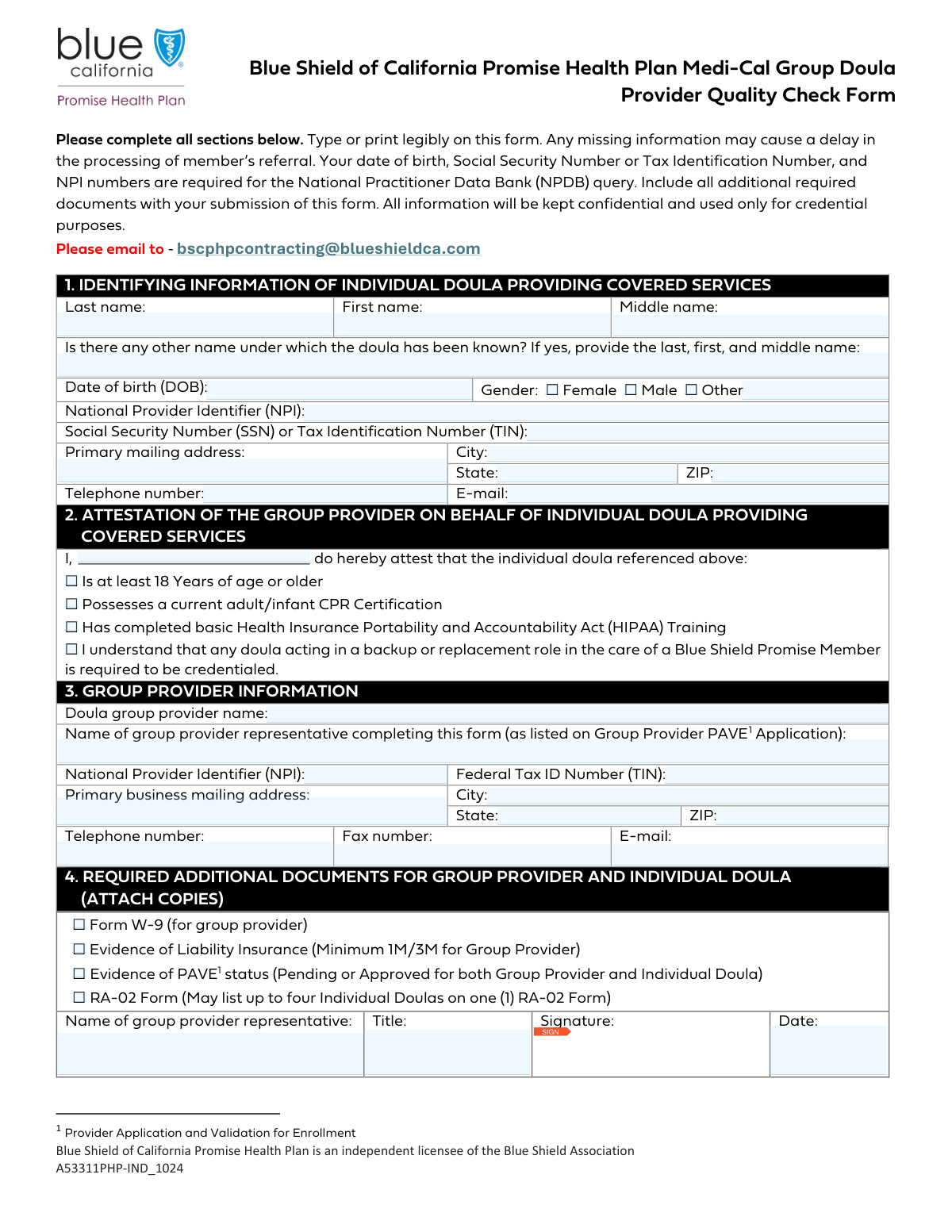
Don't type 41 fields by hand. Tell our AI about yourself, or upload your insurance card, and it fills every field in seconds. You check it, then download, print or sign.
The AI does the filling. You just check it.
No typing into boxes, nothing to install.
What this form asks for
The AI fills all of it, from your answers or your documents.
The AI checks your answers before you download
14 checks built for this form, so a wrong date or a missing answer is caught before anyone else sees it.
This validation ensures the National Provider Identifier (NPI) for the individual doula is a 10-digit number. It also performs a checksum validation (Luhn algorithm) to verify the NPI's structural integrity. This is critical for the National Practitioner Data Bank (NPDB) query mentioned on the form, and failure to provide a valid NPI will prevent credentialing and cause processing delays.
This check validates that the Social Security Number (SSN) or Tax Identification Number (TIN) for the individual doula is in the correct format. It must be either a 9-digit SSN (XXX-XX-XXXX) or a 9-digit TIN. This information is required for the NPDB query and for tax reporting purposes, so an invalid or missing number will halt the application process.
This validation checks that the provided Date of Birth (DOB) is in a valid format (e.g., MM/DD/YYYY) and confirms the individual is at least 18 years old. It cross-references the DOB with the attestation checkbox 'Is at least 18 Years of age or older'. If the DOB indicates the person is under 18, or if it conflicts with the attestation, the form submission will be flagged for review as it violates a key eligibility requirement.
This check ensures that all four checkboxes in the 'Attestation of the Group Provider' section are marked as 'checked'. These attestations regarding age, CPR certification, HIPAA training, and understanding of backup doula credentialing are mandatory declarations. An incomplete attestation section indicates the group provider cannot or has not verified these essential requirements, leading to an immediate rejection of the form.
This validation verifies that the Federal Tax ID Number (TIN) for the group provider is a 9-digit number, typically in an XX-XXXXXXX format. This number is essential for verifying the business entity, processing payments, and for tax purposes with the IRS. An incorrectly formatted or missing Group TIN will cause delays in both credentialing and financial setup.
This check ensures the National Provider Identifier (NPI) for the doula group provider is a valid 10-digit number. Similar to the individual NPI check, it should include a Luhn algorithm checksum to ensure the number is valid and not a simple typo. A valid group NPI is necessary for billing, referrals, and proper identification within the healthcare system.
And 8 more checks
- Email Address Syntax Validation
- Required Fields Completeness for Individual Doula
- Required Fields Completeness for Group Provider
- Signature Date Logical Check
- State and ZIP Code Format Validation
- Representative Name Consistency
- Required Document Attachment Confirmation
- Telephone Number Format
Let AI fill out your A53311PHP-IND_1024
No typing. Every field filled in seconds, checked, ready to sign.
How to Fill Out A53311PHP-IND_1024 Online for Free in 2026
What the AI walks you through.
- Navigate to Instafill.ai and upload or select the Blue Shield of California Group Doula Provider Quality Check Form.
- Allow the AI to scan and identify all the required fields, such as individual doula information, group provider details, and attestations.
- Provide the necessary information for the individual doula, including their full name, NPI, SSN/TIN, and contact details, by answering simple questions.
- Enter the group provider's information, including the group name, NPI, Federal Tax ID, and the representative's details.
- Review and complete the attestation section, and use the platform to gather and attach all required documents like the Form W-9, proof of insurance, and PAVE status evidence.
- Carefully review the auto-filled form for accuracy, then electronically sign in the designated signature fields for the group provider representative.
- Download the completed and signed form, ready for submission via email to [email protected] as instructed.
Common Mistakes in Completing A53311PHP-IND_1024
The ones the AI is built to catch.
Confusing Individual vs. Group Provider Identifiers
Missing Required Document Attachments
Providing Incomplete Name Information
Entering Incorrect Critical Data (DOB, SSN, NPI)
Failing to Complete the Attestation Section
Submitting an Unsigned or Undated Form
Using Inconsistent Group Representative Names
Submitting an Illegible Handwritten Form
Submitting Non-Compliant Liability Insurance
Providing an Incomplete Mailing Address
Frequently Asked Questions About A53311PHP-IND_1024
Is it really free for 7 days?
Can I fill other forms too?
How do I cancel?
How does the AI fill out A53311PHP-IND_1024?
What happens to my information?
How complex is A53311PHP-IND_1024 to fill out?
What is the purpose of the Group Doula Provider Quality Check Form?
Who is responsible for completing and submitting this form?
Why do I need to provide the individual doula's Social Security Number (SSN) and date of birth?
What documents must be submitted along with this form?
What is 'PAVE status' and what do I need to provide?
What is the difference between the information required in Section 1 and Section 3?
What if we use a backup doula? Do they also need to be credentialed?
How do I submit the completed form and all the required documents?
How long will it take to process this form?
The form asks for 'any other name under which the doula has been known.' What should be included here?
Can I use an AI tool to help me fill out this form?
How can I use Instafill.ai to complete this form online?
The PDF version of this form I have is not fillable. What can I do?
Get your A53311PHP-IND_1024 filled out by AI
$0 today. Cancel before Nov 4 and you pay nothing.
Other forms like this one
Medi-Cal forms: Form OWCP-915, Claim for Medical Reimbursement, Form 8994, Employer Credit for Paid Family and Medical Leave, Form OF-178, Certificate of Medical Examination, Form N-648, Medical Certification for Disability Exceptions, U.S. Coast Guard Form CG-719K, Application for Medical Certificate, The Department of Medical Assistance Services Applied Behavior Analysis Preservice Service Authorization Request Form (Effective Dates of Service 09/01/2025 and after), State of Illinois Department of Children and Family Services Medical Report on an Adult in a Child Care Facility (CFS 602), Carer Payment and Carer Allowance – Medical Report (SA431) for a child under 16 years, Medically Prescribed Treatment (Non-Medication) Form — Provider Treatment Order Form | Office of School Health | School Year 2025–2026, VA Form 10-7959f-2, Foreign Medical Program (FMP) Claim Cover Sheet, ABA Authorization Request (Medi-Cal) – Initial and Concurrent Requests, Department of Medical Assistance Services Applied Behavior Analysis (97155, Et al.) Initial Service Authorization Request Form, Applied Behavior Analysis Concurrent Service Authorization Request Form (CPT Codes 97153, 97154, 97155, 97156, 97157, 97158, 0373T) – Virginia Department of Medical Assistance Services, Department of Medical Assistance Services Enhanced Services Individual Service Plan (ISP) Template, Form DS-1843, Medical History and Examination for Individuals Age 12 and Older, Scheduled Medical Leave of Absence (MLOA) - BLET 13, Admissions Application, School of Diagnostic Imaging, Mills-Peninsula Medical Center, Albany Medical Center 2024 Benefits Guide, Form BWC-1141, Request for Medical Information, VA Form 21P-8416, Medical Expense Report
Blue Shield of California forms: Blue Shield of California Prior Authorization Request Form for Applied Behavioral Analysis (ABA) – Commercial Products, Blue Shield of California Prior Authorization Request Form, Blue Shield of California Urgent Request for Prior Authorization, Blue Shield of California Network Participation Letter of Intent, Blue Shield of California Promise Health Plan Long Term Care Treatment Authorization Request Form, Blue Shield of California Servicing Provider Change Request Form, Blue Shield of California Promise Health Plan Referral Form, Blue Shield of California Community Supports (CS) Request Form, Blue Shield of California Promise Health Plan Health Education Referral Form, Blue Shield of California Palliative Care Program Eligibility Screening Tool
health forms: Form 1095-A, Health Insurance Marketplace Statement, Form 8889, Health Savings Accounts, Form WH-380-E, Certification of Health Care Provider, Form 7206, Self-Employed Health Ins. Ded., Form 8885, Health Coverage Tax Credit, Form WH-380-F, Certification of Health Care Provider, Form 1095-C, Employer-Provided Health Insurance Offer and Coverage, Form 1095-B, Health Coverage, Form I-905, Application for Authorization to Issue Certification for Health Care Workers, Form BHVH, Outpatient Behavioral Health – ABA Treatment Request, Form SHA, Separation Health Assessment, DHS-6696-ENG, Minnesota Health Care Programs Application (MNsure/DHS), Geisinger Health Plan Behavioral Health Professional Services Questionnaire, Priority Health Small Group Renewal Decision Form, Form CH-006: PA-BH-Res-PCS, Oregon Behavioral Health Support Program Plan of Care Authorization (Plan of Care Request for Behavioral Health Residential or Personal Care Services), Form 7206 (2025), Self-Employed Health Insurance Deduction, HIPAA Authorization Form, Authorization for the Release of Protected Health Information, Prior Authorization (PA) Request Form – Adult Palliative Care (Alameda Alliance for Health), Medicare Enrolment Application (Australia) – Enrol in Medicare, Re-enrol/Extend Eligibility, Enrol a Newborn, and Register for My Health Record, Alameda Alliance for Health Prior Authorization (PA) Request Form – Adult Palliative Care
Blue Shield forms: Blue Shield of California Network Participation Letter of Intent, Blue Shield of California Prior Authorization Request Form for Applied Behavioral Analysis (ABA) – Commercial Products, Applied Behavior Analysis (ABA) Initial Assessment Request and Clinical Service Request Form – Blue Cross and Blue Shield of Illinois (BCBSIL), Horizon Blue Cross Blue Shield of New Jersey Applied Behavior Analysis Supplemental Information Form, Blue Shield of California Prior Authorization Request Form, Blue Shield of California Urgent Request for Prior Authorization, Blue Cross and Blue Shield of Texas Average Employee Count Form, Blue Cross and Blue Shield of Texas Group Enrollment Application/Change Form, Blue Shield Promise Durable Medical Equipment (DME) Treatment Authorization Request Form, Blue Shield Promise Universal Prior Authorization Form, Blue Shield of California Promise Health Plan Long Term Care Treatment Authorization Request Form, Blue Shield Promise Community Health Worker (CHW) Services Recommendation Form, Blue Shield Promise Treatment Authorization Request Form, Blue Shield of California Servicing Provider Change Request Form, Blue Shield of California Promise Health Plan Referral Form, Blue Shield of California Community Supports (CS) Request Form, Blue Shield of California Promise Health Plan Health Education Referral Form, Blue Shield of California Palliative Care Program Eligibility Screening Tool, Blue Shield Promise Continuity of Care Request Form
California health forms: California HIPAA Authorization Form, Authorization for the Release of Protected Health Information, California Department of Social Services Form RFA 07 (2/18), Resource Family Approval (RFA) Health Questionnaire (Mandatory), Blue Shield of California Promise Health Plan Long Term Care Treatment Authorization Request Form, Blue Shield of California Promise Health Plan Referral Form, Blue Shield of California Promise Health Plan Health Education Referral Form, Partnership HealthPlan of California Doula Application, Form CR-400, Petition/Application Under Health and Safety Code Section 11361.8—Adult Crimes, Form CR-403, Order After Petition/Application Under Health and Safety Code Section 11361.8—Adult Crimes, Form CARE-101, Mental Health Declaration—CARE Act Proceedings, Form CR-401, Proof of Service for Petition/Application Under Health and Safety Code Section 11361.8—Adult Crimes, Form CR-402, Prosecuting Agency's Response to Petition/Application Under Health and Safety Code Section 11361.8—Adult Crimes, Form CR-412/MIL-412, Petition for Resentencing Based on Health Conditions due to Military Service Listed in Penal Code Section 1170.91(b), Form CARE-102, Petition to Begin CARE Act Proceedings By Licensed Behavioral Health Professional Only, Form HC-002, Petition for Writ of Habeas Corpus—LPS Act (Mental Health), Form HC-003, Petition for Writ Of Habeas Corpus—Penal Commitment (Mental Health), Advance Health Care Directive (California Probate Code Section 4701), Health & Human Services Agency California Department of Social Services APPLICATION FOR A FAMILY CHILD HOME LICENSE LIC 279
Let AI fill out your A53311PHP-IND_1024
Your trial starts once a card is added. You pay nothing before Nov 4.
Our AI already knows this form, all 41 fields of it. Skip the typing: tell it about yourself, or upload what you have, and it fills the whole form in seconds.
- AI fills every field on the form, checkboxes included
- No typing into boxes: answer a few questions, or upload your insurance card, an old copy of this form, a photo of a document
- The AI checks the answers; you review and change anything before you download
- Download the finished PDF, print it, or sign it online
- Encrypted, and never used to train AI
Cancel before Nov 4 and you pay nothing.
A card is needed to start the trial. Cancel in two clicks from your account.
Terms · Privacy