Yes! You can use AI to fill out VA Form 21P-8416, Medical Expense Report

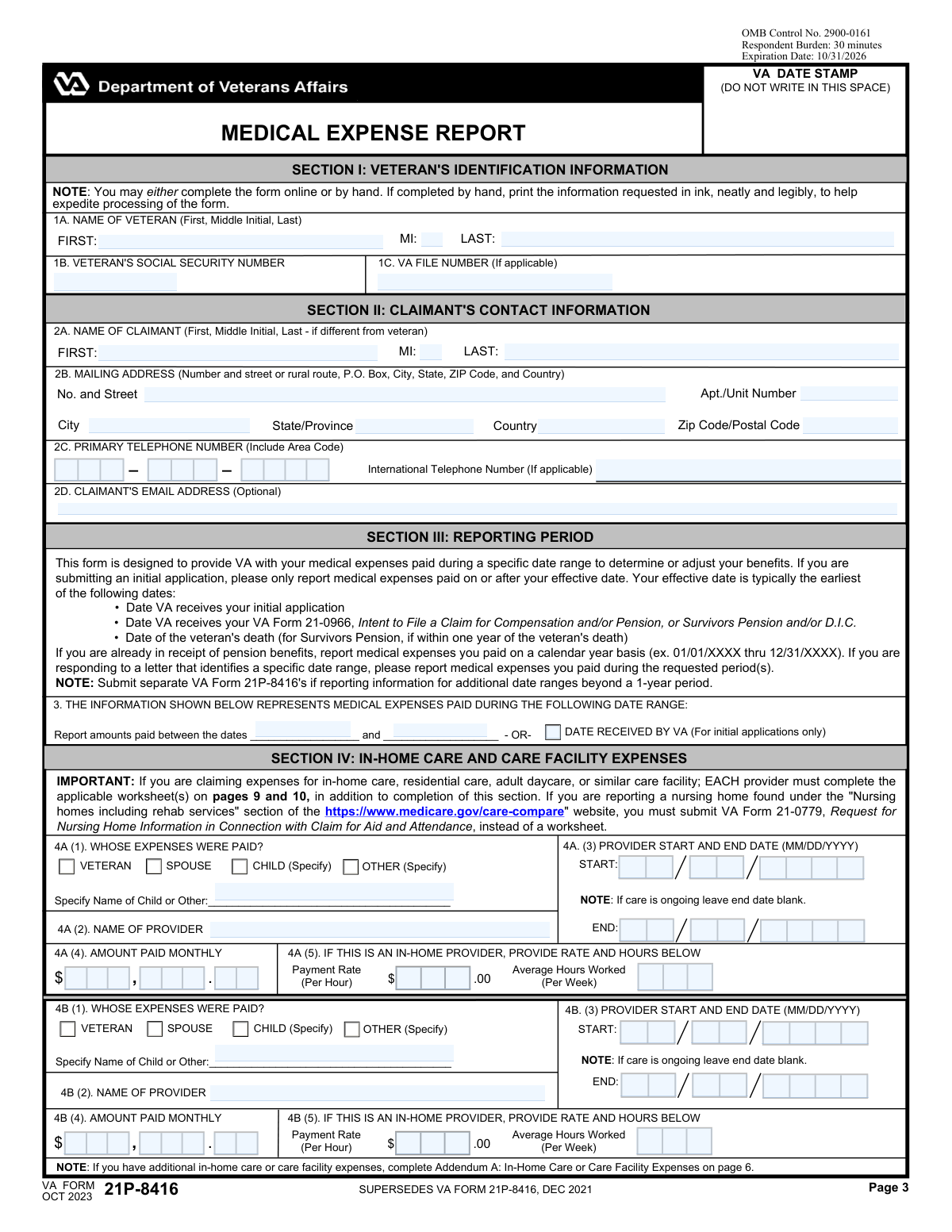
VA Form 21P-8416, the Medical Expense Report, is a Department of Veterans Affairs document used to report medical, hospital, and nursing home expenses that have not been reimbursed. This information helps the VA determine a claimant's eligibility for certain benefits or to adjust their income calculations for pension purposes. Today, this form can be filled out quickly and accurately using AI-powered services like Instafill.ai, which can also convert non-fillable PDF versions into interactive fillable forms.
Our AI automatically handles information lookup, data retrieval, formatting, and form filling.
It takes less than a minute to fill out 21P-8416 using our AI form filling.
Securely upload your data. Information is encrypted in transit and deleted immediately after the form is filled out.

Form specifications

Form name: VA Form 21P-8416, Medical Expense Report
Number of pages: 10
Language: English
Categories: medical forms, medical report forms, VA medical forms, Medi-Cal forms
main-image

Instafill Demo: How to fill out PDF forms in seconds with AI

How to Fill Out 21P-8416 Online for Free in 2026

Are you looking to fill out a 21P-8416 form online quickly and accurately? Instafill.ai offers the #1 AI-powered PDF filling software of 2026, allowing you to complete your 21P-8416 form in just 37 seconds or less.
Follow these steps to fill out your 21P-8416 form online using Instafill.ai:
  1. 1 Navigate to Instafill.ai and upload or select VA Form 21P-8416.
  2. 2 Provide the veteran's and claimant's identification information in Section 1, including names, Social Security Number, VA file number, and contact details.
  3. 3 Complete the sections for reporting medical expenses, such as costs for nursing homes, in-home care providers, or assisted living facilities, providing details like provider names, dates of care, and monthly amounts paid.
  4. 4 Detail any unreimbursed hospital or other medical/dental expenses, including the purpose of the expense, the provider, and the amount paid.
  5. 5 List any travel expenses incurred for medical purposes, specifying the location, date, and miles traveled.
  6. 6 Carefully review all entered information, then complete the certification section by signing and dating the form. If the claimant signs with an 'X', two witnesses must also sign.
  7. 7 Download, print, and submit the completed and signed form to the appropriate VA office as instructed.

Our AI-powered system ensures each field is filled out correctly, reducing errors and saving you time.

Why Choose Instafill.ai for Your Fillable 21P-8416 Form?

Speed

Complete your 21P-8416 in as little as 37 seconds.

Up-to-Date

Always use the latest 2026 21P-8416 form version.

Cost-effective

No need to hire expensive lawyers.

Accuracy

Our AI performs 10 compliance checks to ensure your form is error-free.

Security

Your personal information is protected with bank-level encryption.

Frequently Asked Questions About Form 21P-8416

This form is used to report unreimbursed medical expenses to the VA for a veteran, their spouse, or dependents. Reporting these expenses can help reduce your countable income, which may result in an increase in your VA pension or other benefits.

The claimant is the person filling out the form and applying for benefits. This could be the veteran themselves, their spouse, a dependent, or an authorized representative acting on their behalf.

You should gather the veteran's Social Security Number and VA File Number, as well as detailed records of your medical expenses. This includes provider names, dates of service, monthly amounts paid, and any receipts or statements for care.

Use the main form sections to list the provider's name, payment details, and dates of care. Additionally, your in-home care provider must complete the 'Worksheet for In-Home Attendant Expenses' detailing the services they provide.

An administrator or licensed medical professional from the facility must complete the 'Worksheet for an Assisted Living, Adult Daycare, or a Similar Facility'. This worksheet captures the facility's details, services provided, and monthly charges.

The form instructions state that if care is ongoing, you should leave the 'Provider End Date' field blank. On the specific worksheets for facilities or in-home care, there is often an 'Indefinite' checkbox you can select.

Yes, there is a section for reporting travel expenses for trips to a hospital, clinic, or pharmacy. You will need to provide the date, location, total miles traveled, and the cost of the trip.

ADLs are 'Activities of Daily Living' (e.g., bathing, dressing, eating), and IADLs are 'Instrumental Activities of Daily Living' (e.g., shopping, housekeeping, managing medications). The worksheets require the provider to check which of these activities they assist the care recipient with.

If the claimant signs the form with an 'X' in Section 7, you are required to have two witnesses. Section 8 provides the necessary space for the witnesses to print their names, addresses, and provide their signatures.

Yes, services like Instafill.ai use AI to help you accurately auto-fill form fields from your saved profile. This can save you significant time and help reduce errors, especially on complex forms like this.

You can use a service like Instafill.ai to upload the form and fill it out on your computer or mobile device. This allows you to type directly into the fields, save your progress, and easily print or download the completed document.

If you have a flat, non-fillable PDF, you can upload it to a service like Instafill.ai. Their technology can convert the static PDF into an interactive, fillable form that you can complete online, saving you from having to print and fill it out by hand.

While the VA File Number helps expedite processing, the veteran's Social Security Number is the most critical piece of information. If you cannot find the file number, ensure the SSN is entered correctly and leave the VA File Number field blank.

Compliance 21P-8416
Validation Checks by Instafill.ai

1
Veteran's SSN Format Validation
This check verifies that the 'VETERAN'S SOCIAL SECURITY NUMBER' field contains exactly 9 digits. It is crucial for correctly identifying the veteran in VA systems and preventing data mismatches. If the input is not a 9-digit number, the form submission should be rejected with an error message prompting the user to enter a valid SSN.
2
Veteran's Name Completeness
This validation ensures that the 'Veteran First Name' and 'Veteran Last Name' fields in Section 1 are not empty. A complete name is the primary identifier for the veteran and is essential for processing the claim. A failure to provide a complete name would halt processing and require manual follow-up.
3
Claimant's Address Completeness
This check confirms that the claimant's primary address fields ('Claimant Street Address', 'Claimant City', 'Claimant State', and 'Claimant ZIP Code') are all populated. A complete and valid mailing address is mandatory for all official correspondence, including decision letters and requests for information. If any part of the core address is missing, the form cannot be processed correctly.
4
Reporting Period Date Logic
This validation ensures that the 'Report End Date' is on or after the 'Report Start Date'. A report's time range cannot end before it begins, as this would be a logical impossibility. This check prevents nonsensical data entry that would make it impossible to determine the correct period for which expenses are being claimed, leading to rejection of the expense report.
5
Provider Care Period Logic
This check verifies that for each provider listed, the 'Provider Care End Date' is on or after the 'Provider Care Start Date'. This rule is waived if the end date is intentionally left blank, as the form notes this indicates ongoing care. This validation ensures the timeline of care is logical and prevents errors in calculating the duration and cost of services.
6
Conditional Payer Specification
This validation rule checks that if the 'Child (Specify)' or 'Other (Specify)' checkbox is selected in sections like 4A or 4B, the corresponding text field for the name is filled out. This information is required to verify who paid for the medical expenses. If the box is checked but the name is missing, the submission should be flagged for correction to ensure the claim is complete.
7
Travel Date within Reporting Period
This check ensures that any 'Date Traveled' entered in Section 6 falls within the overall 'Report Start Date' and 'Report End Date' specified in Section 3. Travel expenses are only reimbursable if they occurred during the claimed reporting period. An invalid travel date would result in the rejection of that specific travel expense line item.
8
Signature Date Validity
This validation confirms that the 'Date Signed' in Section 7 is a valid date that is not in the future. It should also logically be on or after the 'Report End Date', as the claimant is certifying expenses that have already occurred. An invalid signature date can call the authenticity and timing of the certification into question, potentially delaying the claim.
9
Conditional Witness Requirement
This check enforces the rule that if the claimant's signature in '7. A. SIGNATURE OF CLAIMANT' is an 'X', then the information for two witnesses in Section 8 must be complete. This includes the printed name, signature, and full address for both witnesses. Failure to provide the required witness information when signing with a mark invalidates the signature and will cause the form to be rejected.
10
Claimant Email Address Format
This validation verifies that the value entered in the 'Claimant's Email Address' field conforms to a standard email format (e.g., '[email protected]'). If the form uses multiple fields for the email, they must be combined and then validated. A valid email is important for electronic communication, and this check prevents data entry errors that would make contact impossible.
11
US Phone Number Structure
This check validates that the 'Claimant Phone Area Code', 'Claimant Phone Prefix', and 'Claimant Phone Line Number' fields contain 3, 3, and 4 digits respectively. It ensures that a complete, 10-digit US phone number is provided for contact purposes. Incomplete or incorrectly formatted numbers prevent communication and can delay claim processing.
12
Worksheet Care End Date Logic
On the facility and in-home care worksheets, this check validates that if the 'Indefinite' box for the care end date is not checked, a valid date is entered in the 'DATE CARE WILL END' fields. Furthermore, this date must be on or after the 'DATE OF ADMISSION' or 'DATE CARE BEGAN'. This ensures the service period is accurately documented for expense calculation.
13
In-Home Provider Rate and Hours Requirement
This validation ensures that when an in-home provider is listed (e.g., in section 4.B.(5) or the specific worksheet), the 'Payment Rate (Per Hour)' and 'Average Hours Worked (Per Week)' fields are filled with positive numeric values. These details are essential for calculating and verifying the total medical expense being claimed. Missing this information makes the expense entry incomplete and unverifiable.
14
US ZIP Code Format
This check validates that the 'Claimant ZIP Code' field contains a valid 5-digit or 9-digit (ZIP+4) numeric format. Correctly formatted ZIP codes are essential for mail delivery and address verification. An invalid format can lead to returned mail and significant delays in communication with the claimant.

Common Mistakes in Completing 21P-8416

Incorrectly Splitting Date and Monetary Fields

This form frequently breaks single data points, like dates (MM, DD, YYYY) and currency (Dollars, Cents), into multiple fields. People often enter the full value in the first box (e.g., '12/25/2024' in the 'Month' field) or misplace the values. This error guarantees processing delays as the data is unreadable, and may lead to the rejection of the expense claim. To avoid this, carefully enter only the requested part of the data in each box, for example, '15' in the dollars field and '50' in the cents field for a rate of $15.50.

Confusing 'Veteran' and 'Claimant' Information

The form requires separate identification for the 'Veteran' and the 'Claimant'. This is confusing when the veteran is also the claimant, leading some to fill out only one section or enter conflicting information. This can cause significant delays while the VA verifies the identity of the individuals involved. To prevent this, if the veteran is the claimant, fill out both sections completely and identically to ensure clarity.

Forgetting to Specify 'Child' or 'Other' Details

Multiple sections have checkboxes for 'Child (Specify)' or 'Other (Specify)' that require a name or relationship to be written in an adjacent field. It is a common oversight to check the box but forget to provide the required specification. This omission makes the entry incomplete and the associated expense may be disallowed. Always double-check that any 'Specify' option is accompanied by the necessary written details.

Mishandling the Provider 'End Date' for Ongoing Care

The form instructs users to leave the provider 'End Date' blank if care is ongoing, but this instruction is easily missed. Many people will enter a future date or the date they are filling out the form, which can lead to a premature termination of benefits or require frequent refiling. If care is indefinite, ensure the 'End Date' field for that provider is left completely empty as instructed.

Missing Required Signatures and Dates

Forgetting to sign and date the form in Section 7 is one of the most frequent and critical errors, resulting in the form being immediately returned and unprocessed. People are often focused on the complex expense details and simply overlook the final certification step. Before submitting, always perform a final review focused specifically on ensuring the 'Signature of Claimant' and 'Date Signed' fields are completed.

Incorrectly Handling Witness Signatures

Section 8 specifies that two witnesses are required only if the claimant signs with an 'X'. People either fail to get witnesses when necessary, which invalidates the form, or they get them unnecessarily, which can cause confusion. This mistake happens due to not reading the specific instructions for the signature block. Carefully read Section 8 and only obtain witness signatures and addresses if the claimant cannot sign their name and uses an 'X' mark instead.

Inconsistent or Incomplete Provider Information

The form contains numerous repetitive sections for listing different medical providers and expenses. It is easy to enter inconsistent provider names, dates, or payment amounts across these sections, or to leave a section partially filled. These inconsistencies require manual review and clarification, delaying the claim. To avoid this, list each provider's information consistently and complete all relevant fields for each expense entry before moving to the next.

Illegible Handwriting on Paper Forms

The form explicitly requests printing information neatly in ink, but handwritten submissions are often difficult to read. Illegible handwriting is a primary source of data entry errors by VA staff, leading to incorrect calculations, misidentified claimants, and significant processing delays. The best way to avoid this is to complete the form online if possible. If you only have a non-fillable PDF, an AI tool like Instafill.ai can convert it into a fillable version, ensuring all entries are perfectly legible.

Improper Completion of Provider Worksheets

The form includes separate worksheets for 'Assisted Living' and 'In-Home Attendant' expenses, which must be completed by a facility administrator or provider, not the claimant. Claimants sometimes fill these out themselves, or the provider uses the wrong worksheet for the type of care given. This error invalidates the expense verification. Ensure the correct worksheet is given to the appropriate care provider and that they, not you, complete and sign it.

Fragmented Address and Contact Information

This form has an unusual and error-prone design where addresses, phone numbers, and even email addresses are split into multiple, separate fields (e.g., 'Claimant Email Address (part 1)', '(part 2)'). Users are likely to enter the entire piece of information into the first box, leaving the others blank. This will cause the data to be truncated and incomplete, potentially making it impossible for the VA to contact the claimant. AI-powered form fillers like Instafill.ai can automatically parse and correctly distribute this information into the proper fragmented fields, preventing this type of error.
Saved over 80 hours a year

“I was never sure if my IRS forms like W-9 were filled correctly. Now, I can complete the forms accurately without any external help.”

Kevin Martin Green

Your data stays secure with advanced protection from Instafill and our subprocessors

Robust compliance program

Transparent business model

You’re not the product. You always know where your data is and what it is processed for.

ISO 27001, HIPAA, and GDPR

Our subprocesses adhere to multiple compliance standards, including but not limited to ISO 27001, HIPAA, and GDPR.

Security & privacy by design

We consider security and privacy from the initial design phase of any new service or functionality. It’s not an afterthought, it’s built-in, including support for two-factor authentication (2FA) to further protect your account.

Fill out 21P-8416 with Instafill.ai

Worried about filling PDFs wrong? Instafill securely fills va-form-21p-8416-medical-expense-report forms, ensuring each field is accurate.