
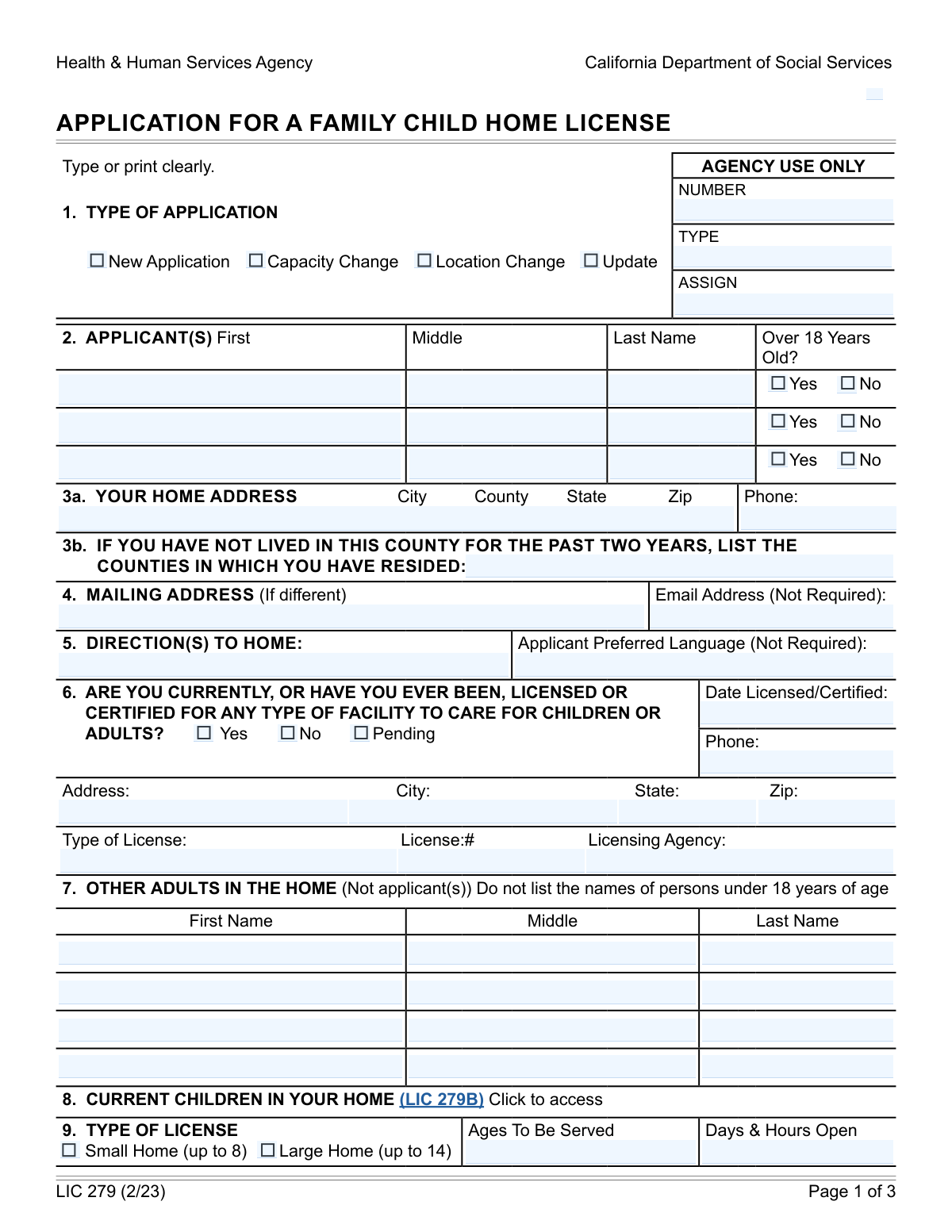
Yes! You can use AI to fill out Health & Human Services Agency California Department of Social Services APPLICATION FOR A FAMILY CHILD HOME LICENSE LIC 279
Don't type 65 fields by hand. Tell our AI about yourself, or upload your insurance card, and it fills every field in seconds. You check it, then download, print or sign.
The AI does the filling. You just check it.
No typing into boxes, nothing to install.
What this form asks for
The AI fills all of it, from your answers or your documents.
The AI checks your answers before you download
16 checks built for this form, so a wrong date or a missing answer is caught before anyone else sees it.
Ensures that at least one 'Type of Application' (New Application, Capacity Change, Location Change, or Update) is selected. This is crucial for routing the application to the correct processing workflow and ensuring the agency understands the applicant's intent. Failure to select a type will prevent the application from being processed.
Validates that for each applicant listed, the 'Over 18 Years Old?' field is correctly answered. Applicants must be 18 or older to be licensed. If 'No' is selected for any applicant, their details should not be processed for licensing, or an error should be flagged to ensure compliance with age requirements.
Checks that for each applicant marked as 'Over 18 Years Old? Yes', the First Name, Middle Name (or initial), and Last Name fields are completed. This ensures the applicant can be accurately identified and that the license will be issued with the correct legal name. Incomplete names will lead to processing delays or rejection.
Verifies that the 'YOUR HOME ADDRESS' field (including street, city, county, state, and ZIP code) is fully populated. This address is the primary location for the licensed facility and must be accurate for inspections and official correspondence. An incomplete address will halt the application process.
Ensures the 'Phone:' field under 'YOUR HOME ADDRESS' is a valid phone number format (e.g., XXX-XXX-XXXX or (XXX) XXX-XXXX). This is essential for the agency to contact the applicant regarding their home. An invalid format may indicate an error and require correction.
Validates that if the applicant has not lived in the current county for the past two years, the 'Other counties resided in (past two years)' field is populated with the names of those counties. This check is important for understanding the applicant's history and potential jurisdictional considerations. Missing information here could lead to further investigation.
And 10 more checks
- Mailing Address Consistency
- License/Certification Status Selection
- Conditional License/Certification Details
- Other Adults in Home Identification
- Type of License Capacity Selection
- Ages to Be Served Format
- Days & Hours Open Format
- Applicant Signature Presence
- Signature City and County
- Signature Date
Let AI fill out your LIC 279
No typing. Every field filled in seconds, checked, ready to sign.
How to Fill Out LIC 279 Online for Free in 2026
What the AI walks you through.
- Navigate to Instafill.ai and upload or select the LIC 279 form.
- Provide basic information such as the type of application (New, Capacity Change, etc.) and applicant details.
- Enter home and mailing addresses, contact information, and any previous licensing history.
- Specify the type of license desired (Small or Large Home) and details about the ages and hours of care.
- Review and confirm the applicant/licensee responsibilities and the perjury statement.
- Electronically sign the application and provide the city, county, and date of signing.
- Submit the completed form through Instafill.ai or download it for manual submission.
Common Mistakes in Completing LIC 279
The ones the AI is built to catch.
Incorrectly selecting 'Type of Application'
Omitting or incorrectly formatting applicant names
Incomplete or incorrect home address entry
Failure to list previous counties of residence
Not providing complete previous license/certification details
Excluding other adults residing in the home
Incorrectly specifying the 'Type of License' capacity
Vague or incomplete 'Ages To Be Served' and 'Days & Hours Open' entries
Missing signatures or incorrect signing details
Not enclosing the application/licensing fee
Failure to attach required supplementary forms
Frequently Asked Questions About LIC 279
Is it really free for 7 days?
Can I fill other forms too?
How do I cancel?
How does the AI fill out LIC 279?
What happens to my information?
How complex is LIC 279 to fill out?
What is the purpose of the Application for a Family Child Home License (LIC 279)?
Who needs to fill out the LIC 279 form?
What information is required to complete the LIC 279 form?
Do I need to provide directions to my home?
What if I have lived in multiple counties in the past two years?
What is the difference between a 'Small Home' and a 'Large Home' license?
What are the 'Applicant/Licensee Responsibilities' listed in section 10?
Do I need to list other adults living in my home?
What is the 'Perjury Statement' in section 11?
How long does it take to process this application?
Can I use AI tools to help fill out this form?
What if the PDF form is not fillable?
Where can I find the LIC 279B form mentioned in section 8?
What should I do if I need more space for information, like listing other adults?
Get your LIC 279 filled out by AI
$0 today. Cancel before Nov 13 and you pay nothing.
Other forms like this one
social services forms: California Department of Social Services (CDSS) Community Care Licensing Child Care Forms Packet (LIC 9150, LIC 282, LIC 627, LIC 700, LIC 995A, CDPH 286, LIC 9227), Missouri Department of Social Services, Family Support Division — Application for Supplemental Nutrition Assistance Program (SNAP) (MO 886-0460 / FS-1), California Department of Social Services (CDSS) Community Care Licensing Division — Administrative Organization (LIC 309), California Department of Social Services Form RFA 07 (2/18), Resource Family Approval (RFA) Health Questionnaire (Mandatory), California Department of Social Services, Sworn Statement, AAP 2, Reassessment Information - Adoption Assistance Program, Adoption Assistance Program (AAP) - Request for Benefits, Adoption Assistance Program (AAP) Eligibility Certification, Adoption Assistance Program (AAP) Rate Questionnaire, Adoption Assistance Program Nonrecurring Adoption Expense Agreement and Claim
human services forms: State of Illinois Department of Human Services (IDHS) – Bureau of Child Care and Development Child Care Application (Form IL444-3455), Arlington County Department of Human Services, Water Recreation Facility License Application
health services forms: Geisinger Health Plan Behavioral Health Professional Services Questionnaire, Form CH-006: PA-BH-Res-PCS, Oregon Behavioral Health Support Program Plan of Care Authorization (Plan of Care Request for Behavioral Health Residential or Personal Care Services), California Department of Social Services Form RFA 07 (2/18), Resource Family Approval (RFA) Health Questionnaire (Mandatory), Texas Standard Prior Authorization Request Form for Health Care Services, Form T-3, Children with Special Health Care Needs (CSHCN) Services Program Application, Behavioral Health Treatment/Applied Behavioral Analysis/Autism Services Recommendation Form, Blue Shield Promise Community Health Worker (CHW) Services Recommendation Form, Community Health Worker (CHW) Services Request for Extension of Services, San Francisco Health Plan (SFHP) Doula Services Attestation Form
social service forms: California Department of Social Services (CDSS) Community Care Licensing Child Care Forms Packet (LIC 9150, LIC 282, LIC 627, LIC 700, LIC 995A, CDPH 286, LIC 9227), Missouri Department of Social Services, Family Support Division — Application for Supplemental Nutrition Assistance Program (SNAP) (MO 886-0460 / FS-1), California Department of Social Services (CDSS) Community Care Licensing Division — Administrative Organization (LIC 309), California Department of Social Services Form RFA 07 (2/18), Resource Family Approval (RFA) Health Questionnaire (Mandatory), California Department of Social Services, Sworn Statement
health department forms: California Department of Social Services Form RFA 07 (2/18), Resource Family Approval (RFA) Health Questionnaire (Mandatory), Utah Department of Health Provider Agreement for Medicaid, Gallatin City-County Health Department Wastewater Treatment System Application, New York State Department of Health Certificate of Qualification Questionnaire - Virology, New York State Department of Health Medicare Savings Program Application
California health forms: California HIPAA Authorization Form, Authorization for the Release of Protected Health Information, California Department of Social Services Form RFA 07 (2/18), Resource Family Approval (RFA) Health Questionnaire (Mandatory), Blue Shield of California Promise Health Plan Long Term Care Treatment Authorization Request Form, Blue Shield of California Promise Health Plan Referral Form, Blue Shield of California Promise Health Plan Health Education Referral Form, Blue Shield of California Promise Health Plan Medi-Cal Group Doula Provider Quality Check Form, Partnership HealthPlan of California Doula Application, Form CR-400, Petition/Application Under Health and Safety Code Section 11361.8—Adult Crimes, Form CR-403, Order After Petition/Application Under Health and Safety Code Section 11361.8—Adult Crimes, Form CARE-101, Mental Health Declaration—CARE Act Proceedings, Form CR-401, Proof of Service for Petition/Application Under Health and Safety Code Section 11361.8—Adult Crimes, Form CR-402, Prosecuting Agency's Response to Petition/Application Under Health and Safety Code Section 11361.8—Adult Crimes, Form CR-412/MIL-412, Petition for Resentencing Based on Health Conditions due to Military Service Listed in Penal Code Section 1170.91(b), Form CARE-102, Petition to Begin CARE Act Proceedings By Licensed Behavioral Health Professional Only, Form HC-002, Petition for Writ of Habeas Corpus—LPS Act (Mental Health), Form HC-003, Petition for Writ Of Habeas Corpus—Penal Commitment (Mental Health), Advance Health Care Directive (California Probate Code Section 4701)
California social services forms: Form SOC 295, Application for In-Home Supportive Services, California Department of Social Services (CDSS) Community Care Licensing Child Care Forms Packet (LIC 9150, LIC 282, LIC 627, LIC 700, LIC 995A, CDPH 286, LIC 9227), California Department of Social Services (CDSS) Community Care Licensing Division — Administrative Organization (LIC 309), California Department of Social Services Form RFA 07 (2/18), Resource Family Approval (RFA) Health Questionnaire (Mandatory), California Department of Social Services, Sworn Statement
Let AI fill out your LIC 279
Your trial starts once a card is added. You pay nothing before Nov 13.
Our AI already knows this form, all 65 fields of it. Skip the typing: tell it about yourself, or upload what you have, and it fills the whole form in seconds.
- AI fills every field on all 3 pages, tables and checkboxes included
- No typing into boxes: answer a few questions, or upload your insurance card, an old copy of this form, a photo of a document
- The AI checks the answers; you review and change anything before you download
- Download the finished PDF, print it, or sign it online
- Encrypted, and never used to train AI
Cancel before Nov 13 and you pay nothing.
A card is needed to start the trial. Cancel in two clicks from your account.
Terms · Privacy