
Yes! You can use AI to fill out Missouri Department of Social Services, Family Support Division — Application for Supplemental Nutrition Assistance Program (SNAP) (MO 886-0460 / FS-1)
Don't type 450 fields by hand. Tell our AI about yourself, or upload a document you already have, and it fills every field in seconds. You check it, then download, print or sign.
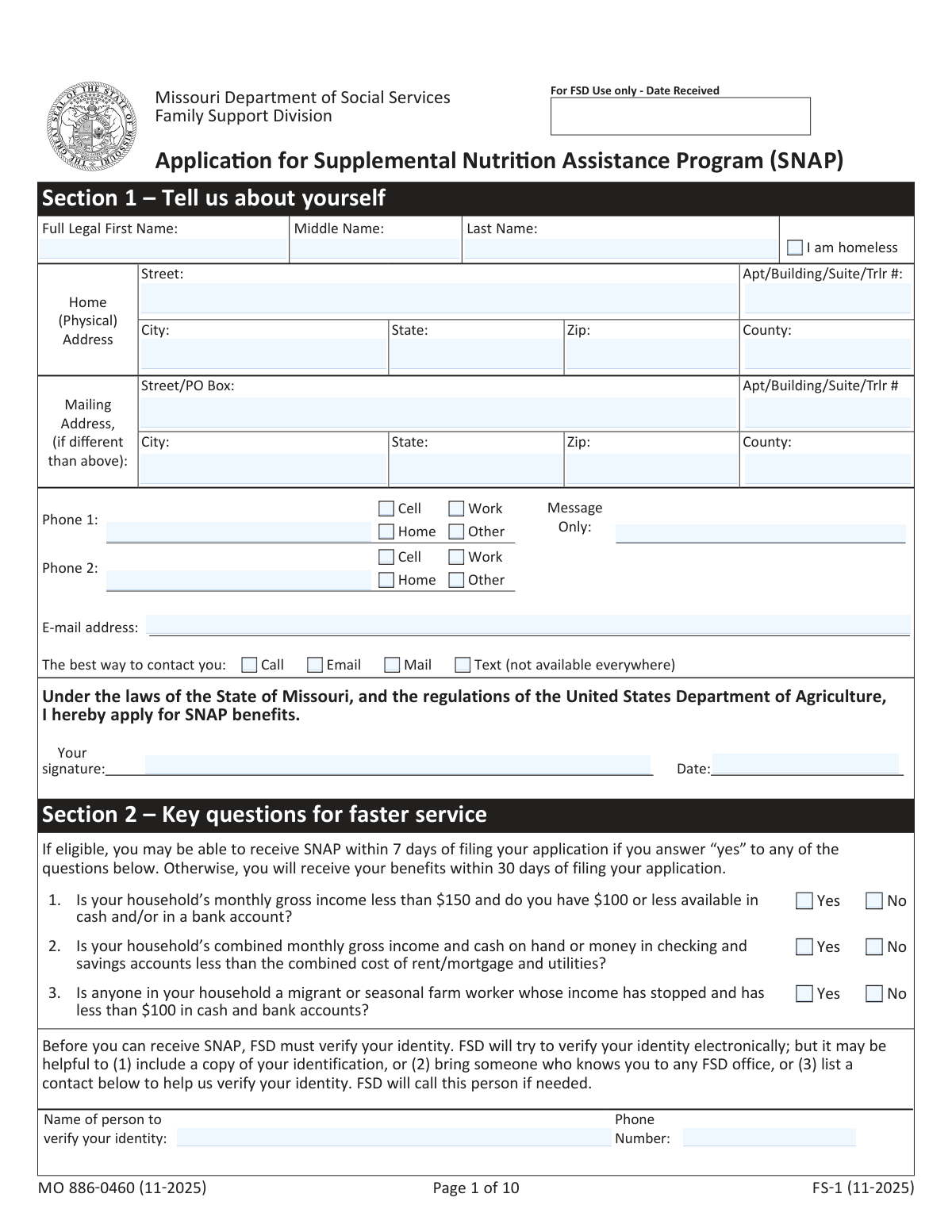
The AI does the filling. You just check it.
No typing into boxes, nothing to install.
What this form asks for
The AI fills all of it, from your answers or your documents.
The AI checks your answers before you download
16 checks built for this form, so a wrong date or a missing answer is caught before anyone else sees it.
Validates that the submission includes at least the applicant’s name, a physical or mailing address, and an applicant signature, since the form states these are required to establish a filing date. The system should confirm these fields are not blank and are not placeholder text (e.g., 'N/A'). If any are missing, the application should be flagged as incomplete and not treated as a valid SNAP filing until corrected.
Checks that the applicant signed in the required signature area and provided a signature date in a valid date format. The signature date should not be in the future and should be reasonably close to the application submission/received date. If validation fails, the system should prevent final submission (or route to exception handling) because an unsigned/undated application may not be processable.
Validates all date entries (e.g., date of application, household member DOBs, date disability began, date last received out-of-state benefits, date of final paycheck) are in an accepted format (MM/DD/YYYY or system-defined) and are real dates (no 02/30). This prevents downstream eligibility and timeline errors (e.g., expedited service, ABAWD screening, 30-day processing clock). If invalid, the system should prompt for correction and block calculations that depend on the date.
Ensures each listed household member DOB is plausible (not in the future, not unreasonably old) and supports age-based questions (e.g., 'age 18 or older enrolled in school', 'age 60 and older medical expenses'). This check reduces mismatches between declared conditions and computed ages. If inconsistent, the system should flag the record and require review/correction before eligibility rules are applied.
Validates Phone 1/Phone 2 and any other phone fields (identity verifier phone, employer phone) contain valid 10-digit US numbers (allowing standard punctuation) and optional extension handling if supported. Also checks that if the applicant selects 'Call' or 'Text' as best contact method, at least one phone number is provided and marked appropriately (cell for text). If validation fails, the system should request a corrected number or require a different contact method selection.
Checks that the email address, if entered, matches a standard email format and is not obviously invalid (missing '@' or domain). If 'Email' is selected as the best way to contact, an email must be present and valid. If invalid or missing, the system should prompt for correction or require changing the contact preference to avoid missed notices/interview coordination.
And 10 more checks
- Address completeness and USPS-style field requirements
- Expedited service (Section 2) yes/no responses are complete and mutually exclusive
- Identity verifier contact completeness when provided
- Household member roster integrity (required fields and at least one member)
- Buy & Eat indicator restricted to allowed values and consistent with household rules
- SSN format validation and per-person uniqueness (when provided)
- Conditional detail requirement for Section 4 declarations (Yes requires 'who')
- Out-of-state SNAP benefits details required when 'Yes' is selected
- Income and expense monetary fields are numeric, non-negative, and frequency provided where required
- Expense utility heating/cooling flags required when utility amounts are provided
Let AI fill out your MO 886-0460 (FS-1)
No typing. Every field filled in seconds, checked, ready to sign.
How to Fill Out MO 886-0460 (FS-1) Online for Free in 2026
What the AI walks you through.
- Enter applicant details in Section 1 (legal name, addresses, contact preferences, homelessness status if applicable) and sign/date to establish the filing date.
- Complete Section 2 expedited-service questions and provide an identity verification contact (or plan to upload/bring ID) to help FSD verify identity quickly.
- List all household members in Section 3 (relationship, DOB, SSN if provided, race/ethnicity optional, and whether you buy/cook/eat together) and answer EBT card and language questions.
- Answer Section 4 household declarations (fraud/conviction and related eligibility questions), naming the household member when a response is “Yes.”
- Fill out Section 5 household information: out-of-state SNAP, student status, disability, resources (accounts/retirement/digital cash), income (earned and unearned), and monthly expenses (housing/utilities, child support, care costs, medical expenses).
- Review Section 6 notices and certifications, choose any opt-outs for automated calls/texts, then sign and date the final signature page (include witness signature if you cannot sign).
- Upload or submit the completed application and any proof documents (e.g., ID, income, expenses) via mydssupload.mo.gov, mail, fax, or in person, then complete the required interview by answering FSD’s call or calling (855) 823-4908.
Common Mistakes in Completing MO 886-0460 (FS-1)
The ones the AI is built to catch.
Submitting without the minimum required filing information (name, address, signature)
Signing only once (or signing in the wrong place) and missing the required signature on page 10
Not providing a working phone number or not indicating the best way to contact you
Misunderstanding who must be listed as a household member in Section 3
Incorrectly marking the “Buy & Eat” (Y/N) field for household composition
Leaving Social Security Number and immigration/citizenship fields blank without understanding the impact
Answering expedited service questions incorrectly (Section 2) or leaving them blank
Not completing identity verification support (contact person) when electronic verification may fail
Reporting income in the wrong amount or frequency (net vs. gross, weekly vs. monthly)
Omitting “stopped or reduced income” details (final paycheck date/amount and whether it was voluntary)
Underreporting resources by forgetting certain account types (retirement, trusts, digital cash accounts)
Not claiming allowable expenses correctly (utilities, rent-includes-utilities note, medical/child care mileage)
Frequently Asked Questions About MO 886-0460 (FS-1)
Is it really free for 7 days?
Can I fill other forms too?
How do I cancel?
How does the AI fill out MO 886-0460 (FS-1)?
What happens to my information?
How complex is MO 886-0460 (FS-1) to fill out?
What is this form used for?
Who should be listed as a household member in Section 3?
What is the minimum information needed to file my SNAP application date (filing date)?
How can I submit (return) the SNAP application?
Do I have to do an interview, and how will it happen?
What if I miss FSD’s call or didn’t put a phone number on my application?
How long does it take to get a decision on my SNAP application?
Can I get SNAP faster than 30 days?
What proof (verification) will I need to provide with this application?
Do I have to provide Social Security numbers and immigration status for everyone in my household?
What does “Buy & Eat” mean in the household member table?
Do I need to report bank accounts, retirement accounts, or digital cash accounts?
What income and expenses should I report on this application?
How will I receive SNAP benefits if I’m approved?
Can someone else apply or manage SNAP benefits for me?
Get your MO 886-0460 (FS-1) filled out by AI
$0 today. Cancel before Nov 1 and you pay nothing.
Other forms like this one
social services forms: California Department of Social Services (CDSS) Community Care Licensing Child Care Forms Packet (LIC 9150, LIC 282, LIC 627, LIC 700, LIC 995A, CDPH 286, LIC 9227), California Department of Social Services (CDSS) Community Care Licensing Division — Administrative Organization (LIC 309), California Department of Social Services Form RFA 07 (2/18), Resource Family Approval (RFA) Health Questionnaire (Mandatory), California Department of Social Services, Sworn Statement, AAP 2, Reassessment Information - Adoption Assistance Program, Adoption Assistance Program (AAP) - Request for Benefits, Adoption Assistance Program (AAP) Eligibility Certification, Adoption Assistance Program (AAP) Rate Questionnaire, Adoption Assistance Program Nonrecurring Adoption Expense Agreement and Claim, Health & Human Services Agency California Department of Social Services APPLICATION FOR A FAMILY CHILD HOME LICENSE LIC 279
SNAP forms: Authorized Representative Designation for FSD Benefits (SNAP, Temporary Assistance, and MO HealthNet), Application for Food and Nutrition Services (SNAP), Missouri Application for Temporary Assistance (TA) and Supplemental Nutrition Assistance Program (SNAP) Benefits
social service forms: California Department of Social Services (CDSS) Community Care Licensing Child Care Forms Packet (LIC 9150, LIC 282, LIC 627, LIC 700, LIC 995A, CDPH 286, LIC 9227), California Department of Social Services (CDSS) Community Care Licensing Division — Administrative Organization (LIC 309), California Department of Social Services Form RFA 07 (2/18), Resource Family Approval (RFA) Health Questionnaire (Mandatory), California Department of Social Services, Sworn Statement, Health & Human Services Agency California Department of Social Services APPLICATION FOR A FAMILY CHILD HOME LICENSE LIC 279
supplemental forms: Form F1C, Account Application Supplemental, Form I-130A, Supplemental Info for Spouse Beneficiary, Form 20-0995, Decision Review Request: Supplemental Claim, Form SSA-8000-BK, Application for Supplemental Security Income (SSI), Supplemental Alternative Documentation of Income (for use when other income documentation is not available), National Apartment Association (NAA) Rental Application for Residents and Occupants (Virginia) and Supplemental Rental Application for Units Under Government Regulated Affordable Housing Programs, Horizon Blue Cross Blue Shield of New Jersey Applied Behavior Analysis Supplemental Information Form, Form I-130A, Supplemental Information for Spouse Beneficiary, Form H1504, Commodity Supplemental Food Program Participant Application, Truckers/Warehouse Supplemental Application, Form UD-101, Plaintiff's Mandatory Cover Sheet and Supplemental Allegations—Unlawful Detainer, Missouri Application for Temporary Assistance (TA) and Supplemental Nutrition Assistance Program (SNAP) Benefits, Form S-320, Supplemental Application: LLC Ownership, Equestrian Day Camp Supplemental Application
SOC forms: Form SOC 295, Application for In-Home Supportive Services, Form 4137, Social Security and Medicare Tax on Unreported Tip Income, Form 8919, Uncollected Social Security and Medicare Tax, Form SS-5-FS, Application for a Social Security Card, Form SSA-4-BK, Application for Social Security Benefits, California Department of Social Services (CDSS) Community Care Licensing Child Care Forms Packet (LIC 9150, LIC 282, LIC 627, LIC 700, LIC 995A, CDPH 286, LIC 9227), Form SSA-1042S, Social Security Benefit Statement, Application for Scope of Clinical Practice (SoCP) – Application Form SoCP Only (v1.00 06/2014), Form SSA-3369-BK, Work History Report (Social Security Administration), California Department of Social Services (CDSS) Community Care Licensing Division — Administrative Organization (LIC 309), California/National Apartment Association Official Form B-15, Rental Application for Residents and Occupants (May 2015) with Application Agreement, National Apartment Association (NAA) Rental Application for Residents and Occupants (Virginia) and Supplemental Rental Application for Units Under Government Regulated Affordable Housing Programs, California Association of REALTORS® (C.A.R.) Form LR, Residential Lease or Month-to-Month Rental Agreement (Revised 12/19), Pacific Gastroenterology Associates Referral Form, Chicago Residential Lease for Apartments, Condominiums, Single Family Homes, and Townhomes (Chicago Association of REALTORS®) (V13.0 2026), Form 8919, Uncollected Social Security and Medicare Tax on Wages, Liantis / RSVZ – Aanvraagformulier voor vrijstelling van sociale bijdragen als zelfstandige (artikel 17 van het koninklijk besluit nr. 38 van 27 juli 1967), Form SSA-827 (06-2024), Authorization to Disclose Information to the Social Security Administration (SSA), Tesorería General de la Seguridad Social (TGSS) — Mandato / Orden de domiciliación de adeudos directos SEPA para el pago de cuotas de la Seguridad Social (TC 1/15-3, 06-2022), California Department of Social Services Form RFA 07 (2/18), Resource Family Approval (RFA) Health Questionnaire (Mandatory)
Let AI fill out your MO 886-0460 (FS-1)
Your trial starts once a card is added. You pay nothing before Nov 1.
Our AI already knows this form, all 450 fields of it. Skip the typing: tell it about yourself, or upload what you have, and it fills the whole form in seconds.
- AI fills every field on all 12 pages, tables and checkboxes included
- No typing into boxes: answer a few questions, or upload a document you already have, an old copy of this form, a photo of a document
- The AI checks the answers; you review and change anything before you download
- Download the finished PDF, print it, or sign it online
- Encrypted, and never used to train AI
Cancel before Nov 1 and you pay nothing.
A card is needed to start the trial. Cancel in two clicks from your account.
Terms · Privacy