
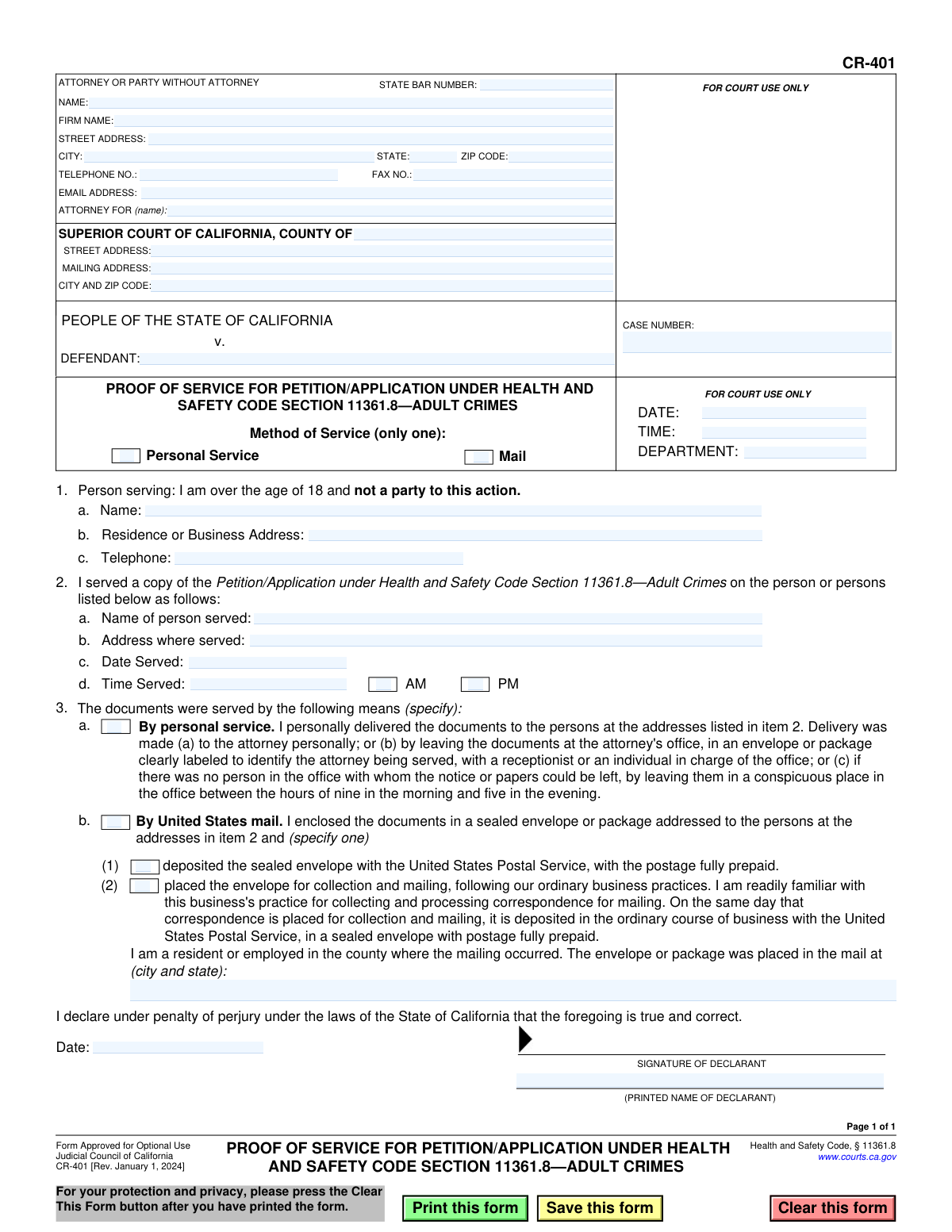
Yes! You can use AI to fill out Form CR-401, Proof of Service for Petition/Application Under Health and Safety Code Section 11361.8—Adult Crimes
Don't type 42 fields by hand. Tell our AI about yourself, or upload your insurance card, and it fills every field in seconds. You check it, then download, print or sign.
The AI does the filling. You just check it.
No typing into boxes, nothing to install.
What this form asks for
The AI fills all of it, from your answers or your documents.
The AI checks your answers before you download
12 checks built for this form, so a wrong date or a missing answer is caught before anyone else sees it.
This check verifies that the 'CASE NUMBER' field is not empty. The case number is the primary identifier for a legal action within the court system. Without it, the court clerk cannot file the document in the correct case file, which would result in the document being rejected or lost.
This check ensures that the value entered in the 'STATE BAR NUMBER' field is a valid number, typically consisting of up to 6 digits. This is important for correctly identifying the attorney of record with the State Bar of California. If the number is improperly formatted or invalid, it could lead to filing rejections or difficulty in verifying the attorney's credentials.
This validation verifies that the text entered in the 'EMAIL ADDRESS' field follows the standard '[email protected]' format. A valid email address is crucial for court communications and electronic service of documents. An invalid format would prevent the party or attorney from receiving critical case information, causing significant delays.
This validation ensures the 'DEFENDANT' name field is filled out. Along with the case number, the party names are essential for identifying the specific case to which this proof of service applies. An empty defendant field creates ambiguity and could lead to the document being misfiled or rejected by the court clerk.
The form specifies that only one method of service ('Personal Service' or 'Mail') should be chosen. This validation ensures that the user has selected one and only one of these primary checkboxes. Selecting both or neither would create ambiguity about how the service was performed, potentially invalidating the proof of service.
This check ensures that the 'Name' field in item 1a, identifying the person who performed the service, is not left blank. The identity of the server is a fundamental requirement for a valid proof of service, as they must be over 18 and not a party to the action. An omission here would render the proof of service incomplete and legally insufficient.
And 6 more checks
- Validates the Date of Service
- Ensures Service Time includes AM/PM
- Requires Sub-Option for Mail Service
- Ensures Mailing Location is Specified for Mail Service
- Verifies Declaration Date is On or After Service Date
- Ensures Declarant's Printed Name Matches Server's Name
Let AI fill out your CR-401
No typing. Every field filled in seconds, checked, ready to sign.
How to Fill Out CR-401 Online for Free in 2026
What the AI walks you through.
- Navigate to Instafill.ai and upload your CR-401 form or select it from the platform's template library.
- Provide the case information, including the court, county, case number, and the names of the parties involved.
- Enter the personal details of the person who served the documents, including their name, address, and telephone number.
- Specify the details of the service, such as the name of the person served, the address where service occurred, and the date and time of service.
- Select the method of service from the options provided (e.g., Personal Service or Mail) and complete any additional required details for that method.
- Review all the information populated by the AI for accuracy, then e-sign and date the declaration to certify its truthfulness.
- Download the completed form to file with the court and serve on the appropriate parties.
Common Mistakes in Completing CR-401
The ones the AI is built to catch.
Server Is a Party to the Action
Conflicting Dates of Service and Signature
Incomplete or Incorrect Case Number
Improper Method of Service Selection
Incomplete Mail Service Details
Incorrect Person Signing the Declaration
Ambiguous Identification of Person Served
Missing Time of Service or AM/PM
Using an Outdated Form Version
Incorrectly Filling the 'Attorney For' Field
Illegible Handwriting or Unfillable PDF Issues
Frequently Asked Questions About CR-401
Is it really free for 7 days?
Can I fill other forms too?
How do I cancel?
How does the AI fill out CR-401?
What happens to my information?
How complex is CR-401 to fill out?
What is the purpose of Form CR-401?
Who is supposed to fill out and sign this form?
Can I, the defendant, serve the petition and sign this form myself?
Who do I need to serve with the Petition/Application?
What information do I put in the 'ATTORNEY OR PARTY WITHOUT ATTORNEY' section?
What is the difference between 'Personal Service' and 'Service by Mail' in Section 3?
What do I do with Form CR-401 after it has been filled out and signed?
Where can I find the 'Case Number' for my form?
The PDF version of this form I have is not fillable. What can I do?
Can AI tools help me fill out Form CR-401?
How can I use Instafill.ai to complete this form online?
In Section 1, who is the 'person serving'?
Do I file this form before or after I serve the documents?
Get your CR-401 filled out by AI
$0 today. Cancel before Nov 1 and you pay nothing.
Other forms like this one
California court forms: Judicial Council of California Form SC-105, Request for Court Order and Answer (Small Claims), Judicial Council of California Form SC-120, Defendant’s Claim and ORDER to Go to Small Claims Court (Small Claims), Judicial Council of California Form SER-001, Request for Sheriff to Serve Court Papers, Judicial Council of California Form SER-001, Request for Sheriff to Serve Court Papers, Affidavit for Collection of Personal Property California Probate Code Section 13100, Form POS-040, Proof of Service—Civil, Declaration of Facts of Death (California Superior Court), declaration-of-marriage-for-court-proceeding-california-family-law, ADOPT-200, Adoption Request, ADOPT-200, Stepparent Adoption Request, ADOPT-210, Adoption Agreement, ADOPT-310, Contact After Adoption Agreement, Judicial Council of California Form ADOPT-200, Adoption Request, Form ADR-107, Mediation Attendance Sheet, Form ADR-110, Order Appointing Referee, Form ADR-109, Stipulation or Motion for Order Appointing Referee, Form ADR-102, Request for Trial De Novo After Judicial Arbitration, Form ADR-108, Referee's Report (Code Civ. Proc., §§ 638, 639), Form ADR-106, Petition to Confirm, Correct, or Vacate Contractual Arbitration Award, Form ADR-104, Rejection of Award and Request for Trial After Attorney-Client Fee Arbitration
California health forms: California HIPAA Authorization Form, Authorization for the Release of Protected Health Information, California Department of Social Services Form RFA 07 (2/18), Resource Family Approval (RFA) Health Questionnaire (Mandatory), Blue Shield of California Promise Health Plan Long Term Care Treatment Authorization Request Form, Blue Shield of California Promise Health Plan Referral Form, Blue Shield of California Promise Health Plan Health Education Referral Form, Blue Shield of California Promise Health Plan Medi-Cal Group Doula Provider Quality Check Form, Partnership HealthPlan of California Doula Application, Form CR-400, Petition/Application Under Health and Safety Code Section 11361.8—Adult Crimes, Form CR-403, Order After Petition/Application Under Health and Safety Code Section 11361.8—Adult Crimes, Form CARE-101, Mental Health Declaration—CARE Act Proceedings, Form CR-402, Prosecuting Agency's Response to Petition/Application Under Health and Safety Code Section 11361.8—Adult Crimes, Form CR-412/MIL-412, Petition for Resentencing Based on Health Conditions due to Military Service Listed in Penal Code Section 1170.91(b), Form CARE-102, Petition to Begin CARE Act Proceedings By Licensed Behavioral Health Professional Only, Form HC-002, Petition for Writ of Habeas Corpus—LPS Act (Mental Health), Form HC-003, Petition for Writ Of Habeas Corpus—Penal Commitment (Mental Health), Advance Health Care Directive (California Probate Code Section 4701), Health & Human Services Agency California Department of Social Services APPLICATION FOR A FAMILY CHILD HOME LICENSE LIC 279
proof of service forms: Form POS-040, Proof of Service—Civil, Judicial Council of California Form SC-104, Proof of Service (Small Claims), Judicial Council of California Form SC-104, Proof of Service (Small Claims), Form DV-200, Proof of Personal Service (CLETS) (Domestic Violence Prevention), Illinois Circuit Court Eviction Summons and Proof of Service of Eviction Summons & Eviction Complaint (Form E-S 3507.3), proof-of-electronic-service-appellate, Form APP-009, Proof of Service (Appellate Division), Form APP-109, Proof of Service (Appellate Division), Form GC-020(P), PROOF OF PERSONAL SERVICE OF NOTICE OF HEARING— GUARDIANSHIP OR CONSERVATORSHIP, Form APP-109E, Proof of Electronic Service (Appellate Division), Proof of Personal Service of Notice of Initial Appearance—CARE Act Proceedings, Form CARE-116, Proof of Personal Service of Notice of Hearing—CARE Act Proceedings, Form CR-106, Proof of Service — Criminal Record Clearing, CARE-107, Proof of Personal Service of Notice of Order for CARE Act Report, Form CIV-120, Notice of Entry of Dismissal and Proof of Service, Form DAL-012, Proof of Service—Disability Access Litigation, Form DE-120(P), Proof of Personal Service of Notice of Hearing—Decedent's Estate or Trust, Form EA-200, Proof of Personal Service (Elder or Dependent Adult Abuse Prevention), Form EA-260, Proof of Service of Order After Hearing by Mail (Elder or Dependent Adult Abuse Prevention), Form FL-115, Proof of Service of Summons (Family Law—Uniform Parentage—Custody and Support)
Let AI fill out your CR-401
Your trial starts once a card is added. You pay nothing before Nov 1.
Our AI already knows this form, all 42 fields of it. Skip the typing: tell it about yourself, or upload what you have, and it fills the whole form in seconds.
- AI fills every field on the form, checkboxes included
- No typing into boxes: answer a few questions, or upload your insurance card, an old copy of this form, a photo of a document
- The AI checks the answers; you review and change anything before you download
- Download the finished PDF, print it, or sign it online
- Encrypted, and never used to train AI
Cancel before Nov 1 and you pay nothing.
A card is needed to start the trial. Cancel in two clicks from your account.
Terms · Privacy