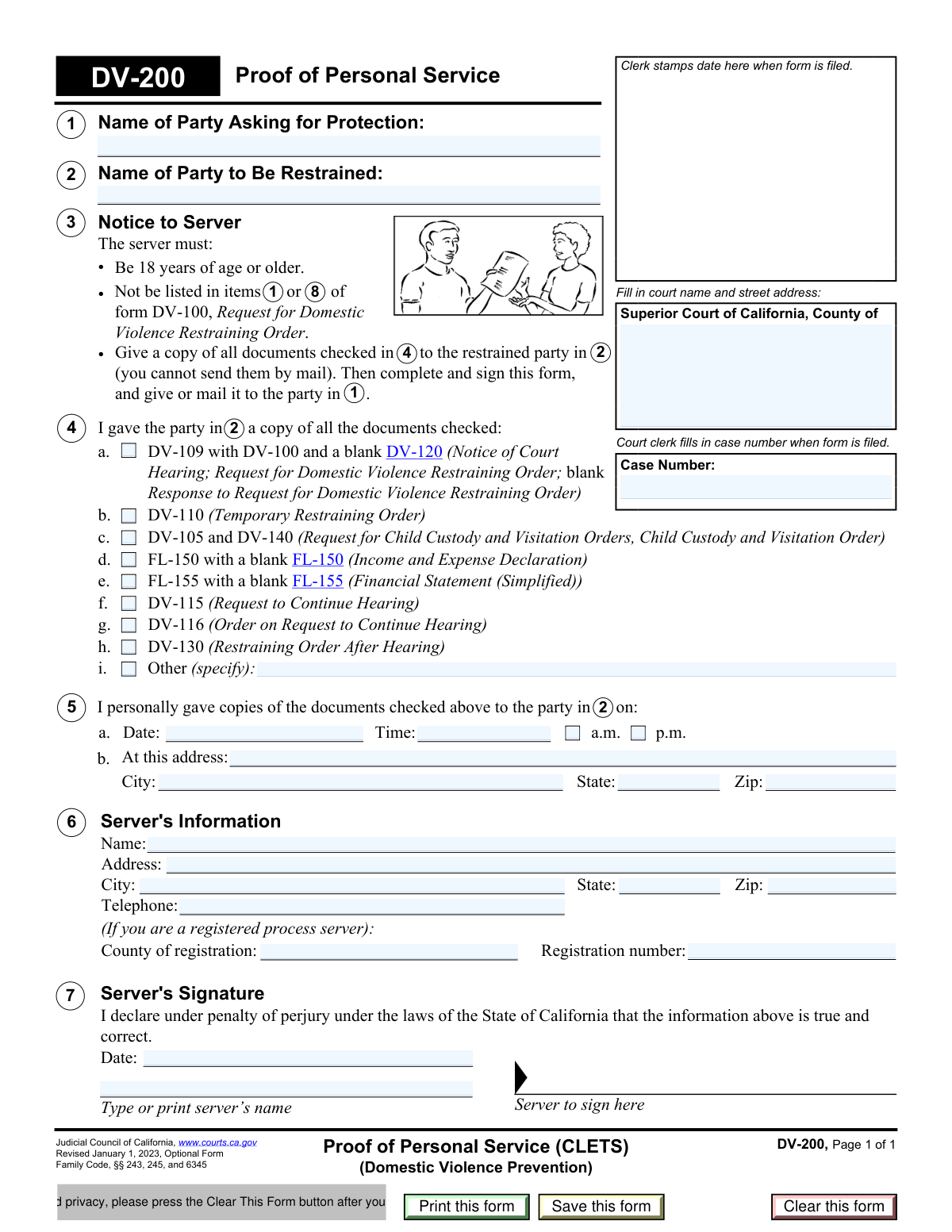
Yes! You can use AI to fill out Form DV-200, Proof of Personal Service (CLETS) (Domestic Violence Prevention)

Form DV-200, Proof of Personal Service (CLETS), is an official California court form issued by the Judicial Council of California under Family Code §§ 243, 245, and 6345. It is used by a process server or other qualified adult to certify, under penalty of perjury, that they personally delivered copies of domestic violence restraining order documents to the restrained party. The form captures critical details including which documents were served, the date, time, and location of service, and the server's identifying information. Today, this form can be filled out quickly and accurately using AI-powered services like Instafill.ai, which can also convert non-fillable PDF versions into interactive fillable forms.
Our AI automatically handles information lookup, data retrieval, formatting, and form filling.
It takes less than a minute to fill out DV-200 using our AI form filling.
Securely upload your data. Information is encrypted in transit and deleted immediately after the form is filled out.

Form specifications

Form name: Form DV-200, Proof of Personal Service (CLETS) (Domestic Violence Prevention)
Number of pages: 1
Language: English
Categories: California court forms, restraining order forms, family law forms, domestic violence forms
main-image

Instafill Demo: filling out a legal form in seconds

How to Fill Out DV-200 Online for Free in 2026

Are you looking to fill out a DV-200 form online quickly and accurately? Instafill.ai offers the #1 AI-powered PDF filling software of 2026, allowing you to complete your DV-200 form in just 37 seconds or less.
Follow these steps to fill out your DV-200 form online using Instafill.ai:
  1. 1 Navigate to Instafill.ai and search for or upload Form DV-200, Proof of Personal Service (CLETS), to begin filling it out online.
  2. 2 Enter the court name, street address, and case number in the designated fields at the top of the form, along with the names of the party asking for protection and the party to be restrained.
  3. 3 Check all applicable boxes in Section 4 to indicate which documents (e.g., DV-109, DV-110, DV-130, FL-150) were personally given to the restrained party, and specify any additional documents in the 'Other' field if needed.
  4. 4 Complete Section 5 by entering the date, time (and whether a.m. or p.m.), and full address where the documents were personally served on the restrained party.
  5. 5 Fill in the server's information in Section 6, including full name, address, city, state, ZIP code, telephone number, and county and registration number if the server is a registered process server.
  6. 6 Review all entered information for accuracy, then have the server enter the date and type or print their name in Section 7 before signing the form under penalty of perjury.
  7. 7 Print or save the completed form, file it with the appropriate Superior Court, and provide a copy to the party asking for protection as required.

Our AI-powered system ensures each field is filled out correctly, reducing errors and saving you time.

Why Choose Instafill.ai for Your Fillable DV-200 Form?

Speed

Complete your DV-200 in as little as 37 seconds.

Up-to-Date

Always use the latest 2026 DV-200 form version.

Cost-effective

No need to hire expensive lawyers.

Accuracy

Our AI performs 10 compliance checks to ensure your form is error-free.

Security

Your personal information is protected with bank-level encryption.

Frequently Asked Questions About Form DV-200

Form DV-200, 'Proof of Personal Service (CLETS),' is a California court form used in domestic violence cases to document that the restrained party was personally served with copies of court documents. It provides official proof to the court that the person named in the restraining order received the required legal papers.

The person who physically delivers (serves) the court documents to the restrained party must complete and sign Form DV-200. This is called the 'server' and must be someone other than the party asking for protection (the petitioner).

The server must be at least 18 years of age and must NOT be listed as a protected person in items 1 or 8 of form DV-100 (Request for Domestic Violence Restraining Order). This means the person asking for protection cannot serve the documents themselves.

No. The documents must be personally handed to the restrained party — mailing is not allowed for this type of service. Only after personal delivery is complete can the server mail or give the completed DV-200 form to the party asking for protection.

The documents to be served depend on your specific case, but may include DV-109, DV-100, DV-120, DV-110 (Temporary Restraining Order), DV-105, DV-140, FL-150, FL-155, DV-115, DV-116, DV-130, or other relevant court documents. Check every box that corresponds to a document you actually handed to the restrained party.

The server must provide their full name, address, city, state, ZIP code, and telephone number. If the server is a registered process server, they must also include their county of registration and registration number. The server must also record the exact date, time, and address where service took place.

Yes, the server must sign the form and by doing so declares under penalty of perjury under California law that all information provided is true and correct. Providing false information on this form can result in serious legal consequences.

After the server completes and signs the form, it should be filed with the court so the clerk can stamp the date and assign or confirm the case number. The server should also give or mail a copy to the party asking for protection (the petitioner).

A registered process server is not required — any person who is 18 or older and not listed as a protected party in the case can serve the documents. However, if a registered process server is used, they must include their county of registration and registration number on the form.

If you served documents that are not listed in items (a) through (h), check the 'Other (specify)' box in item 4 and write the name or description of those additional documents in the space provided.

Yes, you can use Instafill.ai to fill out Form DV-200 quickly and accurately online. The AI-powered service auto-fills form fields based on your information, reducing errors and saving time. Simply upload the form to Instafill.ai and follow the guided prompts to complete each section.

Yes. If you have a flat, non-fillable version of the DV-200 PDF, Instafill.ai can convert it into an interactive fillable form so you can type your information directly into the fields. This eliminates the need to print and handwrite the form before filing.

The 'Clear This Form' button is a privacy protection feature. After printing, clicking it removes all personal information you entered from the digital file, preventing sensitive details (such as names, addresses, and case numbers) from being stored or accidentally shared.

The case number is assigned by the court clerk when the case is first filed. You can find it on any previously filed court documents related to your domestic violence case. If you are filing for the first time, the clerk will fill in the case number when the form is submitted.

Form DV-200 is listed as an 'Optional Form' by the Judicial Council of California, meaning courts may accept other formats for proof of service. However, using this official form is strongly recommended as it ensures all required information is properly documented and accepted by California courts.

Compliance DV-200
Validation Checks by Instafill.ai

1
Ensures Court Name and Street Address Are Fully Populated
This check verifies that the court name and street address fields are not left blank and contain a complete entry in the format 'Superior Court of California, County of [County Name], [Street Address]'. The court name and address are essential for identifying the jurisdiction where the case is filed and ensuring the proof of service is associated with the correct court. If this field is missing or incomplete, the form cannot be properly filed and may be rejected by the clerk.
2
Ensures Case Number Matches Expected Court Format
This check confirms that the case number field is populated and follows a recognizable California superior court case number format (e.g., alphanumeric characters, typically including a year prefix and sequence number). An accurate case number is critical for linking the proof of service to the correct court file. If the case number is absent or malformed, the document cannot be matched to the appropriate case record.
3
Ensures Petitioner's Full Legal Name Is Provided
This check verifies that the 'Party Asking for Protection' field contains a full legal name (first and last name at minimum) and is not left blank or filled with a placeholder. The petitioner's name must match the name on the original DV-100 form to maintain consistency across all case documents. An incomplete or mismatched name could cause the proof of service to be associated with the wrong party or rejected by the court.
4
Ensures Respondent's Full Legal Name Is Provided
This check verifies that the 'Party to Be Restrained' field contains a full legal name and is not blank or abbreviated. The respondent's name must be accurate and consistent with the name used on the restraining order documents to ensure the correct individual is identified as having been served. A missing or incorrect respondent name could invalidate the proof of service and jeopardize enforcement of the restraining order.
5
Ensures At Least One Document Checkbox Is Selected
This check confirms that at least one of the document checkboxes in section 4 (DV-109, DV-110, DV-105/DV-140, FL-150, FL-155, DV-115, DV-116, DV-130, or Other) has been checked. The proof of service must document which specific documents were delivered to the restrained party, as this is the legal record of what was served. If no document is selected, the form is incomplete and fails to fulfill its core legal purpose of documenting service.
6
Ensures 'Other Documents' Description Is Provided When 'Other' Is Checked
This check verifies that if the 'Other (specify)' checkbox is selected, the accompanying text field describing the other document(s) is not left blank. Without a description, the court has no way of knowing what additional documents were served, making the proof of service incomplete for those items. Failure to provide this description when 'Other' is checked renders that portion of the service record legally insufficient.
7
Ensures Date of Service Is Present and in a Valid Date Format
This check confirms that the 'Date Served' field in section 5 is populated and contains a valid calendar date in a recognizable format (e.g., MM/DD/YYYY). The date of service is a legally required element of any proof of service, as it establishes when the restrained party received the documents. A missing or invalid date could cause the proof of service to be rejected and may affect the legal standing of the restraining order.
8
Ensures Time of Service Is Provided and AM/PM Is Selected
This check verifies that the 'Time Served' field contains a valid time value and that exactly one of the AM or PM indicators is selected, not both and not neither. The time of service is a required component of the proof of service record and must be unambiguous to be legally valid. If the time is missing or the AM/PM designation is absent or contradictory, the service record is incomplete and may be challenged in court.
9
Ensures Service Address Is Fully Completed with Street, City, State, and ZIP
This check verifies that all components of the service address in section 5b — street address, city, state, and ZIP code — are populated and not left blank. A complete service address is required to establish where personal service occurred, which may be relevant if the validity of service is later disputed. Missing any component of the address makes the proof of service geographically incomplete and potentially unenforceable.
10
Ensures Service ZIP Code Is a Valid 5-Digit or ZIP+4 Format
This check confirms that the ZIP code entered for the service address consists of exactly five numeric digits, or optionally nine digits in the ZIP+4 format (e.g., 12345 or 12345-6789). An invalid ZIP code format may indicate a data entry error that could call into question the accuracy of the service address. If the ZIP code is malformed, the address record may be flagged for review before the form is accepted.
11
Ensures Server's Full Name and Contact Information Are Provided
This check verifies that the server's name, address (street, city, state, ZIP), and telephone number fields in section 6 are all populated with non-blank values. The server's identifying information is required so the court and parties can contact the server if the validity of service is questioned. Incomplete server information undermines the credibility and legal sufficiency of the proof of service.
12
Ensures Server's Telephone Number Is in a Valid Format
This check confirms that the telephone number entered in the Server's Information section contains a valid U.S. phone number format, typically 10 digits (e.g., (555) 123-4567 or 555-123-4567), with no letters or special characters other than standard separators. A correctly formatted phone number ensures the server can be reached for verification purposes. An invalid or incomplete phone number may delay processing or make it impossible to contact the server if needed.
13
Ensures Registered Process Server Fields Are Consistent (Both or Neither Populated)
This check verifies that if either the 'County of Registration' or 'Registration Number' field is filled in, both fields must be populated together, as they are paired identifiers for a registered process server. Providing only one of the two fields creates an incomplete and potentially misleading record of the server's credentials. If one field is present without the other, the form should prompt the user to complete both or leave both blank if the server is not a registered process server.
14
Ensures Server's Signature Date Is Present and Not a Future Date
This check confirms that the date entered in the Server's Signature section is populated, is in a valid date format, and does not represent a date in the future relative to the current date. The signature date must reflect when the server actually signed the declaration under penalty of perjury, and a future date would be legally invalid. A missing or future signature date could render the entire proof of service defective and subject to challenge.
15
Ensures Server's Signature Date Is Not Earlier Than the Date of Service
This check verifies that the date the server signed the form (section 7) is on or after the date the documents were personally served (section 5a). It would be logically impossible for a server to have signed a declaration about service before the service actually occurred. If the signature date precedes the service date, this inconsistency flags a potential data entry error or fraudulent entry that must be corrected before the form is filed.
16
Ensures Server's Printed Name Matches the Name in Server's Information Section
This check verifies that the name typed or printed in the Server's Signature section (section 7) matches the name entered in the Server's Information section (section 6). Consistency between these two fields confirms that the person who completed the server information is the same person attesting to the declaration under penalty of perjury. A discrepancy between the two names may indicate an error or that a different individual completed part of the form, which could invalidate the proof of service.

Common Mistakes in Completing DV-200

Having the protected party serve the documents themselves

One of the most critical errors is when the petitioner (the party asking for protection) attempts to serve the documents themselves instead of using a qualified third party. The form explicitly requires the server to NOT be listed in items 1 or 8 of form DV-100, meaning the protected party cannot serve the restrained party. This mistake can invalidate the entire service, leaving the restraining order unenforceable. Always designate a neutral adult (18 or older) such as a friend, relative, or professional process server who is not a party to the case.

Failing to check all applicable document boxes in item 4

Servers often forget to check every box corresponding to the documents they actually delivered, or they check boxes for documents they did not include. For example, if a temporary restraining order (DV-110) was issued, that box must be checked, but it is frequently overlooked. Incomplete or inaccurate document checklists can create legal disputes about what was actually served. Carefully compare every document physically handed to the restrained party against the checklist before signing, and tools like Instafill.ai can help prompt you to verify each item.

Attempting to serve documents by mail instead of in person

Some servers mistakenly believe they can mail the documents to the restrained party rather than delivering them in person, especially when personal contact feels uncomfortable or unsafe. The form explicitly states the documents must be given in person — mail service is not permitted for this step. Mailing the documents instead of personally serving them renders the proof of service invalid and may leave the restrained party without proper legal notice. The server must physically hand the documents directly to the restrained party and document the exact location where this occurred.

Recording an incorrect or approximate service date and time

Servers sometimes fill in the date and time from memory hours or days after the actual service, leading to inaccuracies. They may also forget to indicate whether the time was a.m. or p.m., leaving that field blank or ambiguous. Because this form is signed under penalty of perjury, an incorrect date or time can constitute a false statement and may undermine the legal validity of the service. Always record the exact date and time immediately after service occurs, and double-check the a.m./p.m. indicator before signing.

Providing an incomplete or vague service address

A common mistake is entering only a street name without a house number, omitting an apartment or unit number, or leaving the city, state, or ZIP code fields blank. Courts require the precise location where service occurred to verify that the restrained party was properly notified. An incomplete address can lead to challenges about whether service was valid, potentially delaying or voiding the restraining order. Enter the full street address including any unit number, city, state, and ZIP code exactly as they appear on official records.

Using the wrong name format for the parties in items 1 and 2

People often enter nicknames, shortened names, or names that differ from what appears on the underlying court documents (e.g., 'DV-100'). Inconsistent names between forms can cause confusion in the court record and may require corrections that delay processing. Both the protected party's name (item 1) and the restrained party's name (item 2) must match exactly the names used on all related forms in the case. Always copy the names directly from the original DV-100 or other filed documents to ensure consistency.

Leaving the server's contact information incomplete

Servers frequently omit their telephone number, full address, or ZIP code in item 6, sometimes because they feel the information is unnecessary or want to protect their privacy. However, complete server contact information is required so the court or parties can follow up if questions arise about the service. Missing contact details can cause the proof of service to be rejected by the court clerk. Fill in every field in item 6 completely, and if you are a registered process server, also include your county of registration and registration number.

Omitting the county of registration and registration number for professional process servers

Registered process servers often skip the county of registration and registration number fields, either assuming they are optional or simply overlooking them. These fields are specifically required for registered process servers and their omission can raise questions about the server's credentials and the validity of the service. If you are a registered process server, always include both your county of registration and your official registration number as issued by that county. Instafill.ai can help flag these fields as required based on the server's status.

Signing the form before completing all fields

Some servers sign and date the declaration in item 7 before finishing all other sections of the form, then add information afterward — which technically means the signature does not cover the complete form. Since the declaration is made under penalty of perjury, signing before all information is entered can create legal inconsistencies. Always complete every applicable field on the form first, review it for accuracy, and only then sign and date the declaration. The signature date in item 7 should also match or follow the service date in item 5.

Entering the wrong case number or leaving it blank

People sometimes leave the case number blank (assuming the clerk will fill it in), enter an old or incorrect case number, or copy it incorrectly from court documents. The case number is the primary identifier linking this proof of service to the correct court file, and an error can cause the document to be misfiled or rejected. The case number is assigned by the court and appears on all previously filed documents in the case — copy it exactly, character by character, from those documents. Tools like Instafill.ai can auto-populate the case number from prior forms to prevent transcription errors.

Failing to serve all required documents as a complete package

Servers sometimes deliver only the most prominent document (such as the DV-110 Temporary Restraining Order) without including all other required forms, such as the DV-109 notice of hearing, the blank DV-120 response form, or applicable financial declarations. The restrained party is legally entitled to receive all documents so they can respond appropriately, and incomplete service may be challenged in court. Before serving, compile a complete packet of all documents that have been issued by the court and check each one against the list in item 4 to ensure nothing is missing.

Not completing the 'Other documents' description when checking the 'Other' box

When servers check the 'Other (specify)' box in item 4i to indicate additional documents were served, they frequently leave the description field blank or write something vague like 'other papers.' This omission makes it impossible for the court to determine exactly what was served, which can create disputes about notice. If you check the 'Other' box, you must write a clear and specific description of every additional document served, including its form number or title if applicable. Be as precise as possible to create an accurate and complete court record.
Saved over 80 hours a year

“I was never sure if my IRS forms like W-9 were filled correctly. Now, I can complete the forms accurately without any external help.”

Kevin Martin Green

Your data stays secure with advanced protection from Instafill and our subprocessors

Robust compliance program

Transparent business model

You’re not the product. You always know where your data is and what it is processed for.

ISO 27001, HIPAA, and GDPR

Our subprocesses adhere to multiple compliance standards, including but not limited to ISO 27001, HIPAA, and GDPR.

Security & privacy by design

We consider security and privacy from the initial design phase of any new service or functionality. It’s not an afterthought, it’s built-in, including support for two-factor authentication (2FA) to further protect your account.

Fill out DV-200 with Instafill.ai

Worried about filling PDFs wrong? Instafill securely fills form-dv-200-proof-of-personal-service-clets-domestic-violence-prevention forms, ensuring each field is accurate.