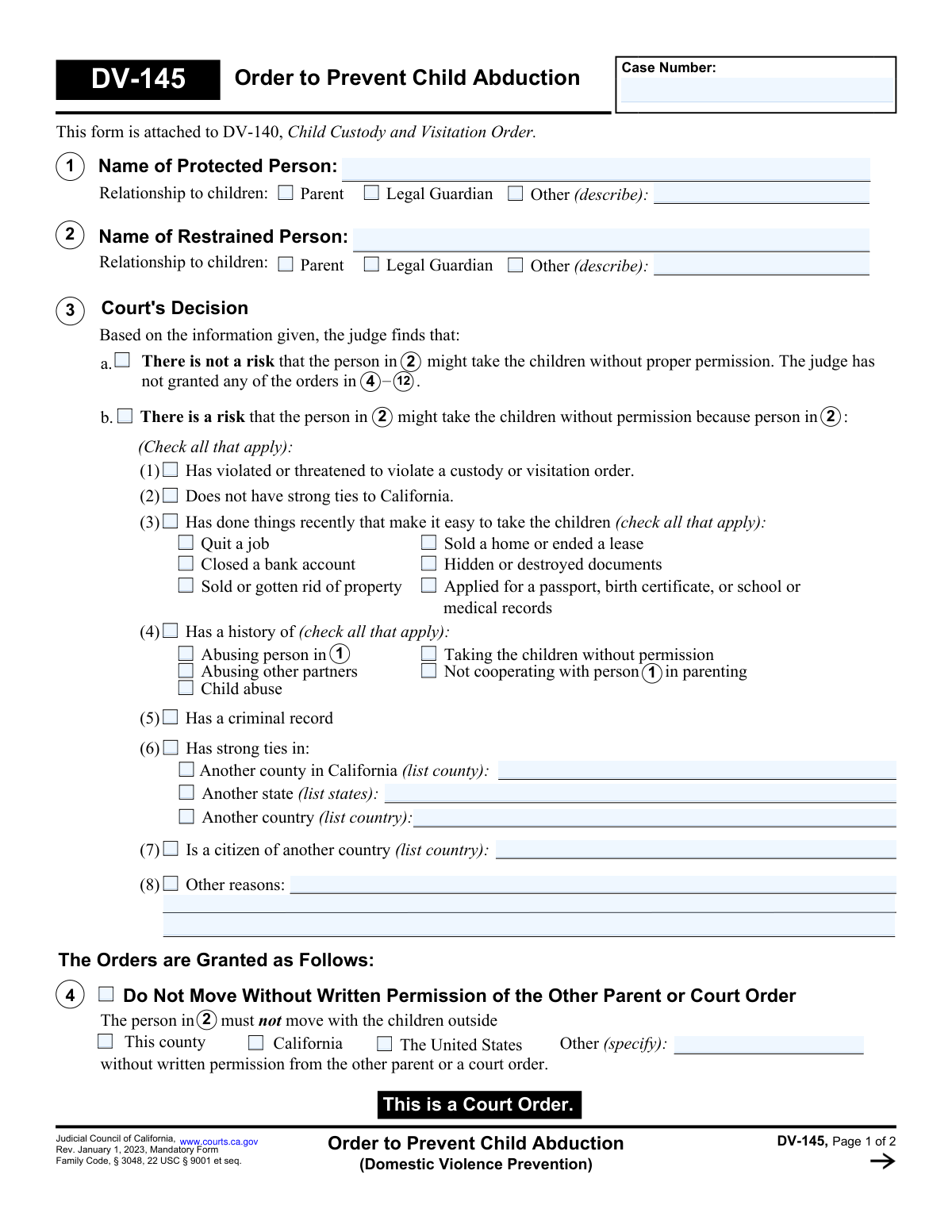
Yes! You can use AI to fill out Form DV-145, Order to Prevent Child Abduction (Domestic Violence Prevention)

The DV-145, Order to Prevent Child Abduction, is a mandatory California Judicial Council form used in conjunction with a Child Custody and Visitation Order (DV-140). It is issued by a judge who finds a risk that one parent or guardian might take a child without permission, outlining specific restrictions to prevent this, such as prohibiting out-of-state travel or requiring the surrender of passports. Today, this form can be filled out quickly and accurately using AI-powered services like Instafill.ai, which can also convert non-fillable PDF versions into interactive fillable forms.
DV-145 is part of the domestic violence forms category on Instafill.
Our AI automatically handles information lookup, data retrieval, formatting, and form filling.
It takes less than a minute to fill out DV-145 using our AI form filling.
Securely upload your data. Information is encrypted in transit and deleted immediately after the form is filled out.

Form specifications

Form name: Form DV-145, Order to Prevent Child Abduction (Domestic Violence Prevention)
Number of fields: 77
Number of pages: 2
Language: English
main-image

Instafill Demo: How to fill out PDF forms in seconds with AI

How to Fill Out DV-145 Online for Free in 2026

Are you looking to fill out a DV-145 form online quickly and accurately? Instafill.ai offers the #1 AI-powered PDF filling software of 2026, allowing you to complete your DV-145 form in just 37 seconds or less.
Follow these steps to fill out your DV-145 form online using Instafill.ai:
  1. 1 Navigate to Instafill.ai and upload or select the DV-145, Order to Prevent Child Abduction form.
  2. 2 Use the AI assistant to input the case number and the full names and relationships of the protected and restrained persons.
  3. 3 Follow the prompts to specify the court's findings, checking the boxes that indicate why there is a risk of abduction, such as past violations, lack of ties to California, or a criminal record.
  4. 4 Clearly define the specific orders granted by the court, such as travel restrictions, the requirement to surrender passports, or the need to provide detailed travel plans.
  5. 5 Indicate any further orders, such as posting a bond, notifying foreign embassies, or registering the order in another state.
  6. 6 Review all the information entered into the form with the AI's guidance to ensure it accurately reflects the court's decision.
  7. 7 Securely download, print, or save the completed DV-145 form for official filing and distribution.

Our AI-powered system ensures each field is filled out correctly, reducing errors and saving you time.

Why Choose Instafill.ai for Your Fillable DV-145 Form?

Speed

Complete your DV-145 in as little as 37 seconds.

Up-to-Date

Always use the latest 2026 DV-145 form version.

Cost-effective

No need to hire expensive lawyers.

Accuracy

Our AI performs 10 compliance checks to ensure your form is error-free.

Security

Your personal information is protected with bank-level encryption.

Frequently Asked Questions About Form DV-145

This form is a court order issued by a judge in a domestic violence case to prevent a parent from taking a child without permission. It outlines specific restrictions and requirements placed on the person who poses an abduction risk.

A judge fills out and signs this form to make it an official court order. You or your attorney would request these orders by presenting evidence and information for the judge to consider.

It means the DV-145 adds specific anti-abduction rules to the main Child Custody and Visitation Order (DV-140). It provides an extra layer of protection when there is a specific fear of a child being taken.

The 'Protected Person' (Section 1) is the parent or guardian seeking the order to protect the children. The 'Restrained Person' (Section 2) is the individual who the court is ordering not to abduct the children.

The judge considers factors listed in Section 3, such as a history of abuse, threats to violate custody, lack of ties to California, or recent actions like quitting a job, selling a home, or applying for a passport for the child.

This court order requires the restrained person to surrender the child's passport to a person designated by the court by a specific date. It also prohibits them from applying for a new passport or other travel documents for the child.

A bond is a sum of money paid to the court as a financial guarantee. If the restrained person violates the order (e.g., doesn't return the child), they forfeit the money, which can help cover costs to recover the child.

The DV-145 is a court order enforceable by any law enforcement officer. The form authorizes police to take action and provides contact information for the local District Attorney's Child Abduction Unit for assistance.

The judge can order several protections, such as surrendering passports (Section 5), notifying the foreign embassy of the order (Section 8), or requiring a mirror custody order from the foreign country before any travel (Section 9).

Yes, while a judge completes the final order, services like Instafill.ai can help you prepare your request. AI can help organize your facts and accurately pre-fill related forms, saving time and ensuring consistency in the information you provide to the court.

You can use a service like Instafill.ai to fill out your forms online. Simply upload your case documents, and the AI will help you accurately populate the fields on the DV-145 and other related forms.

If you have a non-fillable or 'flat' PDF, you can use a tool like Instafill.ai to make it interactive. The platform can convert the document into a fillable format, allowing you to type your information directly onto the form.

Compliance DV-145
Validation Checks by Instafill.ai

1
Case Number Consistency and Presence
This check ensures that the 'Case Number' field is filled out on both page 1 and page 2 of the form and that the values entered are identical. The case number is the primary identifier for the legal proceeding, and inconsistencies can lead to filing errors and confusion. If the numbers are missing or do not match, the system should flag an error and prevent submission until they are corrected.
2
Exclusive Risk Finding Selection
This validation verifies that in Section 3, either checkbox '3a' (no risk) or '3b' (is a risk) is selected, but not both. This decision is the central finding of the order and dictates whether any subsequent preventative measures are granted. An invalid selection (neither or both checked) makes the order logically incoherent, so the form cannot be processed until a single, valid choice is made.
3
Conditional Requirement for 'Other' Relationship Description
This check validates that if the 'Other (describe)' checkbox is selected for the Protected Person's relationship in Section 1, the corresponding text field must contain a description. This ensures that when a non-standard relationship is indicated, it is properly clarified for the court record. If the box is checked but the description is empty, the user should be prompted to provide the necessary detail.
4
Risk Factor Dependency on Main Risk Finding
This validation ensures that the specific risk factor checkboxes and their details in sections 3b(1) through 3b(8) can only be filled if the main '3b' checkbox ('There is a risk...') is selected. This maintains the logical structure of the form, preventing contradictory or nonsensical entries. If '3a' (no risk) is selected, the system should automatically clear or disable all fields related to the specific risk factors in 3b.
5
Location Specification for 'Strong Ties'
This check verifies that if checkbox 3b(6) ('Has strong ties in') is selected, at least one of the sub-options (county, state, or country) is also checked and the corresponding location name is provided. Simply stating that a person has strong ties is insufficient without specifying where those ties are. If this condition is not met, the order lacks necessary detail and the user must be prompted to provide the specific location.
6
Geographic Scope for 'Do Not Move' Order
This validation ensures that if the 'Do Not Move' order in Section 4 is granted, one of the geographic scopes ('This county', 'California', 'The United States', or 'Other') must be selected. An order restricting movement is unenforceable without a clearly defined boundary. If the main box is checked but no scope is selected, the form is incomplete and must be corrected.
7
Completeness of Passport Turn-In Order
This check confirms that if the order in Section 5 ('Turn In and Do Not Apply for Passports...') is selected, all associated detail fields ('documents to turn in', 'turn-in deadline', and 'name of person to receive documents') are filled. For the order to be actionable and enforceable, all of these details are critical. A failure to provide this information would render the order vague and ineffective, so submission should be blocked until the fields are completed.
8
Valid Date Format for Deadlines
This validation checks that any date fields, such as the 'Turn-in deadline' in Section 5 or the 'Date proof of notice provided' in Section 8, are entered in a valid format (e.g., MM/DD/YYYY). It also ensures the date is not in the past, as a deadline must be set for the future. This prevents data entry errors and ensures deadlines are clear and legally sound.
9
Travel Plan Detail Requirement
This validation ensures that if the main checkbox in Section 6 ('Provide Travel Plan and Documents') is selected, at least one of the sub-options specifying the required documents or information is also checked. An order to 'provide a plan' is too vague without specifying what that plan must include. If this rule is violated, the user should be prompted to select at least one specific requirement to make the order clear.
10
Completeness of Embassy Notification Order
This check verifies that if the order in Section 8 ('Notify Foreign Embassy...') is selected, both the 'Name of embassy or consulate' and the 'Date proof of notice provided' fields are filled. The order is meaningless without knowing which embassy to notify and the deadline for proving compliance. If the main box is checked, these two fields become mandatory for the order to be complete.
11
Country Specification for Foreign Order Requirement
This validation ensures that if the order in Section 9 ('Foreign Custody and Visitation Order') is checked, the name of the country must be specified in the corresponding text field. The order requires the restrained person to obtain a mirror order in a specific foreign nation before traveling there with the children. Without the country name, it is impossible to know where this requirement applies, making the order unenforceable.
12
Bond Amount Format and Value
This check validates that if the 'Post a Bond' order in Section 10 is selected, the amount entered is a valid, positive numerical value. The field should not accept text or negative numbers, as a bond must be a specific monetary amount. This ensures the financial requirement of the order is clear and unambiguous.

Common Mistakes in Completing DV-145

Incorrect or Inconsistent Case Number

Users often mistype the case number or forget to enter it on the second page. An incorrect or missing case number can cause the document to be misfiled, rejected by the court clerk, or detached from the rest of the case file, significantly delaying the issuance of a protective order. To prevent this, carefully copy the exact case number, including all letters and dashes, from other official court documents and verify it appears on both pages.

Using Incomplete or Informal Names

In Sections 1 and 2, filers may use nicknames, initials, or incomplete names for the protected and restrained persons. This creates ambiguity and can render the order unenforceable, as law enforcement requires a full legal name to verify identity against official records. Always use the complete legal name as it appears on government-issued identification like a driver's license or passport.

Checking a Risk Factor but Omitting Details

A frequent error in Section 3b is checking a box for a risk factor (e.g., 'Has strong ties in: Another country') but failing to provide the required specific information in the corresponding text field (e.g., the name of the country). This omission weakens the argument for the order and may cause a judge to disregard the factor or return the form. Always double-check that any checked box with a fillable line is completed with the necessary details.

Contradictory Selections in the Risk Assessment

In Section 3, users sometimes check box 3a ('There is not a risk') and also check one or more boxes under 3b ('There is a risk'). This creates a logical contradiction that makes the form invalid and will confuse the court. You must choose one path: either there is no risk (3a), or there is a risk (3b), for which you must then provide supporting reasons. Selecting both will lead to rejection.

Ambiguous Geographic Restrictions

When completing Section 4 ('Do Not Move Without Written Permission'), filers may select multiple, redundant options (e.g., both 'This county' and 'California') or write a vague description in the 'Other' field. An ambiguous restriction is unenforceable. You must select only the single most appropriate geographic boundary or write a very clear, specific, and legally definable area in the 'Other' field to ensure the order is effective.

Omitting Key Details for Document Surrender

In Section 5, which orders the surrender of passports, users often forget to specify the deadline ('by (date):') and the designated recipient ('to (name):'). Without a clear date and a named person or agency to receive the documents, the order is incomplete and cannot be enforced. These details are mandatory for the order to be actionable.

Missing Local Enforcement Contact Information

Section 11 asks for the contact information of the local District Attorney's Child Abduction Unit, which is critical for enforcement. Filers often leave this blank because they don't have the information readily available. This can cause critical delays if law enforcement needs to act. Before filing, research this information on your county court's or DA's website and fill it in completely.

Illegible Handwriting on a Printed Form

This form is often available as a non-fillable PDF, leading people to print it and fill it out by hand. Illegible handwriting can cause misinterpretation of critical data like names, dates, and locations, potentially leading to a rejected filing or an unenforceable order. To avoid this, use an AI-powered tool like Instafill.ai, which can convert the non-fillable PDF into a fillable version, ensuring all your entries are typed, clear, and legible.

Confusing 'Strong Ties' with 'Citizenship'

The form specifically separates 'Has strong ties in' another country (Section 3b(6)) from 'Is a citizen of another country' (Section 3b(7)). Filers often conflate these two, listing citizenship under 'strong ties' or vice-versa. 'Strong ties' refers to connections like family, property, or business, while citizenship is a legal status. Providing this information in the correct sections gives the judge an accurate basis for assessing abduction risk.

Inconsistent Information Across Attached Forms

This DV-145 form is an attachment to the main DV-140 Child Custody and Visitation Order. A common mistake is having discrepancies in names, case numbers, or other details between the two forms. Any inconsistency can create legal vulnerabilities or cause the clerk to reject the entire packet. AI-powered form-filling tools like Instafill.ai can help prevent this by populating shared information consistently across all related documents in a case.
Saved over 80 hours a year

“I was never sure if my IRS forms like W-9 were filled correctly. Now, I can complete the forms accurately without any external help.”

Kevin Martin Green

Your data stays secure with advanced protection from Instafill and our subprocessors

Robust compliance program

Transparent business model

You’re not the product. You always know where your data is and what it is processed for.

ISO 27001, HIPAA, and GDPR

Our subprocesses adhere to multiple compliance standards, including but not limited to ISO 27001, HIPAA, and GDPR.

Security & privacy by design

We consider security and privacy from the initial design phase of any new service or functionality. It’s not an afterthought, it’s built-in, including support for two-factor authentication (2FA) to further protect your account.

Fill out DV-145 with Instafill.ai

Worried about filling PDFs wrong? Instafill securely fills form-dv-145-order-to-prevent-child-abduction-domestic-violence-prevention forms, ensuring each field is accurate.