Yes! You can use AI to fill out Form DV-130, Restraining Order After Hearing (Order of Protection) (Domestic Violence Prevention)
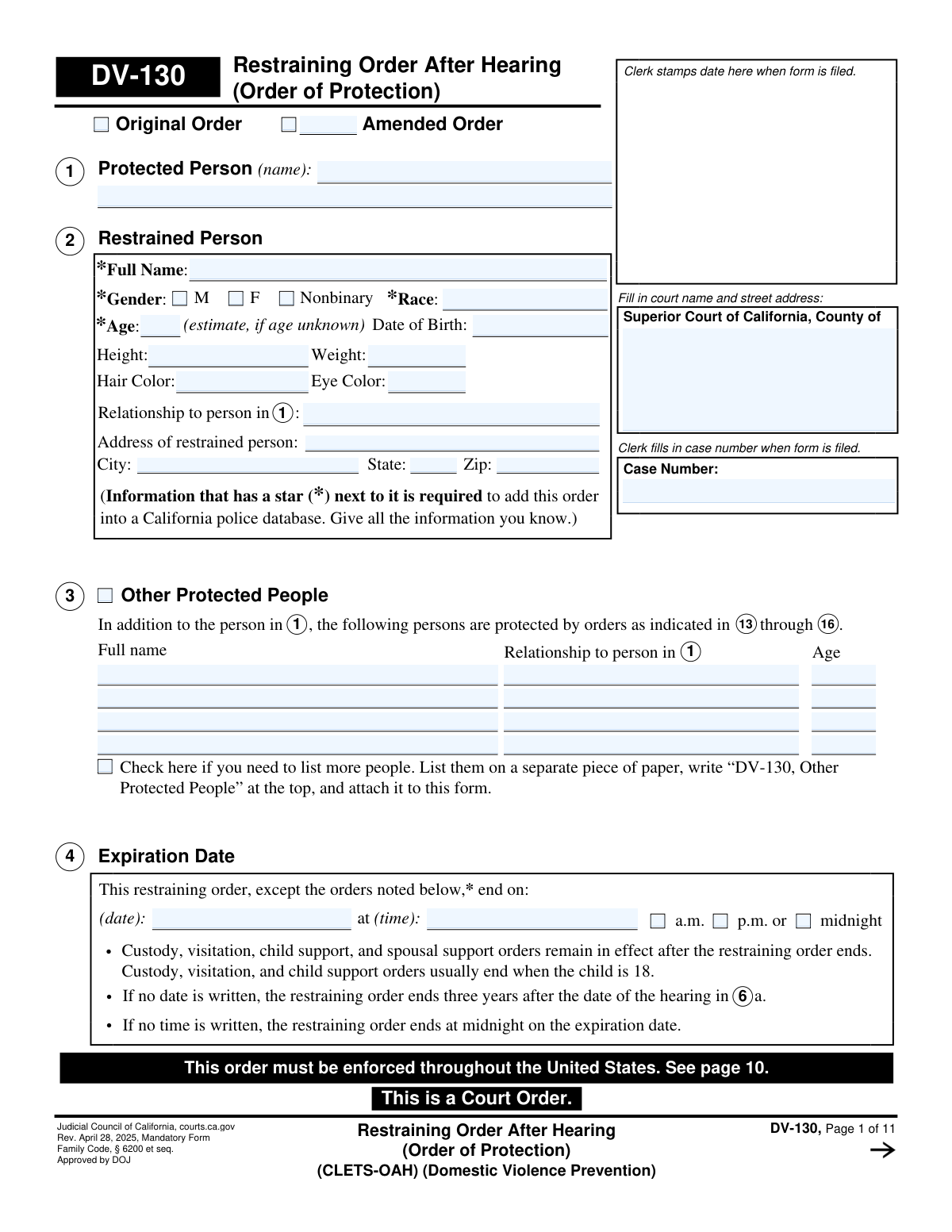
The California Form DV-130, Restraining Order After Hearing, is a mandatory court order issued by a judge after a hearing in a domestic violence prevention case. It details the specific, long-term protections granted to the protected person(s) and the restrictions placed on the restrained person, such as no-contact orders, stay-away requirements, and firearm prohibitions. This legally binding document formalizes the court's final decision on the matter. Today, this form can be filled out quickly and accurately using AI-powered services like Instafill.ai, which can also convert non-fillable PDF versions into interactive fillable forms.
Our AI automatically handles information lookup, data retrieval, formatting, and form filling.
It takes less than a minute to fill out DV-130 using our AI form filling.
Securely upload your data. Information is encrypted in transit and deleted immediately after the form is filled out.
Form specifications
| Form name: | Form DV-130, Restraining Order After Hearing (Order of Protection) (Domestic Violence Prevention) |
| Number of fields: | 254 |
| Number of pages: | 11 |
| Language: | English |
More forms in Domestic violence forms
Instafill Demo: How to fill out PDF forms in seconds with AI
How to Fill Out DV-130 Online for Free in 2026
Are you looking to fill out a DV-130 form online quickly and accurately? Instafill.ai offers the #1 AI-powered PDF filling software of 2026, allowing you to complete your DV-130 form in just 37 seconds or less.
Follow these steps to fill out your DV-130 form online using Instafill.ai:
- 1 Navigate to Instafill.ai and upload or select the Form DV-130, Restraining Order After Hearing.
- 2 Enter the court information, case number, and the full names and details of the protected and restrained persons as determined by the court.
- 3 Use the AI-powered tool to specify the details of the court hearing, including the date, judicial officer, and attendees.
- 4 Clearly define the judge's orders by checking the relevant boxes for no-contact, stay-away distances, firearm restrictions, and child custody arrangements as ruled in the hearing.
- 5 Input any financial orders, such as payment of debts, expenses, or support, and specify details for any other orders like property control or animal protection.
- 6 Review all entered information to ensure it perfectly matches the court's ruling, then download or print the completed DV-130 form for the judge's signature and filing with the court clerk.
Our AI-powered system ensures each field is filled out correctly, reducing errors and saving you time.
Why Choose Instafill.ai for Your Fillable DV-130 Form?
Speed
Complete your DV-130 in as little as 37 seconds.
Up-to-Date
Always use the latest 2026 DV-130 form version.
Cost-effective
No need to hire expensive lawyers.
Accuracy
Our AI performs 10 compliance checks to ensure your form is error-free.
Security
Your personal information is protected with bank-level encryption.
Frequently Asked Questions About Form DV-130
The DV-130, Restraining Order After Hearing, is a mandatory California court form that outlines the final, long-term restraining order granted by a judge after a court hearing to prevent domestic violence. It details the specific protections for the protected person(s) and the restrictions placed on the restrained person.
The DV-130 is a court order, so it is prepared and signed by the judge or judicial officer who presided over the hearing. The parties provide information and testimony during the hearing, which the judge uses to complete the order.
The order lasts until the expiration date specified in Section 4 of the form. If no date is written, the restraining order automatically ends three years after the hearing date.
To enter the order into the California police database (CLETS), you must provide the restrained person's full name, gender, race, age, and date of birth. Providing height, weight, hair color, and eye color is also recommended.
The restrained person is prohibited from owning, possessing, or buying firearms, firearm parts, and ammunition. They must turn in, sell, or store any prohibited items within 24-48 hours and file a receipt (Form DV-800) with the court as proof.
Yes, you can list other people who need protection in Section 3, 'Other Protected People'. If you run out of space, you can attach a separate sheet of paper with the required information.
Violating the orders on the DV-130 is a crime. The restrained person can be arrested, charged with a crime, go to jail or prison, and/or be required to pay a fine.
If the restrained person was not present at the hearing, they must be formally served with a copy of the DV-130. Depending on the circumstances detailed in Section 32, this may be done in person or by mail.
No, there is no fee for the sheriff or marshal to serve this order. You must complete Form SER-001, 'Request for Sheriff to Serve Court Papers,' and provide it to the sheriff's office along with a copy of the order.
The judge may grant exceptions for child-related matters. Section 15b might allow for brief, peaceful contact to communicate about court-ordered visits, but all contact must strictly follow the terms laid out in the order.
Yes, AI-powered services like Instafill.ai can help you accurately fill out the initial request forms (like the DV-100) that lead to this hearing. Using such tools can save time and help ensure your information is correctly formatted before you go to court.
You can use services like Instafill.ai to fill out your court forms online. These platforms guide you through the questions and place your answers in the correct fields on the official PDF form.
If you have a non-fillable or 'flat' PDF, you can use a service like Instafill.ai to make it interactive. The tool converts the static form into a fillable one, allowing you to type your answers directly into the fields.
Coercive control is a pattern of behavior that unreasonably interferes with a person's free will and personal liberty. Examples include isolating you from friends and family, controlling your finances, or monitoring your movements and communications.
Compliance DV-130
Validation Checks by Instafill.ai
1
Restrained Person's Age and Date of Birth Consistency
This check verifies that the 'Age' entered in Section 2 is consistent with the 'Date of Birth' provided. The system should calculate the age based on the date of birth and flag any discrepancy. This is crucial for accurate identification by law enforcement, as both fields are required for entry into the California police database (CLETS).
2
Order Expiration Date Validity
Validates that the 'Expiration Date' in Section 4 is a future date and occurs after the 'Hearing date' specified in Section 6a. An order cannot expire before it is issued. This check prevents the creation of a legally invalid and unenforceable order, ensuring the protected person receives the intended period of protection.
3
Exclusive Expiration Time Selection
Ensures that for the 'Expiration Time' in Section 4, only one option among 'a.m.', 'p.m.', or 'midnight' is selected. Allowing multiple selections would create ambiguity about the exact moment the order ceases to be in effect. This validation is critical for law enforcement to determine if a violation has occurred.
4
Future Hearing Date Logic
This validation confirms that the 'Date' for a 'Future Court Hearing' in Section 5 is a date in the future and is after the original 'Hearing date' in Section 6a. Scheduling a hearing for a past date is a logical error that would cause confusion for the parties and the court. The check ensures that any scheduled follow-up is valid and actionable.
5
Conditional Lawyer Name Entry
In Section 6b, if the checkbox for 'The lawyer for the person in 1' or 'The lawyer for the person in 2' is checked, this validation ensures the corresponding name field is not empty. This is important for maintaining a complete and accurate record of legal representation at the hearing. A failure would result in an incomplete court record.
6
CLETS-Required Fields Completeness
Verifies that all fields in Section 2 marked with a star (*) — Full Name, Gender, Race, Age, and Date of Birth — are populated. This information is mandatory for entering the restraining order into the California Law Enforcement Telecommunications System (CLETS). Missing data would prevent the order from being accessible to police, severely compromising its enforcement and the safety of the protected person.
7
Limited Firearm Exemption Details Requirement
Checks that if the 'Limited Exemption' box in Section 8f is checked, the corresponding text field for the firearm's make, model, and serial number is filled. An exemption without a specific firearm identified is dangerously vague. This validation ensures law enforcement knows exactly which firearm, and only that firearm, the restrained person is permitted to possess under specific circumstances.
8
Stay-Away Order Completeness
Ensures that if a 'Stay-Away Order' is issued in Section 16a, the distance in yards is specified as a positive number and at least one location checkbox (e.g., 'Home of person in 1', 'School', etc.) is selected. An order without a specified distance or location is unenforceable. This check guarantees the order's terms are clear and unambiguous for both the restrained person and law enforcement.
9
Conditional Exception Explanation
Validates that if the 'Other (explain)' checkbox is selected in Section 15b(3) or 16b(3), the corresponding text field for the explanation is not empty. These exceptions modify the standard no-contact or stay-away orders, and their terms must be explicitly defined. Failure to provide an explanation makes the exception void and the order's terms unclear.
10
Move-Out Order Address Requirement
This check ensures that if the 'Order to Move Out' in Section 17 is checked, the address field is fully populated with a valid street address. An order instructing a person to move out without specifying from where is completely unenforceable. This validation is critical for the order to have any legal effect.
11
Payment Due Date and Amount Validity
For any payment ordered in Sections 25, 26, or 29, this validation verifies that the 'Amount' is a positive numerical value and the 'Due date' is a valid date that is not in the distant past. This ensures that financial orders are clear, specific, and actionable. An invalid amount or due date would make the financial obligation impossible to enforce.
12
Attached Pages Count Consistency
In Section 34, this check validates that if any of the form attachment checkboxes (e.g., DV-140, FL-342) are checked, the 'Number of pages attached' field contains a number greater than zero. This serves as a cross-reference to ensure all intended documents are included with the filing. A mismatch could lead to an incomplete order being filed with the court.
13
Service Method Logical Exclusivity
Verifies that in Section 32, only one of the primary service scenarios (a, b, or c) is selected. These options describe mutually exclusive situations regarding the restrained person's presence at the hearing and the method of service. Selecting more than one would create a logical contradiction in the official court record regarding service.
14
Original vs. Amended Order Selection
This validation ensures that only one of the 'Original Order' or 'Amended Order' checkboxes in the form header is selected. These two options are mutually exclusive and define the legal status of the document. Selecting both would create ambiguity and could lead to processing errors by the court clerk and law enforcement.
Common Mistakes in Completing DV-130
People often leave fields like Race, Date of Birth, or other physical descriptors in Section 2 blank, either because they don't know the information or don't realize its importance. These details, marked with a star (*), are required to enter the order into the California Law Enforcement Telecommunications System (CLETS). Without this information, law enforcement may be unable to identify the restrained person and enforce the order, putting the protected person at risk. Always fill in as much information as possible, even if it's an estimate, and use tools like Instafill.ai which can flag missing required fields to ensure completeness. If the form is a non-fillable PDF, Instafill.ai can also make it fillable, preventing handwriting errors.
In Section 16, a person might enter a distance (e.g., '100 yards') but fail to check any of the corresponding boxes for locations like 'Home,' 'School,' or 'Workplace.' This happens due to rushing or assuming the order applies everywhere by default. An order without specified locations is vague and unenforceable, as it doesn't tell the restrained person or law enforcement what specific places to stay away from. To avoid this, you must specify a distance and check all applicable locations that need protection; an intelligent form-filling tool like Instafill.ai can validate that if a distance is entered, at least one location is also selected.
Sections like 19 (Child Custody), 27 (Child Support), and 34 require checking a box and attaching a separate, detailed form (e.g., DV-140, FL-342). Filers often check the box to indicate the order exists but forget to physically attach the corresponding document to the submission. This makes the order incomplete and the specific terms, like custody schedules or support amounts, unenforceable until the missing form is filed. Always create a checklist of all forms mentioned in the main document and ensure they are attached before filing.
The case number field appears at the top of every page, but people sometimes only fill it out on the first page because it feels repetitive. This is a critical error, as pages can become separated during court processing. If a page is missing the case number, the clerk's office may not be able to associate it with the correct file, leading to an incomplete or lost order. AI-powered tools like Instafill.ai can automatically populate recurring information like case numbers across all pages of a document, ensuring consistency and completeness.
In Section 13 ('Cannot Look for Protected People'), the checkbox is used to indicate when the order is *not* granted, which is a confusing 'negative check' format. People sometimes mistakenly check this box thinking they are requesting or affirming the protection, when they are actually documenting its denial. This error nullifies the specific protection, leaving the protected person's location information vulnerable. Carefully read the text next to every checkbox to ensure you understand its function.
When filling out sections for payments, such as 25 (Pay Debts), 26 (Pay Expenses), or 29 (Lawyer's Fees), people may list an amount but omit the payee, the due date, or a clear description of what the payment is for. This ambiguity can lead to disputes over whether a payment was made correctly and on time, creating further conflict and potential non-compliance. For a payment order to be effective, it must clearly state who to pay, how much, by when, and for what purpose.
In Section 9, when listing firearms the restrained person must surrender, users may write a generic description like 'handgun' or 'rifle.' This lack of specificity occurs when the filer doesn't know or can't find the make, model, and serial number. A vague description makes it extremely difficult for law enforcement to identify and confiscate the correct weapon, undermining the safety purpose of the firearms restriction. It is critical to provide as much detail as possible to ensure the order is effective.
In Section 4, filers may write a date but forget to specify a time or check one of the a.m./p.m./midnight boxes. While the form has defaults, this can cause confusion about the exact moment the order expires and could lead to a violation if the restrained person believes the order ended earlier than it did. To avoid this, always specify both the date and the exact time of expiration. AI-powered tools like Instafill.ai can help prevent this by using date/time pickers and validating that a time component (a.m./p.m.) is selected.
In Section 3, a person may list the names of other protected individuals (often children) but forget to include their relationship to the primary protected person or their age. This information is vital for identification and enforcement, especially in situations involving schools or childcare. Furthermore, if there are more people than the form has space for, filers may not realize they must attach a separate page, leaving some individuals unprotected. Ensure every person needing protection is listed with all requested details, using an attachment if necessary.
Section 32 outlines how the order must be served, and it is a legally complex section. A common error is selecting 'service by mail' (32b(1)) when the final orders are different from the temporary orders, a situation that requires 'personal service' (32b(2)). This mistake can happen from a misunderstanding of legal service requirements and can invalidate the service, meaning the order is not yet enforceable and leaving the protected person vulnerable.
Saved over 80 hours a year
“I was never sure if my IRS forms like W-9 were filled correctly. Now, I can complete the forms accurately without any external help.”
Kevin Martin Green
Your data stays secure with advanced protection from Instafill and our subprocessors

Robust compliance program
Transparent business model
You’re not the product. You always know where your data is and what it is processed for.
ISO 27001, HIPAA, and GDPR
Our subprocesses adhere to multiple compliance standards, including but not limited to ISO 27001, HIPAA, and GDPR.
Security & privacy by design
We consider security and privacy from the initial design phase of any new service or functionality. It’s not an afterthought, it’s built-in, including support for two-factor authentication (2FA) to further protect your account.
Fill out DV-130 with Instafill.ai
Worried about filling PDFs wrong? Instafill securely fills form-dv-130-restraining-order-after-hearing-order-of-protection-domestic-violence-prevention forms, ensuring each field is accurate.