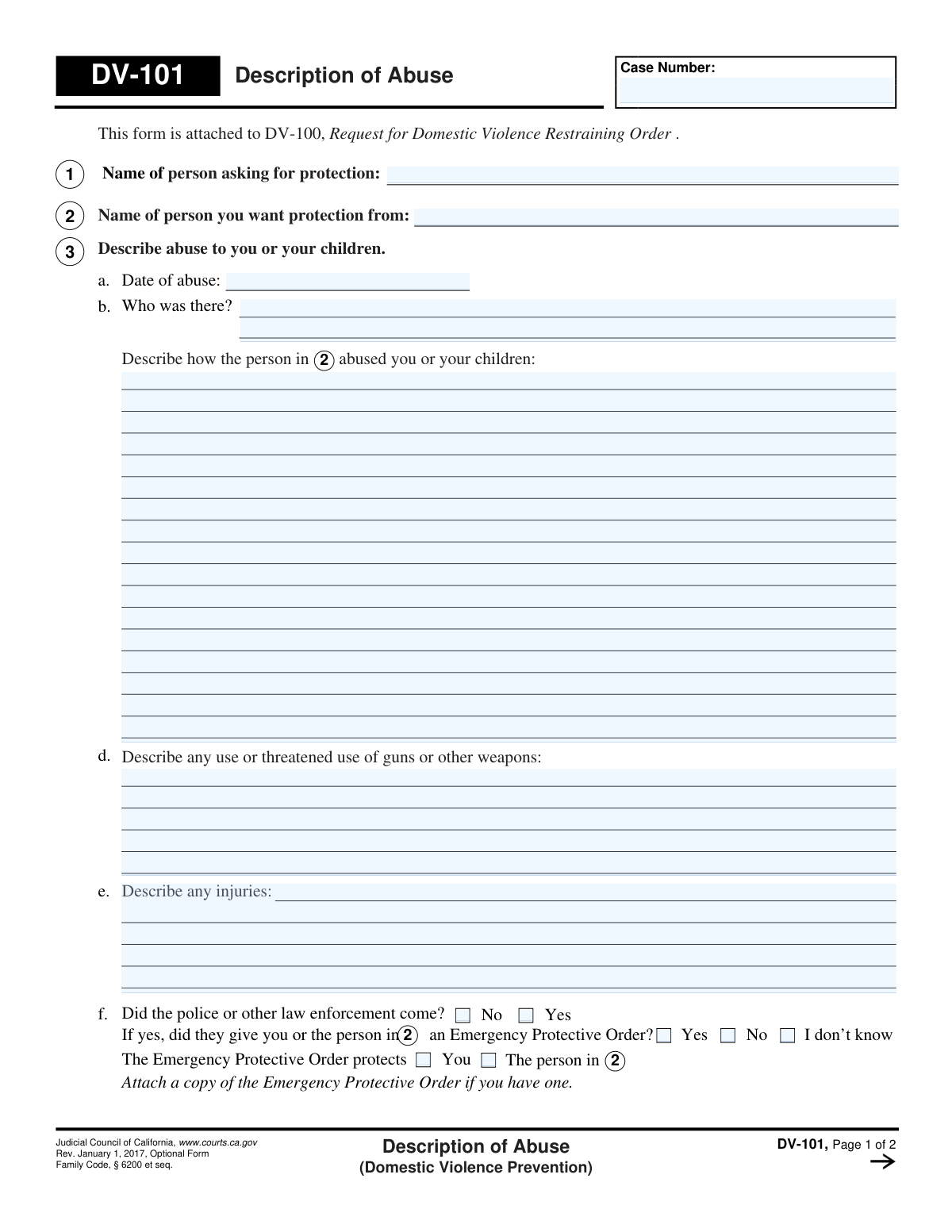
Yes! You can use AI to fill out Form DV-101, Description of Abuse (Domestic Violence Prevention)

Form DV-101 is a crucial legal document used in California courts as an attachment to Form DV-100, Request for Domestic Violence Restraining Order. Its purpose is to provide the judge with a detailed, factual account of the abuse experienced by the person seeking protection. This includes dates, specific actions, injuries, and any involvement of weapons or law enforcement, which is vital for the court's decision-making process. Today, this form can be filled out quickly and accurately using AI-powered services like Instafill.ai, which can also convert non-fillable PDF versions into interactive fillable forms.
DV-101 is part of the domestic violence forms category on Instafill.
Our AI automatically handles information lookup, data retrieval, formatting, and form filling.
It takes less than a minute to fill out DV-101 using our AI form filling.
Securely upload your data. Information is encrypted in transit and deleted immediately after the form is filled out.

Form specifications

Form name: Form DV-101, Description of Abuse (Domestic Violence Prevention)
Number of fields: 35
Number of pages: 2
Language: English
main-image

Instafill Demo: How to fill out PDF forms in seconds with AI

How to Fill Out DV-101 Online for Free in 2026

Are you looking to fill out a DV-101 form online quickly and accurately? Instafill.ai offers the #1 AI-powered PDF filling software of 2026, allowing you to complete your DV-101 form in just 37 seconds or less.
Follow these steps to fill out your DV-101 form online using Instafill.ai:
  1. 1 Navigate to Instafill.ai and upload or select the Form DV-101.
  2. 2 Enter the case number and the full names of the person asking for protection and the person you want protection from.
  3. 3 In Section 3, provide a detailed description of the most recent incident of abuse, including the date, who was present, and what happened.
  4. 4 Describe any use of weapons, injuries sustained, and whether police were called, noting if an Emergency Protective Order was issued.
  5. 5 Use the subsequent sections (4 and 5) to describe any other past incidents of abuse, providing as much detail as possible.
  6. 6 If you need more space than the form provides, check the box indicating you are attaching an extra sheet and title it 'DV-101—Description of Abuse'.
  7. 7 Carefully review all the information you have entered for accuracy and completeness before printing and attaching it to your DV-100 request.

Our AI-powered system ensures each field is filled out correctly, reducing errors and saving you time.

Why Choose Instafill.ai for Your Fillable DV-101 Form?

Speed

Complete your DV-101 in as little as 37 seconds.

Up-to-Date

Always use the latest 2026 DV-101 form version.

Cost-effective

No need to hire expensive lawyers.

Accuracy

Our AI performs 10 compliance checks to ensure your form is error-free.

Security

Your personal information is protected with bank-level encryption.

Frequently Asked Questions About Form DV-101

Form DV-101, Description of Abuse, is an optional form used to provide the court with specific details about incidents of abuse. It is submitted as an attachment to Form DV-100, the main request for a domestic violence restraining order.

No, this form is optional. However, it provides a clear, structured way to describe the abuse, which can help the judge better understand your situation and why you are requesting protection.

Be as specific as possible by including the date of the incident, who was there, what was said and done, and any injuries. You should also describe any use or threats involving weapons and whether police were called.

If you cannot recall the exact date, provide your best estimate. It is acceptable to write 'on or about' followed by the approximate date, month, or year.

You should describe the most recent or most severe incident of abuse in Section 3. Use Sections 4 and 5 to describe other past incidents of abuse.

If you need more room, check the box in Section 5. You can then attach a separate sheet of paper, making sure to write 'DV-101—Description of Abuse' and your case number at the top.

An Emergency Protective Order is a temporary restraining order that law enforcement can get from a judge in response to immediate danger. If you were given one, you should note it on the form and attach a copy if you have it.

This form is an attachment and cannot be filed by itself. It must be filed with the court at the same time as your Form DV-100, Request for Domestic Violence Restraining Order.

Yes, abuse is not limited to physical harm. You should use this form to describe any relevant incidents, including threats, harassment, stalking, or financial control.

Yes, services like Instafill.ai use AI to help auto-fill form fields accurately, which can save you time and help avoid mistakes. This can be particularly helpful when dealing with complex legal documents.

You can use a service like Instafill.ai to securely upload and complete the form online. The platform guides you through the fields, and you can then download or print the completed document for filing.

If you have a non-fillable or 'flat' PDF, you can use a tool like Instafill.ai. It can convert the document into an interactive, fillable form that you can easily complete on your computer.

The 'Clear This Form' button is a privacy feature that erases all the information you've entered. For your safety, you should click this button after printing your form, especially if you are using a public or shared computer.

Compliance DV-101
Validation Checks by Instafill.ai

1
Protected Person Name Completeness
This check ensures the 'Name of person asking for protection' field is not empty. This information is legally required to identify the petitioner and is the primary subject of the restraining order. If this field is left blank, the form submission will be rejected as it is invalid without the petitioner's identity.
2
Restrained Person Name Completeness
This validation verifies that the 'Name of person you want protection from' field has been filled. Identifying the person from whom protection is sought is fundamental to the purpose of the restraining order. A failure to provide this name makes the legal document unenforceable and the submission will be considered incomplete.
3
Case Number Consistency
This check compares the 'Case Number' field on page 1 with the 'Case Number' field on page 2 to ensure they are identical. Maintaining a consistent case number across all pages is critical for correct filing and linking of documents within the court system. A mismatch will trigger an error to prevent misfiling or processing delays.
4
Primary Abuse Description Completeness
This validation ensures that the text area in section 3c, 'Describe how the person in 2 abused you or your children,' is not empty. This narrative is the core evidence for the request and must be provided for the court to evaluate the need for a restraining order. Submissions lacking this description will be flagged as incomplete and require the user to provide details.
5
Date of Abuse Validity
This check validates that the 'Date of abuse' field in section 3a contains a properly formatted date (e.g., MM/DD/YYYY) and that the date is not in the future. This ensures the integrity of the timeline of events presented to the court. An invalid format or a future date will result in an error, prompting the user to correct the entry.
6
Police Response Selection Completeness
This validation confirms that for each incident described (sections 3f and 4f), one option ('Yes' or 'No') has been selected for the question 'Did the police or other law enforcement come?'. This is a required piece of information for the court to understand the context of the incident. If neither is selected, the user will be prompted to make a selection before proceeding.
7
Conditional EPO Question Logic
This check enforces a logical dependency for the question regarding an Emergency Protective Order (EPO). The options ('Yes', 'No', 'I don’t know') for whether an EPO was issued should only be enabled and required if the user has first answered 'Yes' to 'Did the police or other law enforcement come?'. This prevents contradictory or nonsensical data entry and ensures the form's logic is followed.
8
Conditional EPO Protection Logic
This validation ensures the checkboxes for who the EPO protects ('You' or 'The person in 2') are only active if the user has answered 'Yes' to an EPO being issued. If the answer is 'No' or 'I don't know', these checkboxes should be disabled. This prevents users from providing conflicting information and maintains the integrity of the data collected about the protective order.
9
Secondary Incident Description Requirement
This check is triggered if the user indicates that other abuse has occurred, making section 4 active. It then validates that the description field '4c. Describe how the person abused you or your children' is filled out. If a user states there were other incidents, they must provide a description for the court to consider it.
10
Logical Date Sequencing
This validation compares the 'Date of abuse' in section 3a with the date in section 4a. It flags if the dates are identical, as this may indicate the user has accidentally entered the same incident twice. While not a hard rejection, it serves as a helpful warning to the user to review their entries for accuracy.
11
At Least One Incident Required
This is a global validation check to ensure that at least one complete incident description is provided in the form. It verifies that either section 3c or section 4c contains a description of abuse. A form submitted without any description of an abusive event fails its primary purpose and will be rejected as incomplete.
12
Attachment Indicator Logic
This check validates the use of the checkbox in section 5, 'Check here if you need more space.' If this box is checked, the system should flag that a separate attachment is expected for processing. A soft validation could also warn the user if the box is checked but the main text area for section 5 is empty, to prevent accidental checking.

Common Mistakes in Completing DV-101

Providing Vague or Emotional Abuse Descriptions

This occurs when filers use emotional language instead of providing clear, factual details. Due to the traumatic nature of the events, descriptions can become unfocused, making it difficult for a judge to understand the specific actions, threats, and timeline of the abuse. This can weaken the request, as the court needs objective facts (who, what, when, where, how) to issue a protective order. To avoid this, write a chronological, fact-based narrative for each incident, detailing actions and quoting threats verbatim if possible.

Using Incomplete or Incorrect Names

Filers may use nicknames, initials, or spell a name incorrectly for either themselves or the person they seek protection from. This often happens when the full legal name is unknown or forgotten in a stressful situation. An incorrect name on a restraining order can make it unenforceable by law enforcement and can cause the entire filing to be delayed or rejected. To avoid this, always use the full legal name as it appears on government-issued identification. AI-powered form-filling tools like Instafill.ai can help prevent this by saving and correctly populating names across all related documents, ensuring consistency.

Omitting or Incorrectly Entering the Case Number

The DV-101 is an attachment to a primary request (DV-100), and the case number links them together. People often forget to copy the number from the main form or transcribe it with errors. Without the correct case number, the clerk cannot file the document with the correct case, leading to critical delays in obtaining a hearing and a temporary restraining order. To prevent this, carefully copy the case number onto the top of every single page of the form. Using a tool like Instafill.ai can automatically carry over the case number to all associated forms and pages, eliminating the risk of this manual error.

Failing to Provide Specific Dates of Abuse

In the 'Date of abuse' field, individuals might write 'last week' or leave it blank because they can't recall the exact date due to trauma. A lack of specific dates can make the testimony seem less credible and makes it harder for the judge to establish a clear pattern of abuse. If you cannot remember the exact date, use 'on or about [date]' and try to reference other events, texts, or emails to narrow it down. AI form fillers like Instafill.ai can help by validating date formats to ensure they are entered correctly, preventing rejections based on formatting errors.

Not Fully Detailing the Use or Threat of Weapons

When asked to describe weapons, a person might simply state 'a gun was involved' without further detail. This happens when filers are rushed or minimize the incident. The court needs specifics—what type of weapon, was it pointed, what was said, was it loaded—to assess the level of danger and determine if a firearms restriction is necessary. Failing to provide these details can result in a less protective order and leave the filer at greater risk.

Forgetting to Attach Required Documents

The form explicitly states to attach a copy of any Emergency Protective Order (EPO) and to use extra pages if more space is needed. Filers often forget these attachments or don't realize their importance. Missing an EPO copy means the judge cannot review its terms, and failing to attach extra pages for detailed descriptions results in an incomplete story. Always gather all related documents beforehand and clearly label any attachments as instructed on the form.

Providing Inconsistent Information Across Sections

When describing multiple incidents in sections 3, 4, and any attachments, filers might accidentally provide conflicting details about dates, locations, or events. This can happen from rushing or filling out the form over several days. In court, any inconsistency can be used by the opposing side to challenge the filer's credibility and the truthfulness of their entire declaration. It is crucial to proofread the completed form to ensure all facts are consistent throughout.

Minimizing or Omitting Injuries

In the 'Describe any injuries' field, people often only list visible physical injuries like bruises or cuts, overlooking less obvious harm. This is a mistake because 'injury' under the law can also include emotional distress, psychological trauma (like anxiety or PTSD), or financial harm. Failing to list all injuries gives the court an incomplete picture of the abuse's impact. Be sure to include details about any physical, psychological, or emotional harm, and mention if you sought medical or professional help.

Leaving the 'Who was there?' Field Blank or Incomplete

Filers sometimes leave this field blank or provide a vague answer like 'my kids,' thinking it's unimportant or to protect witnesses' privacy. However, this information is critical for the court as it identifies potential witnesses who can corroborate the abuse and shows whether children were exposed to the violence. Always list every person present, including their name, relationship to you, and the ages of any children.

Submitting an Illegible or Poorly Formatted Form

When a form is only available as a non-fillable PDF, people must print and fill it out by hand, which can lead to illegible handwriting. Others try to cram too much information into the small text boxes of a fillable PDF. If the judge or court clerk cannot read your descriptions of abuse, they cannot act on them, potentially leading to a denial or delay. To avoid this, write clearly and use attachments for longer descriptions. AI tools like Instafill.ai can also convert flat PDFs into fillable forms, ensuring your entries are neat and legible.

Failing to Clear Form Data on a Shared Computer

The form includes a 'Clear This Form' button for privacy, which users often overlook after printing, especially if using a library or other public computer. Forgetting to clear the form leaves highly sensitive and personal details about domestic abuse accessible to the next user. This creates a major privacy and safety risk. Always press the 'Clear This Form' button after printing and saving your document, particularly on a shared device.
Saved over 80 hours a year

“I was never sure if my IRS forms like W-9 were filled correctly. Now, I can complete the forms accurately without any external help.”

Kevin Martin Green

Your data stays secure with advanced protection from Instafill and our subprocessors

Robust compliance program

Transparent business model

You’re not the product. You always know where your data is and what it is processed for.

ISO 27001, HIPAA, and GDPR

Our subprocesses adhere to multiple compliance standards, including but not limited to ISO 27001, HIPAA, and GDPR.

Security & privacy by design

We consider security and privacy from the initial design phase of any new service or functionality. It’s not an afterthought, it’s built-in, including support for two-factor authentication (2FA) to further protect your account.

Fill out DV-101 with Instafill.ai

Worried about filling PDFs wrong? Instafill securely fills form-dv-101-description-of-abuse-domestic-violence-prevention forms, ensuring each field is accurate.