Yes! You can use AI to fill out DV-100, Request for Domestic Violence Restraining Order (Domestic Violence Prevention)

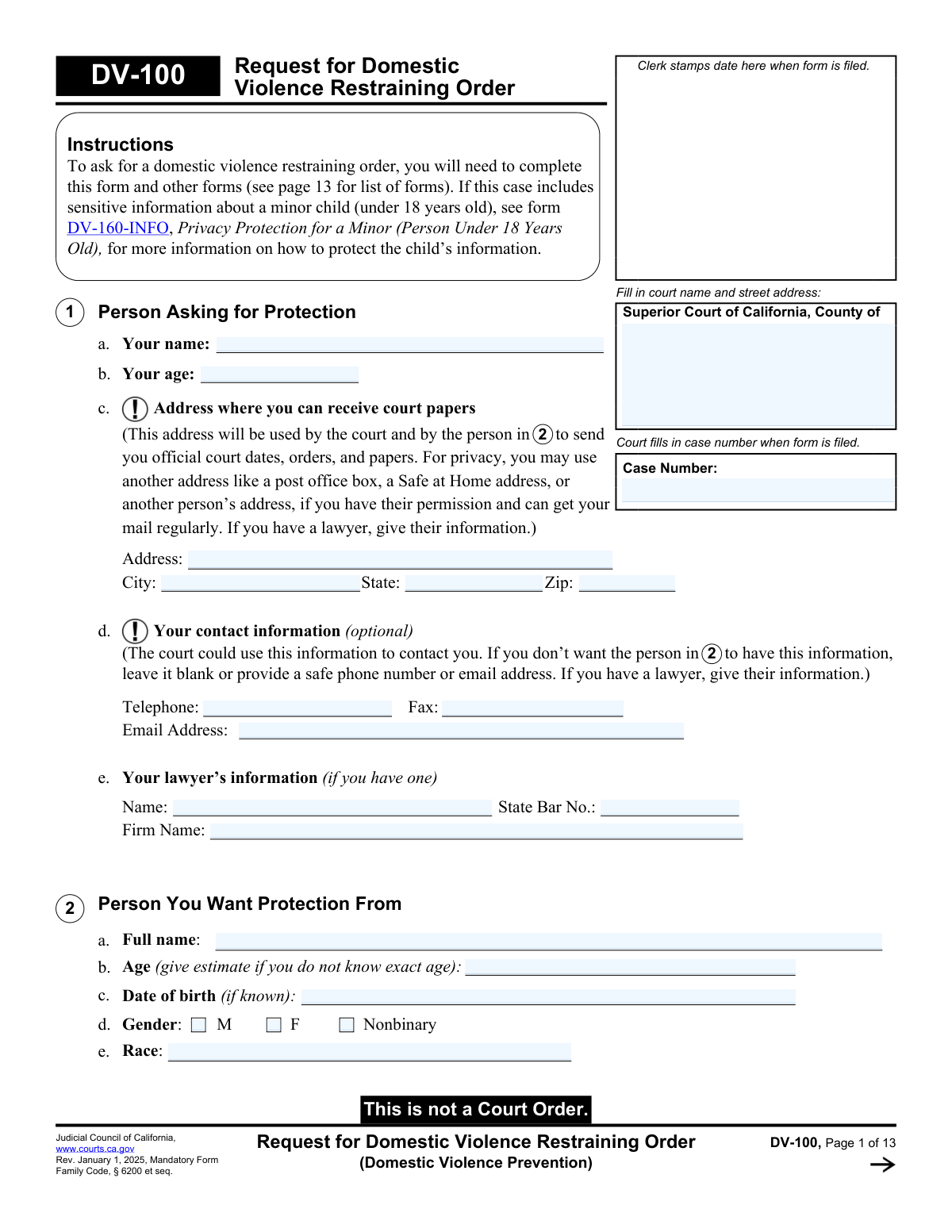
Form DV-100 is the California Judicial Council’s mandatory request form used to start a Domestic Violence Prevention Act (DVPA) restraining order case under Family Code § 6200 et seq. It collects information about the people involved, the qualifying relationship, details of abuse, and the specific temporary and longer-term orders you want the judge to make (for example, no-contact/stay-away, move-out, firearms-related concerns, protected people, property, and support-related requests). The information you provide is important because the judge relies on it to decide whether to issue temporary orders and what issues can be addressed at the hearing after the other party is served. Today, DV-100 can be filled out quickly and accurately using AI-powered services like Instafill.ai, which can also convert non-fillable PDF versions into interactive fillable forms.
Our AI automatically handles information lookup, data retrieval, formatting, and form filling.
It takes less than a minute to fill out DV-100 using our AI form filling.
Securely upload your data. Information is encrypted in transit and deleted immediately after the form is filled out.

Form specifications

Form name: DV-100, Request for Domestic Violence Restraining Order (Domestic Violence Prevention)
Number of pages: 13
Language: English
Categories: restraining order forms, family law forms, domestic violence forms
main-image

Instafill Demo: filling out a legal form in seconds

How to Fill Out DV-100 Online for Free in 2026

Are you looking to fill out a DV-100 form online quickly and accurately? Instafill.ai offers the #1 AI-powered PDF filling software of 2026, allowing you to complete your DV-100 form in just 37 seconds or less.
Follow these steps to fill out your DV-100 form online using Instafill.ai:
  1. 1 Go to Instafill.ai and upload the DV-100 PDF (or select DV-100 from the form library).
  2. 2 Enter court and case details (county Superior Court information and case number if you already have one).
  3. 3 Provide petitioner information (your name, age, safe mailing address for court papers, optional contact details, and attorney information if applicable).
  4. 4 Provide respondent information and confirm the qualifying relationship (spouse/partner, dating, child in common, cohabitation, or family relationship).
  5. 5 Use the guided AI prompts to describe the abuse incidents (most recent and other incidents), including dates, witnesses, weapons, harm, police involvement, and frequency; attach DV-101 or extra pages if needed.
  6. 6 Select the orders you are requesting (no abuse, no contact, stay-away distance/locations, move-out, protected people, firearms info, animals, property/insurance, recording permission, and any additional orders; add DV-105/DV-140/FL-150 as needed).
  7. 7 Review for completeness and consistency, generate a final clean PDF for signature, then download/print for filing and service (and keep copies for your records).

Our AI-powered system ensures each field is filled out correctly, reducing errors and saving you time.

Why Choose Instafill.ai for Your Fillable DV-100 Form?

Speed

Complete your DV-100 in as little as 37 seconds.

Up-to-Date

Always use the latest 2026 DV-100 form version.

Cost-effective

No need to hire expensive lawyers.

Accuracy

Our AI performs 10 compliance checks to ensure your form is error-free.

Security

Your personal information is protected with bank-level encryption.

Frequently Asked Questions About Form DV-100

DV-100 is the California Judicial Council form used to ask the court for a Domestic Violence Restraining Order (DVRO) under Family Code § 6200 et seq. It tells the judge what protection you want and why you need it.

You generally qualify if the person you want protection from is a spouse/registered domestic partner (current or former), someone you date or used to date, a close family member, someone you have a child with, or someone you lived with as a family/household (not just roommates). If none of the relationships in item 3 apply, you may need a different type of restraining order.

No—DV-100 is a request. A judge must review your paperwork and issue orders (such as a Temporary Restraining Order) before anything becomes enforceable.

The form says you must complete at least DV-110 (Temporary Restraining Order—items 1–3), DV-109 (Notice of Court Hearing—items 1–2), and CLETS-001 (Confidential Information for Law Enforcement). If you request custody/visitation, you must also attach DV-105 and DV-140, and other requests (like support) may require additional forms.

In item 1(c), you can use a safe mailing address where you can reliably receive court papers, such as a P.O. box, a Safe at Home address, or another person’s address (with permission). Your phone/email in item 1(d) is optional—leave it blank if it is not safe to share.

No. The form allows you to estimate the person’s age and to list the date of birth only if known.

Describe what happened in clear, specific detail (what was said/done/sent, when it happened, and how often), and include whether there were witnesses, weapons, injuries/emotional harm, or police involvement. If you need more space, you can attach form DV-101 or a separate sheet labeled “Describe Abuse.”

Use item 5 for the most recent incident and items 6 and 7 for other incidents or different types of abuse. If you have more than the space provided, attach DV-101 or additional pages and note the number of extra pages in item 32.

Yes. In item 8, list any additional protected people, whether they live with you, and explain why they need protection.

Answer item 9 and provide any details you know (type, amount, and location). If the judge grants a restraining order, the form lists automatic firearm restrictions (item 29) that can require the person to relinquish firearms and ammunition.

Check the boxes in items 11–12 for no-contact and the specific places you want protected (home, work, school, vehicle, etc.). You can request the standard 100 yards or write a different distance in yards if you need more.

Yes—item 13 lets you request a move-out order and explain your right to live there (ownership, lease, paying rent/mortgage, living there with children, etc.). This is especially relevant if you currently live together.

Custody/visitation requests require DV-105 (and DV-140) attached to your DV-100. Child support (item 24) and spousal support (item 25) are orders the judge considers at the court date, and the form notes you may need to file an Income and Expense Declaration (FL-150) or possibly FL-155 if eligible.

Yes. After the court processes your forms, someone else must serve the respondent with copies of the filed papers; the sheriff or marshal can often serve for free, and you can use SER-001 to request sheriff service. The form also notes you usually have about two weeks to complete service, and you can ask for more time in item 21 if needed.

Yes—AI tools can help organize your information and auto-fill form fields; services like Instafill.ai use AI to accurately populate fields and save time. If your DV-100 PDF is flat/non-fillable, Instafill.ai can convert it into an interactive fillable form and then help you complete it online.

Compliance DV-100
Validation Checks by Instafill.ai

1
Court Venue Information Completeness (Court Name and Street Address)
Validates that the Superior Court county name and the court’s street address are provided and not left blank. This is essential to ensure the filing is routed to the correct court location and to prevent rejected or misdirected submissions. If missing or incomplete, the system should block submission and prompt for the full court name/county and street address.
2
Case Number Format and Presence (When Applicable)
Checks that the case number is either blank (for initial filing where the court assigns it) or matches the court’s expected case-number pattern (e.g., allowed characters, length, and separators). This prevents mismatches across pages where “Case Number” appears multiple times and avoids misfiling into the wrong case. If a case number is entered but fails format validation or is inconsistent across instances, the system should flag the discrepancy and require correction.
3
Petitioner Identity Required Fields (Name and Age)
Ensures the petitioner’s full name is present and the petitioner age is provided as a numeric value within a reasonable range (e.g., 0–120). These fields are foundational for identifying the requesting party and for downstream eligibility and notice processes. If missing or out of range, the submission should fail validation and request corrected identity information.
4
Petitioner Mailing Address Completeness and Postal Format
Validates that mailing address, city, state, and ZIP code are all present, and that state is a valid US state/territory abbreviation while ZIP is 5 digits (or ZIP+4 if supported). This address is used for official court papers and service-related communications, so incomplete or malformed addresses can cause missed deadlines and due process issues. If validation fails, the system should require a complete deliverable mailing address before submission.
5
Optional Contact Information Format (Phone/Fax/Email)
If provided, validates telephone and fax numbers follow an acceptable format (e.g., 10 digits with optional punctuation and optional country code) and email matches standard email syntax. Because these fields are optional and may be safety-sensitive, the system should not require them, but must prevent clearly invalid entries that break notifications or data exchange. If invalid formats are detected, the system should prompt the user to correct or remove the optional contact value.
6
Attorney Information Consistency (Name/Bar Number/Firm)
If any attorney field is provided, validates that the lawyer’s name is present and the State Bar number is in a valid numeric format/length consistent with California State Bar numbering conventions. This ensures the court and parties can correctly identify counsel and avoids misrepresentation or clerical delays. If partial or malformed attorney data is entered, the system should require completion of the attorney block or clearing it entirely.
7
Respondent Identity Required Fields and DOB Logic
Ensures respondent full name is present and respondent age is numeric (allowing an estimate) within a reasonable range; if date of birth is provided, it must be a valid date and logically consistent with the age (e.g., not implying an impossible age). Accurate respondent identification is critical for service, enforcement, and avoiding mistaken identity. If respondent name is missing or age/DOB are invalid or contradictory, the system should block submission and request correction.
8
Respondent Gender Selection Exclusivity
Validates that at most one of the gender checkboxes (M, F, Nonbinary) is selected. Mutually exclusive selections prevent ambiguous respondent descriptors in court records and law enforcement interfaces. If multiple are selected, the system should require the user to choose only one or leave all unselected if unknown/unspecified is allowed by the implementation.
9
DVPA Relationship Eligibility Check (Section 3)
Checks that at least one qualifying relationship option is selected in Section 3 (e.g., married, dating, child in common, related, lived together as family/household). The form instructions state the user should not complete the rest of the DV-100 if no qualifying relationship exists, so this is a gating eligibility rule. If no relationship is selected, the system should stop submission and direct the user to the appropriate restraining order type or require a relationship selection.
10
Cohabitation Sub-Question Consistency (Lived Together as Family/Household)
If “We live together or used to live together” is checked, validates that exactly one of the follow-up answers (Yes/No) is selected for whether they lived together as a family/household (more than roommates). This determines DVPA qualification when cohabitation is the only relationship basis. If the follow-up is missing or both are selected, the system should require a single clear answer and warn that selecting “No” without any other relationship may make the request ineligible.
11
Other Restraining Orders Section Logic (Section 4a)
Validates that the user selects either “No” or “Yes” for existing/expired restraining orders, not both. If “Yes” is selected, at least one order entry must include a valid order date, and any expiration date provided must be a valid date on/after the order date. If the logic fails, the system should require correction and prevent submission to avoid incomplete prior-order disclosures.
12
Other Court Cases Disclosure Completeness (Section 4b)
If “Yes” is selected for involvement in other court cases, validates that at least one case type is checked and that corresponding details (location filed, year, and case number) are provided in a usable format (e.g., year is 4 digits and plausible). This information helps the court coordinate related matters (custody, divorce, criminal) and avoid conflicting orders. If missing, the system should prompt for the minimum identifying details for each selected case type.
13
Abuse Incident Date Validity and Chronology (Sections 5–7)
Validates that each abuse date entered is a valid date (allowing estimated dates if the system supports partial dates) and is not in the future. It should also check basic chronology where multiple incidents are provided (e.g., “Most Recent Abuse” should not be earlier than incidents described as additional/other abuse if those are clearly later-dated). If dates are invalid or future-dated, the system should require correction and flag potential “most recent” inconsistencies for user confirmation.
14
Conditional Detail Requirements for Witness/Weapon/Harm (Sections 5–7)
If “Witnesses: Yes” is selected, requires at least one witness name; if “Weapon use: Yes” is selected, requires a weapon description; if “Harm: Yes” is selected, requires a harm description. These conditional requirements ensure the narrative is sufficiently specific for judicial review and for law enforcement risk assessment. If a required conditional detail is missing, the system should block submission until the corresponding description/names are provided.
15
Other Protected People Roster Integrity (Section 8)
If protection for others is marked “Yes,” validates that each listed protected person has a full name and age, and that the “Lives with you?” field is answered Yes/No (not both) for each entry. It should also require a non-empty explanation in “Why do these people need protection?” to support the request. If any listed person is missing required attributes or the reason is blank, the system should require completion or removal of the incomplete row(s).
16
Stay-Away Order Distance and Location Dependencies (Section 12)
If a stay-away/no-contact order is requested and any stay-away locations are checked, validates that a distance option is selected (100 yards or “Other”) and that “Other distance” is a positive integer in yards within a reasonable bound (e.g., 1–10,000). If “Other location” is checked, requires an explanation text. If these dependencies fail, the system should prompt for the missing distance/location details to avoid an unenforceable or ambiguous order request.

Common Mistakes in Completing DV-100

Leaving the court location blank or using the wrong court address

People often write only the county name (or a mailing address they found online) and forget the full Superior Court name and street address for the filing location. This can delay filing, cause the clerk to reject the packet, or send you to the wrong courthouse department. Use the exact courthouse name and physical street address for the Superior Court in the correct county where you are filing. AI-powered form filling tools like Instafill.ai can help by validating court location details and formatting them consistently.

Filling in the case number when one has not been assigned (or using the wrong case number)

Many filers guess a case number, reuse a number from a different case (divorce/custody/criminal), or leave inconsistent case numbers across pages. Incorrect case numbers can cause misfiling, delays, or documents being associated with the wrong case. If this is a new DVRO request, the court typically assigns the case number—leave it blank unless the clerk or prior paperwork confirms it. Instafill.ai can flag mismatched case numbers across pages and prevent accidental reuse of an unrelated case number.

Using an unsafe mailing address or accidentally disclosing confidential contact info

Because the form asks for an address to receive court papers and optional phone/email, people sometimes list their home address or personal phone/email even when it could put them at risk. This can lead to the restrained person learning where you live or how to contact you, creating safety concerns and complicating privacy protections. Use a safe mailing address (P.O. box, Safe at Home, or a trusted third party with permission) and leave optional contact fields blank or provide a safe number/email. Instafill.ai can prompt you to consider privacy-safe options and ensure optional fields are not filled unintentionally.

Incomplete respondent identification (name/DOB/age) or inconsistent details

Filers often provide nicknames, partial names, or conflicting ages/DOBs across sections, especially when they are unsure of exact information. Incomplete or inconsistent respondent details can make service harder, reduce law enforcement clarity, and slow processing. Provide the respondent’s full legal name if known, estimate age if necessary, and include DOB if known—if you are unsure, clearly indicate it’s an estimate rather than leaving contradictory entries. Instafill.ai can help standardize names and date formats and highlight inconsistencies before you file.

Not checking a qualifying relationship in section 3 (or checking the wrong one)

People sometimes skip the relationship section, check only “we live together” without confirming the “family/household (more than roommates)” requirement, or select a relationship that doesn’t apply. If you do not qualify under Family Code DVPA relationships, the court may deny the request or require you to use a different restraining order type. Carefully check all applicable relationship boxes and answer the follow-up “lived together as a family/household” question accurately. Instafill.ai can reduce this error by guiding you through conditional questions and warning when a selection may not qualify.

Vague abuse descriptions without dates, specifics, or frequency

A common mistake is writing general statements (e.g., “they harass me” or “they are abusive”) without describing what happened, when it happened, what was said/done/sent, and how often. Vague narratives make it harder for the judge to assess risk and can weaken the request for specific orders (no-contact, stay-away, move-out, firearms). Include at least one detailed incident with an estimated date, what occurred, any evidence (texts/emails/photos), witnesses, injuries/emotional harm, and frequency patterns. Instafill.ai can help by prompting for the key elements judges look for and ensuring the narrative fields aren’t left too sparse.

Contradictory checkbox answers (witnesses/weapons/harm/police) without explanations

Filers sometimes check “No” for harm but then describe injuries, check “No” for police but later reference a police report, or forget to list a police emergency protective order in section 4. Contradictions can confuse the court, invite follow-up questions, and delay orders. Re-read sections 5–7 and ensure the checkboxes match your written description; if you are unsure, use “I don’t know” where provided and clarify in the details. Instafill.ai can automatically detect common contradictions and prompt you to reconcile them before submission.

Requesting stay-away/no-contact orders without specifying locations or distance correctly

People often check the stay-away boxes but forget to include “Other” location details, choose “Other distance” without writing the number of yards, or misunderstand that the distance must be in yards (not feet or miles). Missing or unclear stay-away terms can result in an order that is hard to enforce or not as protective as intended. If you select “Other,” write the exact place (address/name) and if you select “Other distance,” provide a clear number of yards. Instafill.ai can enforce required companion fields (like distance in yards) and format location entries consistently.

Listing additional protected people without completing required details or reasons

In section 8, filers frequently list children/family members but omit ages, relationships, whether they live with the petitioner, or fail to explain why each person needs protection. Incomplete protected-person information can lead to those individuals not being included in the order or the judge requesting clarification. Provide full names, ages, relationship, living situation, and a specific reason they need protection (especially for children or household members). Instafill.ai can help ensure each protected person entry is complete and can add structured validation for repeated rows.

Forgetting attachments and follow-up forms (DV-110, DV-109, CLETS-001, DV-105, etc.)

Many people submit DV-100 alone and miss the required companion forms listed on page 13, or they check the child custody request box (DV-105) but do not attach DV-105 (and DV-140 when applicable). Missing required forms can cause the clerk to reject the filing or delay the hearing and temporary orders. Use the “Your Next Steps” checklist: DV-110, DV-109, CLETS-001 are typically required, and add DV-105/DV-140 if requesting custody/visitation; add FL-150/FL-155 if requesting support. Instafill.ai can generate a packet checklist based on what you selected and help prevent missing-attachment errors; if your version is a flat non-fillable PDF, Instafill.ai can convert it into a fillable version to reduce omissions.

Missing signatures, dates, or the number of extra pages attached

Filers often forget to sign and date under penalty of perjury, type/print their name, or they attach extra pages (like DV-101) but leave the “Number of extra pages” field blank. Unsigned or undated forms may be rejected, and uncounted attachments can be separated or overlooked. Before filing, confirm section 33 is fully completed and section 32 accurately reflects every extra page or attachment you included. Instafill.ai can run a final completeness check to ensure signature/date fields and attachment counts are not missed.
Saved over 80 hours a year

“I was never sure if my IRS forms like W-9 were filled correctly. Now, I can complete the forms accurately without any external help.”

Kevin Martin Green

Your data stays secure with advanced protection from Instafill and our subprocessors

Robust compliance program

Transparent business model

You’re not the product. You always know where your data is and what it is processed for.

ISO 27001, HIPAA, and GDPR

Our subprocesses adhere to multiple compliance standards, including but not limited to ISO 27001, HIPAA, and GDPR.

Security & privacy by design

We consider security and privacy from the initial design phase of any new service or functionality. It’s not an afterthought, it’s built-in, including support for two-factor authentication (2FA) to further protect your account.

Fill out DV-100 with Instafill.ai

Worried about filling PDFs wrong? Instafill securely fills dv-100-request-for-domestic-violence-restraining-order-domestic-violence-prevention forms, ensuring each field is accurate.